A Ukrainian shop on WooCommerce usually needs one thing: a customer can pay by card, and the order actually flips to “Paid” — without a manager checking a bank statement every morning. There are several ways to do this, and the choice depends not on which gateway is “best” but on whether you already have an agreement with a bank and which payment methods your customers need.
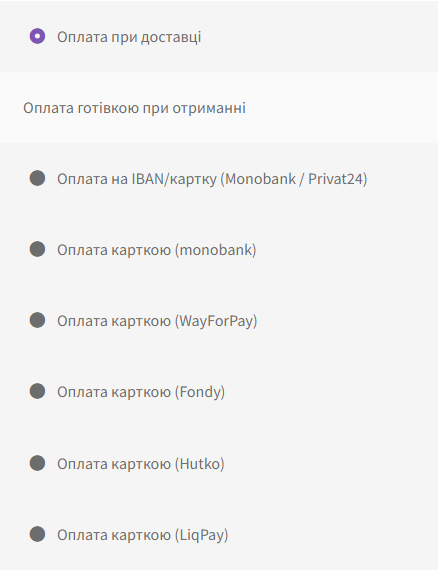
Below are six payment methods we support with our own plugins. Each has a free version. We won’t quote fees — the provider sets those and they change, so check the current rate with your bank.
Short version: what to pick
- Your caseAlready have a sole proprietorship and need the fastest startMonobank acquiring. The application is submitted right in the app, keys arrive within a day.
- Your caseNeed Apple Pay and Google PayWayForPay: they work out of the box, no separate setup.
- Your caseShop already works with LiqPay, Fondy or HutkoTake the matching gateway, no need to re-sign a contract.
- Your caseNo acquiring yetAn IBAN invoice with a QR code. Accepts payment today, no bank agreement needed.
Comparing the six methods
| Method | What it accepts | How payment is confirmed | Free | In Pro |
|---|---|---|---|---|
| monobank | Visa, Mastercard on the bank’s page | Webhook with ECDSA signature verification | Payment + auto status | Log, two-stage payment, refunds, saved card |
| WayForPay | Visa, Mastercard, Apple Pay, Google Pay | Signed serviceUrl webhook | Payment + auto status | Log, two-stage payment, refunds from the admin |
| LiqPay | Visa, Mastercard on the LiqPay page | Signed webhook | Payment + auto status | Log, two-stage payment, refunds |
| Fondy (Flitt) | Visa, Mastercard on the Fondy page | Signed callback | Payment + auto status | Log, two-stage payment, refunds |
| Hutko | Visa, Mastercard on the Hutko page | Signed callback | Payment + auto status | Log, two-stage payment, refunds |
| IBAN invoice | Transfer from a banking app via QR or button | Manually — or automatically via the Monobank API | QR code + Monobank and Privat24 buttons | Auto-closing orders, overpayments, log |
Acquiring requires a registered business (sole proprietorship or company) and a bank agreement. An IBAN invoice works immediately — which is why it’s often switched on first while the contract is being processed, and then kept afterwards as a second method for wholesale buyers.
How to add a payment method in WooCommerce
The process is the same for any of the six — only the keys the provider issues differ.
1. Get keys from the provider
In the bank or service’s dashboard — a public and private key, or a merchant token. With monobank this is done right in the app; for the others, through the merchant dashboard after signing the agreement.
2. Install the plugin and enter the keys
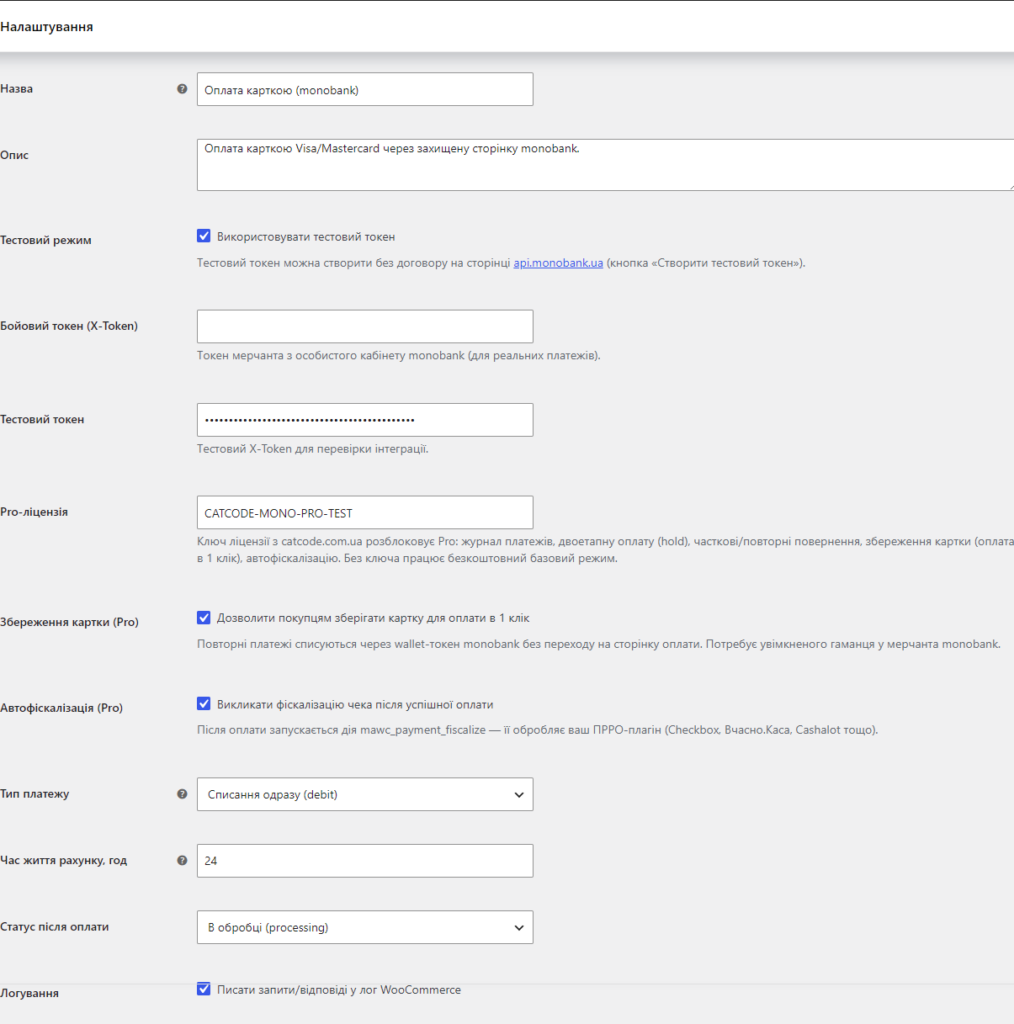
WooCommerce → Settings → Payments → the method you need. Two fields and a “Test connection” button: if the keys are wrong, you find out right away, not on the first order.
3. Set the webhook address
The plugin shows a ready-made URL — paste it into the provider’s dashboard. This is exactly what makes the order flip to “Paid” on its own. Skip this step and the payment will go through, but the status will stay “Pending”.
4. Run a test order
Pay a real 1–2 UAH and check that the status changes without manual intervention. A test card won’t show this: in the sandbox the webhook signature is different, and a configuration error will only surface on live orders.
A plugin for each method
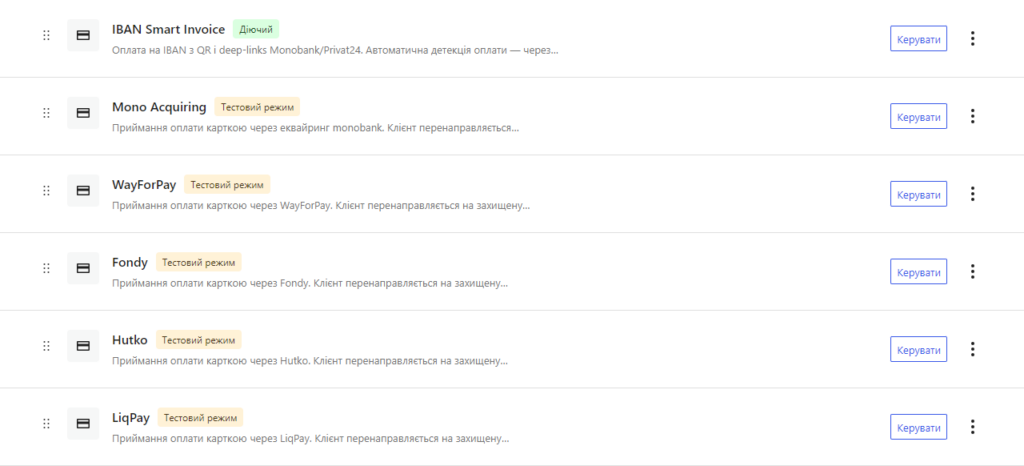
Mono Acquiring — monobank acquiring
The plugin creates an invoice via the bank’s API, sends the customer to a secure monobank page, and after payment accepts a webhook verified against the ECDSA signature. Pro adds a payment log, two-stage payment (hold), one-click refunds and an auto-fiscalisation hook for PRRO.
→ Mono Acquiring for WooCommerce
WayForPay — cards, Apple Pay and Google Pay
The only one of the six where Apple Pay and Google Pay work without any separate setup. Refunds are made straight from the order card in the WooCommerce admin.
LiqPay — payment via PrivatBank
Payment on the LiqPay page with automatic confirmation via a signed webhook. Suits shops whose main account is already with PrivatBank.
Fondy (Flitt)
A classic gateway confirmed via a signed callback. Two-stage payment, log and refunds are in the Pro version.
Hutko
Card payment acceptance with the same confirmation mechanics — a signed callback and an automatic order status change.
IBAN Smart Invoice — an invoice instead of acquiring
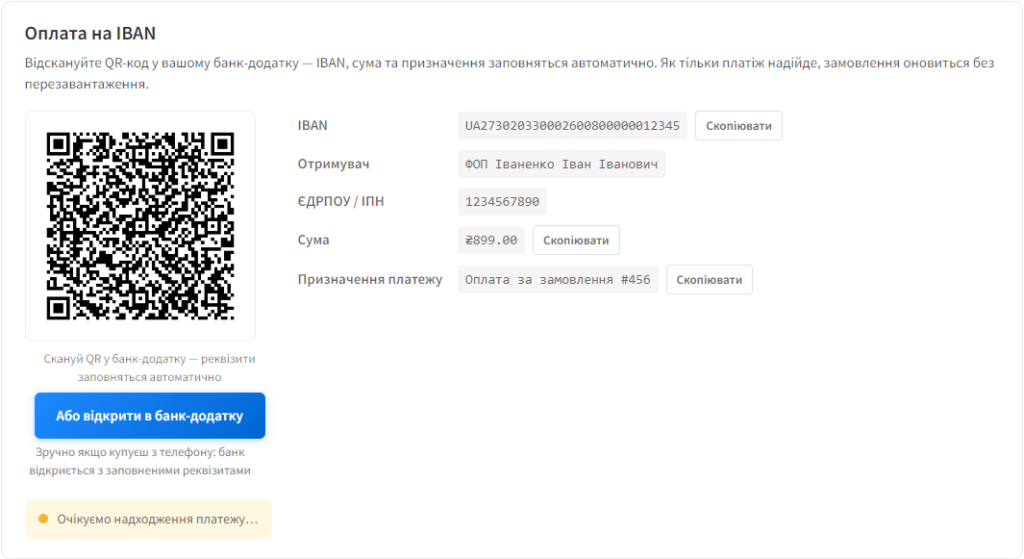
On the thank-you page the customer sees an EPC QR code and Monobank and Privat24 buttons: they scan it in their banking app and the details fill in automatically. The Pro version detects the incoming payment via the Monobank Personal API and closes the order without you lifting a finger. The basic version is published in the WordPress.org directory.
→ IBAN Smart Invoice for WooCommerce
What else you’ll typically need
Accepting payment is only half the job. Two more plugins usually go alongside it: PRRO fiscalisation, which issues a receipt once the order moves to “Paid”, and a cash-on-delivery fee or prepayment discount — to give the customer an economic nudge to pay upfront.
Frequently asked questions
How many payment methods can be enabled at the same time?
As many as you like — WooCommerce lists them at checkout, and the order is set by drag-and-drop. A typical combination for a Ukrainian shop: card, cash on delivery, and an IBAN invoice for business customers.
Can I accept card payments without a registered business?
Not with acquiring — the bank only signs an agreement with a registered business entity. An IBAN invoice technically works with an individual’s details too, but that’s a question for your accountant, not for the plugin.
The order is paid, but the status hasn’t changed. What now?
Nine times out of ten the webhook isn’t arriving: either the address is entered incorrectly in the provider’s dashboard, or the hosting firewall is blocking it. The Pro versions have a payment log — it shows whether the request even arrived and what the site replied.
Do I need a separate plugin for fiscalisation?
Yes. Accepting payment and issuing a PRRO receipt are two different things: the gateway processes the payment, while a separate module issues the receipt once it detects the order status change.