WordPress
B2B Order Import for WooCommerce — turn a customer purchase order in Excel, CSV or PDF into an order
Free + Pro
990 UAH/year
v1.0.0
 All Access4 990 ₴ / year
 Website auditA PDF report by email in 3 minutesCheck a website
Everyday tasks
Image compressorSize, quality and WebP in bulkQR generatorLink, Wi-Fi, payment to IBANVAT calculator20, 14, 7% and amount in wordsTransliterationOfficial Ukrainian standardWebsite checks
PHP and pluginsPHP version, WordPress, pluginsGoogle Merchant feedFields, prices, GTIN, imagesDomain emailSPF, DKIM, DMARC, blacklistsAI search readinessllms.txt, bots, markupAll 9 toolsEnter at least 2 characters
A WooCommerce plugin that turns a wholesale customer's purchase order file into a shop order. The manager uploads Excel (.xlsx) or CSV (in Pro also a PDF with a text layer), the plugin finds the table in the file, matches the lines with your products by SKU, barcode or name and shows everything for review. The order appears only after the manager clicks "Create the order".
The free version works with no time limit. Pro adds the rest of the features in the table.


Nothing changes for regular shoppers: the plugin does not touch the cart or the checkout.

WooCommerce → “B2B Order Import” with the tabs Imports, Settings and Licence.

A fresh install is the free version, nothing switches on by itself. The “Try Pro for 7 days” button → e-mail → the key right in the window and by e-mail.

Moving the store? Unbind the licence on the old domain and activate it on the new one yourself. For studios — keys for 5 or 25 sites, or unlimited.
 WooCommerce 7.0+ (tested on 11.2.1), HPOS or legacy order storage.WordPress 6.2+ (tested on 7.1.2) · PHP 7.4+ (full run on PHP 8.3; on 7.4 — syntax check and parsing of all test files with the same results).PHP extensions: ZipArchive and XMLReader for .xlsx; for PDF (Pro) — zlib, iconv and mbstring.Files: .xlsx, .csv, .tsv, .txt; in Pro — PDF with a text layer, and with AI turned on — scanned PDFs and JPG/PNG/WEBP photos. Old .xls — no.Customer wholesale prices: the Wholesale Prices for WooCommerce plugin (optional).Admin languages: Ukrainian, Russian, English.
Purchase orders from Excel (.xlsx) and CSV/TSV/TXT, header and column detection, matching by SKU, barcode and name, review of every line, order with the PO number, customer wholesale prices…
4 modules in one order — 40% cheaper than separately



B2B Order Import for WooCommerce is a plugin for shops that sell wholesale. A wholesale customer rarely checks out through the cart: they send the manager a file — an Excel sheet, a CSV export or a PDF from their accounting software — with their own article codes, names and quantities. The manager then looks up every line in the catalogue, types the quantities into a WooCommerce order and makes a mistake on line twenty.
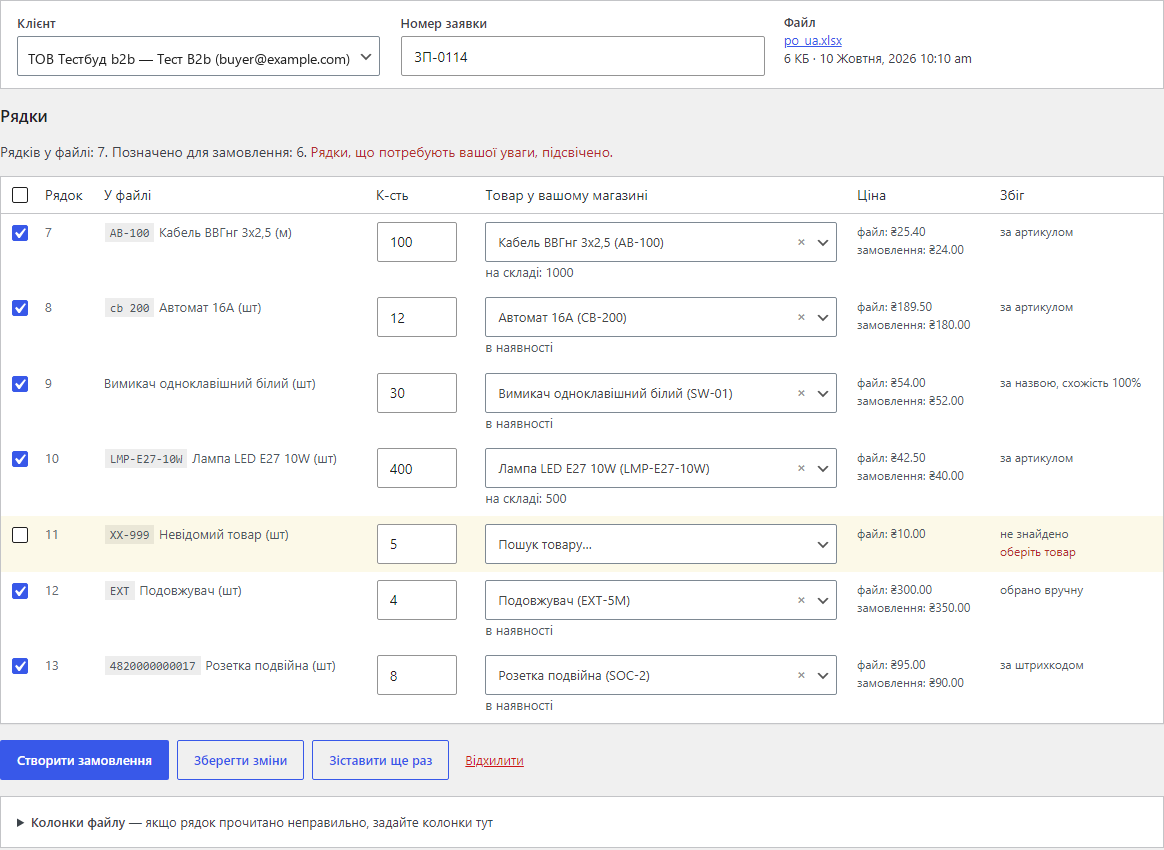
The plugin does this work for the manager: it reads the file, finds the table in it, matches every line with a product of your shop by SKU, barcode or name and shows the result for review. The manager fixes what the plugin did not recognise and clicks “Create the order”. Without that click no order appears — the plugin never orders anything on a guess.
The customer’s wholesale prices come from our Wholesale Prices for WooCommerce plugin: when it is active, every order line gets the price for the customer’s role and quantity — the same as in the cart.
Running OpenCart? There is a separate B2B Order Import for OpenCart module (versions 4.x, 3.x and 2.3) with the same approach: purchase order file, review by a manager, order.
Nothing changes for regular shoppers: the plugin does not touch the cart or the checkout. A wholesale customer receives the order the same way as after the cart — with the usual WooCommerce e-mails (if the status of new orders sends them) and the order in their account.
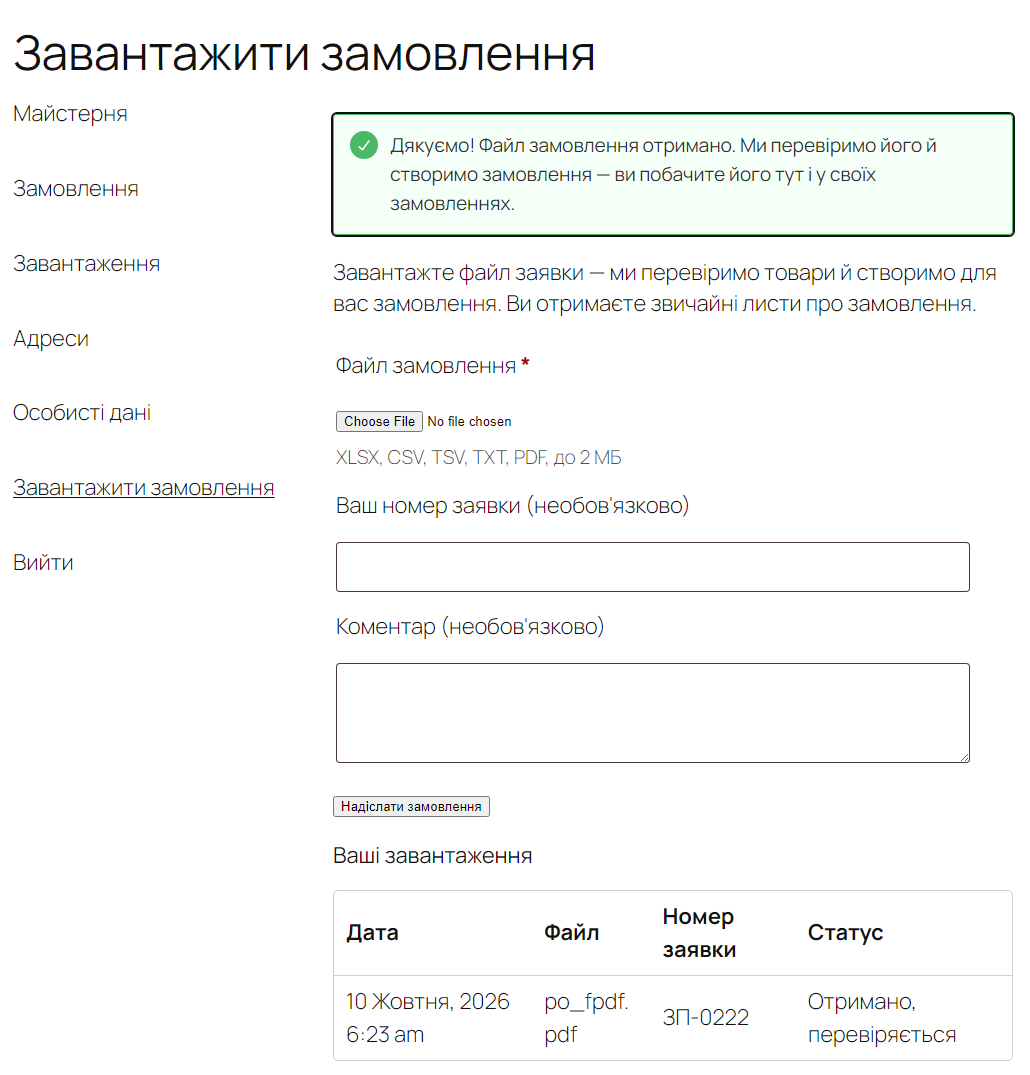
In Pro, wholesale customers can send purchase orders themselves: My account gets an “Upload an order” item. The customer chooses a file, optionally types the PO number and a comment, and sees their uploads with a status — “Received, being checked”, then the order number. You decide which roles see the page; one customer can send up to 10 files an hour. The manager gets an e-mail, and the upload waits in the admin — no order is created without review.
WooCommerce → “B2B Order Import” with the tabs Imports, Settings and Licence. The Imports tab has the “New order from a file” form (file, customer, PO number) and the list of all imports with the filters Waiting for review, Order created and Discarded.
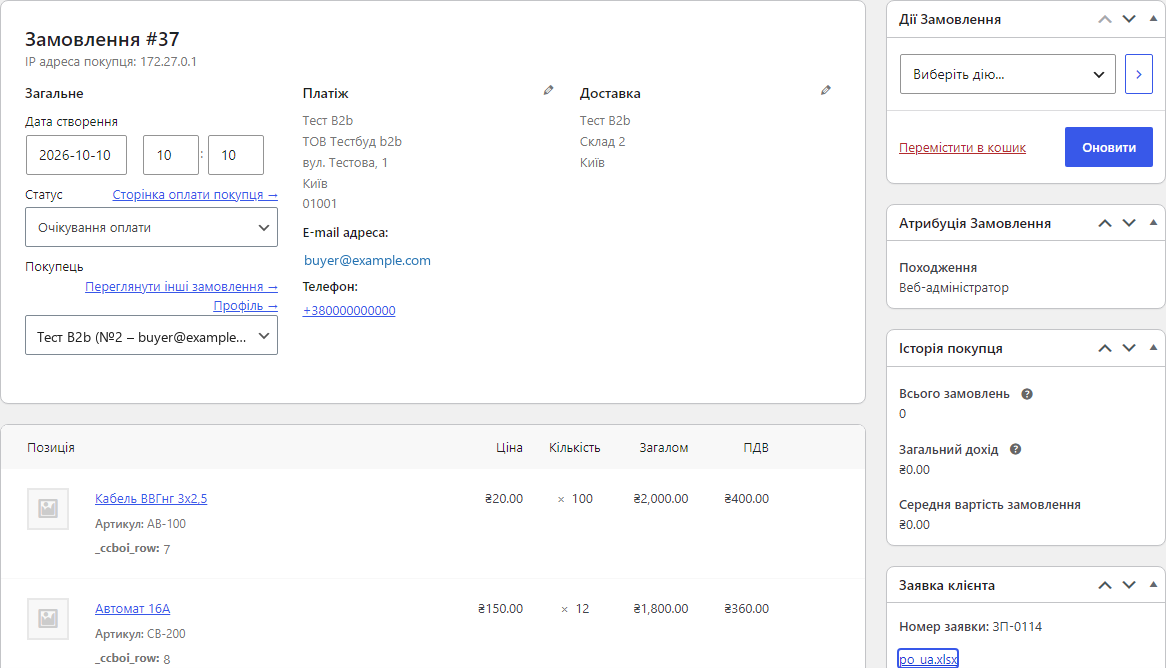
“Create the order” adds a regular WooCommerce order: items, the customer’s addresses, the status from the settings, taxes under your rules. The PO number and the original file are in the “Purchase order” sidebar box, and the number is searchable in the orders list. A double click does not create a duplicate.
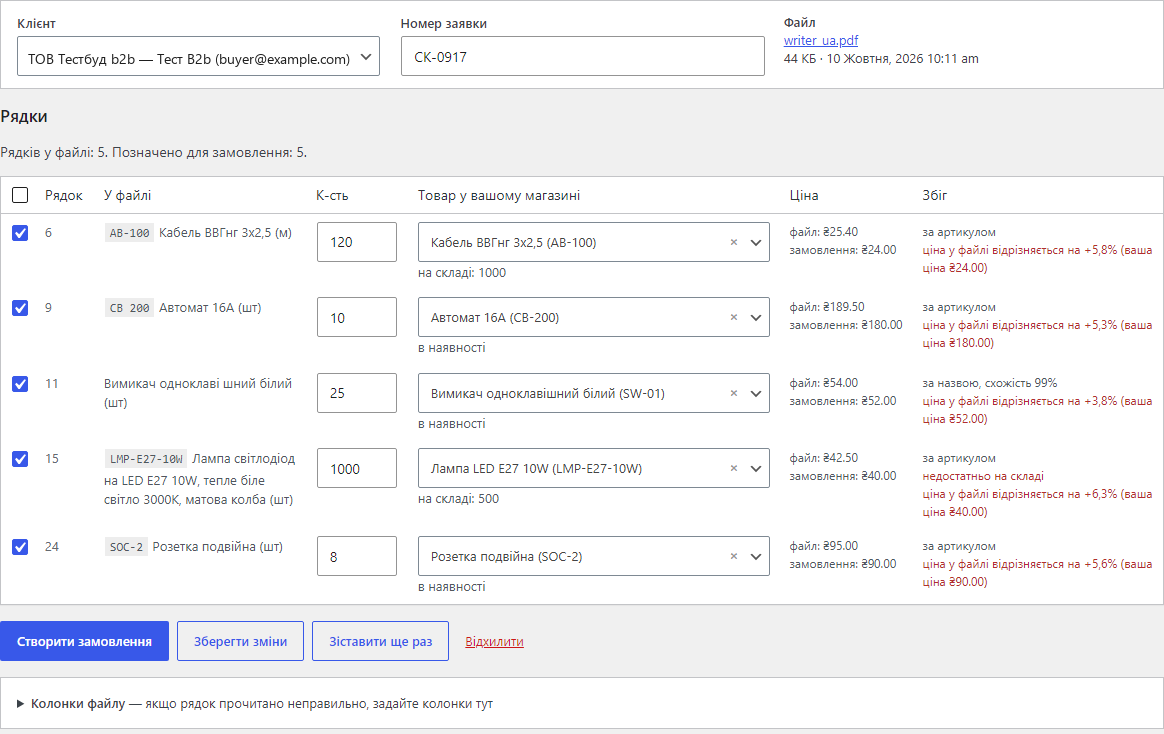
A PDF with a text layer is parsed on your server, without external services: the table is rebuilt from the positions of the text on the page, item names wrapped over several lines are joined, and a header repeated on every page is skipped. The screenshot shows a Word purchase order saved as PDF with prices from the file turned on: the difference from your price is highlighted on every line.
max_input_vars limit.uploads/ccboi-private/ under random names with direct access denied; they are served to managers only, with a nonce check, and deleted after the period you set.catcode-b2b-order-import-for-woocommerce-free-1.0.0.zip and activate it (WooCommerce must be active).Didn't find the answer? Message us on Telegram and we'll reply within a business day.
 @catcode_support
Setup, compatibility, activation
@catcode_support
Setup, compatibility, activation
For free — Excel (.xlsx) and CSV/TSV/TXT in any common encoding. In Pro also a PDF with a text layer, i.e. a PDF whose text you can select and copy: accounting software, Excel and Word produce such files. The old Excel format (.xls) is not read; the plugin asks to save the file as .xlsx or CSV.
A scan or a photo has no text, so without AI the plugin cannot read it. In Pro you can turn on recognition through OpenAI with your own API key: the file goes to OpenAI, you pay OpenAI directly, CatCode sees neither the key nor the file. It is off by default and runs only when you click "Recognise with AI" on a particular file.
No. Every file waits for a manager, who sees the lines, the matched products and the prices, corrects what is needed and clicks "Create the order". A line without a product does not go into the order until the manager picks a product.
The shop's prices, and with the Wholesale Prices for WooCommerce plugin active — the customer's wholesale price for their role and quantity. The price from the file is shown next to it. In Pro you can take the prices from the file: lines where the customer's price differs from yours by more than the percentage you set are highlighted. Taxes are calculated by WooCommerce under your settings.
There is no limit by plan, neither in Free nor in Pro. The plugin reads up to 3,000 lines from a file; a 600-line purchase order against a catalogue of 20,000 products was read and matched in about 3 seconds.
The licence runs for a year (or 2–5 years at a discount) and includes updates and support for that term. No automatic charges. After the term a purchased licence keeps its Pro features — the shop only stops receiving new versions. The free part works in any case.
No reviews yet. Be the first.
No questions yet. Ask one — we answer within 24 hours.
We build custom modules for WordPress, WooCommerce, OpenCart and Shopify. Tell us about the task and we'll prepare an estimate.
Order a custom module
—

CatCode assistant
Just now


CatCode assistant
Online

I’ll help with your website task
Describe your website task — I’ll find a ready-made module or pass it to a developer for an estimate. Modules, custom features, layout, integrations, speed, migration, technical SEO.
