

Market Feeds — Rozetka / Prom for OpenCart 2.3, 3.x and 4.x
Free feed module for OpenCart 2.3, 3 and 4: Rozetka XML, Prom.ua YML, Google Merchant Center and Meta with size and colour variants. Token protection.
- Compatibility
- OpenCart 2.3.0.0 – 2.3.0.2 · 3.0.2 – 3.0.5 · 4.0.2 – 4.1.x
- Version
-
v1.4.1 (OpenCart 4)
v1.4.1 (OpenCart 3.x)
v1.3.1 (OpenCart 2.3) - Updated
- 17 October 2026
The module in action — 36 sec
Clear even without sound: Ukrainian subtitles
What the module does

What it looks like
Key points

Epicentr feed in Epicentr’s own XML
Epicentr does not read the Rozetka/Prom YML: both the product import in the cabinet and the «Stock auto-update» by link expect yml_catalog → offers → offer without a block.

Google Merchant Center and Meta with variants
Since version 1.2.0 (OpenCart 4.x and 3.x) and 1.1.0 (OpenCart 2.3) the module serves two more feeds: for Google Merchant Center and for the Meta catalogue (Facebook and Instagram ads).

Catalogue for AI agents
Shoppers increasingly look for products in ChatGPT, Gemini or Claude rather than in a search engine.
Technical requirements
 OpenCart 4.0.2 – 4.1.x, 3.0.2 – 3.0.5.0 or 2.3.0.0 – 2.3.0.2 — a separate build for each branch
- PHP 8.0+ for OpenCart 4, 7.x for OpenCart 3 and 5.6+ for 2.3 — in every case with the XMLWriter extension, standard on most hosting
- A seller account on Rozetka and/or Prom.ua — to add the feed URL in the marketplace account
- For file caching (optional) — the ability to run cron on your hosting
Version history
Epicentr feed in Epicentr’s own XML.
Catalogue for AI agents — a new “AI agents” tab.
Google feed per the Google product data specification of 14 April 2026.
All versions (11)
Google Merchant Center and Meta feeds (RSS with g: attributes).
A feed token with a special character (&, quotes) is no longer rejected.
In the admin panel’s hints, the , and tags were written unescaped, so the browser swallowed them and the sentence “If a product has a special offer.
A build for OpenCart 2.3.0.x — ported directly from 4.x, skipping the intermediate 3.x version this module went through.
🔴 The price in the feed didn’t match the price on the site — for two reasons at once.
🔴 Special offers weren’t making it into the feed on OpenCart 4.0.x.
Fixed admin AJAX: Twig was escaping & in request URLs, which broke the “Check” and “Rebuild cache” buttons on some OpenCart builds.
First public release: Rozetka XML and Prom.ua YML feeds, token-protected URLs, streamed XMLWriter generation, category and manufacturer filters, a price multiplier, special prices (price +…
Full module description
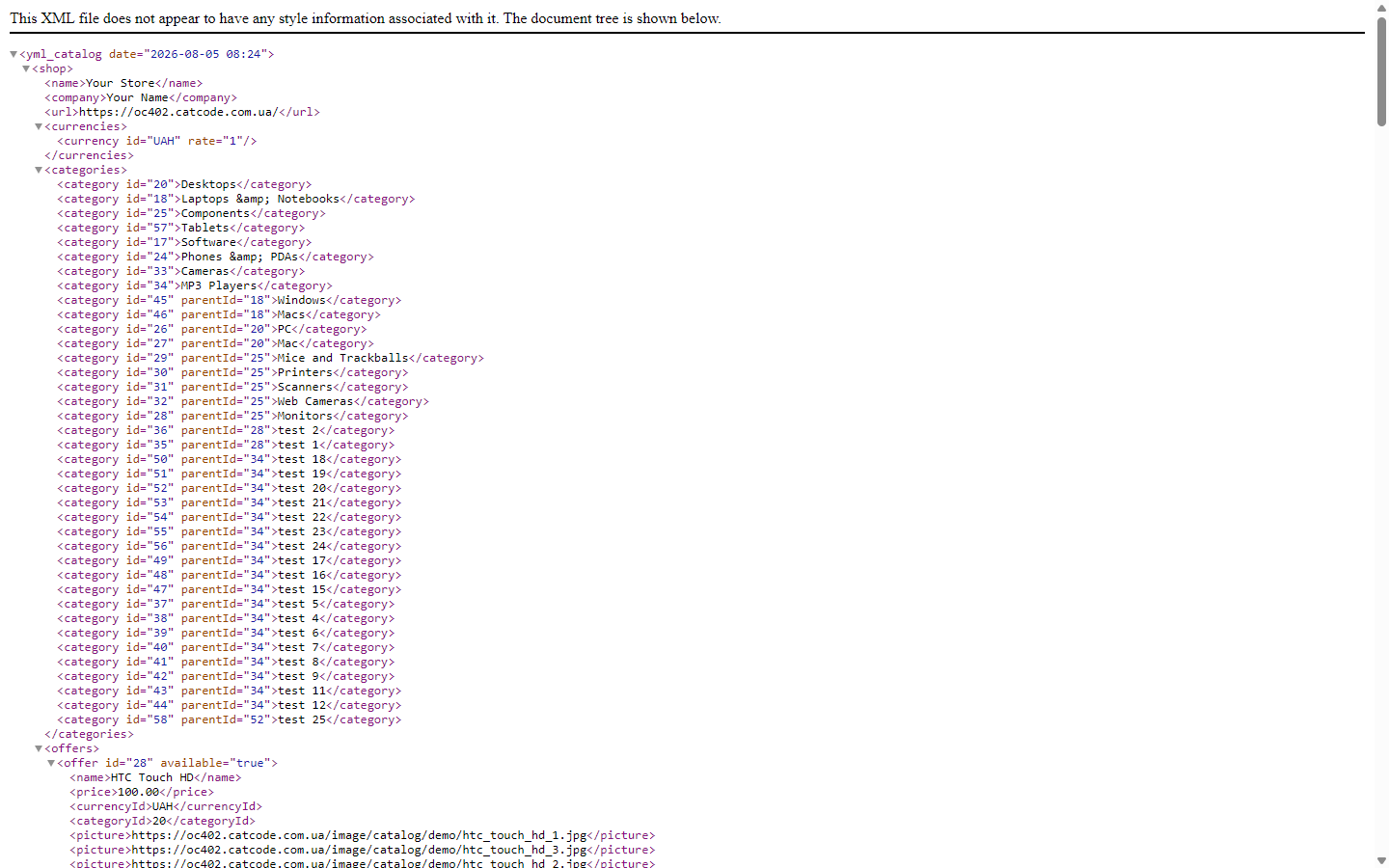
Market Feeds is a feed module for OpenCart 2.3, 3.x and 4.x that exports your store’s catalogue to the two most popular Ukrainian marketplaces: Rozetka (XML) and Prom.ua (YML). Instead of manual exports or custom scripts, you get two permanent feed URLs protected by a secret token — the marketplaces themselves pull the current products, prices and stock on their own schedule. Generation is streamed, so the feed doesn’t bring the server down even on large catalogues.
The module is completely free. The code is open: github.com/catcodestudio/opencart-market-feeds. No paid versions, limits or licence keys — every feature is available right after installation.
Epicentr feed in Epicentr’s own XML
Epicentr does not read the Rozetka/Prom YML: both the product import in the cabinet and the «Stock auto-update» by link expect yml_catalog → offers → offer without a <shop> block. Given a YML, the cabinet answers «Невідомий тег shop у рядку 3» (unknown tag shop in line 3). Since 1.4.1 the module serves a separate Epicentr feed in exactly that format (switched on on the General tab; the address is extension/cc_feeds/feed.epicentr in OpenCart 4 or extension/feed/cc_feeds/epicentr in 3.x and 2.3).
- Price and stock — the short file for «Products → Import → Stock auto-update»:
price,price_old(the special price) andavailability. The article in the cabinet = the OpenCart product ID. - Full version — also the name in Ukrainian (and Russian, if the shop has it), the description with only the tags Epicentr keeps, all photos in one line separated by commas and the EAN as the barcode — to update products already in the cabinet.
- Out-of-stock products are always in the file, marked out of stock: Epicentr leaves a product that simply disappears from the file as it was.
- Prices are in hryvnias: if the shop has the UAH currency, the feed converts at its rate; if not, the settings page warns about it.
New products with Epicentr characteristics (category and attribute codes) are not created by this feed — that is what the Epicentr: Price and Stock Sync module does.
Google Merchant Center and Meta with variants
Since version 1.2.0 (OpenCart 4.x and 3.x) and 1.1.0 (OpenCart 2.3) the module serves two more feeds: for Google Merchant Center and for the Meta catalogue (Facebook and Instagram ads). The format is RSS 2.0 with g: attributes, the one both dashboards accept. Tax-inclusive prices, specials, availability and category filters are the same as in the Rozetka and Prom feeds, so the price in an ad never drifts from the price on the product page, and the product link uses the SEO URL exactly as the storefront prints it.
Sizes and colours as one listing, not duplicates. In OpenCart size and colour are options without their own SKUs, so a regular feed exports a single product and ads run on it or on copies. In the settings you mark which options mean “Size” and which mean “Colour”. Every value — and with two options every size × colour combination — goes out as a separate item sharing a g:item_group_id, with g:size and g:color filled in. A variant’s price is calculated the way the cart does it: the product or special price plus the option surcharge, including tax. A value that is out of stock is left out of the feed (or exported as “out of stock” if you set it that way).
Real dispatch time. A product is “in stock”, yet it ships in 2–6 days — a familiar story when you work with a supplier. Set a default time in business days (“0”, “2” or “2-6”) and, if needed, a per-product one through any attribute. Google receives g:min_handling_time and g:max_handling_time and shows the shopper an honest delivery date. In the Prom.ua feed the “Ready to ship” status (in_stock="true") is set only for products that really ship within one day.
Both feeds are off by default: after the update the store publishes nothing new until you switch them on in the “Google and Meta” tab and paste the link into Merchant Center or Commerce Manager.
Catalogue for AI agents
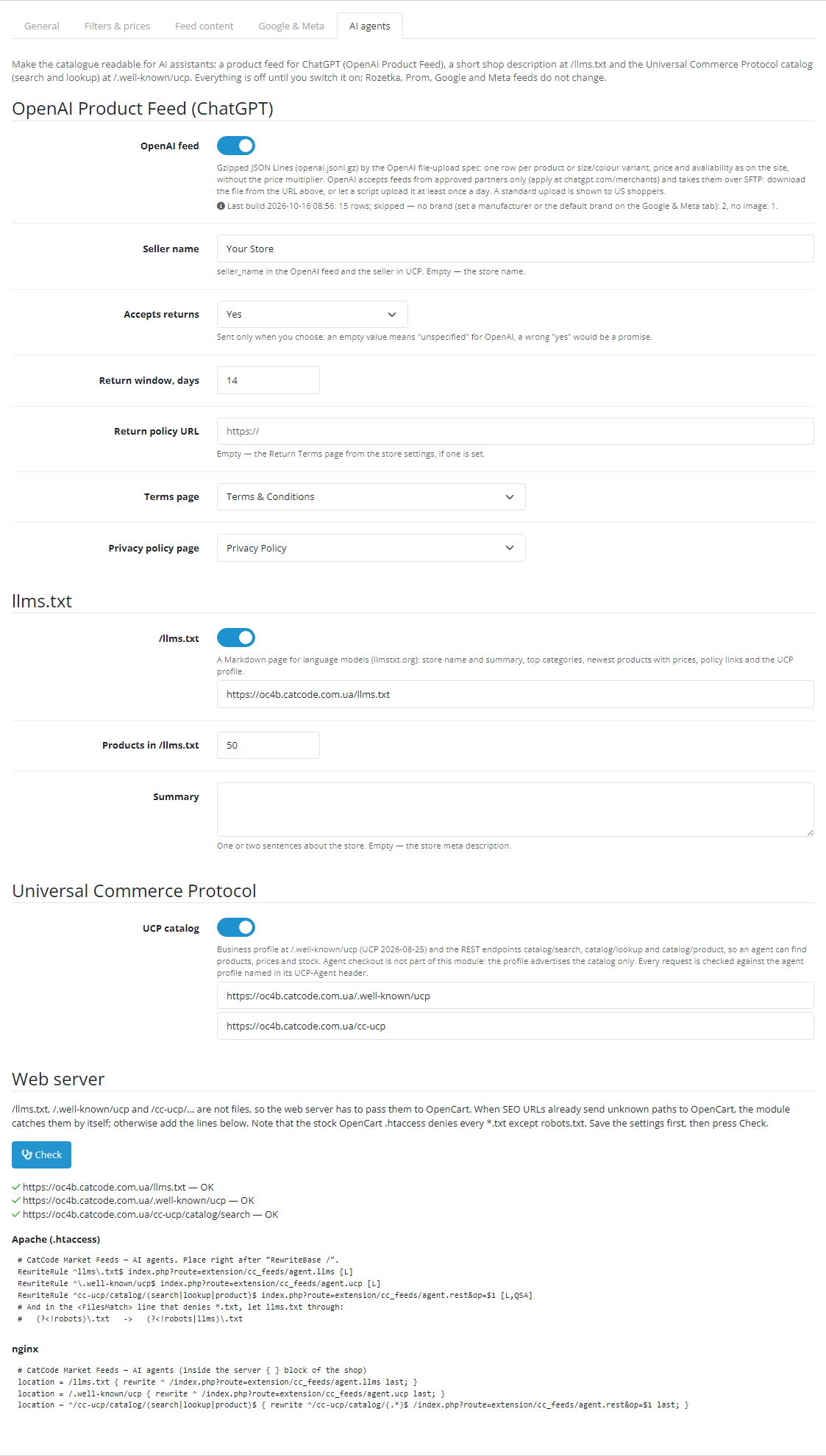
Shoppers increasingly look for products in ChatGPT, Gemini or Claude rather than in a search engine. Since version 1.4.0 (OpenCart 4.x and 3.x) and 1.3.0 (OpenCart 2.3) the module has an “AI agents” tab that makes the store catalogue readable for such assistants in three ways, each switched on separately. After the update everything is off, and the Rozetka, Prom, Google and Meta feeds do not change by a single byte — we compared them before and after the update on OpenCart 4.1, 4.0.2, 3.0 and 2.3.
OpenAI Product Feed. An openai.jsonl.gz file following OpenAI’s file-upload spec: one row per product or per size/colour variant (group_id, variant_dict), price and special exactly as on the storefront — without the multiplier you set for marketplaces — GTIN only with a valid check digit, returns window and the terms and privacy pages from the settings. A product with no brand, image or price is left out, and the admin shows how many rows were skipped and why. Good to know: OpenAI takes feeds only from approved partners (apply at chatgpt.com/merchants) and collects them over SFTP, and the standard upload is shown to shoppers in the US. The module produces the file at a token-protected URL; the SFTP upload is set up once you are approved.
/llms.txt. A short page about the store in the llmstxt.org format: name and summary, top categories with product counts, newest products with prices and stock, policies and a link to the UCP profile.
Universal Commerce Protocol (UCP 2026-08-25). A business profile at /.well-known/ucp and catalogue search for agents: catalog/search, catalog/lookup, catalog/product — prices, variants, availability. Catalogue only: the module does not offer checkout through an agent. Every request validates the agent’s platform profile named in the UCP-Agent header: HTTPS only, no redirects, private addresses refused, profiles cached, request rate limited.
Web server. /llms.txt and /.well-known/ucp are not files, so the server has to pass them to OpenCart. If SEO URLs already work in the store (OpenCart’s stock .htaccess), the module catches the UCP profile and search by itself. On Apache, /llms.txt needs the line from the settings: the stock OpenCart .htaccess denies every *.txt except robots.txt. Ready-made lines for Apache and nginx are on the tab, and the “Check” button requests the three addresses and reports what came back. On a Hestia control panel host (nginx + Apache) we went through all three states: no .htaccess — three red rows with the reason; stock .htaccess — UCP works and /llms.txt returns 403; with the lines from the settings — three green rows.
How it works, step by step
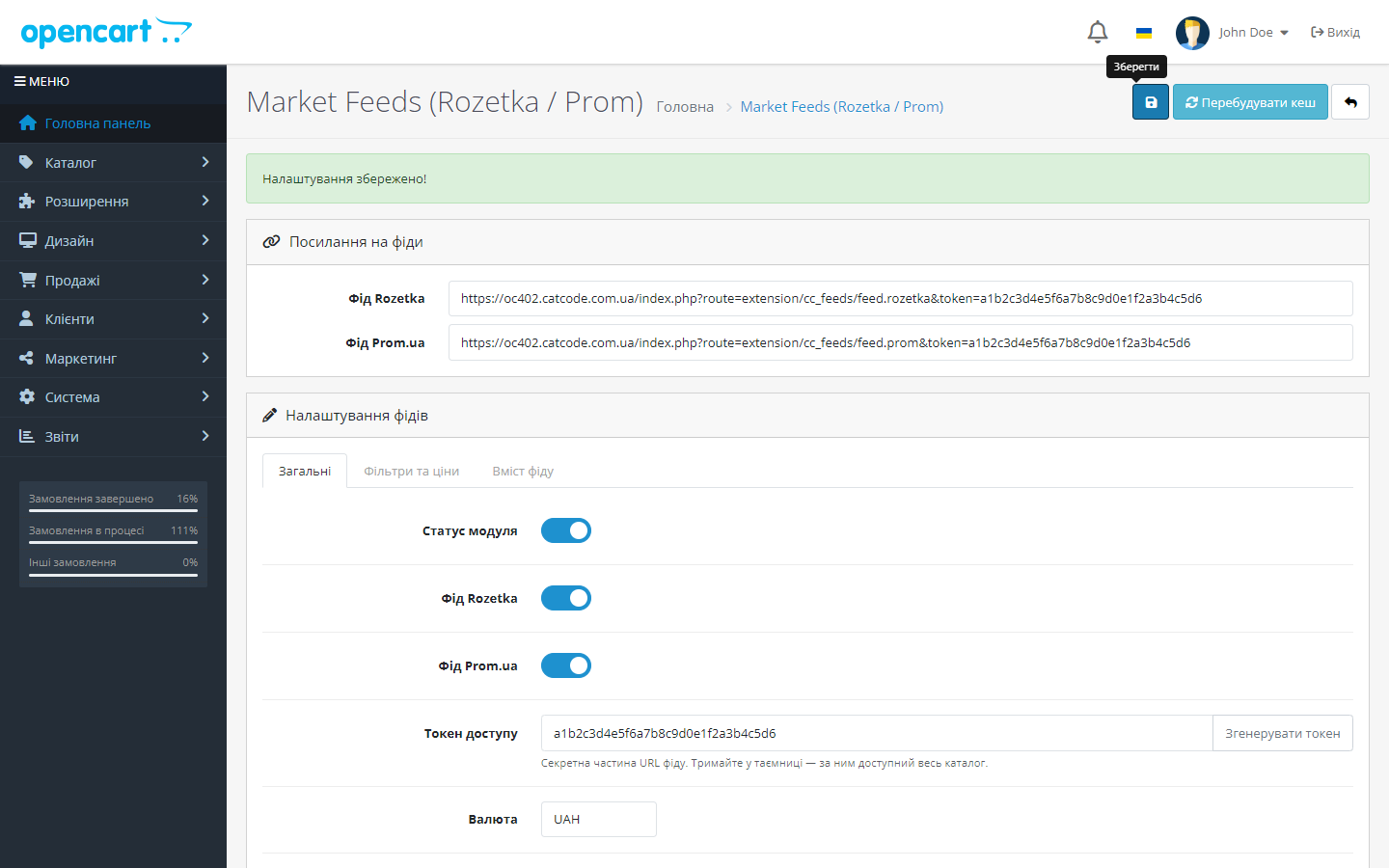
- You install the module and generate a secret access token with one click — without it, the feed is inaccessible to anyone else.
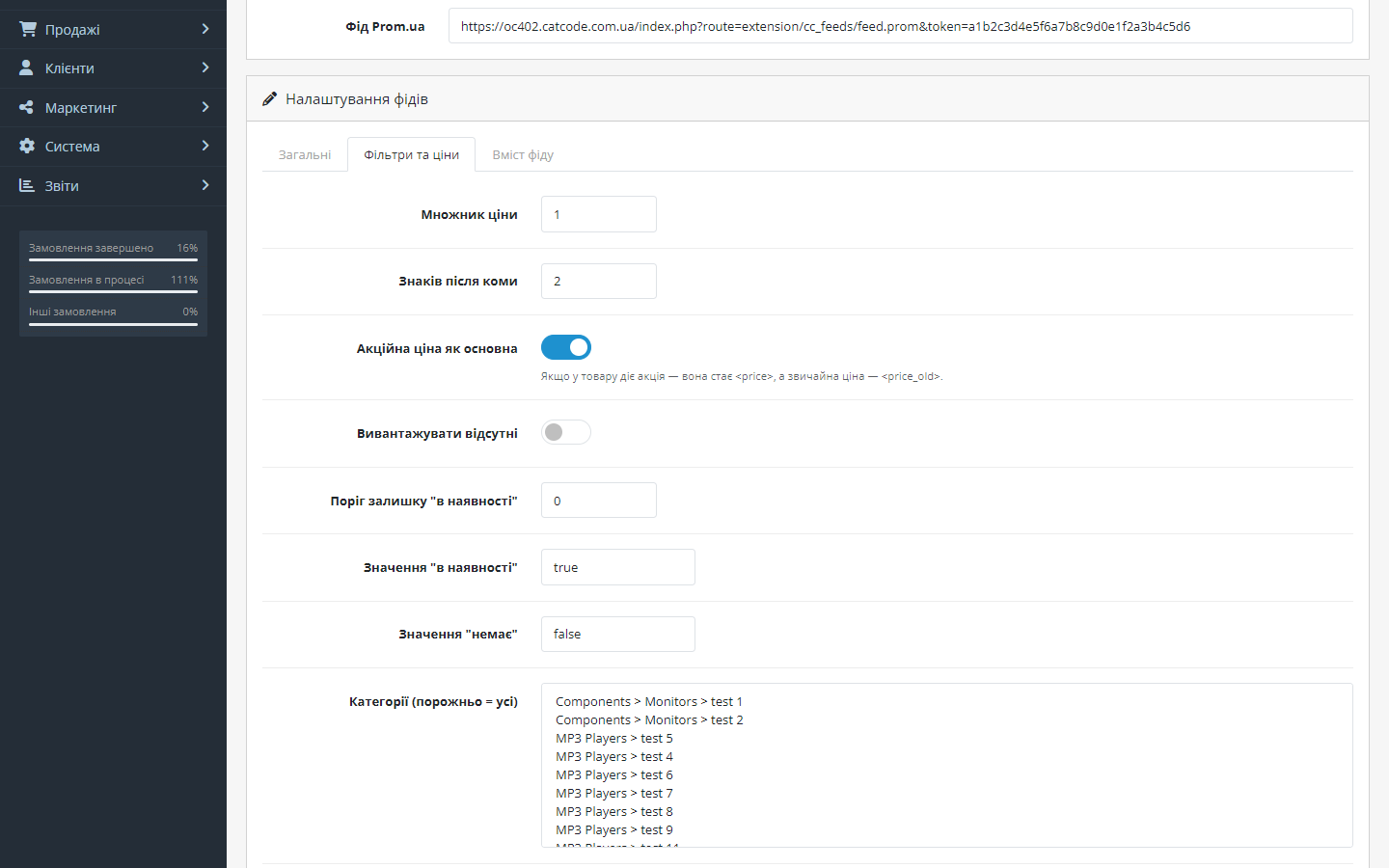
- You configure the export: currency, language, price multiplier, filters by category and manufacturer (empty = the whole catalogue).
- You copy the ready-made feed URLs from the settings page — separately for Rozetka (
feed.rozetka) and Prom.ua (feed.prom). - You paste the links into the marketplace accounts — Rozetka and Prom.ua periodically read the feed themselves and update products, prices and stock.
- Special offers are picked up automatically: if a product has a special price, it becomes
<price>, and the regular price becomes<price_old>(the marketplace shows a discount). - For large catalogues, you can turn on file caching: the feed is rebuilt in the background by cron and served to the marketplace instantly.
Under the hood
- Streamed generation via XMLWriter — products are fetched page by page, and images, attributes and special offers are loaded in batches. Stable memory use regardless of catalogue size.
- Token-protected URLs — the feed is only served with the secret
tokenparameter; a new one can be generated with one click in the admin panel. - Special prices via each branch’s native mechanism —
product_discountin OpenCart 4.1, a separateproduct_specialin 4.0, 3.x and 2.3; the schema is detected automatically. - The right stock tags for each platform: Rozetka gets
stock_quantity, Prom getsquantity_in_stock, plus a configurable “in stock” threshold. - A cron cache to a file — on OpenCart 4 the
extension/cc_feeds/cron.rebuildroute rebuilds the feed on a schedule, on 3.x and 2.3 a token-protected link for the hosting crontab does the same; a “Test” button in the admin panel shows how many products will go into the export.
How to install
- Take the build for your store version:
cc_feeds.ocmod.zip(OpenCart 4.0.2–4.1.x),cc_feeds-oc3.ocmod.zip(3.0.2–3.0.5.0) orcc_feeds-oc2.ocmod.zip(2.3.0.0–2.3.0.2). - On OpenCart 3 and 4, install the archive via Extensions → Installer. On 2.3, the built-in installer only works over FTP, so it’s more reliable to unpack the archive and upload the contents of the
upload/folder to the store’s root. - Extensions → Modules (on OpenCart 3.x, the “Feeds” extension type) → find Market Feeds → Install → Configure.
- Generate a token, choose the currency, language and filters → Save.
- Copy the feed URLs from the “Feed links” section.
- Add the links to your Rozetka and Prom.ua accounts as a product import source.
- Optionally: enable “Cache to file” and add a cron task to rebuild the cache — a ready-made line is shown on the settings page (on OpenCart 3.x and 2.3 this is the only way to refresh the cache, since there’s no scheduler in the core).
Updating from a previous version
Write down the access token before you update (module settings, “General” tab, “Access token” field). Versions before 1.4.0 (before 1.3.0 for OpenCart 2.3) do not keep their settings when the module is uninstalled: uninstalling and installing again wipes all settings including the token, and with it the feed links in Rozetka, Prom, Google and Meta change. So update without uninstalling the module:
- OpenCart 3.x: Extensions → Installer → upload the new
cc_feeds-oc3.ocmod.zipover the old one. Settings, the token and the feed links stay as they are. - OpenCart 2.3: upload the contents of the new archive’s
upload/folder over the old files. If you update with the built-in installer (it works over FTP), it copies the files first and then reports “Modification … is using the same ID code” — by then the files are already new. To clear the message, delete the old Market Feeds modification in Extensions → Modifications and upload the archive once more. - OpenCart 4.x: unpack
cc_feeds.ocmod.zipand copy its contents into the store’sextension/cc_feeds/folder (FTP or the host’s file manager), replacing the files. The module stays installed; settings and the token do not change. The OpenCart 4 installer refuses an archive for an extension that is already installed. If you have no file access and update through the admin (Extensions → Modules → uninstall Market Feeds, Installer → uninstall the extension → upload the new archive → install), paste the token you wrote down into the “Access token” field after installing, set the settings again and save — the feed links stay the same.
From 1.4.0 (1.3.0 for OpenCart 2.3) the settings survive a reinstall. The module keeps a copy of its settings, the token included, in a separate database table that uninstalling does not touch, and puts it back on install. So later updates on OpenCart 4 can go the standard admin way: uninstall the module, uninstall the extension in the Installer, upload the new archive and install — the token and the feed links do not change. For a clean start, press “Reset saved settings” on the “General” tab before uninstalling.
Questions
about the module
Didn't find the answer? Message us on Telegram and we'll reply within a business day.
 @catcode_support
Setup, compatibility, activation
@catcode_support
Setup, compatibility, activation
Do I need Rozetka or Prom API keys?
No. A feed is a URL the marketplace reads itself. The only "key" is the secret token the module generates to protect the feed from outsiders.
I have a large catalogue — won't the feed bring the server down?
No. Generation is streamed (XMLWriter, paginated queries, batched loading of images and attributes), and for the largest catalogues there's a file cache rebuilt by cron — the marketplace gets a ready-made file instantly.
Can I export only part of the catalogue?
Yes: filters by category and manufacturer, an "in stock" threshold, and a separate setting for whether to export out-of-stock products or not.
What about special prices?
If a product has a special offer, the feed sends the special price as <price> plus the old price as <price_old> — the marketplace will show a discount. This is switched on with a single toggle.
Does the module change the theme or checkout?
No. The module only adds a settings page in the admin panel and internal feed routes — the storefront and checkout aren't touched.
Is there one build for all OpenCart versions?
No, it's three separate ports in one package: cc_feeds.ocmod.zip for 4.0.2–4.1.x, cc_feeds-oc3.ocmod.zip for 3.0.2–3.0.5.0 and cc_feeds-oc2.ocmod.zip for 2.3.0.0–2.3.0.2. The set of settings and the feed format are the same.
Is it really free? What's the catch?
No catch: every feature is open, and the code is published on GitHub. There's no Pro version, no hidden limits and no paid "unlocks".
Will the Prom or Rozetka feed work for Epicentr?
No: given a YML with a shop block, the Epicentr cabinet answers «Невідомий тег shop у рядку 3». The module has a separate Epicentr feed in its own XML (since 1.4.1) — switch it on on the General tab and paste the link into «Products → Import → Stock auto-update».
No reviews yet. Be the first.
No questions yet. Ask one — we answer within 24 hours.
Not quite what you are looking for?
We build custom modules for WordPress, WooCommerce, OpenCart and Shopify. Tell us about the task and we'll prepare an estimate.
Order a custom module
Buying the module
—



