WordPress
Mail OAuth & Email Log for WooCommerce — store email through Microsoft 365 and Gmail with an order email log
Free + Pro
990 UAH/year
v1.0.0
 All Access4 990 ₴ / year
 Website auditA PDF report by email in 3 minutesCheck a website
Everyday tasks
Image compressorSize, quality and WebP in bulkQR generatorLink, Wi-Fi, payment to IBANVAT calculator20, 14, 7% and amount in wordsTransliterationOfficial Ukrainian standardWebsite checks
PHP and pluginsPHP version, WordPress, pluginsGoogle Merchant feedFields, prices, GTIN, imagesDomain emailSPF, DKIM, DMARC, blacklistsAI search readinessllms.txt, bots, markupAll 9 toolsEnter at least 2 characters
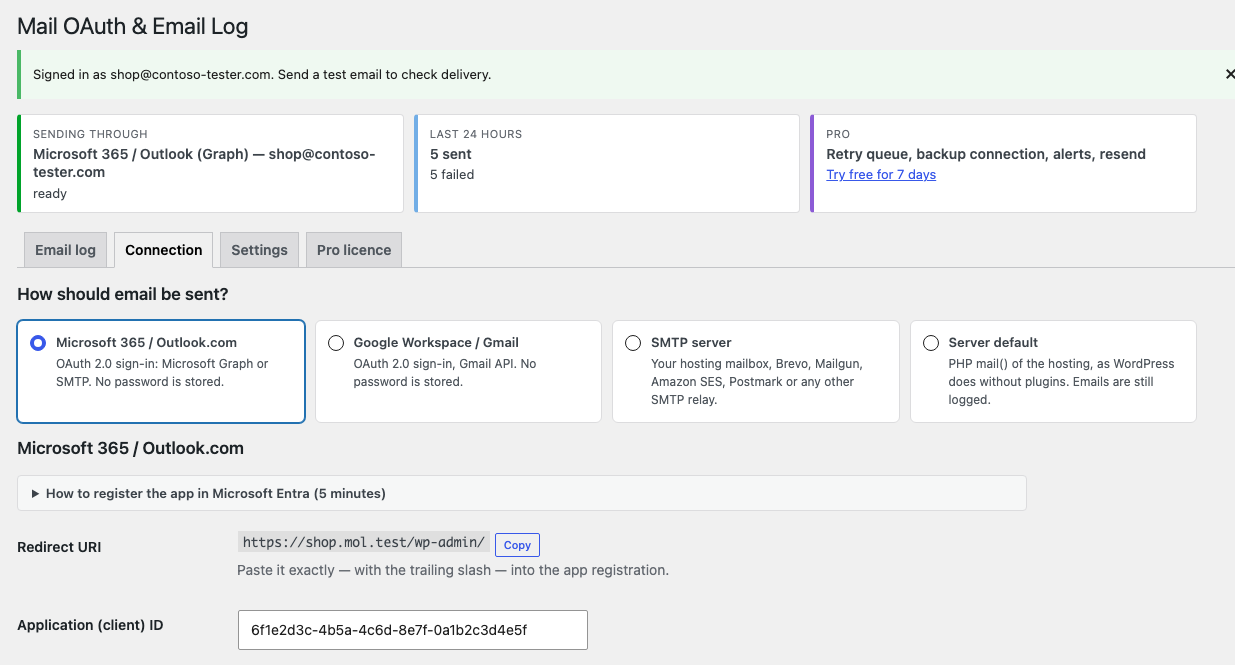
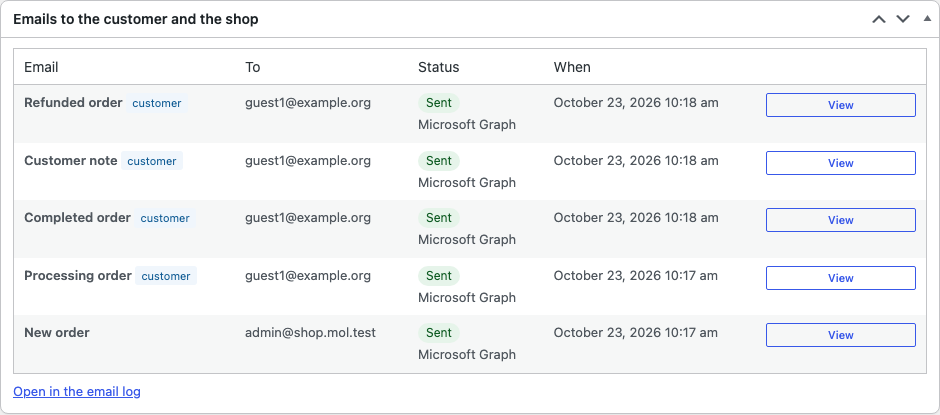
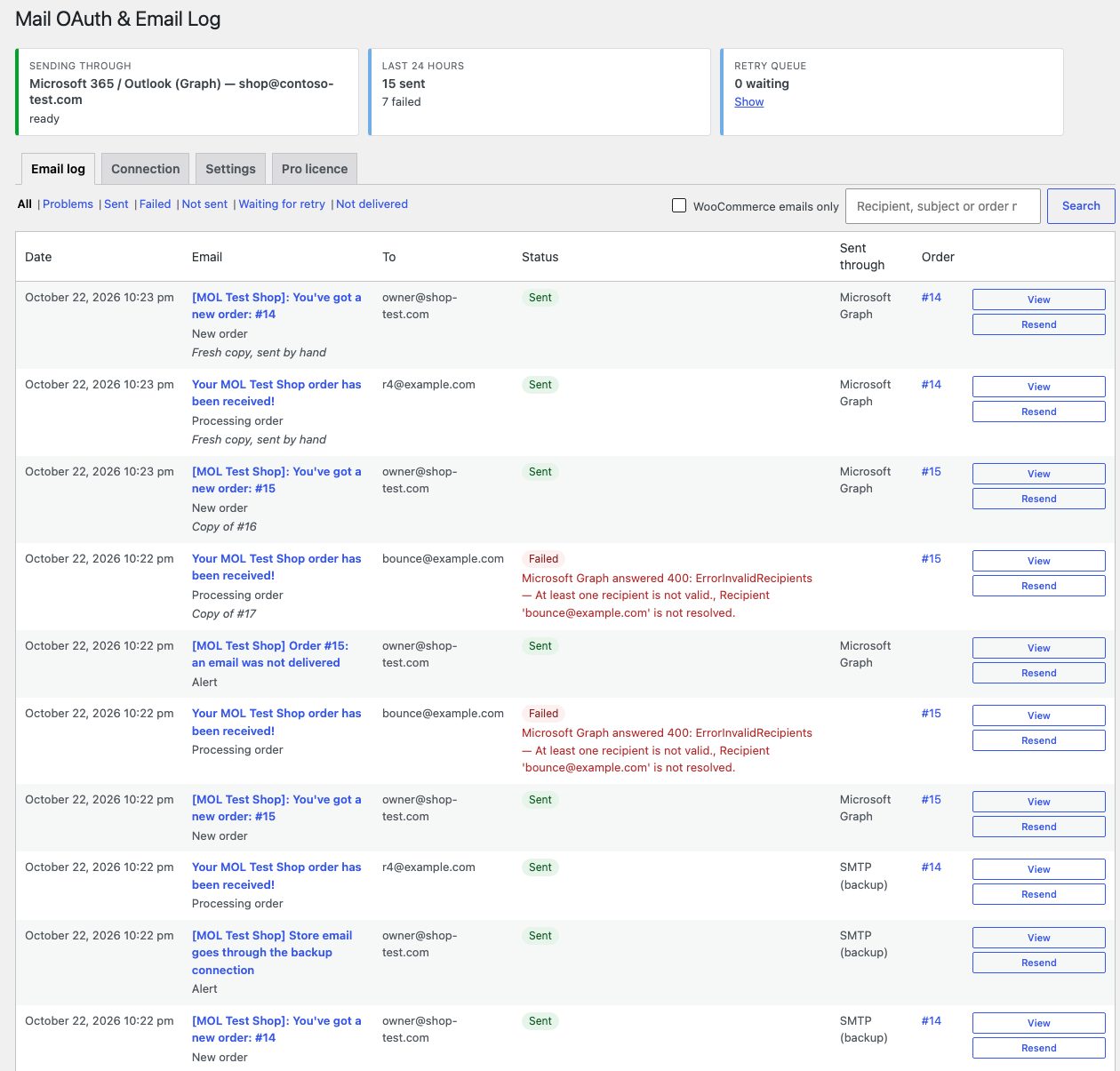
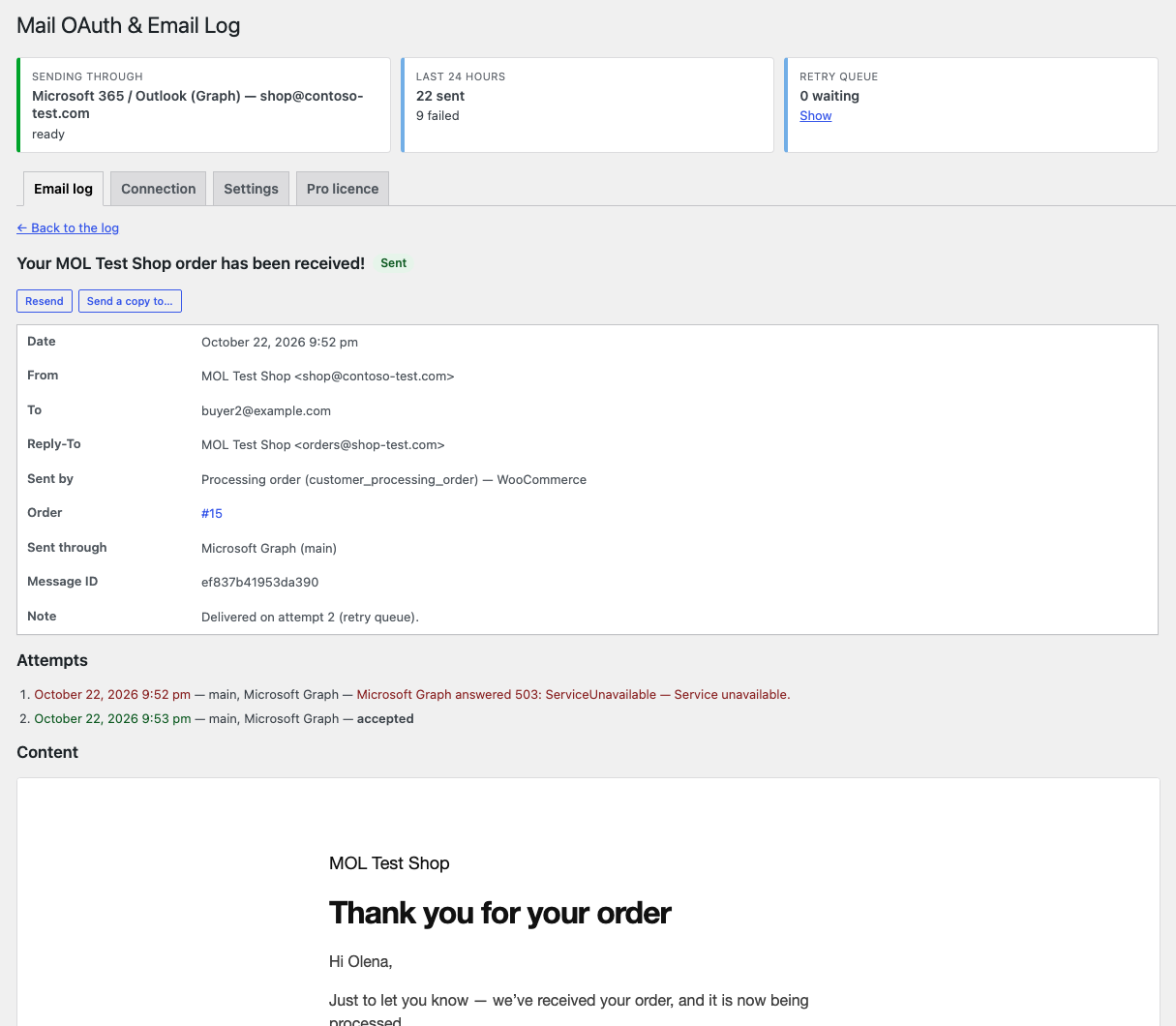
The shop sends email through your Microsoft 365 / Outlook.com or Google Workspace / Gmail mailbox with OAuth 2.0 sign-in — no password — or through any SMTP server. The log records every email, and the order page shows which emails to the customer and to the shop went out and which did not, with the exact error. Free — connections, log, emails on the order. Pro — retry queue, backup connection, resend and a fresh copy of order emails, alerts by e-mail and Telegram.
The free version works with no time limit. Pro adds the rest of the features in the table.


Your shop’s usual emails, sent from your mailbox.

The base version is 0 UAH, with no time limit and no limit on the number of emails: all connections (Microsoft 365 / Outlook.com, Google Workspace / Gmail, SMTP), the log, the “Emails to the customer and the shop” box, the test email, the sign-in watch.

A fresh install is the free version, nothing switches on by itself. The “Try Pro for 7 days” button → e-mail → the key right in the window and by e-mail.

Moving the store? Unbind the licence on the old domain and activate it on the new one yourself. For studios — keys for 5 or 25 sites, or unlimited.
 WordPress 6.2+ · PHP 7.4+ (runs tested on PHP 7.4 and 8.3, code syntax checked on 7.4 and 8.5).WooCommerce 8.0+ for the order features (tested with 8.0.4 and 11.2.1): HPOS and classic order storage, block and classic checkout, WooCommerce’s “Deferred emails” feature (sending through Action Scheduler). Without WooCommerce the plugin works as a WordPress mail plugin: connections, log, test email.Microsoft 365 / Outlook.com — an app in Microsoft Entra with the delegated Mail.Send (Graph) or SMTP.Send (SMTP AUTH) permission and offline_access; for SMTP AUTH the mailbox needs Authenticated SMTP switched on. In some organisations an administrator grants consent to the app.Google Workspace / Gmail — a Google Cloud project with the Gmail API enabled and an OAuth client of the “Web application” type; an external app set to “In production”, because in “Testing” Google issues a sign-in for 7 days only.Server — outgoing HTTPS requests to Microsoft (login.microsoftonline.com, graph.microsoft.com) or Google (accounts.google.com, oauth2.googleapis.com, gmail.googleapis.com); for SMTP — the mail server’s outgoing port open, usually 587 or 465.Interface languages: English, українська, русский.
Microsoft 365 / Outlook.com (Microsoft Graph or SMTP AUTH with XOAUTH2) and Google Workspace / Gmail (Gmail API) with OAuth 2.0 sign-in, SMTP server, email log, the “Emails to the customer…
4 modules in one order — 40% cheaper than separately



Mail OAuth & Email Log for WooCommerce sends your shop’s email — order confirmations, account emails, notifications of other plugins — through your own mailbox and records every email in a log. You can connect Microsoft 365 / Outlook.com (through the Microsoft Graph API or SMTP AUTH) and Google Workspace / Gmail (through the Gmail API) with OAuth 2.0 sign-in — the mailbox password is never entered or stored — as well as any SMTP server: your hosting mailbox, Brevo, Mailgun, Amazon SES, Postmark.
For a shop, the main question about email is a simple one: did the customer get the order confirmation? So the log knows which WooCommerce email was sent and which order it belongs to, and every order has an “Emails to the customer and the shop” box: which emails went out, when, through which connection, and with which error if the mail service did not accept them. It also lists the emails WooCommerce did not send at all — when that email type is switched off or the order has no address.
Why OAuth. Microsoft has announced the retirement of password (Basic) authentication for SMTP AUTH in Exchange Online and recommends moving to OAuth 2.0 or Microsoft Graph; the current dates are in Microsoft’s documentation. A shop that sends email from a Microsoft 365 mailbox with a user name and password will then stop sending — and without a log, you hear about it from customers who never got their confirmation.
What the plugin does not promise. “Sent” in the log means Microsoft, Google or the SMTP server accepted the email for delivery. Whether it landed in the customer’s spam folder, the plugin cannot see. It does not change how WooCommerce emails look.
Need to see what an order email looks like and send a test copy? That is the separate Email Preview for WooCommerce module. Mail OAuth & Email Log takes care of delivery: which mailbox the email goes through, whether the mail service accepted it, and what to do when it did not.
Your shop’s usual emails, sent from your mailbox. The plugin changes nothing in the storefront or at checkout, and nothing in how WooCommerce emails look: it only hands them to the mail service you chose and records them in the log.
With a Microsoft or Google connection, the sender is the mailbox you signed in with: Microsoft refuses other addresses unless the account has Send As rights, and Gmail puts in its own address. If the mailbox may send as an alias or a shared mailbox, one checkbox in the settings allows it. Bcc copies are kept on every connection; through Microsoft Graph they go out as real hidden recipients.
With Pro, if the mail service did not accept an email for a while, the queue sends it again — so the customer gets the order confirmation later rather than never.
Pro — 990 UAH, a one-year licence. A year of updates, technical support and all Pro features: the retry queue, the backup connection, alerts by e-mail and Telegram, resending, a fresh copy of order emails, the Email column in the orders list.
You can take a longer term right away — the longer, the cheaper per year:
No automatic charges: you renew manually, and reminders come by e-mail. A purchased licence keeps the Pro features for good — when the term ends, the site simply stops getting new versions and support.
The base key covers one site; for several shops and for studios there are keys for 5 and 25 sites and an unlimited one — pick them at the top of this page. Moving the shop — press “Release licence” on the old site and activate the key on the new one.
Trial first, payment later. The free 7-day Pro trial starts with the “Try it for 7 days” button at the top of this page or “Try Pro for 7 days” on the “Pro licence” tab of the Pro build; the key arrives by e-mail, no card needed, and the trial never starts by itself. When the trial ends the Pro features switch off; the connections, the log and the order box keep working.
wp_mail() call, so WordPress, WooCommerce and every plugin that sends mail the standard way go through it: log row → main connection → in Pro the backup one./me/sendMail as JSON with real ccRecipients and bccRecipients; SMTP AUTH with XOAUTH2 — its own SMTP client with STARTTLS, works with the PHPMailer of any WordPress 6.2+; Gmail API — the complete RFC 822 message with the Bcc line.woocommerce_mail_callback_params; switched-off emails and emails without an address are logged as rows of their own.catcode-mail-oauth-email-log-for-woocommerce-free-1.0.0.zip and activate it.Didn't find the answer? Message us on Telegram and we'll reply within a business day.
 @catcode_support
Setup, compatibility, activation
@catcode_support
Setup, compatibility, activation
Microsoft has announced the retirement of password (Basic) authentication for SMTP AUTH in Exchange Online. Connect the same mailbox with OAuth 2.0 sign-in — through Microsoft Graph or SMTP AUTH with XOAUTH2: no password is needed or stored.
Not always. A user can register an app in their organisation's Microsoft Entra unless that is forbidden, and a personal Gmail account can create a Google Cloud project. Some organisations require an administrator to grant consent to the app.
Graph is recommended: it works over HTTPS (port 443), needs no Authenticated SMTP switch and keeps Bcc copies. SMTP AUTH with XOAUTH2 is for organisations that do not allow Mail.Send, or to send as a shared mailbox.
Your Google Cloud app is in "Testing": Google ends such sign-ins after 7 days. Set it to "In production" and sign in again. The plugin tells you the reason itself when the sign-in disappears about a week later.
It means Microsoft, Google or the SMTP server accepted the email for delivery. Whether it landed in spam, the plugin cannot see. Errors the service returns right away — an address that does not exist, a sender without Send As rights — appear in the log and on the order with the exact text.
Only in your WordPress database, in the log table, for as many days as you choose; keeping the content can be switched off. A customer's emails are included in WordPress's Export and Erase Personal Data tools. Emails go nowhere except the mail service you connected.
Two mail plugins cannot both send WordPress email — keep one of them. The settings screen names the other active mail plugin.
Email Preview shows what an order email looks like and sends test copies. Mail OAuth & Email Log takes care of delivery: which mailbox the email goes through, whether the mail service accepted it, and in Pro — retries, the backup connection and alerts.
Connections, the log, the order box and the test email are free with no time limit.
No reviews yet. Be the first.
No questions yet. Ask one — we answer within 24 hours.
We build custom modules for WordPress, WooCommerce, OpenCart and Shopify. Tell us about the task and we'll prepare an estimate.
Order a custom module
—

CatCode assistant
Just now


CatCode assistant
Online

I’ll help with your website task
Describe your website task — I’ll find a ready-made module or pass it to a developer for an estimate. Modules, custom features, layout, integrations, speed, migration, technical SEO.
