WordPress
PHP Upgrade Check for WooCommerce — what breaks when you move to PHP 8.3, 8.4 or 8.5
Free + Pro
990 UAH/year
v1.0.0
 All Access4 990 ₴ / year
 Website auditA PDF report by email in 3 minutesCheck a website
Everyday tasks
Image compressorSize, quality and WebP in bulkQR generatorLink, Wi-Fi, payment to IBANVAT calculator20, 14, 7% and amount in wordsTransliterationOfficial Ukrainian standardWebsite checks
PHP and pluginsPHP version, WordPress, pluginsGoogle Merchant feedFields, prices, GTIN, imagesDomain emailSPF, DKIM, DMARC, blacklistsAI search readinessllms.txt, bots, markupAll 9 toolsEnter at least 2 characters
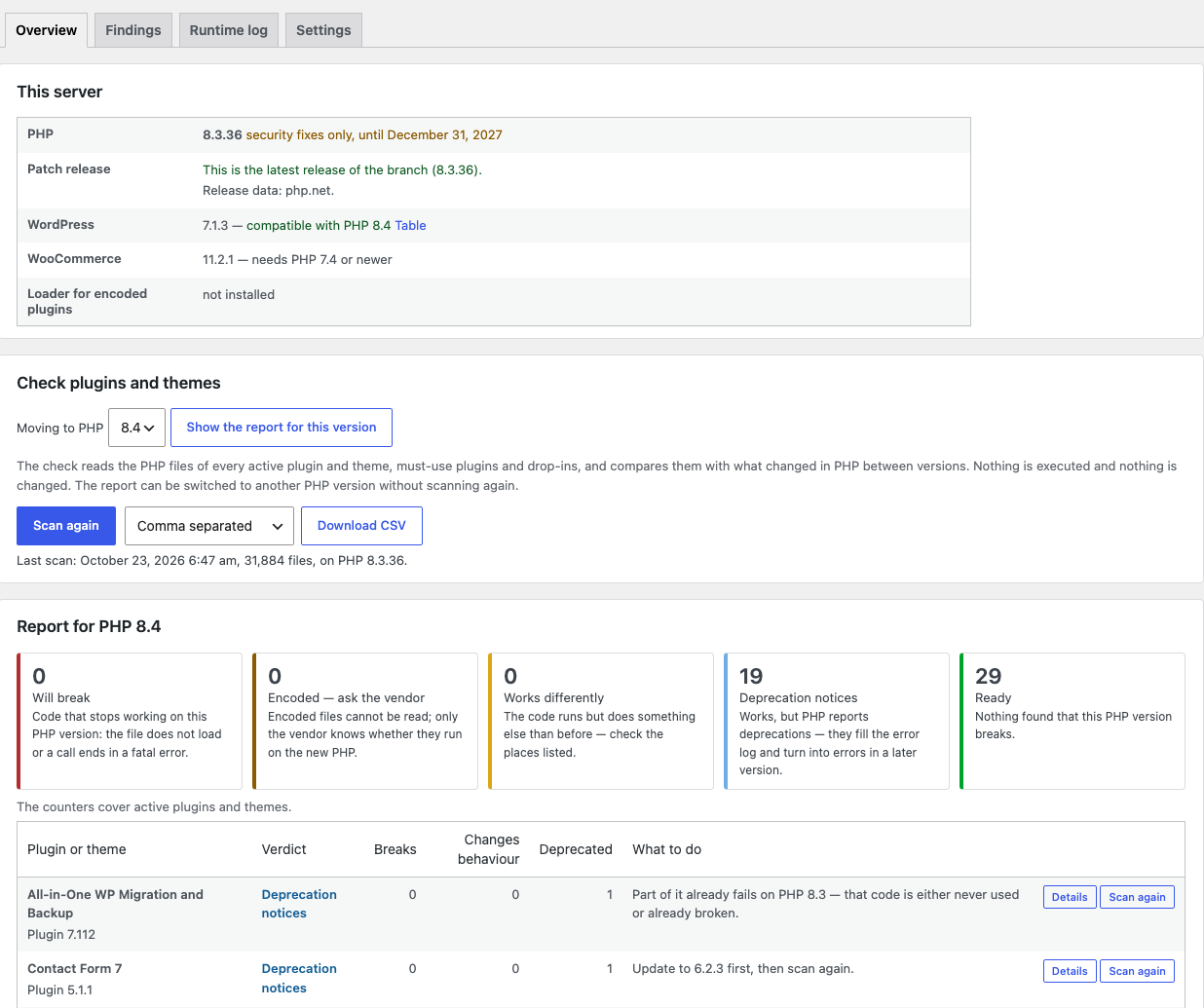
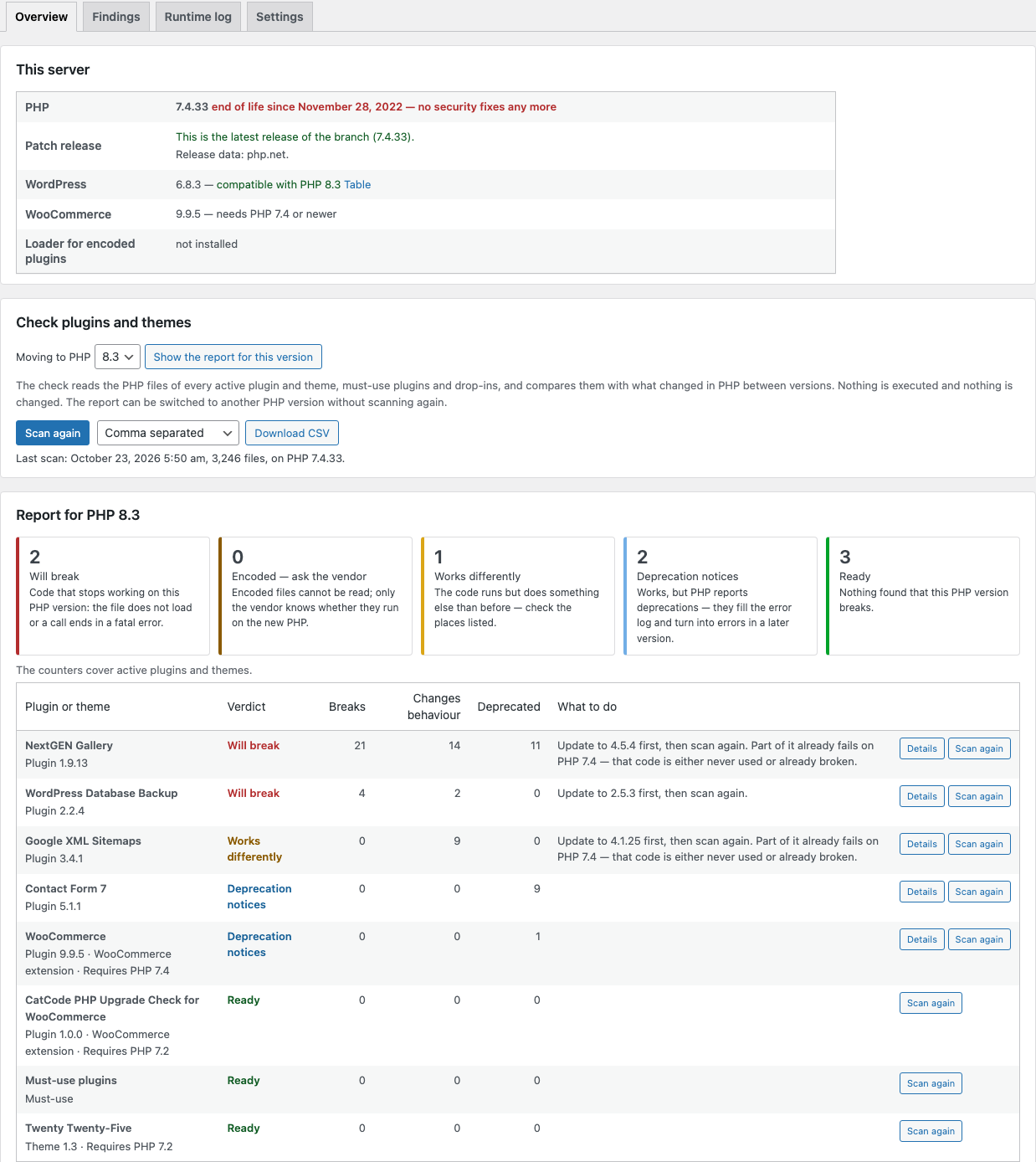
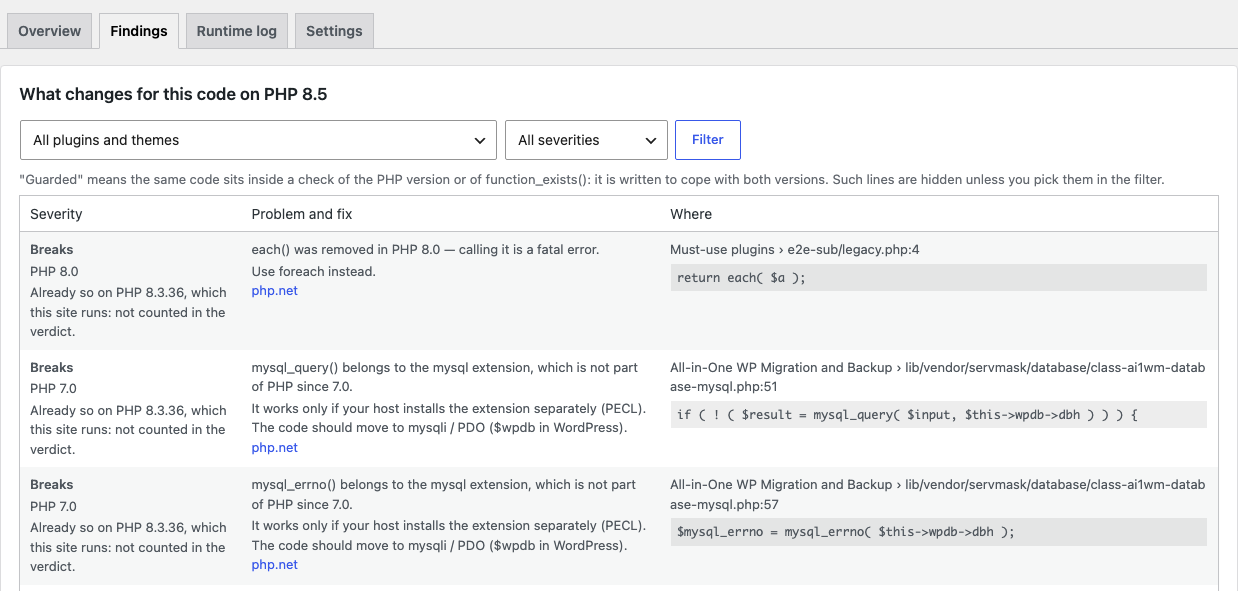
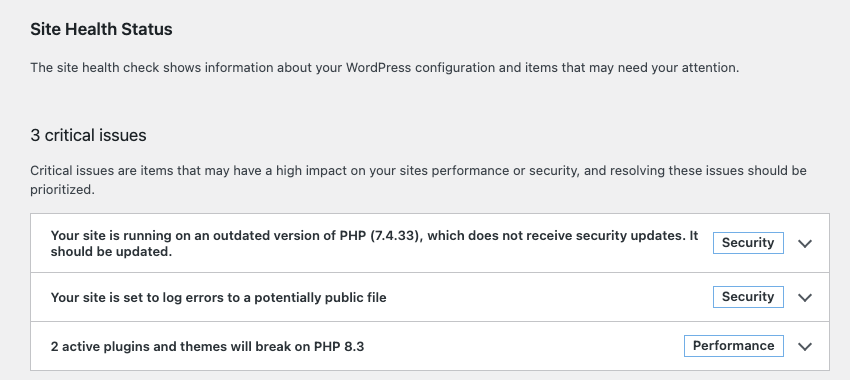
Before your host moves the shop to PHP 8.3, 8.4 or 8.5, the plugin reads the code of every plugin and theme and shows what will break: the plugin, the file, the line and the fix. The verdict counts only what changes between the PHP you run and the target. Nothing is executed or changed. Free: scan, report, findings, CSV, Site Health, WP-CLI. Pro: a log of PHP errors while the site runs, a check after updates, a weekly report.
The free version works with no time limit. Pro adds the rest of the features in the table.


Nothing. The plugin works only in the admin area: it does not change the shop’s pages and shows nothing on the storefront.

The base version is 0 UAH, with no time limit and no limit on the number of plugins: the scan, the report for every PHP version, findings with fixes, the server overview, CSV, Site Health, WP-CLI.

A fresh install is the free version, nothing switches on by itself. The “Try Pro for 7 days” button → e-mail → the key right in the window and by e-mail.

Moving the store? Unbind the licence on the old domain and activate it on the new one yourself. For studios — keys for 5 or 25 sites, or unlimited.
 WordPress 6.2+ · PHP 7.2+ (runs tested on PHP 7.4 and 8.3, the code’s syntax on 7.2 and 8.5) · PHP’s standard tokenizer extension, which is on by default.WooCommerce — optional: the plugin checks any WordPress site, and with WooCommerce it also marks its extensions and shows the PHP version WooCommerce itself needs. Tested with WooCommerce 11.2.1 and 9.9.5; HPOS compatibility is declared.Multisite — network activation; the report covers the plugins and themes of the whole network, only super admins see the screen.Reports — for PHP 7.4, 8.0, 8.1, 8.2, 8.3, 8.4 and 8.5.Interface languages: English, українська, русский.
A scan of plugins, themes, must-use plugins and drop-ins against the PHP 7.0–8.5 changes, a report for PHP 7.4–8.5 with a verdict for every plugin and theme (only what changes between the…
4 modules in one order — 40% cheaper than separately



PHP Upgrade Check for WooCommerce checks the plugins and themes of your shop before a move to a newer PHP version and shows exactly what will break: the plugin, the file, the line, the code and how to fix it. You pick the version you are moving to — 7.4, 8.0, 8.1, 8.2, 8.3, 8.4 or 8.5 — and the plugin compares the code with everything PHP removed or changed from 7.0 to 8.5. The scan runs on the PHP you have today (7.2 or newer), so you see the result before your host switches anything.
Hosts are moving sites off old PHP versions: PHP 7.4 has had no security fixes since November 2022, PHP 8.1 since the end of 2025, and PHP 8.2 loses them on 31 December 2026. For a WooCommerce shop the question is always the same — will the checkout still work after the switch? One old plugin calling a removed function is enough for a customer to see a fatal error instead of the page.
How the verdict is counted. Only what changes between the PHP the site runs today and the target goes into the verdict. Code that would already fail on the current PHP — say, mysql_* functions, removed in PHP 7.0, on a PHP 8.3 server — is either never used or already broken, and moving to a newer version does not change it. Such findings are listed on the Findings tab with the note “not counted in the verdict”, but they do not make the plugin Will break. Encoded files and a Requires PHP header above the target version always count.
What the plugin does not promise. The scan reads code and cannot see what happens only at run time: a null passed to a PHP function, a property created on the fly, data from the database. Ready means nothing was found in the code for the chosen PHP version — not a guarantee. After the switch, test the shop, the checkout above all, and keep a backup you can restore.
Running OpenCart? There is a separate module for OpenCart 4, 3 and 2.3 — PHP Upgrade Check for OpenCart.
Nothing. The plugin works only in the admin area: it does not change the shop’s pages and shows nothing on the storefront. The scan runs in short steps of a few seconds in the administrator’s browser tab, and the site keeps working as usual.
The runtime log in Pro collects PHP messages during the site’s normal requests, but never shows them to visitors and does not change how PHP and other plugins (Query Monitor, for example) handle errors: every message is passed on, exactly as without the plugin. It records at most 50 different messages per request and keeps up to 2,000 rows from the last 60 days.
Requires PHP header is above the target version also lands here.function_exists(), extension_loaded() or defined(), and a plugin’s own replacement of a removed function are marked guarded and do not count. You can see them by picking them in the filter.wp catcode-php-check scan, wp catcode-php-check report --target=8.4 --format=json, wp catcode-php-check export report.csv.A test shop with 76 plugins (inactive ones included), themes, must-use plugins and drop-ins — 40,731 files — was scanned in 53 seconds in twelve steps, using up to 94 MB of memory; no request came near max_execution_time of 30 seconds. With a hard memory_limit of 128M the plugin skipped two files of about 1 MB that would not have fit into memory and named them in the report. Files over 3 MB are skipped with a note too.
Pro — 990 UAH, a one-year licence. A year of updates, technical support and all Pro features: runtime log, re-scan after updates, weekly report.
You can take a longer term right away — the longer, the cheaper per year:
No automatic charges: you renew manually, and reminders come by e-mail. A purchased licence keeps the Pro features for good — when the term ends, the site simply stops getting new versions and support.
The base key covers one site; for several shops and for studios there are keys for 5 and 25 sites and an unlimited one — pick them at the top of this page. Moving the shop — press “Release licence” on the old site and activate the key on the new one. On multisite, every subsite is a separate site for the licence.
Trial first, payment later. The free 7-day Pro trial starts with the “Try it for 7 days” button at the top of this page or “Try Pro for 7 days” in the settings of the Pro build; the key arrives by e-mail, no card needed, and the trial never starts by itself. When the trial ends the Pro features switch off; the scan, the report, the findings and CSV keep working.
token_get_all()) instead of running the code: files are only read, nothing is included, and no code leaves the server.(real) and (unset) casts, =& new, classes named after new reserved words), removed functions (each(), create_function(), get_magic_quotes_gpc(), money_format(), the ereg family and others), removed extensions (mysql, mcrypt, xmlrpc, imap, pspell, oci8), calls that became fatal (implode() with the array first, parse_str() without a result, mktime() without arguments), changed behaviour (PHP 4 style constructors, is_resource() on resources that became objects, assert() with code in a string), deprecations up to PHP 8.5 (implicitly nullable parameters, return types for 188 built-in classes and interfaces, utf8_encode(), strftime(), FILTER_SANITIZE_STRING, E_STRICT, curl_close(), imagedestroy() and more).function_exists(), extension_loaded() or defined() around the code or before &&, || and ?, and a plugin’s own replacement of a removed function are recognised, so code written for both versions does not raise false alarms.catcode-php-upgrade-check-for-woocommerce-free-1.0.0.zip and activate it.Didn't find the answer? Message us on Telegram and we'll reply within a business day.
 @catcode_support
Setup, compatibility, activation
@catcode_support
Setup, compatibility, activation
No. The scan only reads PHP files with PHP's tokenizer: it does not execute, include or edit them and does not switch PHP. The results go into the plugin's own tables. The runtime log in Pro only records PHP messages and passes each one on, exactly as without the plugin.
No. It checks any WordPress site. With WooCommerce active, the report also marks WooCommerce extensions and shows the PHP version WooCommerce itself needs.
Yes — that is what it is for. The scan runs on the PHP you have today (7.2 or newer) and the report is built for the version you choose.
The verdict counts only what changes between the PHP the site runs today and the target. each() was removed in PHP 8.0: on a PHP 8.3 server that code is either never used or already broken, and moving to 8.4 changes nothing about it. Such findings stay on the Findings tab with the note "not counted in the verdict", and the plugin's row says "Part of it already fails on PHP 8.3". On a PHP 7.4 site the same each() makes the plugin Will break in the report for 8.3.
No scan of the code can promise that. Ready means nothing was found in the code for the chosen PHP version. Some changes show up only at run time (a null passed to a PHP function, a property created on the fly) — that is what the runtime log in Pro is for. After the switch, test the shop, the checkout above all, and keep a backup you can restore.
Encoded files cannot be read. They run only on the PHP versions their encoder and the loader on the server support, so the report marks such a plugin Encoded — ask the vendor and shows whether the ionCube Loader is installed.
The plugin is network-activated, and the report on any site covers the plugins and themes used across the network, since the network runs one PHP. Only super admins see the screen. For the licence, every subsite of a multisite is a separate site: the key is activated on the address of the site where you entered it.
The scan runs in the admin area in short steps of a few seconds. A test shop with 76 plugins — 40,731 files — was scanned in 53 seconds, using up to 94 MB of memory, and no step came near max_execution_time of 30 s. A file that would not fit into memory_limit is skipped and named in the report.
The free version asks php.net twice a day which release is the latest in each PHP branch and until when each branch gets security fixes. Nothing about your site is sent; you can switch the request off in the settings, and the plugin then uses its built-in list. Pro checks the licence key and the site address with the licence server on catcode.com.ua.
The scan, the report for every PHP version, the findings with fixes, CSV, Site Health and WP-CLI stay free, with no time limit and no limit on the number of plugins.
Nothing: its tables, settings and scheduled events are removed, on multisite from every site. If a second copy of the plugin sits in another folder, its data is left alone.
No reviews yet. Be the first.
No questions yet. Ask one — we answer within 24 hours.
We build custom modules for WordPress, WooCommerce, OpenCart and Shopify. Tell us about the task and we'll prepare an estimate.
Order a custom module
—

CatCode assistant
Just now


CatCode assistant
Online

I’ll help with your website task
Describe your website task — I’ll find a ready-made module or pass it to a developer for an estimate. Modules, custom features, layout, integrations, speed, migration, technical SEO.
