OpenCart
PHP Upgrade Check for OpenCart — what will break after switching to PHP 8.3, 8.4 or 8.5
Free + Pro
1 290 UAH
v1.1.0
 All Access4 990 ₴ / year
 Website auditA PDF report by email in 3 minutesCheck a website
Everyday tasks
Image compressorSize, quality and WebP in bulkQR generatorLink, Wi-Fi, payment to IBANVAT calculator20, 14, 7% and amount in wordsTransliterationOfficial Ukrainian standardWebsite checks
PHP and pluginsPHP version, WordPress, pluginsGoogle Merchant feedFields, prices, GTIN, imagesDomain emailSPF, DKIM, DMARC, blacklistsAI search readinessllms.txt, bots, markupAll 9 toolsEnter at least 2 characters
A module for OpenCart 4, 3 and 2.3 that reads every PHP file of the shop — core, extensions, OCMOD and vQmod patches, themes and libraries — and compares it with what PHP 7.0 … 8.5 removed or changed. For the PHP version you pick, every extension gets a verdict: ready, only notices, will break, needs a PHP extension or encoded, and every finding comes with the file, the line and the fix. Nothing is executed and nothing is changed. The basic version is free; Pro adds a report for your developer and error-log analysis. Lifetime licence.
The free version works with no time limit. Pro adds the rest of the features in the table.


The shopper never sees the module: there is no code, event or patch of it on the storefront.

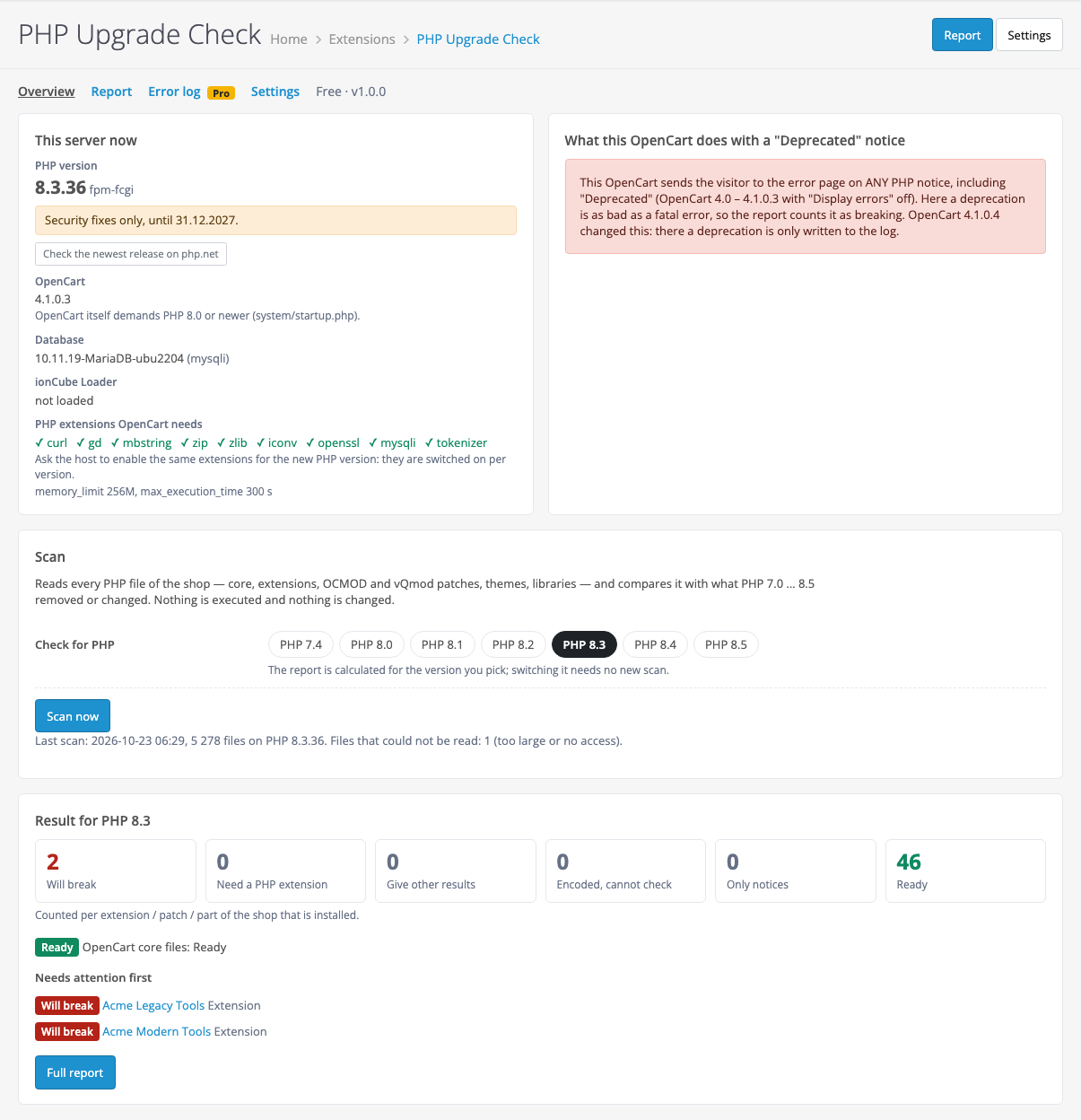
The System → PHP Upgrade Check menu entry with four tabs: Overview, Report, Error log (Pro) and Settings.

Tested locally on four OpenCart versions from the official archives: 4.1.0.3 (mysqli), 4.0.2.3 (pdo), 3.0.5.0 and 2.3.0.2, on PHP 5.6, 7.0, 8.1, 8.3 and 8.5, with “Display errors” on and off.

A fresh install is the free version, nothing switches on by itself. The “Try Pro for 7 days” button → e-mail → the key right in the window and by e-mail.

Moving the store? Unbind the licence on the old domain and activate it on the new one yourself. For studios — keys for 5 or 25 sites, or unlimited.
 OpenCart 4.0.2.0+ and 4.1.x (tested on 4.1.0.3 and 4.0.2.3), 3.0.x (tested on 3.0.5.0) or 2.3.0.x (tested on 2.3.0.2).PHP — the one your shop runs on: the OpenCart 4 build needs 8.0+, like OpenCart 4 itself; the 3.x and 2.3 builds run on 5.6 and newer. Tested on PHP 5.6, 7.0, 8.1, 8.3 and 8.5.The PHP tokenizer extension — the module reads code with it; cURL — for the Pro licence and the “newest release” button.Database MySQL or MariaDB (tested on MariaDB 10.11).OpenCart 2.3: the files are copied by hand, because the stock 2.3 installer needs FTP.Module languages: Ukrainian, English, Russian.
For OpenCart 4, 3 and 2.3: scan of the core, extensions, OCMOD and vQmod patches, themes and libraries for PHP 7.0 … 8.5 changes; a verdict for every extension for PHP 7.4 – 8.5; PHP…
4 modules in one order — 40% cheaper than separately



PHP Upgrade Check for OpenCart is a module by the CatCode studio that answers one question before you change the PHP version: what in this shop will stop working? PHP 8.1 gets no security fixes after 31.12.2025, PHP 8.2 gets them only until 31.12.2026 (php.net dates), and over the years the shop has collected modules by different vendors, OCMOD and vQmod patches and a theme with edits. Switching PHP “to try it” on a live shop means risking an error page instead of a product or the checkout.
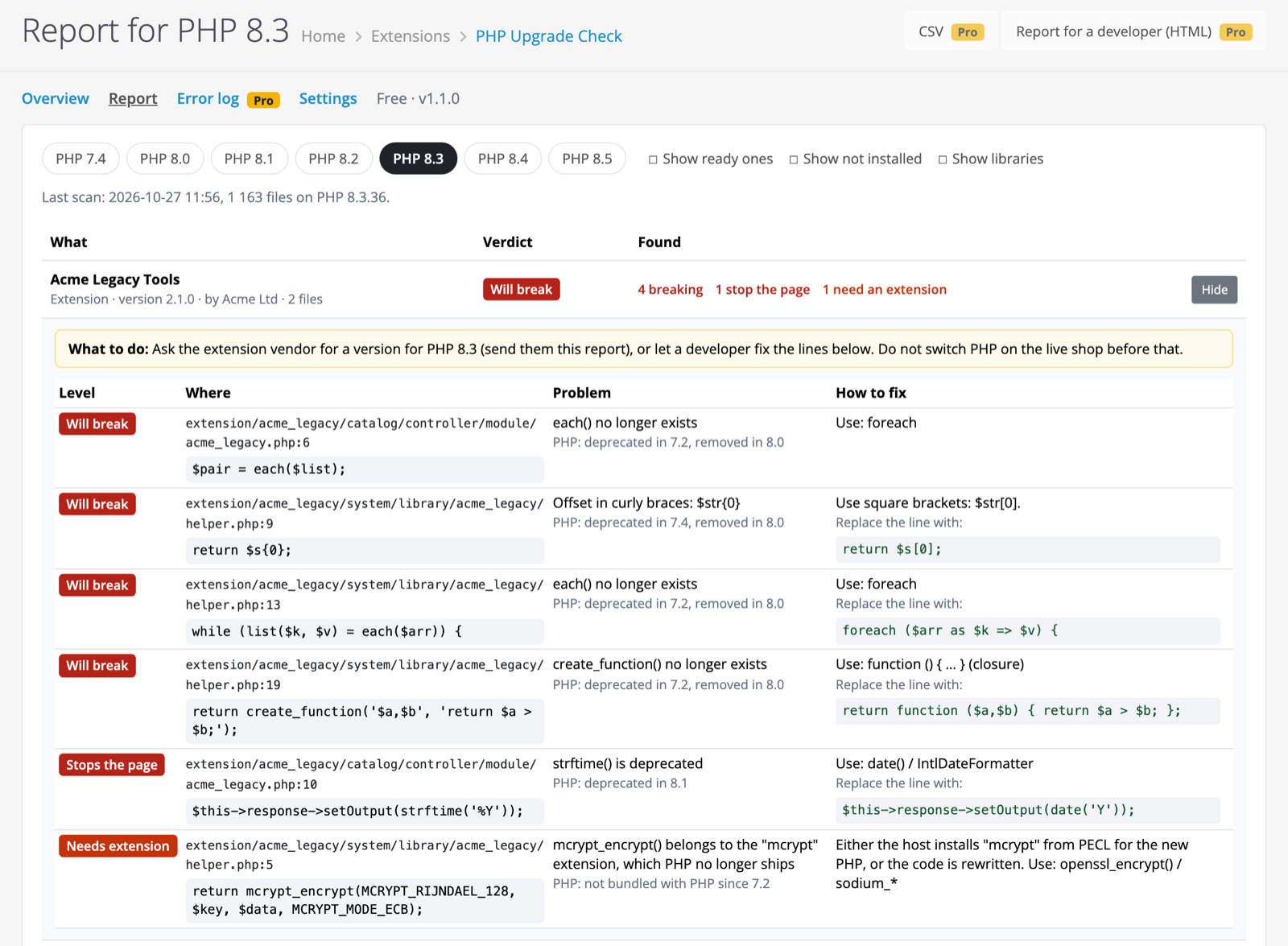
The module reads every PHP file of the shop — the OpenCart core, extensions, the code of OCMOD and vQmod patches, themes, libraries — and compares it with what PHP 7.0 … 8.5 removed or changed, following the official php.net migration guides. For the PHP version you pick, every extension, patch and theme gets a verdict, and every finding comes with the file, the line, the code and the fix. Nothing is executed and nothing is changed.
The shopper never sees the module: there is no code, event or patch of it on the storefront. Its job is to keep the shopper from seeing something else: an error page instead of a product, a blank page or a checkout stuck at the payment step after the host switched PHP.
A shop breaks in different ways after a PHP switch. A function PHP removed (each(), create_function(), mysql_*) is simply not found, and the page stops with a fatal error. A deprecated function in OpenCart 4.0 – 4.1.0.3 with “Display errors” off sends the visitor to the error page. Some functions keep working but return a different result. The module finds these places before the switch, so you fix them on your own schedule rather than after shoppers complain.
The System → PHP Upgrade Check menu entry with four tabs: Overview, Report, Error log (Pro) and Settings. The entry appears right after installation.
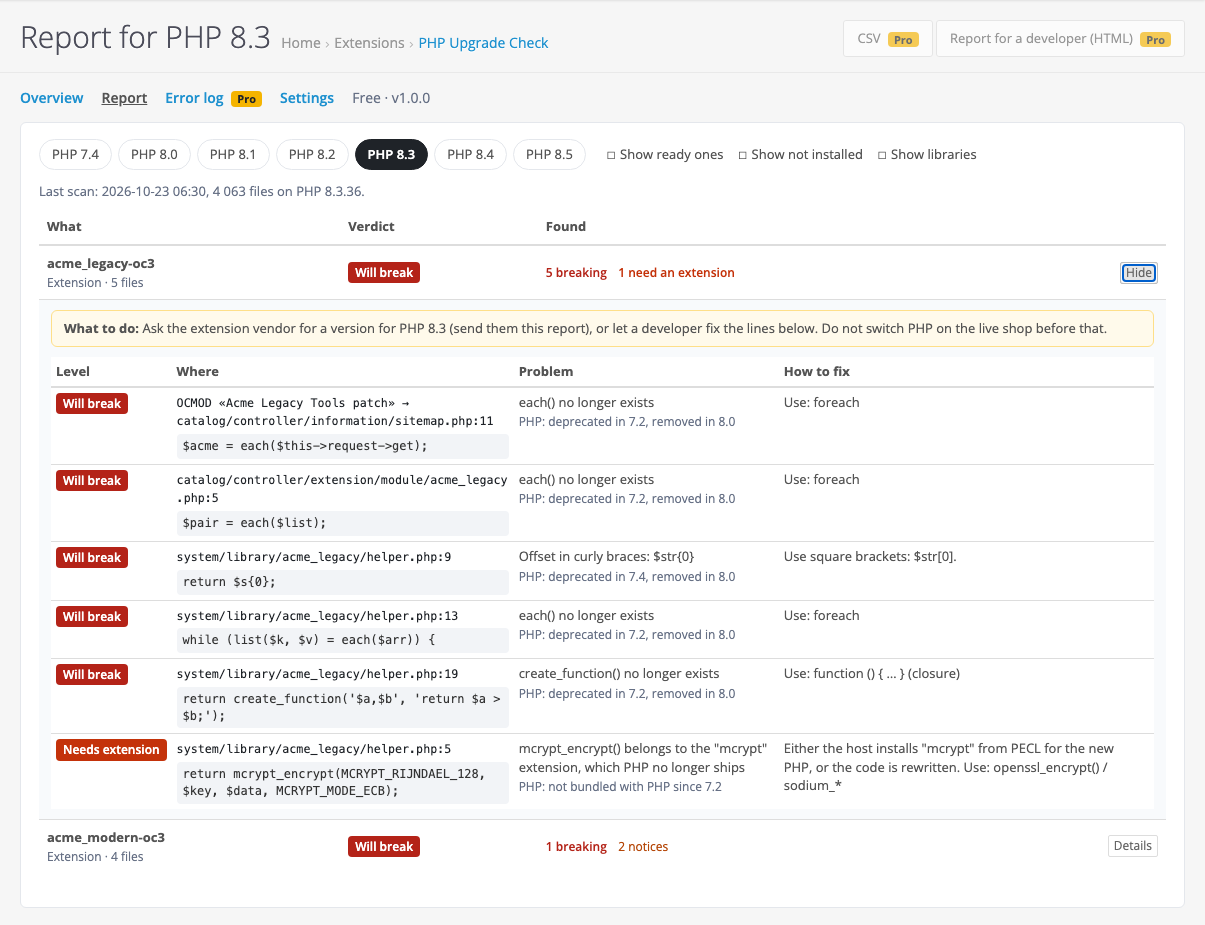
A “what — verdict — found” table for every extension, patch, theme and part of the core. “Details” opens the findings: the level, the file and line, the code itself, what changed and in which PHP version, the fix, and a “What to do” box — ask the vendor for a version for the PHP you need or let a developer fix the lines. The PHP version is switched with buttons without a new scan; the “Show ready ones”, “Show not installed” and “Show libraries” switches add what is hidden by default.
A patch has no files of its own: its code is inserted into someone else’s file. The module reads the code of every OCMOD insertion from the database and every vQmod XML, and shows the finding with the patch name and the line of the file it changes — so you see straight away which module to ask for an update.
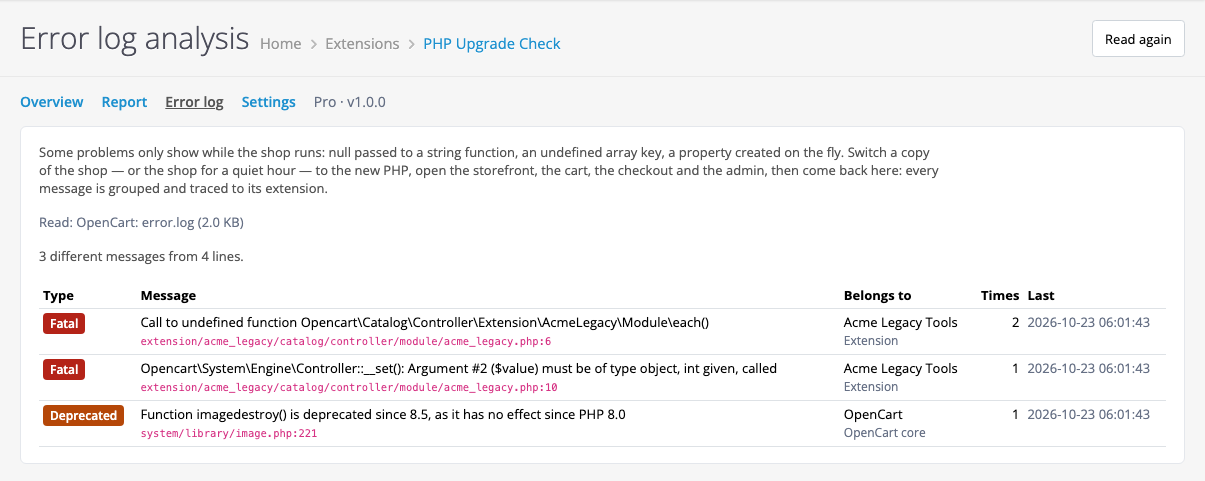
For what only shows while the shop runs. Switch a copy of the shop (or the shop itself for a quiet hour) to the new PHP, go through the storefront, the cart, the checkout and the admin, then come back here: the module reads the OpenCart error.log and the PHP error_log, groups identical messages, counts how many times and when last, and traces each one to an extension, a patch or the core.
Tested locally on four OpenCart versions from the official archives: 4.1.0.3 (mysqli), 4.0.2.3 (pdo), 3.0.5.0 and 2.3.0.2, on PHP 5.6, 7.0, 8.1, 8.3 and 8.5, with “Display errors” on and off. Every page and every action of the module — without a single PHP message in the log. The verdicts were checked against the expected ones on test extensions and real modules (Mollie 14.1.2, Mollie 9.4 with vQmod 2.6.6, d_quickcheckout). Awkward files — unreadable, binary, with a syntax error, in cp1251, with a BOM, nested 3,000 levels deep, symlink loops, files over 768 KB — the scan still reaches the end and lists what it could not read. A big shop — 60,836 files in 180 seconds. In the tests a test server stood in for the licence server.
Limits worth knowing. The scan is static: what only shows while the shop runs (null passed to a string function, an undefined array key, a float turned into an integer) it does not see — that is what the Pro “Error log” page is for. The rule about properties created on the fly (PHP 8.2) only checks classes without a parent class, __set() and traits, so it can miss some cases. Findings in vendor/ libraries matter only if something uses the library, so they are hidden by default. We have not tested real encoded modules by other vendors — only our own encoded test file. Not run live: OpenCart 4.0.0.x – 4.0.1.x and 4.1.0.4, 3.0.0 – 3.0.3.x (the core file lists cover them), MySQL 5.7, OCMOD packages for OpenCart 4, hosts without outgoing connections (there the php.net button just says it did not answer). The rules go up to PHP 8.5; later PHP versions will need a module update.
cc_phpupgrade.ocmod.zip (keep the archive name) and click Install. OpenCart 3: Extensions → Installer → cc_phpupgrade-oc3.ocmod.zip. OpenCart 2.3: copy the contents of the upload/ folder of cc_phpupgrade-oc2.ocmod.zip to the shop root.Didn't find the answer? Message us on Telegram and we'll reply within a business day.
 @catcode_support
Setup, compatibility, activation
@catcode_support
Setup, compatibility, activation
No. It only reads PHP files and never runs them, it does not edit code and does not switch PHP. It writes results only to its own tables. There is nothing of it on the storefront: one admin event adds an entry to the System menu. You can run the scan on a live shop — it works in short steps of up to 6 seconds.
No, and we say so plainly. A static scan sees what is visible in the code: removed functions and extensions, changed syntax, deprecated calls. Some changes only show while the shop runs: null passed to a string function, an undefined array key, a property created on the fly in a class with a parent. For those Pro has the "Error log" page: switch a copy of the shop to the new PHP, go through the storefront, the cart, the checkout and the admin — and every message is traced to its extension.
Because that is what OpenCart 4.0 – 4.1.0.3 itself does: with "Display errors" off (and a live shop has it off) any PHP notice, "Deprecated" included, sends the visitor to the error page. We reproduced it on OpenCart 4.1.0.3 with PHP 8.5: category and product pages with images not yet in the cache went to error.html because of imagedestroy() in system/library/image.php:221 — the very line the module had shown in the report before the switch; on PHP 8.3 the same pages opened. OpenCart 4.1.0.4 changed this: there "Deprecated" is only written to the log. The module reads the error handler of your own shop and counts accordingly.
The report shows exactly what: the file, the line, the code and the fix. Ask the extension vendor for a version for the PHP you need (with Pro, send them the HTML report) or let a developer fix those lines. Do not switch PHP on the live shop before that.
Findings in core files are shown as a separate "OpenCart core" group: the module knows the file lists of every OpenCart release from 2.0.0.0 to 4.1.0.4 and tells core files from added ones. Such findings mean the core was edited by hand or this OpenCart version is older than the PHP you need. For example, for OpenCart 2.3.0.2 the PHP 8.3 report says "OpenCart core files: Will break". Then the answer is to upgrade OpenCart.
Nobody but its author can read an encoded file. The module finds such files — ionCube, SourceGuardian, Zend Guard, obfuscated eval(base64_decode(…)) — and gives them the verdict "Encoded, cannot check": ask the vendor whether that build runs on the new PHP. The Overview shows whether the server has the ionCube Loader: the host has to install it for the new PHP version too.
A test OpenCart 4.1.0.3 with a few extensions has about 5,300 PHP files. On a test shop with 60,836 files (memory_limit 128M, local stand) the scan took 180 seconds — 30 steps of up to 6 seconds each, so it does not hit max_execution_time. The overview and the report open in a tenth of a second after it. You can stop a scan. Above 80,000 files the module stops listing and says so — exclude data folders in the settings.
Yes. The Overview shows the PHP version of the server and its support status by the php.net dates, the newest release of your line (php.net is asked only on a button click), the PHP extensions OpenCart needs, the ionCube Loader, memory_limit and max_execution_time. PHP extensions are switched on per PHP version, so they have to be enabled again for the new one. Functions from extensions the new PHP no longer ships (mcrypt, imap and others) are marked "Needs extension" in the report.
Yes. The OpenCart 3.x and 2.3 builds run on PHP 5.6 and newer, the OpenCart 4 build on the same PHP as OpenCart 4 itself (8.0+). We tested on PHP 5.6, 7.0, 8.1, 8.3 and 8.5. So you install the module on your current PHP and get the verdict for the future one.
No. For OpenCart it is one payment, a lifetime licence, and one licence covers all three builds: 4.x, 3.x and 2.3. The scan, the verdicts and all findings are in the free version with no time limit. The 7-day Pro trial starts with a button in Settings → Licence; it never starts by itself.
Uninstalling removes the menu event and the module tables with scan results — there is no shop data in them. The licence rows stay on purpose, so a reinstall keeps the purchase or the used trial.
No reviews yet. Be the first.
No questions yet. Ask one — we answer within 24 hours.
We build custom modules for WordPress, WooCommerce, OpenCart and Shopify. Tell us about the task and we'll prepare an estimate.
Order a custom module
—

CatCode assistant
Just now


CatCode assistant
Online

I’ll help with your website task
Describe your website task — I’ll find a ready-made module or pass it to a developer for an estimate. Modules, custom features, layout, integrations, speed, migration, technical SEO.
