


CatCode All to Lat — Automatic SEO URLs by Transliteration for OpenCart 2.x, 3.x and 4.x
Automatic SEO URLs by transliteration for OpenCart 2, 3 and 4: Latin clean URLs for products, categories and information pages, with rollback and 301 from old addresses.
- Compatibility
- OpenCart 2.3.x, 3.0.x and 4.0.2 – 4.1.x
- Version
-
v1.1.0 (OpenCart 4)
v1.0.0 (OpenCart 3.x)
v1.0.0 (OpenCart 2.3)
What the module does

What it looks like
Key points

Three layers of transliteration
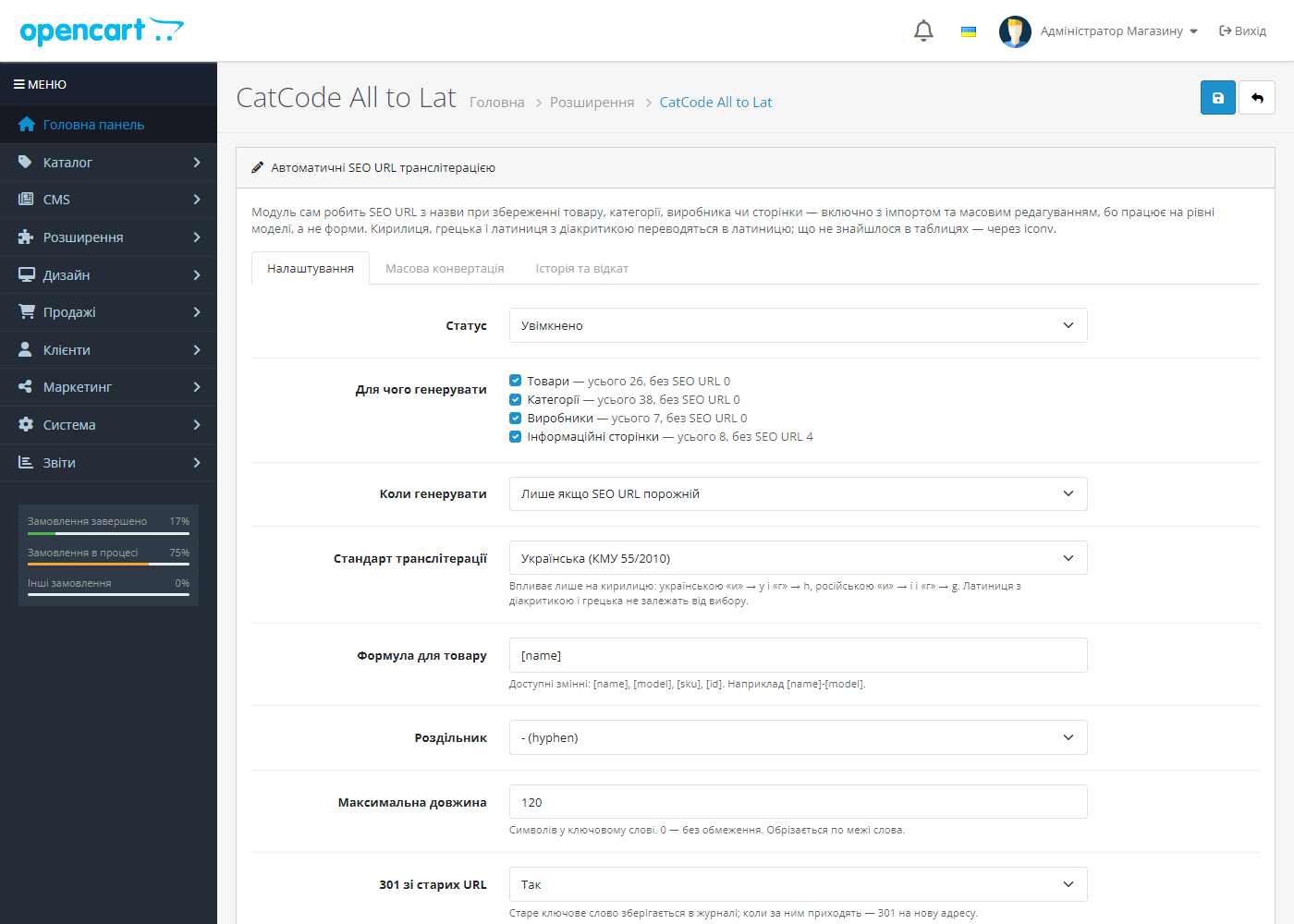
1. A Cyrillic table by standard. Ukrainian (KMU 55/2010) gives и→y, г→h, х→kh, зг→zgh and я→ya at the start of a word; Russian BGN/PCGN gives и→i, г→g.

Bulk conversion of the catalogue
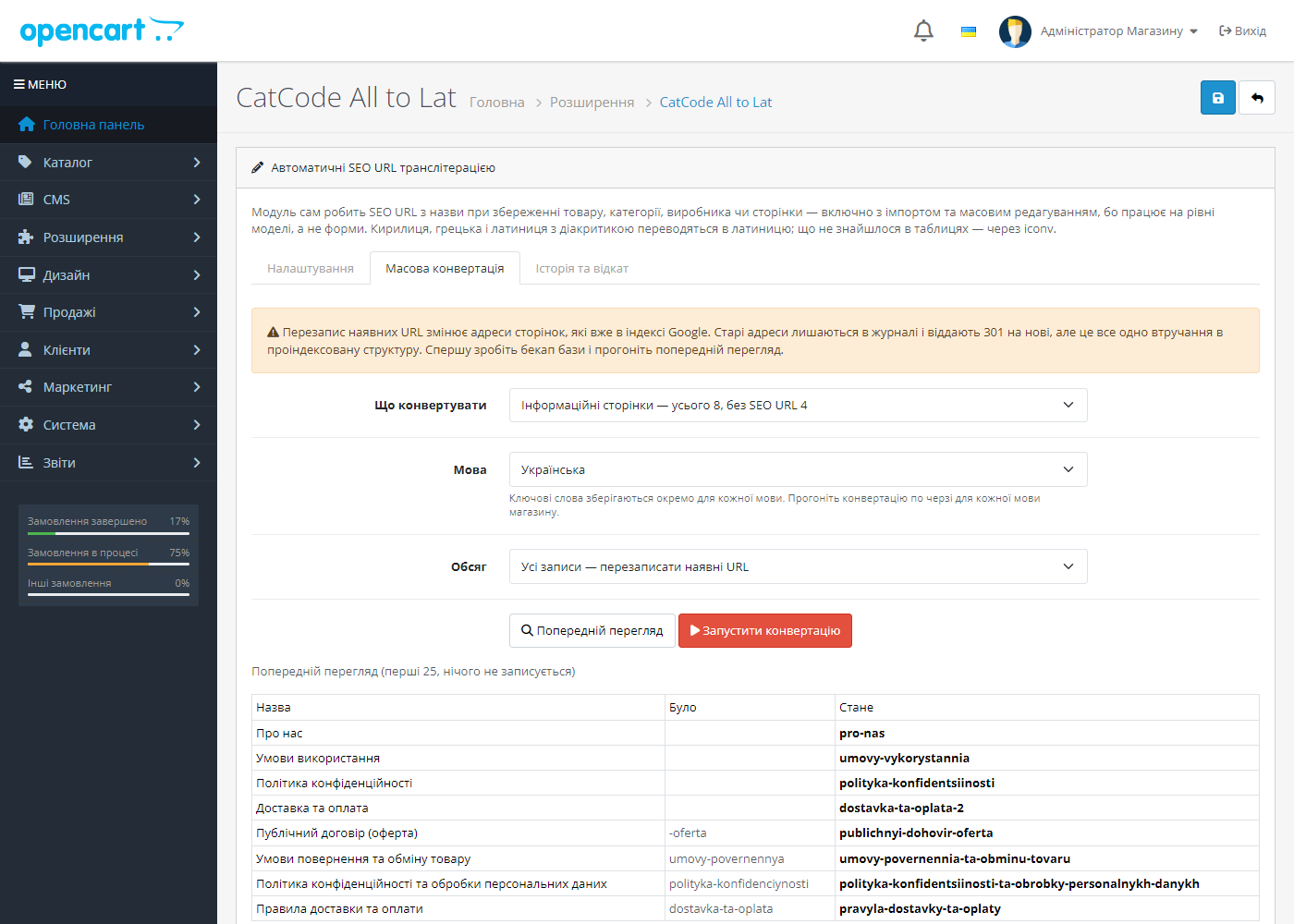
A separate tab for a shop that’s already live. Two modes: only items without an SEO URL (safe — can only add addresses) and all items, overwriting existing ones.

301 from old addresses
A replaced keyword doesn’t disappear: when a request comes in for the old address, the shop returns a 301 to the new one.
Technical requirements
 OpenCart 4.0.2 – 4.1.x, 3.0.x and 2.3.x are supported, as well as ocStore builds based on them — three separate builds. Clean URL mode needs to be enabled in the shop’s settings.
Version history
23 September 2026.
Automatic SEO URL transliteration for products, categories, pages and manufacturers; a Ukrainian transliteration table; bulk conversion of the catalogue; 301 from old addresses; builds for…
Full module description
CatCode All to Lat — the SEO URL is written from the title automatically, every time you save a product, category, manufacturer or information page. No one needs to click “generate” for each item any more, and a catalogue imported overnight doesn’t wake up without addresses.
Why a hook on the model, not the form
The module listens to the admin/model/catalog/* add/edit before event — the last point where the data array can still be changed, and the first one everyone who writes to the catalogue passes through: the product form, a CSV import, someone else’s bulk editor, an ERP sync. An extension that patches the form template only covers the first case — that’s exactly why products end up with no clean URL after an overnight import.
On OpenCart 4, the SEO URL field is additionally filled in right in the form as you type the title: the core checks this field in the controller before it even reaches the model, so without this the form simply wouldn’t save.
Three layers of transliteration
1. A Cyrillic table by standard. Ukrainian (KMU 55/2010) gives и→y, г→h, х→kh, зг→zgh and я→ya at the start of a word; Russian BGN/PCGN gives и→i, г→g. Running a Ukrainian catalogue through the Russian table means getting hodinnik instead of hodynnyk and dropping out of search results for your own product names. Bulgarian, Serbian/Macedonian and Belarusian have their own tables.
2. A universal table — Greek and Latin scripts with diacritics: Polish, Czech, Slovak, German, French, Spanish, Portuguese, Turkish, Romanian, Hungarian, Baltic, Scandinavian, Vietnamese. No language selection is needed here: ł is l everywhere. The exception is German umlauts, switched on by an option, since ü→ue is correct in German and wrong in Turkish.
3. iconv ASCII//TRANSLIT for anything not in the tables — an unknown script is reduced to the nearest Latin equivalent rather than collapsing into hyphens.
Apostrophes don’t break a word: О'Хара → okhara, not o-khara. The keyword is trimmed at a word boundary to a set length and checked for uniqueness within the shop.
Bulk conversion of the catalogue
A separate tab for a shop that’s already live. Two modes: only items without an SEO URL (safe — can only add addresses) and all items, overwriting existing ones. Before running, there’s a “before → after” preview of 25 rows that writes nothing. The run happens in chained batches of 100 rows, so a catalogue of tens of thousands of items doesn’t hit max_execution_time.
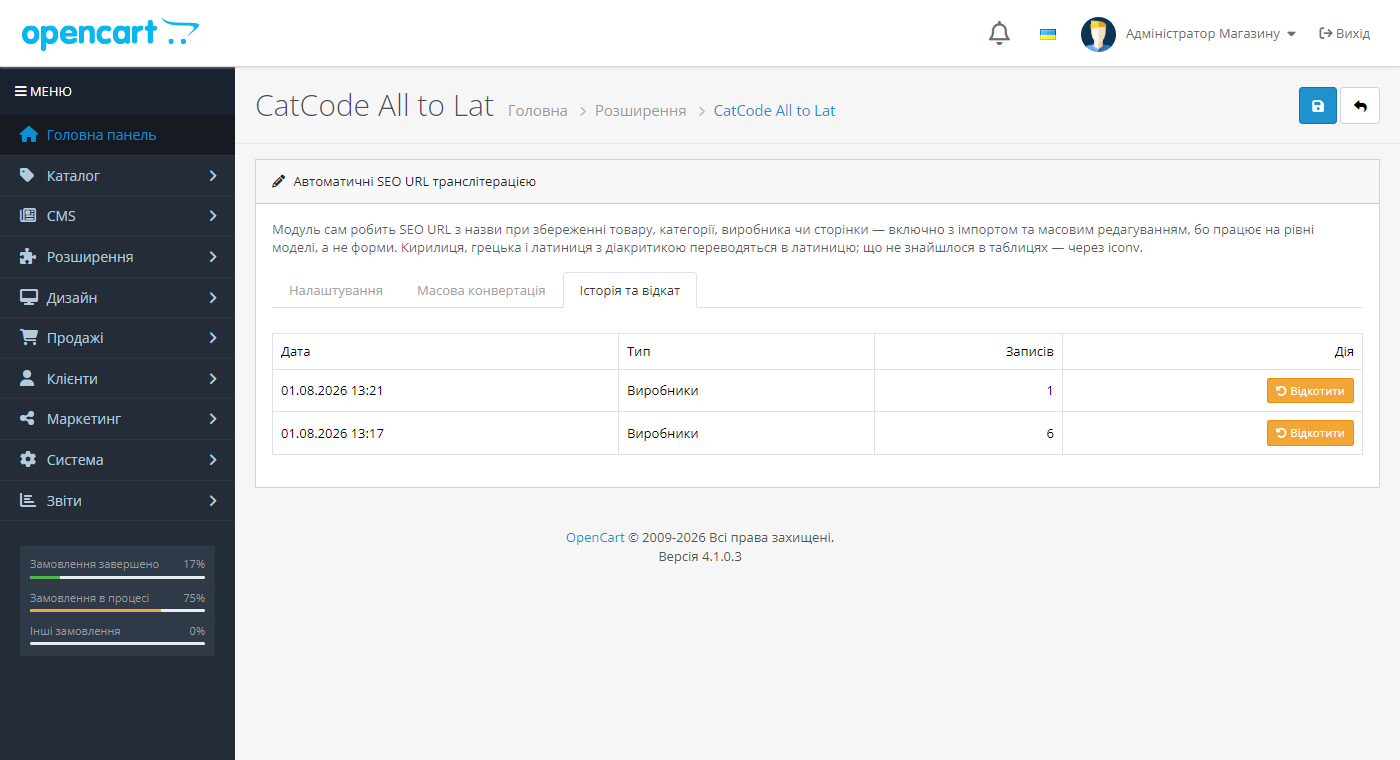
Every change is recorded in the cc_translit_log log: the old keyword, the new one, the language, the store, the run number. Two things work from this log — the “Roll back” button for an entire run, and the 301 from the old address.
301 from old addresses
A replaced keyword doesn’t disappear: when a request comes in for the old address, the shop returns a 301 to the new one. A page that’s still open isn’t touched by the handler at all, and an address that never existed still returns an honest 404 — the module doesn’t turn the shop into a trap for search bots.
Three builds in one place
- OpenCart 4.0.2 – 4.1.x;
- OpenCart 3.0.x (works with both the old
url_aliasscheme from versions 3.0.0–3.0.2 andseo_urlfrom 3.0.3 onward); - OpenCart 2.3.x — cc_translit-oc2.ocmod.zip.
On OpenCart 4 and 3.0.3+, keywords are stored separately for each shop language: the Ukrainian page gets a Ukrainian address, the English one an English address. On OpenCart 4, the run also fills in the missing route rows for languages that lack them — those missing rows are usually exactly why a clean URL on a second language silently returns the home page.
Why a shop needs this
OpenCart builds an SEO URL from whatever you typed by hand, and if it’s left blank, the address stays technical, with index.php?route=. No one is going to fill in thousands of products by hand, so shops either live with technical addresses or end up with Cyrillic in the URL.
A Cyrillic address turns into a screenful of percent-codes the moment it’s copied: a link in a messenger looks like spam, and some external services cut such addresses off.
How it works, step by step
1. The module intercepts the save of a product, category, information page or manufacturer.
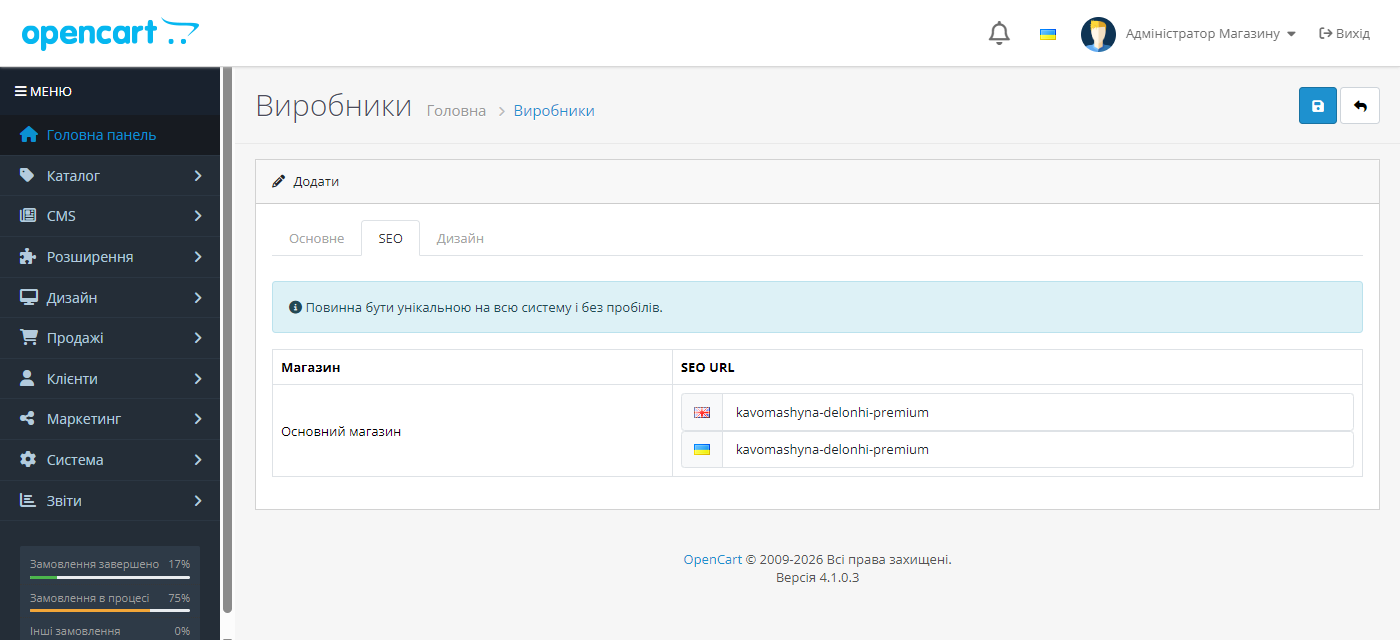
2. The title is transliterated using the chosen standard (Ukrainian KMU 55/2010 by default) and lands in the SEO URL automatically.
3. For an existing catalogue, there’s bulk conversion — in one pass.
4. Old addresses get a 301, so rankings and external links stay alive.
Under the hood
The module hooks into the model, not the admin form. So an SEO URL appears even when a product is created by a price import, a 1C exchange, or any other module — exactly where a “JavaScript in the form” solution wouldn’t work.
The core isn’t patched: everything runs through OpenCart’s standard events, so a shop update doesn’t wipe out the module.
How to install
1. Upload the archive via “Extensions → Installer” and install the module.
2. Confirm that clean URLs are enabled in the shop’s settings.
3. Create a test product and check that the SEO URL filled itself in.
4. Back up the database and run bulk conversion on the existing catalogue.
Questions
about the module
Didn't find the answer? Message us on Telegram and we'll reply within a business day.
 @catcode_support
Setup, compatibility, activation
@catcode_support
Setup, compatibility, activation
Will the module change addresses already in Google's index?
No, not unless you trigger it yourself. By default a keyword is only created where it's empty. Overwriting existing addresses is a separate mode on the bulk conversion tab, with a warning, a preview, and a log you can roll back.
Why didn't an SEO URL appear after an import by another module?
It should — that's exactly why the hook sits on the model, not the form. Check that the relevant post type (products, categories, manufacturers, pages) is enabled in the settings, and that the import actually writes through OpenCart's model rather than direct SQL queries to the database.
What happens to old links after bulk conversion?
The old keyword stays in the log, and a request for it returns a 301 to the new address. An address that never existed still returns a 404 as before.
My shop has two languages — will the addresses be the same?
No. On OpenCart 3 and 4, the keyword is stored separately per language and built from that language's title. The bulk conversion run is done language by language.
Clean URLs were generated, but the page returns the home page. Why?
On OpenCart 4 the address is resolved segment by segment, and without a route row the route stays empty — the shop silently returns the home page with a 200 code. OpenCart only creates these rows for the installation language; the module adds them for the other languages itself during the run.
I have SEO Pack or a similar SEF module installed — does it conflict?
No. Such extensions cache the entire keyword table into a file cache, so the module clears that cache after every save — otherwise the shop would return a 404 for an address that's already in the database.
How much does it cost?
Free, with no limits on the number of products or runs.
No reviews yet. Be the first.
No questions yet. Ask one — we answer within 24 hours.
Not quite what you are looking for?
We build custom modules for WordPress, WooCommerce, OpenCart and Shopify. Tell us about the task and we'll prepare an estimate.
Order a custom module
Buying the module
—



