
WordPress
Nova Poshta Premium — Nova Poshta for WooCommerce
Free + Pro
1 290 UAH/year
v1.3.0
 All Access4 990 ₴ / year
 Website auditA PDF report by email in 3 minutesCheck a website
Everyday tasks
Image compressorSize, quality and WebP in bulkQR generatorLink, Wi-Fi, payment to IBANVAT calculator20, 14, 7% and amount in wordsTransliterationOfficial Ukrainian standardWebsite checks
PHP and pluginsPHP version, WordPress, pluginsGoogle Merchant feedFields, prices, GTIN, imagesDomain emailSPF, DKIM, DMARC, blacklistsAI search readinessllms.txt, bots, markupAll 9 toolsEnter at least 2 characters

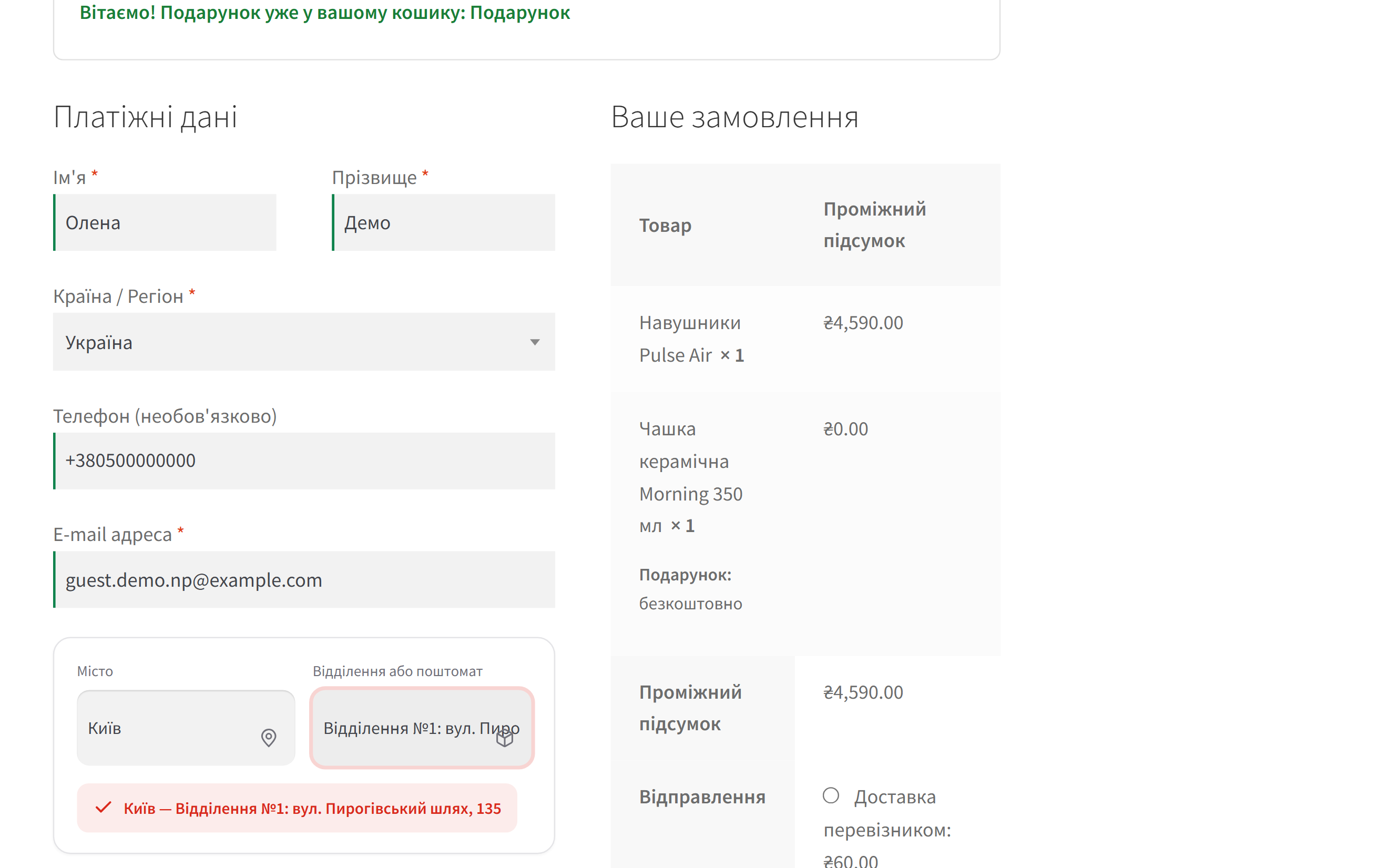

Nova Poshta module for WooCommerce: city and branch selection at checkout, live rate, waybill from the order screen. Premium adds cash on delivery, auto-statuses, returns.
Clear even without sound: Ukrainian subtitles
The free version works with no time limit. Pro adds the rest of the features in the table.


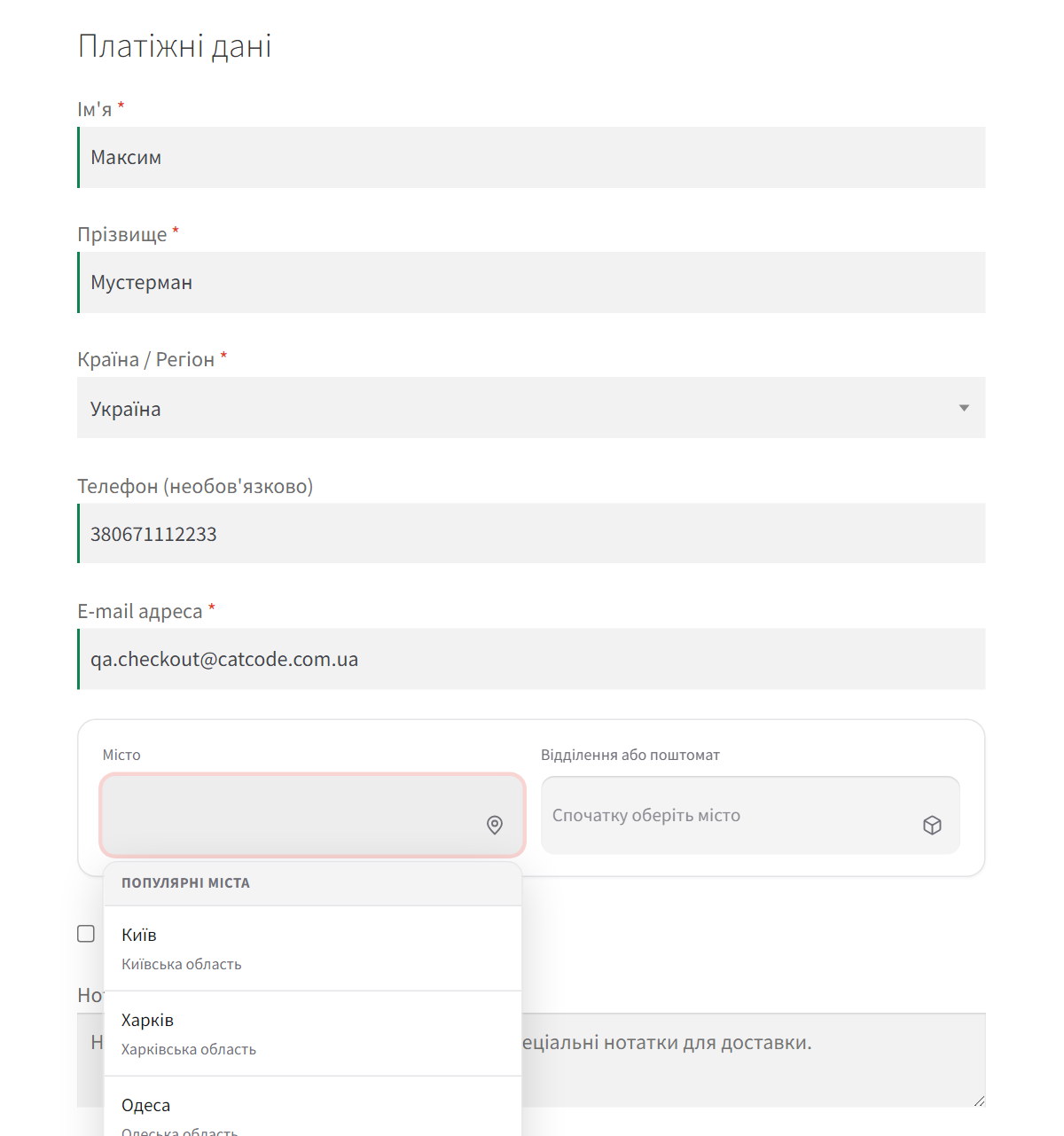
At checkout, instead of the usual set of address fields, the customer sees a single block: a city field with suggestions (or a one-click list of popular cities) and a list of that city’s branches and parcel lockers.

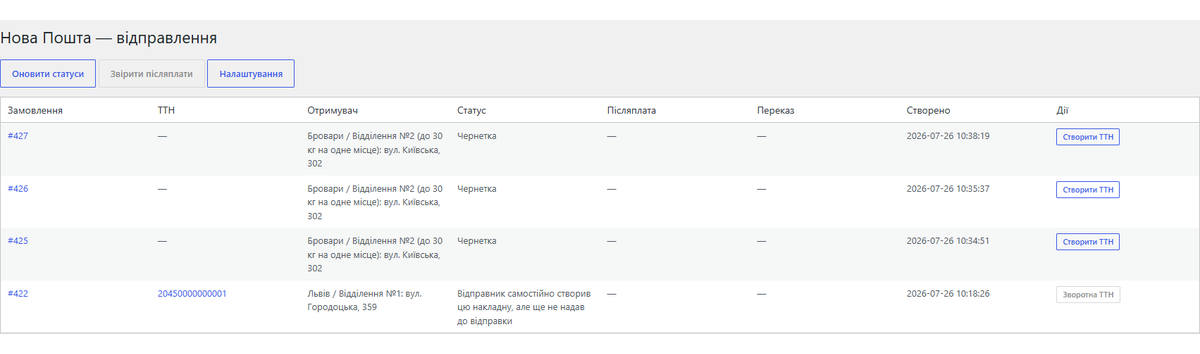
Every shipment sits in one log: waybill number with a tracking link, recipient, current status, cash-on-delivery amounts and money-transfer numbers.

The module is added as a regular WooCommerce shipping method. All settings live on one page: API key, sender profile, pricing rules, widget appearance and waybill automation.

A fresh install is the free version, nothing switches on by itself. The “Try Pro for 7 days” button → e-mail → the key right in the window and by e-mail.

Moving the store? Unbind the licence on the old domain and activate it on the new one yourself. For studios — keys for 5 or 25 sites, or unlimited.
 WordPress 6.2 or newerWooCommerce 7.0 or newer (HPOS-compatible)PHP 7.4 or newerA Nova Poshta API key from your account
A Nova Poshta API outage no longer stops the store.
The Pro version activated next to the free copy from WordPress.org no longer loads the free copy’s code with PHP warnings on every request.
An order shipped to a branch no longer carries the second address line (flat, entrance) from the shopper’s account.
English-language stores: the block checkout no longer stops silently when the shopper’s account has no region.
The shopper’s saved account address is no longer replaced with the branch.
The Nova Poshta picker now shows only when Nova Poshta itself is chosen: on the block checkout it used to open for Ukrposhta or Meest too.
A purchased license stays yours: the Pro features keep working after the license term ends — the term covers updates and support.
Fixed return-waybill creation: the request to Nova Poshta was going out without a return-reason subtype, and the branch was being placed into the field meant for the counterparty’s address…
A single order can no longer get two waybills.
A 7-day Premium trial, started with a click: the key arrives by e-mail, no card required.
API-based rate calculation is now an option, off by default.
A branch-selection widget for classic checkout and Checkout Blocks, live rate, waybill creation, shipment log, status tracking, Premium licence.
4 modules in one order — 40% cheaper than separately



Nova Poshta Premium for WooCommerce is a module that connects your store to Nova Poshta in 10 minutes. The customer picks a city and a branch right at checkout, the shipping cost is calculated using Nova Poshta’s live rate, and the waybill is created from the order screen or automatically — once the order reaches the status you choose.
The widget doesn’t just get added alongside — it replaces the address fields. Street, city, region and postcode are filled in from the chosen branch, so the customer has nothing to type by hand, and you’re left with a correct shipping address on the order.
At checkout, instead of the usual set of address fields, the customer sees a single block: a city field with suggestions (or a one-click list of popular cities) and a list of that city’s branches and parcel lockers. Once a branch is chosen, the shipping cost in the order summary is instantly recalculated using Nova Poshta’s rate.
The block works on both the classic checkout and Checkout Blocks: the choice is stored via the WooCommerce session, so both behave the same way. If the customer picks Nova Poshta but doesn’t select a branch, the order can’t be placed until they do.
Every shipment sits in one log: waybill number with a tracking link, recipient, current status, cash-on-delivery amounts and money-transfer numbers.
The order screen shows exactly which branch the customer chose, plus a button to create the waybill — no need to go into your Nova Poshta account.
The module is added as a regular WooCommerce shipping method. All settings live on one page: API key, sender profile, pricing rules, widget appearance and waybill automation. The “Check connection” and “Test rate lookup” buttons show right away whether everything is set up correctly.
The module works through the official Nova Poshta API (api.novaposhta.ua/v2.0). City and branch directories are stored in their own tables: cities are fully re-synced once a day, branches are fetched per city on first request and cached for 7 days, so checkout rarely waits on an external request. The API key is stored encrypted in the database and is never shown back in the form. No third-party iframes, no swapped-out checkout templates — only standard WooCommerce hooks.
When the Nova Poshta API is down, your checkout keeps working: cities and branches come from the module’s cache, shipping uses the last known rate, and waybills are queued and created automatically once Nova Poshta is back. On a test stand with a hung API, placing an order took 0.2 seconds instead of 30.
Didn't find the answer? Message us on Telegram and we'll reply within a business day.
 @catcode_support
Setup, compatibility, activation
@catcode_support
Setup, compatibility, activation
Just an API key from your Nova Poshta account (Settings → Security → API Keys). No separate agreement with the developer is needed.
Free gives you branch selection at checkout, rate calculation, waybill creation and a shipment log. Pro adds cash on delivery on the waybill, automatic status updates, return waybills, cash-on-delivery reconciliation and webhooks.
Yes. The choice is stored via the WooCommerce session, so classic checkout and Checkout Blocks behave the same way.
No. The branch-selection block is embedded into your existing form, and the shipping address fields are filled in automatically from the chosen branch.
WordPress 6.2+, WooCommerce 7.0+, PHP 7.4+.
No reviews yet. Be the first.
No questions yet. Ask one — we answer within 24 hours.
We build custom modules for WordPress, WooCommerce, OpenCart and Shopify. Tell us about the task and we'll prepare an estimate.
Order a custom module
—

CatCode assistant
Just now


CatCode assistant
Online

I’ll help with your website task
Describe your website task — I’ll find a ready-made module or pass it to a developer for an estimate. Modules, custom features, layout, integrations, speed, migration, technical SEO.
