


Ukrposhta — branch picker + rate for WooCommerce
A free Ukrposhta shipping plugin for WooCommerce: a branch-picker widget at checkout, a live rate via the eCom API, the postal index saved on the order.
- Compatibility
- WordPress 5.6+ / WooCommerce 6.0+
- PHP
- 7.4 or newer
- Updated
- 24 September 2026
The module in action — 44 sec
Clear even without sound: Ukrainian subtitles
What the module does

What it looks like
Technical requirements
 WordPress 5.6+ (tested up to 7.0)
- WooCommerce 6.0+ (tested up to 10.7)
- PHP 7.4+
- An eCom agreement with Ukrposhta: your Ukrposhta account manager issues a Bearer key after the agreement is signed — it’s needed both for the address classifier and for rate calculation
Version history
The Pro version activated next to the free copy from WordPress.org no longer loads the free copy’s code with PHP warnings on every request.
Uninstalling the plugin now also removes its settings (including the Ukrposhta API tokens) and the city search cache.
A guest who creates an account at checkout (or on the order confirmation page) no longer gets the Ukrposhta office as the new account’s address.
All versions (11)
The shopper’s saved account address is no longer replaced with the Ukrposhta office.
An Ukrposhta office picked earlier no longer leaks into an order shipped by courier or Nova Poshta (the “Ukrposhta post office” row in e-mails and on the order page).
The post-office picker now works on the block-based Checkout, where it did not appear at all.
International shipping calculation added.
Source strings moved to English, with Ukrainian shipped as a separate translation bundled with the plugin.
The live Ukrposhta rate is finally calculated.
Works on hosting without mbstring: city search and the parcel description no longer fail silently.
First public release: a branch picker (region → city → branch) at checkout and live rate calculation via the eCom API, with a fallback to a flat rate.
Full module description
Ukrposhta Shipping for WooCommerce is a Ukrposhta shipping plugin for WooCommerce stores. The customer picks a branch right in checkout via a region → city → branch chain, and the shipping cost is calculated live through Ukrposhta’s official eCom API. Data comes from the official Address Classifier, so the list of branches is always current, and the chosen postal index is saved on the order.
The plugin is completely free. The code is open — the repository is on GitHub (catcodestudio/woocommerce-ukrposhta-shipping), GPLv2 licence.
What it looks like to the customer
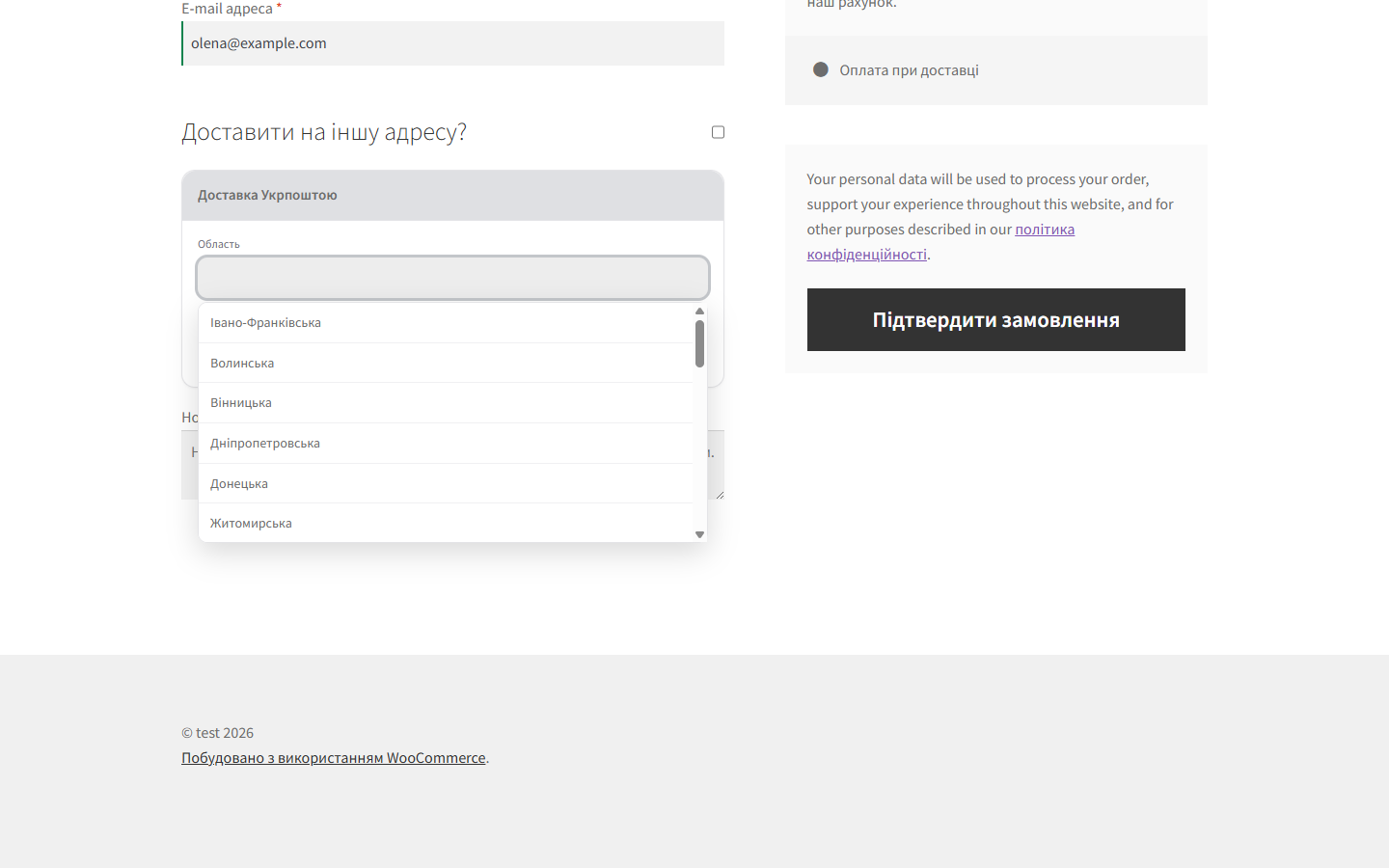
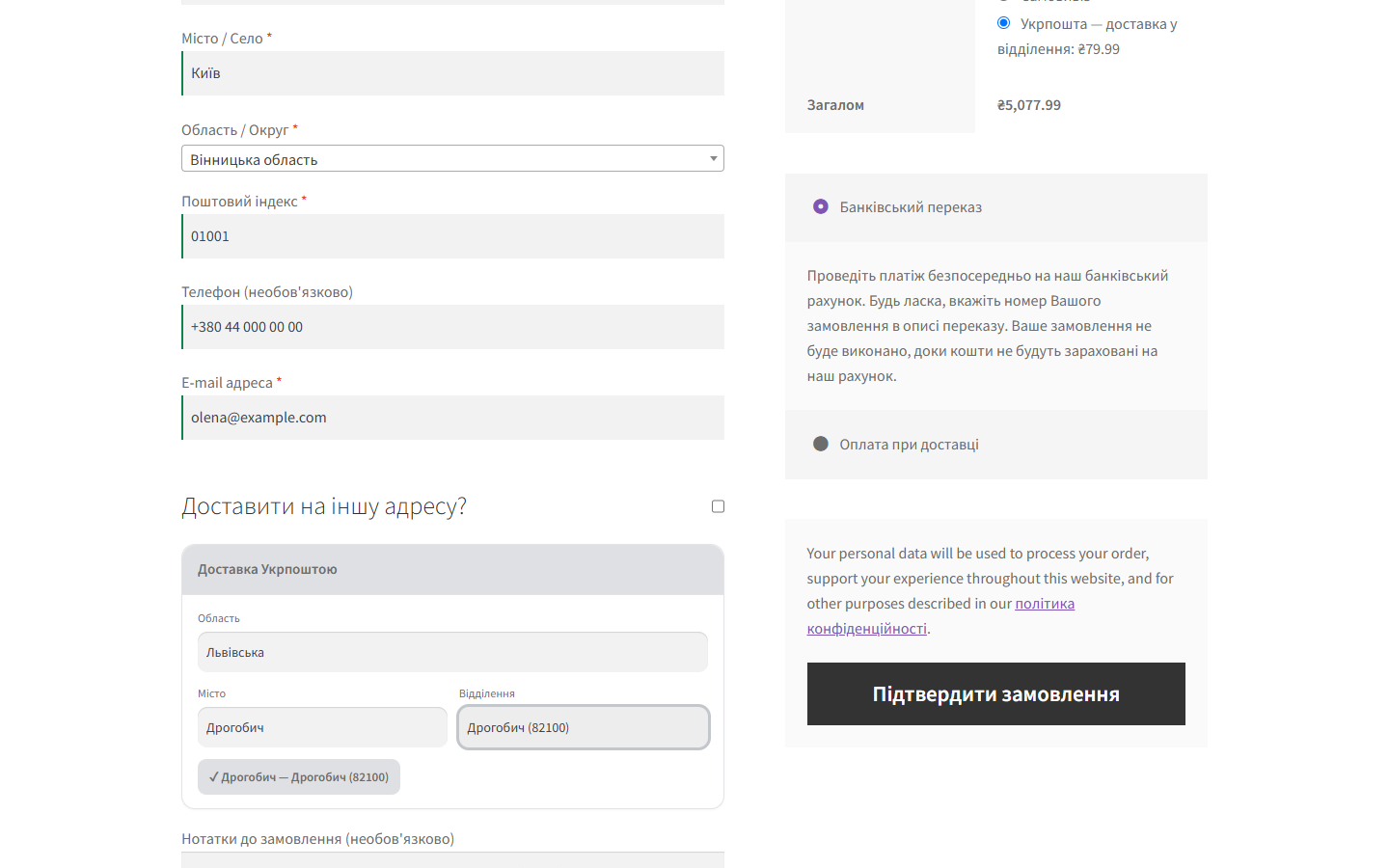
Once “Ukrposhta” is chosen as the shipping method at checkout, a widget appears: the customer picks a region, then a city, then a specific branch. As soon as a branch is picked, the plugin requests a rate from the eCom API (accounting for cart weight and the sender’s and recipient’s postal indices) and shows the real shipping cost. The widget’s accent colour can be adjusted to match your theme.
What the admin gets
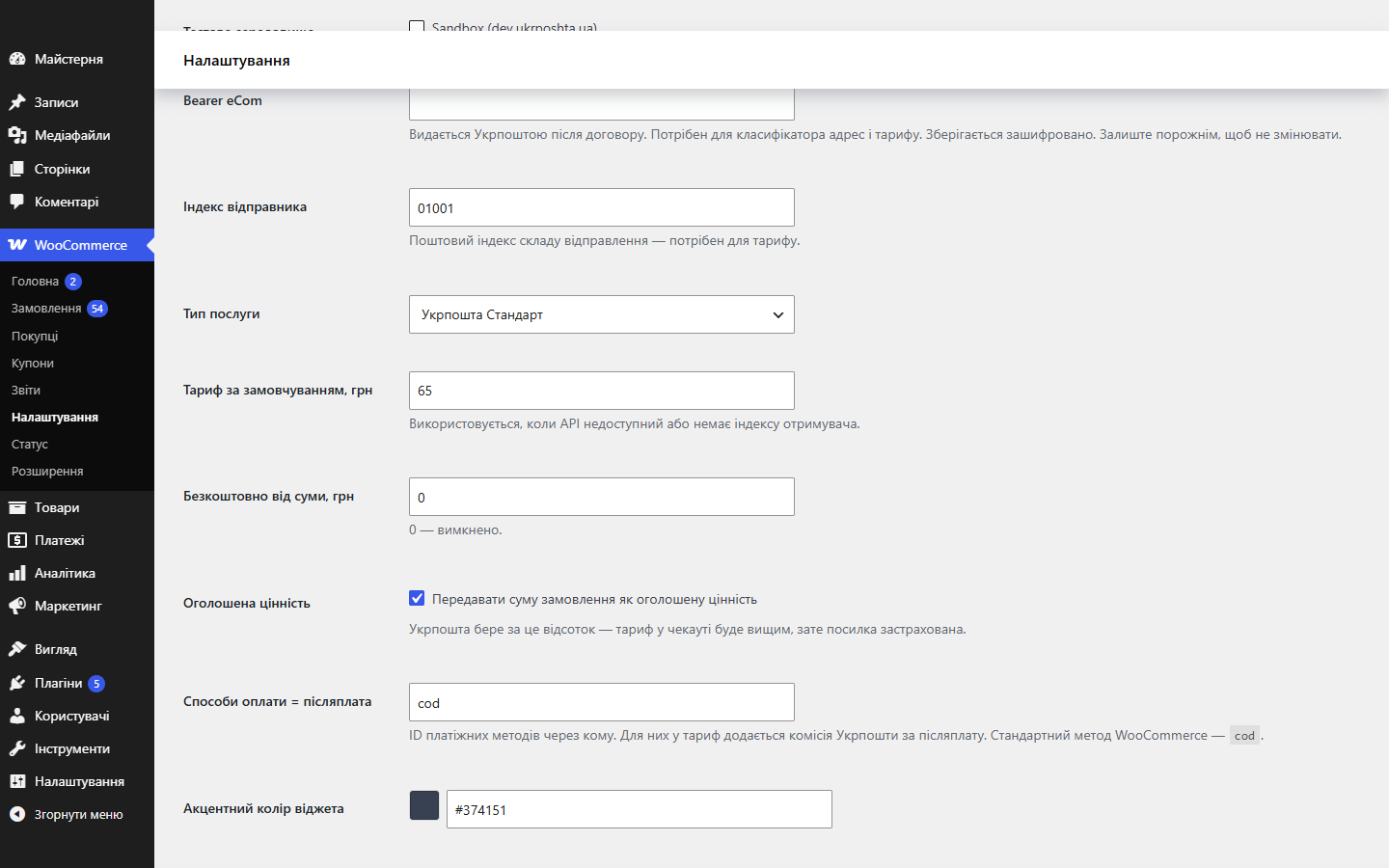
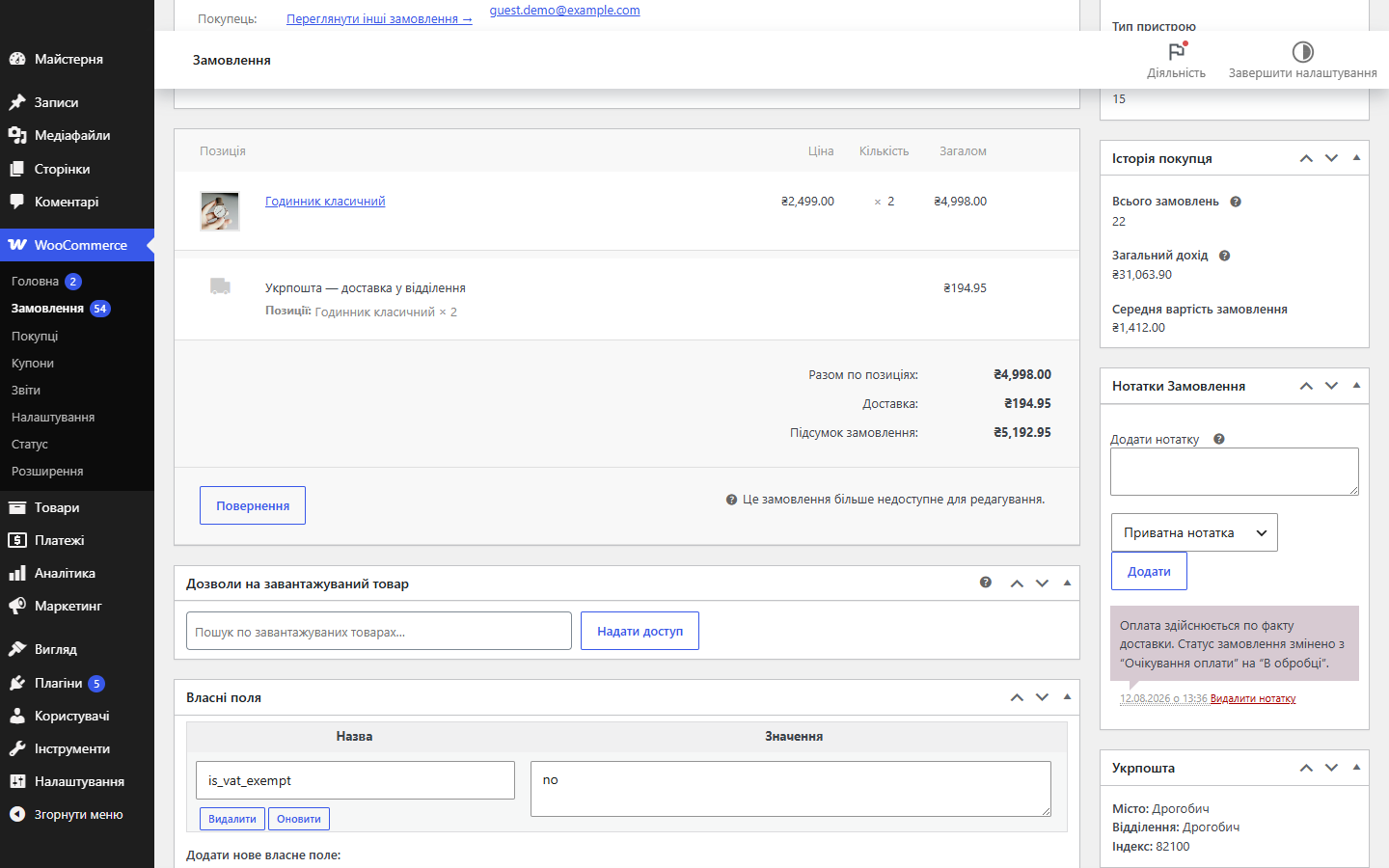
The method is added to a WooCommerce shipping zone, and the credentials are global — one Bearer token for the whole store, regardless of how many zones you have. Settings include: a test environment (sandbox dev.ukrposhta.ua), the service type (Standard or Express), a default rate for when the API is unavailable, and a free-shipping threshold based on order total. The branch the customer picked is visible right on the order — a separate “Ukrposhta” block with the city, branch and index, plus a line in emails and on the thank-you page.
How it works, step by step
- The admin enters the eCom Bearer token and the sender’s postal index, and adds the “Ukrposhta” method to a shipping zone.
- At checkout, the customer chooses Ukrposhta delivery — a region → city → branch picker appears, based on the official Address Classifier.
- The plugin calculates the cart weight and requests a rate via the
/domestic/delivery-priceendpoint; if the API is unavailable, a flat rate from the settings is used instead. - If the customer chose cash on delivery, Ukrposhta’s cash-on-delivery fee is added to the rate — and disappears the moment they switch to prepayment.
- If the order total exceeds the configured threshold, shipping becomes free.
- The customer places the order — the chosen branch’s postal index is saved on the order and available to the admin for shipping.
Under the hood
- The Bearer key is stored encrypted at rest, and is never shown in plain text back in the settings form.
- The branch directory is cached in a dedicated
upwc_officestable, and the list of regions in a transient: checkout doesn’t hit the Ukrposhta API on every load. - HPOS (custom order tables) compatibility is officially declared; order meta is captured on both the classic checkout and the Store API (block) path.
- The rate accounts for the weight of items in the cart, an optional declared value, and the cash-on-delivery fee — but only for payment methods you’ve marked as cash on delivery.
- The chosen branch is part of the WooCommerce shipping package, so changing the branch or payment method recalculates the rate rather than showing a cached one.
- City search understands Latin script: “Drohobych” finds Дрогобич.
- Translation-ready: the text domain and all strings are ready for localisation.
How to install
- Download
ukrposhta-shipping-for-woocommerce-1.2.7.zipand install it via “Plugins → Add New → Upload Plugin”. - Activate the plugin — the branch cache table is created automatically.
- Go to WooCommerce → Settings → Shipping and add the “Ukrposhta” method to the zone you need.
- Enter the eCom Bearer token and the sender’s postal index, and save.
- Enable the method — the branch picker will appear at checkout.
Questions
about the module
Didn't find the answer? Message us on Telegram and we'll reply within a business day.
 @catcode_support
Setup, compatibility, activation
@catcode_support
Setup, compatibility, activation
Can I ship with cash on delivery?
Yes. There's a "Cash-on-delivery payment methods" field in the settings — enter the IDs of your payment methods there (WooCommerce's standard method is cod). The plugin adds Ukrposhta's cash-on-delivery fee to the rate for those. Creating the waybill itself with cash on delivery is coming in the next update.
Why is the rate higher than on Ukrposhta's own calculator?
By default the plugin sends the order total as the declared value — Ukrposhta charges a percentage for this, but the parcel is insured. It can be switched off with a single checkbox in the settings.
Do I need an agreement with Ukrposhta?
Yes. Both the Address Classifier and rate calculation are authorised with a Bearer key that Ukrposhta issues after signing an eCom agreement.
Does it work with WooCommerce's block checkout?
The branch picker targets the classic checkout. Order meta is still captured on the Store API (block) path, and compatibility with cart/checkout blocks is declared.
Can the plugin create waybills and print labels?
Not yet. Creating a shipment (barcode/waybill), printing labels and cash on delivery are planned for the next update, once tested end-to-end on a live agreement.
What happens if the Ukrposhta API is temporarily unavailable?
Checkout won't break: a flat rate from the settings ("Default rate") is used instead of a live one.
Can I test it without a live key?
Yes, there's a Sandbox toggle in the settings — the plugin will work against the dev.ukrposhta.ua test environment.
What's left after deleting the plugin?
Deleting it removes the branch cache table and the plugin's options. Order meta (chosen branches) is kept — shipping history isn't lost.
No reviews yet. Be the first.
No questions yet. Ask one — we answer within 24 hours.
Not quite what you are looking for?
We build custom modules for WordPress, WooCommerce, OpenCart and Shopify. Tell us about the task and we'll prepare an estimate.
Order a custom module
Buying the module
—



