OpenCart
Shared Stock for OpenCart — one stock for several products and option values, no overselling
Free + Pro
1 290 UAH
v1.0.1
 All Access4 990 ₴ / year
 Website auditA PDF report by email in 3 minutesCheck a website
Everyday tasks
Image compressorSize, quality and WebP in bulkQR generatorLink, Wi-Fi, payment to IBANVAT calculator20, 14, 7% and amount in wordsTransliterationOfficial Ukrainian standardWebsite checks
PHP and pluginsPHP version, WordPress, pluginsGoogle Merchant feedFields, prices, GTIN, imagesDomain emailSPF, DKIM, DMARC, blacklistsAI search readinessllms.txt, bots, markupAll 9 toolsEnter at least 2 characters
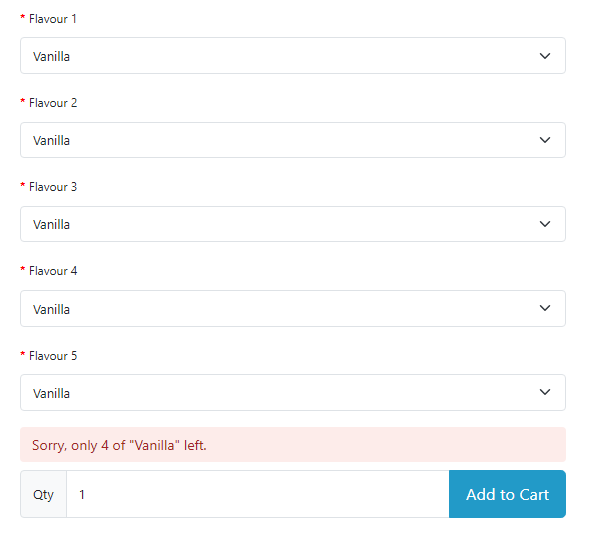
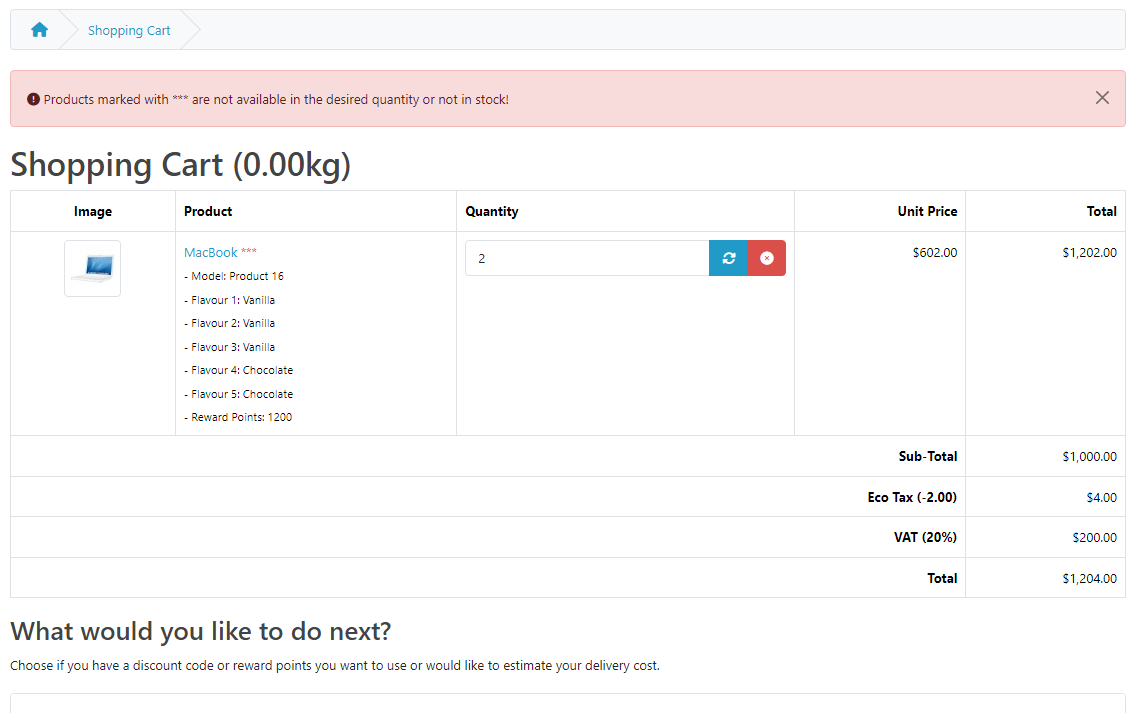
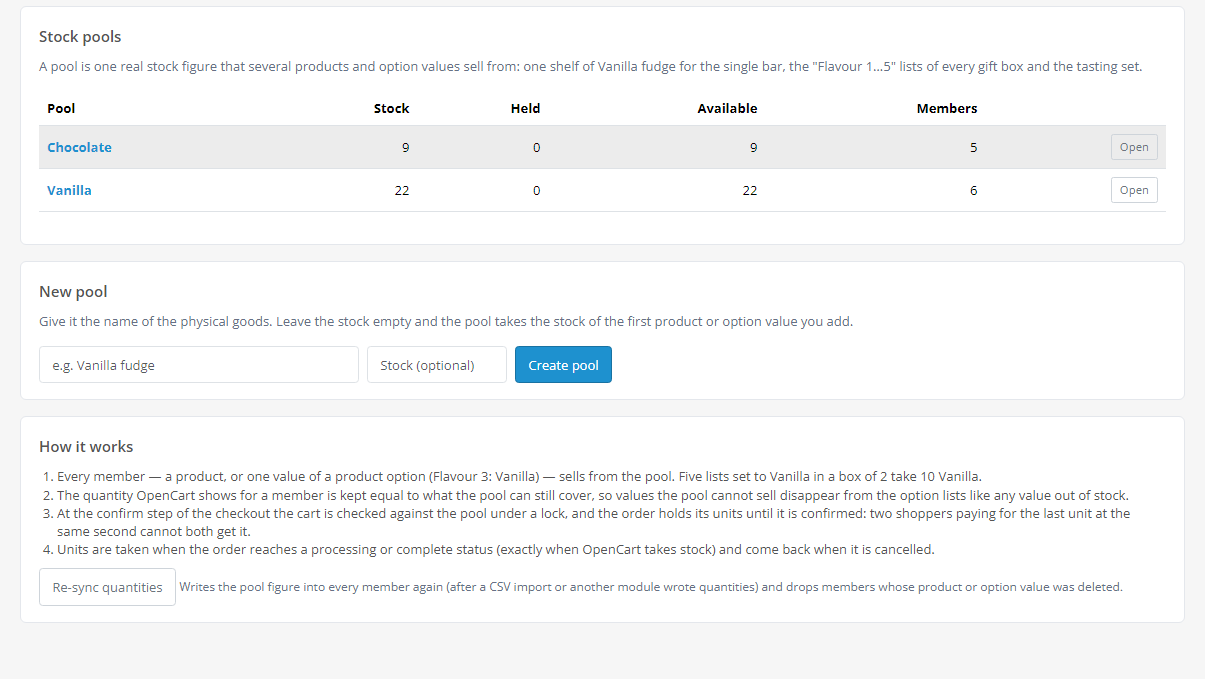
An OpenCart 4, 3 and 2.3 module that sells one physical item from one stock figure wherever it appears: as a product of its own, as an option value in several lists of a gift box ("Flavour 1…5: Vanilla") or in another box. The cart is checked against the pool as a whole, "Add to Cart" refuses with the quantity left, and two shoppers confirming the last units in the same second do not both get them. The basic version is free; Pro adds packs, history with CSV, "low" and "out of stock" e-mails. Lifetime licence.
The free version works with no time limit. Pro adds the rest of the features in the table.


The shopper picks the flavours in a box and presses “Add to Cart”.

Tested locally on four OpenCart versions: 79 checks on OpenCart 4.1.0.3 and 4.0.2.3 and 77 each on 3.0.5.0 and 2.3.0.2 for the main scenario, plus separate runs in a browser, with One Page Checkout, order editing, imports and Pro e-mails.

A fresh install is the free version, nothing switches on by itself. The “Try Pro for 7 days” button → e-mail → the key right in the window and by e-mail.

Moving the store? Unbind the licence on the old domain and activate it on the new one yourself. For studios — keys for 5 or 25 sites, or unlimited.
 OpenCart 4.0.2.0+ and 4.1.x (tested on 4.1.0.3 and 4.0.2.3), 3.x (tested on 3.0.5.0) or 2.3.0.2.PHP 7.0+ — whatever your OpenCart version needs (tested on 7.0, 8.1, 8.2 and 8.3).Database MySQL or MariaDB: the lock between checkouts is a MySQL named lock (GET_LOCK). Tested on MariaDB 10.11. On a Galera cluster this lock does not work across nodes.“Stock Checkout” in the OpenCart settings must be off — otherwise OpenCart does not check stock at checkout and the module does not refuse either.Store mail is configured (System → Settings → Mail) — for the Pro e-mails.Module languages: English, Ukrainian, Russian.
4 modules in one order — 40% cheaper than separately



Shared Stock for OpenCart is a module by the CatCode studio for a store that sells one physical item in several places of its catalogue. A Vanilla bar on its own — and the same flavour in a gift box where the shopper picks a flavour in five lists, “Flavour 1…5”. The same item in another box. OpenCart keeps the stock of every product and every option value separately, so the store owner copies figures by hand — and still sells the last unit twice.
Shared Stock joins such places into a pool — one stock figure they all sell from. A pool member can be a whole product or a single option value. The cart is checked against the pool as a whole: a box with five “Vanilla” picks, quantity 2, takes 10 from the pool. A sale of any member takes from the pool, and every member shows how much the pool can still cover. Two shoppers confirming the last units in the same second do not both get them.
This is not a duplicate of Option Combinations. Option Combinations keeps the stock of option combinations inside one product (size × colour). Shared Stock covers a different scenario: one stock for different products and option values — the same flavour as a product of its own, in the five lists of a box and in another box. The first module does not share stock between products; the second does not track combinations inside a product.
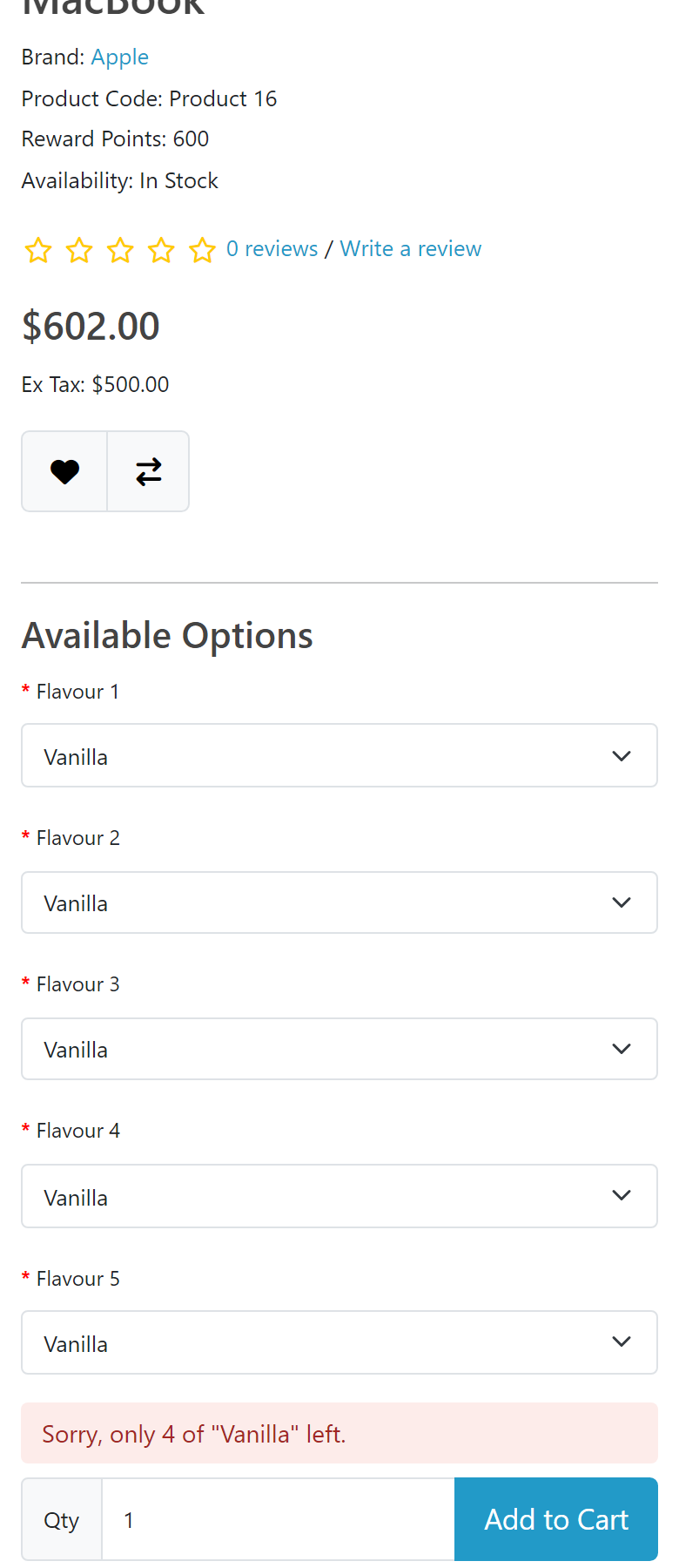
The shopper picks the flavours in a box and presses “Add to Cart”. If, together with what is already in the cart, the pool is not enough, OpenCart does not add the product and a clear sentence appears above the button: how many are left, or that all of them are already in the cart. A value the pool can no longer cover disappears from the option list like any “out of stock” value.
If the pool went down while the product sat in the cart (another shopper bought first), the cart marks the line with *** and blocks checkout — the standard OpenCart behaviour for stock, only counted by the pool.
Tested locally on four OpenCart versions: 79 checks on OpenCart 4.1.0.3 and 4.0.2.3 and 77 each on 3.0.5.0 and 2.3.0.2 for the main scenario, plus separate runs in a browser, with One Page Checkout, order editing, imports and Pro e-mails. Version 1.0.1 went through the same set, plus five runs in a row of simultaneous checkout page loads (default and One Page) on OpenCart 4.1 and 4.0.2.3 — exactly 2 orders out of 8 every time, the pool never below zero — and 24 combinations of store language and shopper language for the “add to cart” message. Test servers stood in for the licence server and mail.
Limits worth knowing. The protection against simultaneous shoppers sits at the order confirm step — both when it runs as a request of its own and when OpenCart 4 or our One Page opens it inside the checkout page. A third-party one-page checkout that writes the order bypassing this step checks the cart without the lock; even then the module writes the hold only when the pool covers it. An order paid after its hold has expired (60 minutes by default) takes from the pool even below zero — just like OpenCart without the module; this shows in the pool history. Not tested: payment gateways with a bank callback, third-party one-page checkouts (other than ours), working together with Option Combinations, OpenCart 4 product variants (master / variant), MySQL 8 and Galera clusters.
cc_sharedstock.ocmod.zip (do not rename the archive) and press “Install”. OpenCart 3: Extensions → Installer → cc_sharedstock-oc3.ocmod.zip → “Install”. OpenCart 2.3: Extensions → Installer → cc_sharedstock-oc2.ocmod.zip if FTP is enabled in the store settings; otherwise upload the contents of the upload/ folder from the archive to the store root.Didn't find the answer? Message us on Telegram and we'll reply within a business day.
 @catcode_support
Setup, compatibility, activation
@catcode_support
Setup, compatibility, activation
Option Combinations keeps the stock of option combinations inside one product. Shared Stock is for when the same item sells in several products or several option lists: a single Vanilla bar, Vanilla in each of the "Flavour 1…5" lists of a gift box, the same flavour in another box. So it is not a duplicate but a different scenario: one stock for different products and options. We have not yet tested both modules together in one store.
Yes, at the confirm step: the order holds its units under a database lock, the second shopper waits and sees that the pool is no longer enough. In the test 8 shoppers confirmed 4 units each from a pool of 10 at the same time — exactly 2 orders went through and the pool never went below zero; without the module the same test let all of the first 4 out of 4 through. Since version 1.0.1 the same protection covers the case when OpenCart 4 or One Page writes the order while the checkout page loads: 8 simultaneous page loads — exactly 2 orders, in 5 runs in a row.
When the order enters a processing or complete status — the same moment OpenCart takes product stock. Cancelling returns the units, a second cancellation returns nothing again. An unconfirmed order only holds its units for the time set in the settings (60 minutes by default).
The member quantity in OpenCart becomes a mirror of the pool and is kept by the module. An empty new pool takes the stock of the first member you add, so the figure is not reset to zero. A new figure typed into the "Quantity" field of a product or an option value sets the pool.
The storefront keeps counting by the pool, so it will not sell more than there is. Press "Re-sync quantities" on the pools page and the mirrors show the pool figure again. If the import carries a new real stock figure, type it into the pool.
Yes, we tested them together on OpenCart 4.1, 4.0.2.3, 3.0 and 2.3: an order through One Page, a refusal when the pool became smaller than the cart, and simultaneous confirmations, including One Page writing the order while the page loads.
The module admin is in English, Ukrainian and Russian, and messages to the shopper are in the language they picked on the storefront (since version 1.0.1 on OpenCart 3 and 2.3 as well).
No. For OpenCart it is a one-time payment and a lifetime licence, and one licence covers all three builds: 4.x, 3.x and 2.3. Pools, the cart check and the protection at confirmation are in the free version with no time limit.
No reviews yet. Be the first.
No questions yet. Ask one — we answer within 24 hours.
We build custom modules for WordPress, WooCommerce, OpenCart and Shopify. Tell us about the task and we'll prepare an estimate.
Order a custom module
—

CatCode assistant
Just now


CatCode assistant
Online

I’ll help with your website task
Describe your website task — I’ll find a ready-made module or pass it to a developer for an estimate. Modules, custom features, layout, integrations, speed, migration, technical SEO.
