
WordPress
Mono Acquiring — monobank card payments for WooCommerce
Free + Pro
890 UAH/year
v1.1.6
 All Access4 990 ₴ / year
 Website auditA PDF report by email in 3 minutesCheck a website
Everyday tasks
Image compressorSize, quality and WebP in bulkQR generatorLink, Wi-Fi, payment to IBANVAT calculator20, 14, 7% and amount in wordsTransliterationOfficial Ukrainian standardWebsite checks
PHP and pluginsPHP version, WordPress, pluginsGoogle Merchant feedFields, prices, GTIN, imagesDomain emailSPF, DKIM, DMARC, blacklistsAI search readinessllms.txt, bots, markupAll 9 toolsEnter at least 2 characters
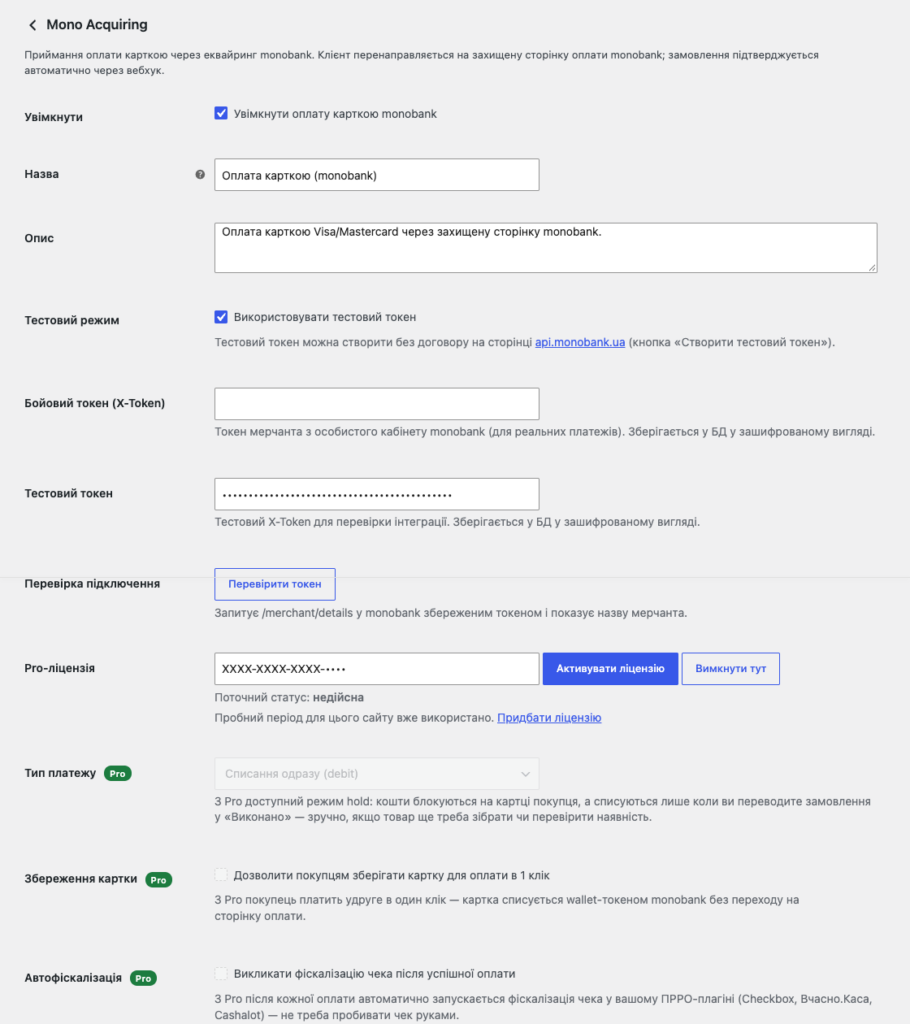
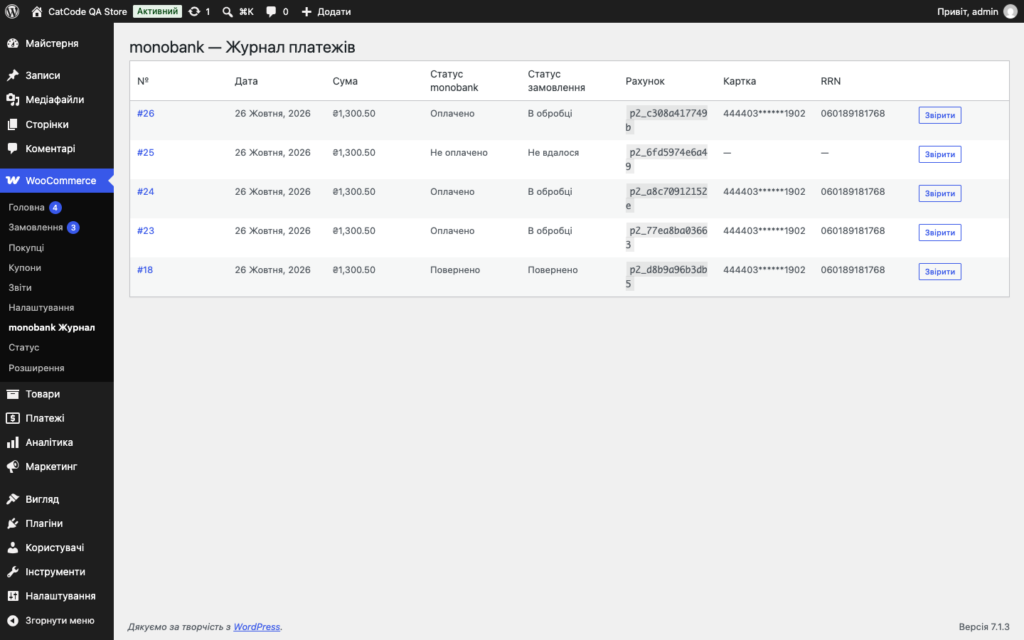
A monobank acquiring plugin for WooCommerce: Visa/Mastercard payment on the bank's page, a webhook with an ECDSA signature updates the status itself. Pro — hold, refunds, log.
Clear even without sound: Ukrainian subtitles
The free version works with no time limit. Pro adds the rest of the features in the table.



A fresh install is the free version, nothing switches on by itself. The “Try Pro for 7 days” button → e-mail → the key right in the window and by e-mail.

Moving the store? Unbind the licence on the old domain and activate it on the new one yourself. For studios — keys for 5 or 25 sites, or unlimited.
 WordPress 6.2+WooCommerce 6.0+ (tested up to 10.7)PHP 7.4+A monobank token: a live one is issued in the merchant dashboard after signing an agreement; a test one is created free at api.monobank.ua — no agreement needed for testing
When monobank cannot create the invoice (wrong token, outage, timeout), the buyer reads a plain “We could not open the card payment…” instead of “forbidden; FORBIDDEN”; the technical answer…
Sites where every language has a URL prefix (Polylang): after paying, the buyer comes back to the thank-you page instead of “Page not found”.
The Pro version activated next to the free copy from WordPress.org no longer loads the free copy’s code with PHP warnings on every request.
The basket monobank shows on the payment page (and passes on for fiscalisation) did not add up to the amount charged.
Free is really free: a fresh install no longer switches Pro on by itself, the trial only starts with the “Try Pro for 7 days” button.
Creating an invoice and redirecting to monobank’s payment page, a webhook with ECDSA signature verification, a fallback status request, refunds, two-stage payment (hold), Checkout Blocks…
4 modules in one order — 40% cheaper than separately


Mono Acquiring for WooCommerce is a payment plugin that connects monobank acquiring to your store. The customer pays for the order by Visa or Mastercard on monobank’s secure page, and the plugin confirms payment itself: the bank sends a webhook, the plugin verifies its ECDSA signature and moves the order to the right status. No manual payment reconciliation — the status in WooCommerce always matches the status at the bank.
mono-acquiring-for-woocommerce-1.1.6.zip via Plugins → Add New → Upload Plugin and activate it.Didn't find the answer? Message us on Telegram and we'll reply within a business day.
 @catcode_support
Setup, compatibility, activation
@catcode_support
Setup, compatibility, activation
For real payments, yes — a live token is issued in the merchant dashboard. For testing, a free test token from api.monobank.ua is enough.
The main one is hryvnia (UAH). USD and EUR are also handled if they're enabled for your merchant.
No. It's a standard WooCommerce payment gateway: it only adds a payment method to the list. It works with both the classic checkout and Checkout Blocks.
It's enabled in the monobank merchant dashboard and needs no changes in the code or plugin settings.
Yes. The licence works on one active domain, and you can move it yourself: in the module's settings on the old domain click "Deactivate" — the slot frees up instantly, then activate the same key on the new domain. No extra charge; if you no longer have access to the old site, contact us and we'll free the slot manually.
Pro features, accepting payments and confirming orders keep working, settings and data stay in place — only updates and support stop. Renewing with the same key brings updates and support back. We'll remind you by email 14, 7, 3 and 1 day before it ends.
No reviews yet. Be the first.
No questions yet. Ask one — we answer within 24 hours.
We build custom modules for WordPress, WooCommerce, OpenCart and Shopify. Tell us about the task and we'll prepare an estimate.
Order a custom module
—

CatCode assistant
Just now


CatCode assistant
Online

I’ll help with your website task
Describe your website task — I’ll find a ready-made module or pass it to a developer for an estimate. Modules, custom features, layout, integrations, speed, migration, technical SEO.
