


Ukrposhta — Ukrposhta shipping for OpenCart 2.3, 3.x & 4.x
A free Ukrposhta shipping module for OpenCart 3 and 4: region → city → branch picker at checkout and live cost calculation via the eCom API.
- Compatibility
- OpenCart 2.3.0.x · 3.0.2 – 3.0.5 · 4.0.2 – 4.1.x
- Version
-
v1.2.8 (OpenCart 4)
v1.2.4 (OpenCart 3.x)
v1.1.5 (OpenCart 2.3) - Updated
- 25 October 2026
The module in action — 43 sec
Clear even without sound: Ukrainian subtitles
What the module does

What it looks like
Technical requirements
 OpenCart 4.0.2 – 4.1.x, 3.0.2 – 3.0.5 or 2.3.0.x — a separate build for each branch
- PHP 7.4 and newer; the OpenCart 2.3 build also runs on PHP 5.6
- An eCom agreement with Ukrposhta: the Bearer key is issued in the eCom account after signing the agreement — it’s needed for the address classifier and rate calculation
- For rate calculation — the sender’s warehouse postal index
Version history
With international delivery on, an empty grey «Ukrposhta delivery / Another country» bar no longer hangs above the Nova Poshta (or another carrier’s) block when that carrier is chosen.
CatCode One Page Checkout: the widget sometimes did not appear — Ukrposhta ticked, but no region, city and branch selector.
The hidden address form no longer gets the dummy postcode «00000».
All versions (17)
The region → city → branch widget supports the CatCode One Page Checkout page and appears in the shipping method block; after a branch is picked the rate list is requested again.
The region placeholder in the hidden address field is no longer “the first zone of the country”.
The rate is recalculated after a post office is chosen.
Works on CatCode One Page Checkout (route extension/cc_onepage/checkout) exactly as on the stock checkout.
International shipping calculation added.
The live Ukrposhta rate is finally calculated.
The OpenCart 3 build was brought up to the level of 2.3 and 4.x.
Fixed a dead PHP 7.4 polyfill: the polyfill file had a WordPress ABSPATH guard copied into it, which never exists in OpenCart.
The widget scrolls into view as soon as Ukrposhta is chosen — on mobile it renders above the shipping-method selector and was easy to miss.
City search no longer fails silently without the mbstring extension: mb_strlen / mb_strtolower are now guarded, and autocomplete works on any hosting.
Saving contact details no longer resets an already-chosen shipping and payment method.
The order’s address is now filled with exactly what the customer picked (the classifier’s city, the region in Cyrillic, the branch’s real postal index), plus manual index entry.
Fixed a fatal error in shipping-method calculation.
First public release: a region → city → branch widget at checkout, a live domestic rate via the eCom API, key encryption, weekly classifier sync via cron.
Full module description
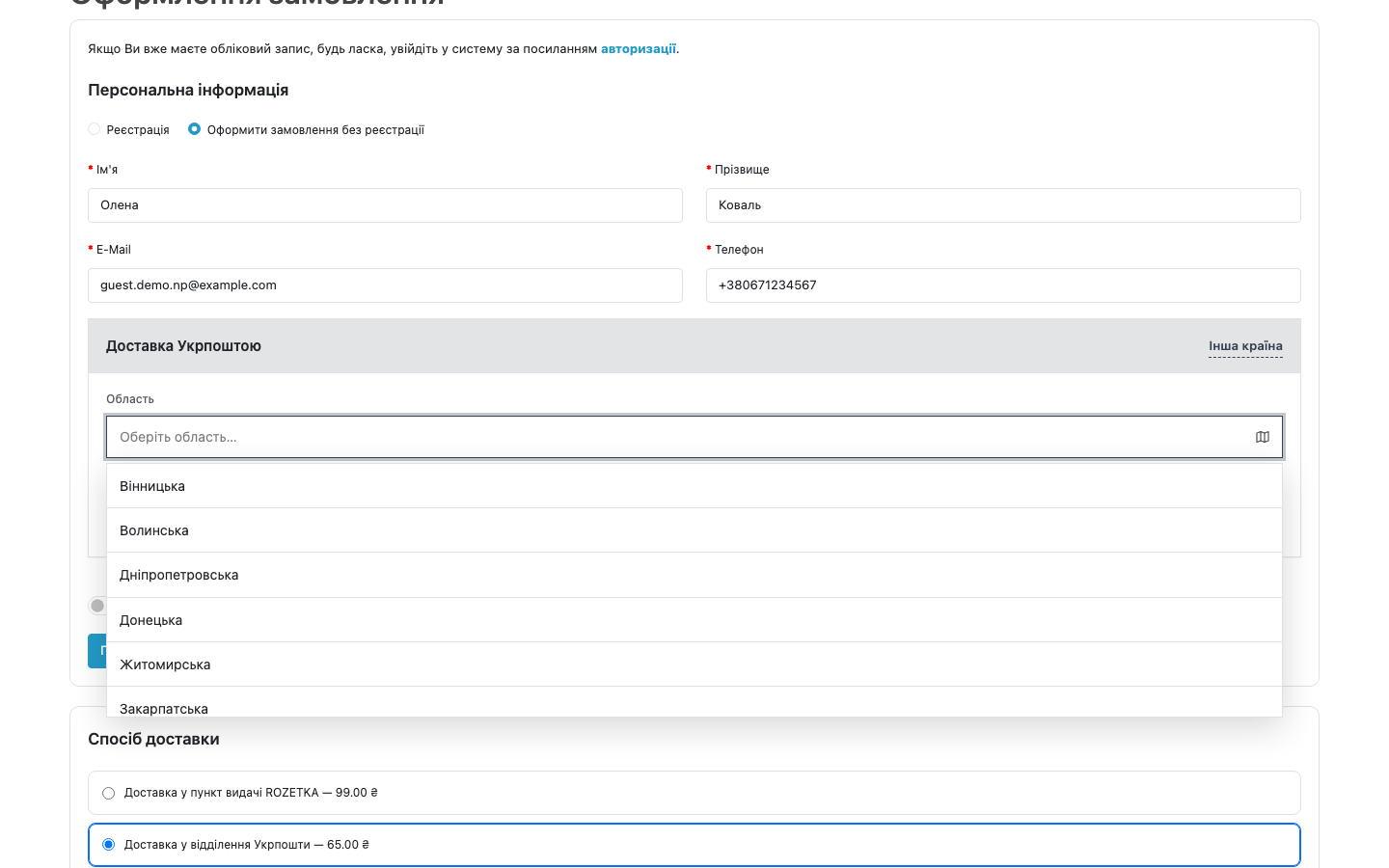
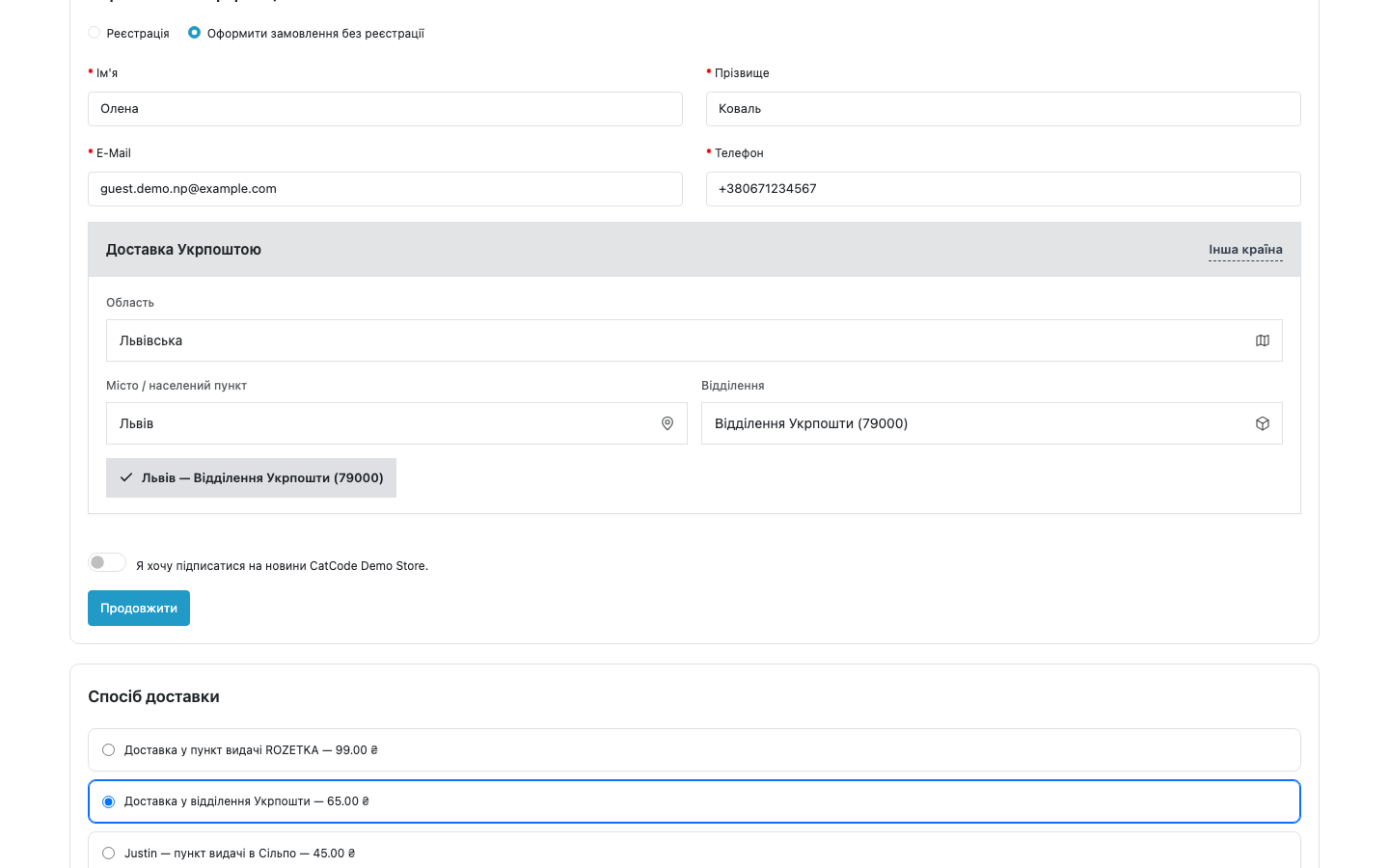
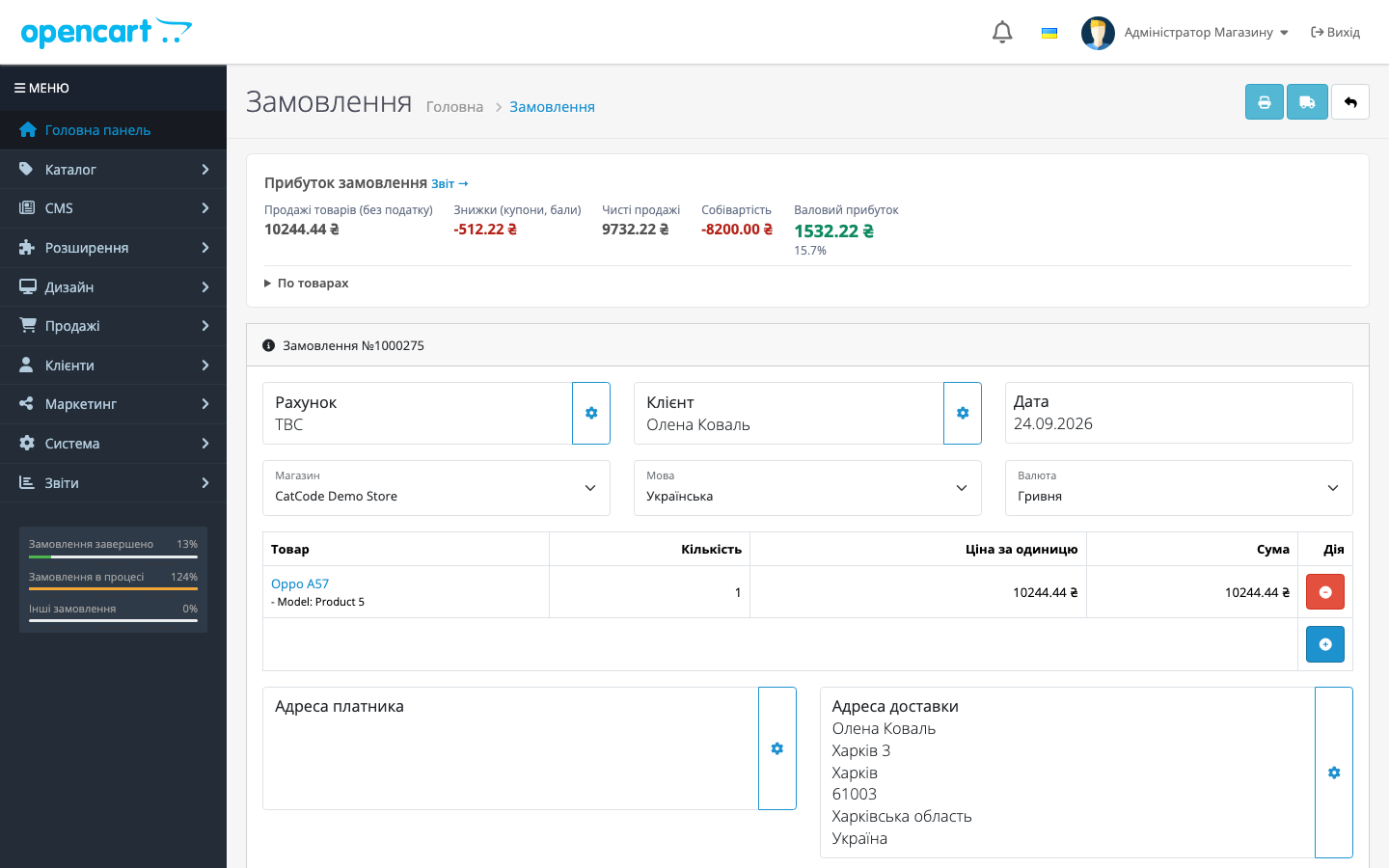
Ukrposhta Shipping for OpenCart 2.3, 3.x and 4.x is a Ukrposhta shipping module: a branch-picker widget (region → city → branch) at checkout, based on the official Address Classifier, and live domestic shipping-cost calculation via the eCom API. The branch the customer picked is recorded on the order, so a manager doesn’t have to ask for the address again over messenger.
The module is free. It installs as a standard OpenCart extension (ocmod) and needs no theme edits — the widget hooks in via the event system.
How it works, step by step
- The admin installs the extension, clicks “Install” on the settings page — the module creates its tables, events and cron tasks — and syncs regions with one click.
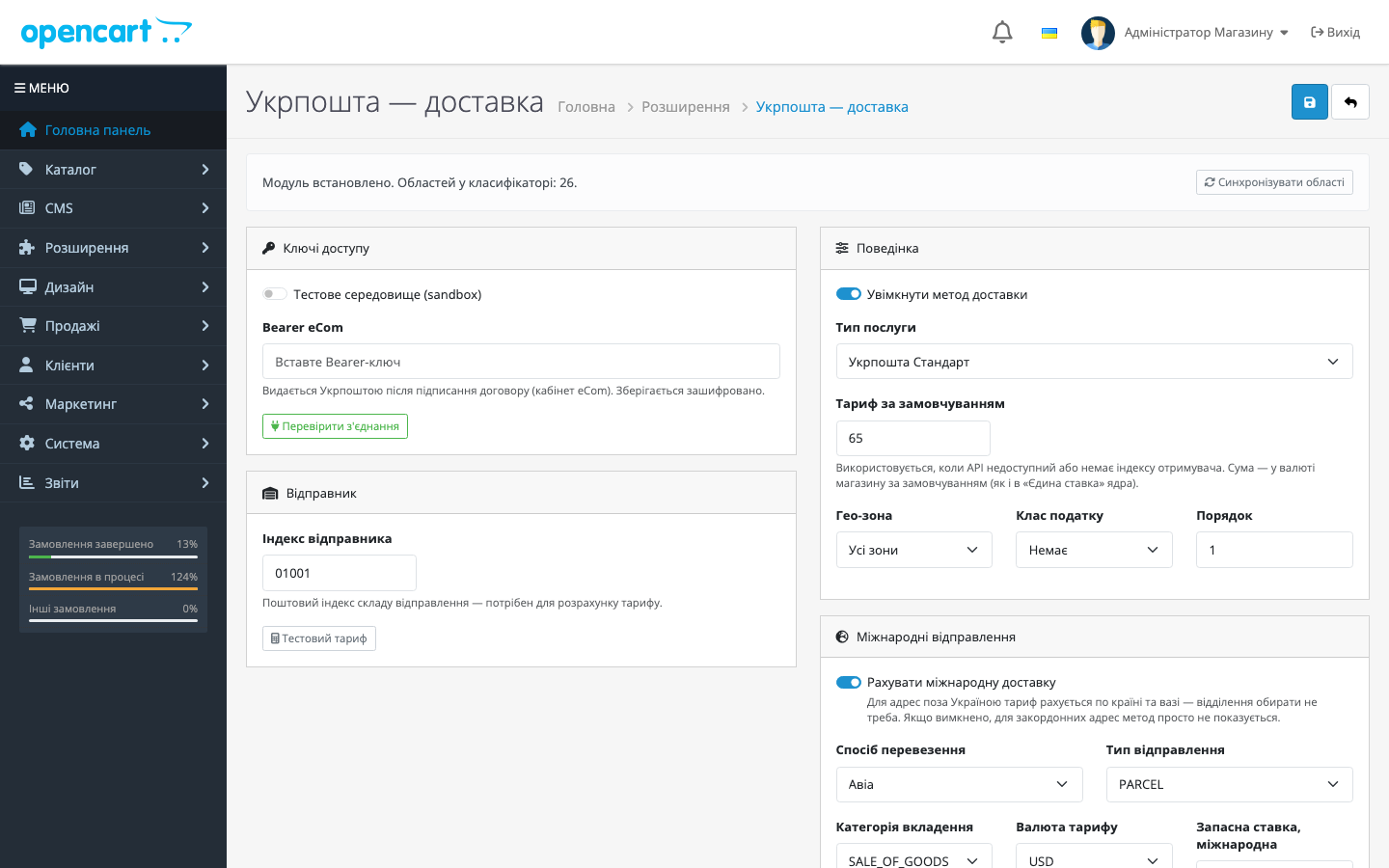
- The eCom Bearer token and sender index are entered; “Test connection” and “Test rate” buttons instantly confirm the key is accepted and the API responds.
- At checkout, the customer chooses Ukrposhta delivery — the
footer/afterevent loads the widget, which walks through region → city → branch. - The module requests a rate from the eCom API using the sender’s and recipient’s postal indices; if the API is unavailable, a default rate from the settings is shown instead.
- After checkout, the
order.addOrder/afterevent saves the chosen branch (index, city, name) along with the order. - Once a week the region classifier cache is refreshed — the directory never goes stale. On OpenCart 4 the built-in cron does it; on 3.x and 2.3, a link for the system crontab shown in the module settings.
Under the hood
- The Bearer key is encrypted before being written to the database; the settings form shows only a “saved” mask, never the plain value.
- The classifier is cached in the module’s own tables (
up_regions,up_cities,up_offices) — checkout reads the local database rather than hitting the API on every request. - Integration is via OpenCart events (footer inject, order added) — no theme template edits; the 4.x and 3.x builds have no OCMOD controller patches, while the 2.3 build adds a small OCMOD patch that saves the address at checkout.
- Standard OpenCart shipping-method settings: geo-zone, tax class, sort order.
- The widget’s look is configurable: accent colour, corner radius, theme (auto/light/dark).
- The OpenCart 4 build has a sandbox toggle for working against Ukrposhta’s test environment.
How to install
- Download the build for your version and install it via “Extensions → Installer”:
ukrposhta.ocmod.zipfor 4.x,ukrposhta-oc3-1.2.4.ocmod.zipfor 3.x,ukrposhta-oc2-1.1.5.ocmod.zipfor 2.3. - In “Extensions → Extensions → Shipping” find “Ukrposhta shipping” and click Install.
- Open the settings and click “Install” — the tables, events and cron tasks are created.
- Enter the eCom Bearer token and sender index, click “Test connection”, then “Sync regions”.
- Enable the shipping method and save — the branch-picker widget will appear at checkout.
Questions
about the module
Didn't find the answer? Message us on Telegram and we'll reply within a business day.
 @catcode_support
Setup, compatibility, activation
@catcode_support
Setup, compatibility, activation
Do I need an agreement with Ukrposhta?
Yes. The Address Classifier and the rate are authorised with a Bearer key issued after signing an eCom agreement.
Do I need to edit the theme for the widget to appear at checkout?
No. The widget hooks in via the footer/after event — theme templates aren't changed, and there's no conflict with custom checkouts built into theme code.
Does the module create waybills and labels?
Not yet. Creating a shipment (waybill) is planned for the next update; the current version covers branch selection and rate calculation.
What happens if the Ukrposhta API is unavailable?
The shipping method won't disappear from checkout: the customer sees the default rate you set in the settings.
Can I test it without a live key?
Yes, there's a test-environment (sandbox) toggle on the "Access keys" tab.
What happens to the data after I delete the module?
Events and cron tasks are removed, but the tables with the directory and saved branch choices are intentionally kept — nothing is lost after reinstalling.
No reviews yet. Be the first.
No questions yet. Ask one — we answer within 24 hours.
Not quite what you are looking for?
We build custom modules for WordPress, WooCommerce, OpenCart and Shopify. Tell us about the task and we'll prepare an estimate.
Order a custom module
Buying the module
—



