
WordPress
SEO Templater — bulk meta tag generation for WooCommerce
Free + Pro
890 UAH/year
v1.1.0
 All Access4 990 ₴ / year
 Website auditA PDF report by email in 3 minutesCheck a website
Everyday tasks
Image compressorSize, quality and WebP in bulkQR generatorLink, Wi-Fi, payment to IBANVAT calculator20, 14, 7% and amount in wordsTransliterationOfficial Ukrainian standardWebsite checks
PHP and pluginsPHP version, WordPress, pluginsGoogle Merchant feedFields, prices, GTIN, imagesDomain emailSPF, DKIM, DMARC, blacklistsAI search readinessllms.txt, bots, markupAll 9 toolsEnter at least 2 characters

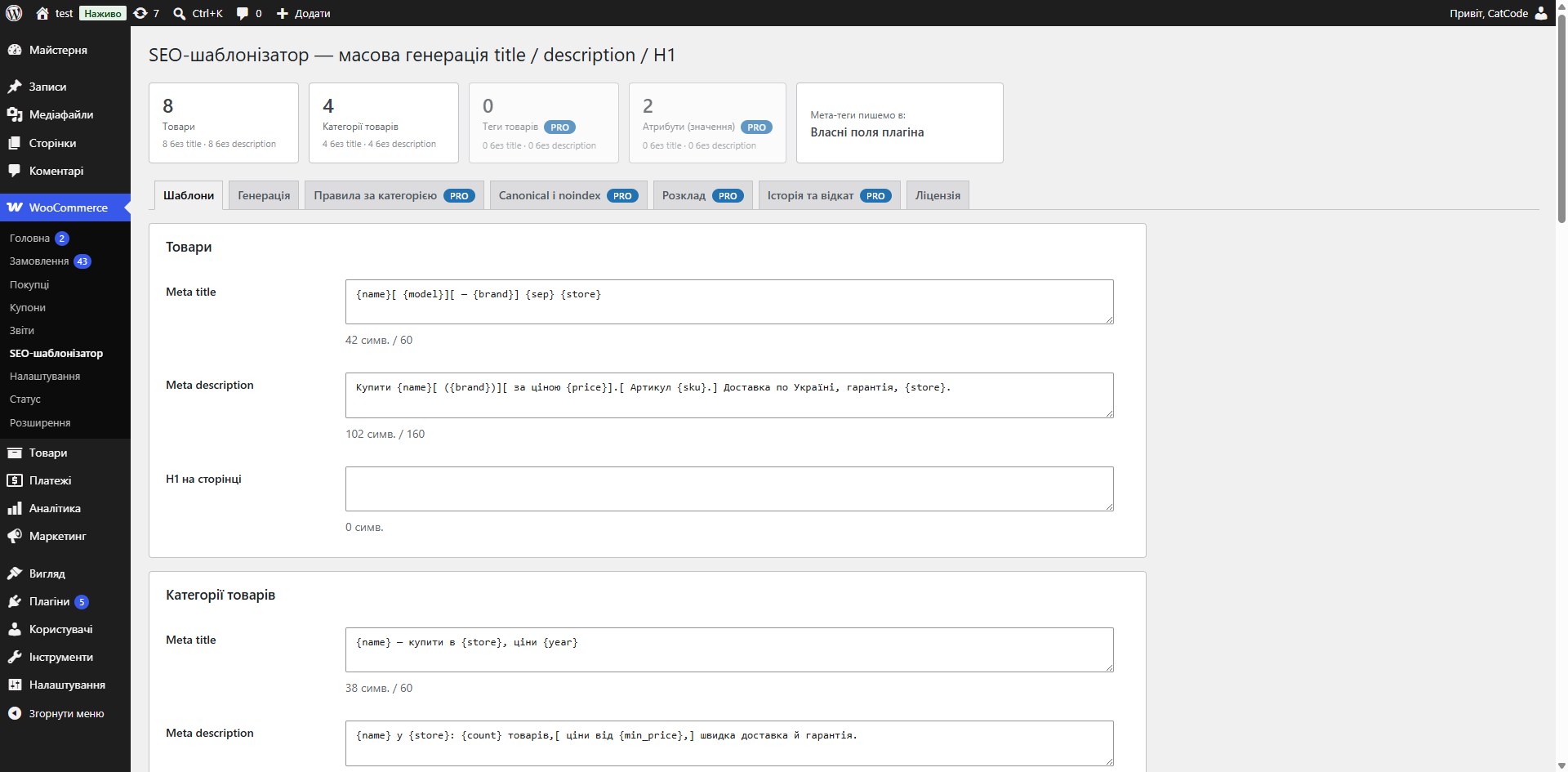
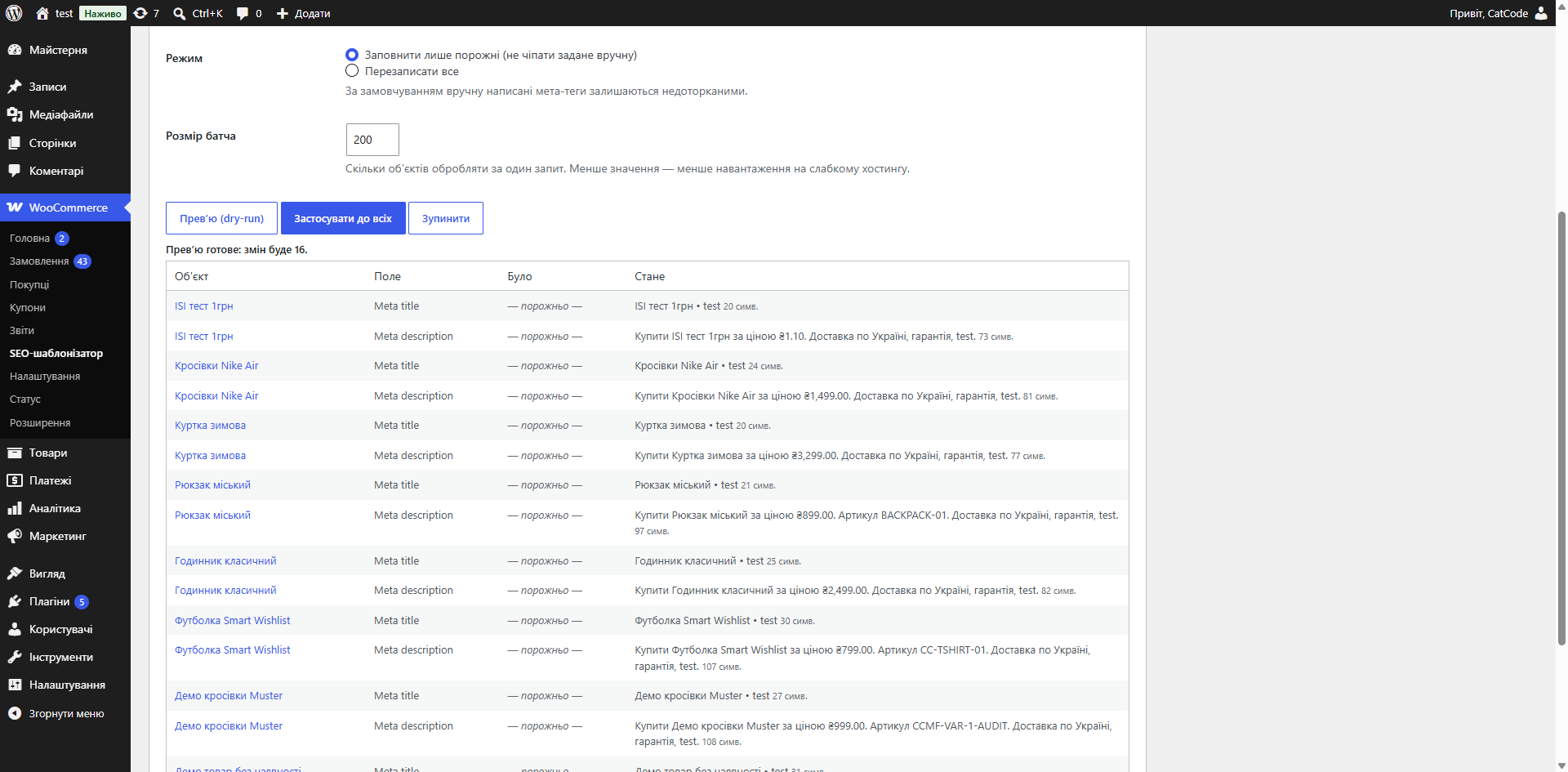
One template with placeholders instead of thousands of manual meta tags: title, description and H1 for WooCommerce products and categories, with a "before → after" preview.
The free version works with no time limit. Pro adds the rest of the features in the table.


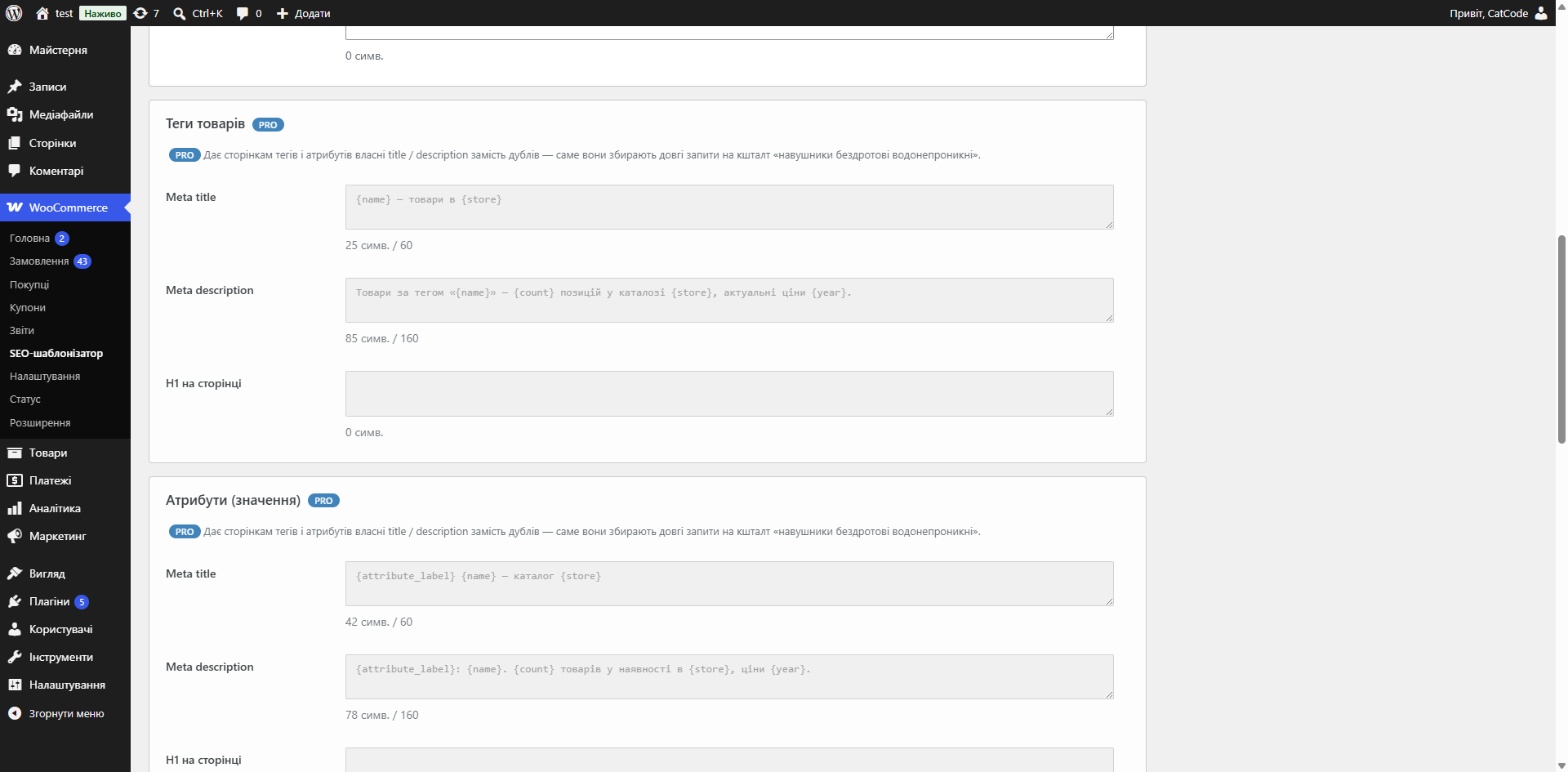
Separate formulas for products and product categories, and in Pro also for tags and attribute values.

The “Preview (dry run)” shows a “before → after” list and highlights any length overruns — nothing is written yet.

If Yoast SEO or Rank Math is active, values are written straight into their fields, so your usual tools and checks keep working as before.

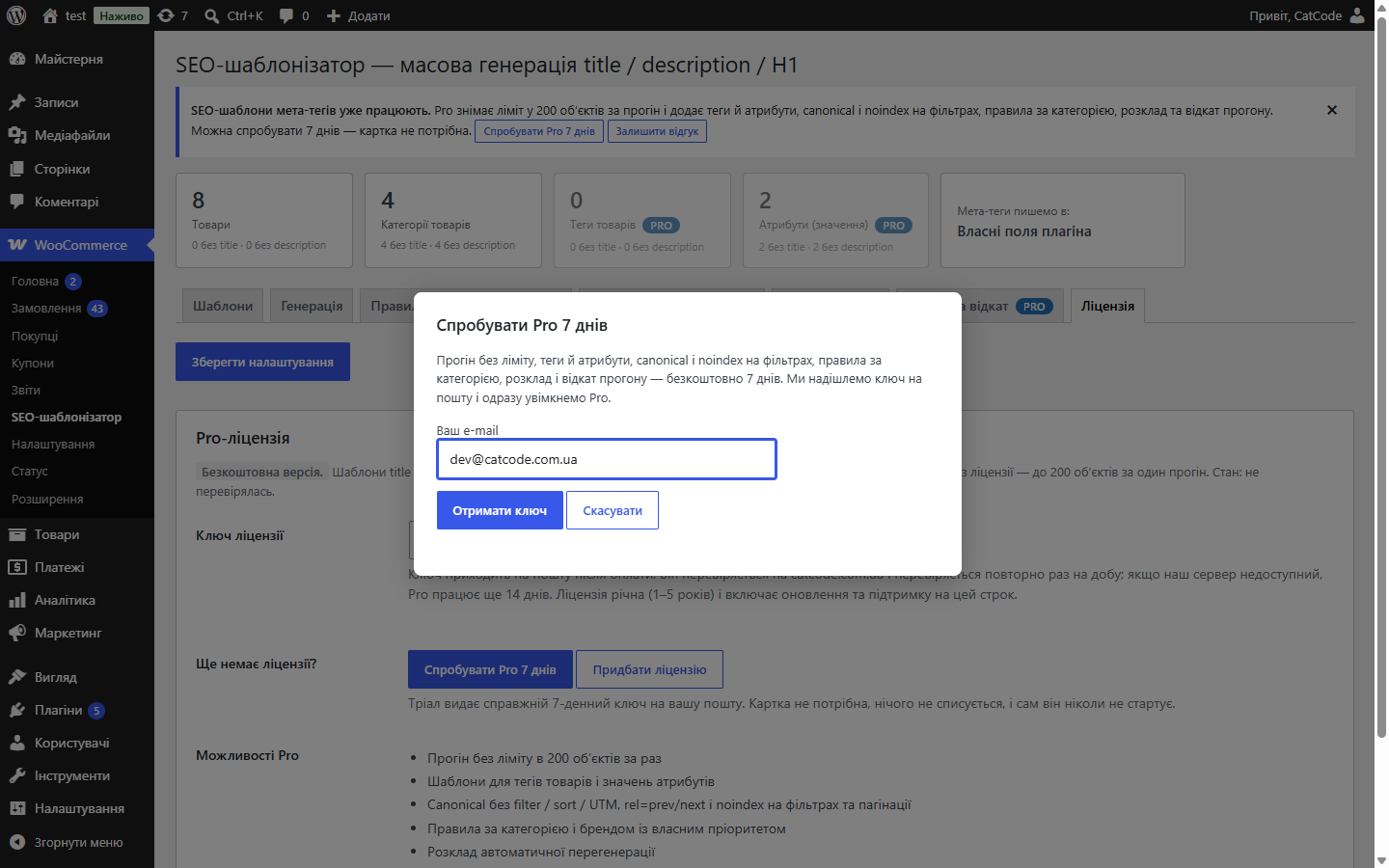
A fresh install is the free version, nothing switches on by itself. The “Try Pro for 7 days” button → e-mail → the key right in the window and by e-mail.

Moving the store? Unbind the licence on the old domain and activate it on the new one yourself. For studios — keys for 5 or 25 sites, or unlimited.
 WordPress 6.2 or newer, WooCommerce, PHP 7.4 or newer. Works alongside Yoast SEO or Rank Math — the plugin writes into their fields rather than competing with them for output.
Title and description templates built from product variables, applied to products and categories, preview before writing, writes into Yoast SEO / Rank Math fields, canonical and technical…
4 modules in one order — 40% cheaper than separately



SEO Templater for WooCommerce describes the title, description and H1 as a formula with placeholders — and applies it across the whole catalogue. Filling in meta tags by hand for several thousand products isn’t realistic, and without them pages end up competing with each other in search results.
Separate formulas for products and product categories, and in Pro also for tags and attribute values. About 25 placeholders: name, category, brand, price, SKU, store name, model, attribute, option, product count, minimum price, availability, year, page number, separator. Templates are compatible with the OpenCart version of the module: {product_name}, {manufacturer}, {store_name}, {attribute:Colour} behave the same way.
An empty variable doesn’t leave a gap in the string: it’s removed together with its separator, and an optional block such as [ SKU {sku}. ] disappears entirely. Title and description length is controlled with trimming at a word boundary.
The “Preview (dry run)” shows a “before → after” list and highlights any length overruns — nothing is written yet. Applying then runs in batches with a progress bar and a “Stop” button. “Fill empty fields only” mode protects anything you wrote by hand.
If Yoast SEO or Rank Math is active, values are written straight into their fields, so your usual tools and checks keep working as before. If there’s no SEO plugin, the module keeps its own fields and prints <title> and <meta name="description"> itself.
Without a licence key, one run processes up to 200 objects at a time, and meta tags already generated stay in place after the trial ends. Pro fields stay in place — greyed out, with a Pro badge and one line explaining what they give you, so you see a boundary rather than an empty spot.
rel=canonical stripped of filter_*, orderby, min_price, max_price and UTM tags; self-canonical or canonical to the first page; rel=prev/rel=next; noindex for filters, sorting, pagination and search.
Nobody writes meta tags by hand for a thousand products. So most stores either leave the title empty (and Google pulls something from the page as best it can) or use the same one across the whole catalogue — which means duplicates, and search engines cut visibility for those.
A template solves this once: you describe the rule, and every product gets its own unique title and description, assembled from its own data.
1. You write a template out of variables: product name, category, brand, price, store name.
2. Choose what to apply it to — products or categories (in Pro also tags and attribute values, and a single category or brand can get a rule of its own).
3. Look at the preview on real products: exactly what will come out before anything is written.
4. Run the write. If Yoast SEO or Rank Math is installed, meta tags land in its fields, not in a parallel store.
A mistake in a template applied to a thousand products means a thousand identical or truncated titles. Fixing it takes another run, and by then Google has already recrawled the catalogue.
That’s why writing here is always two steps: first you see the result on a sample, and only then do you give the command to write.
If Yoast SEO or Rank Math is installed, meta tags are written into the same meta fields the SEO plugin reads. So the result shows up both in its interface and in its page analysis — and if you ever remove the templater, the tags stay in place. Without an SEO plugin, the tags live in the module’s own fields and are deleted together with it.
The run goes in batches rather than one request, so a large catalogue doesn’t time out the site.
1. Upload the archive via “Plugins → Add New → Upload Plugin” and activate it.
2. Write a title and description template.
3. Check the preview on a dozen products.
4. Run the write and check a few cards in your SEO plugin.
Didn't find the answer? Message us on Telegram and we'll reply within a business day.
 @catcode_support
Setup, compatibility, activation
@catcode_support
Setup, compatibility, activation
No, not unless you switch the mode to "overwrite everything" yourself. By default only empty fields are filled.
The "History and rollback" tab has "Roll back last run". Previous values are kept for every run (Pro).
Yes. Generation runs in AJAX batches with a progress bar rather than one long request, so max_execution_time doesn't matter.
If Yoast SEO or Rank Math is active — in their fields, so all your usual tools keep working. Without an SEO plugin, the plugin keeps its own fields and outputs the title and description itself.
SEO plugins have no field for H1, and rewriting the product name for the sake of a heading would break the catalogue, cart and e-mails. So H1 lives in its own field and is only inserted into the page heading.
No reviews yet. Be the first.
No questions yet. Ask one — we answer within 24 hours.
We build custom modules for WordPress, WooCommerce, OpenCart and Shopify. Tell us about the task and we'll prepare an estimate.
Order a custom module
—

CatCode assistant
Just now


CatCode assistant
Online

I’ll help with your website task
Describe your website task — I’ll find a ready-made module or pass it to a developer for an estimate. Modules, custom features, layout, integrations, speed, migration, technical SEO.
