WordPress
Marketplace Feeds (Rozetka, Prom, Epicentr, Kasta) for WooCommerce
Free + Pro
890 UAH/year
v1.4.1
 All Access4 990 ₴ / year
 Website auditA PDF report by email in 3 minutesCheck a website
Everyday tasks
Image compressorSize, quality and WebP in bulkQR generatorLink, Wi-Fi, payment to IBANVAT calculator20, 14, 7% and amount in wordsTransliterationOfficial Ukrainian standardWebsite checks
PHP and pluginsPHP version, WordPress, pluginsGoogle Merchant feedFields, prices, GTIN, imagesDomain emailSPF, DKIM, DMARC, blacklistsAI search readinessllms.txt, bots, markupAll 9 toolsEnter at least 2 characters
Feeds for Rozetka, Prom, Epicentr, Kasta, Google Merchant Center and Meta from WooCommerce: variations as one listing, dispatch time, stock, cache and a token-protected URL. For AI assistants — /llms.txt, and in Pro an OpenAI feed for ChatGPT and a UCP catalogue.
Clear even without sound: Ukrainian subtitles
The free version works with no time limit. Pro adds the rest of the features in the table.


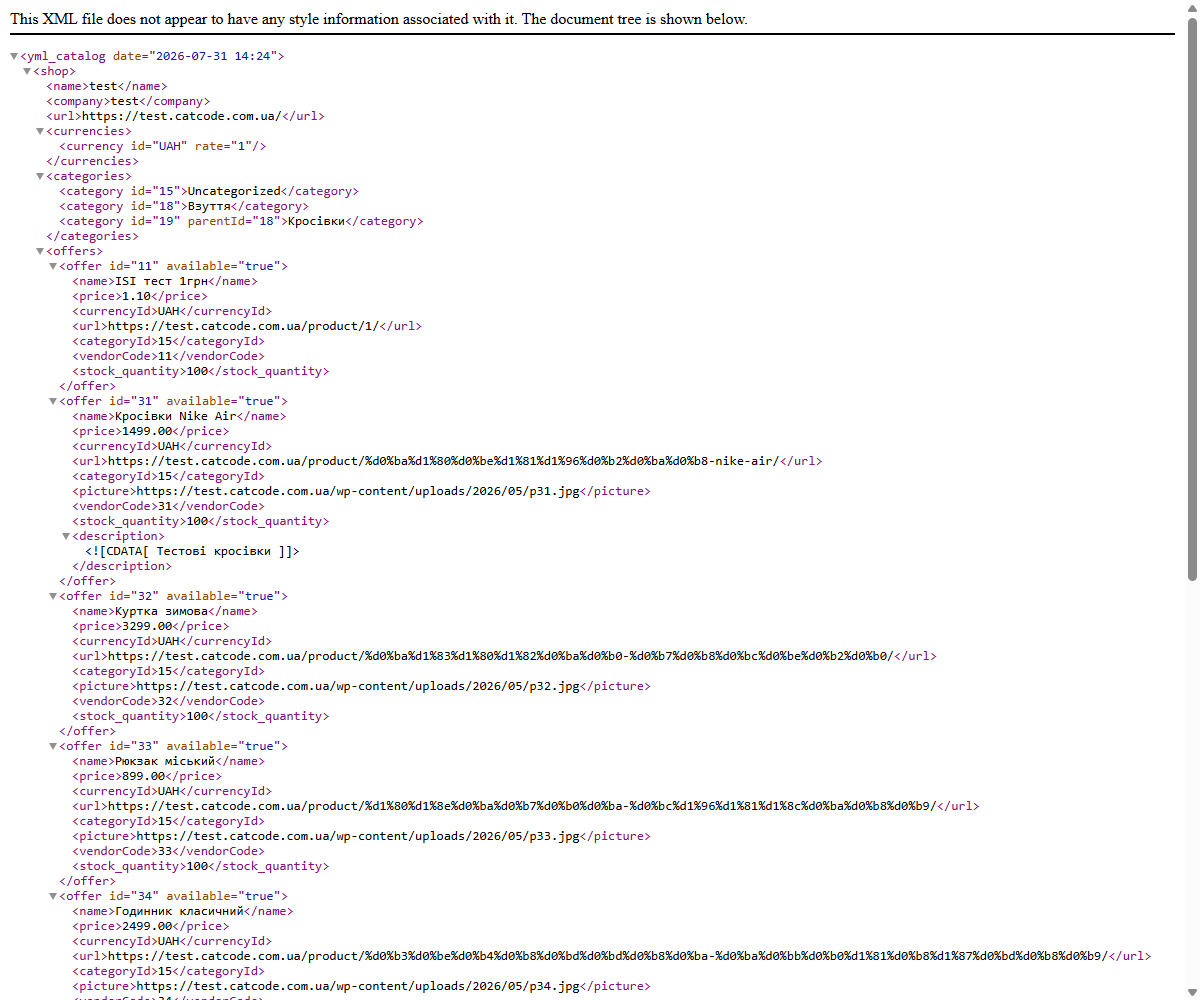
Every product is output with a name, price, currency, link, category, images, brand, SKU and stock.

Epicentr does not read the Rozetka/Prom YML: both the product import in the cabinet and the «Stock auto-update» by link expect yml_catalog → offers → offer without a block.

Pro gets two more feeds in 1.2.0: for Google Merchant Center and for the Meta catalogue (Facebook and Instagram ads) — RSS 2.0 with g: attributes that both dashboards accept.

A fresh install is the free version, nothing switches on by itself. The “Try Pro for 7 days” button → e-mail → the key right in the window and by e-mail.

Moving the store? Unbind the licence on the old domain and activate it on the new one yourself. For studios — keys for 5 or 25 sites, or unlimited.
 WordPress 6.2+ · WooCommerce 7.0+ · PHP 7.4+The PHP xmlwriter extension (included in a standard PHP build)Works with both the classic and block-based cart, compatible with HPOSSettings screen in English, Ukrainian and Russian, following the WordPress admin languageFor the UCP catalogue: the site on HTTPS and WordPress at the root of the domain
The Epicentr feed is now Epicentr’s own XML.
A catalogue for AI assistants and agents.
Google Merchant Center product data specification of 14 April 2026.
Pro: Google Merchant Center and Meta feeds with variations.
New Free/Pro model: a fresh install no longer switches anything on by itself, the trial only starts with a click and issues a 7-day key by email.
Rozetka, Prom.ua, Epicentr and Kasta feeds; variations with group_id; sale prices, characteristics, brand and GTIN; catalogue filters, price multiplier, UTM; scheduled cache and a…
4 modules in one order — 40% cheaper than separately



Marketplace Feeds outputs the WooCommerce catalogue in the format Ukrainian marketplaces accept: Rozetka, Prom.ua, Epicentr and Kasta. The shop doesn’t export CSV by hand and doesn’t pay for a separate service: the marketplace fetches a fresh XML from a permanent link itself.
Every product is output with a name, price, currency, link, category, images, brand, SKU and stock. A sale price goes as <price>, and the regular price as <price_old>, so the marketplace shows a struck-through old price. Product characteristics are output as <param> tags, the barcode from the GTIN field, and the brand from WooCommerce’s “Brands” taxonomy or from an attribute.
Variable products are output the way marketplaces expect: each variation is a separate offer with the parent product’s group_id and its own size, colour, SKU, price and stock. The link goes straight to the right variation.
Epicentr does not read the Rozetka/Prom YML: both the product import in the cabinet and the «Stock auto-update» by link expect yml_catalog → offers → offer without a <shop> block. Given a YML, the cabinet answers «Невідомий тег shop у рядку 3» (unknown tag shop in line 3). Since 1.4.1 the Epicentr feed (Pro) serves exactly that XML, in two versions.
price, price_old and availability (in stock, to order, out of stock). The article in the cabinet = the WooCommerce product or variation ID.New products with Epicentr characteristics (category and attribute codes) are not created by this feed — that is what the Epicentr: Price and Stock Sync module does. A shop that already served the Epicentr feed before the update keeps the old format unchanged until it switches «Epicentr feed format» in the settings; the link stays the same.
Pro gets two more feeds in 1.2.0: for Google Merchant Center and for the Meta catalogue (Facebook and Instagram ads) — RSS 2.0 with g: attributes that both dashboards accept. Every variation goes out as a separate item sharing a g:item_group_id (the parent product ID), with the size in g:size and the colour in g:color, so Google and Meta show one listing with a size picker instead of running ads on duplicates. You can point to the size and colour attributes in the settings; if you don’t, the plugin recognises them by name (size, розмір, color, колір), including local attributes with Cyrillic names.
Price and sale, availability, brand, GTIN, category path and a link to the exact variation follow the same rules as the marketplace feeds. Products without a brand get a default brand, and Google gets an optional google_product_category.
Real dispatch time — in the free version. The product’s “Shipping” tab has a new “Dispatch time (feeds)” field, and the settings have a store-wide default. Google receives g:min_handling_time and g:max_handling_time, and in the Prom.ua feed the “Ready to ship” status is set only for products that ship within one day: “in stock, but ships in 2–6 days” no longer passes for same-day dispatch.
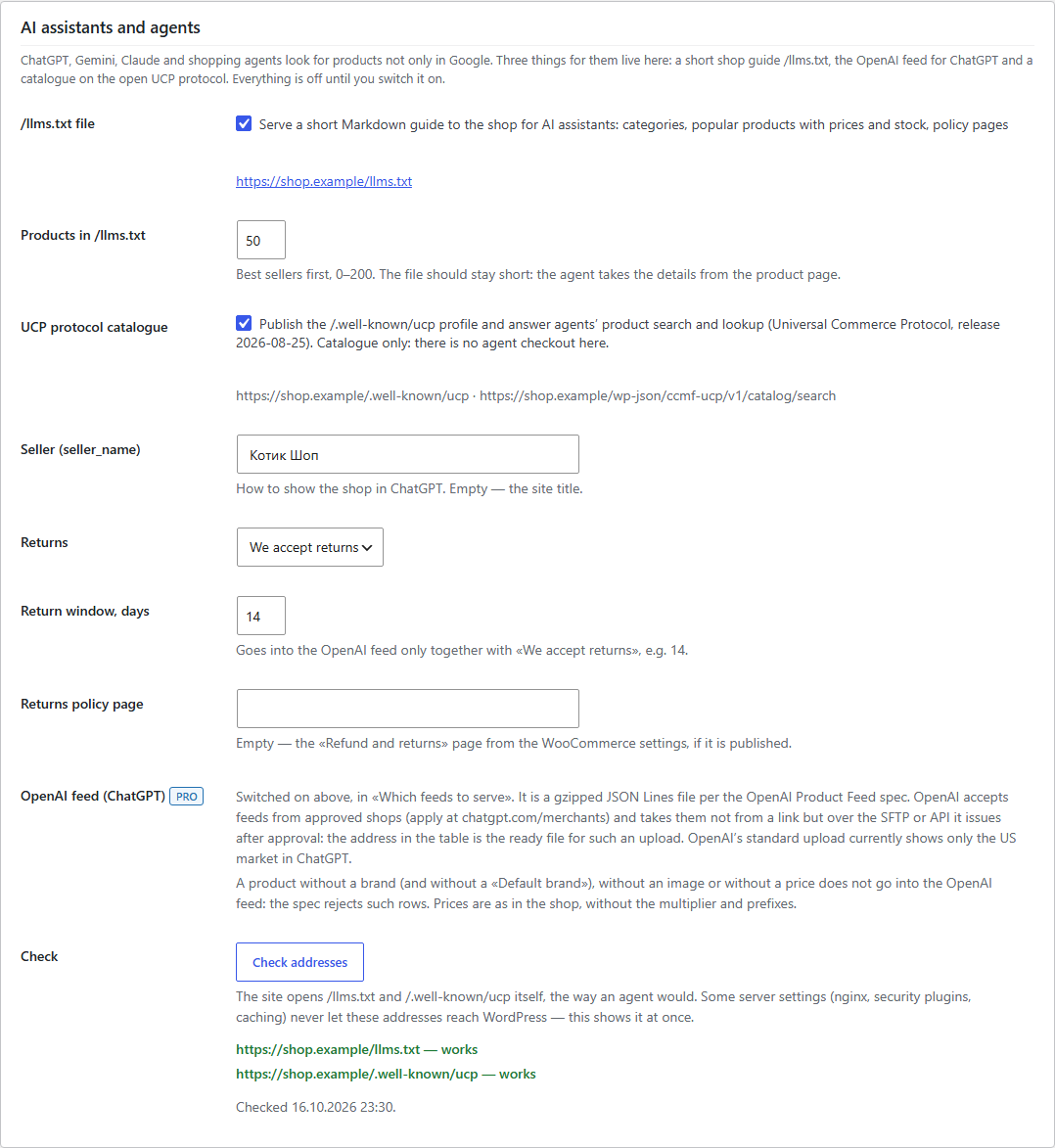
Shoppers increasingly look for products in ChatGPT, Gemini or Claude rather than in a search engine. Since version 1.4.0 the plugin makes the shop’s catalogue readable for such assistants in three ways — each is switched on separately, and everything is off after the update. The Rozetka, Prom, Epicentr, Kasta, Google and Meta feeds do not change: we compared them byte for byte before and after updating from 1.2.0 and 1.3.0, with and without Pro, on WordPress 7.1 and WooCommerce 11.2.
/llms.txt (free). A short page about the shop in the llmstxt.org format: name and description, currency and country, categories with product counts, best sellers with price and stock, policy pages. Headings follow the site language. If another plugin has already put an llms.txt in the site root, the settings screen says so.
OpenAI Product Feed (Pro). An openai.jsonl.gz file per OpenAI’s file-upload specification: one row per product or variation (group_id, variant_dict), price and sale price as in the shop — without the multiplier you set for marketplaces, GTIN only with a valid check digit, seller and returns data from the settings. A product without a brand, an image or a price is left out, and the feed table shows how many rows were skipped and why. Note: OpenAI accepts feeds from approved merchants only (apply at chatgpt.com/merchants) and takes them over SFTP or its API, and the standard upload is currently shown to shoppers in the US. The plugin prepares the file at a token-protected URL; uploading it to OpenAI is done with the credentials OpenAI issues after approval. Whether OpenAI accepts a Ukrainian shop’s catalogue in UAH, we have not verified.
Universal Commerce Protocol (Pro). The shop profile at /.well-known/ucp (UCP 2026-08-25) and catalogue search for agents: catalog/search, catalog/lookup, catalog/product — products, variations, prices and stock. Catalogue only: the plugin does not offer agent checkout. Every request checks the agent platform’s profile: HTTPS only, no redirects, private addresses refused, request rate limited. We validated the responses against the official UCP JSON schemas.
Address check. /llms.txt and /.well-known/ucp are not files on disk, so the server has to hand them to WordPress. The «Check addresses» button opens both the way an agent would and shows what came back: if nginx, a security plugin or a cache intercepts them, you see it at once.
The feed is written as a stream via XMLWriter, straight to the output stream or to a cache file, and products are fetched page by page by key (WHERE ID > …). So memory usage doesn’t depend on the catalogue size, and large shops don’t hit the PHP limit. The cache is stored in a separate folder with an unpredictable name and is only served through the endpoint, so the catalogue can’t be found by guessing the URL directly.
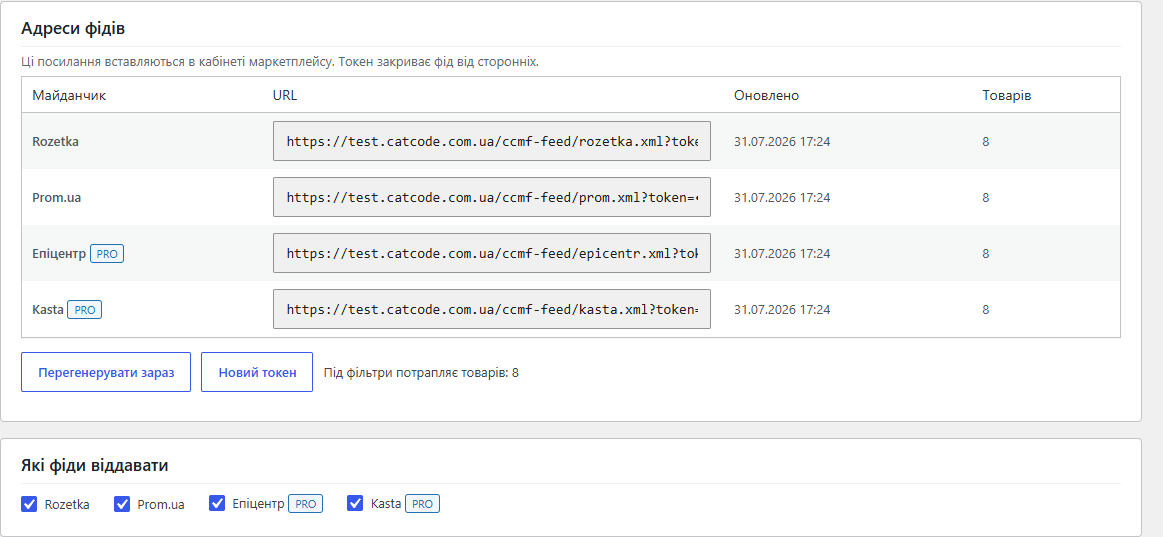
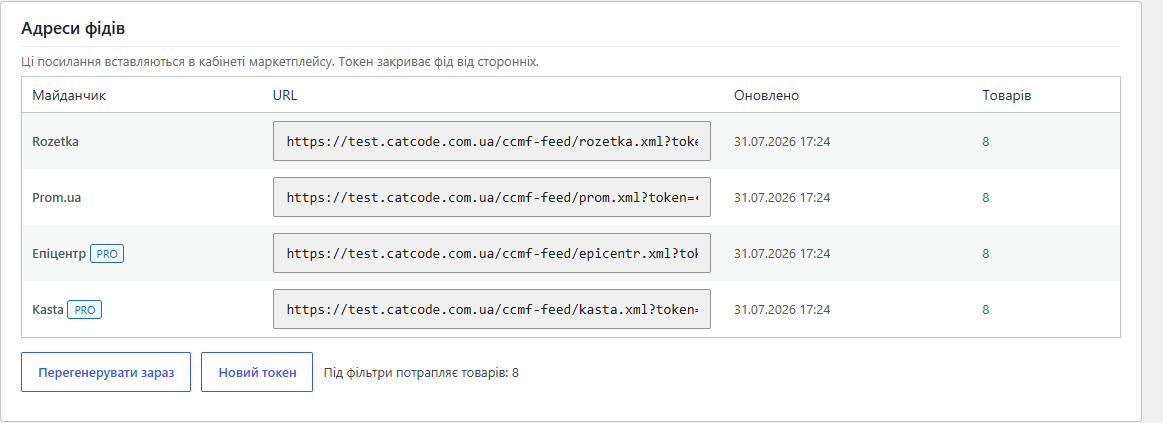
The link is protected by a token: if it leaks somewhere, the “New token” button instantly invalidates the old one. The file updates on a WP-Cron schedule, and the cache is cleared immediately when settings change — the marketplace won’t get yesterday’s catalogue.
market-feeds-for-woocommerce-1.4.0.zip archive.Didn't find the answer? Message us on Telegram and we'll reply within a business day.
 @catcode_support
Setup, compatibility, activation
@catcode_support
Setup, compatibility, activation
No. The plugin always serves the feed at an address like ?ccmf_feed=rozetka&token=…, and with permalinks enabled, additionally at the short /ccmf-feed/rozetka.xml?token=…
The feed is protected by a token in the link, and the cache sits in a folder with a random name. The token changes with one click — the old link stops working immediately.
Generation is streamed and paginated, so the limit is PHP execution time, not memory. For large catalogues, leave the cache enabled: the marketplace downloads a ready-made file.
Each variation is a separate offer with the parent product's group_id, its own characteristics, SKU, price and stock. The mode can be switched off with one checkbox.
Yes, Pro has a price multiplier: 1.05 raises every price in the feed by 5%, without changing the prices in the shop.
Yes, in Pro: filter by categories (with subcategories), by brands, and a list of excluded products by ID.
No. OpenAI accepts feeds from approved merchants only (apply at chatgpt.com/merchants) and takes the file over SFTP or its API; the standard upload currently works for the US market. The plugin produces the file in OpenAI's format and keeps it current.
/llms.txt is a short calling card of the shop for AI assistants (free). UCP is an open protocol an agent uses to search products and get prices and stock (Pro).
That is how the Epicentr cabinet answers a Rozetka/Prom YML: it needs its own XML without a shop block. Since 1.4.1 the Epicentr feed serves exactly that. If the Epicentr feed was on before the update, choose «Epicentr feed format» → «Epicentr XML» in the settings — the link does not change.
No reviews yet. Be the first.
No questions yet. Ask one — we answer within 24 hours.
We build custom modules for WordPress, WooCommerce, OpenCart and Shopify. Tell us about the task and we'll prepare an estimate.
Order a custom module
—

CatCode assistant
Just now


CatCode assistant
Online

I’ll help with your website task
Describe your website task — I’ll find a ready-made module or pass it to a developer for an estimate. Modules, custom features, layout, integrations, speed, migration, technical SEO.
