
OpenCart
Greece Couriers — a shipping module for ACS, ELTA, Geniki and Speedex in OpenCart: to the address, to an ACS store / SmartPoint / locker
Free + Pro
1 290 UAH
v1.0.1
 All Access4 990 ₴ / year
 Website auditA PDF report by email in 3 minutesCheck a website
Everyday tasks
Image compressorSize, quality and WebP in bulkQR generatorLink, Wi-Fi, payment to IBANVAT calculator20, 14, 7% and amount in wordsTransliterationOfficial Ukrainian standardWebsite checks
PHP and pluginsPHP version, WordPress, pluginsGoogle Merchant feedFields, prices, GTIN, imagesDomain emailSPF, DKIM, DMARC, blacklistsAI search readinessllms.txt, bots, markupAll 9 toolsEnter at least 2 characters

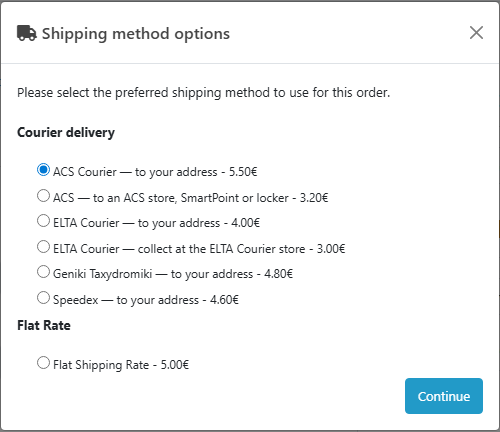
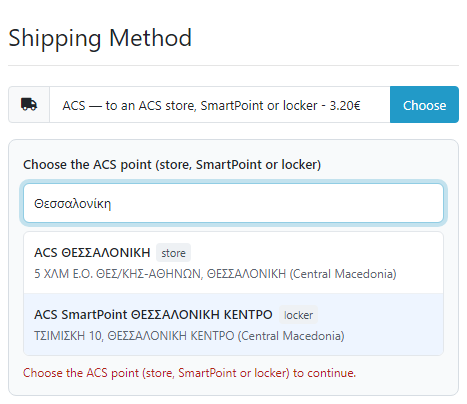
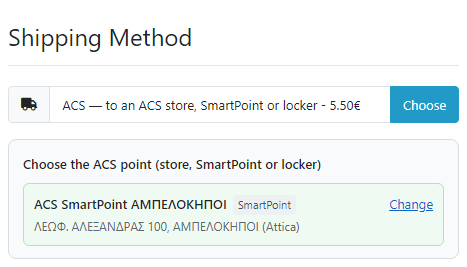
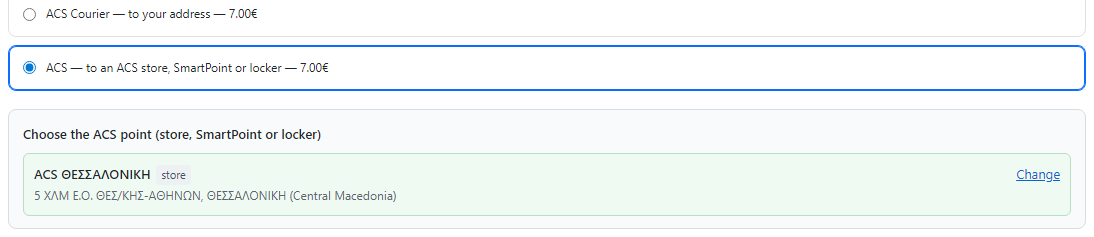
Greek couriers in one module for OpenCart 4, 3 and 2.3: ACS Courier (to the address in Greece and Cyprus or to an ACS store, SmartPoint or locker picked at checkout), ELTA Courier (to the address or "collect at an ELTA store", beta), Geniki Taxydromiki and Speedex to the address. Vouchers, labels, cash on delivery, tracking, the ACS pickup list and the Geniki day close from the order page. Pro — live ACS rates, bulk vouchers, an automatic voucher and hourly statuses. Lifetime licence.
The free version works with no time limit. Pro adds the rest of the features in the table.



A fresh install is the free version, nothing switches on by itself. The “Try Pro for 7 days” button → e-mail → the key right in the window and by e-mail.

Moving the store? Unbind the licence on the old domain and activate it on the new one yourself. For studios — keys for 5 or 25 sites, or unlimited.
 OpenCart 4.0.2.0+ and 4.1.x (tested on 4.1.0.3 and 4.0.2.3), 3.x (tested on 3.0.5.0) or 2.3.0.2.PHP 7.0+ — the one your OpenCart version needs (tested on 7.0, 8.1 and 8.3). cURL and OpenSSL extensions; the SOAP extension is not needed.Courier accounts with web service access: ACS, ELTA Courier, Geniki Taxydromiki, Speedex — any of them.Buyer’s phone at checkout — all couriers need it, and ACS needs a mobile for SmartPoints and lockers; in OpenCart 4 the module turns the phone on with one click.EUR currency in the store with a current rate — cash on delivery goes in it.Cron: in OpenCart 4 — the built-in scheduler (System → Maintenance → Cron Jobs); in OpenCart 3 and 2.3 — the cron URL from the settings once an hour. Without cron the points are updated with a button.Product weights — SmartPoints and lockers depend on them (up to 6 kg); for products without a weight the default weight from the settings is used.Module languages: English and ελληνικά.
OpenCart 3 and 2.3: the live ACS rate (Pro) for a point is updated in the method list right after the point is picked, and the same price goes to confirm and into the order.
ACS Courier (to the address in Greece and Cyprus, to an ACS store, SmartPoint and locker picked at checkout), ELTA Courier (to the address and “collect at an ELTA store”, beta), Geniki…
4 modules in one order — 40% cheaper than separately



Greece Couriers is an independent shipping module by the CatCode studio for stores in Greece and Cyprus on OpenCart 4, 3 and 2.3. It connects four Greek couriers — ACS Courier, ELTA Courier, Geniki Taxydromiki and Speedex. The buyer chooses delivery to the address or an ACS point — a store, SmartPoint or SmartPoint locker — right at checkout, and the manager creates the voucher, prints the label and sees the parcel status on the order page without opening the couriers’ portals.
What you need. A contract and web service access with the couriers you use. Honest note about testing: we have no courier test accounts — ACS and ELTA have no public test systems, Geniki and Speedex give them only to customers with a contract. The module is written from the official ACS Rest API and Geniki JobServicesV2 documentation and the ELTA Courier and Speedex WSDL, and tested on mocks of these services built from their documentation. We have not created real vouchers at the couriers. ELTA Courier is beta: ELTA has no public documentation, and “collect at an ELTA store” has not been checked on a real account yet. Try the module on your own accounts in the 7-day Pro trial — if a courier answers differently from the documentation, we will fix it quickly.
About trademarks. ACS, ELTA Courier, Geniki Taxydromiki and Speedex are trademarks of their owners. Greece Couriers is an independent module by CatCode, not an official product of these companies: they do not publish or support it. The module works with your own accounts through their web services.
Running WooCommerce? There is a separate Greece Couriers for WooCommerce plugin: the same four couriers — ACS, ELTA Courier (beta), Geniki Taxydromiki and Speedex, the ACS point picker at the classic and block checkout, vouchers and labels from the order screen, tracking and cash on delivery.
cc_grcourier.ocmod.zip (do not rename the archive) and press “Install”. OpenCart 3: Extensions → Installer → cc_grcourier-oc3.ocmod.zip, then Extensions → Modifications → “Refresh”. OpenCart 2.3: upload the contents of the upload/ folder from cc_grcourier-oc23.ocmod.zip to the store root (FTP or the hosting file manager).Didn't find the answer? Message us on Telegram and we'll reply within a business day.
 @catcode_support
Setup, compatibility, activation
@catcode_support
Setup, compatibility, activation
A contract and access to the web services of each courier you use: ACS — API key, Company ID and password, User ID and password, billing code; ELTA Courier — user code, password and customer code; Geniki Taxydromiki — username, password and application key; Speedex — username, password, customer ID and agreement ID. Only the couriers you set up are turned on.
Honestly: none. ACS and ELTA have no public test systems, Geniki and Speedex give test systems only to customers with a contract. The module is written from the official ACS Rest API and Geniki JobServicesV2 documentation and the ELTA and Speedex WSDL, and tested on mocks of these services built from their documentation. Only the ELTA answers to an empty account and the ELTA store lookup by postcode were checked live. Courier errors are shown in the courier's own words. Try it on your own account in the 7-day Pro trial — if the courier answers differently, we will fix it quickly.
ELTA Courier has no public documentation: the field descriptions come from the ELTA integration pages and the service WSDL. The "collect at an ELTA store" voucher uses the service that holds the parcel at the ELTA store for the buyer's postcode — this has not been checked on a real account yet. ELTA has no cancel API: a cancelled voucher has to be agreed with the ELTA store, the module only marks it.
No. Geniki Taxydromiki and Speedex in this module are delivery to the address only. Point selection is for ACS only (stores, SmartPoints and SmartPoint lockers).
Yes, ACS to the address only: for a Cypriot address the buyer sees only this method. For a voucher to Cyprus ACS needs a content type (customs) — it is entered in the ACS settings, otherwise the module stops the voucher with an explanation.
ACS accepts the day's vouchers only after the pickup list is issued. Press "Issue the ACS pickup list" when the day's labels are printed. A voucher already in a pickup list cannot be cancelled at ACS — the module shows the ACS answer.
For SmartPoints and lockers ACS needs the buyer's mobile number (69…) — the code is sent to it. Without a mobile the module stops the voucher before calling ACS and says what is missing. In OpenCart 4 the checkout phone is turned on with a button on the settings page.
No. For OpenCart it is one payment, a lifetime licence, and one licence covers all three builds: 4.x, 3.x and 2.3. Shipping methods, point selection, vouchers, labels, tracking and cash on delivery stay free with no time limit.
No reviews yet. Be the first.
No questions yet. Ask one — we answer within 24 hours.
We build custom modules for WordPress, WooCommerce, OpenCart and Shopify. Tell us about the task and we'll prepare an estimate.
Order a custom module
—

CatCode assistant
Just now


CatCode assistant
Online

I’ll help with your website task
Describe your website task — I’ll find a ready-made module or pass it to a developer for an estimate. Modules, custom features, layout, integrations, speed, migration, technical SEO.
