


OneBox Sync — CRM for OpenCart 2.3, 3.x and 4.x
Free module integrating OpenCart with OneBox OS: every order becomes a CRM process together with the customer, phone, address and items. Open source.
- Compatibility
- OpenCart 2.3.0.0 – 2.3.0.2 · 3.0.2 – 3.0.5 · 4.0.2 – 4.1.x
- PHP
- 7.4 or newer
- Version
-
v1.1.1 (OpenCart 4)
v1.1.1 (OpenCart 3.x)
v1.0.0 (OpenCart 2.3) - Updated
- August 2026
What the module does

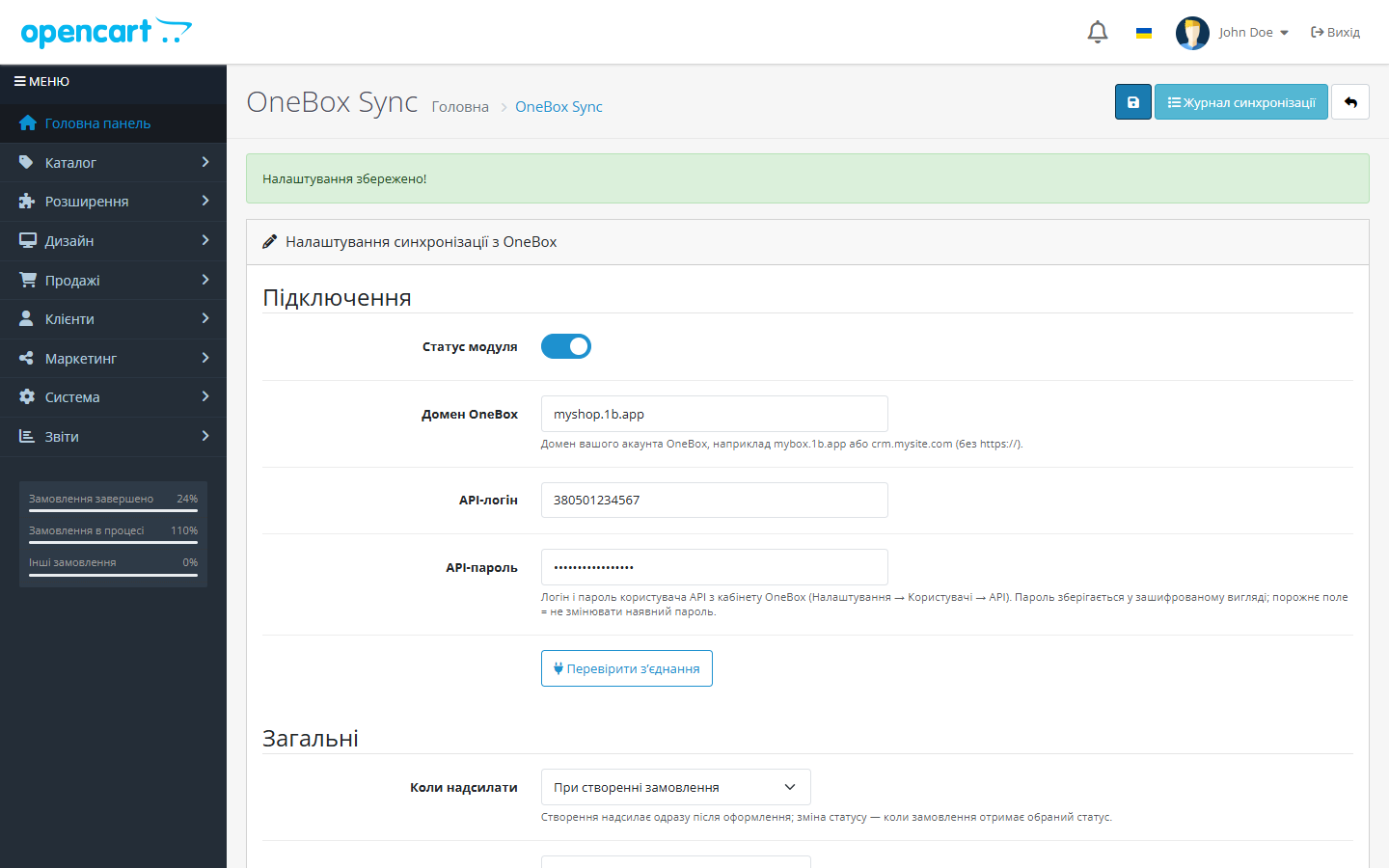
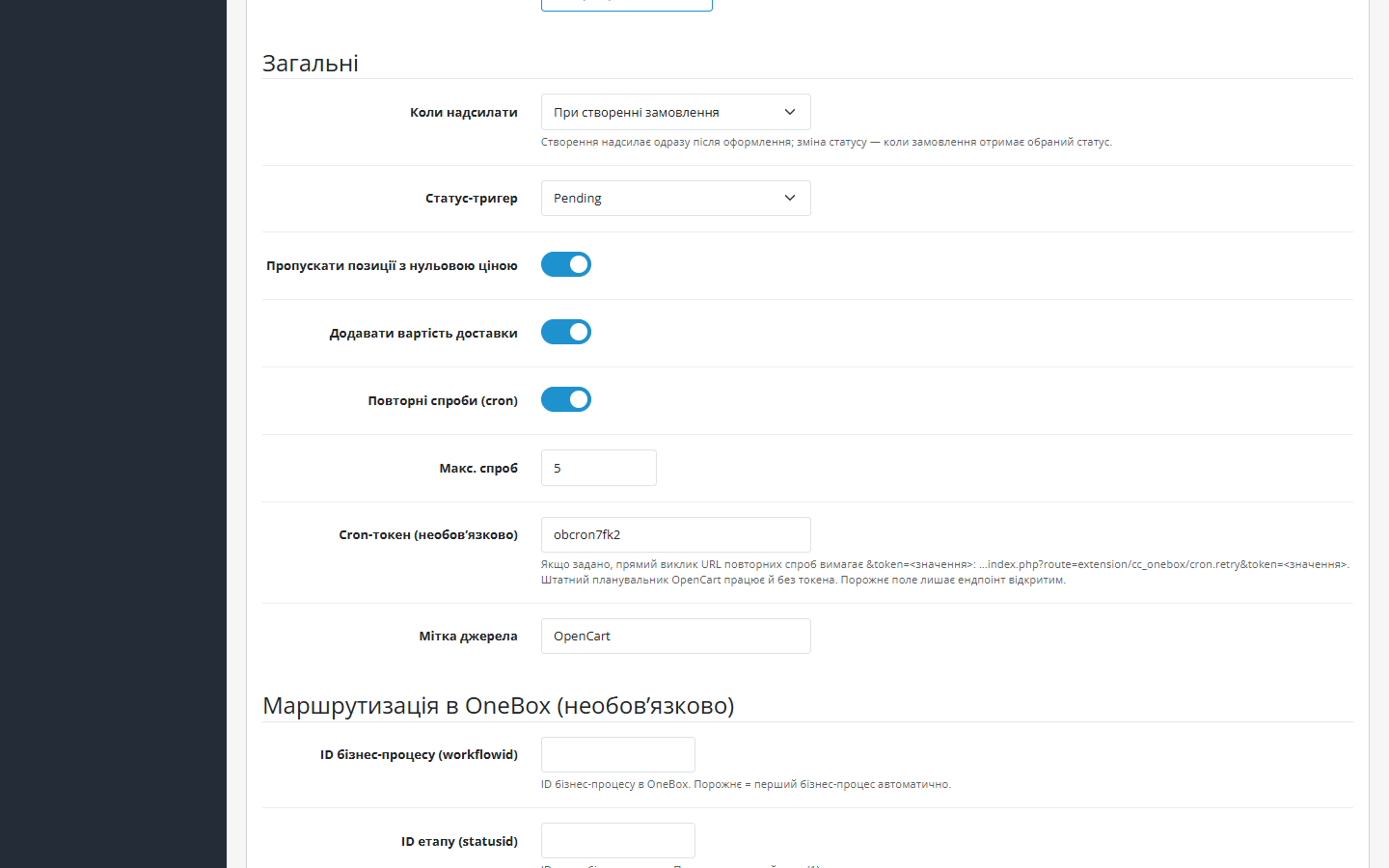
What it looks like
Technical requirements
 OpenCart 2.3.0.0–2.3.0.2, 3.0.2–3.0.5 and 4.0.2–4.1.x — three separate builds
- PHP 7.4+ for the OpenCart 3.x and 4.x builds; the OpenCart 2.3 build also runs on PHP 5.6–7.x
- OneBox OS with the “API v2” component (1b.app → Apps → API Services) and an employee login/password for the REST API
Version history
Amounts in the CRM no longer travel in the store’s base currency.
A separate build for OpenCart 2.3.0.0–2.3.0.2 and PHP 5.6–7.x.
The order event is registered as order*addHistory.
All versions (5)
Fixed a “silent” trigger on OpenCart 4.0.2.x: the order-history-add event wasn’t firing because of the method separator.
First public release: sending OpenCart 4.x orders to OneBox OS via API v2 (POST /order/set/ with token auth), upsert by externalid + unique sync log, mapping of items/payment/shipping,…
Full module description
OneBox Sync for OpenCart is a module that links a store on OpenCart 2.3, 3.x or 4.x to OneBox OS: every new order automatically becomes a process/order in the CRM, together with the customer, phone number, shipping address and items. Instead of transferring data by hand, the manager sees the request in OneBox straight away and works it through your own business process.
The module is completely free, the code is open. Repository on GitHub: github.com/catcodestudio/opencart-onebox-sync. No keys, no subscriptions, no order limits.
How it works, step by step
- The customer places an order — the module reacts to the order-history-add event, without touching checkout.
- The module authenticates with your OneBox: gets a token via POST
/api/v2/token/get/and sends the order via POST/api/v2/order/set/. - Items are matched to the OneBox catalogue: name, SKU (article/model), quantity and price — catalogue products are found or created automatically, with no duplicates in the catalogue. Shipping is passed as a separate line, so the process total matches the order total.
- OneBox returns a process ID — it’s recorded in the sync log; an externalid is also passed, so a repeat trigger won’t create a second process.
- Failed sends are retried by a cron job — orders that didn’t go through on the first attempt reach the CRM automatically.
Under the hood
- OpenCart events — the module subscribes to the order-history-add event (
addHistoryin OpenCart 4,addOrderHistoryin 3.x and 2.3); core and theme files are not modified. - Idempotency: an upsert by externalid on the OneBox side plus a unique sync log in the store’s database — no duplicate processes and no duplicate catalogue items.
- Mapping of items, payment and shipping into the OneBox process fields; optional workflowid/statusid/sourceid routing (empty = the first business process automatically).
- Cron retry queue for orders that failed to send the first time: it picks up both failed sends and ones stuck “in progress” for over an hour (for example if PHP was interrupted mid-request).
- Cron token — the public retry URL can be locked down with a shared secret:
...&token=<value>. OpenCart 4’s built-in scheduler also works without a token; an empty field leaves the endpoint open. - The API password is stored encrypted in the database, and the sync log holds the API request and response for diagnostics.
How to install
- In OneBox, install the “API v2” component (1b.app → Apps → API Services) and set an employee’s login and password (Users and Employees → Login, password, access rights).
- Upload
cc_onebox.ocmod.zipvia Extensions → Installer in the OpenCart admin. For OpenCart 3.0.2–3.0.5 use the separate build — cc_onebox-oc3.ocmod.zip (after installing, refresh modifications: Extensions → Modifications → “Refresh” button). - For OpenCart 2.3.0.0–2.3.0.2 use the build cc_onebox-oc2.ocmod.zip. ⚠️ The built-in 2.3 installer copies files via FTP only: if FTP isn’t configured, unpack the archive and upload the contents of the
upload/folder to the store root, then go to Extensions → Modules → OneBox Sync → “Install”. - In Extensions → Modules, find OneBox Sync, click “Install” and open the settings.
- Enter your OneBox domain, API login and API password, then click “Test connection”.
- If needed, fill in the business process, stage and source IDs (you can leave them blank — the module will take the first business process) and save.
- Place a test order and check the process in OneBox and the entry in the log.
- OpenCart 3.x and 2.3 have no scheduler — the retry line is added to the hosting’s crontab manually (typically every 15 minutes):
curl -s "https://SHOP/index.php?route=extension/module/cc_onebox_cron/retry&token=TOKEN"(on 3.x the route isextension/module/cc_onebox/cronRetry; the ready-made URL is shown in the module settings)
Questions
about the module
Didn't find the answer? Message us on Telegram and we'll reply within a business day.
 @catcode_support
Setup, compatibility, activation
@catcode_support
Setup, compatibility, activation
Where do I get OneBox API access?
From the employee card in the “Users and Employees” app of your OneBox: the employee's login and REST API password. The module exchanges them for a token itself via /api/v2/token/get/.
Does the module change checkout or the theme?
No. The module works through server-side OpenCart events — the checkout page and templates stay exactly as they were, and nothing needs restoring after the module is removed.
Can processes or products get duplicated in OneBox?
No. The module passes an externalid (OneBox updates the found process instead of creating a new one) and keeps a unique sync log; catalogue products are matched by SKU rather than created every time.
What happens if OneBox is unavailable at the moment of ordering?
The send goes into the retry queue — a cron retry will automatically deliver the order once OneBox responds again. The number of attempts and any errors are visible in the log.
Where do orders land in OneBox?
In the business process you specify in the settings (workflowid + statusid + sourceid). If the fields are left blank, the module automatically uses the first business process in your OneBox.
What happens after the module is removed?
Processes in OneBox and orders in the store are left untouched — the module only reads orders and keeps its own sync log.
No reviews yet. Be the first.
No questions yet. Ask one — we answer within 24 hours.
Not quite what you are looking for?
We build custom modules for WordPress, WooCommerce, OpenCart and Shopify. Tell us about the task and we'll prepare an estimate.
Order a custom module
Buying the module
—



