Get in touch
Payments · WordPress

Cash-on-Delivery Fee / Prepayment Discount for WooCommerce

Обраний метод оплати додає в підсумок кошика й чекауту окремий рядок — надбавку за післяплату або знижку за передоплату чи самовивіз. Безкоштовна версія дає одне правило: фікс або відсоток, мін/макс, поріг суми кошика, власний лейбл, податковий клас і коректний перерахунок при зміні методу оплати. Pro знімає ліміт на кількість правил і додає умови за методом доставки, категорією товару, групою покупців, країною та розкладом дії.

Download for free
Version
v1.1.0
Compatibility
WooCommerce 6.0+ · WordPress 5.6+
Platform
WordPress
Cash-on-Delivery Fee / Prepayment Discount for WooCommerce

What each licence includes

Feature Free Pro
Rule “payment method → surcharge or discount” 1 rule unlimited
Fixed amount or percentage
Minimum and maximum fee amount (percentage clamp)
Cart-total threshold “from / to”
Separate line in cart, checkout and order with a custom label
Recalculation on payment-method change without reload
Tax status and VAT class for the fee line
Calculation base: “items + shipping” or items only
Unlimited rules with execution priority
Condition “shipping method” — including a separate pickup discount
Condition “cart product category”
Condition “user role”
Condition “country”
Rule schedule — active from / to

Cash on delivery costs the store money: the carrier’s fee, return shipping on refused parcels, frozen cash, and a percentage of failed pickups. Cash-on-Delivery Fee / Prepayment Discount lets you shift that difference onto checkout: the chosen payment method adds a separate line to the total — a surcharge or a discount. The customer sees it before confirming the order, and the amount recalculates every time they switch payment method.

The base version is free and not time-limited: one rule “payment method → plus or minus”, a fixed amount or percentage, min/max, a cart-total threshold, and a custom line label. Pro features are visible right away — but greyed out, in their place: they switch on only once you ask for the 7-day trial yourself. The download link is in the “How to install” section.

What the customer sees

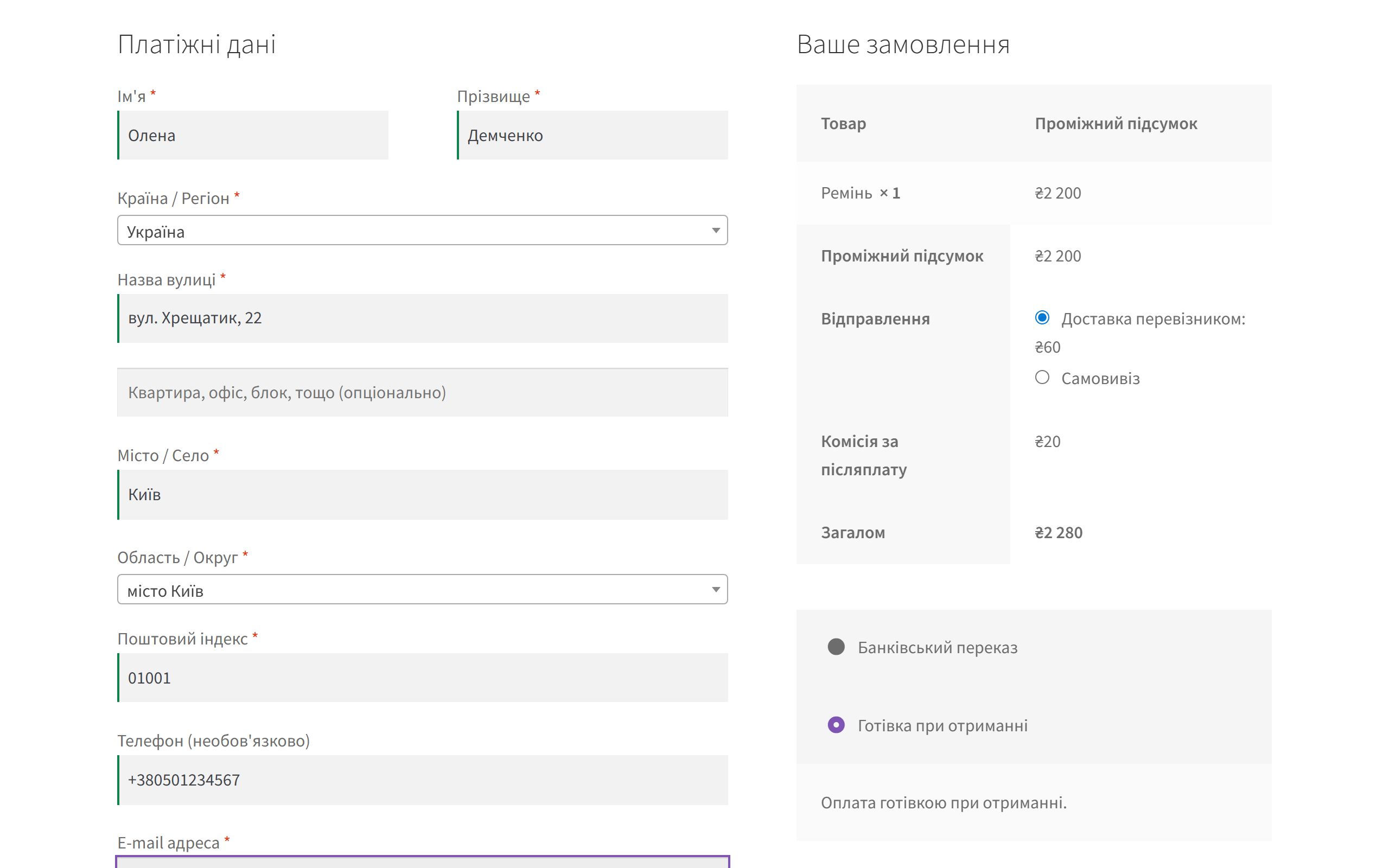
‘Cash-on-delivery fee’ line in the WooCommerce order summary
WooCommerce checkout: the customer picked “Cash on delivery” — a “Cash-on-delivery fee” of ₴20.00 is added on top of the ₴1,499.00 subtotal and ₴60.00 shipping, for a total of ₴1,579.00. Switch to another payment method and the line disappears — the total recalculates without a page reload.

It works the same way on the block-based checkout: the chosen method is passed into the session via the Store API, after which the total is recalculated — behaviour identical to the classic checkout.

What the admin gets

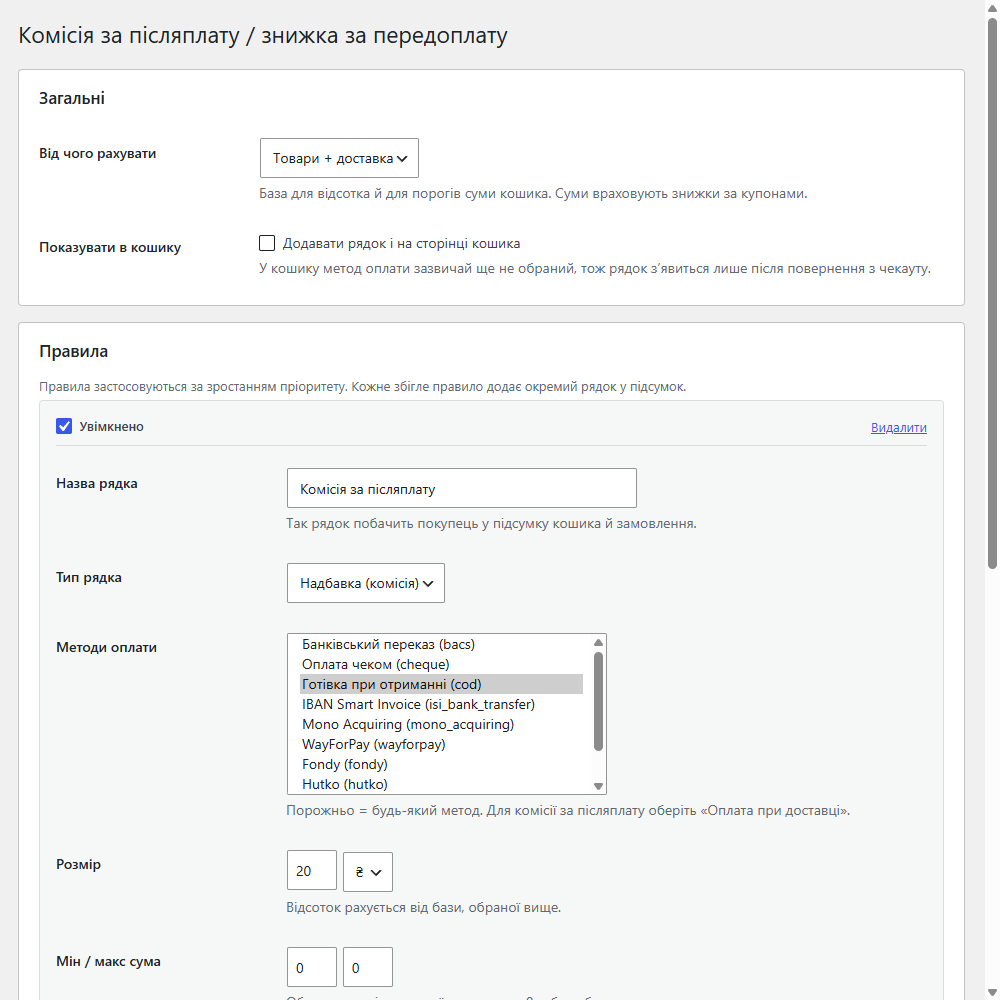
Cash-on-delivery fee settings in WooCommerce: calculation base and rule list
Settings in WooCommerce. At the top — the calculation base (“items + shipping” or items only) and a “show line in cart” toggle. Below — the rules: line name, type (surcharge or discount), list of payment methods, amount in UAH or percent, min/max amount.

How it works, step by step

  1. You create a rule: pick a payment method (e.g. “Cash on delivery”), a mode — surcharge or discount — and an amount type — fixed or a percentage of the base.
  2. Set the limits. For a percentage you set a min and max: 5% of 899 UAH gives 30 UAH if the minimum is 30; 5% of a large order is capped at the maximum. 0 means no limit.
  3. Restrict the cart range — “from / to”. The fee won’t trigger on orders cheaper or more expensive than the stated amounts.
  4. Choose the tax status and class of the line if the fee is subject to VAT.
  5. At checkout, the customer picks a payment method — the line appears or disappears, the total recalculates, and the same value is written to the order.
  6. With Pro there can be any number of rules: they’re checked by priority (a lower number is a higher priority), and the conditions gain a shipping method, cart product category, user role, country and date range.
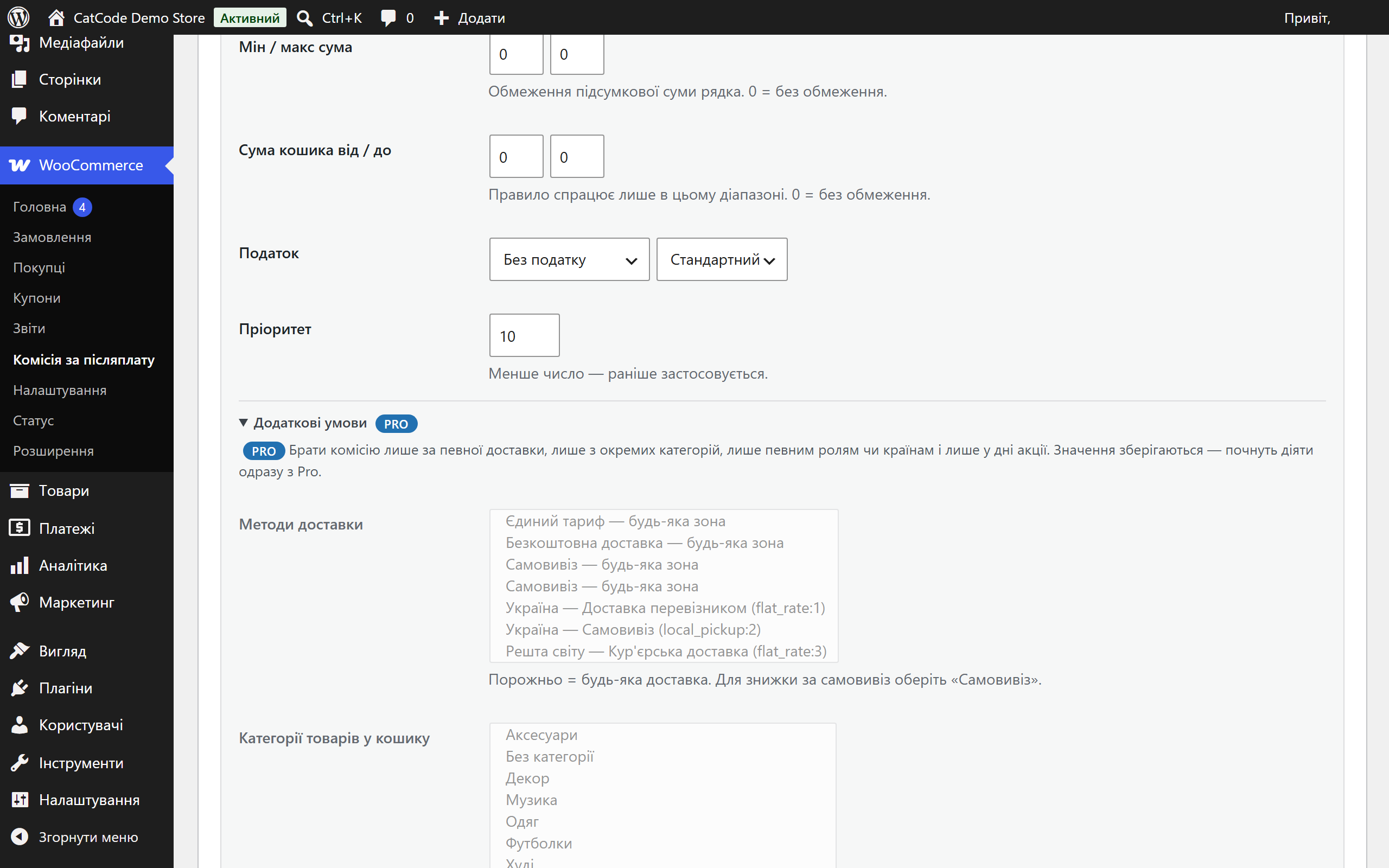
Pro rule conditions shown greyed out
Pro conditions stay in their place — greyed out, with a badge and one line explaining what they unlock. Saved values never disappear and start working the moment the licence is activated.

The trial starts only on your click

A fresh install is simply the free version: no Pro features switch themselves on and none expire after a week. If you want to try Pro, click “Try Pro for 7 days”, enter an email — and you’ll get a genuine 7-day key by email. No card required, nothing gets charged, one trial per installation.

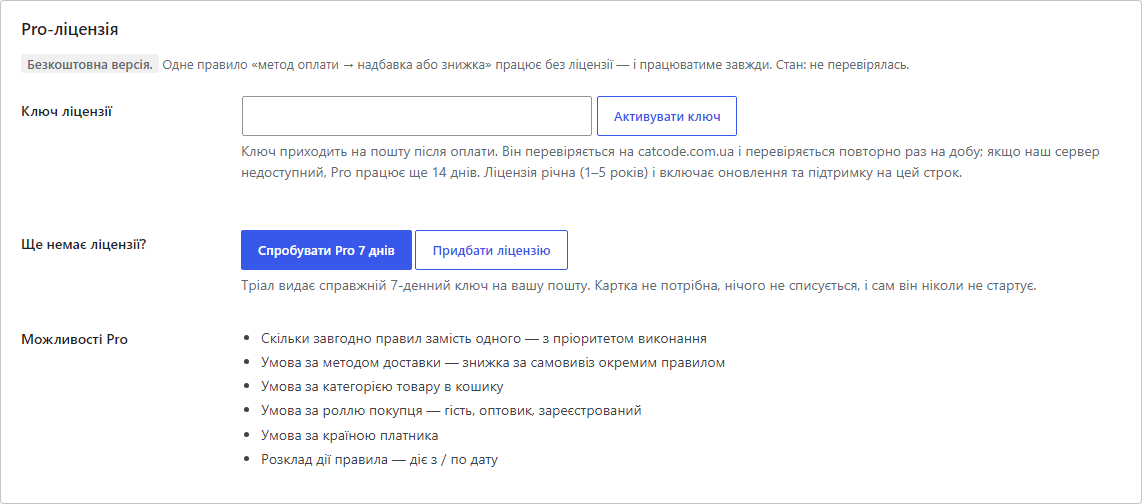
Licence block: Pro features and trial button
Licence block: status, list of Pro features, and the trial button. The key is checked against catcode.com.ua once a day; if the server is unreachable, Pro keeps working for another 14 days.
‘Try Pro for 7 days’ modal
A single email field — and the key arrives by mail and activates on the site.

Pricing

990 UAH — one year’s licence. A year of updates, technical support and access to all Pro features. No auto-charges: renewal is always manual, we don’t store card details.

You can take a longer term right away — the longer, the cheaper per year:

  • 1 year — 990 UAH
  • 2 years — 1,880 UAH (−5%, 940 UAH/year)
  • 3 years — 2,610 UAH (−12%, 870 UAH/year)
  • 4 years — 3,250 UAH (−18%, 813 UAH/year)
  • 5 years — 3,710 UAH (−25%, 742 UAH/year)

When the term expires, only updates and new features stop — Pro features keep working: additional rules stay saved but aren’t applied, while the first (base) rule keeps running with no time limit. We’ll remind you by email 14, 7, 3 and 1 day before expiry. One key — one domain; if you move the store, deactivate the licence on the old domain and activate it on the new one yourself.

Trial first, payment after. You start the trial yourself with the “Try Pro for 7 days” button — and for seven days all Pro features work: you can build the full rule matrix (cash-on-delivery fee, prepayment discount, a separate pickup discount) and see how it behaves on real orders. That’s why refunds after payment aren’t offered.

Technical requirements

  • WooCommerce 6.0+ (tested on 10.7) on WordPress 5.6+ — build cod-fee-and-prepay-discount-for-woocommerce v1.1.0
  • PHP 7.4+ (tested on 8.1–8.3)
  • Calculation happens on your own server; the only outbound call is the licence-key check at catcode.com.ua

Under the hood

  • The standard totals mechanism. The fee is added to the cart as a fee, so it flows into orders, emails and reports with no extra plumbing — and displays correctly in the order admin screen.
  • Correct recalculation. On the classic checkout the plugin triggers update_checkout itself when the payment method changes; on the block checkout it reads the chosen method from the session, where the Store API puts it.
  • Taxes without surprises. The line can be assigned a tax class, and VAT is calculated on the fee itself: in testing, an order with the fee produced 199.80 in tax versus 179.80 with a “no tax” tax status.
  • Compatible with HPOS (custom order tables) and the WooCommerce block checkout.

How to install

  1. Download cod-fee-and-prepay-discount-for-woocommerce-1.1.0.zip, upload it via “Plugins → Add New → Upload Plugin” and activate it.
  2. Open WooCommerce → Cash-on-Delivery Fee, enable the status and enter a line name (e.g. “Cash-on-delivery fee”).
  3. Choose the calculation base — “items + shipping” or items only — and, if needed, enable showing the line in the cart.
  4. Create a rule: payment method, mode (surcharge or discount), fixed amount or percentage, min/max and cart threshold.
  5. If the fee is subject to VAT — set the line’s tax status and class.
  6. For Pro: paste the licence key from the email and click “Activate key” — after that all rules apply, not just the first. No key yet? “Try Pro for 7 days” will send a trial one to your inbox.

Version history

1.1.0 — 12 August 2026
The trial no longer starts by itself: a fresh install stays the free version until the owner asks for Pro. Keys are checked on our server (activation on save, daily check, 14-day offline grace period). Pro conditions are shown greyed out in place, with an explanation. “Save settings” no longer wipes the key and saved Pro values. The free tier applies exactly the rule highlighted on screen. One unobtrusive notice — and only after the fee line has actually triggered.
1.0.0 — 28 July 2026
First release: rules with fixed/percentage amounts, min/max clamp, cart thresholds, “items + shipping” or items-only base, cart display, tax status and VAT class, works on both classic and block checkout, HPOS-compatible.

Frequently asked questions

Why isn't the fee line visible in the cart?

The payment method is chosen at checkout, so it isn't known yet in the cart. If you need the line there too, enable the “show in cart” option: it will appear once the customer has been to checkout and picked a payment method.

Can I take a percentage but not less than a fixed amount?

Yes. Choose the “percentage” type, and set the lower bound in the “min” field. “Max” works the same way: 5% of a large order won't exceed the set ceiling. 0 in both fields means no limits.

How do I create a prepayment or pickup discount?

Create a rule with the “Discount” mode and select online payment methods in it. A pickup discount is a Pro rule with a shipping-method condition.

Is the fee subject to VAT?

If needed — yes, the line is assigned a tax status and tax class, and VAT is calculated on the fee itself.

Does it work with the WooCommerce block checkout?

Yes. The chosen payment method is passed into the session via the Store API, after which the total recalculates — the same as on the classic checkout.

What happens to the rules when the licence expires?

Additional rules stay saved but stop applying — the first (base) rule of the free version keeps working. Renewing the licence with the same key switches all rules back on.

Questions about the module?

Message us on Telegram — we reply within the working day. We will help with setup, compatibility and key activation.

@catcode_support

Not quite what you are looking for?

We build custom modules for WordPress, WooCommerce, OpenCart and Shopify. Tell us about your task and we will prepare an estimate.

Order a custom module