WordPress
Wholesale — Bulk Prices by Customer Role for WooCommerce
Free + Pro
990 UAH/year
v1.2.0
 All Access4 990 ₴ / year
 Website auditA PDF report by email in 3 minutesCheck a website
Everyday tasks
Image compressorSize, quality and WebP in bulkQR generatorLink, Wi-Fi, payment to IBANVAT calculator20, 14, 7% and amount in wordsTransliterationOfficial Ukrainian standardWebsite checks
PHP and pluginsPHP version, WordPress, pluginsGoogle Merchant feedFields, prices, GTIN, imagesDomain emailSPF, DKIM, DMARC, blacklistsAI search readinessllms.txt, bots, markupAll 9 toolsEnter at least 2 characters
Wholesale prices by customer role in WooCommerce: minimum order amount, quantity step and selling by packs. The price is applied on the fly through Woo's filters.
Clear even without sound: Ukrainian subtitles
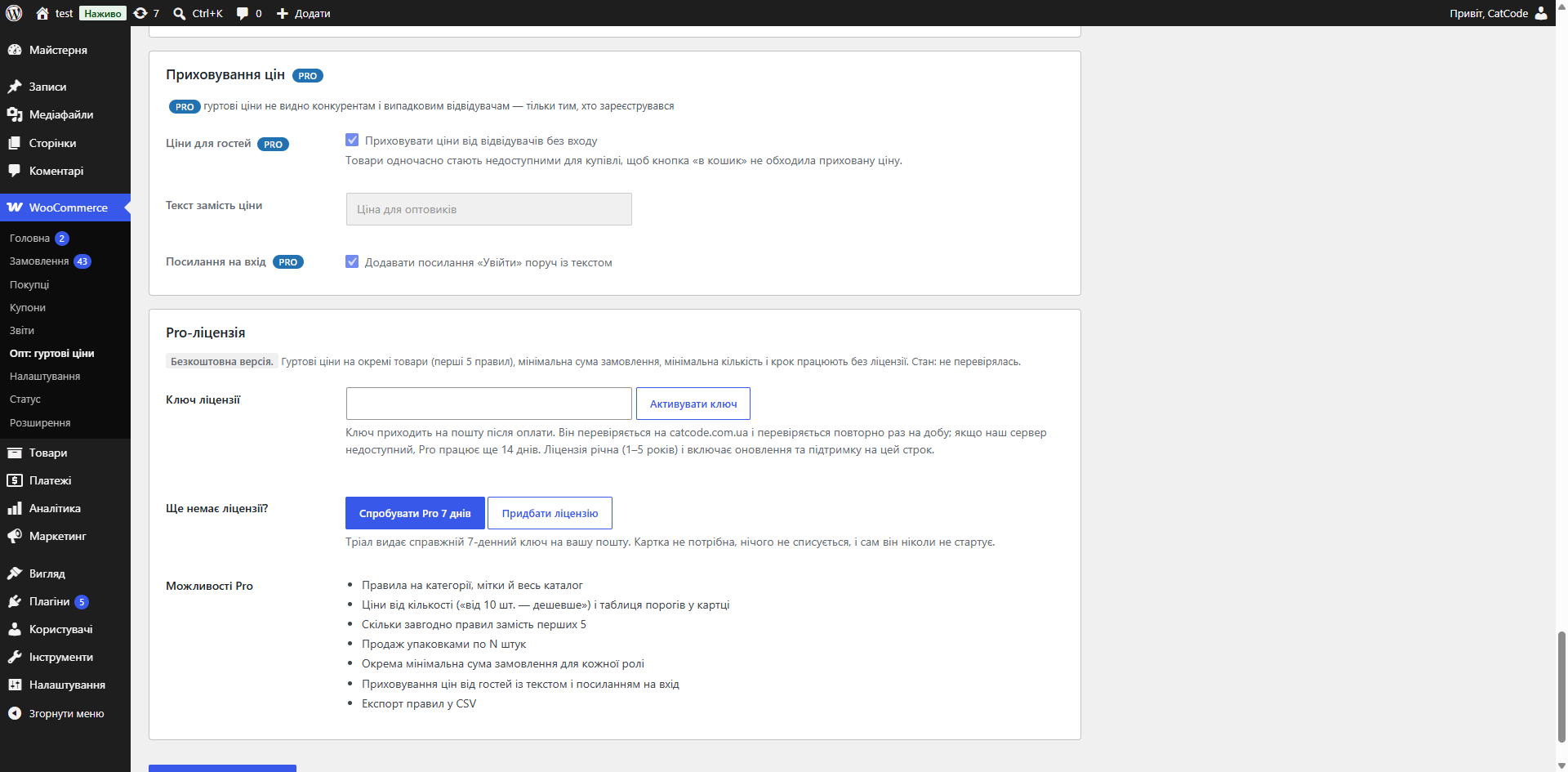
The free version works with no time limit. Pro adds the rest of the features in the table.


Set globally or separately for each role. Two modes: hard — checkout is blocked — and soft — the shopper sees a warning showing how much more they need to add.

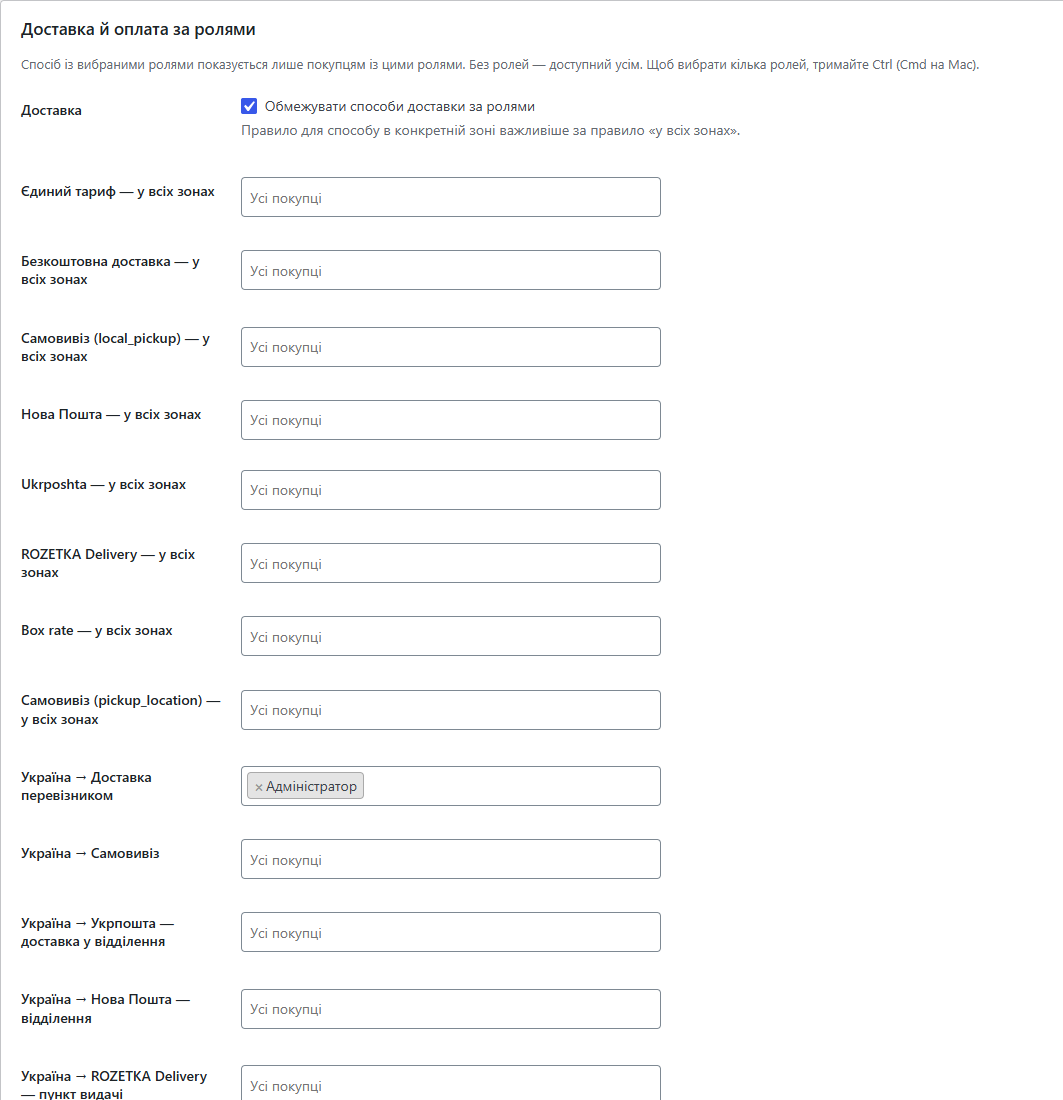
Warehouse pickup or your own courier only for wholesale customers, while retail shoppers see the usual carriers.

The classic and block-based cart and checkout (Store API) are handled identically, and HPOS (custom order tables) is supported.

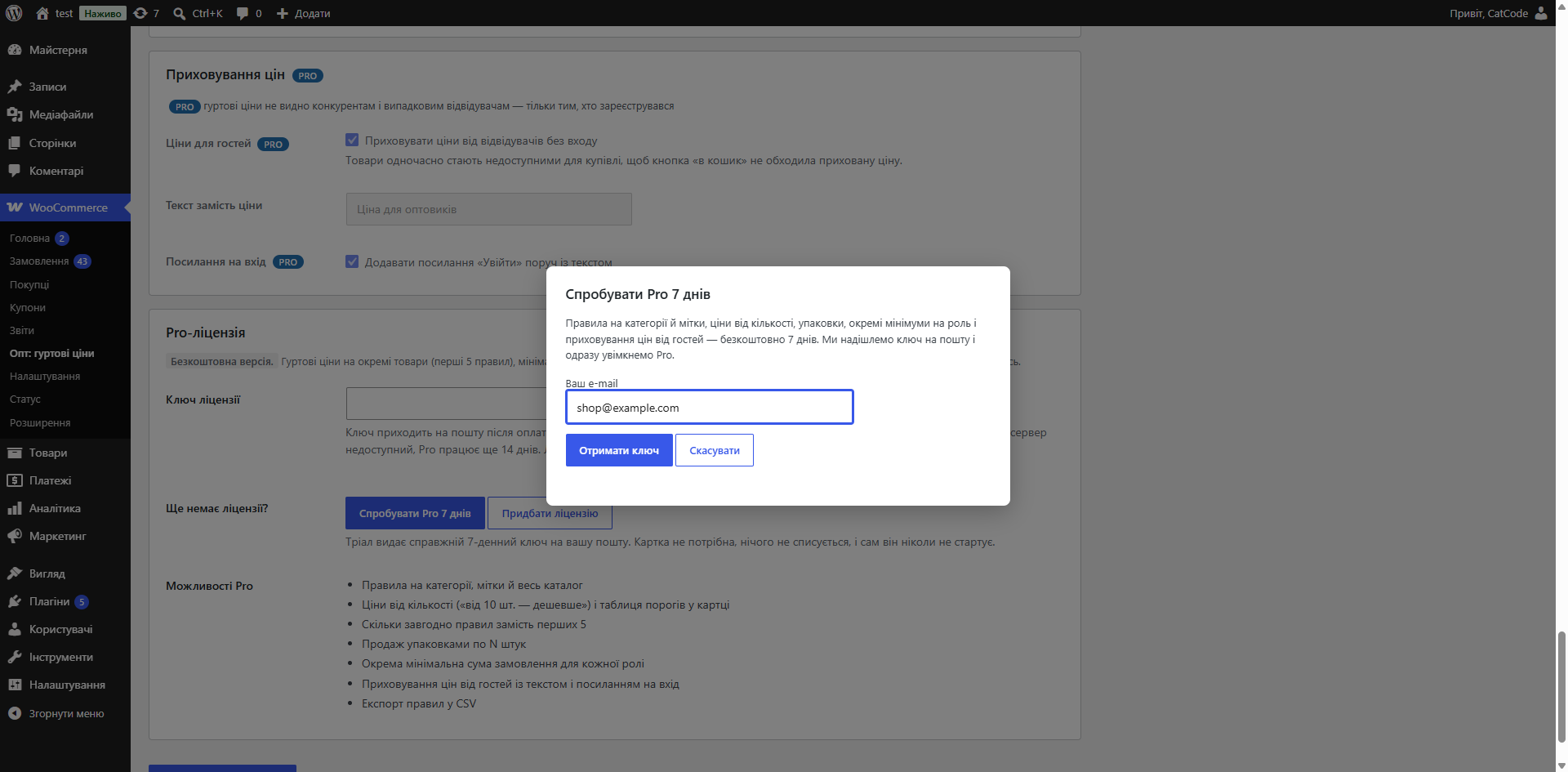
A fresh install is the free version, nothing switches on by itself. The “Try Pro for 7 days” button → e-mail → the key right in the window and by e-mail.

Moving the store? Unbind the licence on the old domain and activate it on the new one yourself. For studios — keys for 5 or 25 sites, or unlimited.
 WordPress 6.2 or newer, WooCommerce, PHP 7.4 or newer. Compatible with HPOS, the classic checkout and the block-based checkout.
Shipping methods by customer role (for one zone or every zone, classic and block checkout); in Pro, payment methods by role.
Wholesale prices by customer role, minimum order amount, quantity step, selling by packs, price applied through WooCommerce filters with no rewriting of products, compatibility with HPOS…
4 modules in one order — 40% cheaper than separately



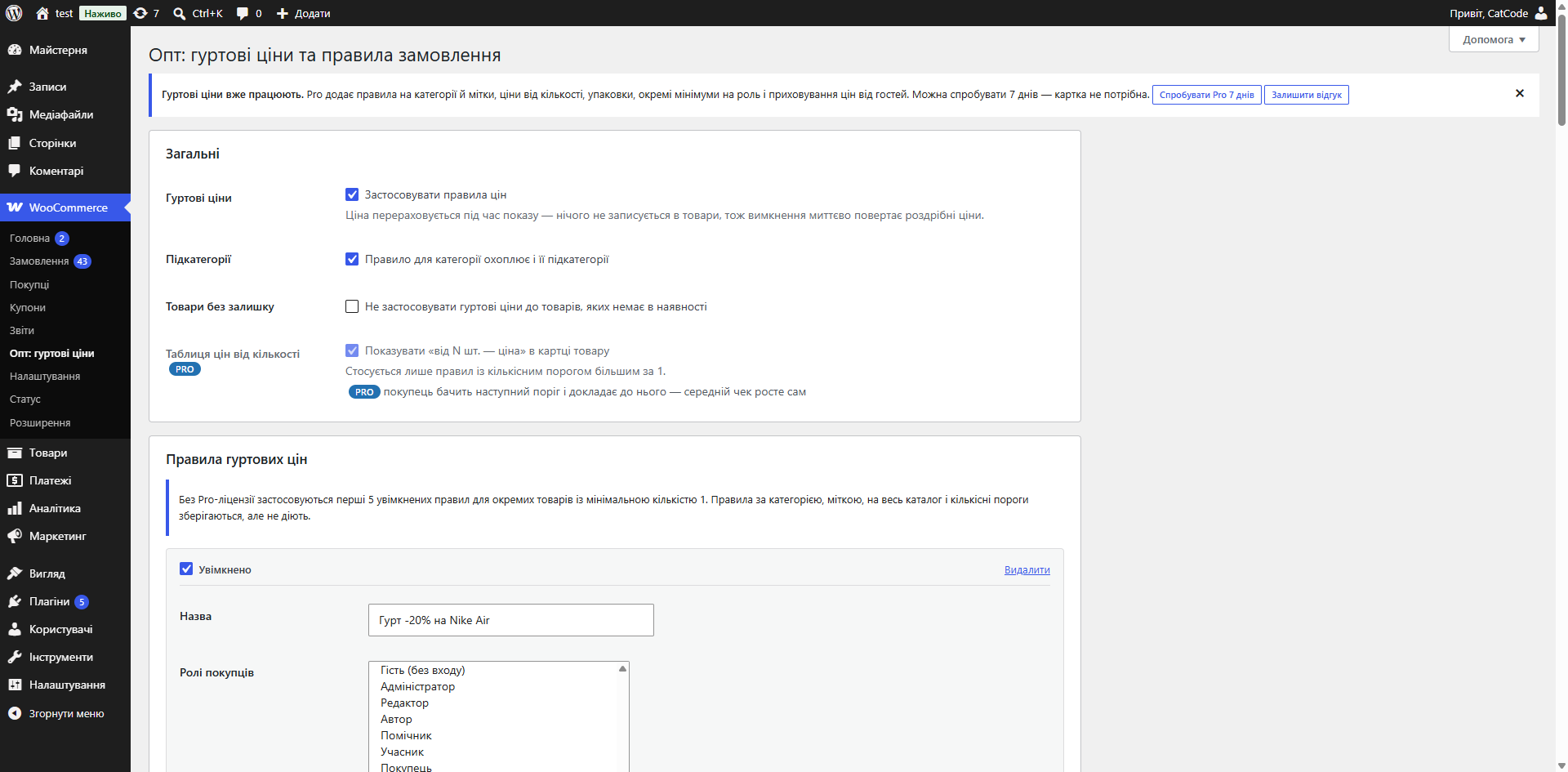
Wholesale for WooCommerce is a module for shops that sell both retail and wholesale at once. WooCommerce keeps one price per product; the plugin adds a second layer: a wholesale price for chosen customer roles, a minimum order amount, and quantity rules — step, minimum, and selling by whole packs.
Set globally or separately for each role. Two modes: hard — checkout is blocked — and soft — the shopper sees a warning showing how much more they need to add. The cart total is compared, with or without tax, as you choose.
Minimum quantity and step can be set globally, for an individual product, and for a variation. An incorrect quantity isn’t rejected, it’s corrected — up, down, or to the nearest allowed value, with a message to the shopper. Pack mode makes the step and minimum equal to the pack size.
Warehouse pickup or your own courier only for wholesale customers, while retail shoppers see the usual carriers. Next to each shipping method you pick the roles: for one zone or for every zone at once. A method with no roles stays available to everyone. It works in both the classic and the block checkout, and after logging in with a wholesale account the list updates straight away, with no stale shipping cache.
In Pro, payment methods are limited the same way: invoice or deferred payment only for trusted dealers.
The “Try Pro for 7 days” button only asks for an email and issues a 7-day key. No card needed, nothing is charged. The key is shown immediately in the dialogue and sent by email as well.
The key is checked on the CatCode server. The licence is annual (1–5 years) and includes updates and support for that term.
The classic and block-based cart and checkout (Store API) are handled identically, and HPOS (custom order tables) is supported. For variable products, prices and quantities are resolved per variation.
Wholesale in Woo is usually done one of two bad ways: setting up a second shop, or duplicating products with different prices. Both mean double stock-keeping and double the content work.
The right way is the same catalogue, with the price depending on who’s looking. Then there’s one stock count, one product page, and the retail shopper and the wholesale buyer see different numbers.
1. You pick a customer role — any existing WordPress role, or “Guest” — and set a price rule for it: a percentage discount or a fixed price.
2. A shopper with that role enters the shop and sees their own price in the catalogue, product page and cart.
3. For that same role you can set a minimum order amount, a quantity step, and selling by packs.
4. If the order total is below the minimum, the shopper sees an explanatory message rather than a silent error; in hard mode checkout is blocked. An invalid quantity is corrected automatically.
Rules are set at the role level, not the product level, so a new discount for wholesale buyers can be introduced with a single change, without touching the catalogue.
Prices on the products themselves are not rewritten. Disable the module, and the catalogue has exactly the prices it had before it, with no rollback or cleanup needed.
The price is applied through WooCommerce’s standard price filters. That’s why it correctly carries through to the cart, the order, emails and reports — rather than existing only visually in the catalogue, as happens with solutions that swap the price in the template.
1. Upload the archive under “Plugins → Add New → Upload Plugin” and activate it.
2. Pick the wholesale buyers’ role and set a price rule. The plugin does not create roles itself — the role must already exist in WordPress.
3. Add a minimum amount, a quantity step, or packs, if needed.
4. Log in with a test wholesale account and check the price in the catalogue, cart and order.
Didn't find the answer? Message us on Telegram and we'll reply within a business day.
 @catcode_support
Setup, compatibility, activation
@catcode_support
Setup, compatibility, activation
No. The price is applied at display time through WooCommerce's standard filters — your regular and sale prices stay untouched. Disable the plugin, and the shop instantly returns to retail prices.
Whichever is better value for the shopper wins. A wholesale rule never raises the price.
Create a user role for wholesale customers and select it in the "Customer roles" field of the rule. An empty field means any role.
The product is sold with a step or in packs, and the entered quantity didn't fit the grid. The plugin adjusts it and shows a message — so an order isn't lost to a typo.
No. Delivery isn't known yet at the cart stage, so the cart total is compared — with or without tax, as configured.
Yes. Enable "Limit shipping methods by role" and pick the roles next to the method, for one zone or for every zone. Customers without those roles simply won't see it. Payment methods by role are in Pro.
No reviews yet. Be the first.
No questions yet. Ask one — we answer within 24 hours.
We build custom modules for WordPress, WooCommerce, OpenCart and Shopify. Tell us about the task and we'll prepare an estimate.
Order a custom module
—

CatCode assistant
Just now


CatCode assistant
Online

I’ll help with your website task
Describe your website task — I’ll find a ready-made module or pass it to a developer for an estimate. Modules, custom features, layout, integrations, speed, migration, technical SEO.
