Payment Status Sync for WooCommerce is a plugin for shops that take card payments. It happens like this: the customer has paid, the money is with the payment provider, and the order in the admin still says “Pending payment”. The “paid” status is set by the notification the provider sends to the site, and when it does not arrive — the site was down for a minute, a firewall or a security plugin cut the request, the webhook URL or secret changed — the order just hangs. Nobody ships it, WooCommerce may even cancel it once the “Hold stock” time runs out, and the shop learns about it from an annoyed customer’s e-mail.
The plugin asks the provider itself about orders waiting for payment — through its official status API, the same question the notification should have answered. An order is marked paid only when the provider has confirmed the payment and the amount and currency match the order. Underpayment, another currency, a payment for another order or a payment not yet captured is shown and left to a human: nothing is changed on a guess.
Works with our WooCommerce payment gateways — LiqPay, monobank, WayForPay and Portmone — and with the official WooCommerce Stripe Payment Gateway and WooCommerce PayPal Payments plugins. Our gateways need no separate keys: the gateway itself reads and applies the status with its own settings.
Running OpenCart? There is a separate module for it — Payment Status Sync for OpenCart (builds for 4.x, 3.x and 2.3, LiqPay, monobank, WayForPay and Portmone).
What the customer sees
Nothing new: the checkout, the payment page and the thank-you page stay exactly as your gateway makes them. The difference is that the customer’s paid order does not hang in “Pending payment”: as soon as the provider confirms the payment, the order moves to “Processing”, WooCommerce sends the usual “order is being processed” e-mail and reduces stock — exactly once. If “Hold stock” is on in your shop, Pro keeps WooCommerce from cancelling an order that has already been paid.
What the admin gets
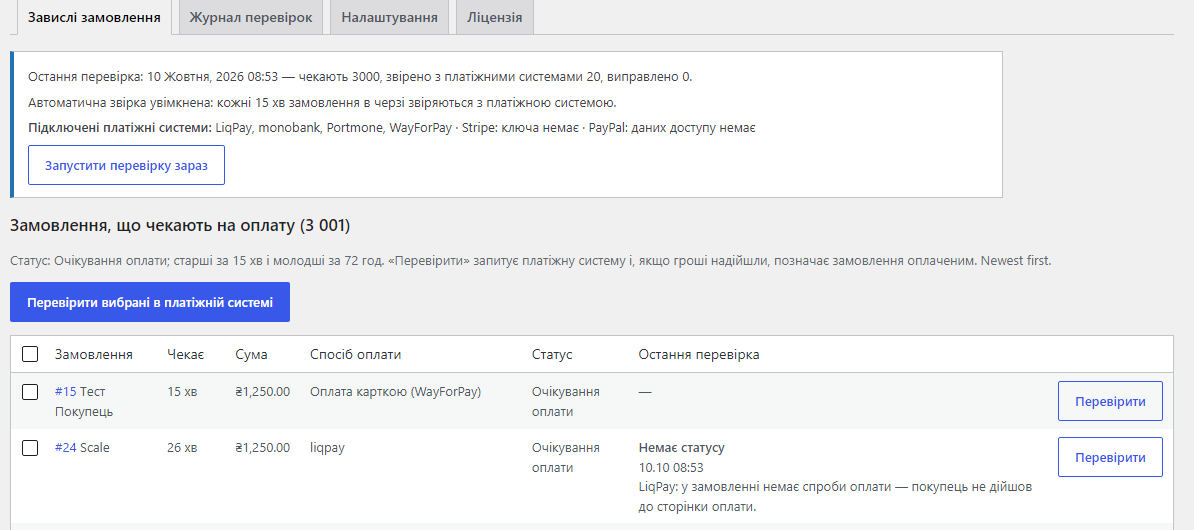
- WooCommerce → Payment Status Sync with the tabs “Stuck orders”, “Check log”, “Settings” and “Licence”.
- The list of orders waiting for payment: how long it has waited, the total, the payment method, the status and the result of the last check with an explanation — for example, “the order has no payment attempt — the customer never reached the payment page”. Newest first, with paging and an exact count even with thousands of orders.
- “Check” next to each order and “Check selected with the provider” for several at once; at the top — when the last scan ran, how many orders are waiting and which providers are connected.
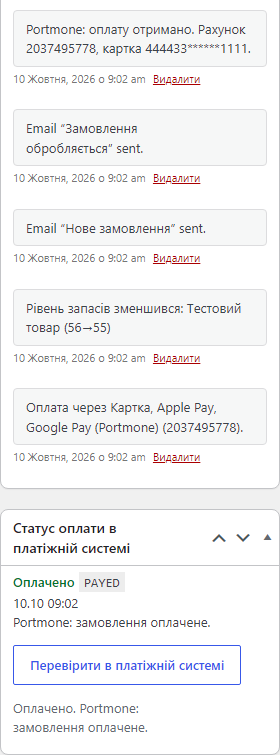
The order page gets a “Payment status at the provider” box: what the provider answered, when, and a “Check with the provider” button. Once the payment is confirmed, the order notes show the gateway’s own entry (here “Portmone: payment received”) and the usual WooCommerce entries about the e-mail and stock.
The WooCommerce orders list gets a bulk action “Check payment with the provider” (up to 25 orders at a time) with a summary: how many were checked, how many marked paid, how many skipped. A separate notice appears when payments in the last 24 hours did not match their orders by amount, currency or order number.
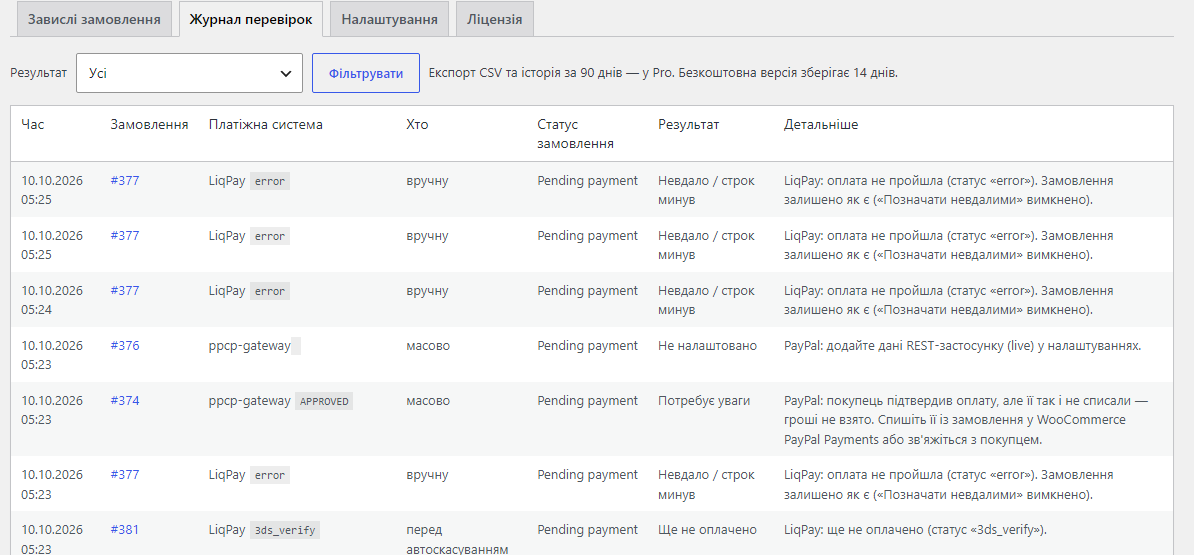
The check log keeps every check: time, order, the provider with its own status (error, 3ds_verify, APPROVED…), who checked — manually, in bulk, automatically or before the auto-cancel — the order status and an explanation. Free keeps 14 days, Pro 90 days with CSV export.
How it works — step by step
- What counts as “stuck”. By default, “Pending payment” orders older than 15 minutes (a younger one may still be on the payment page) and younger than 72 hours. Optionally also Failed, On hold and Cancelled.
- Who answers. For each order the plugin takes the payment method and the matching connector: our LiqPay, monobank, WayForPay or Portmone gateway — then the status is read by the gateway’s own client with its keys; Stripe — by the PaymentIntent or Checkout Session the official plugin stored; PayPal — by the PayPal Orders v2 order. Other payment methods have no check, and the list shows that.
- The question to the provider. LiqPay
status, monobank invoice/status, WayForPay CHECK_STATUS, the Portmone payment result request, Stripe /v1/payment_intents and /v1/checkout/sessions, PayPal /v2/checkout/orders.
- The decision. Paid, amount and currency match — the order becomes paid, with a note saying where the confirmation came from. Funds held (hold, requires_capture) or the amounts differ — On hold for a manual check. Still processing — the order keeps waiting. The customer never reached the payment — nothing changes.
- Declined payments. By default the plugin only reports them. With the Pro option “Mark failed”, a declined, cancelled or expired payment moves the order to Failed (or Cancelled, the way the gateway does it).
- Digest. Once an hour the plugin collects the orders that have waited longer than the set time (60 minutes by default) and sends one e-mail — each order goes into it once. In Free this scan does not call the providers; it only reminds you.
Pro. Orders in the queue are checked with the provider by themselves — every 5, 10, 15, 30 or 60 minutes, no more than the set number per run (20 by default). Each order is re-checked with a growing pause — 10, 20, 40 minutes and on up to 6 hours — so abandoned carts do not eat your API limits. Before WooCommerce cancels an unpaid order after the “Hold stock” time, Pro asks the provider: a paid order becomes paid instead of cancelled; if the provider does not answer, the order is kept for up to 24 hours. Separately, Pro counts the share of unpaid orders of each online payment method over the last 6 hours and compares it with that method’s own level over the previous 14 days — a sharp jump usually means the payment page or the notifications broke.
For Stripe a restricted key (rk_live_…) with Read access to PaymentIntents and Checkout Sessions is enough; the test key is for orders placed in test mode. For PayPal — the Client ID and Secret of a REST app of your business account (developer.paypal.com → Apps & Credentials), separately for live and sandbox. Keys are stored encrypted and never printed back into the form.
Under the hood
- CatCode gateways: the status is read by the gateway’s own client (its keys, its signature) and applied by the gateway itself — under its own lock and with its own amount and currency check. That is why a late provider notification does not produce a second payment.
- Stripe: the PaymentIntent or Checkout Session from the official plugin’s metadata; the amount is compared in the currency’s minor units, zero-decimal currencies included;
metadata.order_id must match the order. Several keys (live, test) are tried until the provider recognises the payment.
- PayPal: the OAuth token is cached; only a capture with status COMPLETED and the order total counts as paid. APPROVED without a capture is only a note: the plugin never captures money itself.
- Locks on the scan and on each order; before marking an order paid it is re-read from the database (with the HPOS cache cleared).
- Scale: in a test with 3,000 unpaid orders the list opened in 0.3–0.4 s and a Pro run of 20 checks took 0.4 s; a run is capped at 40 seconds so a slow server is not overloaded.
- Keys for Stripe, PayPal and the Telegram token — AES-256 with HMAC, the key derived from the WordPress salts.
- Deleting the plugin removes its settings, log, order markers and cron jobs.
How to install
- Plugins → Add New → Upload Plugin: choose
catcode-payment-status-sync-for-woocommerce-1.0.0.zip and activate it (WooCommerce must be active).
- Open WooCommerce → Payment Status Sync — the list of orders waiting for payment appears right away.
- Settings: which statuses to watch, from what age to start and when to stop, who gets the digest.
- For Stripe, paste a restricted key with Read access; for PayPal, the Client ID and Secret of a REST app. CatCode gateways need nothing.
- Click “Check” next to an order or “Run the scan now”.
- For Pro: paste the licence key from the e-mail after payment, or click “Try Pro free for 7 days” in the “Licence” tab.