OpenCart
Payment Status Sync for OpenCart — match pending orders with the bank: LiqPay, monobank, WayForPay, Portmone
Free + Pro
1 290 UAH
v1.0.1
 All Access4 990 ₴ / year
 Website auditA PDF report by email in 3 minutesCheck a website
Everyday tasks
Image compressorSize, quality and WebP in bulkQR generatorLink, Wi-Fi, payment to IBANVAT calculator20, 14, 7% and amount in wordsTransliterationOfficial Ukrainian standardWebsite checks
PHP and pluginsPHP version, WordPress, pluginsGoogle Merchant feedFields, prices, GTIN, imagesDomain emailSPF, DKIM, DMARC, blacklistsAI search readinessllms.txt, bots, markupAll 9 toolsEnter at least 2 characters
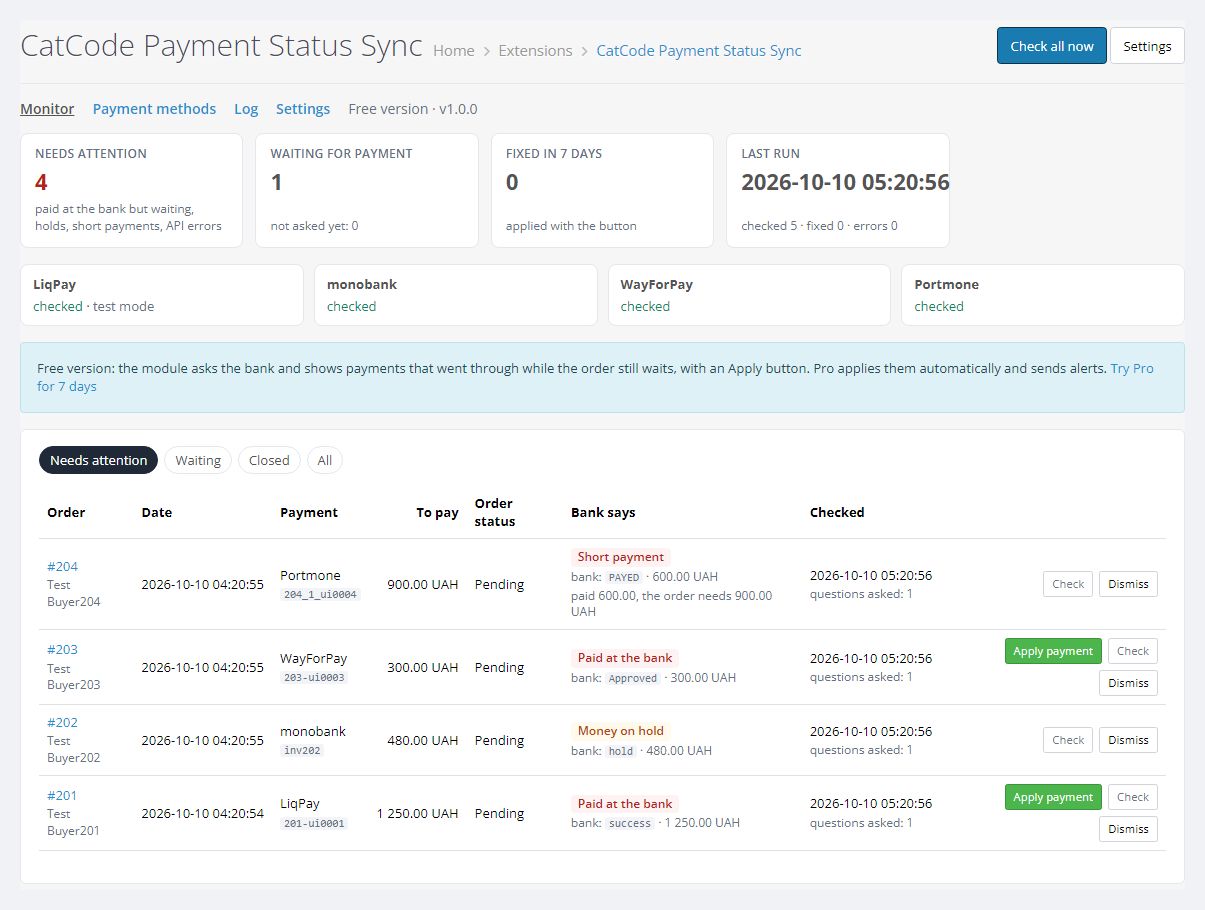

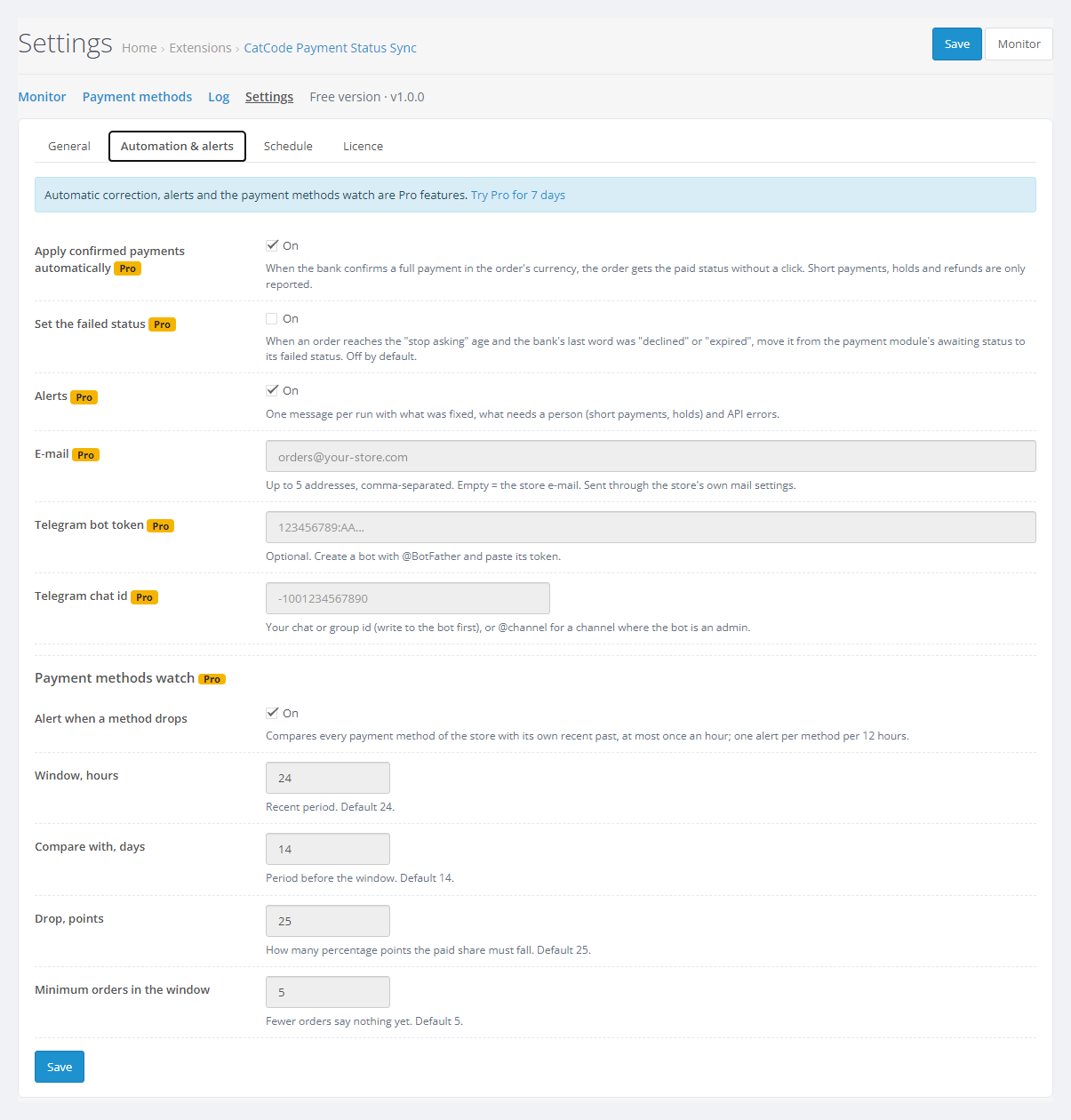
A module for OpenCart 4, 3 and 2.3 that finds orders still waiting for payment although the bank has already taken the money, because the bank notification never reached the store. It asks LiqPay, monobank (Mono Acquiring), WayForPay and Portmone for the payment status through their official APIs and shows every mismatch with an Apply payment button. Works with our payment modules and reads the keys from them. Pro sets the paid status by itself and sends alerts by e-mail and Telegram.
The free version works with no time limit. Pro adds the rest of the features in the table.


Nothing changes in the storefront or the checkout: the module adds no scripts and makes no requests from store pages.

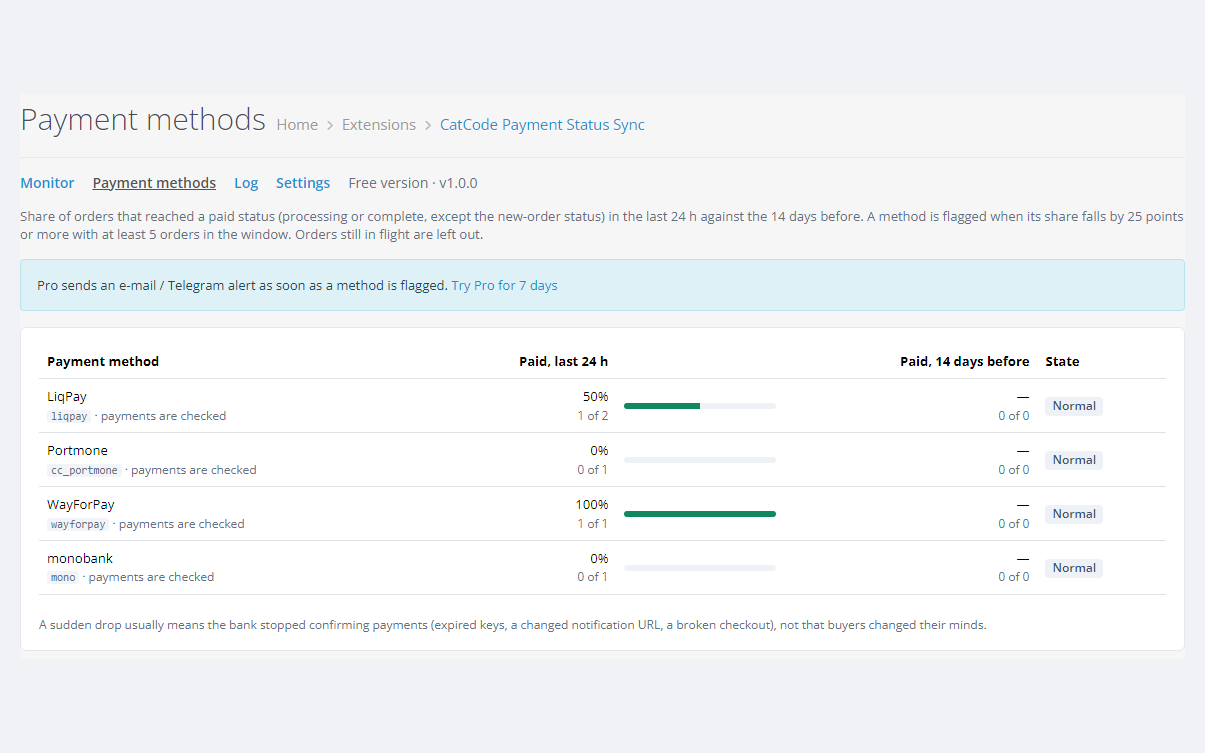
Menu item Sales > Payment Status Sync with a counter of orders that need attention, and the Monitor, Payment methods, Log and Settings pages.

A fresh install is the free version, nothing switches on by itself. The “Try Pro for 7 days” button → e-mail → the key right in the window and by e-mail.

Moving the store? Unbind the licence on the old domain and activate it on the new one yourself. For studios — keys for 5 or 25 sites, or unlimited.
 OpenCart 4.0.2 – 4.1.x (tested on 4.1.0.3 and 4.0.2.3 with the mysqli and pdo database drivers), 3.0.x (tested on 3.0.5.0) or 2.3.0.2.A CatCode payment module: LiqPay, Mono Acquiring, WayForPay or Portmone for your OpenCart version, with saved keys.PHP as your OpenCart version needs it: the 2.3 build was tested on PHP 7.0, the others on PHP 8.x. The cURL extension for bank requests and the licence.Database: tested on MariaDB 10.11.For checks more often than once an hour (and on OpenCart 3 and 2.3): a hosting cron that opens the check URL every 5 to 10 minutes. A ready crontab line is on the Schedule tab.
OpenCart 4.0.2 with the PDO database driver: the check run stopped with SQL error 1064 — fixed.
For OpenCart 4.x, 3.x and 2.3: matching orders waiting for payment with the LiqPay, monobank (Mono Acquiring), WayForPay and Portmone APIs, the monitor, the Apply payment button, the line…
4 modules in one order — 40% cheaper than separately



Payment Status Sync for OpenCart is a module for stores that take card payments. It happens: the buyer paid, the bank took the money, and the order in the admin is still waiting for payment. The paid status is set by the notification the bank sends to the site. If it never arrived (the site was down, the notification URL changed, a firewall cut the request), the order keeps waiting. Nobody ships it, the buyer writes to support, and a manager opens the bank dashboard to match payments by hand.
The module asks the bank about every order waiting for payment through the official payment status APIs of LiqPay, monobank (Mono Acquiring), WayForPay and Portmone, and shows the orders that are actually paid, with an Apply payment button. The check relies only on the status the bank returns: the module guesses nothing from the cart, e-mails or timing. Short payments, payments in another currency, holds and refunds are shown, but the order status is not changed.
It works with our payment modules for OpenCart: LiqPay, Mono Acquiring (monobank), WayForPay and Portmone. The keys are read from their settings, so you do not enter them twice.
Running WooCommerce? There is a separate plugin for it — Payment Status Sync for WooCommerce: LiqPay, monobank, WayForPay and Portmone (our gateways), plus Stripe and PayPal.
Nothing changes in the storefront or the checkout: the module adds no scripts and makes no requests from store pages. The buyer only notices the result: a paid order does not get stuck waiting for payment, it gets shipped, and nobody asks for a receipt. If Notify the customer is on in the settings, the buyer gets the usual OpenCart status e-mail.
Menu item Sales > Payment Status Sync with a counter of orders that need attention, and the Monitor, Payment methods, Log and Settings pages.
Orders paid with one of the four modules show at the top what the bank said last and when, with the Ask the bank now and Apply payment buttons. The line can be switched off in the settings.
action=status, monobank invoice status with the merchant token, WayForPay CHECK_STATUS with the response signature checked, Portmone method=result. Keys and secrets come from the payment module settings and are decrypted the same way that module does it.oc_cc_paysync_check (check state of each order) and oc_cc_paysync_log (event log). Core tables are not changed. In the payment module log only the row of the paid order is updated, with a conditional query, so a parallel bank notification is never overwritten.index.php?route=extension/cc_paysync/cron.cron&key=… (on 3.x and 2.3: extension/module/cc_paysync_cron/cron). Without the key it returns 403. The admin buttons call the same URL.oc_cc_paysync_* tables by hand.cc_paysync.ocmod.zip (keep the file name) and press Install. OpenCart 3: Extensions > Installer > cc_paysync-oc3.ocmod.zip. OpenCart 2.3: upload the contents of upload/ from cc_paysync-oc2.ocmod.zip to the store root (FTP or the hosting file manager). The 2.3 Installer does not copy files without a configured FTP.Didn't find the answer? Message us on Telegram and we'll reply within a business day.
 @catcode_support
Setup, compatibility, activation
@catcode_support
Setup, compatibility, activation
The paid status is set by the notification the bank sends to the site after the payment. If the site was down at that moment, the notification URL was changed, a firewall blocked the request or the hosting failed, the bank has the money and the order keeps waiting. The module asks the bank about such orders itself and shows which of them are actually paid.
With the CatCode payment modules for OpenCart: LiqPay, Mono Acquiring (monobank), WayForPay and Portmone, builds for 4.x, 3.x and 2.3. The module reads the keys and the payment log from them, so modules from other developers are not supported. The Payment methods page counts the paid share for any payment method of the store.
The status is set only when the bank returns a successful status for the full amount in the order currency. Before applying, the bank is asked once more, and the order and the payment log are re-read under a lock. Short payments, another currency, holds and refunds are never applied, only shown.
The module writes the payment into the log of the payment module itself, so that module treats the late notification as already handled: no second line in the order history and no second e-mail. In the tests this was checked for all four payment modules and for the reverse order too (notification first, then the module).
The first request goes 15 minutes after the last status change, so the bank notification has time to arrive. Then less and less often: 10, 20, 40 minutes … up to once every 12 hours, and after 72 hours the requests stop. Both limits can be changed in the settings. In OpenCart 4 the store scheduler runs the check every hour. For a faster reaction, call the check URL from the hosting cron every 5 to 10 minutes.
No. For OpenCart it is a one-time payment, a lifetime licence, one for all three builds: 4.x, 3.x and 2.3. The Pro trial starts only when you press the button. After the trial the check and the Apply payment button keep working. Only the automation, the alerts and the payment methods watch switch off.
No. No core edits, no OCMOD patches. The menu item and the line on the order page are added with OpenCart events. The module does not touch the storefront or the checkout and does not change core tables. The bank keys are used only to request the payment status.
No reviews yet. Be the first.
No questions yet. Ask one — we answer within 24 hours.
We build custom modules for WordPress, WooCommerce, OpenCart and Shopify. Tell us about the task and we'll prepare an estimate.
Order a custom module
—

CatCode assistant
Just now


CatCode assistant
Online

I’ll help with your website task
Describe your website task — I’ll find a ready-made module or pass it to a developer for an estimate. Modules, custom features, layout, integrations, speed, migration, technical SEO.
