WordPress
Verpackungsmengen für LUCID (VerpackG) for WooCommerce
Free + Pro
990 UAH/year
v1.0.3
 All Access4 990 ₴ / year
 Website auditA PDF report by email in 3 minutesCheck a website
Everyday tasks
Image compressorSize, quality and WebP in bulkQR generatorLink, Wi-Fi, payment to IBANVAT calculator20, 14, 7% and amount in wordsTransliterationOfficial Ukrainian standardWebsite checks
PHP and pluginsPHP version, WordPress, pluginsGoogle Merchant feedFields, prices, GTIN, imagesDomain emailSPF, DKIM, DMARC, blacklistsAI search readinessllms.txt, bots, markupAll 9 toolsEnter at least 2 characters
WooCommerce module for the German market: works out the packaging weight of every order by LUCID material type and builds a ready Mengenmeldung for the period. 990 UAH/year.
Clear even without sound: Ukrainian subtitles
The free version works with no time limit. Pro adds the rest of the features in the table.


A profile is packaging with a weight for each material: “Karton M” = 320 g of paper plus 12 g of plastic for tape.

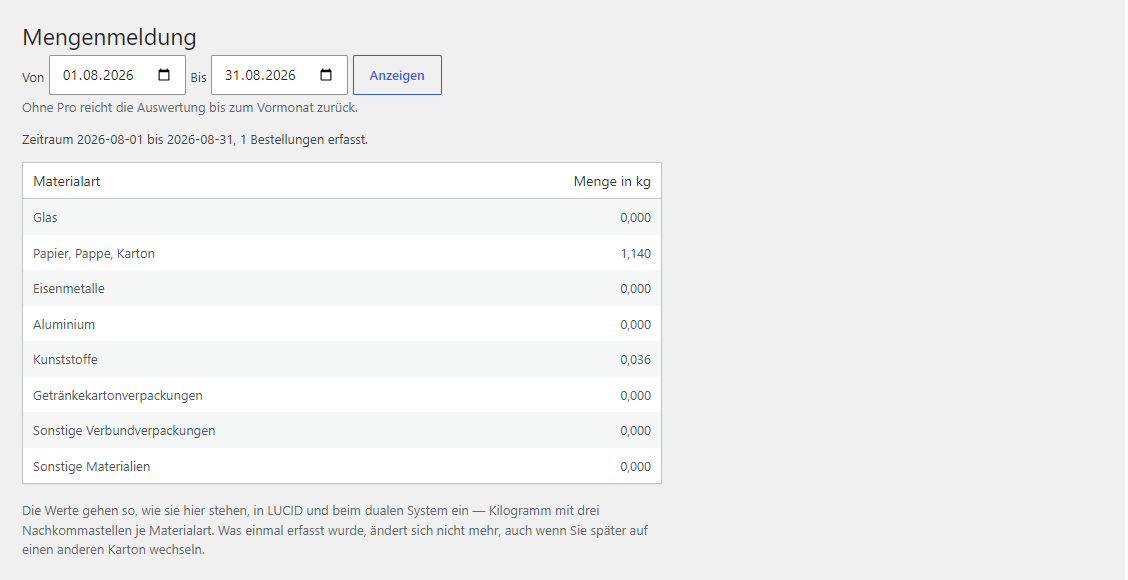
Pick a period and get a table by material type in kilograms to three decimal places, plus the order count, so you can see straight away whether the figure is even plausible.

If you sell into Germany, you’re required to register with LUCID and file a Mengenmeldung annually (or quarterly, for large volumes): how many kilograms of packaging of which material type you put on the market.

A fresh install is the free version, nothing switches on by itself. The “Try Pro for 7 days” button → e-mail → the key right in the window and by e-mail.

Moving the store? Unbind the licence on the old domain and activate it on the new one yourself. For studios — keys for 5 or 25 sites, or unlimited.
 WordPress 6.2 and newer, WooCommerce, PHP 7.4 and newer. Compatible with HPOS. The module calls no external services for its calculations — everything is calculated locally and order data never leaves; it contacts the CatCode server only to check a licence key.
4 modules in one order — 40% cheaper than separately



Verpackungsmengen für LUCID (VerpackG) is a WooCommerce module for the German market: it works out the packaging weight of every order by LUCID material type and produces a ready Mengenmeldung, which the seller enters into LUCID and the dual system’s dashboard.
Anyone shipping packaged goods to Germany must report packaging weight — from the very first parcel. In practice this weight is usually worked out in Excel from memory: how much that carton weighed and how many went out over the year. The module takes the figure straight from orders.
A profile is packaging with a weight for each material: “Karton M” = 320 g of paper plus 12 g of plastic for tape. A profile is attached to a product, a category (in Pro), or set separately for the shipment itself. Changed the carton? Edit the profile, not hundreds of product cards.
The material types are the same as in LUCID: glass; paper, cardboard; ferrous metals; aluminium; plastic; beverage cartons; other composites; other materials.
Pick a period and get a table by material type in kilograms to three decimal places, plus the order count, so you can see straight away whether the figure is even plausible. In Pro the same report exports to CSV, which German Excel opens without complaint.
If you sell into Germany, you’re required to register with LUCID and file a Mengenmeldung annually (or quarterly, for large volumes): how many kilograms of packaging of which material type you put on the market.
The problem isn’t the report itself, but where the figures come from. The typical route is opening Excel at year-end and guessing from memory how many boxes, how much film and filler there were. It’s slow, it doesn’t match reality, and the responsibility for the figures is yours.
The module doesn’t calculate the report “on the fly” from current profiles. It stores the result at the moment of the order.
This matters: if you switched to a lighter box in March and changed the profile, February’s orders must stay calculated with the old box. A module that recalculates retroactively from current profiles quietly rewrites reporting you’ve already filed — and the discrepancy surfaces during an audit, not in your admin.
A dedicated packaging profiles screen: name, weight in grams across the eight types. Then profile assignment to products, and in Pro to categories too, so you don’t have to set thousands of items by hand.
The shipment’s own packaging (box, tape, filler) is counted either once per order or per line item — depending on how you actually pack.
The report shows kilograms to three decimal places, with the order count next to it that the figure is built from. This lets you sanity-check the result without opening the database.
It doesn’t file the report for you and has no LUCID integration: filing stays your action in the dashboard. The module covers exactly the part that’s impossible to do accurately by hand — tracking grams per order over a period.
It also doesn’t invent weights. If profiles are described roughly, the report will be exactly as accurate as the profiles are.
Pro lifts the limit on the number of profiles and on the report period (any period and whole years), and adds category-level profiles (one action instead of a thousand), CSV report export and backfilling of existing orders.
The packaging snapshot is written to the module’s own table, linked to the order, so it survives a theme change, WooCommerce updates and the move to HPOS. The report is built by querying this table over a date range, with no nightly cron jobs.
The material types are hard-coded to exactly the eight from the LUCID form — the module doesn’t let you invent your own, because that would make the report unfileable.
1. Upload the archive under “Plugins → Add New → Upload Plugin” and activate it.
2. WooCommerce → Verpackung — describe the packaging profiles you actually use.
3. Assign profiles to products (to categories in Pro) and set the shipment profile.
4. Place a test order and check that its packaging snapshot appears.
5. WooCommerce → Mengenmeldung — pick a period and check the kilograms.
Didn't find the answer? Message us on Telegram and we'll reply within a business day.
 @catcode_support
Setup, compatibility, activation
@catcode_support
Setup, compatibility, activation
No. The register doesn't accept machine submissions from stores — the obligated party enters the figures themselves. The module gives exactly the numbers asked for, in the right units.
Recalculation in Pro recomputes the chosen period using current profiles. If packaging was different back then, create a separate profile with the weight from that time and recalculate the period with it.
It's switchable. If you ship bulky items individually, count per line item: three products in an order will produce three cartons.
Because the reporting has already been filed. If you switch to a lighter carton next year, last year's figure must not change retroactively — otherwise you won't be able to explain the discrepancy in an audit.
One. The licence is annual: once it ends, the module keeps working, only updates and support stop.
No reviews yet. Be the first.
No questions yet. Ask one — we answer within 24 hours.
We build custom modules for WordPress, WooCommerce, OpenCart and Shopify. Tell us about the task and we'll prepare an estimate.
Order a custom module
—

CatCode assistant
Just now


CatCode assistant
Online

I’ll help with your website task
Describe your website task — I’ll find a ready-made module or pass it to a developer for an estimate. Modules, custom features, layout, integrations, speed, migration, technical SEO.
