WordPress
Nova Post Global for WooCommerce — international shipping rates in the cart
Free + Pro
990 UAH/year
v1.0.0
 All Access4 990 ₴ / year
 Website auditA PDF report by email in 3 minutesCheck a website
Everyday tasks
Image compressorSize, quality and WebP in bulkQR generatorLink, Wi-Fi, payment to IBANVAT calculator20, 14, 7% and amount in wordsTransliterationOfficial Ukrainian standardWebsite checks
PHP and pluginsPHP version, WordPress, pluginsGoogle Merchant feedFields, prices, GTIN, imagesDomain emailSPF, DKIM, DMARC, blacklistsAI search readinessllms.txt, bots, markupAll 9 toolsEnter at least 2 characters
Nova Poshta international shipping for WooCommerce: the price abroad is calculated in the cart through the Nova Post Global API from the order weight and size.
The free version works with no time limit. Pro adds the rest of the features in the table.


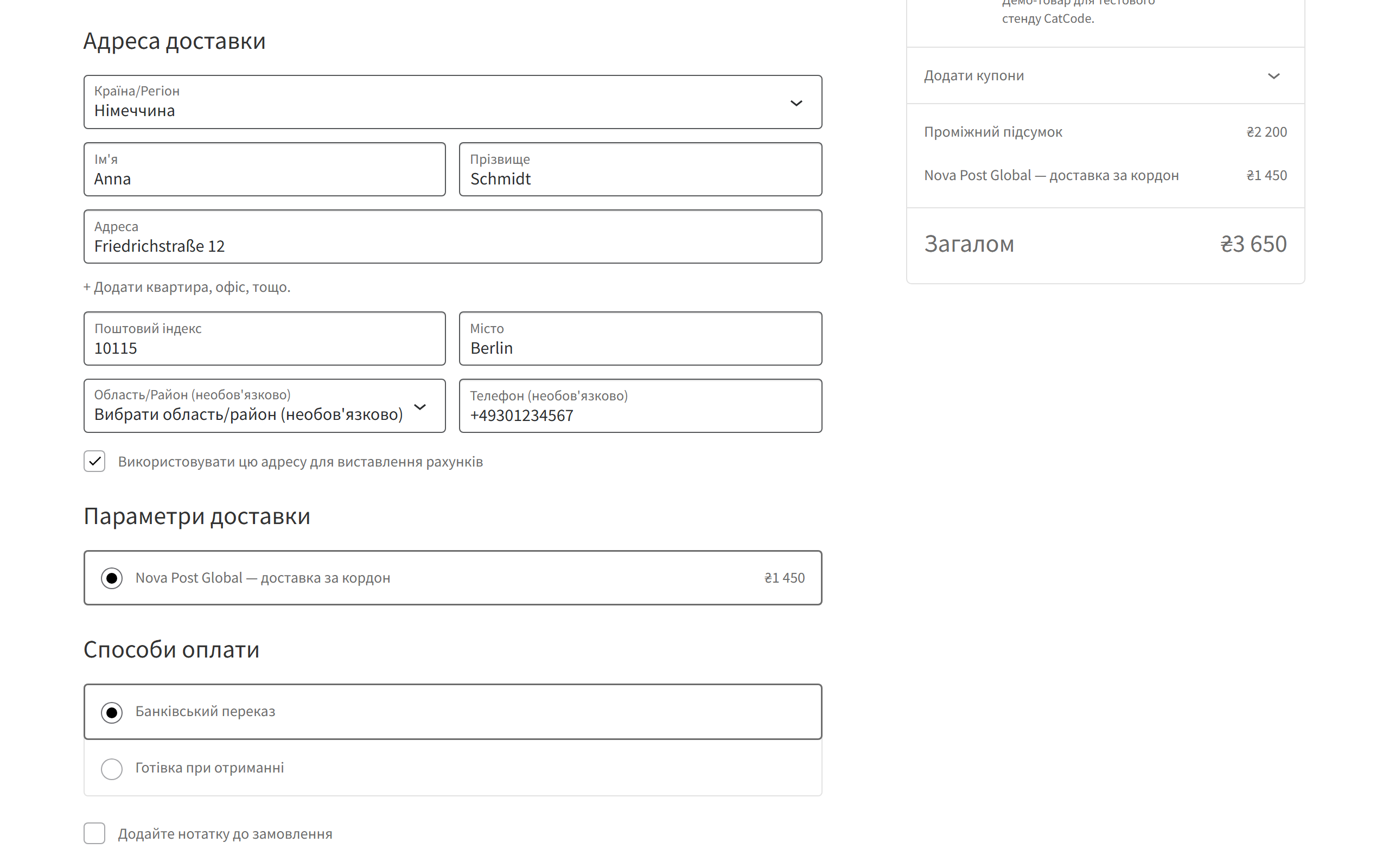
Checkout shows a “Nova Post Global: shipping abroad” method with a price. It appears only for countries the NPG tariff covers and only for addresses outside Ukraine — Ukrainian buyers keep seeing regular domestic Nova Poshta.

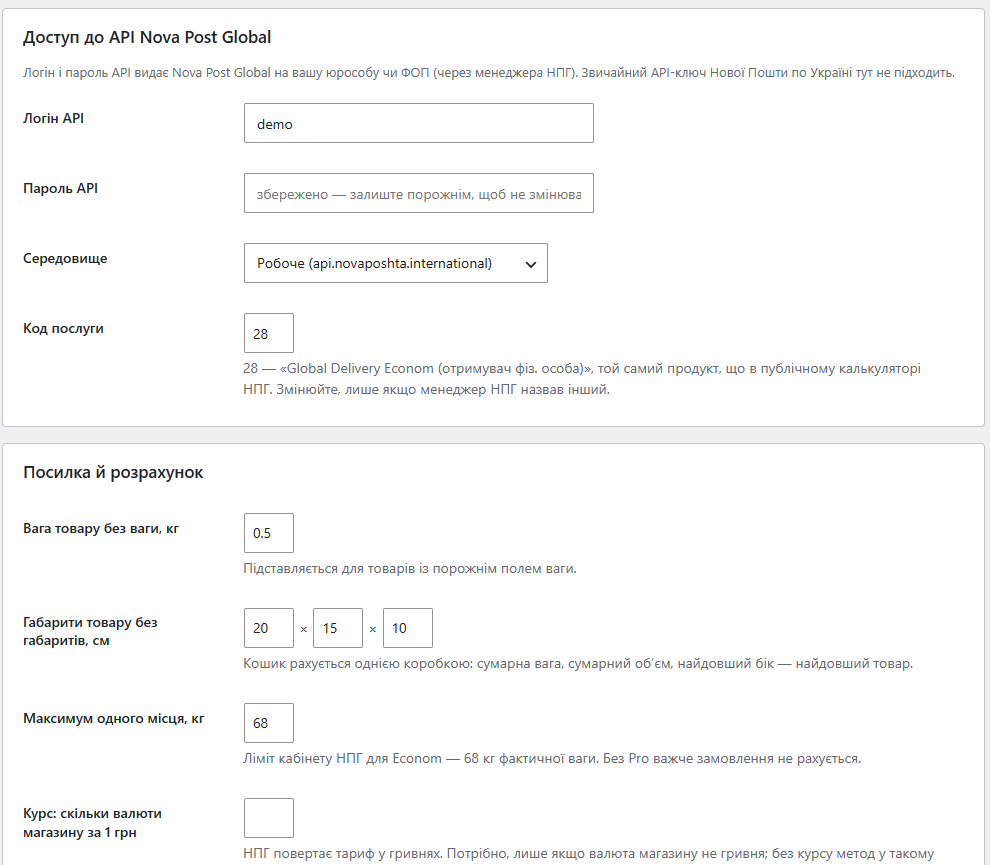
A dedicated WooCommerce → Nova Post Global screen: API login and password, test or production environment, service code (28 — Global Delivery Econom by default), weight and size for products with empty fields, the per-piece limit, an exchange rate for stores not in UAH, behaviour when the API fails, caching and an error log.

A fresh install is the free version, nothing switches on by itself. The “Try Pro for 7 days” button → e-mail → the key right in the window and by e-mail.

Moving the store? Unbind the licence on the old domain and activate it on the new one yourself. For studios — keys for 5 or 25 sites, or unlimited.
 WordPress 6.2+, WooCommerce 7.0+ (tested up to 10.7), PHP 7.4+. Compatible with HPOS and the classic and block checkout. You need a Nova Post Global API login and password issued to your company — the regular Nova Poshta Ukraine API key doesn’t work for international rates. Your hosting must allow outgoing connections to port 8243.
Nova Post Global rates in the cart through the API; splitting into pieces, markup, free shipping above a total and delivery to a branch abroad in Pro; a connection test that explains NPG codes.
4 modules in one order — 40% cheaper than separately



Nova Post Global for WooCommerce puts Nova Poshta international shipping right into your store’s cart. A shopper from Germany, Poland or the US enters their address and immediately sees the price of delivery abroad, instead of messaging you “how much to Berlin?”. The rate comes from the official Nova Post Global API, calculated from the weight and size of that exact order.
Checkout shows a “Nova Post Global: shipping abroad” method with a price. It appears only for countries the NPG tariff covers and only for addresses outside Ukraine — Ukrainian buyers keep seeing regular domestic Nova Poshta. The price updates as soon as the buyer changes the country or the cart.
If NPG doesn’t ship to the country (code CALC004) or the weight is outside the tariff, the method simply doesn’t appear — the buyer never sees a price you’d have to rewrite by hand later.
A dedicated WooCommerce → Nova Post Global screen: API login and password, test or production environment, service code (28 — Global Delivery Econom by default), weight and size for products with empty fields, the per-piece limit, an exchange rate for stores not in UAH, behaviour when the API fails, caching and an error log. The “Test connection” button prices a test parcel and explains in plain words what’s wrong: a wrong password, a closed port 8243 or a country outside the tariff.
1. The buyer adds products to the cart and enters an address abroad.
2. The plugin packs the order as one box: total actual weight, total volume, and the longest item as the longest side. Store units (grams, pounds, inches) are converted to kilograms and centimetres automatically.
3. The request goes to the Nova Post Global API (IEW/publicCalculateCost) — the same Global Delivery Econom product as the public NPG calculator.
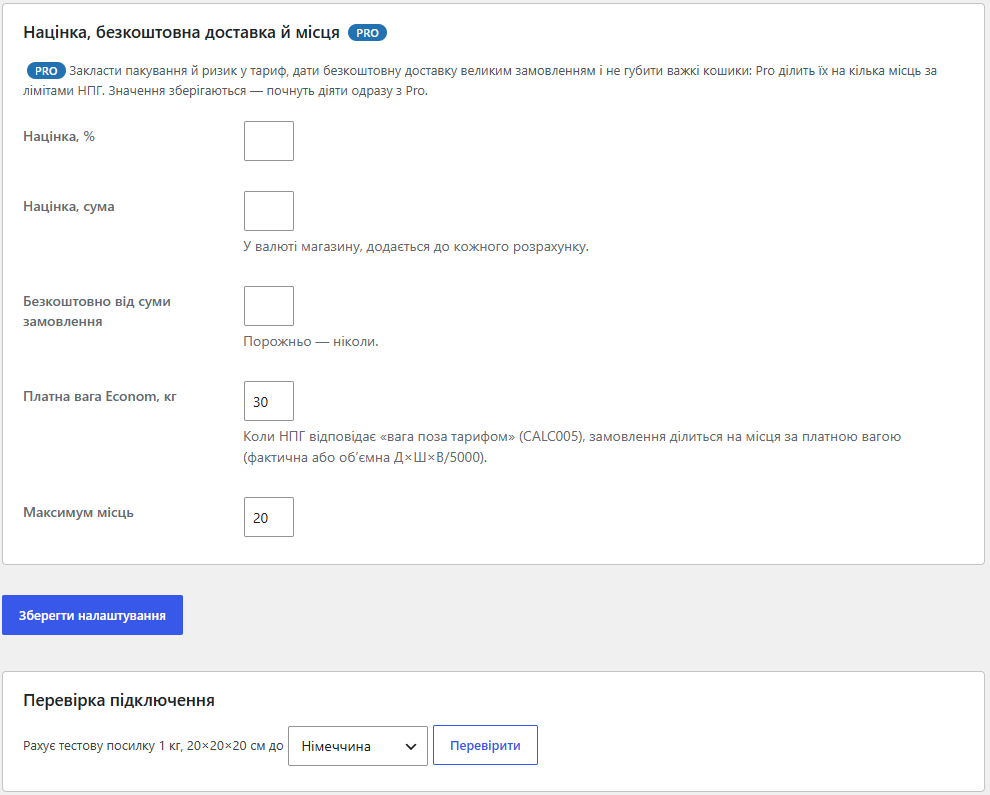
4. NPG returns the price in UAH. If the store runs in another currency, the plugin converts it at your rate; Pro adds a markup or makes shipping free above a set total.
5. The price is cached, so the same cart to the same country doesn’t call the API on every checkout refresh.
Econom carries one piece up to 68 kg actual weight, and to most countries only rates up to ~30 kg paid weight. Without Pro such an order simply gets no rate. Pro splits it into several identical pieces — first by actual weight, and if NPG answers “weight outside the tariff” (CALC005), by paid weight (actual or volumetric L×W×H/5000) — prices one piece and multiplies.
A regular WooCommerce shipping method in shipping zones, with no rewritten checkout. Requests go through the WordPress HTTP API with Basic auth, so standard debugging tools see them. An HTTP 424 answer with CALC004/CALC005/CALC006 is treated as a tariff answer rather than a failure and is cached; network and authorisation errors aren’t cached, so the next page refresh tries again.
1. Upload the archive via “Plugins → Add New → Upload Plugin” and activate it.
2. WooCommerce → Nova Post Global: enter the API login and password, save and press “Test connection”.
3. WooCommerce → Settings → Shipping: add “Nova Post Global” to the zones with the countries you ship to.
4. Place a test order with an address abroad and check that the price appears at checkout.
Didn't find the answer? Message us on Telegram and we'll reply within a business day.
 @catcode_support
Setup, compatibility, activation
@catcode_support
Setup, compatibility, activation
No. International rates come from a separate Nova Post Global API with its own login and password. Ask your NPG manager for access.
NPG answered that the service doesn't cover that country (CALC004) or that the weight is outside the tariff (CALC005). Pro handles heavy orders; CALC004 can't be fixed by the plugin.
By default the method is hidden. You can show a flat price instead in the settings.
No reviews yet. Be the first.
No questions yet. Ask one — we answer within 24 hours.
We build custom modules for WordPress, WooCommerce, OpenCart and Shopify. Tell us about the task and we'll prepare an estimate.
Order a custom module
—

CatCode assistant
Just now


CatCode assistant
Online

I’ll help with your website task
Describe your website task — I’ll find a ready-made module or pass it to a developer for an estimate. Modules, custom features, layout, integrations, speed, migration, technical SEO.
