WordPress
Box Rate Shipping for WooCommerce
Free + Pro
990 UAH/year
v1.0.2
 All Access4 990 ₴ / year
 Website auditA PDF report by email in 3 minutesCheck a website
Everyday tasks
Image compressorSize, quality and WebP in bulkQR generatorLink, Wi-Fi, payment to IBANVAT calculator20, 14, 7% and amount in wordsTransliterationOfficial Ukrainian standardWebsite checks
PHP and pluginsPHP version, WordPress, pluginsGoogle Merchant feedFields, prices, GTIN, imagesDomain emailSPF, DKIM, DMARC, blacklistsAI search readinessllms.txt, bots, markupAll 9 toolsEnter at least 2 characters
Woo calculates shipping by weight, the courier charges by box. This plugin packs the cart into your real boxes and charges for those. Catches products without dimensions after import. Free — 3 formats, Pro — no limit.
Clear even without sound: Ukrainian subtitles
The free version works with no time limit. Pro adds the rest of the features in the table.


A fresh install is the free version, nothing switches on by itself. The “Try Pro for 7 days” button → e-mail → the key right in the window and by e-mail.

Moving the store? Unbind the licence on the old domain and activate it on the new one yourself.
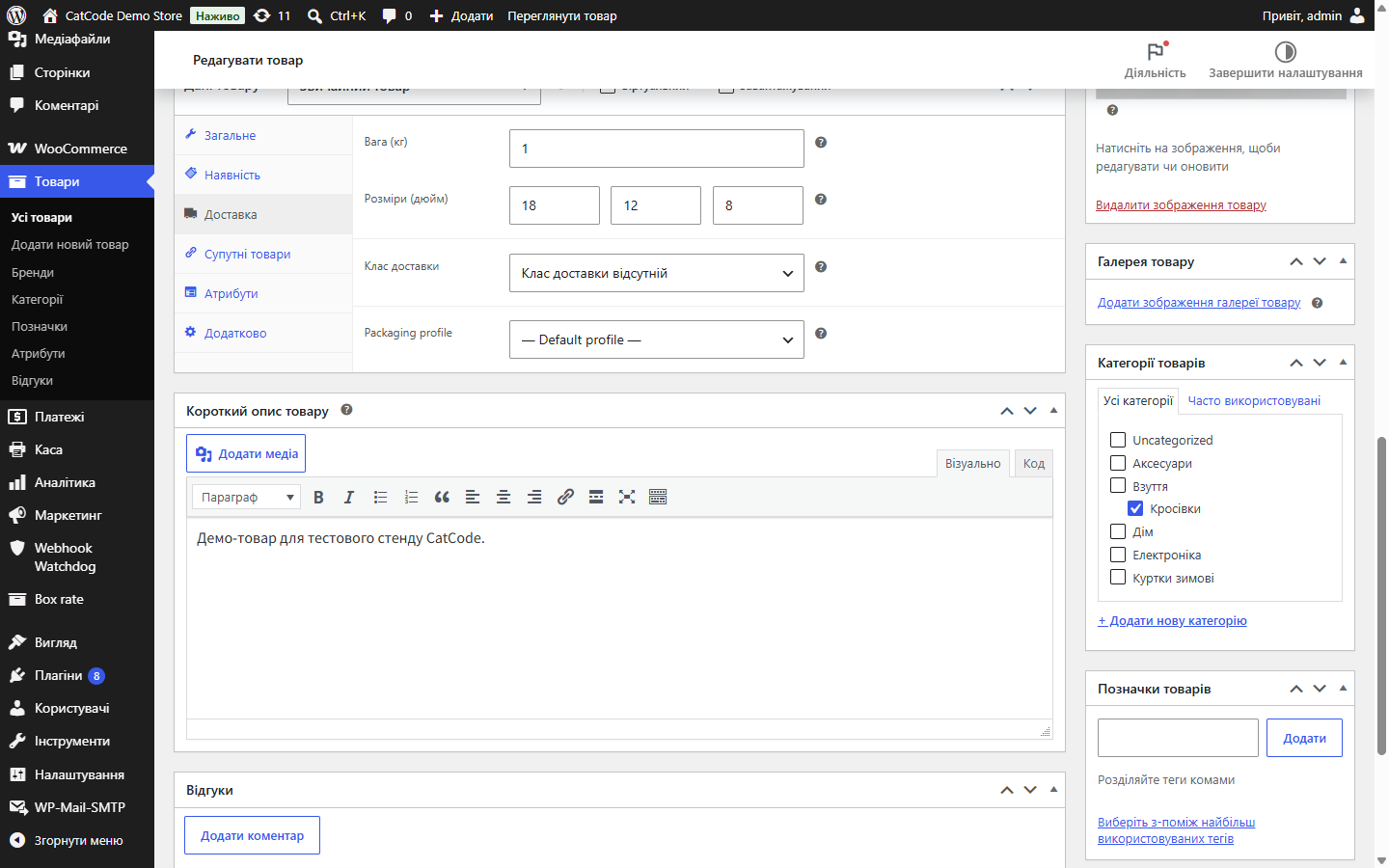
 WordPress 6.2+ (tested on 7.1).WooCommerce 6.0+ (tested on 10.7).PHP 7.4+.Product dimensions and weight filled in — no module of this kind can calculate honestly without them.Compatibility with HPOS and the block cart/checkout is explicitly declared.
Box settings: the Name field no longer overlaps the Length column.
A purchased licence stays yours: the Pro features keep working after the licence term ends — the term covers updates and support.
Box catalogue, first-fit-decreasing packing with a three-side check, splitting an order across multiple boxes, per-kilogram and handling surcharges, free shipping above a threshold,…
4 modules in one order — 40% cheaper than separately



WooCommerce calculates shipping by weight and shipping class. The courier charges for the box the parcel actually fits in. For anything bulky, those two numbers aren’t even close, and the gap eats into your margin on every order.
Three T-shirts and one kettle weigh the same, but they travel in completely different boxes. A pillow, a dog bed, a lampshade: light, but they take up as much room as a 150 UAH box.
This module closes exactly that gap. You describe the boxes you actually ship in, and the checkout shows the cost of the boxes the order genuinely fits into.
An ordinary shipping method in the cart and at checkout, with whatever name you gave it. No extra fields, popups, or steps. The order details show which boxes made up the price — for example “Small × 2”.
If a product lands in the cart that can’t be honestly calculated, the method simply isn’t shown — instead of showing a confidently wrong amount.
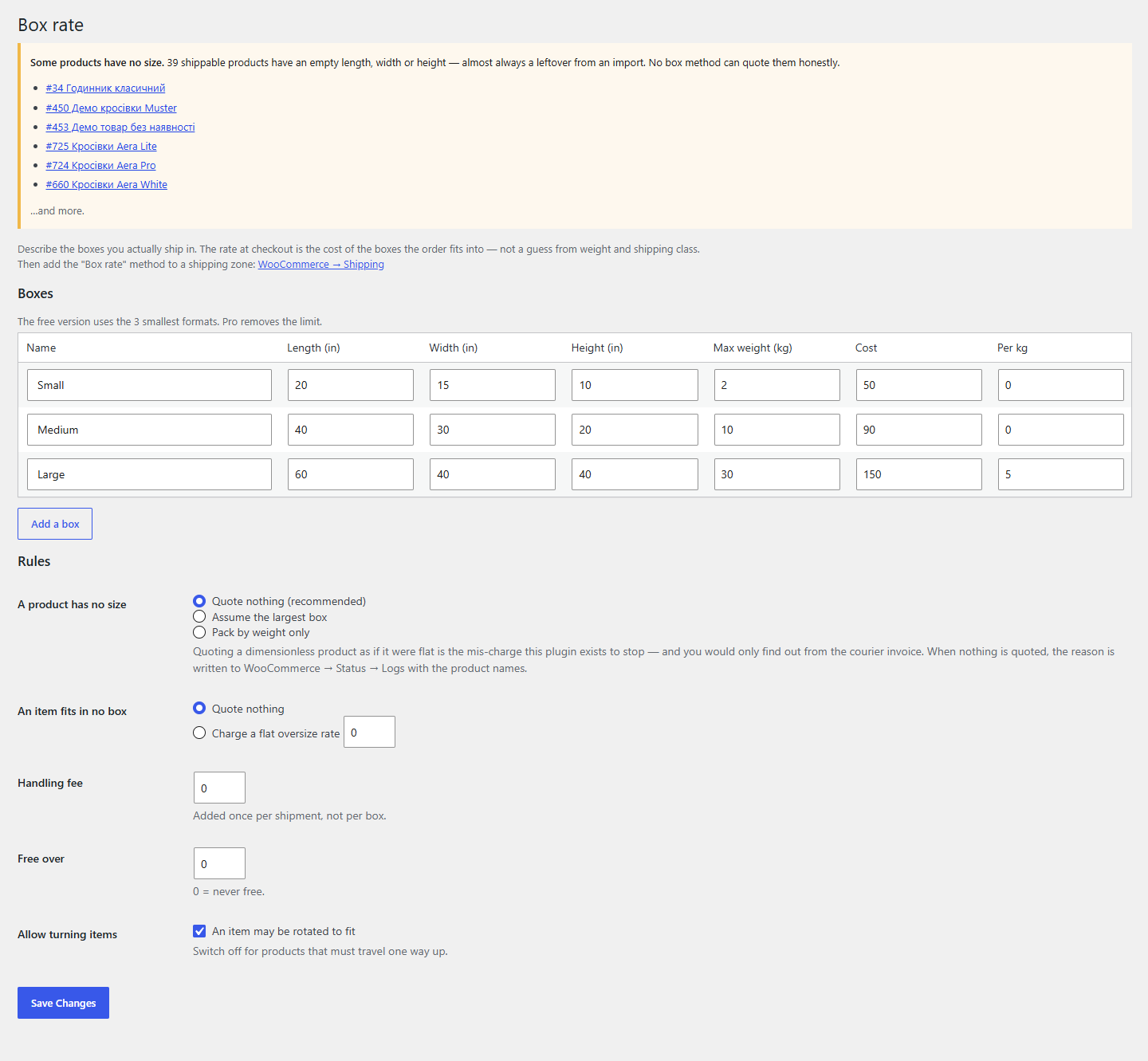
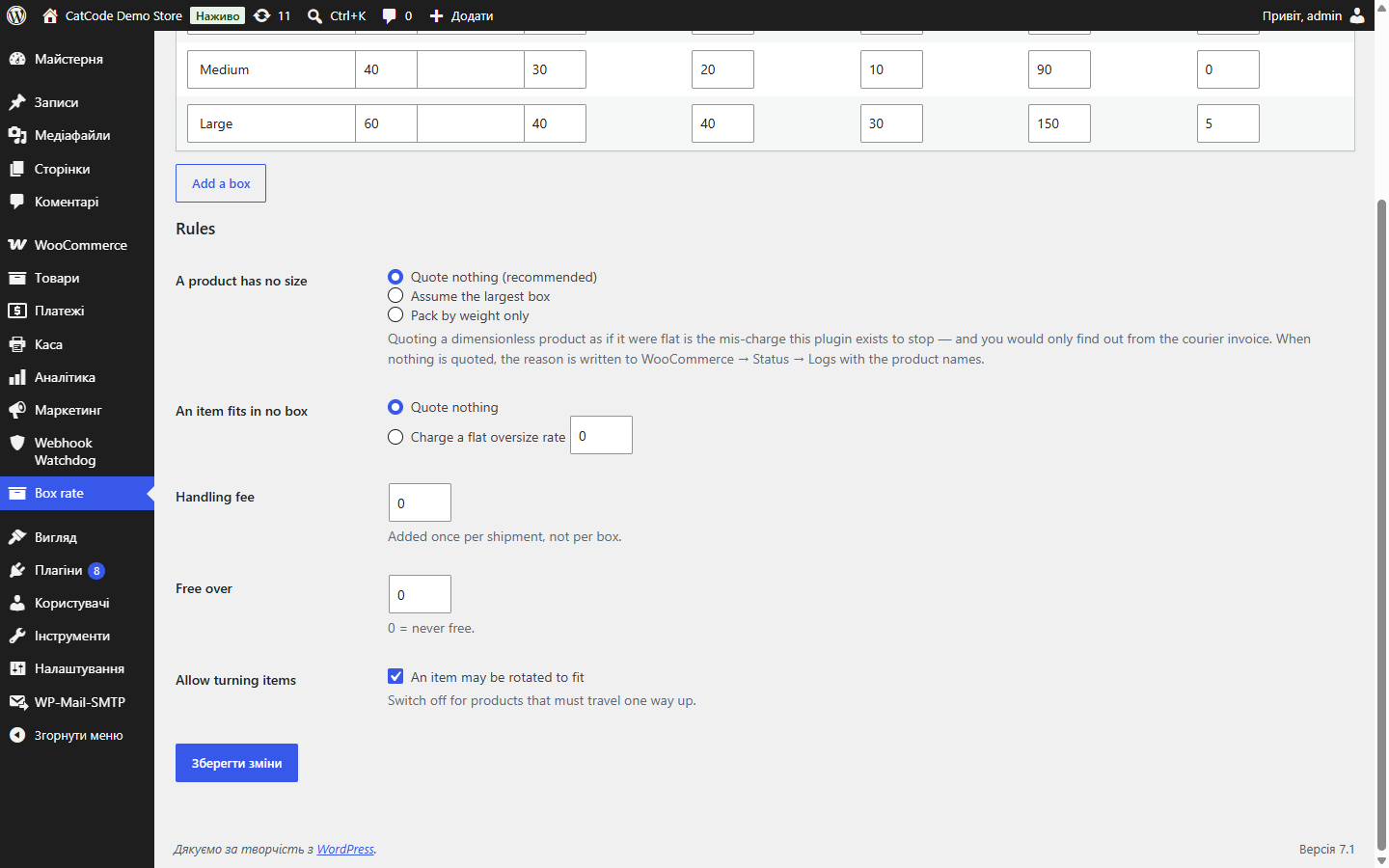
Box table: name, length, width, height, maximum weight, cost, and a per-kilogram surcharge. Dimensions in whatever units your WooCommerce uses — nothing is converted behind your back.
Rules: what to do with a product without dimensions, what to do with an oversized item, a handling surcharge (once per shipment, not per box), free shipping above a threshold, permission to rotate items when packing.
Separately — diagnostics: a list of published products with an empty length, width, or height, with edit links. On our own test site, 39 out of 40 turned out to be like that.
The “fits” check is not by volume. A 90 cm-long item won’t go into a 40 cm box, however much free volume is left, so every candidate is checked against all three sides. Rotating the item is optional — for products that must only travel one way up, it can be switched off.
The algorithm is first-fit-decreasing: largest items first, the smallest box they fit into. It’s not perfect three-dimensional packing — the perfect version is an NP-hard problem, and no checkout should be solving it. But it never claims a packing that’s physically impossible, and that property is what keeps the calculation honest.
The rotation check is done cheaply and correctly: both triples of sides are sorted and compared member by member — this covers all six orientations without enumerating them. Plus a small tolerance so a 30.0 cm item is treated as fitting a 30.0 cm box, as it would be in any warehouse.
🔴 The main decision is what to do with a product without dimensions. The most common reason a box-rate calculation produces nonsense has nothing to do with the maths: the store imported a feed that left the dimension fields empty, and half the catalogue officially has a zero size. Most modules happily treat such products as flat, and the seller finds out from the courier’s invoice.
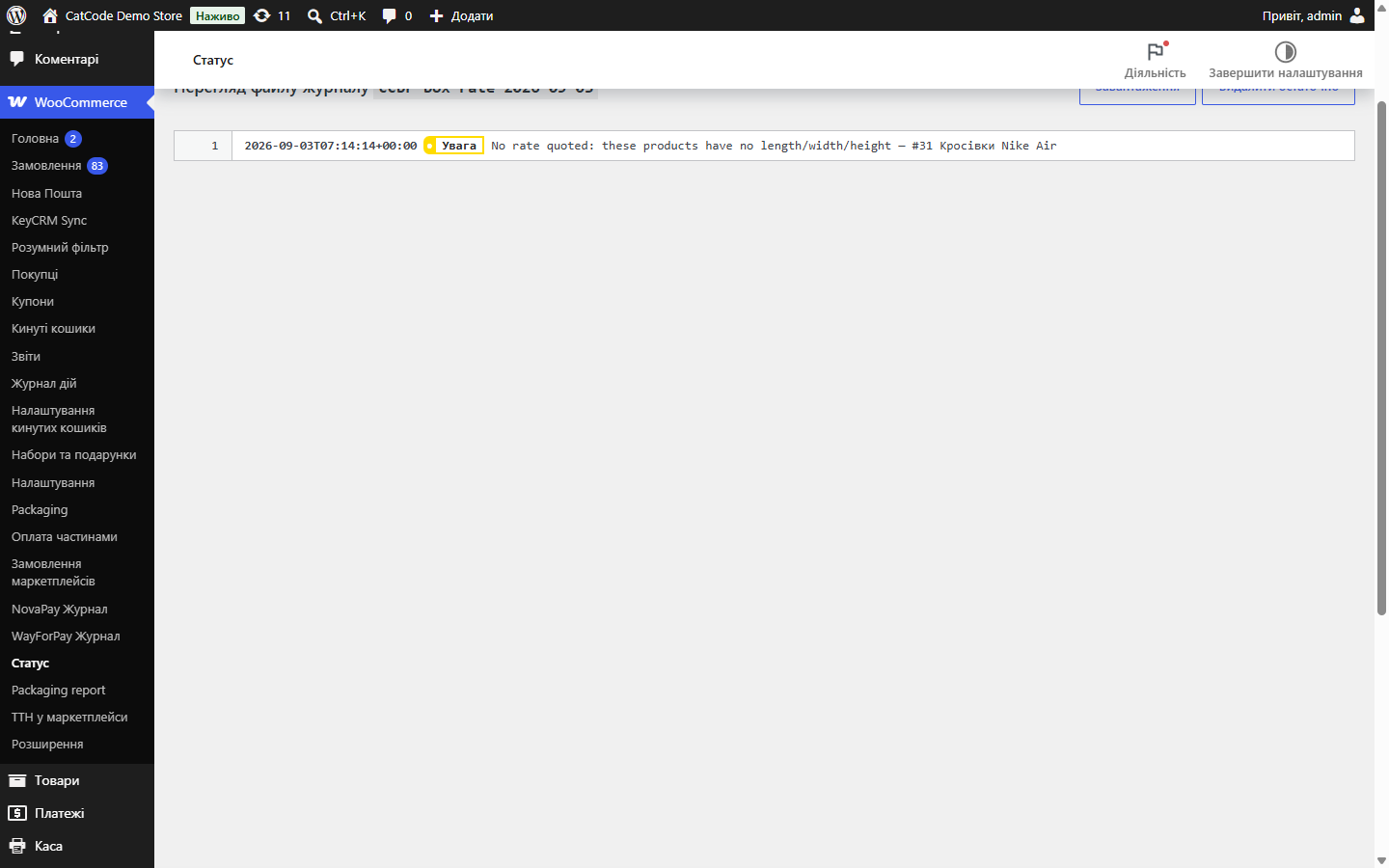
Here, by default, the module refuses to calculate a cart containing a product without dimensions, logs the names of those products under WooCommerce → Status → Logs, and lists them on its own settings screen. Two other policies (treat as the largest box, or pack by weight only) are available — but that’s a decision you make deliberately, not a default behaviour you never saw.
Didn't find the answer? Message us on Telegram and we'll reply within a business day.
 @catcode_support
Setup, compatibility, activation
@catcode_support
Setup, compatibility, activation
No. It's first-fit-decreasing with a genuine per-side check: it may open one box more than the perfect algorithm, but it will never promise an impossible packing.
Your own, from WooCommerce → Products → Dimensions. Nothing is converted.
Your choice: don't show the method, or take a fixed oversize rate.
Yes, it takes the dimensions of the specific variation.
Most likely there's a product without dimensions in the cart. The module logs the reason and product names under WooCommerce → Status → Logs.
No reviews yet. Be the first.
No questions yet. Ask one — we answer within 24 hours.
We build custom modules for WordPress, WooCommerce, OpenCart and Shopify. Tell us about the task and we'll prepare an estimate.
Order a custom module
—

CatCode assistant
Just now


CatCode assistant
Online

I’ll help with your website task
Describe your website task — I’ll find a ready-made module or pass it to a developer for an estimate. Modules, custom features, layout, integrations, speed, migration, technical SEO.
