
WordPress
Notify me when available — product subscriptions for WooCommerce
Free + Pro
990 UAH/year
v1.1.2
 All Access4 990 ₴ / year
 Website auditA PDF report by email in 3 minutesCheck a website
Everyday tasks
Image compressorSize, quality and WebP in bulkQR generatorLink, Wi-Fi, payment to IBANVAT calculator20, 14, 7% and amount in wordsTransliterationOfficial Ukrainian standardWebsite checks
PHP and pluginsPHP version, WordPress, pluginsGoogle Merchant feedFields, prices, GTIN, imagesDomain emailSPF, DKIM, DMARC, blacklistsAI search readinessllms.txt, bots, markupAll 9 toolsEnter at least 2 characters

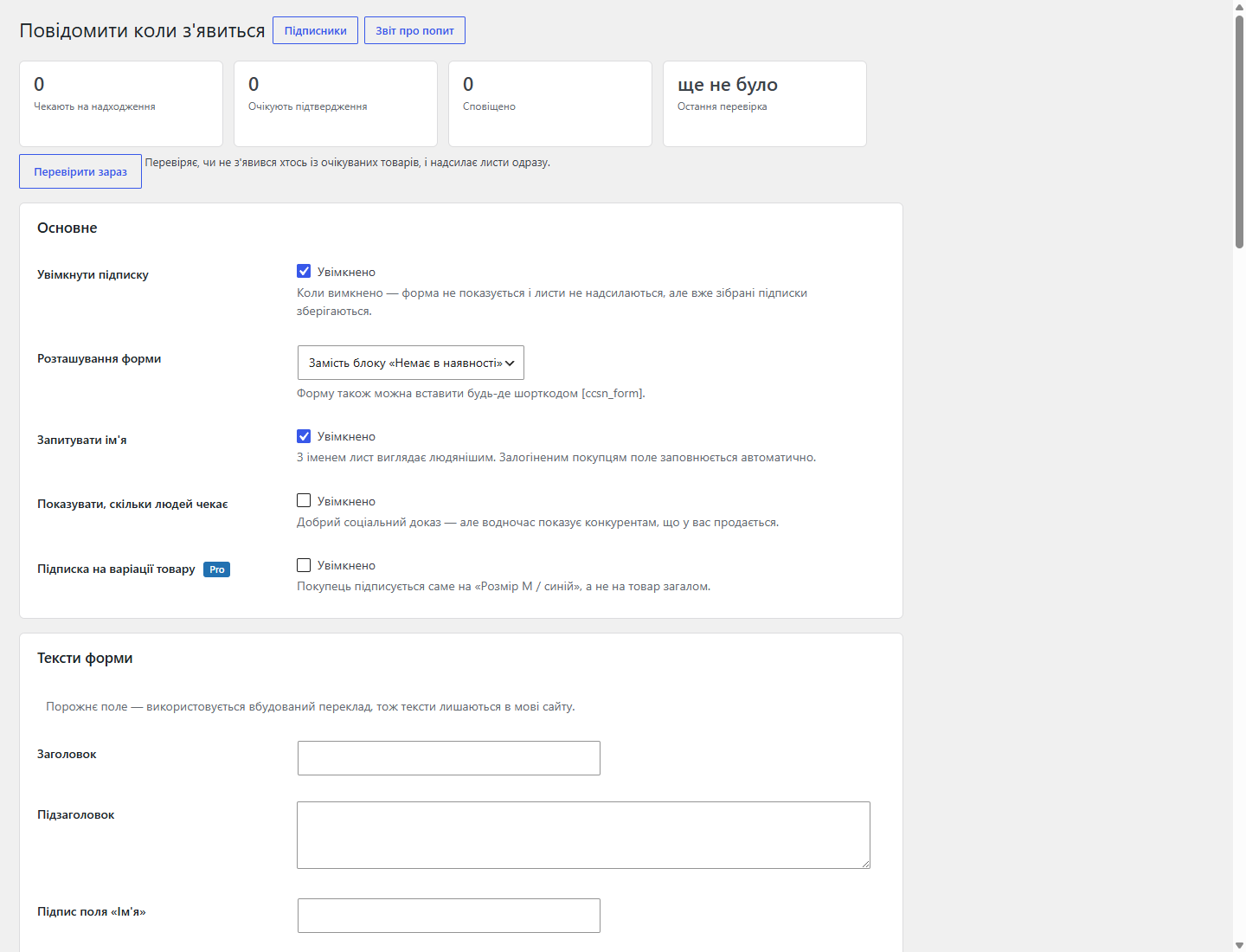
A subscription form for an out-of-stock product, and an auto e-mail to the buyer the moment it's back. Plus a demand report — what to restock first.
Clear even without sound: Ukrainian subtitles
The free version works with no time limit. Pro adds the rest of the features in the table.


Email and, optionally, a name — fields are filled in automatically for logged-in customers.

The e-mail goes out as soon as stock is replenished, and this is triggered two ways: a WooCommerce event (stock changed in the admin, an order cancelled or refunded) and an hourly check that catches CSV/XML imports, ERP exchanges and direct database writes — none of which trigger any events.

A subscriber list with filters by product, ID, email, status and date, pagination, and bulk actions “send now”, “return to waiting”, “delete”.

A fresh install is the free version, nothing switches on by itself. The “Try Pro for 7 days” button → e-mail → the key right in the window and by e-mail.

Moving the store? Unbind the licence on the old domain and activate it on the new one yourself. For studios — keys for 5 or 25 sites, or unlimited.
 WordPress 6.2 or newer, PHP 7.4+WooCommerce 7.0 or newer; HPOS (separate order tables) and block checkout are supportedIts own subscription table; deactivating the plugin keeps the queue, deleting it erases it together with the settings
The “confirm subscription” and “unsubscribe” links no longer fire for an e-mail scanner.
A purchased OpenCart licence works with no time limit.
Pro no longer switches on by itself: a fresh install is the free version until the owner starts a trial or activates a key.
A form on the product page, an auto e-mail after restock via two independent paths, a subscriber list with filters, a demand report, anti-spam; Pro.
4 modules in one order — 40% cheaper than separately



“Notify me when available” for WooCommerce lets a buyer leave an email instead of an empty cart — and writes to them itself the moment the product can be ordered again. A customer opens a product that’s out of stock and leaves: that’s the scenario this plugin closes.
Email and, optionally, a name — fields are filled in automatically for logged-in customers. The form can replace the “Out of stock” block, sit below it, or be placed anywhere on the page via the [ccsn_form] shortcode. A “N buyers are waiting for this product” counter can optionally be shown.
The e-mail goes out as soon as stock is replenished, and this is triggered two ways: a WooCommerce event (stock changed in the admin, an order cancelled or refunded) and an hourly check that catches CSV/XML imports, ERP exchanges and direct database writes — none of which trigger any events. That’s exactly why the subscription doesn’t “go silent” on stores with automated stock updates.
A subscriber list with filters by product, ID, email, status and date, pagination, and bulk actions “send now”, “return to waiting”, “delete”. Separately, a demand report: products ranked by how many people are waiting. The shortest answer to “what to restock first”.
Nonce, honeypot, a time trap, and an hourly subscription limit per IP. The IP address itself is stored only as a hash. Unsubscribing is one click from the e-mail, and completed rows are cleaned up automatically.
Without a licence, up to 25 subscriptions can be active at once. Pro settings stay in their place, greyed out, with a Pro badge and a line on what exactly they give.
A product runs out — and traffic to its page keeps coming, but turns into zero. A customer sees “out of stock” and goes to a competitor, and you never find out there was demand for that item.
The subscription form turns that zero into two assets: a deferred sale and data on real demand — exactly what to restock first.
1. On a product page with no stock, a subscription form shows instead of the “Buy” button.
2. The buyer leaves an email (and, in Pro with double opt-in switched on, confirms it).
3. As soon as stock returns, the module sends an e-mail to everyone subscribed to that item.
4. In the report, you see which products have the most subscriptions — that’s your restocking queue.
Subscriptions live in their own table, not in product meta fields, so the list doesn’t bloat the database and reports quickly even on a large catalogue.
Sending goes through WordPress’s standard mail, meaning through your SMTP plugin if you have one set up — no separate mailer needs configuring.
1. Upload the archive via “Plugins → Add New → Upload Plugin” and activate it.
2. Check that a subscription form appeared on an out-of-stock product.
3. Subscribe yourself and restock the item — an e-mail should arrive.
4. If e-mails don’t arrive, it’s almost always the site’s mail, not the module: install an SMTP plugin.
Didn't find the answer? Message us on Telegram and we'll reply within a business day.
 @catcode_support
Setup, compatibility, activation
@catcode_support
Setup, compatibility, activation
The form only shows where a product genuinely can't be bought: stock tracking is on and stock is zero, or the status is "Out of stock". If tracking is off, WooCommerce treats the product as available.
Yes. Besides the WooCommerce event, an hourly check runs that catches CSV/XML imports, ERP exchanges and direct database writes — none of which trigger any events.
In Pro you set a limit on messages per run, so a mailing doesn't run into your hosting's hourly quota.
Email and name (if that field is enabled); the IP address is stored only as a hash. Unsubscribing is one click from the e-mail, and completed rows are cleaned up automatically.
The free version keeps working with no time limit: subscriptions already collected stay in place, and restock e-mails keep going out.
No reviews yet. Be the first.
No questions yet. Ask one — we answer within 24 hours.
We build custom modules for WordPress, WooCommerce, OpenCart and Shopify. Tell us about the task and we'll prepare an estimate.
Order a custom module
—

CatCode assistant
Just now


CatCode assistant
Online

I’ll help with your website task
Describe your website task — I’ll find a ready-made module or pass it to a developer for an estimate. Modules, custom features, layout, integrations, speed, migration, technical SEO.
