OpenCart
Supplier Price List Import for OpenCart 2.3, 3 and 4
Free + Pro
1 790 UAH
v1.0.1
 All Access4 990 ₴ / year
 Website auditA PDF report by email in 3 minutesCheck a website
Everyday tasks
Image compressorSize, quality and WebP in bulkQR generatorLink, Wi-Fi, payment to IBANVAT calculator20, 14, 7% and amount in wordsTransliterationOfficial Ukrainian standardWebsite checks
PHP and pluginsPHP version, WordPress, pluginsGoogle Merchant feedFields, prices, GTIN, imagesDomain emailSPF, DKIM, DMARC, blacklistsAI search readinessllms.txt, bots, markupAll 9 toolsEnter at least 2 characters
Update OpenCart prices and stock from a supplier price list: XLSX, CSV, XML/YML, file or URL, tiered markup, a "before → after" plan, rollback and scheduled runs. 2.3, 3.x, 4.x.
Clear even without sound: Ukrainian subtitles
The free version works with no time limit. Pro adds the rest of the features in the table.


The module reads XLSX (ordinary Excel, no need to re-save as CSV), CSV in UTF-8 or windows-1251 with any delimiter, and also XML and YML — the format Rozetka, Prom and most Ukrainian distributors use for price feeds.

The module reads the file’s header and finds the SKU, price and stock columns itself: it recognises “Артикул”, “Код товара”, “Цена закупочная”, “Наличие”, “vendorCode”, “stock_quantity” and dozens of other spellings.

The module never writes to the catalogue immediately.

A fresh install is the free version, nothing switches on by itself. The “Try Pro for 7 days” button → e-mail → the key right in the window and by e-mail.

Moving the store? Unbind the licence on the old domain and activate it on the new one yourself. For studios — keys for 5 or 25 sites, or unlimited.
 OpenCart 2.3.0.x, 3.0.2 – 3.0.5.0 or 4.0.2 – 4.1.x, PHP 7.0 – 8.3, the zip and xml extensions enabled, cURL for downloading a price list by URL. Installation is standard: Admin → Extensions → Installer → Upload, then activation in the list of modules.
A purchased licence keeps Pro for good.
Import of price lists in any supplier format, automatic column detection, price calculation rules, a preview plan of changes, handling of products outside the price list, log and rollback…
4 modules in one order — 40% cheaper than separately



Supplier Price List Import updates prices and stock in OpenCart from a file sent by the supplier — Excel, CSV or XML/YML, from your computer or by URL. There are three builds: for OpenCart 4.0.2 – 4.1.x, 3.0.2 – 3.0.5.0 and 2.3.0.x; the functionality is identical, only the package differs. The code is open, ionCube isn’t required, and no core files are changed.
The module reads XLSX (ordinary Excel, no need to re-save as CSV), CSV in UTF-8 or windows-1251 with any delimiter, and also XML and YML — the format Rozetka, Prom and most Ukrainian distributors use for price feeds. The delimiter, encoding and format are detected automatically; the Excel sheet, the number of header rows, and the product tag in XML can be set manually if needed.
A price list can be uploaded as a file or given as a URL — the module then fetches it from the supplier’s site itself on every run.
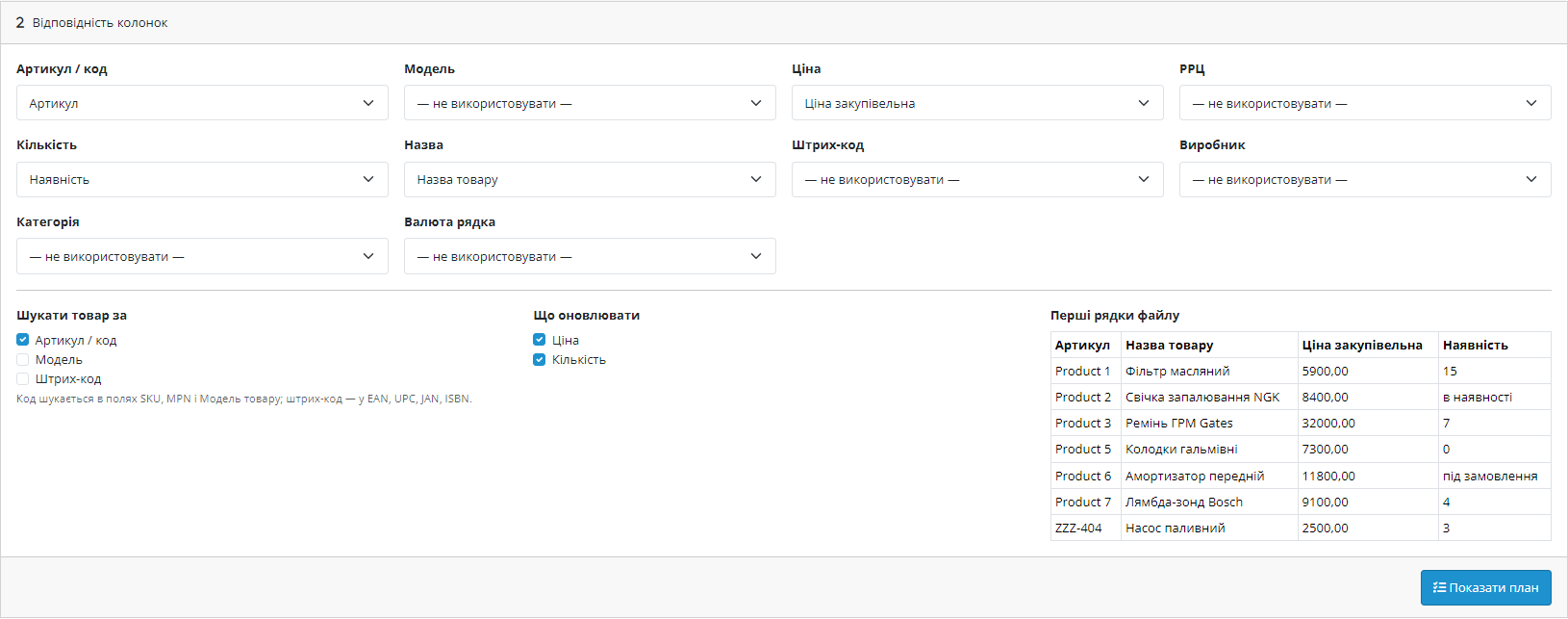
The module reads the file’s header and finds the SKU, price and stock columns itself: it recognises “Артикул”, “Код товара”, “Цена закупочная”, “Наличие”, “vendorCode”, “stock_quantity” and dozens of other spellings. Any mapping can be overridden manually — the first rows of the file are shown alongside so you can see exactly what will land in the shop.
A product is matched by SKU (or MPN or model), separately by model, or by barcode (EAN, UPC, JAN, ISBN) — whichever field is actually filled in in your catalogue.
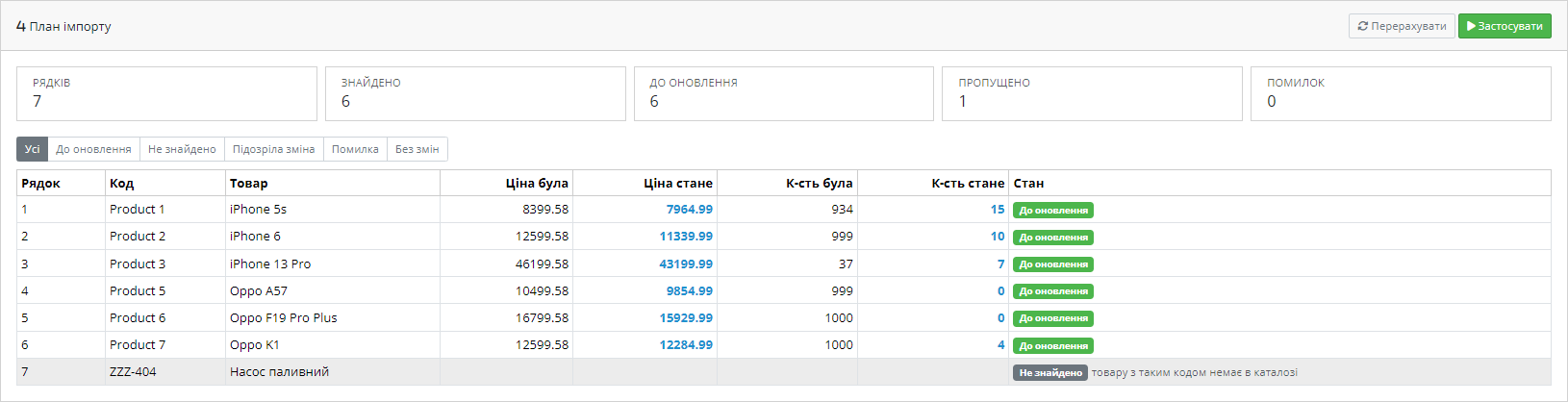
The module never writes to the catalogue immediately. First it reads the file, matches it against products, and shows a full plan: how many rows were read, how many were found in the catalogue, which prices and stock levels will change — a “before → after” table for each product. Rows with unknown codes, suspicious changes, errors, and rows with no change are shown separately.
Only after your confirmation is the plan applied — in batches, so 40,000 rows don’t depend on whether a single request survives the server timeout.
Every run is stored: when, from which file, how many rows were read and how many products were updated. All changes are recorded field by field — old and new price, old and new stock — so any run can be rolled back with one click to the values it had before. This isn’t “restore a database backup” — it’s an exact rollback of precisely the products the import touched.
A supplier profile with a price-list URL can be put on a schedule — hourly, every 6 hours, daily or weekly. The module fetches the file itself, calculates prices by your rules and updates the catalogue; the result of each run stays in history with the same rollback available. The run happens at a cron URL with a secret token, so no one else can trigger the import.
A supplier’s price list is almost always someone else’s Excel file with arbitrary columns, arriving once a week and slightly different each time. Reconciling such a file with the catalogue by hand takes hours and ends up with pricing mistakes.
The module takes over this work: it recognises the columns itself, calculates prices by your rules, and shows a plan of changes before anything is written.
1. Upload the archive via “Extensions → Installer” and install the module.
2. Upload one price list and check that the columns were detected correctly.
3. Set the price rules and behaviour for products outside the price list.
4. Look over the plan of changes, and only then trigger the write.
Didn't find the answer? Message us on Telegram and we'll reply within a business day.
 @catcode_support
Setup, compatibility, activation
@catcode_support
Setup, compatibility, activation
No. The module reads .xlsx directly, including formulas (it takes the calculated value) and multiple sheets.
No, the encoding is detected automatically, and can be set manually if needed.
Turn on the percentage change limit — such rows won't be written, they'll land in the "Suspicious change" list for review.
Yes. Every run stores the old and new values for each field; a rollback restores exactly the products that import touched.
No, it updates prices and stock for existing ones. This is a deliberate choice: creating product cards without descriptions and images damages the catalogue and SEO.
Yes, in Pro: give it the price list URL and a schedule, and the module fetches the file and updates the catalogue on its own.
Yes, the licence includes builds for 2.3, 3.x and 4.x — moving the shop to a different version costs nothing extra.
No reviews yet. Be the first.
No questions yet. Ask one — we answer within 24 hours.
We build custom modules for WordPress, WooCommerce, OpenCart and Shopify. Tell us about the task and we'll prepare an estimate.
Order a custom module
—

CatCode assistant
Just now


CatCode assistant
Online

I’ll help with your website task
Describe your website task — I’ll find a ready-made module or pass it to a developer for an estimate. Modules, custom features, layout, integrations, speed, migration, technical SEO.
