


SalesDrive Sync — CRM for OpenCart 2.3, 3.x and 4.x
Free OpenCart integration module for SalesDrive CRM: every order becomes a lead with items, shipping and comment. No licence keys or limits.
- Compatibility
- OpenCart 2.3.0.0 – 2.3.0.2 · 3.0.2 – 3.0.5 · 4.0.2 – 4.1.x
- Version
-
v1.1.1 (OpenCart 4)
v1.1.1 (OpenCart 3.x)
v1.0.0 (OpenCart 2.3) - Updated
- August 2026
What the module does

What it looks like
Technical requirements
 OpenCart 4.0.2 – 4.1.x, 3.0.2 – 3.0.5 or 2.3.0.0 – 2.3.0.2 — a separate build for each branch
- PHP 7.4 or newer for the OC4 and OC3 builds; the OpenCart 2.3 build works from PHP 5.6
- A SalesDrive account: a domain like yourshop.salesdrive.me and a leads-database API key with “Leads: add” permission
- OpenCart cron enabled — for automatic retries on failures (the send itself works without it too)
Version history
Lead and line totals are now sent in the order’s currency at its historical rate.
A separate build for OpenCart 2.3.0.0–2.3.0.2 and PHP 5.6–7.x.
Fixed sending line items: SalesDrive was silently dropping items without an id field, and the lead arrived with an empty list and a zero total.
All versions (5)
Minor fixes to event registration and line-item mapping.
First public release: sends orders to SalesDrive on placement or by status trigger, an idempotent sync log (UNIQUE on order_id), a retry queue via hourly cron, mapping of…
Full module description
SalesDrive Sync for OpenCart is a module that connects a shop on OpenCart 2.3, 3.x or 4.x to SalesDrive CRM. Every order, on placement (or on moving to a chosen status), automatically becomes a lead in SalesDrive — with the buyer, items, shipping cost and comment. The manager gets the lead in the CRM within seconds of the purchase, with no manual copying of data from the OpenCart admin.
The module is completely free. Download: cc_salesdrive.ocmod.zip for OpenCart 4.x, cc_salesdrive-oc3.ocmod.zip for OpenCart 3.0.2–3.0.5, or cc_salesdrive-oc2.ocmod.zip for OpenCart 2.3.0.0–2.3.0.2 — no licence keys or limits on the number of orders.
How it works, step by step
- The customer places an order in your OpenCart shop.
- The catalog/model/checkout/order*addHistory event fires — the module reacts to the placement or to the order reaching the trigger status.
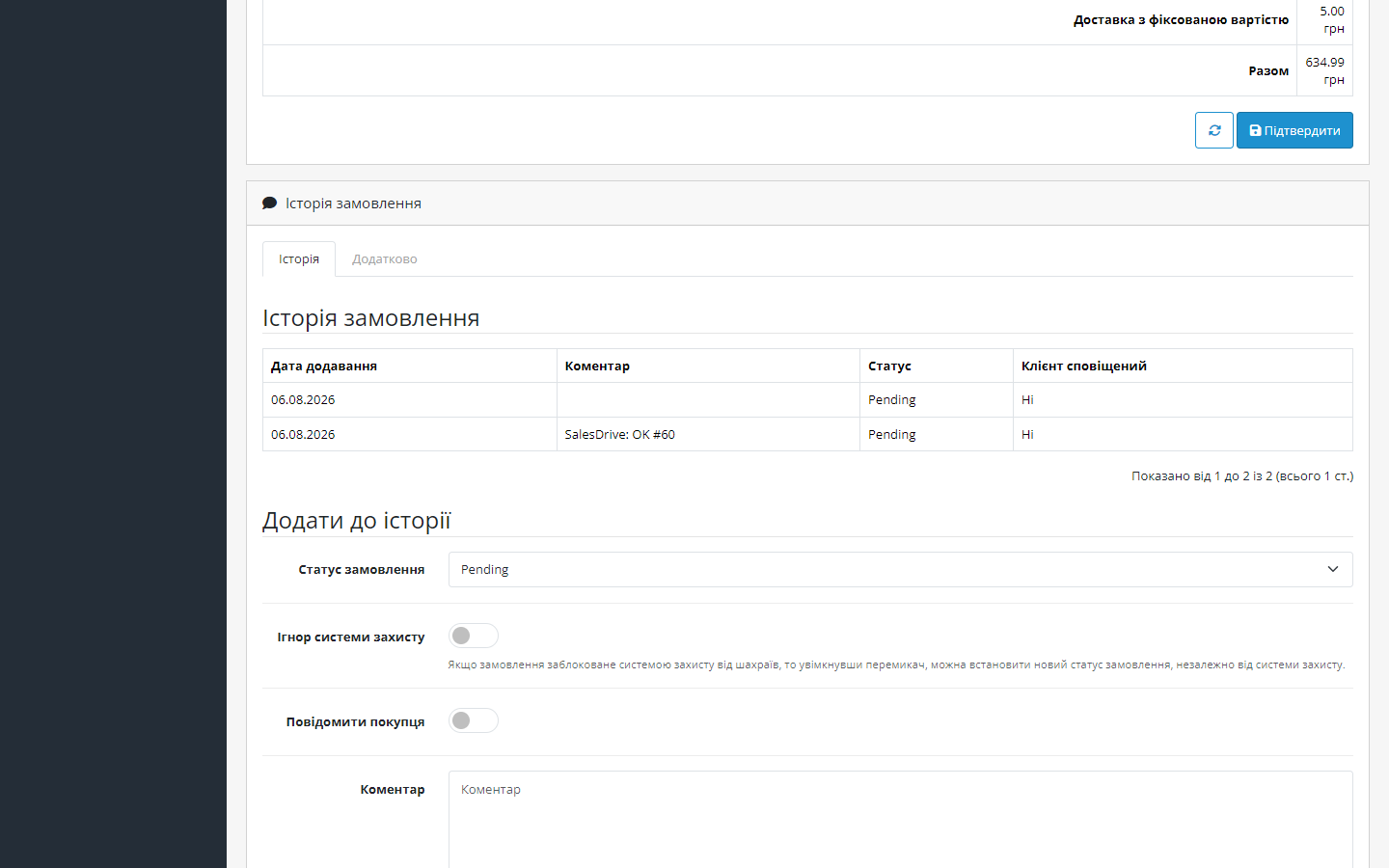
- A lead is built: the buyer with a phone number in +380 format, items with SKU, price and quantity, shipping cost, comment — and it’s sent to SalesDrive via the leads handler (POST /handler/, X-Api-Key header).
- The lead number is recorded in the sync log. The log holds a unique record per order, so a repeated event will never create a duplicate — a completed record is simply skipped.
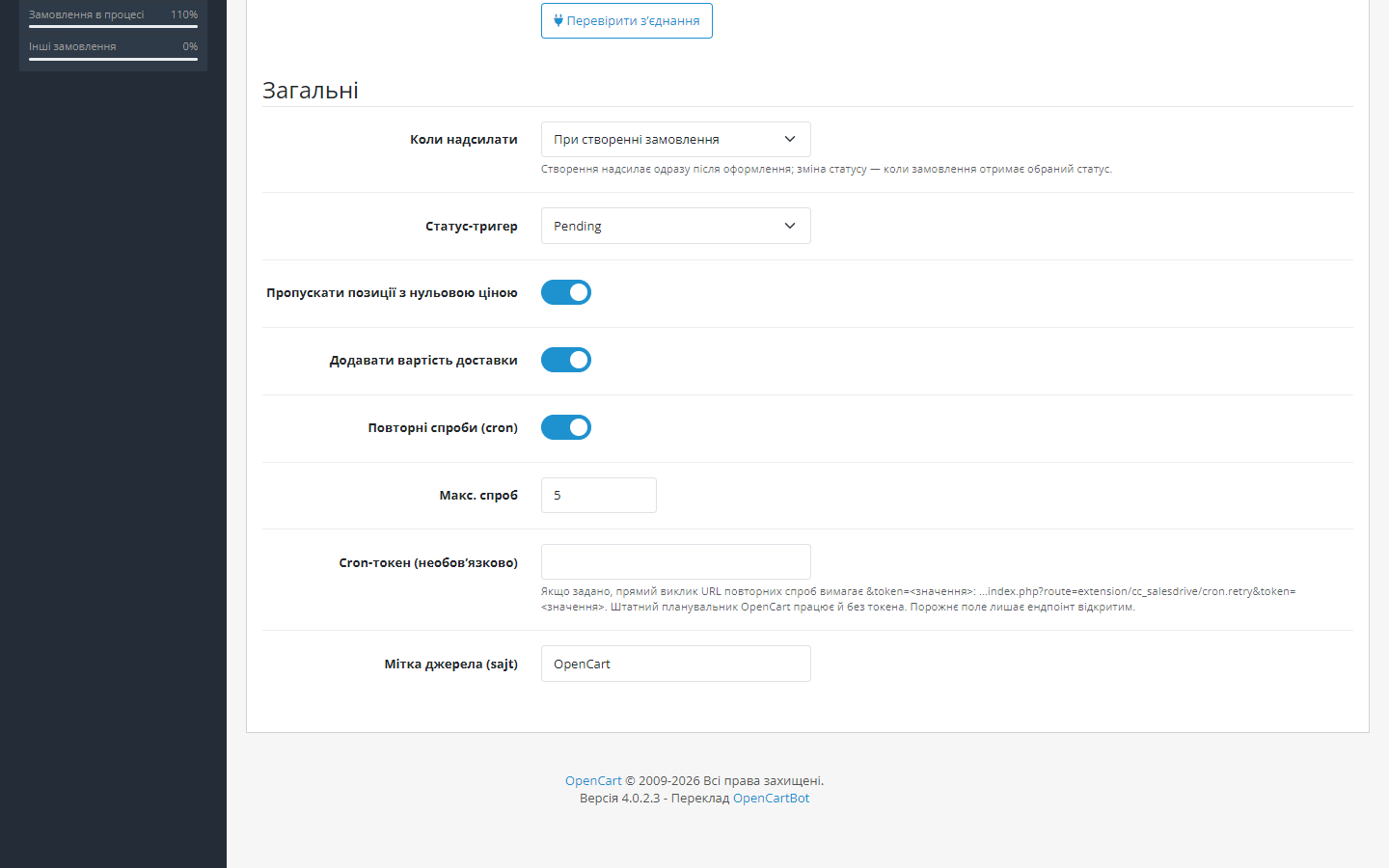
- If SalesDrive is unavailable — the record stays queued, and OpenCart’s hourly cron retries the send (up to 5 attempts by default).
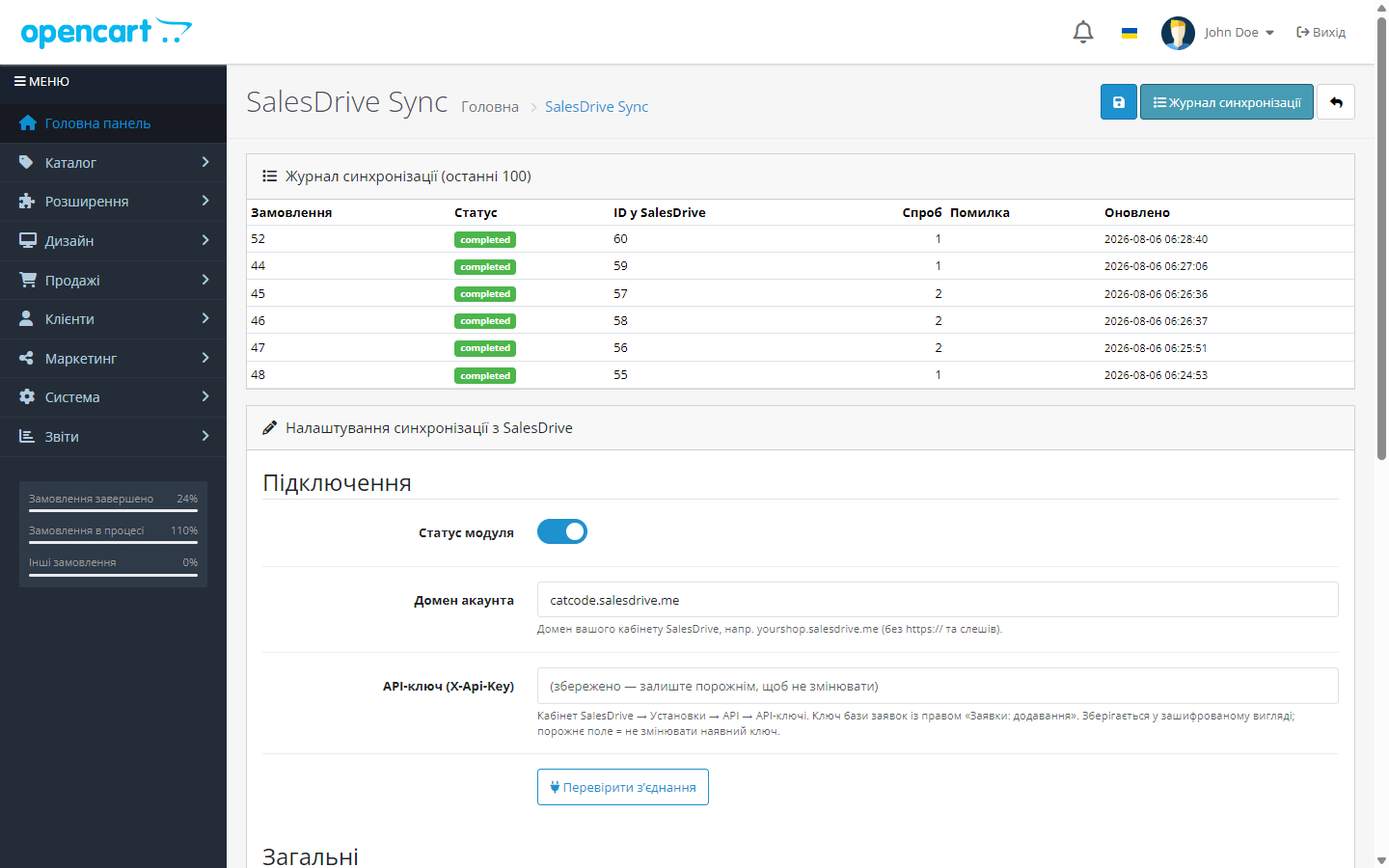
- The result is visible in the admin: the log shows the status, lead ID, number of attempts and the last error, if any.
How much it costs
Free. Download it and use it — no activations, subscriptions or hidden fees.
Under the hood
- Native extension for OpenCart 4.x — events and its own table, with no OCMOD patches to other files. The event is registered in OC4 format with a * separator before the method — that’s exactly how the 4.x core matches model events.
- Database-level idempotency: a cc_salesdrive_sync table with a UNIQUE key on order_id — creating two leads from one order is physically impossible.
- The API key is encrypted before being stored in the database — it isn’t kept in plain text.
- Retry queue via OpenCart’s built-in cron: the cc_salesdrive_retry task runs hourly and picks up orders in an error status, as well as ones that got stuck mid-send for over an hour. The retry URL can be locked with your own cron token.
- A log with request and response excerpts — when troubleshooting, you can see exactly what the module sent and what the CRM replied.
How to install
- In the OpenCart admin, open Extensions → Installer and upload
cc_salesdrive.ocmod.zip. - Go to Extensions → Extensions → Modules, find SalesDrive Sync and click “Install” — the module creates the log table, the event and the cron task.
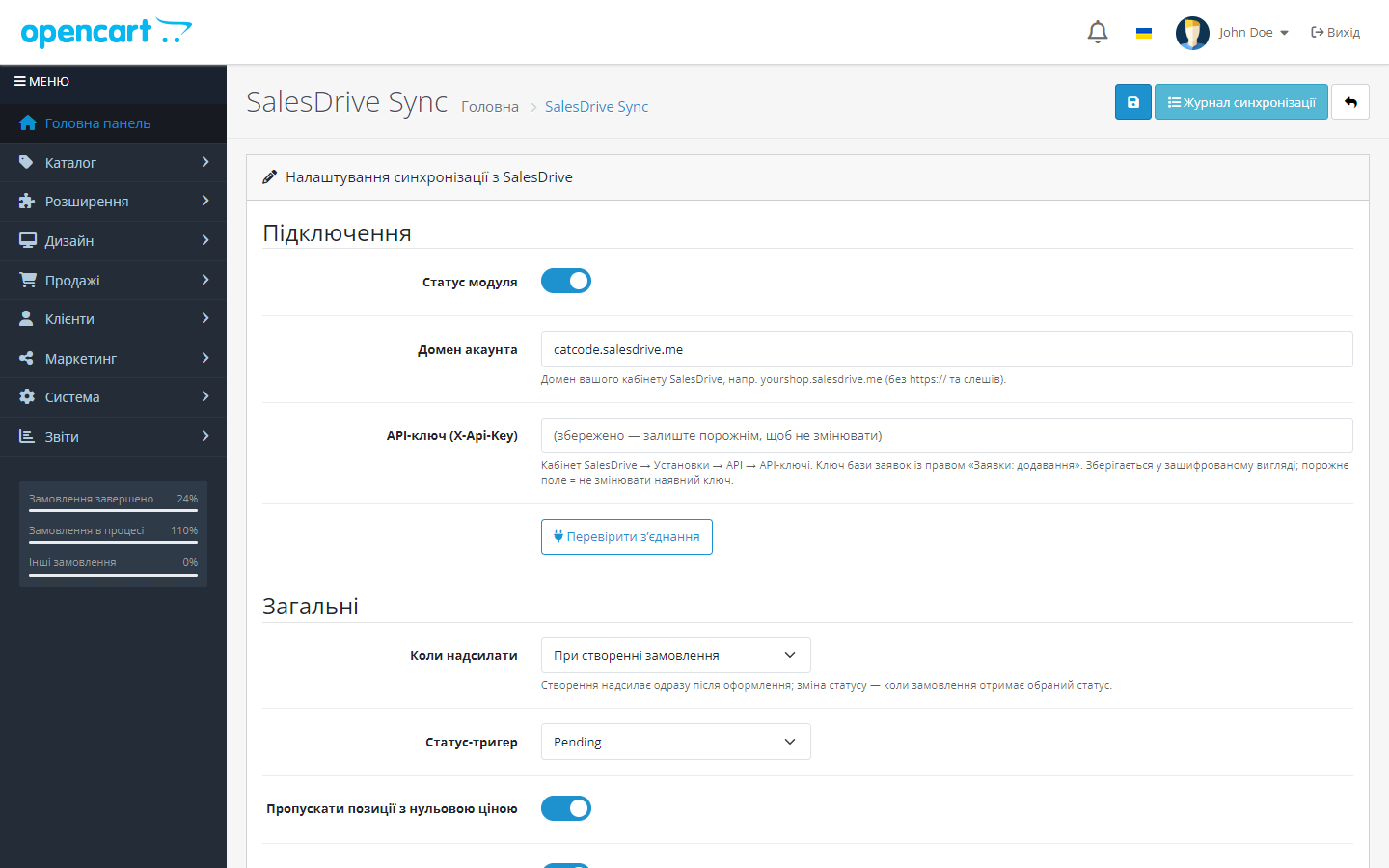
- Open the module’s settings: enter your SalesDrive account domain and API key.
- Click the connection-test button — make sure the CRM responds.
- Choose the send moment (on placement or on status change), save — done.
OpenCart 2.3. The built-in 2.3 Installer only copies files via FTP: if FTP isn’t configured in the shop, unpack cc_salesdrive-oc2.ocmod.zip and upload the contents of the upload/ folder to the shop root, then follow the same steps — Extensions → Modules → SalesDrive Sync → “Install”.
Retries in OpenCart 2.3. 2.3 has no scheduler at all, so the retry queue is driven by a plain storefront address — add it to the hosting’s crontab (typically every 15 minutes) and lock it with your own cron token from the module’s settings:
curl -s "https://YOUR-SHOP/index.php?route=extension/module/cc_salesdrive_cron/retry&token=TOKEN"Questions
about the module
Didn't find the answer? Message us on Telegram and we'll reply within a business day.
 @catcode_support
Setup, compatibility, activation
@catcode_support
Setup, compatibility, activation
Does the module modify OpenCart files or the theme?
No. This is an event-driven extension for OC4: no OCMOD patches to system files, checkout and theme remain untouched. After the module is removed, the shop works as before.
Where do I get a SalesDrive API key?
SalesDrive account → Settings → General settings and integrations → Other services → API → API keys. You need a leads-database key with "Leads: add" permission.
An order changes status several times — will there be several leads?
No. The sync log holds a unique record per order: if the lead is already created, repeated events are skipped.
What happens if SalesDrive goes down at the moment of the order?
Nothing is lost: the attempt is recorded as an error, and the hourly cron will retry the send (up to 5 attempts by default). The order in OpenCart is created regardless.
What happens after the module is deleted?
The event and cron task are removed. The sync log table is deliberately kept so the send history isn't lost; it can be removed manually if needed.
Do I need cron running all the time?
Only for automatic retries on failure. The initial send happens right on the order event, without cron.
No reviews yet. Be the first.
No questions yet. Ask one — we answer within 24 hours.
Not quite what you are looking for?
We build custom modules for WordPress, WooCommerce, OpenCart and Shopify. Tell us about the task and we'll prepare an estimate.
Order a custom module
Buying the module
—



