

OneBox Sync — order synchronisation for WooCommerce
Free WooCommerce integration plugin for OneBox OS: after checkout, the CRM creates a process order with the customer, delivery address and items.
- Compatibility
- WordPress 6.2+, WooCommerce 6.0+
- PHP
- 7.4 or newer
- Updated
- 13 August 2026
What the module does

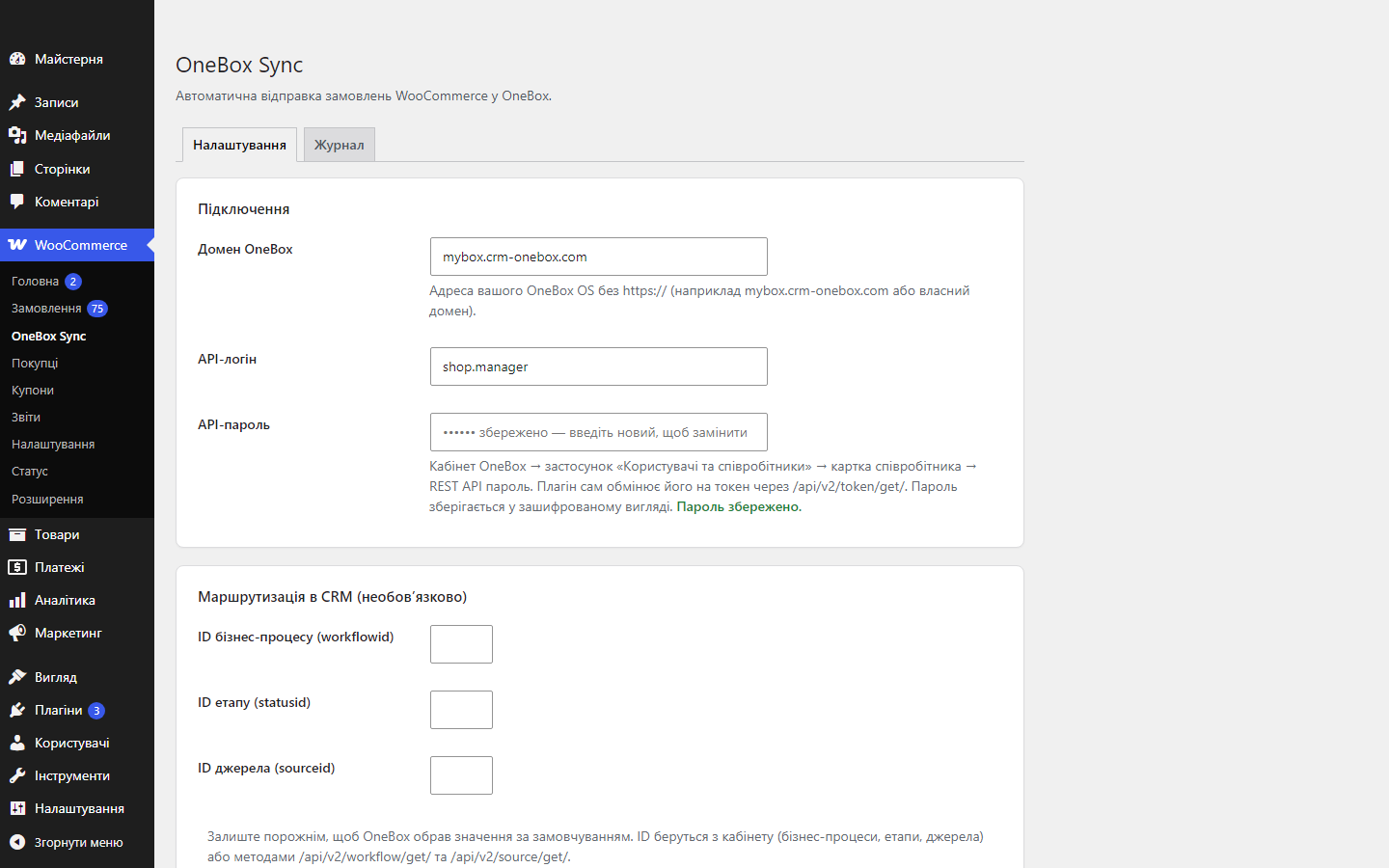
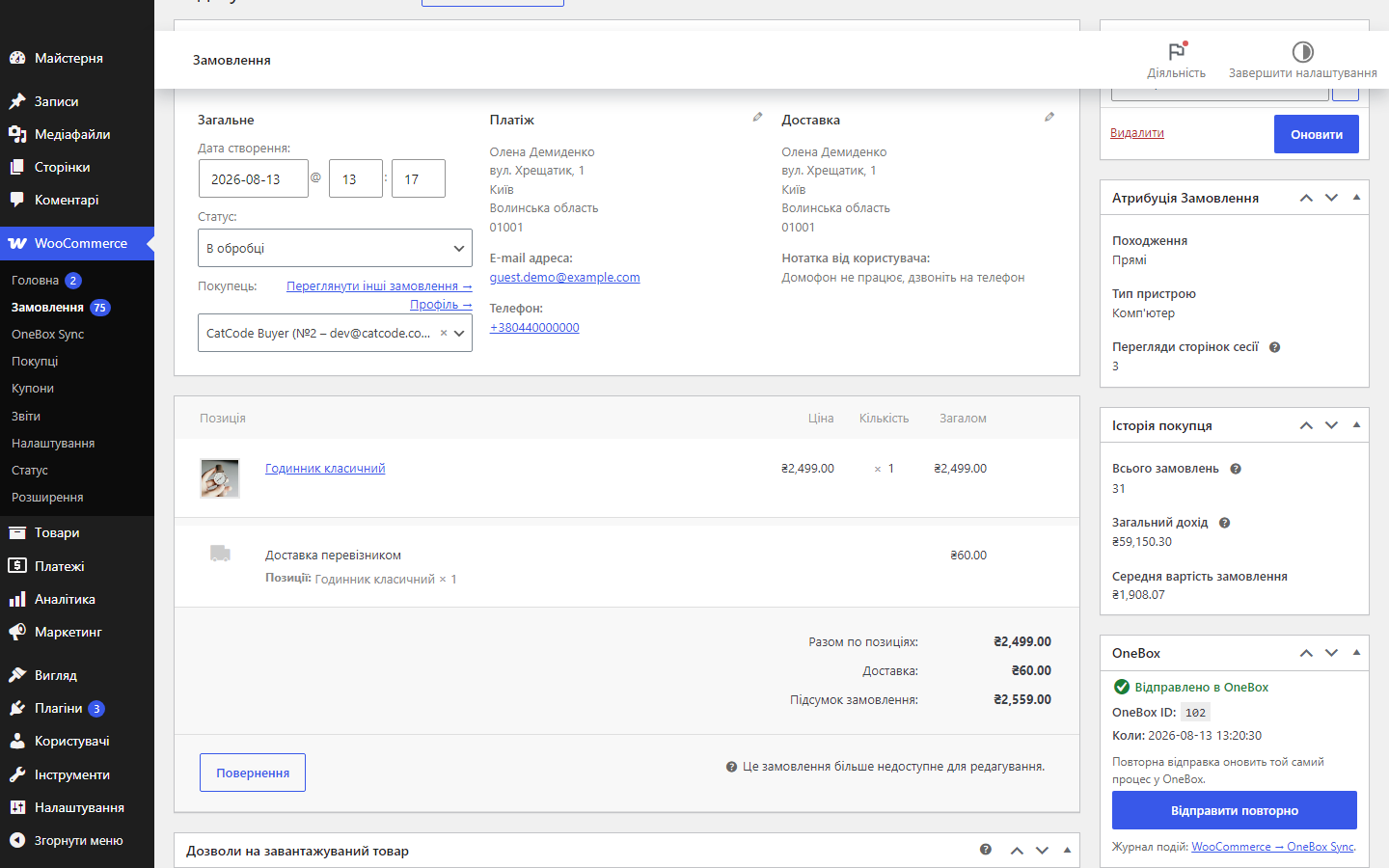
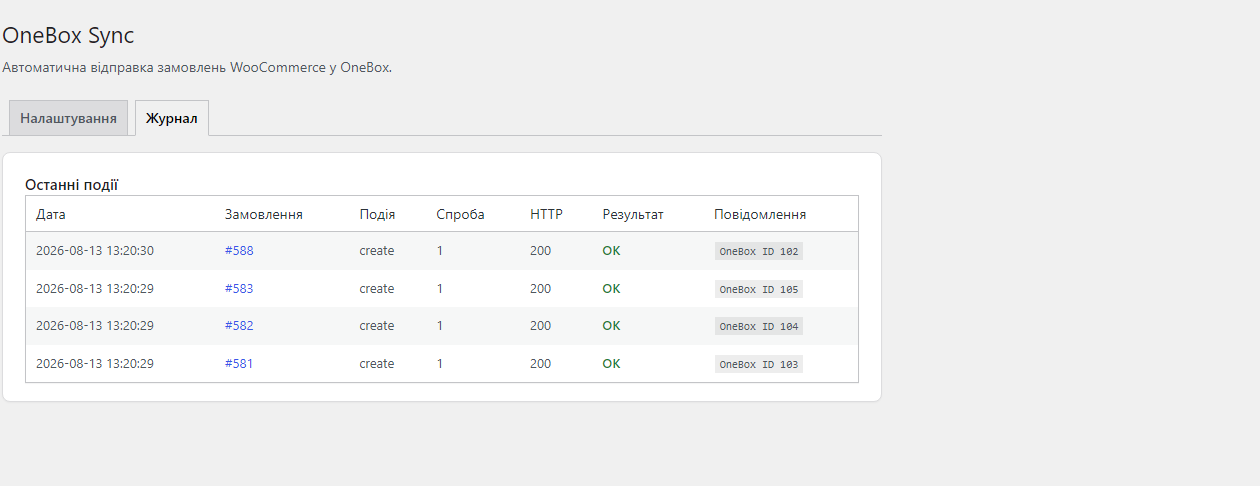
What it looks like
Technical requirements
 WordPress 6.2+ (tested up to 7.0)
- WooCommerce 6.0 or newer
- PHP 7.4+
- OneBox OS with the “API v2” component (1b.app → Apps → API services) and an employee REST API login/password (Users and employees → employee card)
Version history
Fixed the “Resend” button in the metabox.
First public release: sends orders to OneBox OS via API v2 (token/get + order/set), double deduplication (externalid + meta), item-to-catalogue mapping, routing by business…
Full module description
OneBox Sync for WooCommerce is a plugin that, after every checkout, automatically creates a process order in OneBox OS with the customer, phone number, delivery address and list of items. The manager opens a ready-made request in the CRM instead of copying data from the WooCommerce order by hand — and no order gets lost between the site and OneBox.
How it works, step by step
- The customer places an order — the plugin supports both the classic checkout and Checkout Blocks.
- The plugin authenticates with OneBox: it obtains a token via POST
/api/v2/token/get/(the token is cached and refreshed automatically) and sends the order via POST/api/v2/order/set/to your OneBox domain. - The customer and items are mapped to the CRM: clientname/clientemail/clientphone/clientaddress plus a products array linked to the OneBox catalogue — catalogue items are matched by SKU or created automatically. Delivery is a separate line, so the process total matches the order total.
- OneBox returns a process ID — it is stored in the
_cc_onebox_order_idmeta; an externalid ofwc-{id}is also sent, so duplicates are ruled out twice over. - If OneBox is unavailable — WP-Cron retries the send: up to 3 attempts — a retry after 5 min, then after 30 min. Orders paid online get a “✅ Paid online” note on the process (COD and offline methods are not marked).
How much it costs
Free. The plugin is distributed under GPLv2 with open source on GitHub — all features are available with no payment right after installation.
Under the hood
- Double deduplication: an externalid of
wc-{id}gives an upsert on the OneBox side, and the process ID saved in the order meta blocks the plugin from creating it again. - Database-level lock — if the checkout hook, a status change and a payment callback hit the same order at once, exactly one create request goes to OneBox (verified with 24 parallel requests against 3 orders).
- An unanswered attempt doesn’t duplicate the deal — if OneBox doesn’t respond (timeout), the order is flagged, and before retrying the plugin asks the CRM for the externalid (POST
/order/get/) and picks up the process already created. - API password encrypted in the database — libsodium with an HMAC fallback; the access token is cached and refreshed automatically.
- Phone normalisation to E.164 (+380…) — numbers arrive in the CRM in a single format.
- HPOS compatibility (custom order tables) — orders are handled exclusively through WC_Order CRUD.
- Extensibility: the
cc_onebox_order_payloadfilter lets you change the data before sending, and thecc_onebox_order_senthook lets you run your own code after a successful sync.
How to install
- Install the “API v2” component in OneBox (1b.app → Apps → API services) and set a login and password for the employee in their card (Users and employees → Login, password, permissions).
- Upload
catcode-order-sync-with-onebox-for-woocommerce-0.2.0.zipvia Plugins → Add New → Upload Plugin and activate it. - Open WooCommerce → OneBox Sync and enter your OneBox domain, API login and API password.
- Click “Test connection” — the plugin will fetch a token and the list of business processes.
- If needed, set the business process, stage and source ID (leave blank for the first business process automatically) and save.
- Place a test order — a process order will appear in OneBox.
Questions
about the module
Didn't find the answer? Message us on Telegram and we'll reply within a business day.
 @catcode_support
Setup, compatibility, activation
@catcode_support
Setup, compatibility, activation
Where do I get the API login and password?
OneBox OS admin panel → "Users and employees" app → employee card → REST API password. The login is that employee's login. The plugin exchanges them for a token itself via /api/v2/token/get/.
Do duplicates appear when the status changes again?
No. The plugin sends an externalid of wc-{id} — OneBox updates the matching process itself — and additionally checks the OneBox ID saved in the order meta.
What does the "Resend" button do?
If the order isn't in OneBox yet — it creates a process. If it was already sent — it updates the same process with current data: items are updated, not duplicated.
Does the plugin touch the checkout or the theme?
No. All the work happens on the server via order hooks — the front end, the theme and the checkout page are not changed.
What happens if an item has no match in the OneBox catalogue?
The plugin sends items linked to the catalogue (productinfo: name, SKU, externalid) — the item is matched by SKU or created in the catalogue automatically.
What happens if OneBox doesn't respond at all?
The order is marked as a "no-response attempt", and before retrying, the plugin asks OneBox whether a process with that externalid already exists. If it does — it adopts that ID and writes a note on the order; a second process is not created.
What happens after the plugin is deleted?
The processes in OneBox and the orders themselves remain. The plugin removes its own log table and settings, but deliberately leaves the meta with the process ID in place — that's exactly what prevents old orders from being resent after reinstalling.
No reviews yet. Be the first.
No questions yet. Ask one — we answer within 24 hours.
Not quite what you are looking for?
We build custom modules for WordPress, WooCommerce, OpenCart and Shopify. Tell us about the task and we'll prepare an estimate.
Order a custom module
Buying the module
—



