
OpenCart
Marketplace Waybills for OpenCart — Rozetka and Epicentr
Free + Pro
1 290 UAH
v1.0.2
 All Access4 990 ₴ / year
 Website auditA PDF report by email in 3 minutesCheck a website
Everyday tasks
Image compressorSize, quality and WebP in bulkQR generatorLink, Wi-Fi, payment to IBANVAT calculator20, 14, 7% and amount in wordsTransliterationOfficial Ukrainian standardWebsite checks
PHP and pluginsPHP version, WordPress, pluginsGoogle Merchant feedFields, prices, GTIN, imagesDomain emailSPF, DKIM, DMARC, blacklistsAI search readinessllms.txt, bots, markupAll 9 toolsEnter at least 2 characters

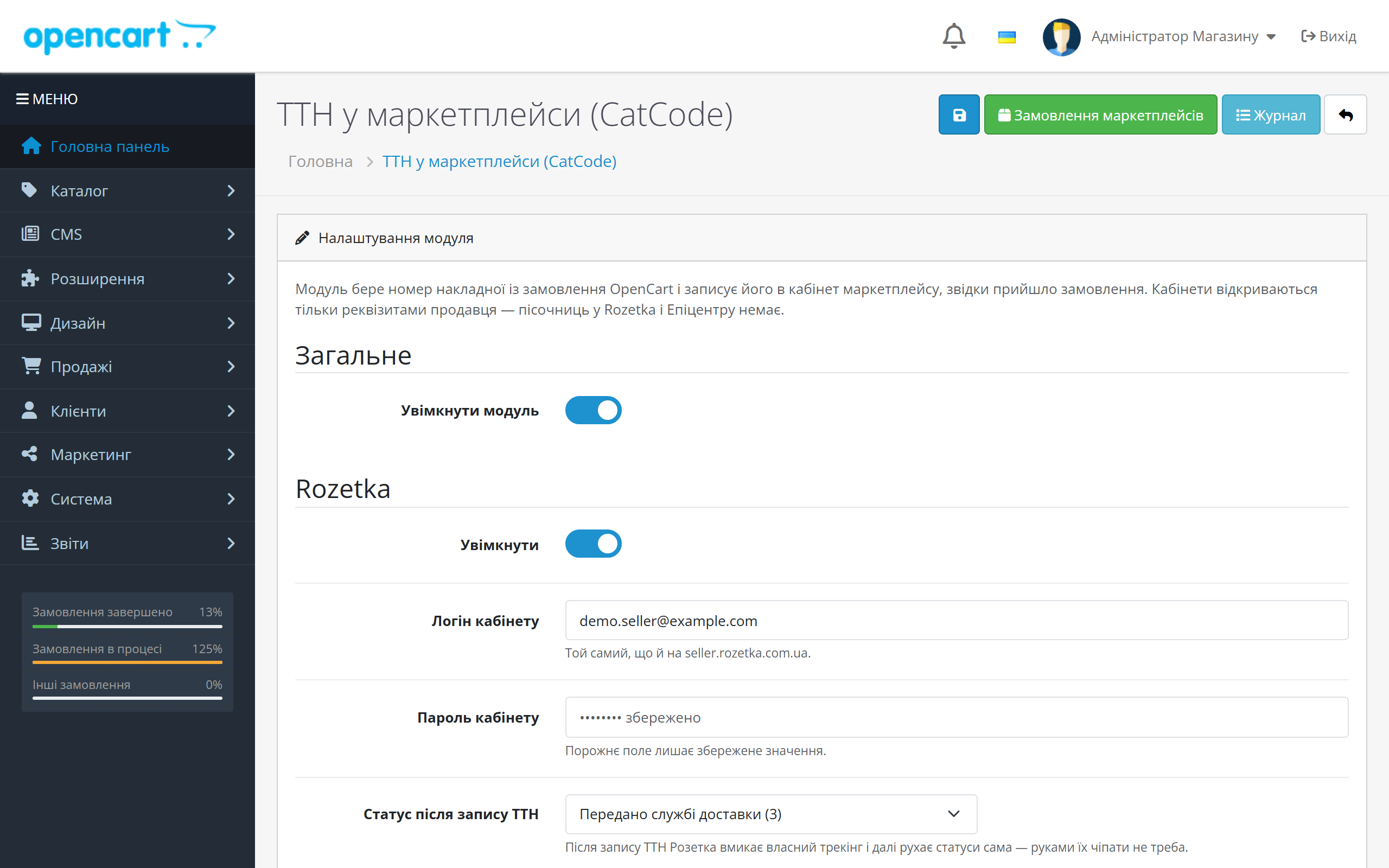
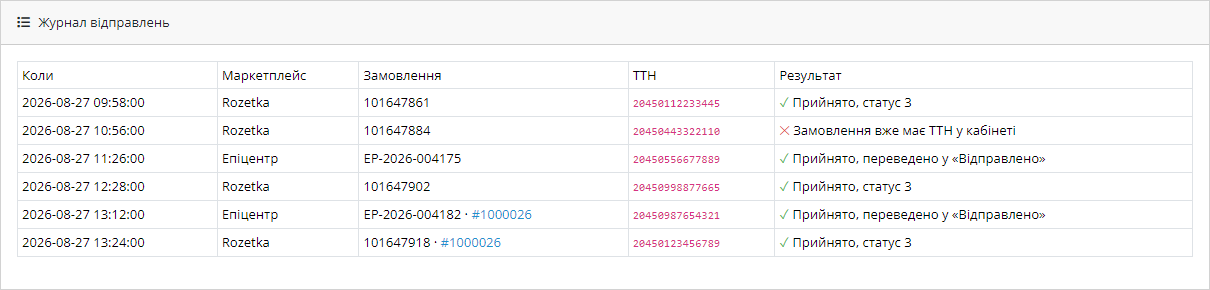
The module carries the waybill number from an OpenCart order into your Rozetka Marketplace or Epicentr Marketplace account: a list of orders missing a waybill, one-click sending, a log and auto-send in Pro.
Clear even without sound: Ukrainian subtitles
The free version works with no time limit. Pro adds the rest of the features in the table.


An item called “Marketplace Orders” appears in the OpenCart admin menu. It’s a single list of orders from both accounts that still need a waybill — not Rozetka and Epicentr separately, but one shared work queue for the day.

The module doesn’t invent a number or contact the carrier. It reads it from the tables of our own shipping modules: np_shipment.int_doc_number (Nova Poshta), up_shipment.barcode (Ukrposhta) and from ROZETKA Delivery.

For Rozetka, the order status is set together with the waybill number. This matters: in the Rozetka account, the number by itself doesn’t trigger anything until the order is moved into the matching status.

A fresh install is the free version, nothing switches on by itself. The “Try Pro for 7 days” button → e-mail → the key right in the window and by e-mail.

Moving the store? Unbind the licence on the old domain and activate it on the new one yourself. For studios — keys for 5 or 25 sites, or unlimited.
 OpenCart 4.x, 3.x and 2.3 are supported — three separate builds, one archive per version. ocStore built on these versions works too.Outbound HTTPS to the Rozetka and Epicentr APIs is required. This is open on a normal hosting setup; if your store sits behind a strict firewall, this is the one thing you’ll need to allow.
A purchased licence for OpenCart now works without expiry.
The «Send» button in the marketplace orders list sends the number again (on OpenCart 4.x and 3.x the click did nothing); the list refreshes by itself after sending; order dates are shown in…
Rozetka Marketplace and Epicentr Marketplace, a shared order queue, waybill sending from the list, number sources (Nova Poshta, Ukrposhta, ROZETKA Delivery by CatCode, or typed in by hand),…
4 modules in one order — 40% cheaper than separately



Marketplace Waybills is a module for OpenCart 2.3, 3.x and 4.x that sends the waybill number from a store order to your Rozetka Marketplace and Epicentr Marketplace account. The seller no longer copies the same number by hand: create the waybill on the order, and one button (or auto-send in Pro) puts it into the marketplace account together with the status.
The module doesn’t create waybills and doesn’t replace shipping. It takes the number that’s already on the OpenCart order — from Nova Poshta, Ukrposhta, ROZETKA Delivery or any other module — and closes off the last, most manual step of the day.
A seller trading on both a marketplace and their own store ends up doing the same job twice. First the waybill is created in OpenCart: the buyer chose a branch, the manager clicked “Create waybill”, the number was saved to the order. Then the Rozetka or Epicentr account is opened, the same order is found, and the number is typed in by hand.
At twenty orders a day that’s twenty tab switches, twenty searches for the order in someone else’s interface, and just as many chances to get a digit wrong. A mistyped number on the marketplace costs more than one made in your own system: the account stops seeing the parcel move, the order sits at “Awaiting shipment”, and the complaint lands on the seller, not the carrier.
The module removes the second step entirely. The number travels to the marketplace account from the OpenCart order, and the status is set alongside it — tracking from that point on is handled by the marketplace itself.
An item called “Marketplace Orders” appears in the OpenCart admin menu. It’s a single list of orders from both accounts that still need a waybill — not Rozetka and Epicentr separately, but one shared work queue for the day.
Each row shows: the marketplace order, the OpenCart order it’s linked to, the waybill number if it already exists, and a send button. Click it, and the number goes to the account; the account’s response then appears in the row. If it doesn’t appear, the module shows exactly why, in the account’s own wording.
All the work happens from one list: the link, the number, and the send button are all right there. There’s no need to open every order separately.
Self-pickup orders are flagged separately in the list. They will never have a waybill, so the module doesn’t offer a send button and doesn’t show them as “unresolved” — otherwise the queue would never empty out.
The module doesn’t invent a number or contact the carrier. It reads it from the tables of our own shipping modules: np_shipment.int_doc_number (Nova Poshta), up_shipment.barcode (Ukrposhta) and from ROZETKA Delivery. In other words, the number fills in by itself as soon as the waybill is created, and with Pro it’s sent automatically too.
If shipping is handled by a different module, the number can be typed into the order by hand: the queue and sending still work the same way — only the auto-fill is lost.
For Rozetka, the order status is set together with the waybill number. This matters: in the Rozetka account, the number by itself doesn’t trigger anything until the order is moved into the matching status. The module does both in one call, so the order shows as shipped in the account right after the button is pressed.
Tracking from that point is handled by the account itself — the module doesn’t touch that order again and doesn’t poll the API every hour. That’s a deliberate choice: Rozetka knows better where the parcel actually is, and mirroring its statuses locally would only build up discrepancies.
The credentials needed are the seller account login and password from seller.rozetka.com.ua. No separate API key is required.
For Epicentr, the module sets the waybill number and moves the order to “Shipped” in one action. The logic is the same as for Rozetka; only the authentication method differs.
Epicentr works with a static token. It’s obtained in the account under “Company Settings” → the “API” tab. If the tab isn’t visible, your category manager can enable access to it — that’s a one-message request.
1. The order arrives from the marketplace into your normal workflow. The module sees it in the shared “Marketplace Orders” queue.
2. You link the marketplace order to the OpenCart order right in the queue row — type in the OpenCart order ID, no import.
3. The waybill is created on the order the way you always do it. If a CatCode shipping module makes it, the number fills into the queue row by itself; otherwise you type it in.
4. You click “Send waybill” in the list row. The module takes the number, contacts the account, and sets the status.
5. The account’s response is written to the log. If all’s well, the row disappears from the queue. If not, you see the exact reason.
In the Pro version, steps 4 and 5 happen automatically: the number goes to the account as soon as it appears on the order.
Every send is written to a log: which order, which account, when, with what number, and exactly what the account replied. This isn’t a decorative log — it’s what answers the question “why is the account empty, I did click send”.
The account’s error is shown in its own words, not as a response code. If Rozetka says the order is already in a different status, that’s exactly what you’ll read, not HTTP 400. That lets the manager work it out themselves, without going to a developer.
The same number is never sent twice. If the button is clicked twice, or a cron job picks up an order that’s already closed, the module simply does nothing — the account isn’t pinged for no reason and doesn’t receive duplicates.
The module talks to the accounts through their official APIs — no page scraping, no login emulation whatsoever. Credentials are stored encrypted in the store settings.
The result of every send is written not only to the module’s log but also to the order history — the place a manager already looks to see what happened with an order. The link between the OpenCart order and the marketplace order is stored in a separate table and survives theme and store updates.
The module doesn’t create any storefront pages, doesn’t add scripts to the store, and does nothing outside the admin at all — the buyer never sees it and it can’t slow anything down for them.
1. Upload the archive via “Extensions → Installer” (in OpenCart 2.3 and 3.x — “Extension Installer”).
2. “Extensions → Modules” → find “Marketplace Waybills” and install it.
3. Open the settings, enable the accounts you need, enter the credentials, and click “Test connection”.
4. From then on you work from the marketplace orders list — that’s your daily queue of orders still waiting for a number.
Setup takes a few minutes, and the longest part is finding the Epicentr token in the account.
Didn't find the answer? Message us on Telegram and we'll reply within a business day.
 @catcode_support
Setup, compatibility, activation
@catcode_support
Setup, compatibility, activation
For Rozetka — the seller account login and password (seller.rozetka.com.ua). For Epicentr — a static token: account → "Company Settings" → the "API" tab; access to the tab is granted by your category manager.
No. Neither marketplace has a sandbox — the API only opens with a live account's credentials. The "Test connection" button shows the account's reply verbatim, so setup can be checked in a second.
From our own shipping modules' tables: `np_shipment.int_doc_number` (Nova Poshta), `up_shipment.barcode` (Ukrposhta), `rzd_shipment.track_id` (ROZETKA Delivery). If a module isn't installed, that source is simply skipped — no error is raised.
In the marketplace orders list, each row has an "OpenCart order ID" field. Enter it once and the link is saved — after that the number fills in automatically, and with Pro it's sent automatically too.
No. Rozetka turns on its own tracking once the waybill appears and moves statuses itself. Epicentr is moved to "Shipped" by the module.
The module shows the reason exactly as the account phrased it, and writes it to the log and to the order history. The order isn't marked as sent, so the next attempt will go through again.
4.x, 3.x and 2.3.
No reviews yet. Be the first.
No questions yet. Ask one — we answer within 24 hours.
We build custom modules for WordPress, WooCommerce, OpenCart and Shopify. Tell us about the task and we'll prepare an estimate.
Order a custom module
—

CatCode assistant
Just now


CatCode assistant
Online

I’ll help with your website task
Describe your website task — I’ll find a ready-made module or pass it to a developer for an estimate. Modules, custom features, layout, integrations, speed, migration, technical SEO.
