OpenCart
Epicentr: Price and Stock Sync for OpenCart
Free + Pro
1 290 UAH
v1.2.1
 All Access4 990 ₴ / year
 Website auditA PDF report by email in 3 minutesCheck a website
Everyday tasks
Image compressorSize, quality and WebP in bulkQR generatorLink, Wi-Fi, payment to IBANVAT calculator20, 14, 7% and amount in wordsTransliterationOfficial Ukrainian standardWebsite checks
PHP and pluginsPHP version, WordPress, pluginsGoogle Merchant feedFields, prices, GTIN, imagesDomain emailSPF, DKIM, DMARC, blacklistsAI search readinessllms.txt, bots, markupAll 9 toolsEnter at least 2 characters
A module for OpenCart 2.3–4.x sends price, old price and stock to the Epicentr Marketplace dashboard via the API: only changed products, statuses and a log. Pro adds auto-sync.
Clear even without sound: Ukrainian subtitles
The free version works with no time limit. Pro adds the rest of the features in the table.


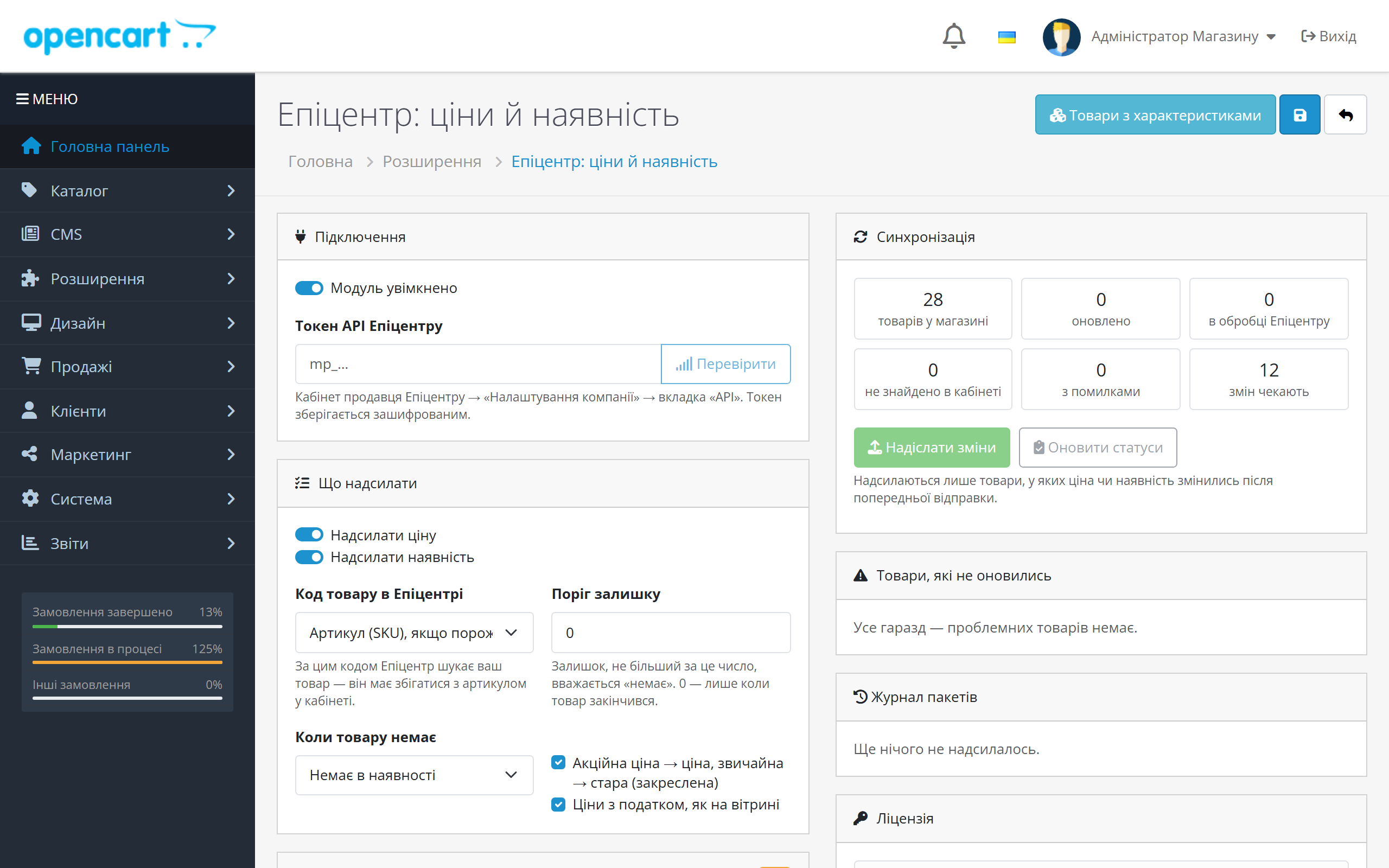
One page under Extensions → Modules: connection, exactly what to send, sync, a list of products that failed to update, and a batch log.

Price. The module calculates it exactly as the customer sees it on the storefront: with tax under the store’s rules, and in hryvnia, even if the store’s main currency is different.

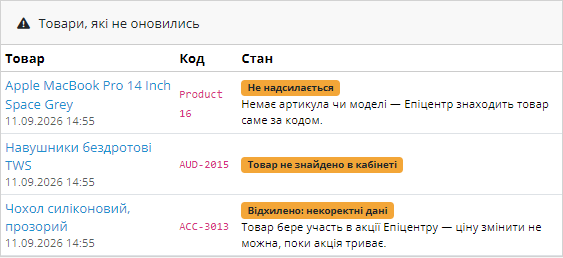
The dashboard doesn’t always accept a change, and the reason matters. No product with that article number exists in the dashboard — codes need reconciling.

A fresh install is the free version, nothing switches on by itself. The “Try Pro for 7 days” button → e-mail → the key right in the window and by e-mail.

Moving the store? Unbind the licence on the old domain and activate it on the new one yourself. For studios — keys for 5 or 25 sites, or unlimited.
 OpenCart 4.x, 3.x and 2.3 are supported, along with ocStore on these versions — separate archives for each branch. PHP: whatever version your OpenCart runs on. The cURL extension is required, along with outbound HTTPS access to the Epicentr API.Epicentr only accepts prices in hryvnia, so the store needs a UAH currency. If the main currency is different, the module converts the price using the rate from Localisation → Currencies.
A purchased licence for OpenCart now works without expiry.
A changed-products file (Pro): every build writes a second file next to the full one containing only the offers whose line changed since last time; the report shows “Changed since the last…
The account token is encrypted with AES-256-CBC plus HMAC instead of the old method that hosting antivirus scanners flagged and deleted.
XML import file for new products with attributes.
Price, old price and stock sent to Epicentr Marketplace via the API, storefront-matching price calculation (specials, tax, hryvnia rate), product code by SKU or model, stock threshold,…
4 modules in one order — 40% cheaper than separately



Epicentr: Price and Stock Sync is a module for OpenCart 2.3, 3.x and 4.x that sends the price, the old (struck-through) price and the stock status of your store’s products to the Epicentr Marketplace seller dashboard through the official API. Change a price on the site, run out of a product in the warehouse, launch a promotion — the dashboard gets the same update, with no file exports and no manually editing hundreds of listings.
The module doesn’t change descriptions of products already in the dashboard. It updates what changes daily: how much something costs and whether it’s in stock. The listings in the dashboard stay yours — the module just keeps their prices and stock in sync with the store.
The module also helps with new products. The public Epicentr API can’t create products, so the module builds an XML file for the dashboard import: it takes categories and attributes from the Epicentr directory, values from your products, and shows which required attribute is missing. After moderation, prices and stock of those products keep syncing through the API.
A seller on Epicentr runs two catalogues: their own store and the marketplace dashboard. The price gets changed on the site, but in the dashboard it stays the old one until someone gets round to updating it by hand or uploading a new file. A product runs out on your site, but Epicentr keeps selling it, and the order has to be cancelled.
Every such cancellation hurts the seller’s rating, and a price lower than the one on the website simply eats into margin. Across a catalogue of a few hundred SKUs, manual reconciliation can’t keep up with the changes, especially on a sale day.
The module removes that reconciliation. It sees what changed on a product and sends only that to the dashboard — price, old price and stock.
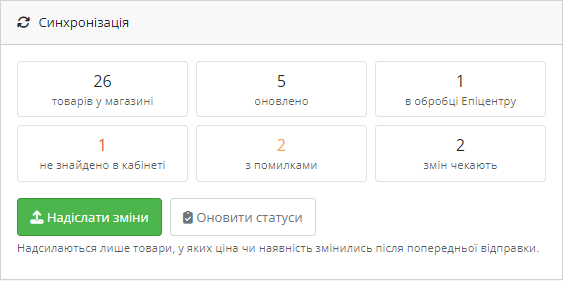
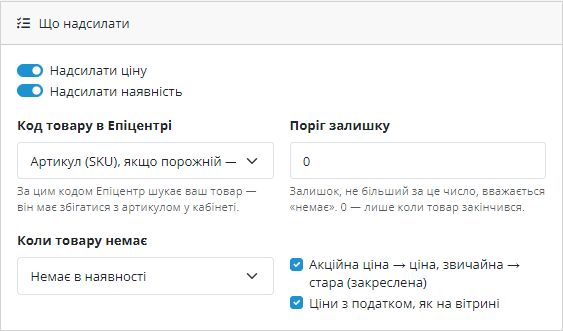
One page under Extensions → Modules: connection, exactly what to send, sync, a list of products that failed to update, and a batch log. Above the button there are counters: how many products have been updated, how many are still being processed by Epicentr, how many weren’t found in the dashboard, and how many changes are waiting to be sent.
Price. The module calculates it exactly as the customer sees it on the storefront: with tax under the store’s rules, and in hryvnia, even if the store’s main currency is different. A price mismatch between the site and the marketplace prompts questions from the dashboard, so the module doesn’t take the “raw” price from the database — it repeats the storefront’s own calculation.
Old price. If a special price is active on a product, the special price goes across as the price, and the regular price goes across as the struck-through old price. Specials from both OpenCart 2.3/3.x and the new OpenCart 4.1 discount scheme are handled the same way.
Stock. A product with stock above the threshold is “in stock.” Out of stock becomes “out of stock” or “on backorder,” as you choose. A product disabled on the site is also not sold on the marketplace.
Product code. Epicentr matches your product by article number. The module uses the SKU, or the model if the SKU is empty. You can force it to use only the model.
1. You paste the dashboard token and click “Check.” The token is found in the dashboard: Company Settings → the API tab.
2. You click “Send changes.” The module walks the catalogue in chunks so it doesn’t hit a hosting timeout, calculating the price, old price and stock for each product.
3. Changed products are batched up to 1,000 items and sent to Epicentr in a single request. Products with no changes since the previous submission are skipped.
4. Epicentr queues the batch. A few minutes later, the “Update statuses” button collects the processing result: what was updated, what was already the same, what was rejected.
5. Products with a problem land in a “Products that failed to update” list with a plain-language explanation.
In Pro, steps 2–4 happen on their own: saving a product in the admin panel, or an order that reduced stock, queues the product, and a cron job sends the queue and collects the results.
The dashboard doesn’t always accept a change, and the reason matters. No product with that article number exists in the dashboard — codes need reconciling. The product is part of an Epicentr promotion — the price can’t be changed while the promotion runs. The product on the site has neither an SKU nor a model — there’s simply nothing to match it by.
The module shows this in plain words rather than an API response code, with a link to edit the product. The same set of values isn’t resent until you change the product, so the dashboard doesn’t get the same error every hour.
Every submission goes into a log: when, whether by button or automatically, how many records, and what happened to them. A batch Epicentr is still processing is marked “awaiting result” — once statuses are collected, it closes with a summary.
Epicentr accepts a new product only with the required attributes from its own directory: brand, country, volume — each category has its own set and its own value codes. By hand that is a spreadsheet of hundreds of rows. The module turns it into three steps:
Without Pro the file is built for one store category; with Pro, for all of them, and it rebuilds itself daily.
A full file with several thousand products takes the dashboard a long time to process, while a store changes about a dozen items a day. So every build now writes two files: the full one and a file with the changed products only. The module remembers a fingerprint of every <offer> line and compares against it next time — only products where something really differs get into the changed file: price, old price, stock, name, image or an attribute.
After a build the report shows the line “Changed since the last build: 12, unchanged: 3,480”, links to both files and a separate “Gone from the file” block — SKUs that were in the previous file and are not there any more: the product was disabled, removed from the category, or lost a required field. An import does not remove such products from the dashboard, so they are worth taking down there by hand.
The changed file is fetched the same way as the full one: with a button in the admin or through a permanent URL with the mode=delta parameter, which you can hand to a scheduler. A foreign or empty token returns 404, and both files live in the non-public system/storage/cc_epicentr folder.
Until now you learnt about a broken file from the dashboard itself: “Unknown tag shop on line 3” — and the import stops. Now the file is checked before the upload: the “Check the file” and “Check the changed file” buttons read the finished XML exactly the way Epicentr reads it and name the problem together with the line number:
A separate table lists the products the dashboard accepts but with losses: an unreachable image (a local address, a format other than jpg/png/webp, a space in the URL), a category code missing from the directory, a name (150 characters) and a description (12,160) that get cut, an old price the dashboard ignores because after the multiplier and rounding it is no longer higher than the current one, a GTIN that fails its check digit, and optional attributes that quietly will not reach the product card. Such products do import — you simply see now what will be missing from them.
The changed file is a Pro feature; fingerprints are counted at all times, so right after buying Pro the first changed file is already correct. The file check works in the free version too.
The module works through Epicentr’s official Merchant API endpoints for updating prices and stock — no dashboard scraping, no simulated login. The token is stored in the store’s settings encrypted.
Each product’s state — exactly what was sent and what the dashboard replied — sits in a separate table, so the module knows what changed and doesn’t send anything unnecessary. Epicentr’s limit of 120 requests per 2 minutes is handled by the module itself: if it’s reached, the rest goes out on the next pass.
For automation on OpenCart 4 the module registers a task in the scheduler, and for more frequent runs — and on OpenCart 2.3 and 3.x — it shows a tokenised link for the hosting’s cron. The module adds nothing to the storefront — the customer never sees it.
1. Download the archive for your version: on OpenCart 4.x and 3.x, via Extensions → Extension Installer. On OpenCart 2.3 the installer only works over FTP, so the contents of the upload folder are uploaded to the store’s root.
2. Extensions → Modules → “Epicentr: Price and Stock” → Install.
3. Open the settings, paste the dashboard token and click “Check.”
4. Confirm that the product code in Epicentr matches the site’s SKU or model, and click “Send changes.”
If the API tab isn’t visible in the dashboard, access to updating prices and stock is granted by your Epicentr category manager.
Didn't find the answer? Message us on Telegram and we'll reply within a business day.
 @catcode_support
Setup, compatibility, activation
@catcode_support
Setup, compatibility, activation
In the seller dashboard: Company Settings → the API tab. If the tab isn't visible, or the dashboard says you don't have permission for the action, access to updating prices and stock is granted by your Epicentr category manager.
No. Epicentr has no sandbox — the API only opens with a live dashboard token. The "Check" button shows whether the dashboard accepted the token, before the first submission.
Not through the API: the public Epicentr API only updates price and stock. The module builds new products into an XML file with attributes from the Epicentr directory, and you upload it in the dashboard (Import → File → Update all). After moderation, prices and stock of those products keep syncing.
By article number: the product's SKU is used, or the model if the SKU is empty. The code in the Epicentr dashboard must match it. Products the dashboard couldn't find appear in the "Products that failed to update" list.
While the marketplace promotion is running, Epicentr won't allow the price to change. The module will show this in the list of problem products, while stock will keep updating as usual.
No, as long as UAH is set up under Localisation → Currencies. The module will convert the price using the store's rate. Without hryvnia, the module will only send stock status.
4.x, 3.x and 2.3, as well as ocStore on these versions.
For OpenCart it's perpetual: one payment, no annual fees.
No reviews yet. Be the first.
No questions yet. Ask one — we answer within 24 hours.
We build custom modules for WordPress, WooCommerce, OpenCart and Shopify. Tell us about the task and we'll prepare an estimate.
Order a custom module
—

CatCode assistant
Just now


CatCode assistant
Online

I’ll help with your website task
Describe your website task — I’ll find a ready-made module or pass it to a developer for an estimate. Modules, custom features, layout, integrations, speed, migration, technical SEO.
