OpenCart
Cart Discounts (Amount-Based and N+1) for OpenCart
Free + Pro
990 UAH
v1.0.2
 All Access4 990 ₴ / year
 Website auditA PDF report by email in 3 minutesCheck a website
Everyday tasks
Image compressorSize, quality and WebP in bulkQR generatorLink, Wi-Fi, payment to IBANVAT calculator20, 14, 7% and amount in wordsTransliterationOfficial Ukrainian standardWebsite checks
PHP and pluginsPHP version, WordPress, pluginsGoogle Merchant feedFields, prices, GTIN, imagesDomain emailSPF, DKIM, DMARC, blacklistsAI search readinessllms.txt, bots, markupAll 9 toolsEnter at least 2 characters
Module for OpenCart 2.3–4.x: tiered order-amount discounts and "buy 2, get the third free" deals on products and categories, in-cart progress toward the discount, correct VAT.
Clear even without sound: Ukrainian subtitles
The free version works with no time limit. Pro adds the rest of the features in the table.


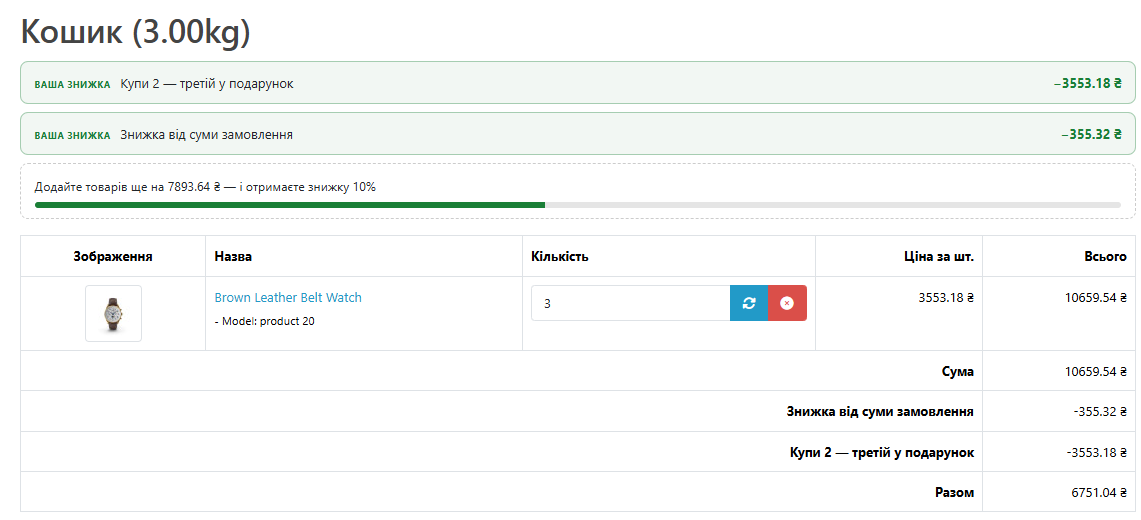
Above the cart table, the module displays discounts already in effect and a line reading “Add … more to your cart to get … off” with a progress bar.

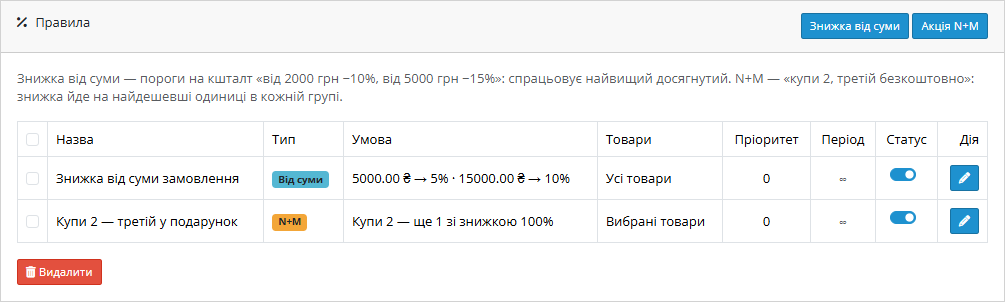
One page under Extensions → Modules: the list of rules, settings and licence.

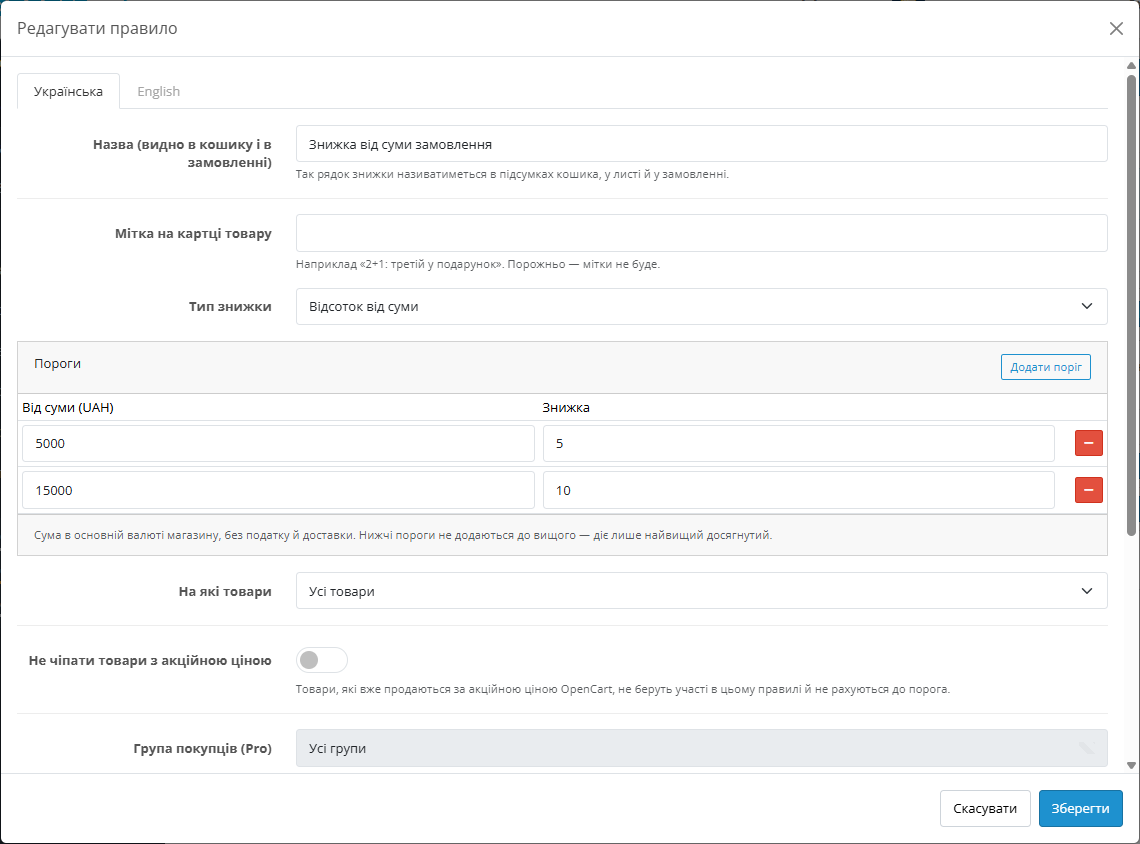
A rule consists of thresholds: from which amount, and what discount applies. The highest threshold reached is the one that fires; lower ones aren’t added on top.

A fresh install is the free version, nothing switches on by itself. The “Try Pro for 7 days” button → e-mail → the key right in the window and by e-mail.

Moving the store? Unbind the licence on the old domain and activate it on the new one yourself. For studios — keys for 5 or 25 sites, or unlimited.
 OpenCart 4.x, 3.x and 2.3 are supported, along with ocStore on these versions — separate archives for each branch. PHP 7.0 or later for 2.3; for 3.x and 4.x, whatever version your OpenCart runs on. The module has been tested on OpenCart 4.1.0.3, 4.0.2.3, 3.0.5.0 and 2.3.0.2.The module works with the stock OpenCart cart. If you use a third-party checkout module, discounts will appear in the totals as long as it calculates totals through OpenCart’s own mechanism.
A purchased licence for OpenCart now works without expiry.
The cart and the checkout work again on the PDO database driver when a rule excludes products on special.
Tiered order-amount discount (percentage or fixed amount), N+M deals with distribution to the cheapest units, a limit on how many times a deal can fire, rules for the whole catalogue,…
4 modules in one order — 40% cheaper than separately



Cart Discounts (Amount-Based and N+1) is a module for OpenCart 2.3, 3.x and 4.x that gives the customer an automatic discount: tiered discounts based on order amount (“5% off from 5,000 UAH, 10% off from 15,000 UAH”) and quantity-based deals (“buy 2, get the third free”). No coupons, no editing prices on product pages, and no code the customer has to find somewhere.
The cart itself shows the customer which discount they’ve already earned and how much more they need to add to reach the next threshold. In the order, each discount is a separate line with its own name, so both the manager and the accountant can see exactly what reduced the total.
The simplest way to raise the average order value is to promise more for a bigger purchase. “10% off from 3,000 UAH” only works if the customer knows about it at the exact moment they’re deciding whether to add one more item. They’ve long since scrolled past the banner on the homepage, and nothing in the cart reminds them of the offer.
“2+1” promotions are just as popular in clothing, cosmetics and home goods. In stock OpenCart these are done with a coupon or by manually setting a price — and both break the moment the customer puts different products at different prices into the cart.
The module covers both scenarios. Rules are set up once, and the discount is calculated in the cart automatically for every customer.
Above the cart table, the module displays discounts already in effect and a line reading “Add … more to your cart to get … off” with a progress bar. Change the quantity, and the line updates along with the cart. In the totals, each rule appears as its own line, and tax is recalculated with the discount already applied.
One page under Extensions → Modules: the list of rules, settings and licence. The list shows the rule type, its condition in one line (“5,000 UAH → 5% · 15,000 UAH → 10%” or “Buy 2, get 1 more at 100% off”), which products it applies to, its active period and a toggle. A disabled rule isn’t deleted — next season you only need to switch it back on.
A rule consists of thresholds: from which amount, and what discount applies. The highest threshold reached is the one that fires; lower ones aren’t added on top. The discount is set as a percentage or a fixed amount, and the amount is calculated excluding tax and shipping — the same way “Sub-Total” is calculated in the cart totals.
A rule can be limited to categories (subcategories are included automatically) or to specific products, and products already on an OpenCart special price can be excluded so you don’t stack a discount on a discount.
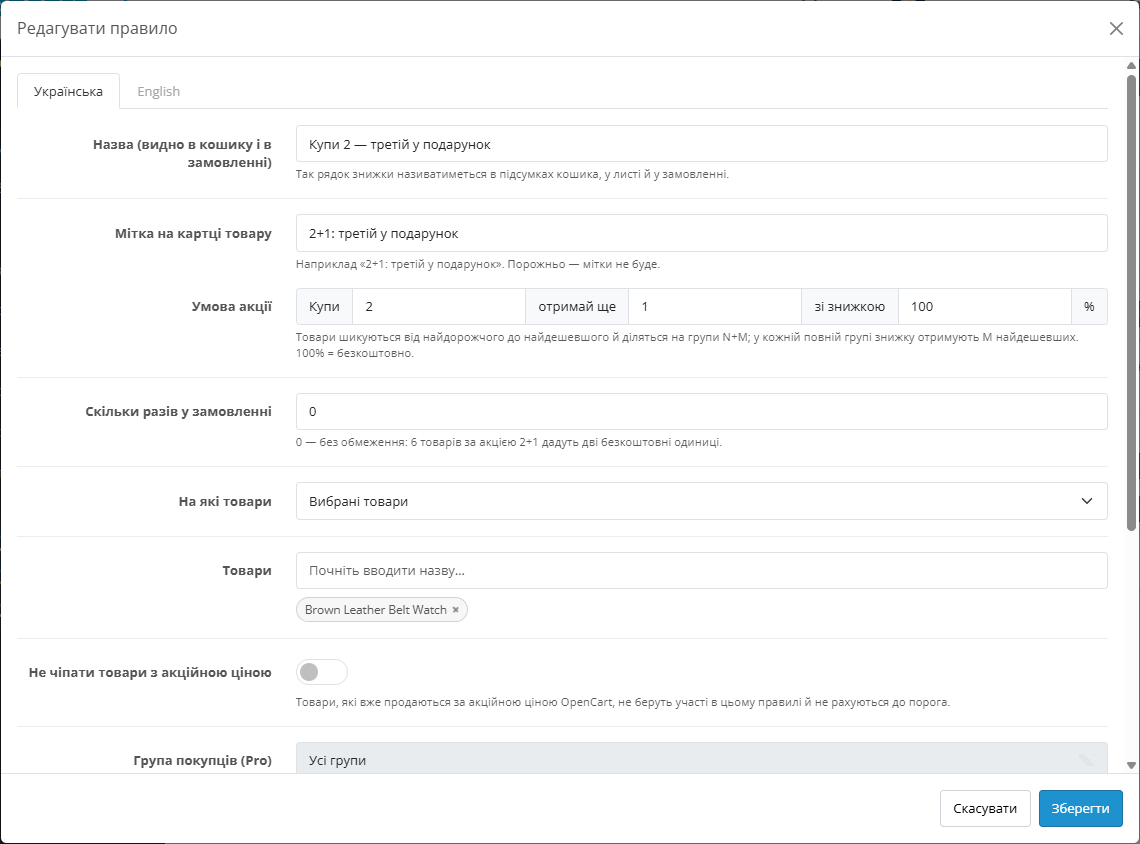
The condition is set with three numbers: how many to buy, how many to get, and at what discount — 100% means free, 50% means half price. You can also limit how many times the deal can fire in a single order.
If the products in the deal have different prices, the module sorts them from most to least expensive and splits them into groups. In each complete group, the cheapest units get the discount. This way the deal can’t be gamed by putting an expensive item next to a cheap one in the cart.
By default, N+M deals fire first, and the amount-based discount is calculated on what’s left. A single unit of a product never gets two discounts: an item given away in an N+M deal doesn’t count toward the amount threshold.
If deals shouldn’t stack, the mode can be switched to “only one rule — whichever gives the largest discount.”
1. You create a rule: an amount-based discount with thresholds, or an N+M deal, and choose the products or categories.
2. The customer adds products to the cart. The module checks which rules apply to this store and this cart.
3. N+M deals are calculated first, then the best available amount-based threshold on the rest of the cart.
4. Each discount is added to the totals as a separate line, and tax is reduced proportionally to the products it applied to.
5. At checkout, the same lines are recorded in the order, the customer’s email and the invoice.
A discount is a separate Order Total with sort order 4, i.e. before tax — the same way the core coupon works. The module doesn’t change product prices in the cart and doesn’t modify core files: no OCMOD modifications, no template overrides.
The block in the cart and the badge on the product page are added via OpenCart events on top of whatever the theme already renders. Rules are stored in their own tables; uninstalling the module doesn’t erase them, so an accidental click doesn’t wipe out all of the store’s promotions.
1. Download the archive for your version: on OpenCart 4.x and 3.x, via Extensions → Extension Installer. On OpenCart 2.3 the installer only works over FTP, so the contents of the upload folder are uploaded to the store’s root.
2. Extensions → Modules → “CatCode Cart Discounts (Amount-Based and N+1)” → Install. The discount line in the order totals is installed together with the module.
3. Open the module, enable it on the Settings tab and save.
4. On the Rules tab, create an amount-based discount or an N+M deal and check it in the cart.
Didn't find the answer? Message us on Telegram and we'll reply within a business day.
 @catcode_support
Setup, compatibility, activation
@catcode_support
Setup, compatibility, activation
OpenCart's core discounts are tied to a single product and the quantity of that same product, and a coupon has to be entered by the customer. The module gives a discount automatically: based on the whole cart's amount or on the quantity of products from a category, with no code and no editing prices on product pages.
Products are sorted from most to least expensive and split into groups of three. In each complete group, the cheapest item becomes free. This way the deal can't be gamed by putting an expensive item in the cart next to a cheap one.
By default, yes, but a single unit of a product never gets two discounts: an item that already went into an N+M deal doesn't count toward the amount threshold. You can switch the mode to "only the best rule."
Yes. Tax is reduced along with the discount, proportionally to the products it applied to, the same way the core coupon works. Fixed fees such as an eco-tax are unaffected.
Yes. Every rule that fired is recorded in the order as a separate named line — in the email, the invoice and the admin panel, it's clear exactly what caused the discount.
The rules stay in the database. After reinstalling, they're still there — you only need to enable the module again.
4.x, 3.x and 2.3, as well as ocStore on these versions.
For OpenCart it's perpetual: one payment, no annual fees.
No reviews yet. Be the first.
No questions yet. Ask one — we answer within 24 hours.
We build custom modules for WordPress, WooCommerce, OpenCart and Shopify. Tell us about the task and we'll prepare an estimate.
Order a custom module
—

CatCode assistant
Just now


CatCode assistant
Online

I’ll help with your website task
Describe your website task — I’ll find a ready-made module or pass it to a developer for an estimate. Modules, custom features, layout, integrations, speed, migration, technical SEO.
