WordPress
Card Testing Shield for WooCommerce — stop card testing on your checkout
Free + Pro
990 UAH/year
v1.0.0
 All Access4 990 ₴ / year
 Website auditA PDF report by email in 3 minutesCheck a website
Everyday tasks
Image compressorSize, quality and WebP in bulkQR generatorLink, Wi-Fi, payment to IBANVAT calculator20, 14, 7% and amount in wordsTransliterationOfficial Ukrainian standardWebsite checks
PHP and pluginsPHP version, WordPress, pluginsGoogle Merchant feedFields, prices, GTIN, imagesDomain emailSPF, DKIM, DMARC, blacklistsAI search readinessllms.txt, bots, markupAll 9 toolsEnter at least 2 characters
A WooCommerce plugin that stops card testing on the checkout: it counts card payment attempts and gateway declines per IP address, browser session and e-mail, adds a growing pause after every decline and refuses the next attempt before it reaches the payment gateway. Classic and block checkout, "Pay for order", "Add payment method". The base version is free; Pro adds limits per card BIN and network, an automatic lockdown during a wave of declines, block lists, a 90-day log and CSV.
The free version works with no time limit. Pro adds the rest of the features in the table.



A fresh install is the free version, nothing switches on by itself. The “Try Pro for 7 days” button → e-mail → the key right in the window and by e-mail.

Moving the store? Unbind the licence on the old domain and activate it on the new one yourself. For studios — keys for 5 or 25 sites, or unlimited.
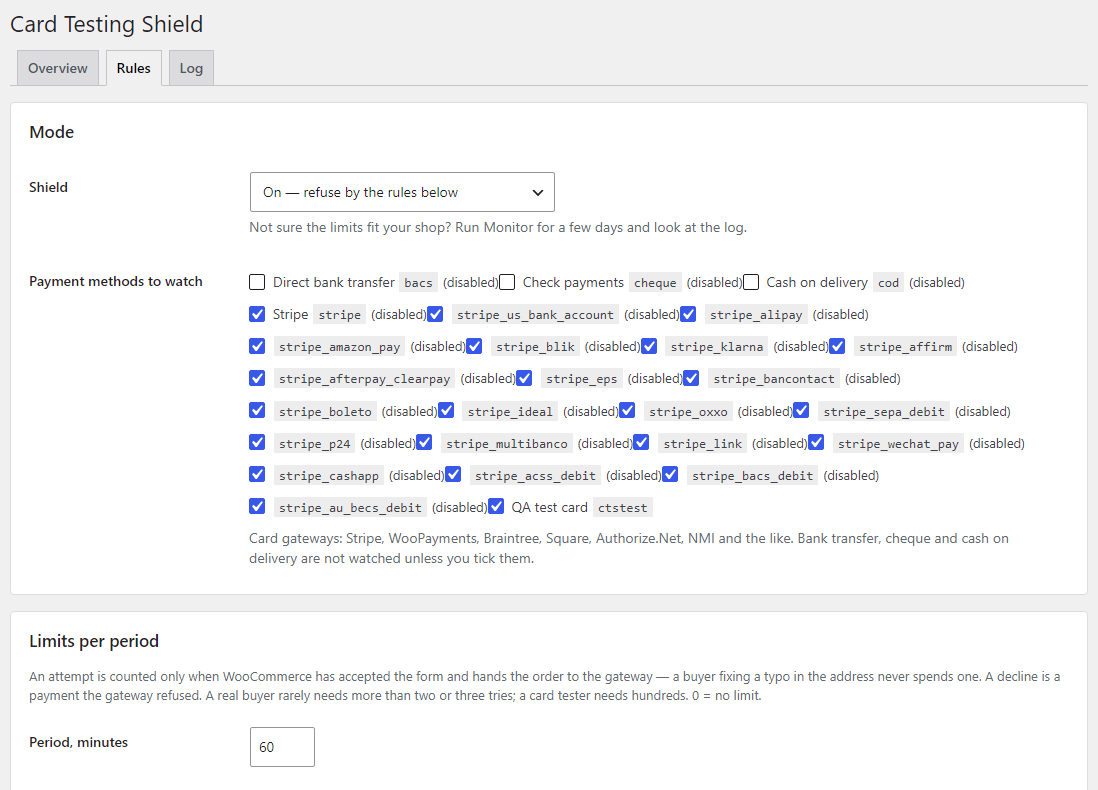
 WooCommerce 8.0+ (tested on 11.2.1), classic and block checkout, “Pay for order”, “Add payment method”WordPress 6.2+ (tested on 7.1) · PHP 7.4+ (full run on PHP 8.3, syntax check on 7.4)Gateways: any card gateway through the standard WooCommerce hooks. WooCommerce Stripe Gateway (tested with 11.0.1, “Add payment method” AJAX from 9.7) and WooPayments (its AJAX card check, reviewed on 11.2) are wired in separately. Braintree, Square, Authorize.Net and NMI are wired in from their source code, with no live payments through themBIN limit (Pro): only for gateways that send the card number or BIN to the site — Authorize.Net, NMI, the standard WooCommerce card formCounters: Redis object cache (tested with Redis Object Cache), APCu or the plugin’s own database table — the shield picks the fastest one availableProxies: Cloudflare (CF-Connecting-IP only from Cloudflare’s networks) or the header of your proxy or load balancerAdmin languages: English, Ukrainian, Russian
Attempt and decline limits per address, session and e-mail; a growing pause after declines; a limit on simultaneous payments; classic and block checkout, “Pay for order” and “Add payment…
4 modules in one order — 40% cheaper than separately



Card Testing Shield for WooCommerce stops card testing on your checkout. Card testing looks like this: a script runs a list of stolen card numbers through your shop, one small payment after another, to find the cards that still work. The shop pays for it: hundreds of declined transactions, a gateway fee per attempt, chargebacks, and later a letter from Stripe or the acquiring bank about a frozen or closed account.
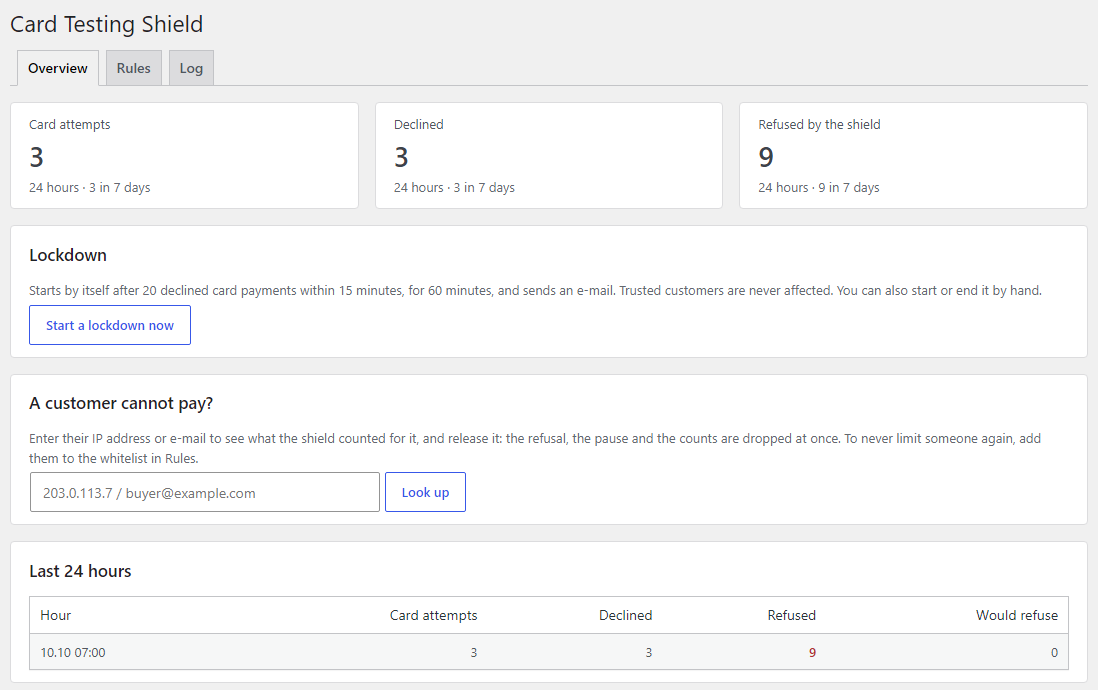
The shield counts what a card tester cannot hide: how many card payments come from one IP address, one browser session and one e-mail, and how many of them the gateway declined. Once a limit is used up, the next attempt is refused on your own server — it never reaches the payment gateway and costs no fee. A real buyer does not notice: they make one payment, rarely two.
For bots that crawl the catalogue and filters with GET requests we have a separate plugin — Crawler Shield for WooCommerce. Card Testing Shield guards something else: the POST requests of payments on the checkout, “Pay for order” and “Add payment method”. They do not get in each other’s way; on the test they ran together.
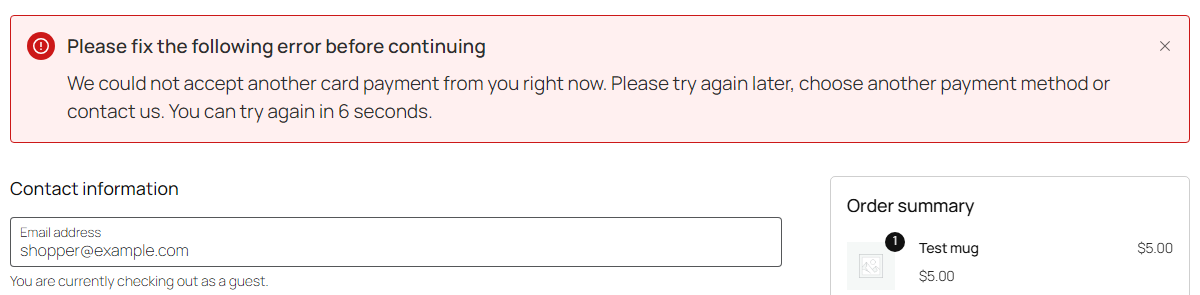
An ordinary buyer sees nothing new: the same form, the same gateway. One who has used up a limit gets a neutral message where checkout errors normally appear, without a hint about which limit it was: “We could not accept another card payment from you right now. Please try again later, choose another payment method or contact us.” During a short pause it adds how many seconds are left before the next try. The message text can be changed in the settings. Other payment methods — bank transfer, cash on delivery — stay open.
An attempt is counted only when WooCommerce has accepted the form and hands the order to the gateway. A buyer fixing a typo in the address or a missing field never spends one.
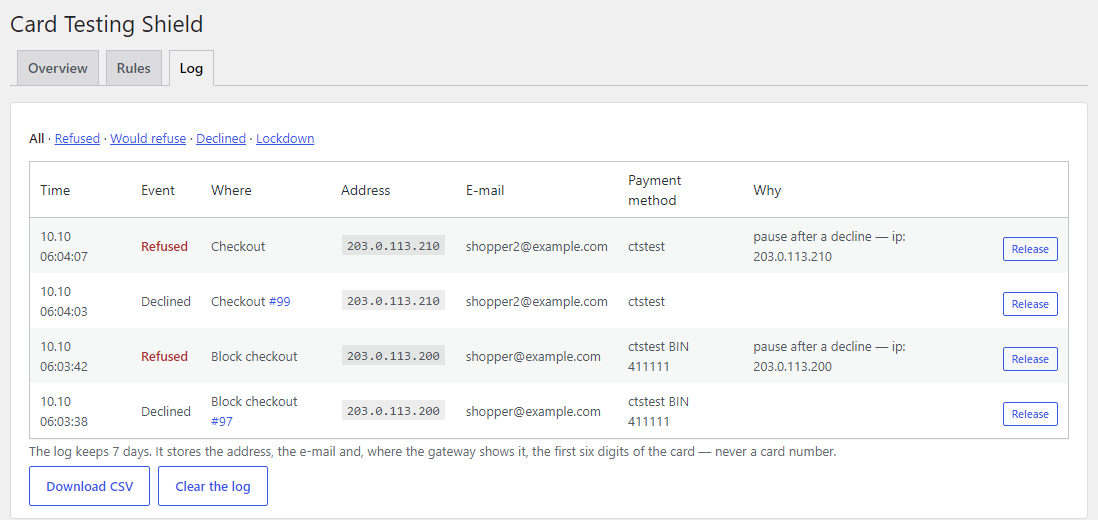
The Log records every declined payment and every refusal: the time, where (checkout, block checkout, “Pay for order”, “Add payment method”), the address, the e-mail, the payment method, the order and the reason — for example “pause after a decline” or “several payments at the same moment”. Filters: Refused, Would refuse, Declined, Lockdown. Repeated refusals of the same client during an attack are not written one by one, so the database does not swell. Free keeps the log for 7 days, Pro for up to 90 with CSV export.
catcode_cts_burst filter.Pro. Testers run generated numbers of one bank range through many addresses — Pro counts declines per card BIN (the first six digits) across all visitors. This works with gateways that send the card number or the BIN to the site: the Authorize.Net and NMI plugins and the standard WooCommerce card form. Stripe, Braintree and Square turn the card into a token in the browser and the number never reaches the site — there the other limits do the work. Pro also counts declines per /24 network (IPv4) or /48 (IPv6) for attacks from neighbouring addresses. During a wave of declines (20 declined card payments in 15 minutes across the shop by default) Pro starts a 60-minute lockdown: tighter limits for everyone except trusted customers, optionally no card payments for guests, and an e-mail to you. A lockdown can also be started and ended by hand. For “Add payment method” there is a minimum account age (24 hours by default) or an “only accounts with a paid order” rule. Block lists cover IP addresses and networks, e-mails and e-mail domains, and BINs.
woocommerce_checkout_process for the classic checkout, a check of the Store API request before it runs for the block checkout (the answer is an ordinary payment error), woocommerce_before_pay_action for “Pay for order”, woocommerce_add_payment_method_form_is_valid and the Stripe and WooPayments AJAX actions for “Add payment method”.INSERT … ON DUPLICATE KEY UPDATE — parallel requests do not read stale values.catcode-card-testing-shield-for-woocommerce-free-1.0.0.zip and activate it (WooCommerce must be active).Didn't find the answer? Message us on Telegram and we'll reply within a business day.
 @catcode_support
Setup, compatibility, activation
@catcode_support
Setup, compatibility, activation
A script runs stolen card numbers through your checkout as small payments to find the cards that still work. The shop pays for it: hundreds of declined transactions, gateway fees per attempt, chargebacks, and in the end a payment provider that freezes or closes the account.
The defaults allow 6 attempts and 3 declines per browser session and e-mail, and 10 attempts and 5 declines per IP address, per hour — a real buyer rarely needs more than two or three. Customers who have paid before are never limited. If somebody does get refused, look them up on the Overview tab by IP or e-mail and release them.
No, it works alongside them. A CAPTCHA can be solved by a farm and does nothing for "Pay for order" or saved cards. Gateway fraud rules only see the attempts that already reached the gateway and cost you a fee. The shield stops repeat attempts on your own server.
That feature (Settings → Advanced → Features) allows 3 block-checkout requests a minute per address or account, whatever their outcome. It does not cover the classic checkout, "Pay for order" or saved cards, and does not look at declines or e-mails. Both can be on at the same time.
Yes: the address is taken from CF-Connecting-IP automatically, but only for requests that really come from Cloudflare's networks. Behind another proxy or load balancer, choose its header in Rules → Server. The Overview tab shows which address the shield sees for you.
No. The log keeps the address, the e-mail, the payment method and the order — never a card number. For gateways that send the number to the site, Pro reads only the first six digits (the BIN) in memory and keeps only those. The free version makes no external requests.
No reviews yet. Be the first.
No questions yet. Ask one — we answer within 24 hours.
We build custom modules for WordPress, WooCommerce, OpenCart and Shopify. Tell us about the task and we'll prepare an estimate.
Order a custom module
—

CatCode assistant
Just now


CatCode assistant
Online

I’ll help with your website task
Describe your website task — I’ll find a ready-made module or pass it to a developer for an estimate. Modules, custom features, layout, integrations, speed, migration, technical SEO.
