
OpenCart
Bulk price and stock editor for OpenCart 2.3, 3.x and 4.x
Free + Pro
1 290 UAH
v1.1.2
 All Access4 990 ₴ / year
 Website auditA PDF report by email in 3 minutesCheck a website
Everyday tasks
Image compressorSize, quality and WebP in bulkQR generatorLink, Wi-Fi, payment to IBANVAT calculator20, 14, 7% and amount in wordsTransliterationOfficial Ukrainian standardWebsite checks
PHP and pluginsPHP version, WordPress, pluginsGoogle Merchant feedFields, prices, GTIN, imagesDomain emailSPF, DKIM, DMARC, blacklistsAI search readinessllms.txt, bots, markupAll 9 toolsEnter at least 2 characters

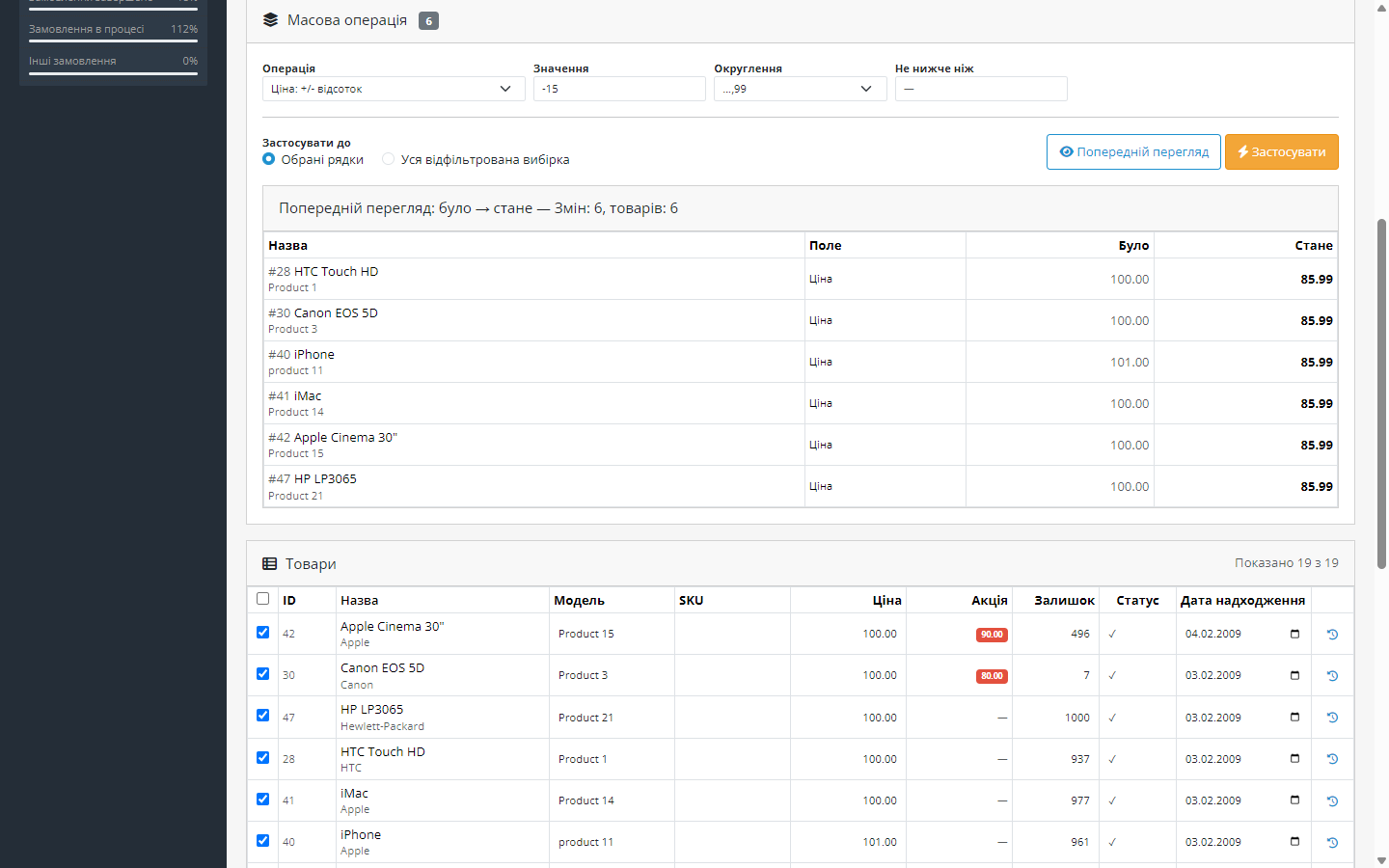
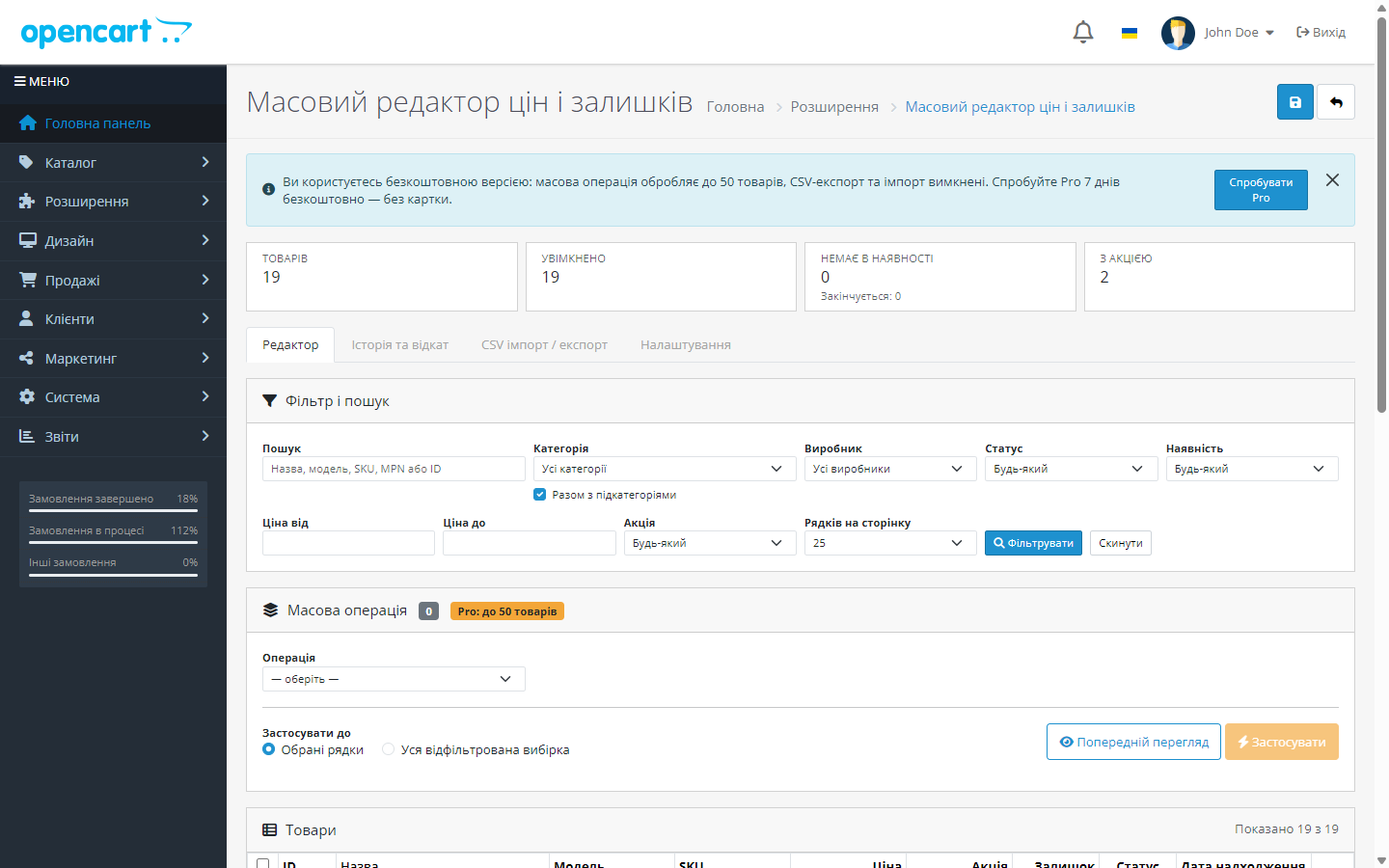
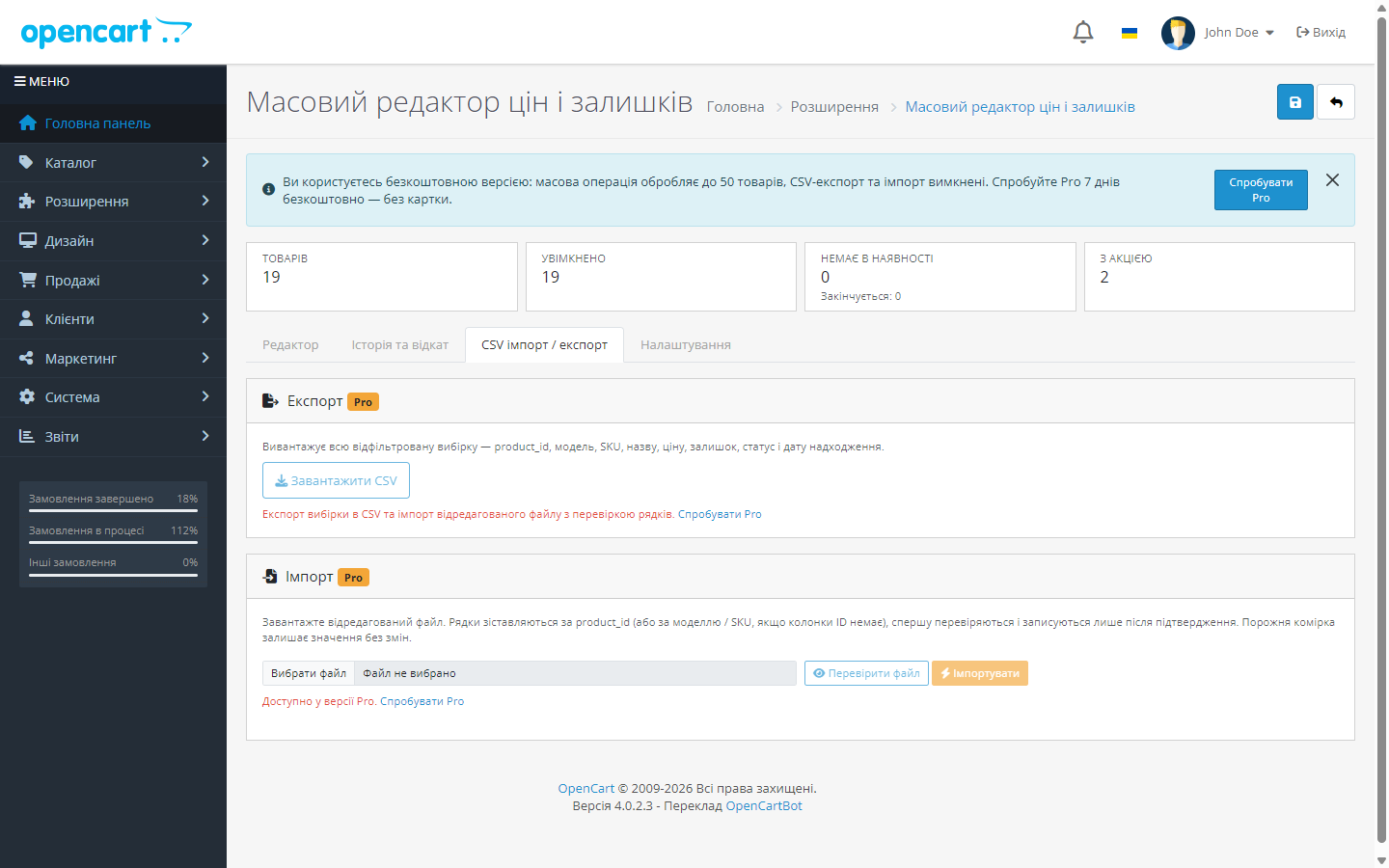
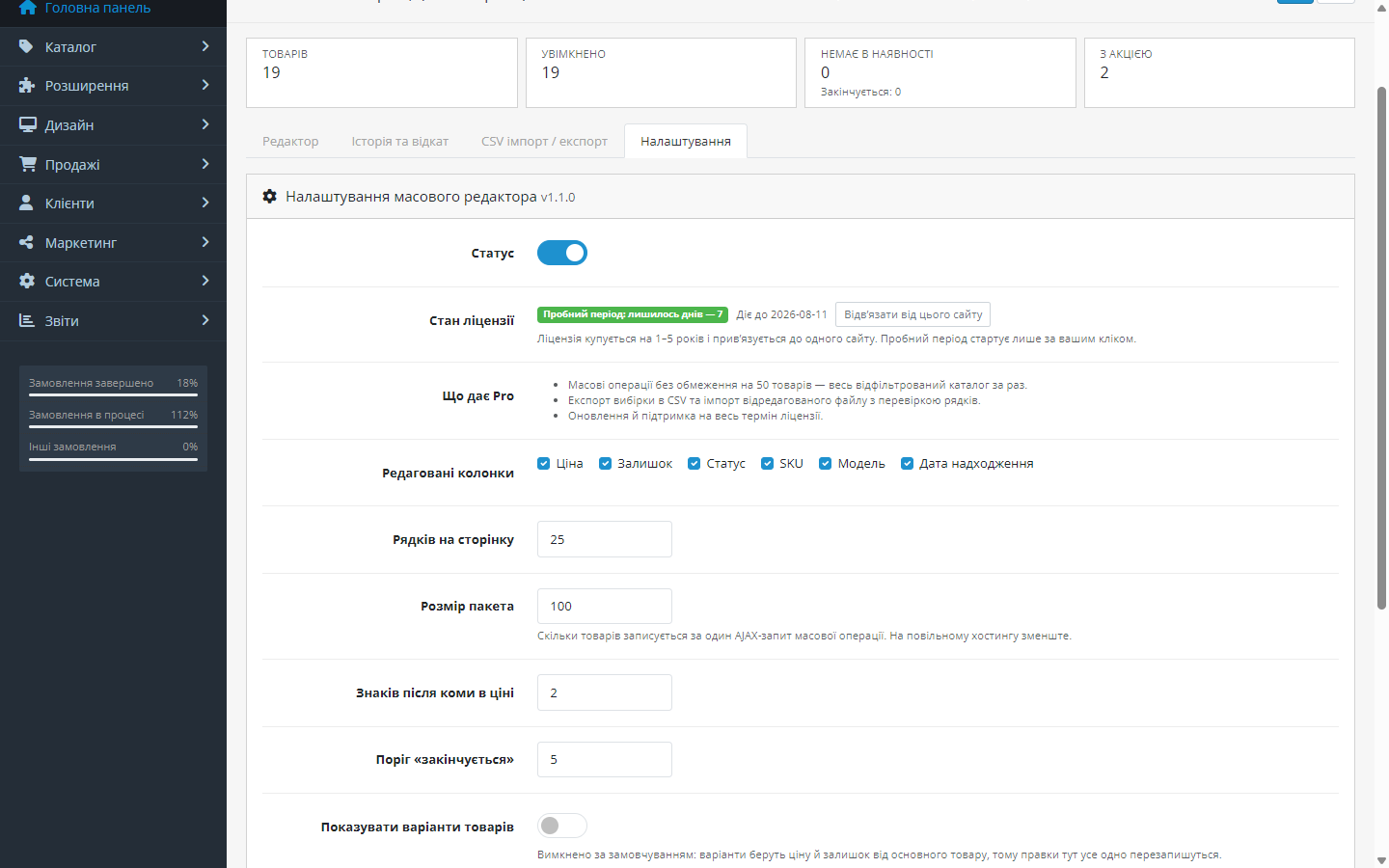
Bulk price and stock editing for OpenCart on one screen: markup and discount by % or amount, rounding, CSV import, price change history with one-click rollback.
Clear even without sound: Ukrainian subtitles
The free version works with no time limit. Pro adds the rest of the features in the table.


Price, stock, status, SKU, model and date available are edited right in the table, without opening the product page.

Applied to selected or to all filtered products: changing price by a percentage or amount, rounding to a desired form (for example to 0.99), setting a fixed price, setting or adding to stock, switching status on and off, assigning and clearing promotions.

The filtered set is exported to CSV, edited in a familiar spreadsheet, and uploaded back.

A fresh install is the free version, nothing switches on by itself. The “Try Pro for 7 days” button → e-mail → the key right in the window and by e-mail.

Moving the store? Unbind the licence on the old domain and activate it on the new one yourself. For studios — keys for 5 or 25 sites, or unlimited.
 OpenCart 4.x, 3.x and 2.3 are supported, as well as ocStore builds based on them. The module works without core patches, so a store update doesn’t overwrite it.
The licence hint in the module settings: one key covers two sites, your store and a staging copy.
A purchased licence for OpenCart now works without expiry.
23 September 2026.
The licence is verified on the CatCode server, the trial only starts on a click, and the Free/Pro boundary is visible right in the interface.
The 3.0.x build moved to the same model as 4.x and 2.3: the licence is verified on the CatCode server, the trial is only issued on your own click.
A separate build for OpenCart 2.3.0.x: the same functionality, server-side licensing with a trial on click, compatible with PHP 5.6 and 7.0.
4 modules in one order — 40% cheaper than separately



Bulk editor for OpenCart removes the most tedious daily job a store owner has: opening every single product page just to change a price or stock level. There are three builds — for OpenCart 4.x, 3.x and 2.3.0.x; the functionality is identical, only the package differs.
Price, stock, status, SKU, model and date available are edited right in the table, without opening the product page. Saving happens immediately, changed and saved rows are highlighted, and the last action can be undone with Ctrl+Z.
Products are narrowed down with filters: category, manufacturer, status, availability, price range, and search by name, model or SKU — with sorting by any column.
Applied to selected or to all filtered products: changing price by a percentage or amount, rounding to a desired form (for example to 0.99), setting a fixed price, setting or adding to stock, switching status on and off, assigning and clearing promotions.
Any bulk operation first shows a “before → after” table — and only applies after confirmation. If the result isn’t right, the whole operation rolls back in one click.
The filtered set is exported to CSV, edited in a familiar spreadsheet, and uploaded back. Before import the file is validated: you see how many rows are valid and which contain errors — with the row number and reason.
The module handles promotions carefully: it only changes its own rows and never touches discounts created by other extensions or by hand.
A fresh install is a clean free version: nothing Pro switches on by itself. The 7-day trial only starts on your click — in the “Try Pro” modal, enter your e-mail, and the key appears on screen right away and is sent by mail. Once the period ends, only Pro features close: everything you’ve already edited stays in place.
Changing the price of a few hundred products in the standard OpenCart admin means opening the product page, finding the field, saving, going back to the list. On thirty items that’s an evening’s work, on three hundred it just doesn’t get done.
Editing right in the list removes that cycle: click the cell, type, move on.
1. Open the product list with the filter you need.
2. Edit price or stock right in the cell, without opening the product page.
3. For bulk changes, select products and set an operation — percentage, fixed amount, set a value.
4. Check the preview: what will change and by how much. Only then apply it.
5. Price change history stays — you can see what was done and when.
A bulk operation runs in chunks, so three thousand products don’t time out the admin area. CSV export and import give a path for anyone who’d rather work the numbers in Excel.
1. Upload the archive via “Extensions → Installer” and install the module.
2. Open Extensions → Modules → Bulk Price & Stock Editor, the Editor tab, and try changing a price right in the cell.
3. For a bulk operation, check the preview first.
Didn't find the answer? Message us on Telegram and we'll reply within a business day.
 @catcode_support
Setup, compatibility, activation
@catcode_support
Setup, compatibility, activation
Yes. Every operation rolls back in one click, and the last inline edit can be undone with Ctrl+Z.
Yes, bulk operations first show a "before → after" table.
No. It only works with its own discount rows and never touches ones created by hand or by other modules.
Yes. Export the filtered set to CSV, edit it and upload it back — the file is validated before import.
Yes, history keeps the user, date, old and new value and the source of the change.
No reviews yet. Be the first.
No questions yet. Ask one — we answer within 24 hours.
We build custom modules for WordPress, WooCommerce, OpenCart and Shopify. Tell us about the task and we'll prepare an estimate.
Order a custom module
—

CatCode assistant
Just now


CatCode assistant
Online

I’ll help with your website task
Describe your website task — I’ll find a ready-made module or pass it to a developer for an estimate. Modules, custom features, layout, integrations, speed, migration, technical SEO.
