
WordPress
Stock Reserve & Reorder for WooCommerce — physical stock, reserved orders and a reorder point
Free + Pro
990 UAH/year
v1.0.1
 All Access4 990 ₴ / year
 Website auditA PDF report by email in 3 minutesCheck a website
Everyday tasks
Image compressorSize, quality and WebP in bulkQR generatorLink, Wi-Fi, payment to IBANVAT calculator20, 14, 7% and amount in wordsTransliterationOfficial Ukrainian standardWebsite checks
PHP and pluginsPHP version, WordPress, pluginsGoogle Merchant feedFields, prices, GTIN, imagesDomain emailSPF, DKIM, DMARC, blacklistsAI search readinessllms.txt, bots, markupAll 9 toolsEnter at least 2 characters

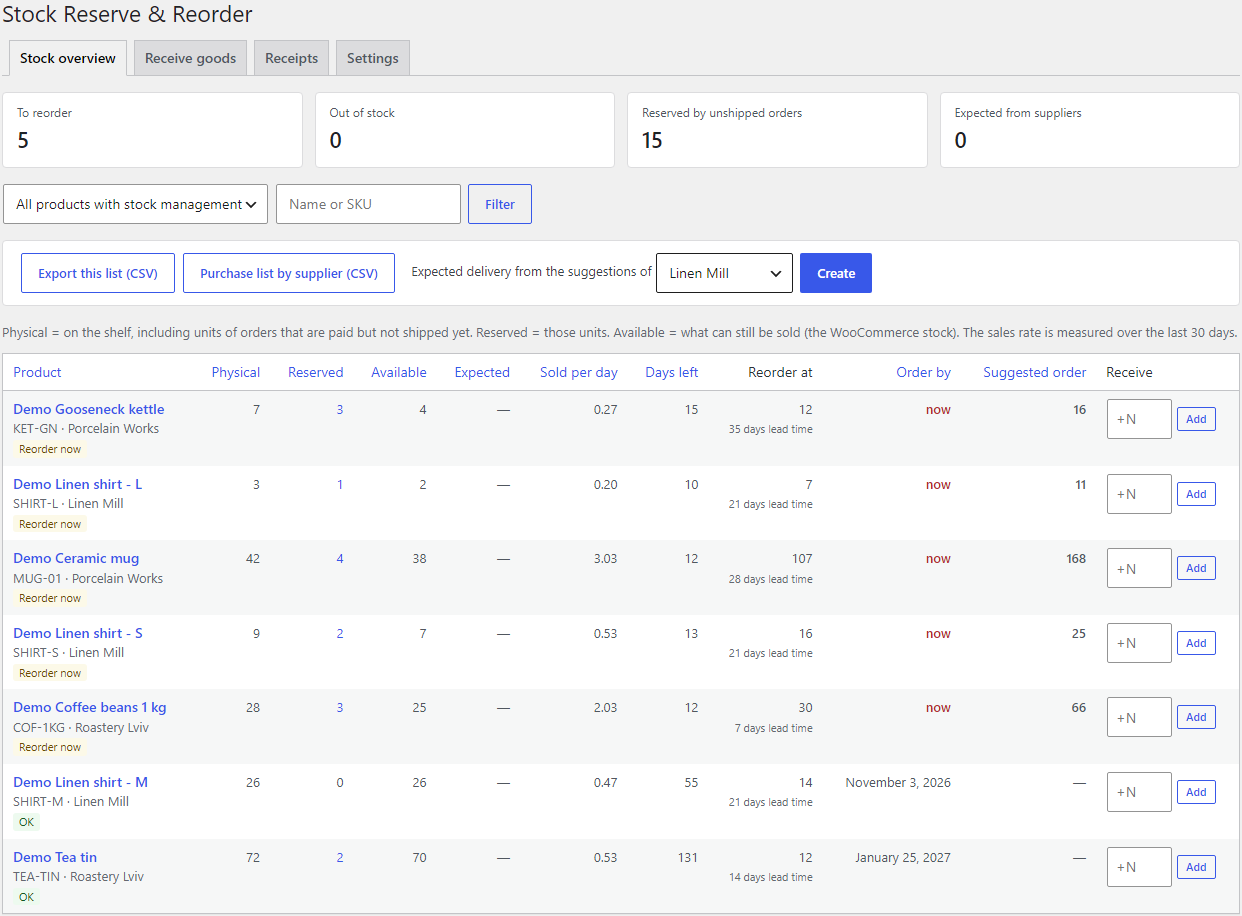
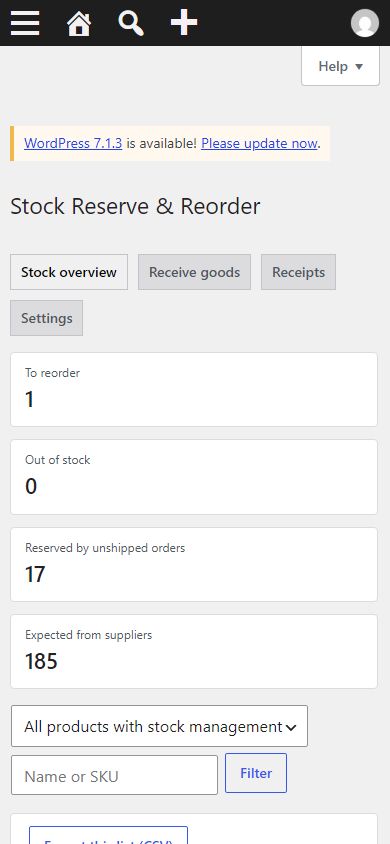
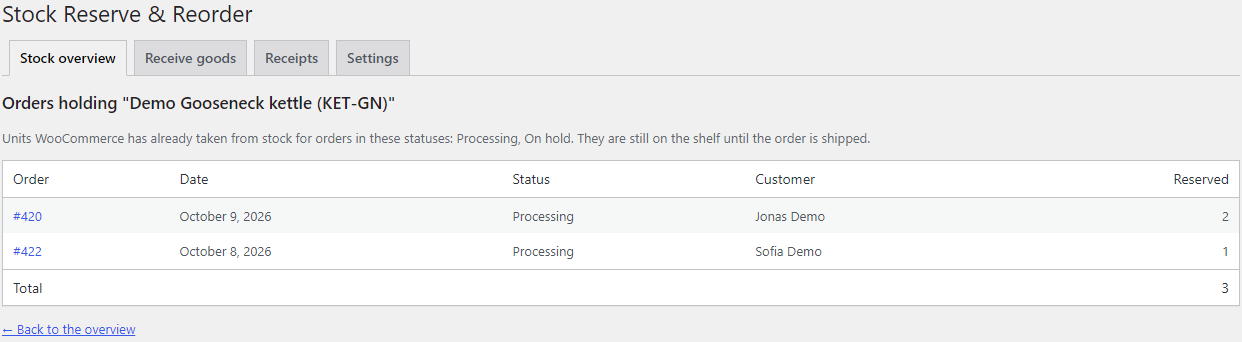
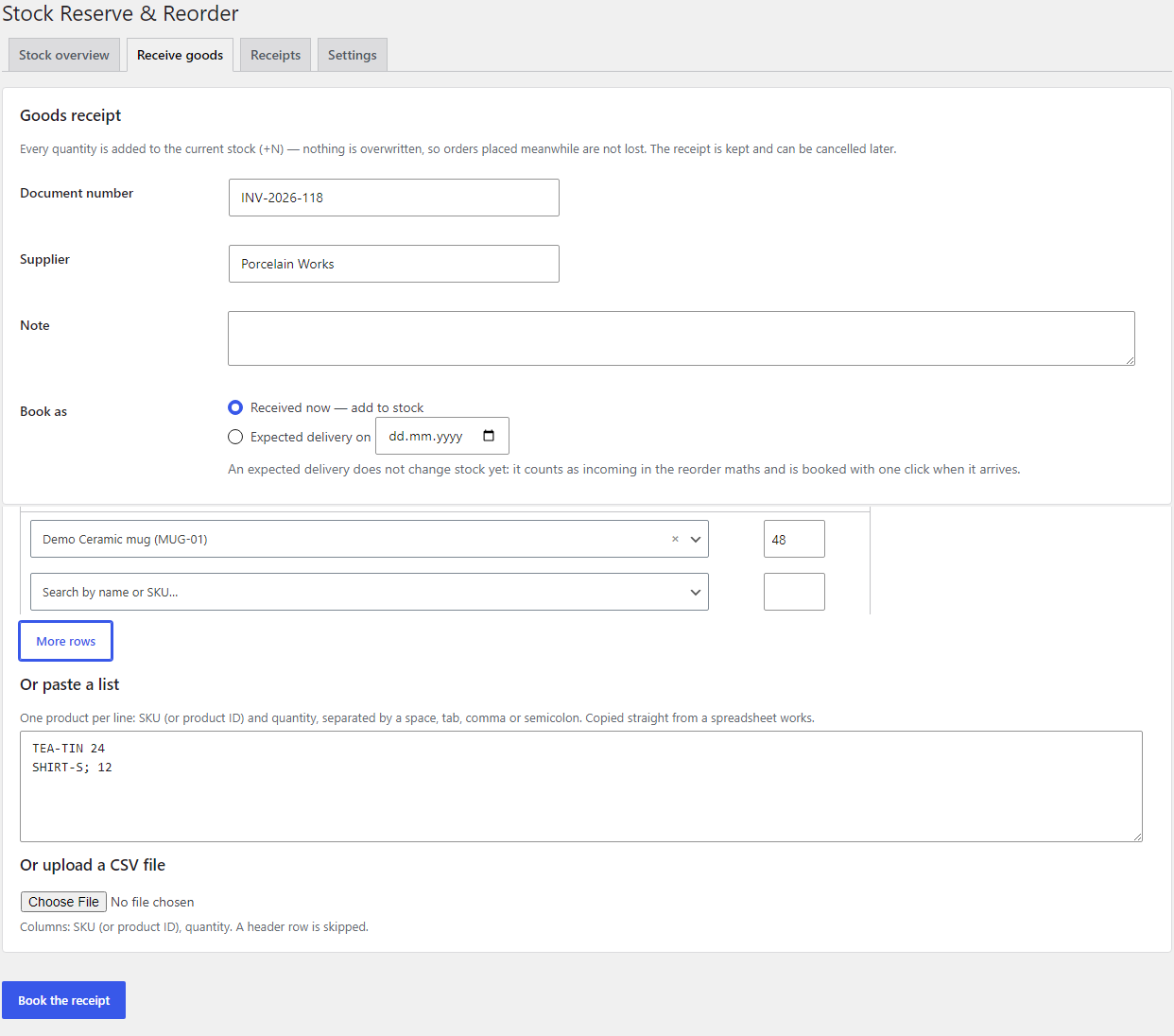
Shows how much of a product is physically on the shelf, how much is already promised to paid orders that have not shipped yet, and how much can still be sold. A goods receipt adds "+N" to the current stock instead of overwriting it. The reorder point comes from the sales rate and the supplier's lead time. Pro adds the suggested order quantity, suppliers, expected deliveries, CSV and a digest by e-mail and Telegram.
The free version works with no time limit. Pro adds the rest of the features in the table.



A fresh install is the free version, nothing switches on by itself. The “Try Pro for 7 days” button → e-mail → the key right in the window and by e-mail.

Moving the store? Unbind the licence on the old domain and activate it on the new one yourself. For studios — keys for 5 or 25 sites, or unlimited.
 WordPress 6.2+ · WooCommerce 8.0+ with stock management on · PHP 7.4+.HPOS and the Cart and Checkout blocks — compatible; tested with HPOS on and off.Database — MySQL or MariaDB, as for WooCommerce (tested on MariaDB 10.11 and MySQL 8.0).The digest and the menu counter run on WP-Cron. If WP-Cron is switched off on the server (DISABLE_WP_CRON), a system cron is needed — otherwise the digest will not go out.With Multi Warehouse — a receipt can go into a chosen warehouse. With Shared Stock — cards of one pool are counted together: every card shows the whole pool, and the overview keeps one row per pool, so a reorder is suggested once.Interface languages: English, українська, русский, Deutsch.
Updates from catcode.com.ua: new Pro versions show up in Dashboard → Updates and install in one click while the licence covers updates.
The “physical / reserved / available / expected” overview, the list of orders holding a product, partial shipments and refunds without restock taken into account, goods receipts with “+N”,…
4 modules in one order — 40% cheaper than separately



Stock Reserve & Reorder for WooCommerce shows three figures instead of one: how much of a product is physically on the shelf, how much of it is reserved by orders that are paid but not shipped yet, and how much is available to sell. Deliveries are booked as a document that adds “+N” to the current stock, and the reorder point is worked out from the sales rate and the supplier’s lead time.
WooCommerce takes stock the moment an order is paid or put on hold. The box is still on the shelf until the parcel leaves, but the stock figure no longer shows it. So a stock count never matches, and nobody can say how much is already promised to customers. The low-stock e-mail fires at a fixed number — the same for a supplier who delivers in three days and one who needs four weeks. And a delivery typed into the Stock field overwrites whatever orders changed while you were counting boxes.
The plugin adds the light warehouse layer a small shop is missing — without an ERP and without changing how WooCommerce takes stock.
There is a separate version for OpenCart: Stock Reserve & Reorder for OpenCart.
Nothing new — on purpose. The plugin works in the admin and does not change how WooCommerce holds and takes stock at checkout: the classic and the block checkout work as before. The buyer feels the result indirectly: you spot a product that needs reordering before it runs out, and a delivery booked while orders keep coming does not oversell what is already gone.
On a test catalogue of 20,000 products and variations the overview opens in 0.7 s with 12,000 orders in the last 60 days and in 1.7 s with 52,000 — on MariaDB 10.11 and MySQL 8.0. Sales of the whole catalogue are cached for 10 minutes for the Products list and the product screen; reserved stock is always read live.
_reduced_stock meta of order lines, which WooCommerce writes when it takes stock and lowers on cancellation and on a refund with restock. The plugin writes nothing to orders and does not change how WooCommerce takes stock.wc_update_product_stock() with the increase operation, not a new figure written over the old one. A form token stops the same form from being booked twice; parallel cancels and bookings were tested with simultaneous processes — exactly one goes through.catcode-stock-reserve-reorder-for-woocommerce-free-1.0.1.zip and activate. WooCommerce must be active, with stock management on.Didn't find the answer? Message us on Telegram and we'll reply within a business day.
 @catcode_support
Setup, compatibility, activation
@catcode_support
Setup, compatibility, activation
Only when you book or cancel a goods receipt — and then relatively (+N / −N), through WooCommerce's own stock function. Reserved and physical stock are computed from your orders; nothing is written to products.
Tick "Completed" (or your own status, e.g. "Packing") in Settings → Reserved stock. Units of orders in the ticked statuses are reserved.
They count. The figures come from WooCommerce's own order data, so the overview is right from the first minute.
Orders imported from another system often have no record of WooCommerce taking stock for them. They are neither reserved nor counted as sales.
The field overwrites the stock with the figure you typed — and orders placed while you were counting boxes drop out of the books. A receipt in the plugin adds the quantity to the current stock, so this cannot happen. The same form submitted twice is booked once.
On a test catalogue of 20,000 products and variations the overview opens in 0.7 s with 12,000 orders in the last 60 days and in 1.7 s with 52,000 (MariaDB 10.11 and MySQL 8.0).
By default the receipts, the settings and the lead times on products stay. Tick "Also delete" in the settings and the plugin removes its tables and meta. Product stock is never touched.
The overview, reserved stock, receipts with cancelling, the reorder point, the Products column and the menu counter stay free with no time limit and no product limit.
No reviews yet. Be the first.
No questions yet. Ask one — we answer within 24 hours.
We build custom modules for WordPress, WooCommerce, OpenCart and Shopify. Tell us about the task and we'll prepare an estimate.
Order a custom module
—

CatCode assistant
Just now


CatCode assistant
Online

I’ll help with your website task
Describe your website task — I’ll find a ready-made module or pass it to a developer for an estimate. Modules, custom features, layout, integrations, speed, migration, technical SEO.
