
OpenCart
Stock Reserve & Reorder for OpenCart — physical stock, reserved orders and a reorder point
Free + Pro
1 290 UAH
v1.0.0
 All Access4 990 ₴ / year
 Website auditA PDF report by email in 3 minutesCheck a website
Everyday tasks
Image compressorSize, quality and WebP in bulkQR generatorLink, Wi-Fi, payment to IBANVAT calculator20, 14, 7% and amount in wordsTransliterationOfficial Ukrainian standardWebsite checks
PHP and pluginsPHP version, WordPress, pluginsGoogle Merchant feedFields, prices, GTIN, imagesDomain emailSPF, DKIM, DMARC, blacklistsAI search readinessllms.txt, bots, markupAll 9 toolsEnter at least 2 characters

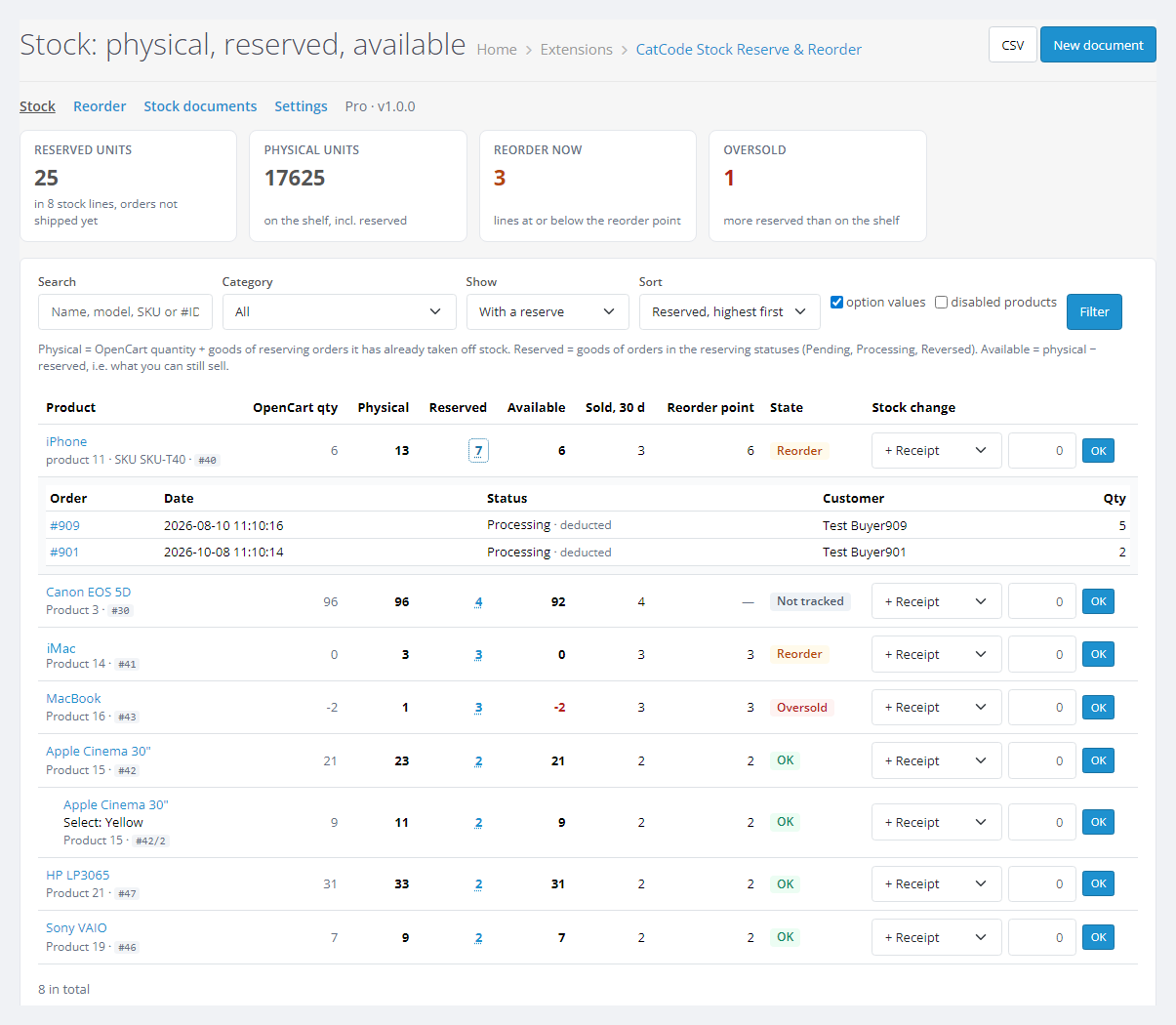
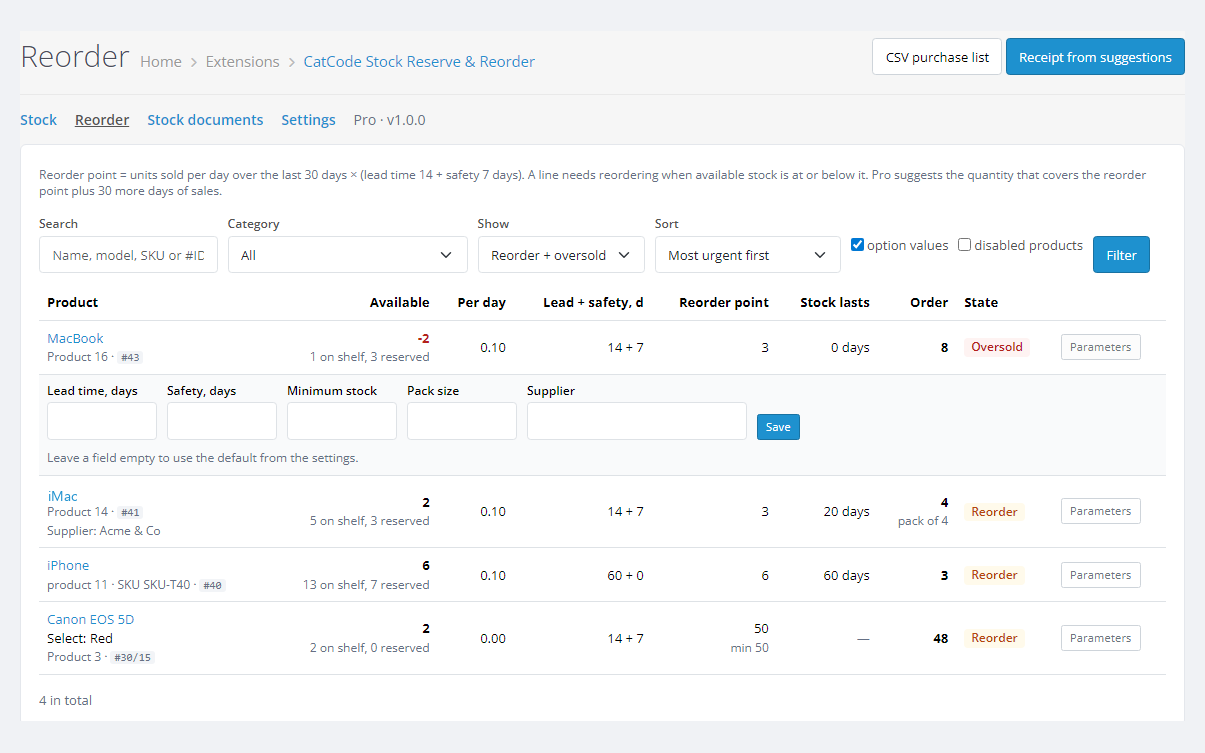
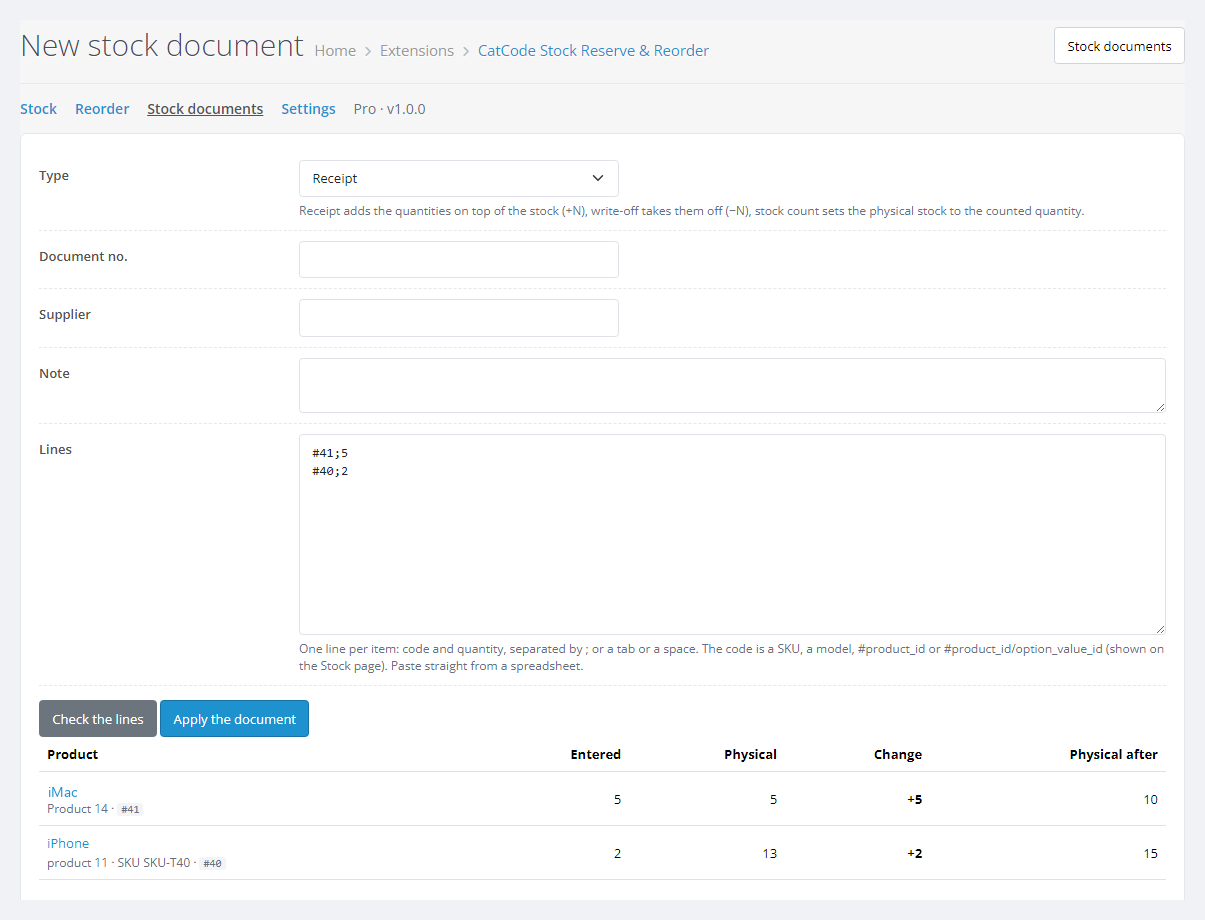
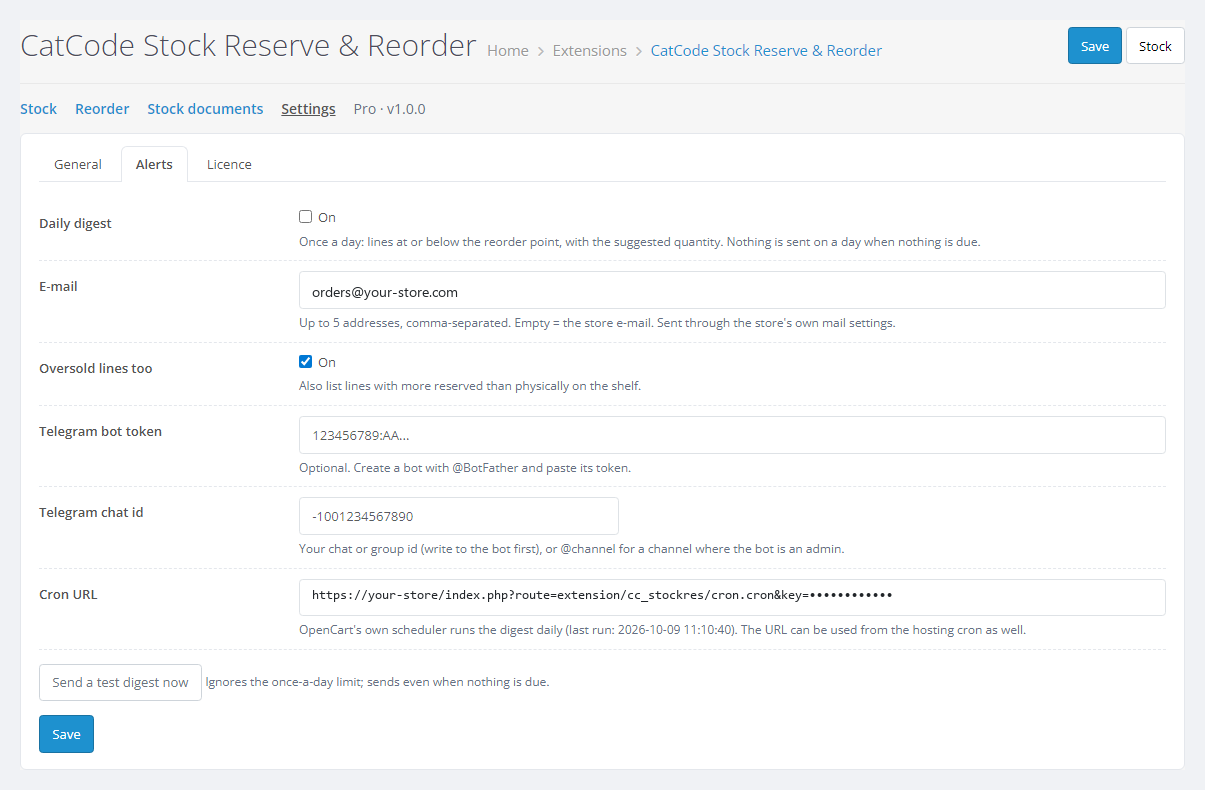
A module for OpenCart 4, 3 and 2.3 that shows three figures for every product and option value: how many units are physically on the shelf, how many are sold but not shipped yet (the reserve, with the orders that hold it) and how many you can still sell. A receipt adds +N on top of the stock instead of overwriting it; write-offs and stock counts are logged and can be cancelled. The reorder point comes from your sales speed, lead time and safety days. Pro adds per-product parameters, a suggested order quantity, documents pasted from a spreadsheet, CSV and a daily e-mail and Telegram digest.
The free version works with no time limit. Pro adds the rest of the features in the table.


Customers do not see the module: nothing changes in the storefront or the checkout, the module adds no scripts or requests to shop pages, and OpenCart keeps selling from the same Quantity field.

A Catalog → Stock & reorder menu item and the Stock, Reorder, Stock documents and Settings pages.

A fresh install is the free version, nothing switches on by itself. The “Try Pro for 7 days” button → e-mail → the key right in the window and by e-mail.

Moving the store? Unbind the licence on the old domain and activate it on the new one yourself. For studios — keys for 5 or 25 sites, or unlimited.
 OpenCart 4.0.2 – 4.1.x (tested on 4.1.0.3 and 4.0.2.3 with the mysqli and pdo database drivers), 3.0.x (tested on 3.0.5.0) or 2.3.0.2.PHP as your OpenCart version requires: the 2.3 build was tested on PHP 7.0, the others on PHP 8.x.Database: tested on MariaDB 10.11. The CREATE TEMPORARY TABLES privilege speeds up pages on large catalogues; without it the module uses direct queries with the same figures.The PHP cURL extension, for the licence and Telegram.For the daily digest on OpenCart 3 and 2.3: a hosting cron that opens the URL from the settings once a day.
For OpenCart 4.x, 3.x and 2.3: physical, reserved and available stock from orders with the core deduction rule (OpenCart 4 variants, option values), the orders of the reserve, receipts +N,…
4 modules in one order — 40% cheaper than separately



Stock Reserve & Reorder for OpenCart is a module for shops that keep goods in their own stockroom. OpenCart stores one number per product, Quantity, and takes an order off it as soon as the order enters a processing status, long before the parcel leaves the shelf. After a few days of sales the number in the admin no longer matches the shelf, and every stock count starts with the question “where did those 7 units go?”.
The module reads the orders and shows three figures for every product and every option value: physical stock (what is on the shelf), reserved (sold but not shipped yet, with the list of orders) and available (what you can still sell). A receipt adds +N on top of the stock instead of overwriting it; write-offs and stock counts are logged and can be cancelled. The reorder point comes from your sales speed, lead time and safety days.
There is a separate version for WooCommerce: Stock Reserve & Reorder for WooCommerce.
Customers do not see the module: nothing changes in the storefront or the checkout, the module adds no scripts or requests to shop pages, and OpenCart keeps selling from the same Quantity field. Customers only notice the result: the product was reordered in time, not after the last unit had been sold twice.
A Catalog → Stock & reorder menu item and the Stock, Reorder, Stock documents and Settings pages.
#product_id or #product_id/option_value_id and a quantity. Check the lines shows the stock before and after; an unknown code, an ambiguous model or a zero quantity blocks the whole document until the line is fixed.oc_cc_stockres_doc (documents), oc_cc_stockres_move (change lines with the counter before and after), oc_cc_stockres_item (product parameters). Core tables are not changed.index.php?route=extension/cc_stockres/cron.cron&key=… (on 3.x and 2.3 extension/module/cc_stockres_cron/cron): without the key it answers 403, the digest goes out at most once a day and is retried if sending fails.oc_cc_stockres_* tables by hand.cc_stockres.ocmod.zip (keep the archive name) and press Install. OpenCart 3: Extensions → Installer → cc_stockres-oc3.ocmod.zip, then Extensions → Modifications → Refresh. OpenCart 2.3: upload the contents of the upload/ folder from cc_stockres-oc2.ocmod.zip to the shop root (FTP or the hosting file manager); the 2.3 Installer does not copy files without FTP set up.Didn't find the answer? Message us on Telegram and we'll reply within a business day.
 @catcode_support
Setup, compatibility, activation
@catcode_support
Setup, compatibility, activation
OpenCart takes goods off the Quantity field as soon as an order enters a processing status, long before the parcel leaves the shelf. The module adds the goods of those not-yet-shipped orders back: that is the physical stock. The reserve is the same goods, and available stock is physical minus reserved.
No. The figures are calculated from the orders, nothing in the catalogue is rewritten. The quantity changes only with your receipt, write-off or stock count: one atomic quantity + N, written to the log and possible to cancel.
By default the processing statuses of your store minus the complete ones, i.e. sold but not shipped. In the settings you can pick your own, including statuses in which OpenCart does not deduct stock: such orders are marked not deducted yet and reduce the available stock.
Units sold per day over the last N days × (lead time + safety days), rounded up. In Pro it is set per product and is never below the minimum stock; the suggested quantity covers the reorder point plus a set number of days of sales and is rounded up to the pack size.
The digest is sent with the sendMessage method of the Bot API, following the Telegram documentation. In testing it was checked against a mock of the Telegram server, not with a live bot. The e-mail digest was checked through the store mail settings. Check both channels with the Send a test digest now button during the 7-day trial.
No. For OpenCart it is a one-time payment and a lifetime licence, one for all three builds: 4.x, 3.x and 2.3. The Pro trial starts only when you press the button. After the trial the documents, the log and the parameters stay, and the calculation falls back to the global settings.
No. No core edits and no OCMOD patches; the menu item and the product form line are added with events. The module does not touch the storefront or the checkout and changes no core tables, only its own.
No reviews yet. Be the first.
No questions yet. Ask one — we answer within 24 hours.
We build custom modules for WordPress, WooCommerce, OpenCart and Shopify. Tell us about the task and we'll prepare an estimate.
Order a custom module
—

CatCode assistant
Just now


CatCode assistant
Online

I’ll help with your website task
Describe your website task — I’ll find a ready-made module or pass it to a developer for an estimate. Modules, custom features, layout, integrations, speed, migration, technical SEO.
