Get in touch
  • WordPress
  • Payments
  • v1.0.0

PayTR for WooCommerce — card payments and installments (taksit) through the PayTR iFrame API

Card payments and installments (taksit) through the PayTR iFrame API at the classic and block WooCommerce checkout: an order is paid only on a signed PayTR notification or Status Inquiry; installment table on the product page and refunds in Pro.

Download Free
Pro · one-year licence The more sites, the less each one costs
Compatibility
WordPress 6.2+ · WooCommerce 7.0+ (tested on WordPress 7.1 and WooCommerce 11.2) · PHP 7.4+ (run on PHP 8.3 and 7.4) · HPOS and posts · MariaDB, MySQL 8.0 · block and classic checkout, block theme and Storefront
Licence
one site, annual
Trial
7 days, no card, one per site
Updated
October 2026
Or all 173 Pro modules with All Access — 4 990 ₴ / year

What Free has,
and what Pro adds

The free version works with no time limit. Pro adds the rest of the features in the table.

Feature Free Pro
Card payments in the PayTR form (iFrame API) on the order payment page, with 3D Secure and installments; classic and block checkout ✔ ✔
The order becomes paid only on a signed PayTR notification (Notification URL, HMAC-SHA256) or a Status Inquiry answer — never on a browser redirect ✔ ✔
The answer to PayTR is exactly "OK"; repeated and simultaneous notifications do not duplicate the payment, e-mail or stock reduction; a forged notification is refused ✔ ✔
Status Inquiry: the buyer reached "Thank you" before the notification — the plugin asks PayTR about the payment itself ✔ ✔
Amount, collected amount and currency checks; a mismatch puts the order "On hold" with an explanation in a note ✔ ✔
Every attempt has its own merchant_oid; after a declined card — a fresh form right away and a "Choose another payment method" button ✔ ✔
A second payment for the same order or a payment for a cancelled order is not lost — a "refund the extra payment" note ✔ ✔
PayTR currencies: TRY (TL), EUR, USD, GBP, RUB — in other currencies the method is not shown ✔ ✔
Installments: all options / up to N payments / single payment only; test mode; form language tr / en / by site language ✔ ✔
Merchant key and salt are stored encrypted in the database; "Check keys" button ✔ ✔
HPOS and the classic order storage; Storefront and block themes ✔ ✔
Plugin languages: English, Türkçe ✔ ✔
Installment (taksit) table on the product page: World, Bonus, Axess, Maximum, CardFinans, Paraf, Advantage, Combo — ✔
Table as a tab, under the price and button or as a shortcode; recalculated when a variation is chosen; rates from PayTR once a day — ✔
Refunds from the order screen through the PayTR Refund API, full and partial — ✔
"Single payment only" for categories (with subcategories) and products — ✔
Installment interest as an order line — the total equals the collected amount — ✔
PayTR payment journal with a "Re-check" button — ✔
Updates from catcode.com.ua in Dashboard → Updates — ✔

What it looks like

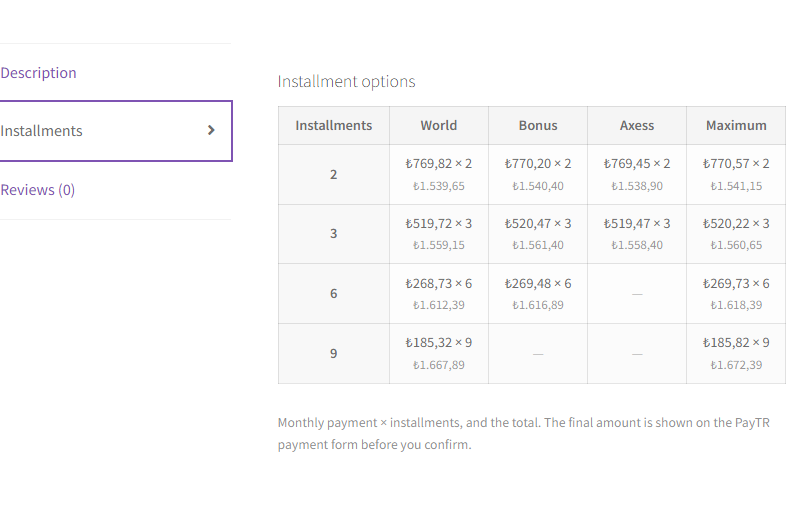
PayTR installment (taksit) table in a WooCommerce product page tab
Product page (Storefront theme): the “Installments” tab next to the description — monthly payment × number of payments and the total for World, Bonus, Axess, Maximum (rates from test data).
Credit / debit card (PayTR) payment method at the WooCommerce block checkout
Block checkout: the PayTR payment method with its description; after “Place order” the buyer sees the PayTR form on a store page.
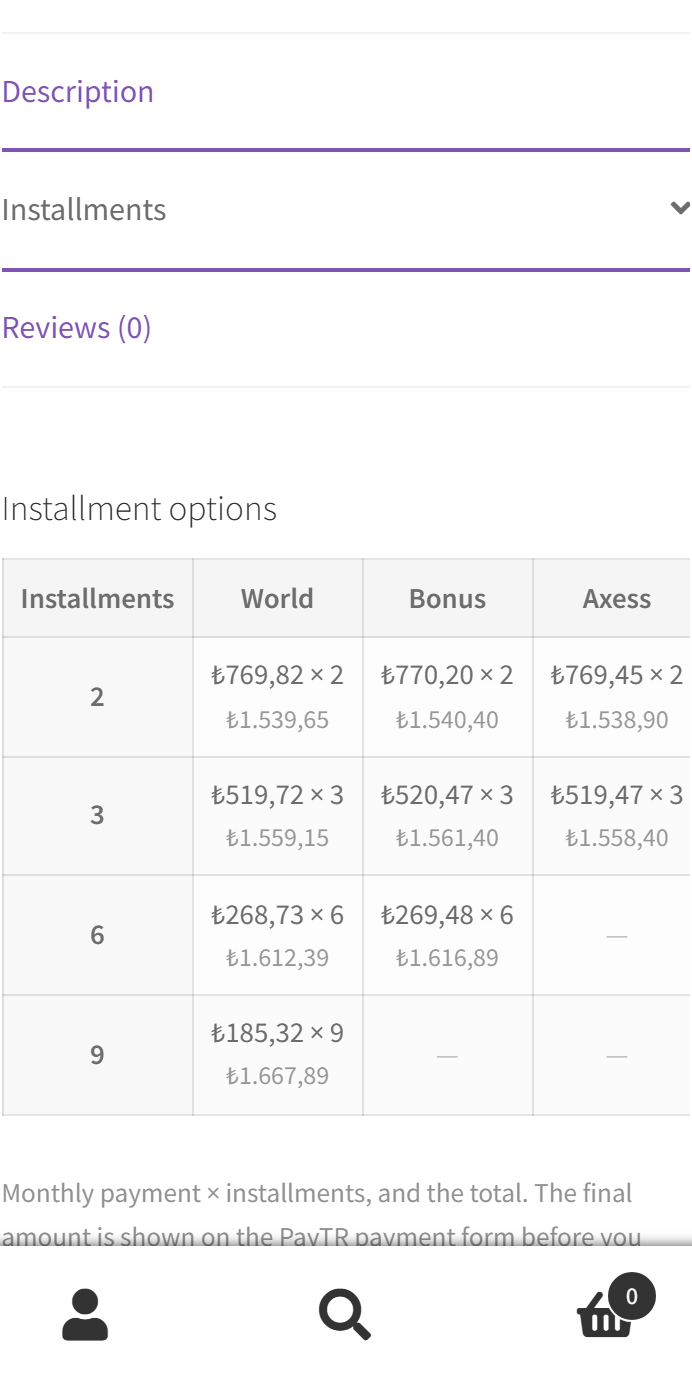
Installment table on a phone
On a phone the table scrolls sideways inside its own block, the page does not stretch.

The trial starts when you ask

A fresh install is the free version, nothing switches on by itself. The “Try Pro for 7 days” button → e-mail → the key right in the window and by e-mail.

One key — one site

Moving the store? Unbind the licence on the old domain and activate it on the new one yourself. For studios — keys for 5 or 25 sites, or unlimited.

Technical requirements

  • WordPress 6.2+, WooCommerce 7.0+ (tested on WordPress 7.1 and WooCommerce 11.2), PHP 7.4+.
  • A PayTR merchant account (Mağaza No, Mağaza Parola, Mağaza Gizli Anahtar) with the iFrame API enabled.
  • A site reachable from the internet — so PayTR can send the notification to the Notification URL; SSL recommended.

Version history

v1.0.0 Current October 2026

PayTR iFrame API at the classic and block checkout, Notification URL with signature checks, Status Inquiry, amount and currency checks, a separate merchant_oid for every attempt, HPOS;…

Frequently bought with PayTR for WooCommerce

4 modules in one order — 40% cheaper than separately

“Store starter” bundle PayTR Nova Poshta Premium Mono Acquiring Telegram notifications and Viber/SMS for customers Need more — all 173 modules in All Access for 4 990 ₴.
2 690 ₴ / year instead of 4 460 UAH bought separately
Buy the bundle →

Full module description

PayTR for WooCommerce connects the Turkish payment service PayTR through its iFrame API: the buyer places the order at the usual WooCommerce checkout (classic or block) and pays by card in the PayTR form right on a store page — with 3D Secure and installments (taksit). The order becomes paid only when PayTR has confirmed it with a signed notification or a Status Inquiry answer. Plugin languages: English and Türkçe.

Honestly about testing. We do not have a PayTR merchant account, so we have not made real payments through PayTR: the plugin is tested against a PayTR mock — a test server that checks signatures and request fields the way the dev.paytr.com documentation describes and sends notifications to the store the way PayTR does. On it, in clean WordPress 7.1 + WooCommerce 11.2 stores (PHP 8.3 and 7.4, MariaDB and MySQL 8, HPOS and the classic order storage), we ran real checkouts in a browser: classic and block checkout, guest and registered buyer, a coupon, shipping, variable products, installments with interest, EUR, a Turkish-language site, a declined card and a new attempt, a return to the store before the notification, repeated, forged and parallel notifications, refunds from the admin — checking the orders in the database. Before going live, make a few payments in PayTR test mode on your own account — the 7-day Pro trial is there for that.

There is a separate module for OpenCart — PayTR for OpenCart.

⚠ One Notification URL per PayTR account

PayTR sends the result of every payment to one address set in the panel: Mağaza Paneli → Ayarlar → Bildirim URL. It is a single field per PayTR store. If another site or another PayTR plugin already uses the same account, notifications will arrive at only one of the addresses, and some orders will not be confirmed automatically.

  • The most reliable way is a separate PayTR account for each store; if in doubt, ask PayTR support.
  • Switching from the official PayTR plugin. Once the Bildirim URL points to our plugin, notifications for the official plugin’s old orders (merchant_oid like PAYTRWOO…) come to us: the plugin answers PayTR “OK” and changes nothing, so if such orders were still waiting for payment, close them by hand using the PayTR panel. It is best to change the address when there are no unfinished payments through the old plugin.
  • The plugin checks its own orders once more through Status Inquiry when the buyer returns to the “Thank you” page, and the journal (Pro) has a “Re-check” button.

What the buyer sees

  • The “Credit / debit card (PayTR)” payment method at the classic and block checkout — in Turkish lira and in the currencies PayTR accepts (EUR, USD, GBP, RUB). In other currencies the method is not shown.
  • The PayTR form on a store page: after “Place order” the order payment page opens with the PayTR form inside (iFrame), its height follows the form, and on a phone the form fits the screen width.
  • Return to the store: after payment — the “Thank you” page, after a declined card — the same payment page with a message, a fresh form for a new attempt and a “Choose another payment method” button.
  • The form language — Turkish on a Turkish site, English on others (or always tr / en).
  • The installment table (Pro) on the product page: as a tab, under the price and button or as a shortcode; for a variable product the amounts are recalculated when a variation is chosen.

What the admin gets

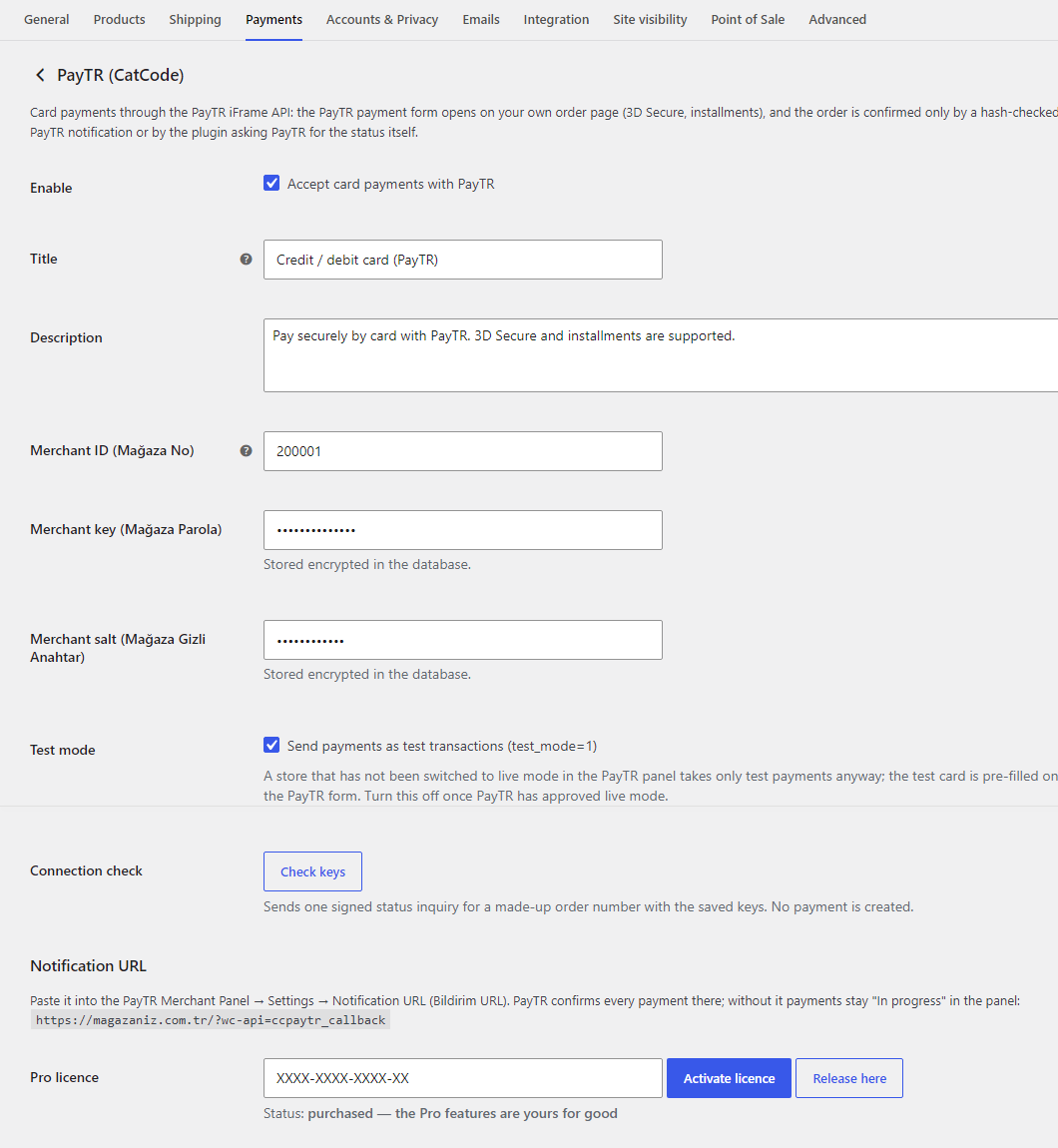
  • WooCommerce → Settings → Payments → PayTR (CatCode): Mağaza No, Mağaza Parola (key) and Mağaza Gizli Anahtar (salt) — the key and salt are stored encrypted in the database; the “Check keys” button makes a signed request to PayTR and shows whether the details are accepted.
  • A ready Notification URL for the PayTR panel (like /?wc-api=ccpaytr_callback).
  • Installments: all options, up to N payments (2–12) or single payment only; test mode; form language; status after payment (Processing or Completed); a WooCommerce debug log without keys.
  • Notes in every order: amount, number of payments, merchant_oid, test / live; on a decline — the reason from PayTR; transaction ID = merchant_oid.

Protection against payment errors

  • Paid — only by PayTR. Browser redirects mark nothing: the status changes only on a notification with a valid HMAC-SHA256 signature or a Status Inquiry answer.
  • Amount and currency check. The attempt amount, the collected amount, the order total and the currency must match; otherwise the order goes “On hold” with an explanation of what exactly is wrong.
  • Retries without duplicates. PayTR repeats a notification until it gets “OK”: the plugin counts only the first one and answers exactly “OK”, even if another plugin on the site prints a warning at that moment. Ten simultaneous notifications — one payment, one e-mail to the buyer, stock reduced once.
  • Every attempt has its own merchant_oid. After a decline the buyer gets a fresh form right away; a late notification of an old attempt is checked against that attempt’s own amount. A payment page open in two tabs shows the same form, so a payment from either of them finds its order.
  • A double payment is not lost. If an order was paid twice or a payment arrived for an order that is already cancelled, the status does not change, and the notes get an entry about the extra payment — so you can refund it.
  • The buyer switched the payment method (for example, to bank transfer) after already paying in the PayTR form — the order still becomes paid through PayTR.

Pro: installment table, refunds, journal

  • Installment table (taksit tablosu): World, Bonus, Axess, Maximum, CardFinans, Paraf, Advantage, Combo — your store’s rates from the PayTR Installment Rates service, refreshed once a day and with the “Refresh rates now” button. Amounts with interest (the buyer pays) or without it (peşin fiyatına taksit). Works in classic and block themes.
  • Refunds from the order screen through the PayTR Refund API: full or partial, several times, each with its own reference_no; nothing above the remaining payment amount goes through.
  • Single payment only for selected categories (with their subcategories) and products: PayTR receives no_installment=1, the table is not shown on such products.
  • Installment interest in the order: the difference between the collected amount and the order total is added as an “Installment interest (N installments)” line — the total equals what the buyer paid.
  • Payment journal (WooCommerce → PayTR journal): received, installments, card, test / live, merchant_oid, refunded and a “Re-check” button through Status Inquiry.
  • Updates of Pro come from catcode.com.ua in “Dashboard → Updates” while the licence is active.

How it works step by step

  1. The buyer picks “Credit / debit card (PayTR)” and presses “Place order”.
  2. On the payment page the plugin creates an attempt with its own merchant_oid and gets a form token from PayTR (iFrame API, step 1) with the order amount, the cart with shipping, the currency, the buyer’s IP and the installment settings.
  3. The buyer pays in the PayTR form; 3D Secure and the number of payments are chosen in the PayTR form.
  4. PayTR sends the result to the Notification URL (step 2). The plugin checks the signature, compares the amount and currency, updates the order and answers “OK”.
  5. The buyer returns to the “Thank you” page. If the notification has not arrived yet, the plugin asks PayTR itself through Status Inquiry.

Under the hood

  • Notification URL — /?wc-api=ccpaytr_callback (the standard WC API, no REST route and no separate files): an HMAC-SHA256 signature over merchant_oid, salt, status and total_amount; the answer is exactly OK even when another plugin prints something at that moment.
  • Payment attempts are stored in the order as a list of merchant_oid values with the amount of each; a notification looks the order up by this list, not by the current payment method. Simultaneous notifications and Status Inquiry go through a lock in the database, so the payment, the buyer e-mail and the stock reduction happen once — both with HPOS and with the classic order storage.
  • The keys merchant_key and merchant_salt are encrypted in the database (AES-256 + HMAC) and never reach the HTML of the settings page or the debug log.
  • Block checkout — the standard WooCommerce Blocks integration; the PayTR form opens on the order payment page (order-pay), as the iFrame API recommends.
  • Deleting the plugin removes its settings, the rates cache and its cron jobs; orders and their PayTR payment data stay.

Installation

  1. “Plugins → Add New → Upload Plugin” → zip → “Activate”.
  2. WooCommerce → Settings → Payments → PayTR (CatCode): enter Mağaza No, Mağaza Parola and Mağaza Gizli Anahtar from the PayTR panel (Destek & Kurulum → Entegrasyon Bilgileri), save and press “Check keys”.
  3. Copy the Notification URL from the settings to the PayTR panel: Ayarlar → Bildirim URL.
  4. Keep test mode on, make a test payment, then turn test mode off.

Questions
about the module

Didn't find the answer? Message us on Telegram and we'll reply within a business day.

@catcode_support Setup, compatibility, activation
Can I use the same PayTR account on two sites?

PayTR sends notifications to only one Bildirim URL per PayTR store. Two PayTR accounts are more reliable for two sites. Our plugin answers "OK" to foreign merchant_oid values and changes nothing, and checks its own orders once more through Status Inquiry.

I am switching from the official PayTR plugin. What about its old orders?

After the Bildirim URL is changed, notifications for the official plugin's old orders (PAYTRWOO…) get "OK" from us, but the status does not change. Close payments that were unfinished at the time of the switch by hand using the PayTR panel.

Have you tested the plugin with the real PayTR?

No, we do not have a PayTR merchant account. The plugin is written from the dev.paytr.com documentation and tested against a PayTR mock that checks signatures the way the documentation describes. Before going live, make test payments in test mode of your own PayTR account.

The buyer paid but closed the tab before returning to the store. Will the order stay unpaid?

No. The payment is confirmed by the PayTR notification to the Notification URL, not by the buyer's return. If the notification has not arrived yet when the buyer opens "Thank you", the plugin asks PayTR itself (Status Inquiry).

Where do the installment table rates come from?

From the PayTR Installment Rates service for your store, once a day and with the "Refresh rates now" button. The buyer sees the final amount in the PayTR form before confirming.

What happens after the trial?

PayTR payments keep working. Only the installment table, refunds from the admin, "single payment only", the interest line and the journal are switched off.

Not quite what you are looking for?

We build custom modules for WordPress, WooCommerce, OpenCart and Shopify. Tell us about the task and we'll prepare an estimate.

Order a custom module