OpenCart
PayTR for OpenCart — card payments and installments (taksit) via the PayTR iFrame API
Free + Pro
1 290 UAH
v1.0.0
 All Access4 990 ₴ / year
 Website auditA PDF report by email in 3 minutesCheck a website
Everyday tasks
Image compressorSize, quality and WebP in bulkQR generatorLink, Wi-Fi, payment to IBANVAT calculator20, 14, 7% and amount in wordsTransliterationOfficial Ukrainian standardWebsite checks
PHP and pluginsPHP version, WordPress, pluginsGoogle Merchant feedFields, prices, GTIN, imagesDomain emailSPF, DKIM, DMARC, blacklistsAI search readinessllms.txt, bots, markupAll 9 toolsEnter at least 2 characters
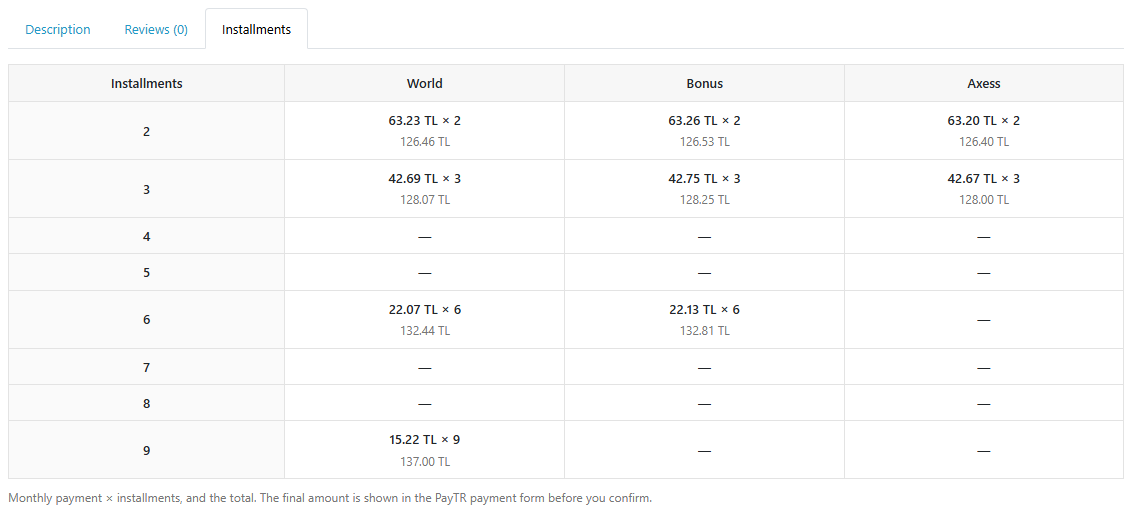
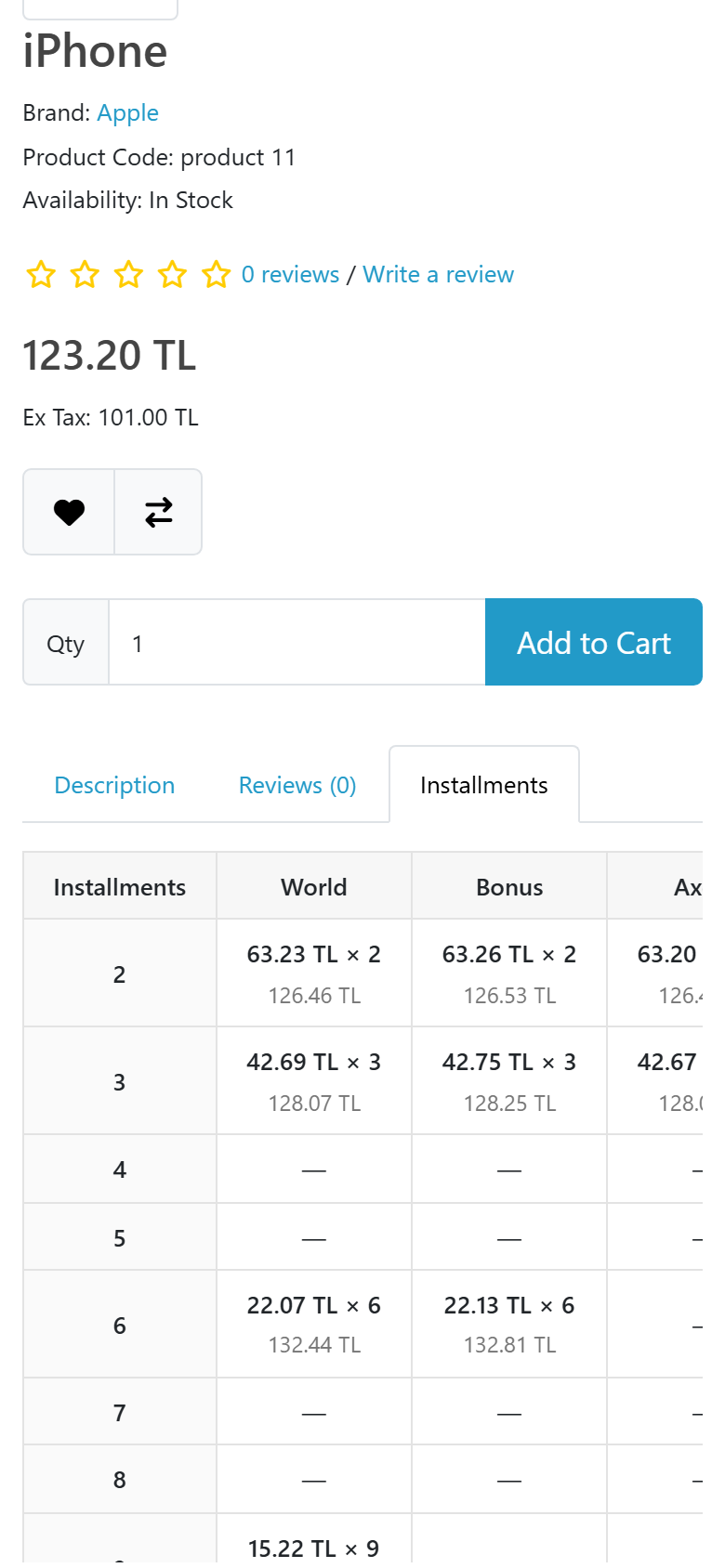
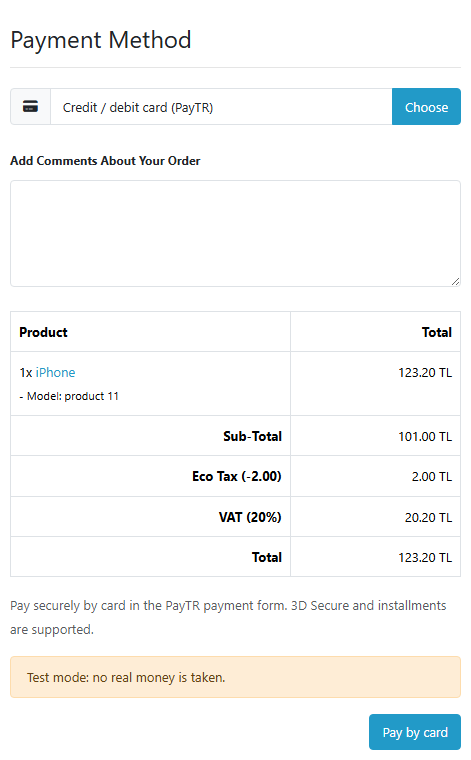
Card payments in Turkey through the PayTR iFrame API for OpenCart 4, 3 and 2.3: the PayTR form on a store page, an order becomes paid only on a signed PayTR notification or a Status Inquiry answer, amount and currency checks, TRY / EUR / USD / GBP / RUB. Pro — an installment (taksit) table on the product page, "single payment only" for categories and products, installment interest as an order line, a payment journal with re-check and refunds. Lifetime licence.
The free version works with no time limit. Pro adds the rest of the features in the table.



A fresh install is the free version, nothing switches on by itself. The “Try Pro for 7 days” button → e-mail → the key right in the window and by e-mail.

Moving the store? Unbind the licence on the old domain and activate it on the new one yourself. For studios — keys for 5 or 25 sites, or unlimited.
 OpenCart 4.0.2 – 4.1.x, 3.0.x or 2.3.0.2; PHP 7.0+ (for OpenCart 4 — the PHP version your OpenCart requires), curl and openssl extensions.A PayTR merchant account (Mağaza No, Mağaza Parola, Mağaza Gizli Anahtar) with the iFrame API enabled.A storefront reachable from the internet — so PayTR can send notifications to the Notification URL; SSL recommended.
4 modules in one order — 40% cheaper than separately



PayTR for OpenCart connects the Turkish payment service PayTR through its iFrame API: the buyer pays by card in the PayTR form right on a store page, with 3D Secure and installments (taksit), and the order becomes paid only when PayTR has confirmed it with a signed notification. One module for OpenCart 4, 3 and 2.3, languages English and Türkçe.
Honestly about testing. We do not have a PayTR merchant account, so we have not made real payments through PayTR. The module is written from the official dev.paytr.com documentation (signature formulas, request and response fields) and tested in clean stores on OpenCart 4.1.0.3, 4.0.2.3 (pdo driver), 3.0.5.0 and 2.3.0.2 on PHP 7.0 against a test server that checks signatures the way the PayTR documentation describes. We ran real storefront checkouts with a coupon, shipping, product options, in a second currency (EUR) and in Turkish, a declined card, repeated and forged notifications, a return before the notification, a double payment, a cart change during payment and refunds from the admin — checking the order and its total lines in the database. Before going live, make a few payments in PayTR test mode on your own account — the 7-day Pro trial is there for that.
Running WooCommerce? There is a separate PayTR for WooCommerce plugin: the same PayTR form (iFrame API) at the classic and block checkout, signed notifications and Status Inquiry, and in Pro an installment table on the product page and refunds from the order screen.
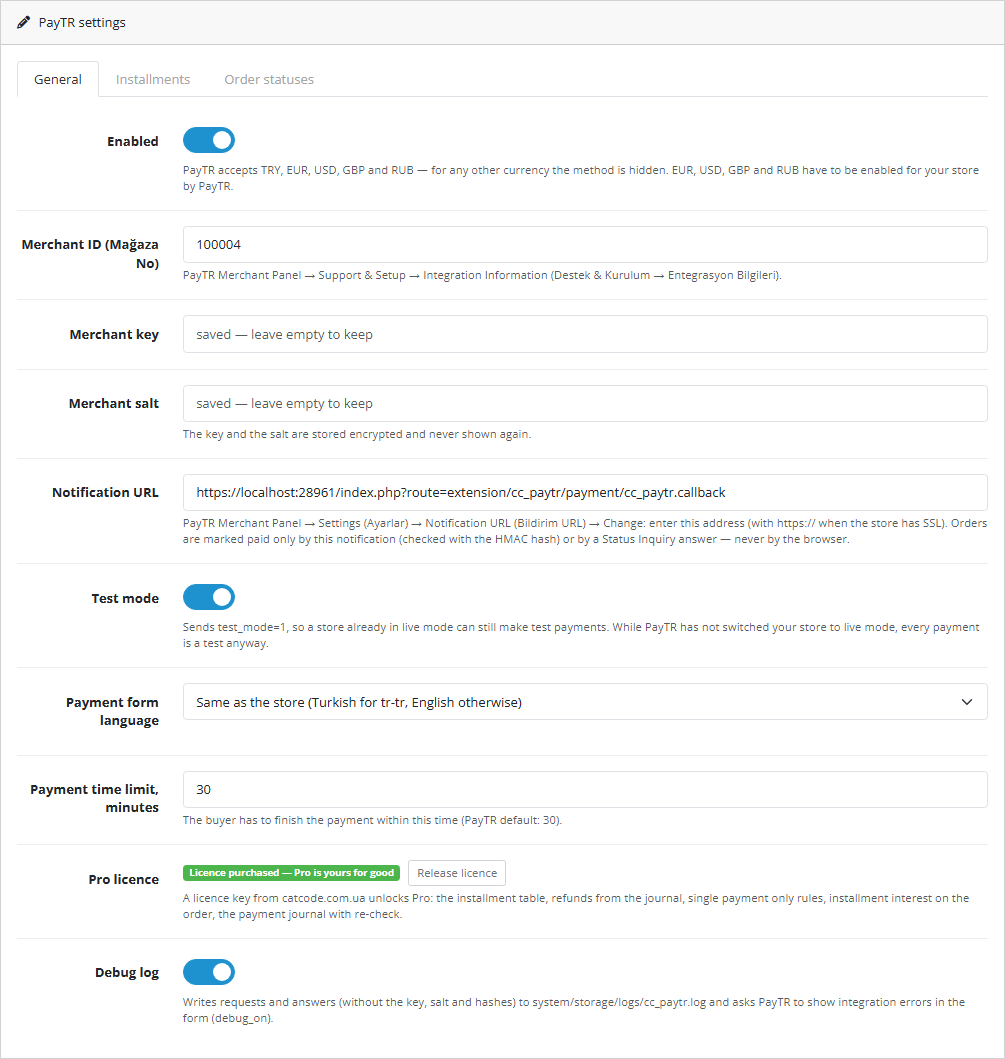
PayTR sends the result of every payment to the address set in the panel: Mağaza Paneli → Ayarlar → Bildirim URL. It is a single field in the store settings. If another site or another PayTR module already uses the same PayTR account, notifications will arrive at only one of the addresses, and some orders will not be confirmed automatically.
cc_paytr.log without keys, salt or signatures.upload/ folder from the archive to the store root.Didn't find the answer? Message us on Telegram and we'll reply within a business day.
 @catcode_support
Setup, compatibility, activation
@catcode_support
Setup, compatibility, activation
Carefully. The PayTR panel has a single "Bildirim URL" (Notification URL) field in the store settings, so payment notifications go to one address only. If another site or another PayTR module already works on the same account, some notifications will go elsewhere. Our module answers "OK" to foreign notifications and changes nothing, and checks its own orders once more through Status Inquiry when the buyer returns to the store. The reliable way is a separate PayTR account for each store; if in doubt, ask PayTR support.
The order still becomes paid as soon as PayTR sends the notification to the Notification URL: the module checks its signature and amount. If the buyer came back to the store before the notification, the module asks PayTR itself through Status Inquiry. Until PayTR answers, the order has status 0 (in the "Missing Orders" list), as with PayPal for OpenCart.
No. The return page does not mark a payment: only a signed PayTR notification or a Status Inquiry answer makes an order paid, and both are checked against the amount and currency of the attempt. We tested a forged notification and a forged return link — the order did not change.
The module compares the paid amount with the current order total. If they differ, the order gets a "review" status with an explanation in the history instead of "paid" — so you do not ship more than you received.
From the rates of the PayTR Installment Rates service (cached for a day), based on the product price with tax, for prices in Turkish lira only. You can show amounts with interest (the buyer pays) or without it (peşin fiyatına, the store pays). The table is indicative: PayTR shows the exact amount in its form before confirmation, and this is written under the table.
Yes, if PayTR has enabled these currencies for your store: the module sends the order currency (EUR, USD, GBP, RUB) and the amount in it. In currencies PayTR does not accept, the payment method is not shown.
Turn on "Test mode" — the module sends test_mode=1 and PayTR runs a test payment without charging. You need your details from the PayTR panel for this (Mağaza No, Mağaza Parola, Mağaza Gizli Anahtar).
Card payments, notifications, Status Inquiry and the checks keep working — that is Free. The installment table disappears from the product page, and the journal and refunds from the admin become unavailable until you buy a licence. An OpenCart licence is bought once and is valid forever.
No reviews yet. Be the first.
No questions yet. Ask one — we answer within 24 hours.
We build custom modules for WordPress, WooCommerce, OpenCart and Shopify. Tell us about the task and we'll prepare an estimate.
Order a custom module
—

CatCode assistant
Just now


CatCode assistant
Online

I’ll help with your website task
Describe your website task — I’ll find a ready-made module or pass it to a developer for an estimate. Modules, custom features, layout, integrations, speed, migration, technical SEO.
