OpenCart
Payments with SumUp for OpenCart 2.3, 3.x and 4.x — cards, Apple Pay, webhook and payment checks
Free + Pro
1 290 UAH
v1.0.0
 All Access4 990 ₴ / year
 Website auditA PDF report by email in 3 minutesCheck a website
Everyday tasks
Image compressorSize, quality and WebP in bulkQR generatorLink, Wi-Fi, payment to IBANVAT calculator20, 14, 7% and amount in wordsTransliterationOfficial Ukrainian standardWebsite checks
PHP and pluginsPHP version, WordPress, pluginsGoogle Merchant feedFields, prices, GTIN, imagesDomain emailSPF, DKIM, DMARC, blacklistsAI search readinessllms.txt, bots, markupAll 9 toolsEnter at least 2 characters
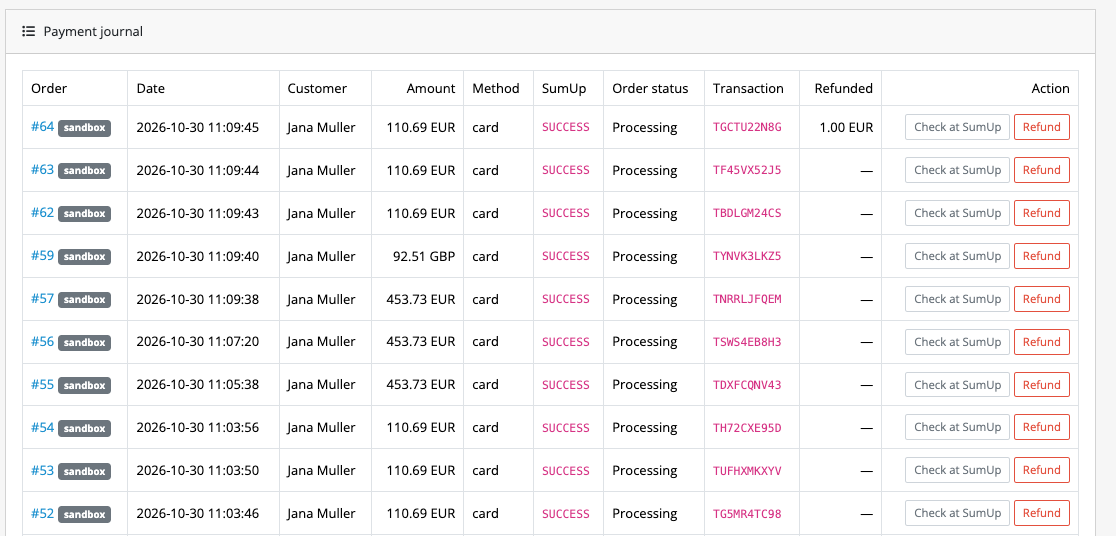
Take SumUp payments in OpenCart: cards with 3-D Secure, wallets and the local methods of your account. An order becomes paid only after a check against the SumUp API. No webhook set-up. Pro adds refunds from the order, a payment watchdog, Hosted Checkout, Google Pay and a payment journal. Perpetual licence.
The free version works with no time limit. Pro adds the rest of the features in the table.


After confirming the order the buyer sees the payment form on the shop page. If the bank declines, the buyer sees a message and a Pay again button.

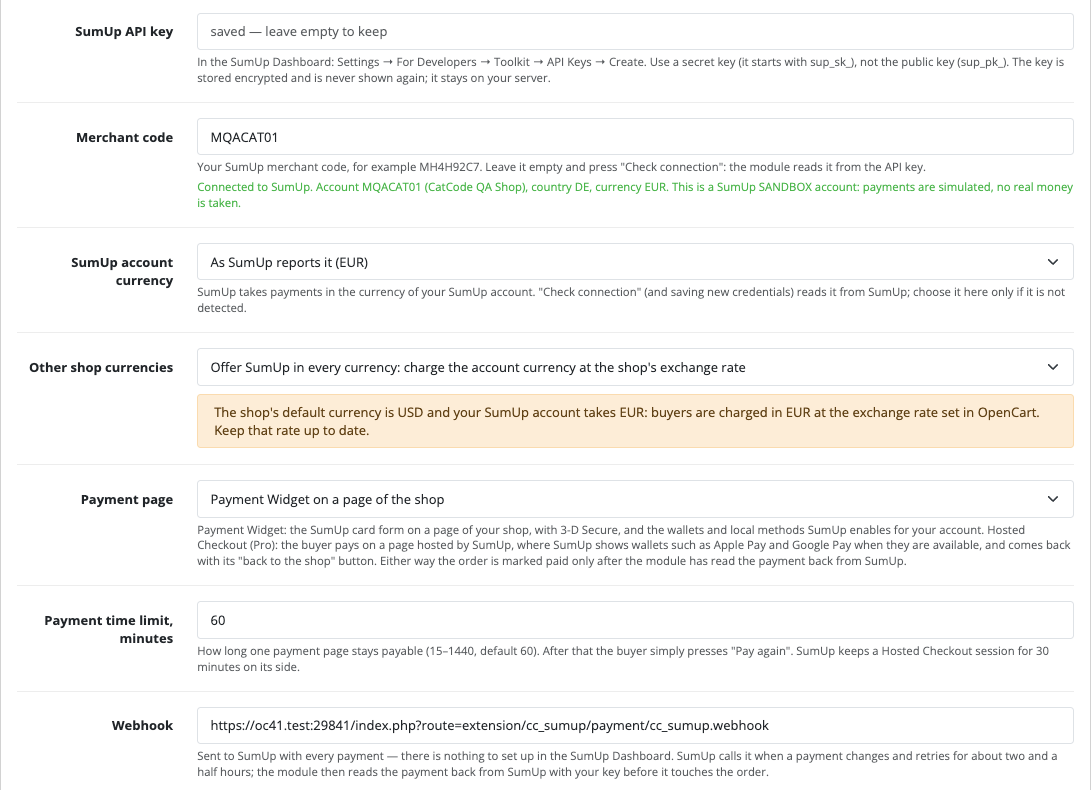
Paste the API key and press the connection check: the module shows the merchant code, country and account currency.

A fresh install is the free version, nothing switches on by itself. The “Try Pro for 7 days” button → e-mail → the key right in the window and by e-mail.

Moving the store? Unbind the licence on the old domain and activate it on the new one yourself. For studios — keys for 5 or 25 sites, or unlimited.
 OpenCart 4.0.2.3+ and 4.1.x, 3.x or 2.3.0.2 · PHP 7.0+.A SumUp account allowed to take online payments and a secret API key.Payment watchdog: 3.x and 2.3 need a hosting cron job, 4.x has the OpenCart scheduler.
For OpenCart 4.x, 3.x and 2.3: SumUp payment form, webhook, payment checks, a tab on the order.
4 modules in one order — 40% cheaper than separately



Payments with SumUp for OpenCart takes cards with 3-D Secure, wallets and the local methods SumUp enabled for your account. The buyer pays in the SumUp form in the shop, and an order becomes paid only after a check against the SumUp API.
After confirming the order the buyer sees the payment form on the shop page. If the bank declines, the buyer sees a message and a Pay again button. SumUp translates the form into the buyer’s language.
Paste the API key and press the connection check: the module shows the merchant code, country and account currency. There is no webhook to set up, its address travels with every payment.
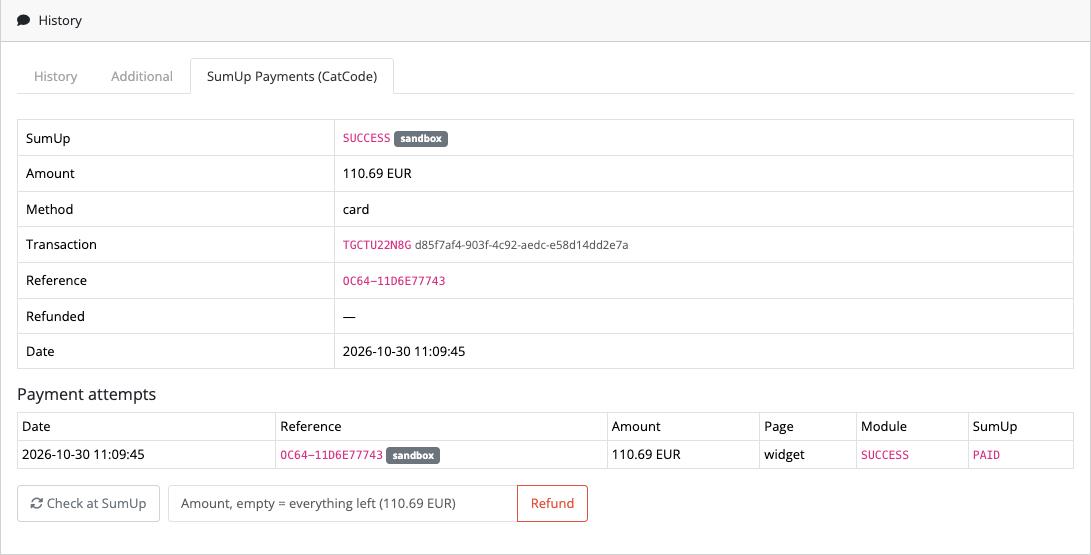
The order has a SumUp tab with the status, amount, method, transaction and all attempts. If the amount or currency does not match, the order moves to a review status with the reason.
Didn't find the answer? Message us on Telegram and we'll reply within a business day.
 @catcode_support
Setup, compatibility, activation
@catcode_support
Setup, compatibility, activation
A merchant account allowed to take online payments and a secret API key. For tests SumUp gives every account a sandbox that moves no real money.
Open the SumUp tab on the order. Pro has a check button and a watchdog that finds such payments by itself.
The currency cannot be charged, or in match mode it differs from the account currency. The connection check shows the account currency.
Wallets appear in the form when SumUp enables them for the account. Google Pay in Pro needs your Google merchant ID.
The 2.3 installer copies files over FTP. Without FTP, copy the upload/ folder from the archive to the store root.
No. The module is made by CatCode studio; SumUp is a trademark of its owner.
No reviews yet. Be the first.
No questions yet. Ask one — we answer within 24 hours.
We build custom modules for WordPress, WooCommerce, OpenCart and Shopify. Tell us about the task and we'll prepare an estimate.
Order a custom module
—

CatCode assistant
Just now


CatCode assistant
Online

I’ll help with your website task
Describe your website task — I’ll find a ready-made module or pass it to a developer for an estimate. Modules, custom features, layout, integrations, speed, migration, technical SEO.
