
WordPress
Fiskalizacija HR for WooCommerce — fiscal receipts to the Croatian Tax Administration CIS (ZKI, JIR, QR)
Free + Pro
990 UAH/year
v1.0.0
 All Access4 990 ₴ / year
 Website auditA PDF report by email in 3 minutesCheck a website
Everyday tasks
Image compressorSize, quality and WebP in bulkQR generatorLink, Wi-Fi, payment to IBANVAT calculator20, 14, 7% and amount in wordsTransliterationOfficial Ukrainian standardWebsite checks
PHP and pluginsPHP version, WordPress, pluginsGoogle Merchant feedFields, prices, GTIN, imagesDomain emailSPF, DKIM, DMARC, blacklistsAI search readinessllms.txt, bots, markupAll 9 toolsEnter at least 2 characters

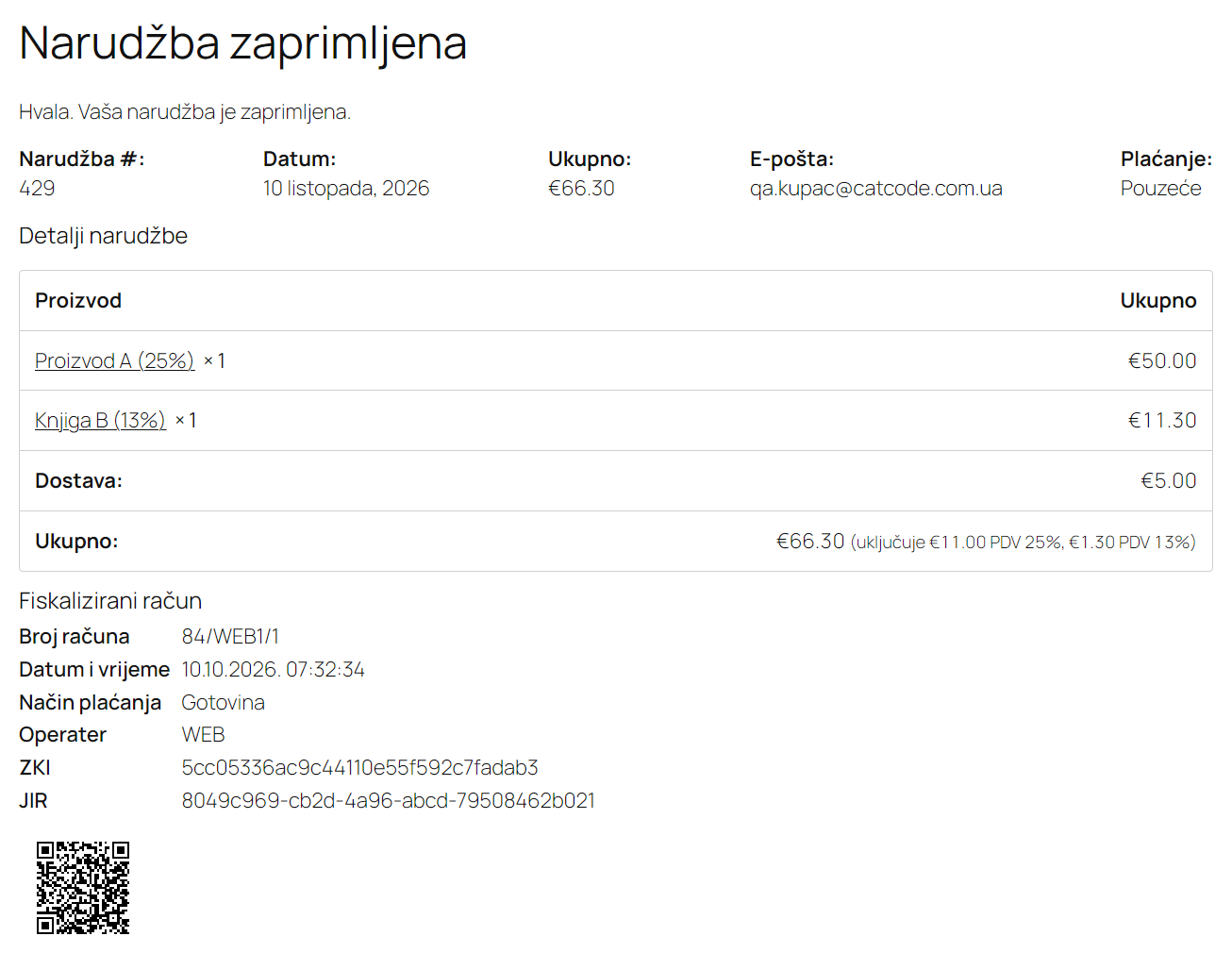
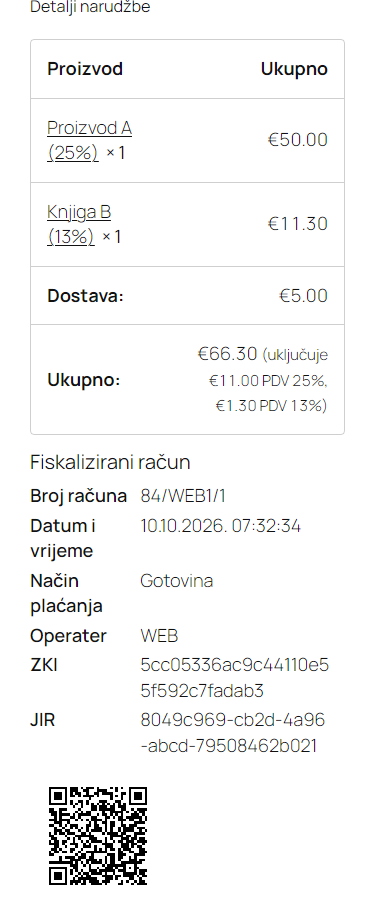
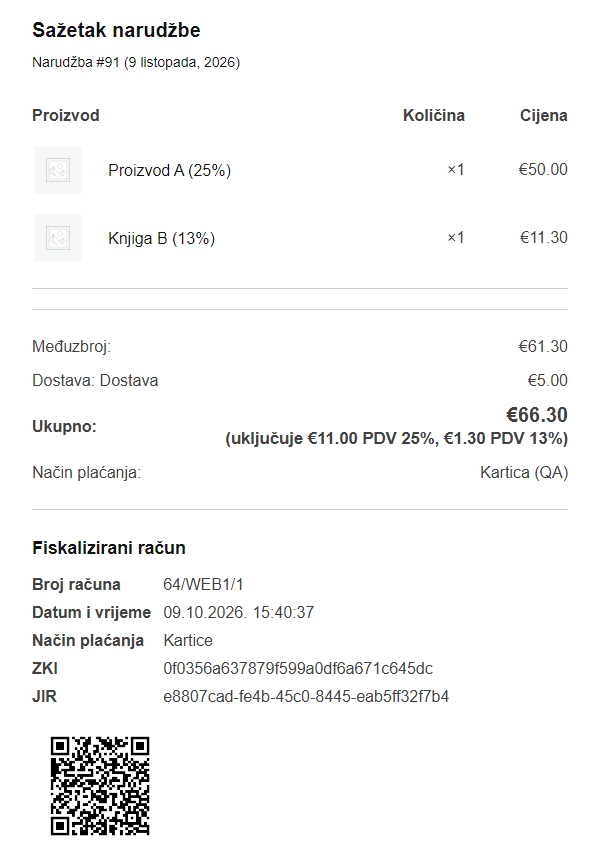
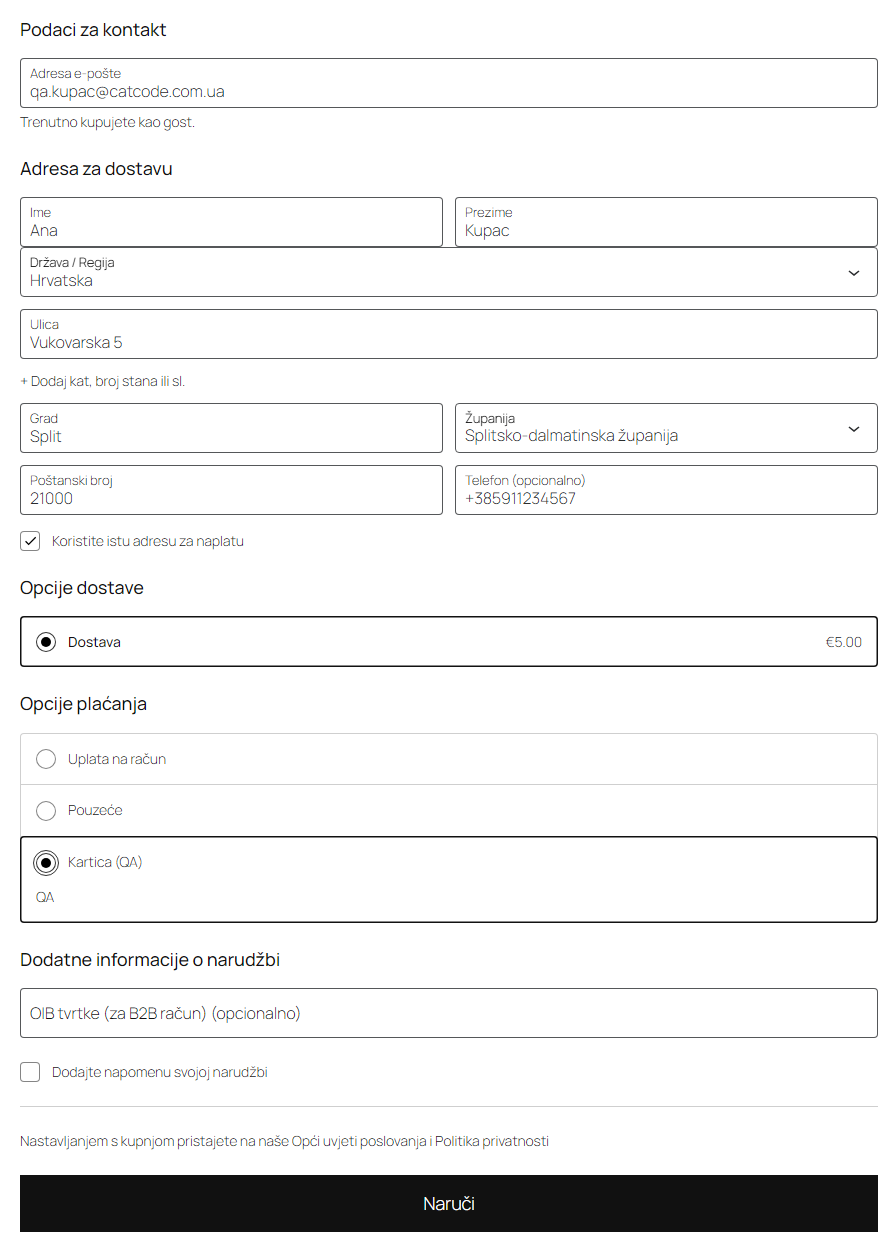
Croatian fiscalisation of receipts for WooCommerce: the ZKI protective code, a request signed with your application certificate sent to the Tax Administration (Porezna uprava) CIS service, JIR and the QR code on the order, the thank-you page and customer e-mails. Gapless numbering, VAT by rate, late delivery when CIS is down, a receipt register. Pro — storno receipts for refunds, buyer OIB at checkout, PDF Invoices, CSV and alerts.
The free version works with no time limit. Pro adds the rest of the features in the table.



A fresh install is the free version, nothing switches on by itself. The “Try Pro for 7 days” button → e-mail → the key right in the window and by e-mail.

Moving the store? Unbind the licence on the old domain and activate it on the new one yourself. For studios — keys for 5 or 25 sites, or unlimited.
 WooCommerce 7.0+ (tested on 11.2), classic or block checkout, HPOS compatibleWordPress 6.2+ (tested on 7.1) · PHP 7.4+ with OpenSSL and DOM (run on PHP 7.4 and 8.3)Shop currency — EUR; orders in other currencies and 0 € orders are skippedApplication certificate for fiscalisation issued to your OIB (FINA or another trusted provider): DEMO for test, production for production. PHP with OpenSSL 3 cannot read old .p12 files with RC2/3DES encryption — the plugin tells you to reissue or repackage the fileBusiness premises of the web shop registered in ePoreznaWooCommerce taxes with Croatian rates (25/13/5/0 %)Not included: eRačun and Fiskalizacija 2.0 between businesses, eIzvještavanje, business premises registration; CIS does not accept OSS sales with foreign VAT rates — such orders are not fiscalised and the reason shows in the registerPlugin languages: English and Croatian.
Fiscalisation of receipts to CIS per specification v2.7 and WSDL/XSD 1.10.
4 modules in one order — 40% cheaper than separately



Fiskalizacija HR for WooCommerce is a plugin for online shops in Croatia that sell on WooCommerce. In Croatia every receipt to an end customer must be fiscalised whatever the payment method — since 1 January 2026 that includes payments to the transaction account. The shop computes the ZKI protective code, sends the signed receipt to the Tax Administration (Porezna uprava) fiscalisation service CIS and prints the receipt identifier JIR and a QR code on the receipt. The plugin does this for WooCommerce orders directly against CIS with your own application certificate — no third-party invoicing service in between and no monthly subscription.
Running OpenCart? There is a separate version for it — Fiskalizacija HR for OpenCart (4.x, 3.x and 2.3), with the same signature, ZKI and request format; the OpenCart licence is a one-time payment, forever.
What you need. The OIB of your company or craft; the web shop registered as business premises in ePorezna (the plugin does not do that — it only needs the premises label, for example WEB1); an application certificate for fiscalisation issued to your OIB by a trusted provider such as FINA. The CIS test environment accepts only DEMO certificates, production only production ones. Shop currency: EUR.
Honestly about testing. The plugin was checked against the official CIS technical specification “Tehnička specifikacija za korisnike” v2.7 and FiskalizacijaSchema / WSDL 1.10: every generated request — ordinary receipts, late delivery, storno with negative amounts, receipts with the buyer OIB — passed the official XSD and an independent signature check, and every ZKI was recomputed separately. The full run was on a local WooCommerce shop (PHP 7.4 and 8.3, HPOS on and off, classic and block checkout) with a model of CIS answers: success, refusals s001–s006 and s013, outages, broken answers. The real CIS test server answered us only without a DEMO certificate: getting one needs a Croatian OIB, which CatCode does not have. So you get a live JIR in your own 7-day Pro trial with a FINA DEMO certificate — the Tax Administration recommends at least two days of stable work in the test environment before going to production anyway. If CIS answers differently from the specification, we will fix it promptly.
Responsibility for the receipt data stays with the shop. The plugin takes amounts and taxes from the WooCommerce order, and the VAT system, premises and device labels, operator, payment methods and the category for untaxed lines from your settings. Go through these settings with your accountant before switching to production.
After payment the thank-you page shows the “Fiskalizirani račun” block: the receipt number in number/premises/device format, date and time, payment method, operator, ZKI, JIR and a QR code linking to the receipt check on porezna.gov.hr. The same block is in “My account” on the customer’s order.
Fiscal data and the QR code also go into WooCommerce customer e-mails — Processing, Completed, invoice, refund. The QR code in the e-mail is a PNG image. The block on the page and in e-mails can be switched off separately.
Pro. The classic and block checkout get an “OIB tvrtke (za B2B račun)” field — for companies paying by card or cash that want their OIB on the receipt. The plugin validates the OIB check digit: a wrong number blocks the order, with an explanation in Croatian. The field can be hidden, optional, or required for B2B shops.
The receipt page shows everything that went to CIS and came back: environment, status, ZKI, JIR, whether the answer signature was verified, attempts, the last message id, and below that the last XML request and answer. In the test environment there is a “Check at CIS test” button — the provjera method, with which CIS checks a receipt without fiscalising it.
Every order has a “Fiskalizacija” box with number, amount, status, ZKI, JIR and the QR code, and order notes record each step: receipt issued, fiscalised, waiting, refused.
VAT comes from each order’s tax lines, grouped by rate — 25 %, 13 %, 5 % or 0 %. A rate CIS does not accept (for example 19 %) is stopped before sending, and no number is used up. Untaxed lines go as VAT exempt, not taxable or 0 % — as you choose; fees named like “povratna naknada” go as Naknade. Rounding cents between the lines and the order total are settled so the receipt total matches to the cent. The payment method is set per gateway: G cash, K card, T transaction account, O other.
Pro. A WooCommerce refund — full, partial by line or amount-only — produces a storno receipt with negative amounts at the same VAT rates; each further amount-only refund is calculated from what is left after earlier storno receipts. Fiscal data and the QR code (25×25 mm) are added to PDF Invoices & Packing Slips documents. The register exports to CSV (UTF-8 with BOM, “;” separator, decimal comma), and alerts go to the address you set when CIS refuses a receipt or is unreachable.
ccfh_ca_file filter.CCFH_CERT_FILE and CCFH_CERT_PASSWORD in wp-config.php.CCFH_CIS_MOCK constant (ok, down, s002, s004, s006, s013) simulates answers in the test environment only — to try the shop before you have a certificate.CCFH_DELETE_DATA constant removes those too.catcode-fiskalizacija-hr-for-woocommerce-1.0.0.zip and activate it (WooCommerce must be active).Didn't find the answer? Message us on Telegram and we'll reply within a business day.
 @catcode_support
Setup, compatibility, activation
@catcode_support
Setup, compatibility, activation
The OIB of your company or craft, the web shop registered as business premises in ePorezna, and an application certificate for fiscalisation from a trusted provider (for example FINA). A DEMO certificate for the CIS test environment, a production one for production. Shop currency: EUR.
Against the official CIS technical specification v2.7 and FiskalizacijaSchema / WSDL 1.10: every generated request passed the official XSD and a signature check, every ZKI was recomputed independently. CIS answers were modelled in testing — success, refusals s001–s013, outages. We reached the real CIS test server only without a DEMO certificate: it needs a Croatian OIB. You get a live JIR in your own 7-day Pro trial with a FINA DEMO certificate.
The receipt is issued with its ZKI (also in the QR code) and delivered automatically as soon as CIS answers, marked as late delivery. The law (Zakon o fiskalizaciji NN 89/2025, čl. 21) gives two working days from the outage for that; CIS technically refuses receipts older than 30 days.
Those CIS accepts: 0, 5, 13 and 25 %. Untaxed lines go as exempt, not taxable or 0 % — as you choose in the settings. Which category is right for your goods is your accountant's call.
No. The plugin fiscalises receipts to end customers. It does not do eRačun, eIzvještavanje or business premises registration in ePorezna.
The shop. The plugin takes the data from the WooCommerce order and from your settings: VAT system, premises and device labels, payment methods, operator. Go through the settings with your accountant before switching to production.
No reviews yet. Be the first.
No questions yet. Ask one — we answer within 24 hours.
We build custom modules for WordPress, WooCommerce, OpenCart and Shopify. Tell us about the task and we'll prepare an estimate.
Order a custom module
—

CatCode assistant
Just now


CatCode assistant
Online

I’ll help with your website task
Describe your website task — I’ll find a ready-made module or pass it to a developer for an estimate. Modules, custom features, layout, integrations, speed, migration, technical SEO.
