
OpenCart
Fiskalizacija HR for OpenCart — fiscal receipts to the Croatian Tax Administration CIS (ZKI, JIR, QR)
Free + Pro
1 290 UAH
v1.0.0
 All Access4 990 ₴ / year
 Website auditA PDF report by email in 3 minutesCheck a website
Everyday tasks
Image compressorSize, quality and WebP in bulkQR generatorLink, Wi-Fi, payment to IBANVAT calculator20, 14, 7% and amount in wordsTransliterationOfficial Ukrainian standardWebsite checks
PHP and pluginsPHP version, WordPress, pluginsGoogle Merchant feedFields, prices, GTIN, imagesDomain emailSPF, DKIM, DMARC, blacklistsAI search readinessllms.txt, bots, markupAll 9 toolsEnter at least 2 characters

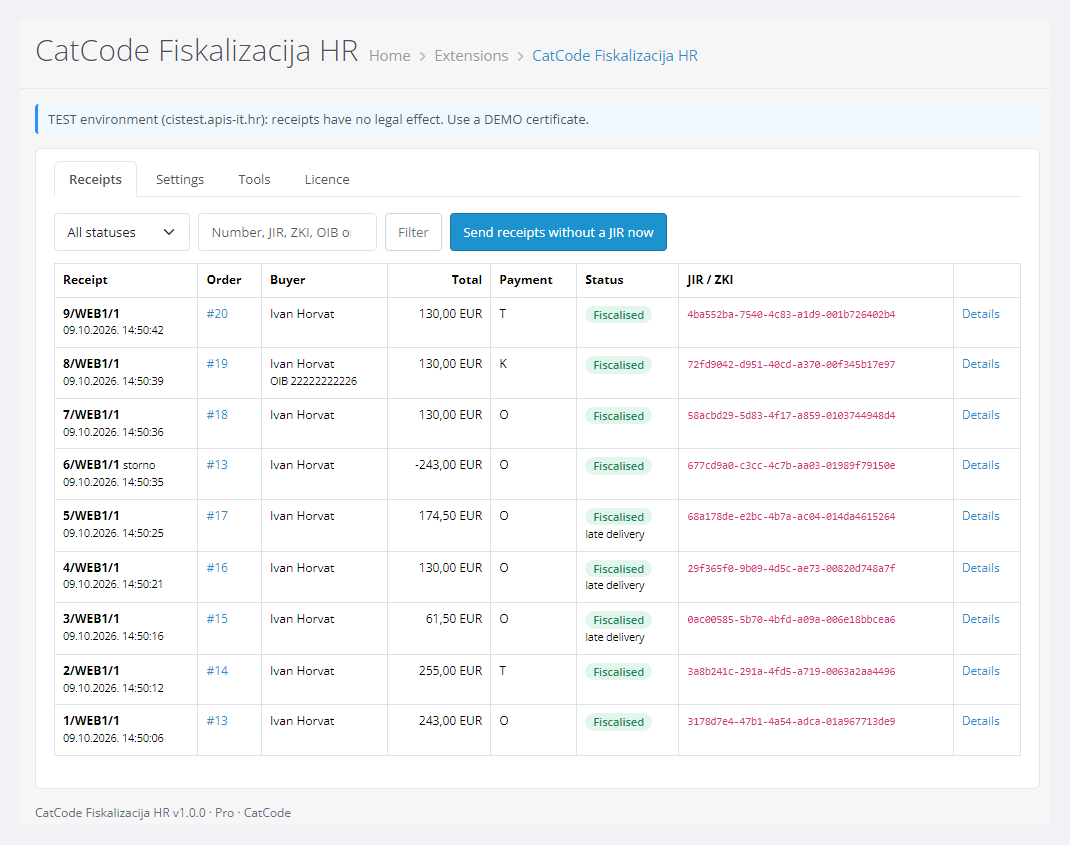
Croatian receipt fiscalisation for OpenCart 4, 3 and 2.3: the ZKI protection code, a request signed with your own certificate sent to the CIS service of the Tax Administration (Porezna uprava), the JIR and QR code on the order, on the printable receipt and in the customer account. Gapless numbering, VAT by rate, late delivery when CIS is down, a receipt register. Pro adds storno receipts, buyer OIB at checkout, the receipt by e-mail, other currencies, CSV and alerts. One-time payment, perpetual licence.
The free version works with no time limit. Pro adds the rest of the features in the table.



A fresh install is the free version, nothing switches on by itself. The “Try Pro for 7 days” button → e-mail → the key right in the window and by e-mail.

Moving the store? Unbind the licence on the old domain and activate it on the new one yourself. For studios — keys for 5 or 25 sites, or unlimited.
 OpenCart 4.0.2 – 4.1.x (tested on 4.1.0.3 and 4.0.2.3, with the mysqli and pdo database drivers), 3.0.x (tested on 3.0.5.0) or 2.3.0.2 (tested on PHP 7.0).PHP 7.0+ with OpenSSL and DOM, outgoing connections to port 8449 (TLS 1.2+).A fiscalisation certificate for your OIB: DEMO for testing, production for live receipts. PHP with OpenSSL 3 cannot open old .p12 files encrypted with RC2 — the module shows the command to repack the file into .pem once.Business premises of the web shop registered in ePorezna; OpenCart tax classes with the Croatian rates (25/13/5/0 %).Cron: in OpenCart 4 retries run from the OpenCart scheduler; in 3.x and 2.3 add the address from the “Tools” tab to your hosting cron (every 5 minutes). Without cron, retries happen only on page views.Does not do: eRačun and Fiskalizacija 2.0 between businesses, eIzvještavanje, registration of business premises, PNP, and changing the payment method with promijeniPodatkeRacuna (use storno and a new receipt instead).Module languages: English and Croatian.
For OpenCart 4.x, 3.x and 2.3: receipt fiscalisation in CIS per specification v2.7 and WSDL/XSD 1.10.
4 modules in one order — 40% cheaper than separately



Fiskalizacija HR for OpenCart is a module for web shops in Croatia running OpenCart 4, 3 or 2.3. In Croatia every receipt to an end customer must be fiscalised, whatever the payment method. The shop computes the ZKI protection code, sends the signed receipt to the CIS fiscalisation service of the Tax Administration (Porezna uprava) and prints the JIR identifier and a QR code on the receipt. The module does this for OpenCart orders straight to CIS with your own certificate, with no third-party service in between and no monthly subscription.
Running WooCommerce? There is a separate version for it — Fiskalizacija HR for WooCommerce, with the same signature, ZKI and request format.
What you need. The OIB of your company or obrt; the web shop registered as business premises in ePorezna (the module does not do this — it only needs the premises code, e.g. WEB1); a fiscalisation certificate issued for your OIB, e.g. FINA “Fiskal”. The CIS test environment accepts only DEMO certificates, production only production ones.
Honestly about testing. The module was built and checked against the official CIS technical specification “Tehnička specifikacija za korisnike” v2.7 and the FiskalizacijaSchema / WSDL 1.10: every generated request — regular receipts, late delivery, storno with negative amounts, receipts with a buyer OIB — passed the official XSD and an independent signature check, and every ZKI was recomputed separately. The full run was done on local shops with OpenCart 4.1.0.3, 4.0.2.3 (pdo driver), 3.0.5.0 and 2.3.0.2 on PHP 7.0 against a model of the CIS answers: success, refusals, outages. The real CIS test server answered us only without a DEMO certificate, which requires a Croatian OIB that CatCode does not have. So you get the live JIR in your own 7-day Pro trial with a FINA DEMO certificate. If CIS answers differently from the specification, we will fix it promptly.
Responsibility for the receipt data stays with the shop. The module takes amounts and taxes from the OpenCart order, and the VAT system, premises and device codes, operator, payment methods and the category of lines without VAT from your settings. Review these settings with your accountant before switching to production.
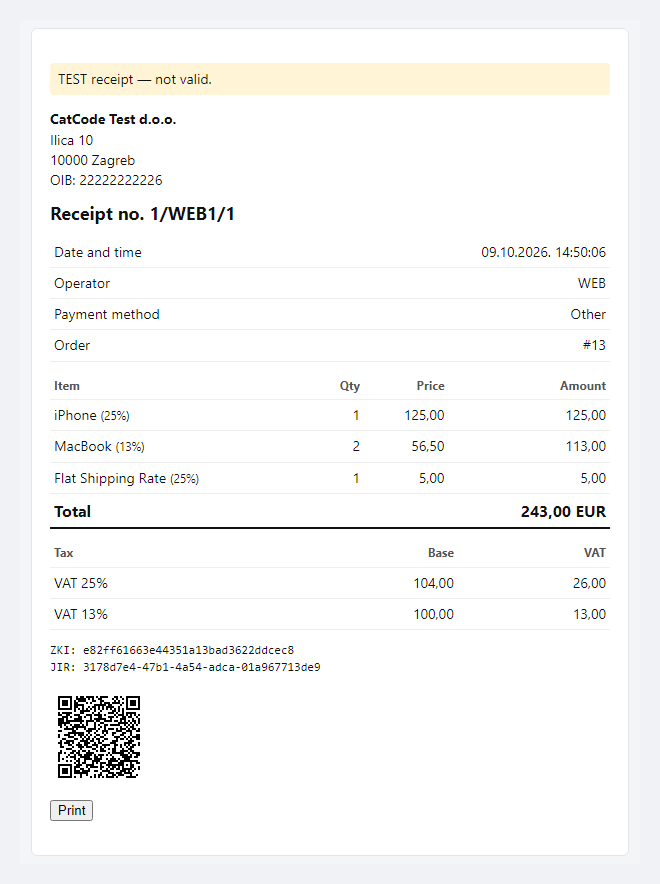
The customer gets a receipt: shop details and OIB, the number in the broj/prostor/uređaj format, date and time in Croatian time, operator, payment method, items with VAT rates, the VAT breakdown, ZKI, JIR and a QR code linking to the receipt check on porezna.gov.hr. The receipt page opens only through a keyed link and prints with the “Print” button.
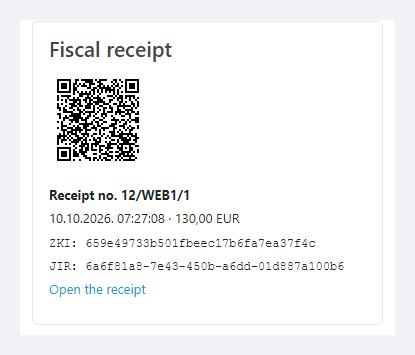
In the customer account, in the order history, a “Fiscal receipt” block appears with the QR code, number, total, ZKI, JIR and a link to the receipt. Customers never see other people’s receipts; on a phone the block has no horizontal scroll.
Pro. A company paying by card or in cash can enter its OIB in the “Company OIB” field at checkout — the default one and CatCode One Page Checkout. The module checks the check digit: a wrong OIB stops the checkout next to the field. After the JIR the customer gets the receipt by e-mail.
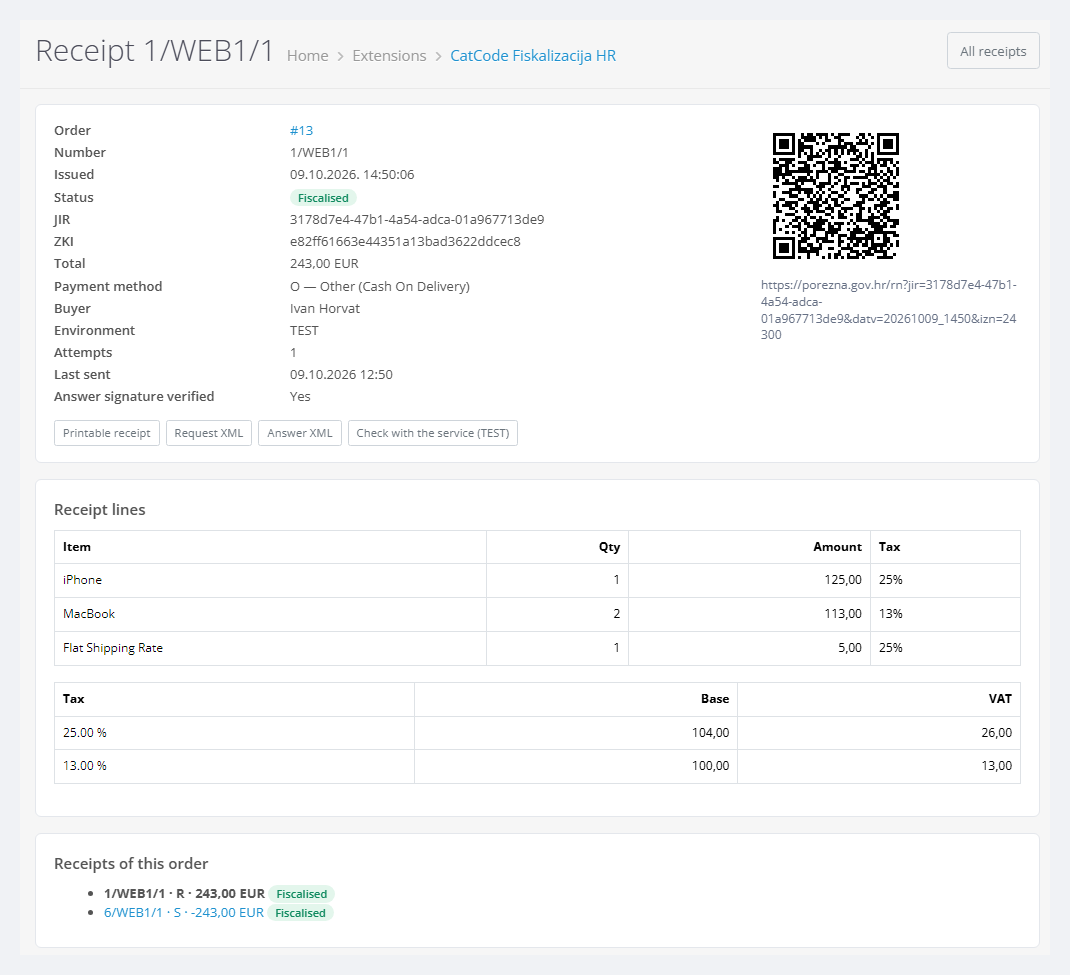
The receipt page shows everything that went to CIS and came back: number, status, ZKI, JIR, whether the answer signature was verified, the number of attempts, the receipt lines and VAT breakdown, all receipts of the order, and below them the signed request and the answer XML. In the test environment there is the provjera check — CIS compares the receipt without fiscalising it.
The order page gets a “Fiscal receipt” panel with the receipts and storno receipts of the order, the “Issue and fiscalise the receipt” button and the buyer OIB field for the next receipt (Pro). Each step is written to the order history.
system/storage, not in the database) and takes the OIB from the certificate into the settings. “Check the connection” tests the link to CIS with an echo message.VAT is taken from the order’s tax rows and grouped by rate — 25 %, 13 %, 5 % or 0 %. A rate CIS does not accept is stopped before sending with an explanation, and no number is used. Coupons are spread over the rates, shipping goes by its own tax, and rounding cents are reconciled so the receipt total matches the order total. Lines without tax go as VAT-exempt by default, a product with a real 0 % rate as VAT at 0 %; other categories can be forced.
Pro. A refund produces a storno receipt with negative amounts at the same rates — automatically on the “Refunded” and “Reversed” statuses (configurable) or with a button. The buyer OIB goes to CIS only with payment G or K, as the specification requires. An order in another currency gets a receipt in euro at the shop’s rate, past orders can be fiscalised in bulk by ID, the register exports to CSV, and the owner gets an e-mail when a receipt is refused or still has no JIR after 5 attempts.
cc_fiskalhr.ocmod.zip (do not rename the archive) and press Install. OpenCart 3: Extensions → Installer → cc_fiskalhr-oc3.ocmod.zip. OpenCart 2.3: upload the contents of the upload/ folder from cc_fiskalhr-oc2.ocmod.zip to the shop root (FTP or the hosting file manager).Didn't find the answer? Message us on Telegram and we'll reply within a business day.
 @catcode_support
Setup, compatibility, activation
@catcode_support
Setup, compatibility, activation
The OIB of your company or obrt, the web shop registered as business premises in ePorezna, and a fiscalisation certificate for your OIB (for example FINA). The CIS test environment takes a DEMO certificate, production takes a production one. Receipts are issued in EUR.
Against the official CIS technical specification v2.7 and the XSD/WSDL 1.10: generated requests passed the official XSD and an independent signature check, the ZKI was recomputed separately. CIS answers were modelled in the tests. You get a live JIR in your own 7-day Pro trial with a FINA DEMO certificate — without a Croatian OIB it is not available to us.
No. For OpenCart it is a one-time payment and a perpetual licence, one for all three builds: 4.x, 3.x and 2.3. The Pro trial starts only with your button; after it receipts keep being fiscalised.
The shop. The module takes amounts and taxes from the order and the VAT system, premises and device codes, operator, payment methods and the category of lines without VAT from your settings. Check them with your accountant before switching to production.
No reviews yet. Be the first.
No questions yet. Ask one — we answer within 24 hours.
We build custom modules for WordPress, WooCommerce, OpenCart and Shopify. Tell us about the task and we'll prepare an estimate.
Order a custom module
—

CatCode assistant
Just now


CatCode assistant
Online

I’ll help with your website task
Describe your website task — I’ll find a ready-made module or pass it to a developer for an estimate. Modules, custom features, layout, integrations, speed, migration, technical SEO.
