
OpenCart
Merchant Image Audit for OpenCart — product photo audit against the Google Merchant Center 500×500 minimum
Free + Pro
1 290 UAH
v1.0.0
 All Access4 990 ₴ / year
 Website auditA PDF report by email in 3 minutesCheck a website
Everyday tasks
Image compressorSize, quality and WebP in bulkQR generatorLink, Wi-Fi, payment to IBANVAT calculator20, 14, 7% and amount in wordsTransliterationOfficial Ukrainian standardWebsite checks
PHP and pluginsPHP version, WordPress, pluginsGoogle Merchant feedFields, prices, GTIN, imagesDomain emailSPF, DKIM, DMARC, blacklistsAI search readinessllms.txt, bots, markupAll 9 toolsEnter at least 2 characters

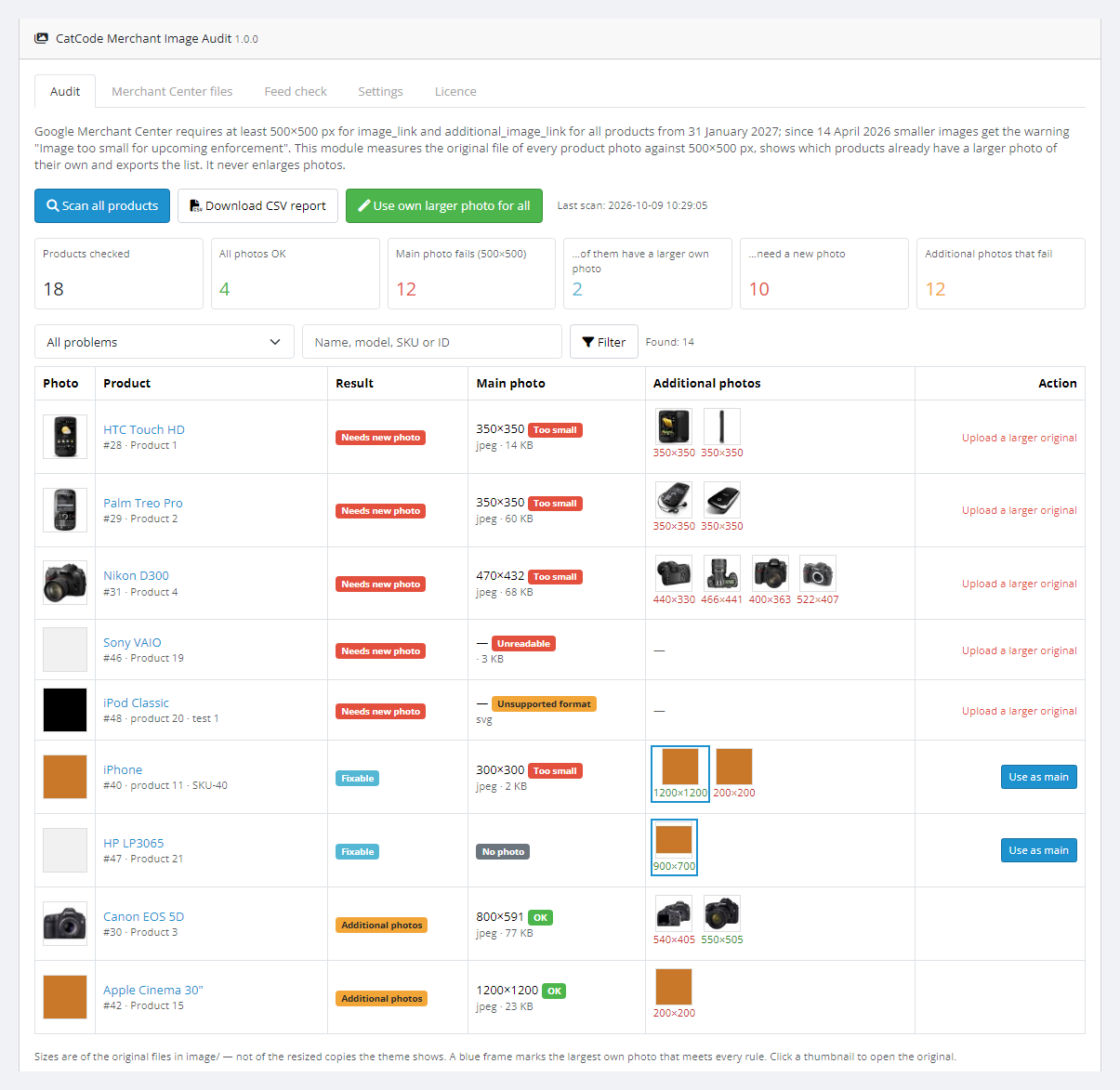
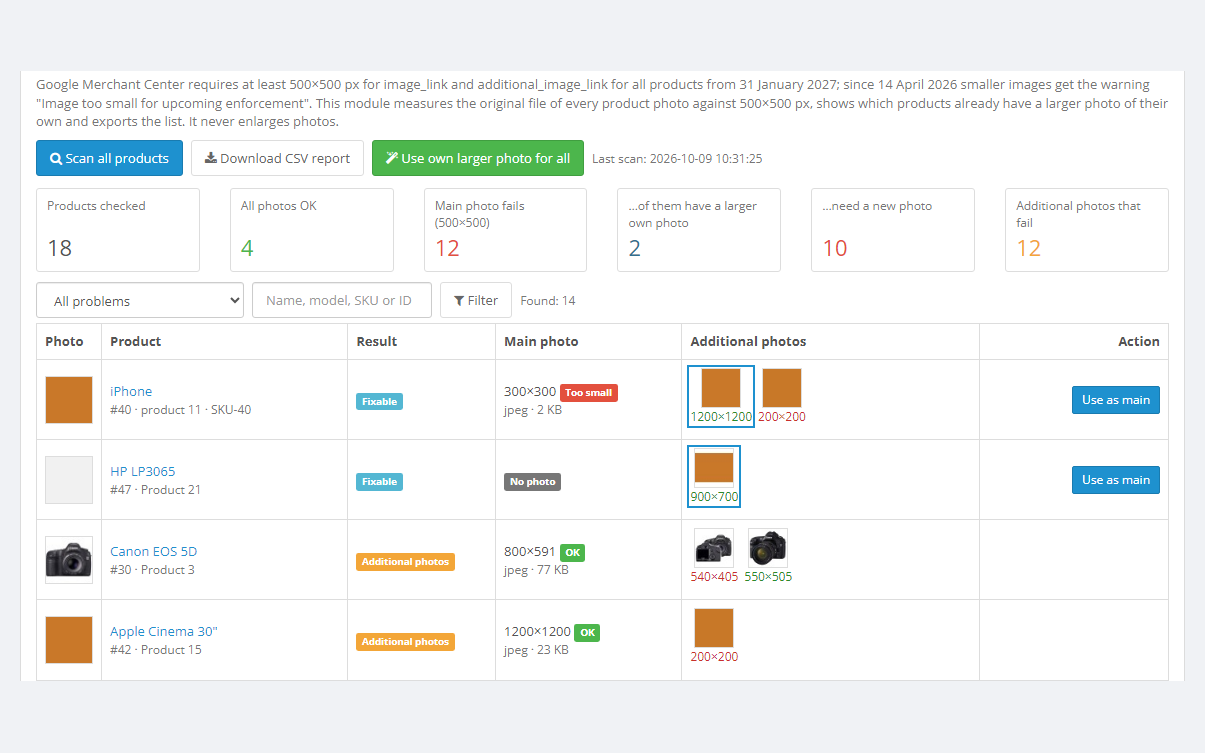
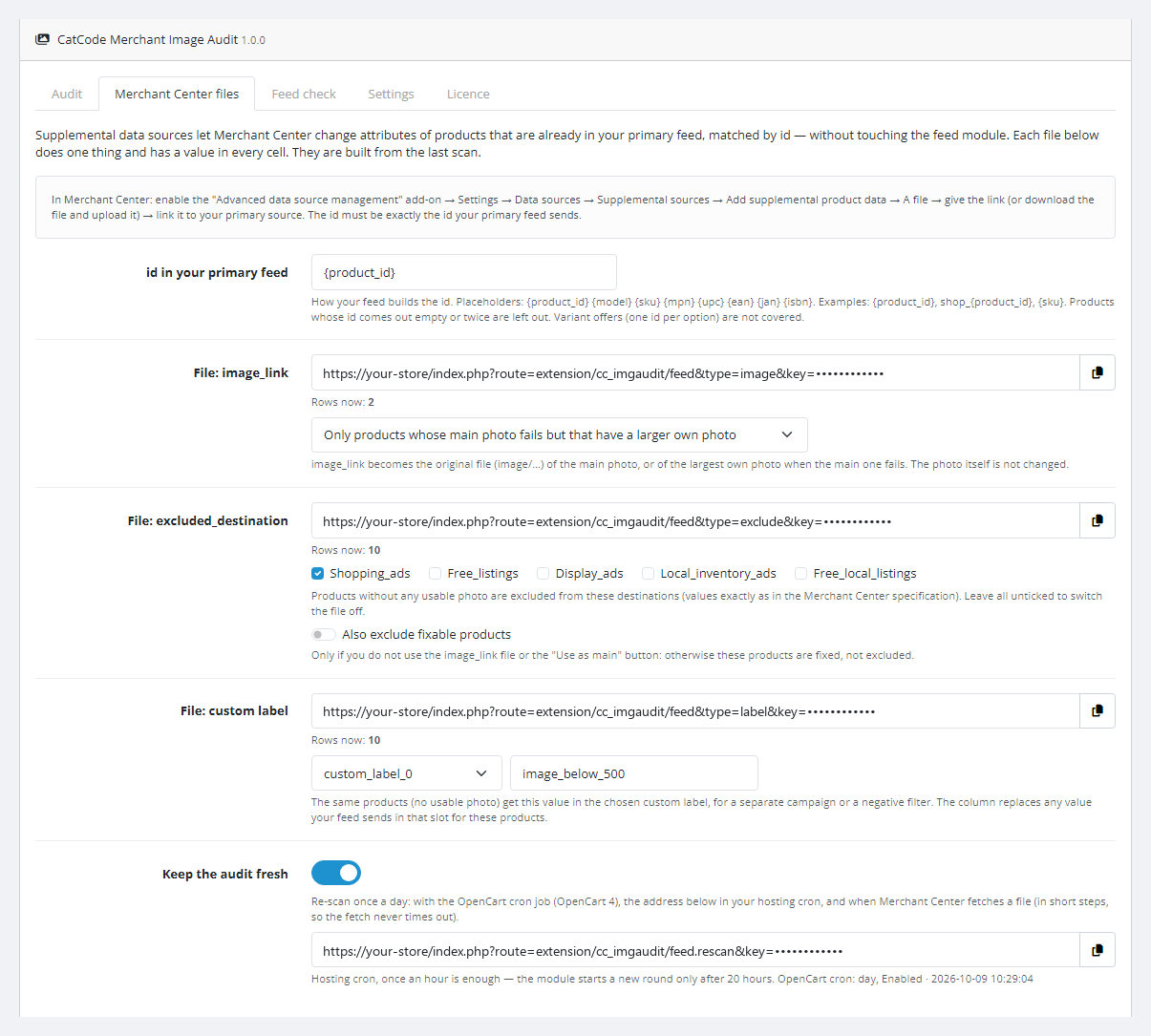
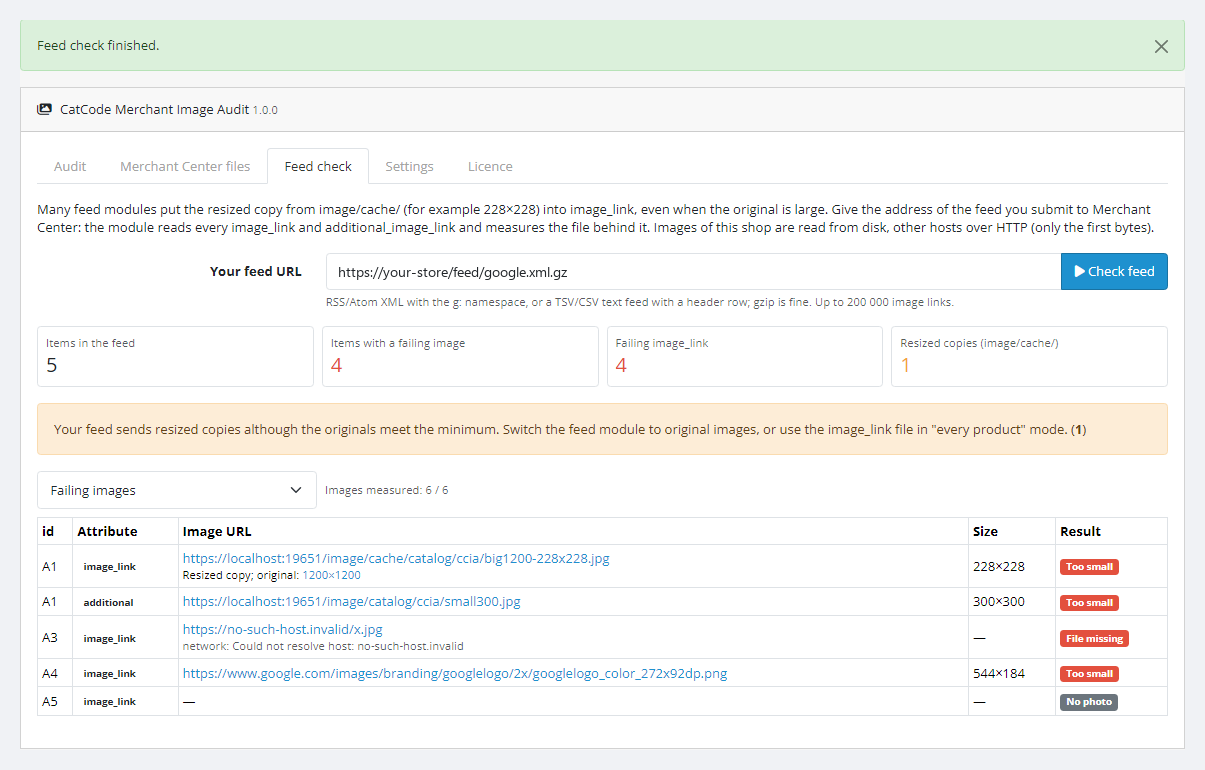
A module for OpenCart 4, 3 and 2.3 that measures the original file of every product photo — main and additional — against the Google Merchant Center minimum of 500×500 px, which Google applies to all products from 31 January 2027. It shows which products already have a larger photo of their own, checks format, file size and megapixels, and exports a CSV report. Pro makes the product's own larger photo the main one in one click (with undo), serves supplemental files for Merchant Center and checks which images your feed really sends.
The free version works with no time limit. Pro adds the rest of the features in the table.


Customers do not see the module: nothing changes in the storefront or checkout, and the module adds no scripts or requests to shop pages.

The module lives in Extensions → Extensions → Modules → CatCode Merchant Image Audit.

A fresh install is the free version, nothing switches on by itself. The “Try Pro for 7 days” button → e-mail → the key right in the window and by e-mail.

Moving the store? Unbind the licence on the old domain and activate it on the new one yourself. For studios — keys for 5 or 25 sites, or unlimited.
 OpenCart 4.0.2 – 4.1.x (tested on 4.1.0.3 and 4.0.2.3, with the mysqli and pdo database drivers), 3.0.x (tested on 3.0.5.0) or 2.3.0.2.PHP — whatever your OpenCart version needs: the 2.3 build is tested on PHP 7.0, the others on PHP 8.1, 8.2 and 8.3.Product photos in the image/ folder on the same server (OpenCart standard).The PHP cURL extension — for the licence and for remote feed images; XMLReader — for checking an XML feed.For the daily re-scan in OpenCart 3 and 2.3 — a hosting cron that opens the URL from the settings.
For OpenCart 4.x, 3.x and 2.3: audit of the original main and additional photos against the Merchant Center minimum, checks of format, file size, megapixels and extension, verdicts, the…
4 modules in one order — 40% cheaper than separately



Merchant Image Audit for OpenCart is a module for shops that list products in Google Shopping and free listings through Merchant Center. According to the Google help, from 31 January 2027 every image in image_link and additional_image_link must be at least 500×500 px — for all products and categories. Since 14 April 2026 smaller images already get the Merchant Center warning “Image too small for upcoming enforcement”. In a typical OpenCart catalogue photos were uploaded over the years, by different people and in different sizes, so checking them by hand takes a long time.
The module measures the original file of every product photo — the main one and all additional ones, not the resized copies the theme shows — and splits products into four groups: all fine; only additional photos fail; the main photo is too small but the product has a larger photo of its own; a new photo is needed. Along the way it checks format, file size, megapixels and whether the file extension matches the real format. The module never enlarges photos: it either finds a larger photo the product already has, or says plainly that a new one is needed.
For WooCommerce there is a separate version — Merchant Image Audit for WooCommerce.
Customers do not see the module: nothing changes in the storefront or checkout, and the module adds no scripts or requests to shop pages. Its public addresses — the supplemental files for Merchant Center and the re-scan URL — open only with a secret key. The customer sees only the result: the product in Google Shopping is shown with a sharp photo instead of being disapproved for a small image.
The module lives in Extensions → Extensions → Modules → CatCode Merchant Image Audit. Five tabs: Audit, Merchant Center files, Feed check, Settings, Licence.
oc_cc_imgaudit_product (product verdict), oc_cc_imgaudit_image (every photo), oc_cc_imgaudit_log (main-photo swaps for Undo), oc_cc_imgaudit_feed (feed check).getimagesize(), and the WebP header is parsed by hand so it works on PHP 7.0 too. Photos are not re-encoded or copied.index.php?route=extension/cc_imgaudit/feed&type=image|exclude|label&key=…: without the key or without an active Pro — “403”.cc_imgaudit.ocmod.zip (do not rename the archive) and press Install. OpenCart 3: Extensions → Installer → cc_imgaudit-oc3.ocmod.zip, then Extensions → Modifications → Refresh. OpenCart 2.3: upload the contents of the upload/ folder from cc_imgaudit-oc2.ocmod.zip to the shop root (FTP or the hosting file manager) — the 2.3 Installer does not copy files without a configured FTP.Didn't find the answer? Message us on Telegram and we'll reply within a business day.
 @catcode_support
Setup, compatibility, activation
@catcode_support
Setup, compatibility, activation
500×500 px by default. According to the Google Merchant Center help, this is the minimum for image_link and additional_image_link of all products; since 14 April 2026 smaller images get the warning "Image too small for upcoming enforcement", and from 31 January 2027 the requirement is enforced. You can change the minimum in the settings — for example, to the 1500×1500 that Google recommends.
No, and it does not promise to. The Google help sets the minimum and says nothing about whether an enlarged photo is acceptable, while it explicitly forbids borders and padded canvases. So the module either finds a larger photo the product already has, or honestly says "Needs new photo".
The theme shows resized copies from image/cache/. The module measures the original file in image/ — that is the one worth sending to Merchant Center. If your feed sends cached copies, the Pro tab "Feed check" shows it.
In Free — no: it only reads file headers and stores the result in its own tables. In Pro a photo changes only when you press "Use as main" or "Use own larger photo for all", and every change can be undone. If the main photo was changed by hand after the module, Undo leaves it alone.
We have not tested this on a live Merchant Center account. The module serves TSV files with an id column and the attribute, following the Google help on supplemental data sources (input: a file, Google Sheets or the API). Whether Merchant Center fetches the file by link on a schedule in your account — check it during the 7-day trial; you can also download the file and add it by hand.
Set the id template on the "Merchant Center files" tab: {product_id}, {sku}, {model}, {mpn}, {upc}, {ean}, {jan}, {isbn}, with any prefix — for example shop_{product_id}. Products whose id comes out empty or twice are left out. Separate offers per product option are not covered.
No. For OpenCart it is a one-time payment and the licence is forever, one for all three builds: 4.x, 3.x and 2.3. The Pro trial starts only when you press the button. After the trial the audit, the list and the CSV keep working, while the supplemental file links answer "403" — Merchant Center stops applying their values.
No. No core edits, no OCMOD patches, no events; it has its own tables. Uninstall removes these tables together with the change log used by Undo.
No reviews yet. Be the first.
No questions yet. Ask one — we answer within 24 hours.
We build custom modules for WordPress, WooCommerce, OpenCart and Shopify. Tell us about the task and we'll prepare an estimate.
Order a custom module
—

CatCode assistant
Just now


CatCode assistant
Online

I’ll help with your website task
Describe your website task — I’ll find a ready-made module or pass it to a developer for an estimate. Modules, custom features, layout, integrations, speed, migration, technical SEO.
