Get in touch
  • OpenCart
  • Payments
  • v1.1.0

E-Invoice EN 16931 for OpenCart — ZUGFeRD / Factur-X, XRechnung and Peppol BIS (Slovakia, Belgium) from orders

EN 16931 e-invoices straight from OpenCart 4, 3 and 2.3 orders: ZUGFeRD / Factur-X (PDF/A-3 with the XML inside), XRechnung 3.0 in CII and UBL, Peppol BIS Billing 3.0 for the Slovak e-faktúra (DIČ, 0245) and Belgian B2B (enterprise number, 0208), and Factur-X with the French reform data. Buyer VAT ID, Leitweg-ID, IČO, DIČ and company number at checkout, VAT categories with exemption reasons, gap-free numbering — all generated in your shop. Pro — automatic issuing with e-mail, credit notes, downloads in the customer account, hand-over to the Slovak delivery service or a Belgian Peppol access point, a CSV for the French e-reporting, VIES. Lifetime licence.

Download Free
Pro · lifetime licence The more sites, the less each one costs
Compatibility
OpenCart 4.0.2 – 4.1.x, 3.0.x and 2.3.0.2 (tested on 4.1.0.3, 4.0.2.3, 3.0.5.0, 2.3.0.2 on PHP 7.0) · default checkout and One Page Checkout (CatCode) · ZUGFeRD / Factur-X EN 16931 · XRechnung 3.0 · Peppol BIS Billing 3.0 (SK, BE) · Factur-X with the French reform data
Version
v1.1.0 (OpenCart 4)
v1.1.0 (OpenCart 3.x)
v1.1.0 (OpenCart 2.3)
Licence
one site, lifetime
Trial
7 days, no card, one per site
Updated
October 2026
Or all 173 Pro modules with All Access — 4 990 ₴ / year

What Free has,
and what Pro adds

The free version works with no time limit. Pro adds the rest of the features in the table.

Feature Free Pro
ZUGFeRD / Factur-X: PDF/A-3b with the CII XML inside, EN 16931 profile ✔ ✔
XRechnung 3.0 in both syntaxes — CII and UBL ✔ ✔
Peppol BIS Billing 3.0 for the Slovak e-faktúra: DIČ as Peppol address (scheme 0245) of seller and buyer ✔ ✔
Peppol BIS Billing 3.0 for Belgian B2B: the enterprise number (KBO / BCE) as Peppol address (scheme 0208), check digits tested at checkout ✔ ✔
Factur-X with the French reform data: SIREN / SIRET, category of the operation, VAT on debits, notes PMD / PMT / AAB, BR-FR pre-check; French invoices in euro only ✔ ✔
Invoice with one button on the order page: PDF preview, PDF and every XML from the order screen ✔ ✔
Buyer VAT ID, Leitweg-ID (buyer reference), IČO, DIČ and company number (SIREN / SIRET, Belgian enterprise number) as OpenCart custom fields — created with one button, checked at checkout ✔ ✔
VAT categories S / Z / E / AE / K / G / O set automatically: reverse charge, intra-Community supply, export, small business — with the reason text and VATEX code ✔ ✔
Coupons as allowances per VAT group, vouchers and store credit as prepaid amount, the order's second currency ✔ ✔
Gap-free numbering from your own pattern (INV-{YYYY}-{N:5}), pre-flight check without using a number, rebuild under the same number ✔ ✔
Correcting the buyer data on the order page ✔ ✔
Document language by buyer country (German, French, Slovak, Dutch, English) or one for all ✔ ✔
Module languages: English, Deutsch, Français, Slovenčina, Nederlands ✔ ✔
Automatic issuing on chosen order statuses with the e-mail to the customer: PDF plus XRechnung or Peppol XML — ✔
Credit notes (type 381): full on Refunded / Reversed, partial by amount split over the VAT rates — ✔
Invoices in the customer account (order page) with keyed download links — ✔
Hand-over of the Slovak e-faktúra to your delivery service over HTTPS with an API key — ✔
Hand-over of Belgian Peppol invoices to your access point over HTTPS with an API key — ✔
CSV for the French e-reporting of consumer sales — ✔
VIES check of the VAT ID at checkout — ✔
Shop logo on the PDF, ZIP for the accountant (PDF + XML + CSV) — ✔

What it looks like

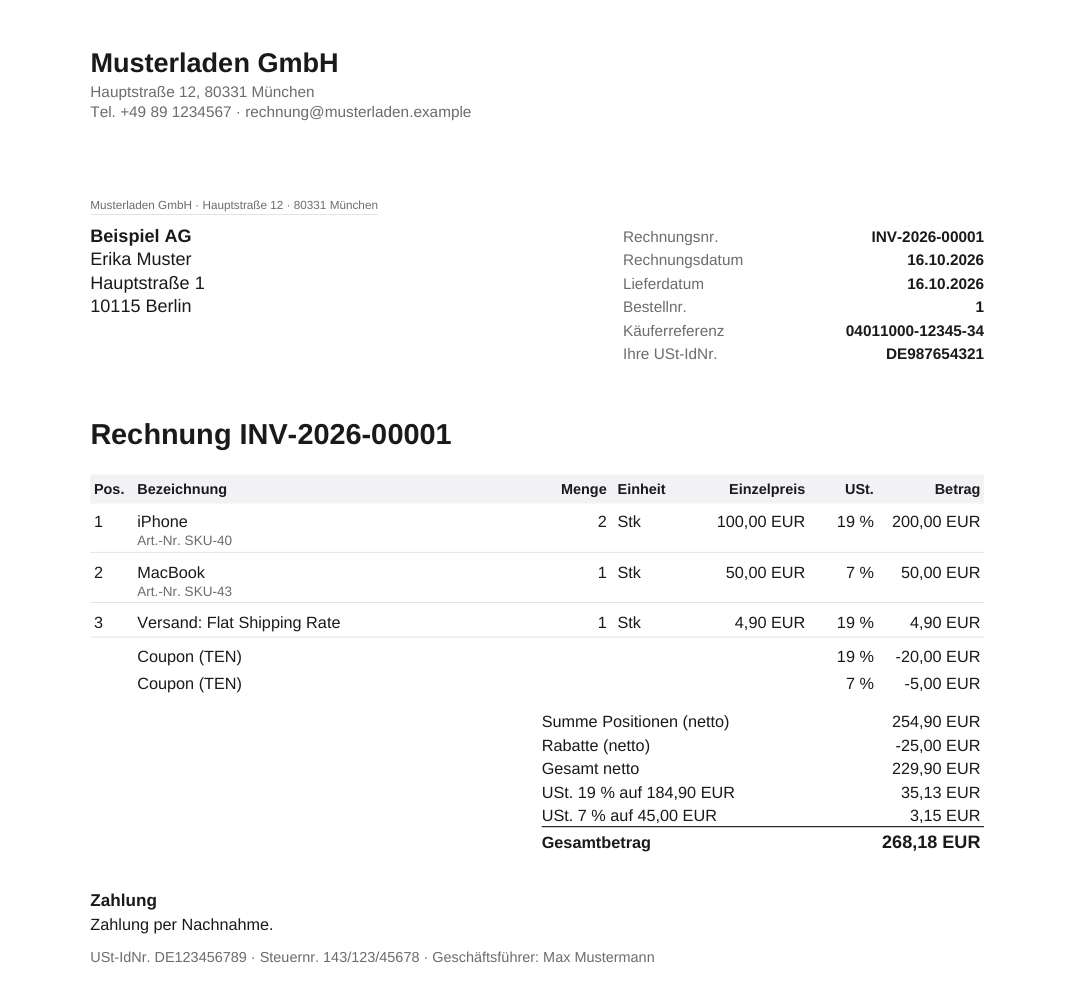
ZUGFeRD / Factur-X invoice from an OpenCart order, German
Invoice from the German test shop: PDF/A-3b in German, buyer VAT ID and Leitweg-ID, a 10 % coupon spread over the 19 % and 7 % groups, payment by cash on delivery. Inside the PDF — the CII XML under EN 16931.
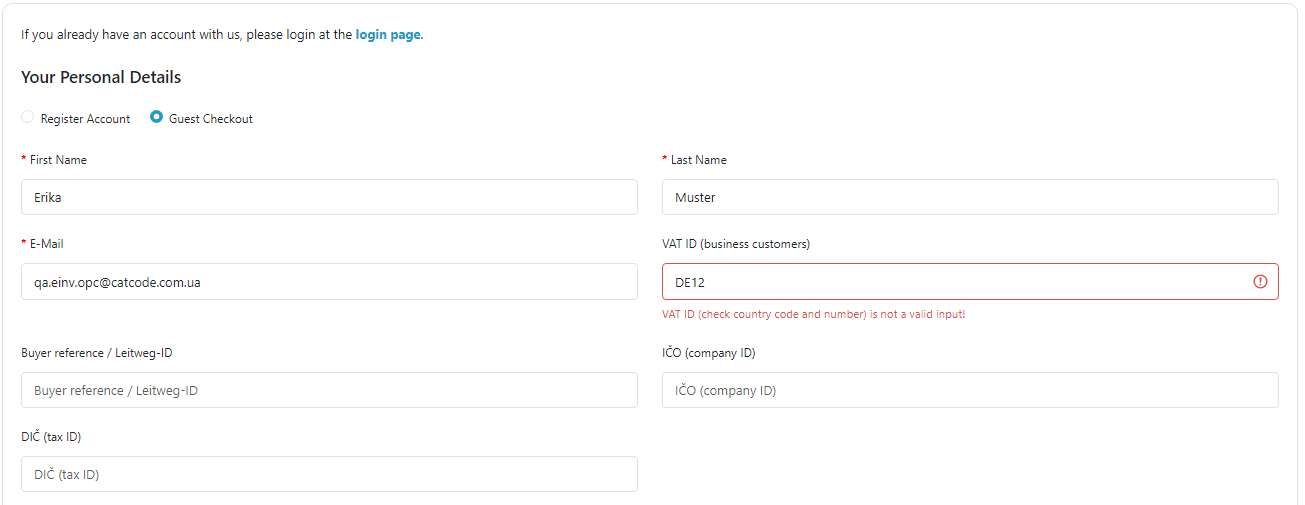
VAT ID, Leitweg-ID, IČO and DIČ fields on the OpenCart checkout with One Page Checkout
One Page Checkout (CatCode) on OpenCart 4.1 with the E-Invoice fields: a VAT ID with a wrong format is refused next to the field, the order goes through with a valid one.
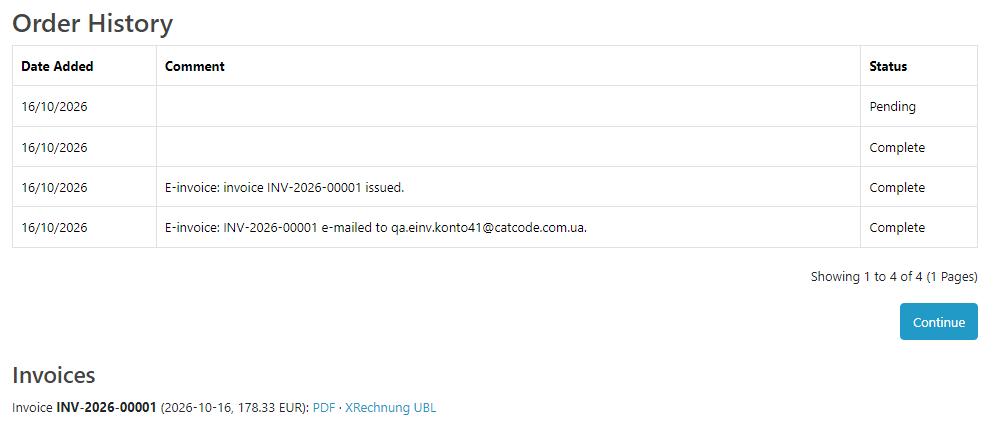
Invoices block in the OpenCart customer account
Pro: the customer opens the order in the account and downloads the invoice PDF and the XRechnung XML. Another customer or a visitor opening the same order gets nothing.

Key points

Slovak e-faktúra: Peppol BIS and the delivery service

From 1 January 2027 a Slovak VAT payer issues invoices for domestic supplies to Slovak businesses in a structured form under EN 16931 and hands them to a certified delivery service (§ 85o and § 76a of Act 222/2004 on VAT, as amended by Act 385/2025).

Belgium: Peppol BIS for B2B since 1 January 2026

Since 1 January 2026, Belgian VAT payers invoice each other only with structured electronic invoices — Peppol BIS Billing 3.0 over the Peppol network.

France: the e-invoicing reform 2026 / 2027

Since 1 September 2026 every French company must be able to receive e-invoices, and large and mid-sized companies (ETI) must also issue them; SMEs and micro-enterprises issue from 1 September 2027.

The trial starts when you ask

A fresh install is the free version, nothing switches on by itself. The “Try Pro for 7 days” button → e-mail → the key right in the window and by e-mail.

One key — one site

Moving the store? Unbind the licence on the old domain and activate it on the new one yourself. For studios — keys for 5 or 25 sites, or unlimited.

Technical requirements

  • OpenCart 4.0.2 – 4.1.x (tested on 4.1.0.3 and 4.0.2.3 with the pdo driver), 3.0.x (tested on 3.0.5.0) or 2.3.0.2 (tested on PHP 7.0)
  • PHP as required by your OpenCart version; cURL for VIES and the hand-over, GD for the logo (JPEG / PNG). No third-party libraries; fonts (Liberation Sans) are included.
  • OpenCart taxes set up in tax classes of products and shipping; the module reads the tax lines of the order.
  • Units: one invoice unit for all products and one for shipping, from the settings.
  • Checkout: default and One Page Checkout (CatCode). Third-party checkouts with their own field templates have not been tested.
  • Module languages: English, German, French, Slovak, Dutch.

Version history

v1.1.0 Current October 2026

Belgium: Peppol BIS Billing 3.0 for B2B with the enterprise number (KBO / BCE, scheme 0208) and a check-digit test at checkout, documents in Dutch.

v1.0.0 First release October 2026

For OpenCart 4.x, 3.x and 2.3: ZUGFeRD / Factur-X (PDF/A-3b, EN 16931), XRechnung 3.0 in CII and UBL, Peppol BIS Billing 3.0 for the Slovak e-faktúra; buyer VAT ID, Leitweg-ID, IČO and DIČ…

Frequently bought with E-Invoice EN 16931 for OpenCart

4 modules in one order — 40% cheaper than separately

“Store starter” bundle E-Invoice EN 16931 Nova Poshta Premium LiqPay Telegram notifications and Viber/SMS for customers Need more — all 173 modules in All Access for 4 990 ₴.
3 790 ₴ lifetime instead of 6 260 UAH bought separately
Buy the bundle →

Full module description

E-Invoice EN 16931 for OpenCart turns orders into electronic invoices under the European standard EN 16931: ZUGFeRD / Factur-X (a PDF/A-3 with the XML inside), XRechnung 3.0 in the CII and UBL syntaxes, and Peppol BIS Billing 3.0 for the Slovak e-faktúra, mandatory between Slovak businesses from 1 January 2027. One module for OpenCart 4, 3 and 2.3; everything is generated in your shop — no external service, no subscription, no order data handed to third parties.

Running WooCommerce? There is a separate plugin for it — E-Invoice EN 16931 for WooCommerce: ZUGFeRD / Factur-X and XRechnung 3.0 from WooCommerce orders.

Honestly about testing. The module went through full runs in clean shops on OpenCart 4.1.0.3, 4.0.2.3 (pdo driver), 3.0.5.0 and 2.3.0.2 on PHP 7.0, installed with the stock installer, with real checkouts in the storefront: all 76 XRechnung files (CII and UBL, invoices and credit notes) ACCEPTABLE in the official KoSIT 1.6.3 validator with the XRechnung 3.0.2 configuration, all 76 PDF and CII files valid in Mustang 2.26 (EN 16931 and veraPDF PDF/A-3b), all 12 Peppol BIS files without errors against the UBL 2.1 schema, the CEN EN 16931 rules and OpenPeppol BIS 3.0.20. The total of every document equals the order total, also with a coupon and in a second currency. We have not tested real portals and providers yet — ZRE / OZG-RE, Chorus Pro, Peppol access points, a certified Slovak delivery service: try it on your own shop in the 7-day Pro trial. The tax content of the invoice is the seller’s settings, not tax advice.

What the customer sees

  • Fields for business customers — VAT ID, buyer reference / Leitweg-ID and, for Slovakia, IČO and DIČ. They are ordinary OpenCart custom fields, created by the module with one button, so they work on the default checkout, in registration and in the account, and next to One Page Checkout.
  • A check right at the field: a VAT ID with a wrong format, a Slovak DIČ or IČO of the wrong length stop the order with the message next to the field. With Pro and VIES switched on, a number that VIES reports as not registered is refused too; an unreachable VIES never blocks an order.
  • The invoice by e-mail (Pro): the PDF with the XML inside, plus the XRechnung XML for orders with a Leitweg-ID and the Peppol XML for Slovak B2B.
  • Invoices in the account (Pro): on the order page of the customer account there is an “Invoices” block with the PDF and XML. Links are keyed per document: another customer or a visitor gets nothing.

What the admin gets

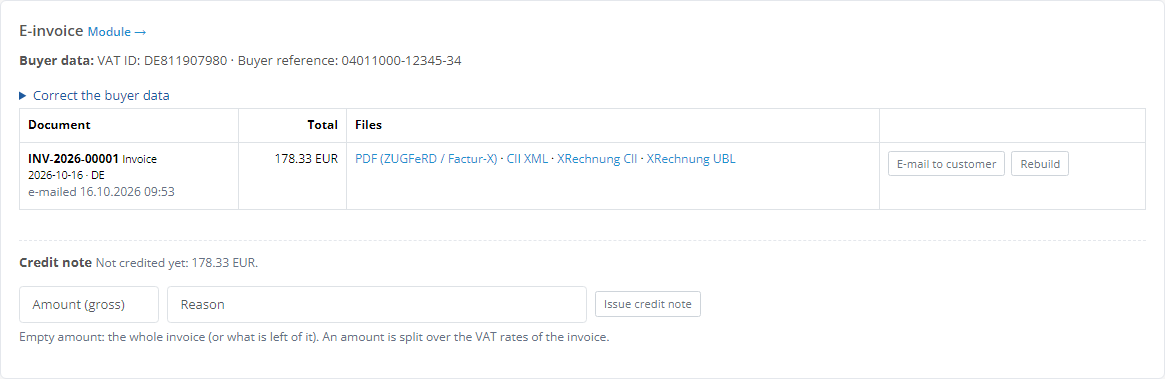
  • E-invoice panel on the order page: issue the invoice, preview the PDF, download the PDF, CII, XRechnung CII and UBL, Peppol BIS; see credit notes and correct the buyer data (VAT ID, buyer reference, IČO, DIČ).
  • Pre-flight check against a real order: the module builds the document with your settings and tells you what is missing, without using an invoice number.
  • VAT categories set automatically from the order: standard rate S, zero rate Z, reverse charge AE and intra-Community supply K for an EU business customer with a VAT ID, export G, services abroad and small business E — each with a reason text and VATEX code.
  • Totals exactly as in the order: products, shipping and fees with their tax per rate, coupons as allowances per VAT group, vouchers and store credit as a prepaid amount, the second currency of the order.
  • Gap-free numbering from a pattern like INV-{YYYY}-{N:5} under a lock, with yearly restart and a start number to continue from your previous tool; “Rebuild” re-creates a document under the same number.
  • Register of documents with filters and every file.

Slovak e-faktúra: Peppol BIS and the delivery service

From 1 January 2027 a Slovak VAT payer issues invoices for domestic supplies to Slovak businesses in a structured form under EN 16931 and hands them to a certified delivery service (§ 85o and § 76a of Act 222/2004 on VAT, as amended by Act 385/2025). The module covers the shop’s part:

  • for a Slovak seller and a Slovak business customer the invoice is issued also as Peppol BIS Billing 3.0 (UBL), with the DIČ of both sides as Peppol address 0245, groups 23 % / 5 % and the document in Slovak;
  • a DIČ or IČO of the wrong length is refused at checkout;
  • Pro sends the Peppol XML to your delivery service: by a button on the order page or automatically after the invoice is issued. The answer of the provider goes into the register and the order history; a failed hand-over is marked as failed and can be repeated.

Every provider has its own API. The module supports the common form — an HTTPS address that takes the UBL XML in the request body, with an API key in a header you name; the key is stored encrypted, plain http is refused, the provider’s certificate is verified. We tested it against our own HTTPS endpoint (key accepted, wrong key → HTTP 401 shown on the order), not yet against a real certified provider.

Belgium: Peppol BIS for B2B since 1 January 2026

Since 1 January 2026, Belgian VAT payers invoice each other only with structured electronic invoices — Peppol BIS Billing 3.0 over the Peppol network. The module covers the shop’s part:

  • for a Belgian seller and a Belgian business customer the invoice is also issued as Peppol BIS Billing 3.0 (UBL): the enterprise number (KBO / BCE, 10 digits) of both parties is the Peppol address and the legal entity identifier under scheme 0208, taken from the company number field or derived from the BE VAT ID;
  • the company number field at checkout checks the check digits (mod 97): a mistyped number is refused next to the field before the order is placed;
  • 21 % and 6 % as separate VAT groups; the document in Dutch or French, by the language of the order;
  • a Belgian consumer gets the usual PDF / Factur-X, no Peppol file;
  • Pro sends the Peppol XML to your access point from the order page or automatically after the invoice is issued; the answer goes into the register and the order history.

We tested the hand-over against our own HTTPS test endpoint, not yet against a real Belgian access point. Every provider has its own API; the module supports the common form — an HTTPS address that takes the UBL XML, with an API key in a header. Every Peppol file was checked with the official OpenPeppol rules (PEPPOL-EN16931-UBL 3.0.21) and the CEN EN 16931 rules.

France: the e-invoicing reform 2026 / 2027

Since 1 September 2026 every French company must be able to receive e-invoices, and large and mid-sized companies (ETI) must also issue them; SMEs and micro-enterprises issue from 1 September 2027. Invoices between companies go through a platform approved by the tax administration (plateforme agréée), sales to consumers are e-reported. The module produces the Factur-X with the data of the reform, ready to upload to your platform:

  • SIREN of the seller and the business customer (scheme 0002), SIRET as identifier (0009), electronic addresses under scheme 0225;
  • category of the operation (BT-23): goods, services or both, separately for invoices already paid; the B2B / B2C note;
  • the option for paying VAT on debits (services): BT-8 = 5 and the mandatory mention on every invoice;
  • the mandatory notes PMD (late payment penalties), PMT (fixed recovery fee of €40) and AAB (early payment discount), with ready texts you can change;
  • a SIREN / SIRET field at checkout: a number of the wrong length is refused next to the field. B2B or B2C is decided by the customer’s SIREN — from this field or from a French VAT ID;
  • a pre-check against the French BR-FR rules shows what is missing; only the currency blocks the invoice (next point);
  • French invoices are issued in euro only. For another currency rule BR-FR-CO-12 also wants the VAT total in euro — at the latest Banque de France rate (based on the ECB rate) known on the day the tax becomes chargeable (CGI, art. 266-1 bis). OpenCart’s rate is a different one (manual or taken at order time), so a true amount cannot be derived from it. The module therefore does not turn a French seller’s non-euro order into an invoice: the reason shows on the order page and, for automatic issuing, in the order history; no number is used. The module’s main screen warns when other currencies are enabled in the shop; credit notes for invoices already issued work as usual;
  • Pro: a CSV for the e-reporting of consumer sales — totals per day, currency, kind of operation and VAT rate, to enter into the platform. The official e-reporting flow itself is produced by the platform.

Every French invoice was checked with the official Factur-X / EN 16931 rules (Mustang, veraPDF) and the French BR-FR schematron (FNFE-MPE, version 1.4.0.04). The module has no direct connection to a particular platform.

Pro: automation, credit notes, customer account and a ZIP for the accountant

  • Automatic issuing when the order reaches the statuses you choose, with the e-mail to the customer.
  • Credit notes (type 381): a full one when the order gets Refunded / Reversed, and a partial one for any amount from the order page, split over the invoice’s VAT rates and referencing the invoice; an amount above the invoice is refused.
  • Invoices in the customer account with keyed links.
  • Hand-over to the Slovak delivery service, by button or automatic.
  • Hand-over of Belgian invoices to your Peppol access point, by button or automatic.
  • CSV for the French e-reporting — consumer sales per day, currency, kind of operation and VAT rate.
  • VIES check of the VAT ID at checkout, answers kept for a day.
  • Your logo on the PDF and a ZIP for the accountant per period: PDF, XML and a CSV list.

How it works — step by step

  1. Enter the seller details (name, address, VAT ID, tax number or register number, contact) and the payment details (IBAN, BIC, days until due).
  2. Create the buyer fields with one button each: VAT ID, buyer reference / Leitweg-ID, IČO, DIČ, company number (SIREN / SIRET, Belgian enterprise number).
  3. Run the pre-flight check on any order — the module shows whether the document will be valid and what to add.
  4. A business customer places an order and enters the VAT ID (a public-sector buyer — the Leitweg-ID, a Slovak company — IČO and DIČ).
  5. Click “Issue invoice” on the order page — or, with Pro, the invoice is issued by itself on the chosen status, e-mailed to the customer and, for Slovak B2B, handed to the delivery service.
  6. A refund → a credit note; at month end — a ZIP for the accountant.

Under the hood

  • Standards: EN 16931 (urn:cen.eu:en16931:2017), ZUGFeRD / Factur-X EN 16931 profile with XMP metadata and the embedded XML, XRechnung 3.0 in CII and UBL, Peppol BIS Billing 3.0 (CustomizationID urn:cen.eu:en16931:2017#compliant#urn:fdc:peppol.eu:2017:poacc:billing:3.0).
  • PDF/A-3b with an sRGB profile and embedded fonts — German, French and Slovak diacritics print correctly.
  • Totals by the EN 16931 rules: VAT per group base, the difference to OpenCart’s rounding closed with the rounding amount — the amount due equals the order total.
  • Numbers under a lock: two orders in the same second never get the same number; the pre-flight check uses none.
  • Small business without VAT ID: the tax number is written as seller identifier (BT-29), so BR-CO-26 is met.
  • OpenCart events and own tables (cc_einvoice_document, cc_einvoice_order, cc_einvoice_kv) — no core file edits. Uninstalling keeps the register (documents have to be retained by law); “Delete data on uninstall” removes the tables and the fields the module created.

Installation

  1. OpenCart 4: Extensions → Installer → upload cc_einvoice.ocmod.zip (do not rename the archive) and click “Install”. OpenCart 3: Extensions → Installer → cc_einvoice-oc3.ocmod.zip, then Modifications → Refresh. OpenCart 2.3: copy the contents of the upload/ folder of cc_einvoice-oc2.ocmod.zip to the shop root (FTP or the hosting file manager).
  2. Extensions → Modules → E-Invoice EN 16931 → “Install”, then “Edit”.
  3. Seller and payment details, number format; create the buyer fields.
  4. Pre-flight check on an order, then “Issue invoice” on a test order.
  5. For Pro: the “Licence” tab — the key from the e-mail after payment, or the 7-day trial; then the statuses for automatic issuing and, for Slovakia or Belgium, the address and key of the delivery service or the Peppol access point.
  6. Updating from 1.0.0 on OpenCart 4: OpenCart takes a new version only after the old one is uninstalled, and the uninstall deletes the module’s settings. Write the settings down first (seller, payment, number formats, VAT, Pro), then: Modules → E-Invoice EN 16931 → Uninstall → Installer → delete the old archive → upload the new one → Install → Modules → Install, and enter the settings again. The module links the buyer fields of 1.0.0 (VAT ID, reference, IČO, DIČ) by itself — do not create new ones; once it shows what to enter again and the last invoice and credit note numbers. Documents, numbering, customer data and the licence stay. Invoice links in e-mails already sent stop working; the customer account shows new ones. From 1.1.0 the module keeps a copy of its settings and puts them back by itself. On OpenCart 3.x and 2.3 the new archive simply goes over the old one and the settings stay.

Questions
about the module

Didn't find the answer? Message us on Telegram and we'll reply within a business day.

@catcode_support Setup, compatibility, activation
Do I need an external service or an e-invoicing subscription?

No. PDF and XML are created inside your OpenCart; order data is not sent anywhere. Only two Pro features talk to the outside: the VIES check (the European Commission's public service) and the hand-over to the Slovak delivery service or a Belgian Peppol access point you configure yourself.

Will portals and accounting software accept my invoices?

Every document from our test runs on OpenCart 4.1, 4.0.2, 3.0 and 2.3 passed the official validators: KoSIT 1.6.3 with the XRechnung 3.0.2 configuration, Mustang 2.26 (EN 16931 + veraPDF PDF/A-3b), and the CEN EN 16931 and OpenPeppol BIS 3.0.20 rules for Peppol files. We have not tested real portals yet (ZRE / OZG-RE, Chorus Pro, Peppol access points) — try it on your shop in the 7-day Pro trial, and if something is rejected, we fix it quickly.

Slovakia: what does the module do for the e-faktúra from 2027?

For a Slovak seller and a Slovak business customer (IČ DPH, IČO or DIČ) the module issues the invoice also as Peppol BIS Billing 3.0 with both DIČ as Peppol addresses (0245). Pro hands that XML to the delivery service you have a contract with — any provider that takes the UBL XML over HTTPS with an API key in a header. We have tested the hand-over against our own HTTPS test endpoint, not against a real certified provider yet.

Belgium: what does the module do for Peppol from 2026?

For a Belgian seller and a Belgian business customer the module also issues the invoice as Peppol BIS Billing 3.0 with the enterprise number (KBO / BCE) of both parties as Peppol address 0208; a number with wrong check digits is refused at checkout. Pro sends the XML to your Peppol access point — any that takes UBL XML over HTTPS with an API key in a header. We tested the hand-over against our own test endpoint, not yet against a real Belgian access point.

France: can I invoice in another currency than euro?

No. For a French invoice in another currency the BR-FR rules want the VAT total in euro at the Banque de France rate of the day the tax becomes chargeable (CGI, art. 266-1 bis), and OpenCart's rate does not give that. So the module issues French invoices only for orders in euro; for another currency it shows the reason on the order page and uses no number.

Who is responsible for the tax content of the invoice?

The seller. VAT categories and exemption texts come with sensible defaults, but they are settings, not tax advice. Exempt supplies and simplified invoices are not excluded from the Slovak B2B flow automatically — check unusual cases with your tax adviser.

A logged-in customer does not see the VAT ID field at checkout.

OpenCart shows account fields of a logged-in customer in the account, not at checkout. The customer adds the number in the account, or you enter it on the order page with "Correct the buyer data" before issuing the invoice.

Is the licence really lifetime?

Yes. For OpenCart the licence is a one-time payment with no yearly fees, and the Pro features stay in your shop for good.

What stays free?

Issuing every format with a button on the order page, the checkout fields with the check, VAT categories, numbering and the pre-flight check — with no time limit.

Not quite what you are looking for?

We build custom modules for WordPress, WooCommerce, OpenCart and Shopify. Tell us about the task and we'll prepare an estimate.

Order a custom module