Get in touch
  • WordPress
  • Payments
  • v1.0.0

E-Invoice EN 16931 for WooCommerce — ZUGFeRD, Factur-X and XRechnung from your orders

EN 16931 e-invoices straight from WooCommerce orders: ZUGFeRD / Factur-X (PDF/A-3 with embedded XML) and XRechnung 3.0 in CII and UBL. Buyer VAT ID and Leitweg-ID at checkout, VAT categories with exemption reasons, gap-free numbering. Everything is created in your shop, no external service. Pro — automatic issuing with e-mails, credit notes from refunds, invoices in the customer account and a ZIP for your accountant.

Download Free
Pro · one-year licence The more sites, the less each one costs
Compatibility
WooCommerce 8.0+ · WordPress 6.2+ · PHP 7.4+ · HPOS · classic and block checkout · ZUGFeRD 2.5 / Factur-X 1.09 (EN 16931) · XRechnung 3.0
Licence
one site, annual
Trial
7 days, no card, one per site
Updated
September 2026
Or all 144 Pro modules with All Access — 4 990 ₴ / year

What Free has,
and what Pro adds

The free version works with no time limit. Pro adds the rest of the features in the table.

Feature Free Pro
ZUGFeRD / Factur-X: PDF/A-3b with embedded factur-x.xml, EN 16931 profile ✔ ✔
XRechnung 3.0 in both syntaxes — CII and UBL ✔ ✔
Issue an invoice with one button in the order: PDF, XML and XRechnung download from the order screen ✔ ✔
Buyer VAT ID (USt-IdNr.) and Leitweg-ID (buyer reference) on the classic and block checkout, with a format check ✔ ✔
VAT categories S / Z / E / AE / K / G / O set automatically: reverse charge for EU B2B, export, §19 UStG — with the reason text and VATEX code ✔ ✔
UN/ECE units per product, UNTDID 4461 payment means and "pays after the invoice" per payment method ✔ ✔
Gap-free numbering from your own pattern (RE-{YYYY}-{N:5}), a separate counter for credit notes ✔ ✔
Invoice language: German for DE/AT/CH/LI/LU, English for everyone else, or one for all ✔ ✔
Settings check against a real order and an unnumbered sample PDF ✔ ✔
Plugin languages: English, Deutsch ✔ ✔
Automatic issuing by order status and the PDF in WooCommerce e-mails, XRechnung XML for orders with a Leitweg-ID — ✔
Credit notes (type 381) from refunds: line refunds and amount-only refunds, referencing the invoice — ✔
Invoices and credit notes in the customer's My account — ✔
ZIP for your accountant per period: PDF + XRechnung + CSV — ✔
VIES check of the VAT ID right at checkout — ✔
Shop logo on the PDF — ✔

What it looks like

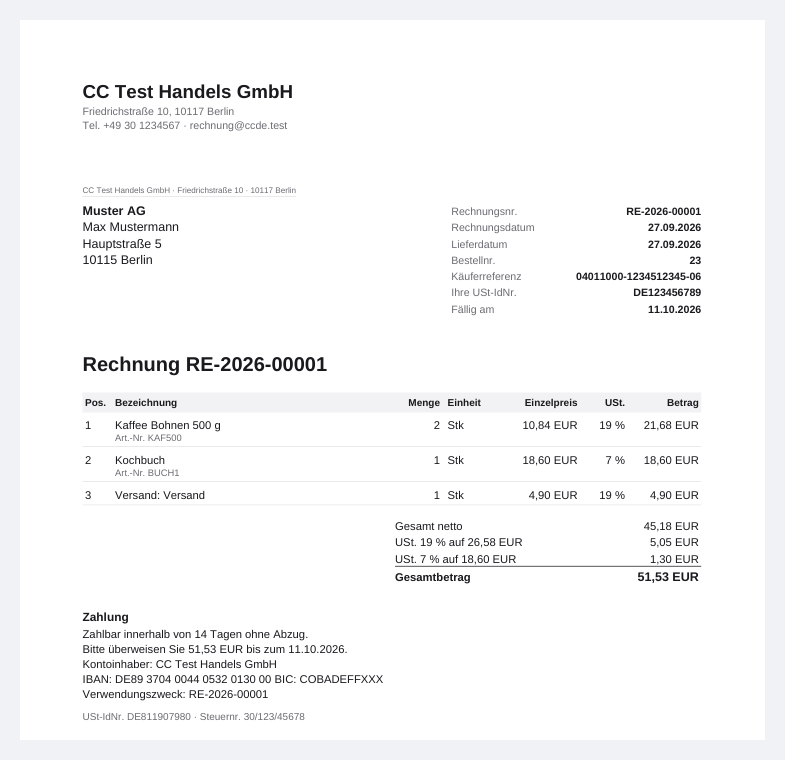
ZUGFeRD / Factur-X invoice from a WooCommerce order
Invoice RE-2026-00001 from the test shop: PDF/A-3b in German, Käuferreferenz (Leitweg-ID), buyer VAT ID, 19 % and 7 % VAT groups, payment terms with IBAN. Inside the PDF — factur-x.xml under EN 16931.
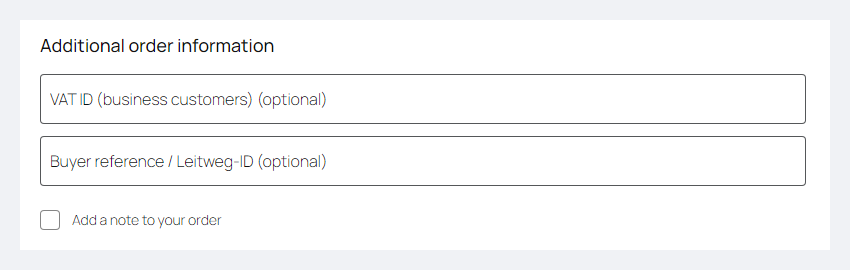
VAT ID and Leitweg-ID fields on the WooCommerce block checkout
Block checkout: a VAT number field for business customers and Buyer reference / Leitweg-ID for public-sector buyers. An invalid number format stops the order with a hint.
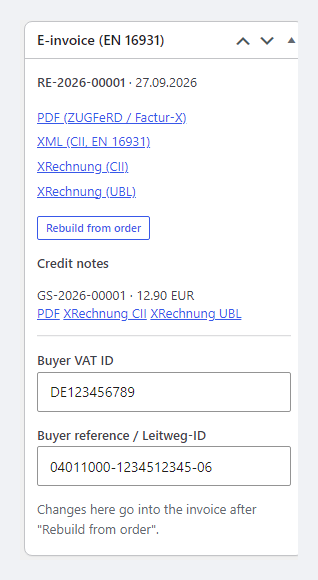
E-invoice box in the order: PDF, XML, XRechnung CII and UBL, credit notes
E-invoice box in the order: invoice number and date, PDF, XML (CII), XRechnung in CII and UBL, credit note GS-2026-00001, buyer VAT ID and Leitweg-ID.

The trial starts when you ask

A fresh install is the free version, nothing switches on by itself. The “Try Pro for 7 days” button → e-mail → the key right in the window and by e-mail.

One key — one site

Moving the store? Unbind the licence on the old domain and activate it on the new one yourself. If our server is unreachable, Pro keeps working for 14 more days. For studios — keys for 5 or 25 sites, or unlimited.

Technical requirements

  • WooCommerce 8.0+ with the classic or block checkout, compatible with HPOS and the legacy order storage
  • WordPress 6.2+ · PHP 7.4+ (the full run was on PHP 8.3)
  • Currency: one shop currency; the multi-currency fields BT-6 / BT-111 are not written
  • Plugin languages: English and German (formal “Sie”).

Version history

v1.0.0 Current September 2026

ZUGFeRD / Factur-X (PDF/A-3b, EN 16931) and XRechnung 3.0 in CII and UBL; VAT ID and Leitweg-ID on the classic and block checkout; VAT categories with exemption reasons and VATEX; UN/ECE…

Frequently bought with E-Invoice EN 16931 for WooCommerce

4 modules in one order — 40% cheaper than separately

“Store starter” bundle E-Invoice EN 16931 Nova Poshta Premium LiqPay Telegram notifications and Viber/SMS for customers Need more — all 144 modules in All Access for 4 990 ₴.
3 590 ₴ / year instead of 5 960 UAH bought separately
Buy the bundle →

Full module description

E-Invoice EN 16931 for WooCommerce turns every order into an electronic invoice under the European standard EN 16931: ZUGFeRD / Factur-X (a PDF/A-3 with the XML embedded) and XRechnung 3.0 in the CII and UBL syntaxes — formats that both people (PDF) and software (XML) can read. The plugin does it inside WooCommerce — no external service, no subscription, and no order data handed to third parties.

Honestly about testing. The plugin went through a full run on WordPress 7.1 and WooCommerce 11.1 (classic and block checkout, HPOS on and off, real e-mail delivery): 25 of 25 XML files ACCEPTABLE in the official KoSIT 1.6.3 validator with the XRechnung 3.0.2 configuration, every PDF and factur-x.xml valid in Mustang 2.26 (EN 16931 and veraPDF PDF/A-3b), and the total of every document equals the order total. We have not tested real portals and software yet — ZRE / OZG-RE, Peppol, DATEV, lexoffice: try it on your own shop in the 7-day Pro trial. The tax content of the invoice (categories, exemption texts) is the seller’s settings, not tax advice.

What the customer sees

  • A VAT number field (USt-IdNr.) for business customers — on the classic and block checkout. The number is normalised (“de 123 456 789” → DE123456789), and a clearly wrong format stops the order with a hint.
  • Buyer reference / Leitweg-ID — an optional field for public-sector buyers; it goes into the invoice as BT-10, which XRechnung portals require.
  • The invoice by e-mail (Pro): the PDF with embedded XML comes with WooCommerce’s order-completed e-mail, plus the XRechnung XML for orders with a Leitweg-ID.
  • Invoices in My account (Pro): customers download their invoices and credit notes themselves, without writing to the shop.

What the admin gets

  • E-invoice box in the order: issue the invoice, download the PDF, XML (CII), XRechnung CII or UBL, see credit notes and correct the buyer’s VAT ID or Leitweg-ID.
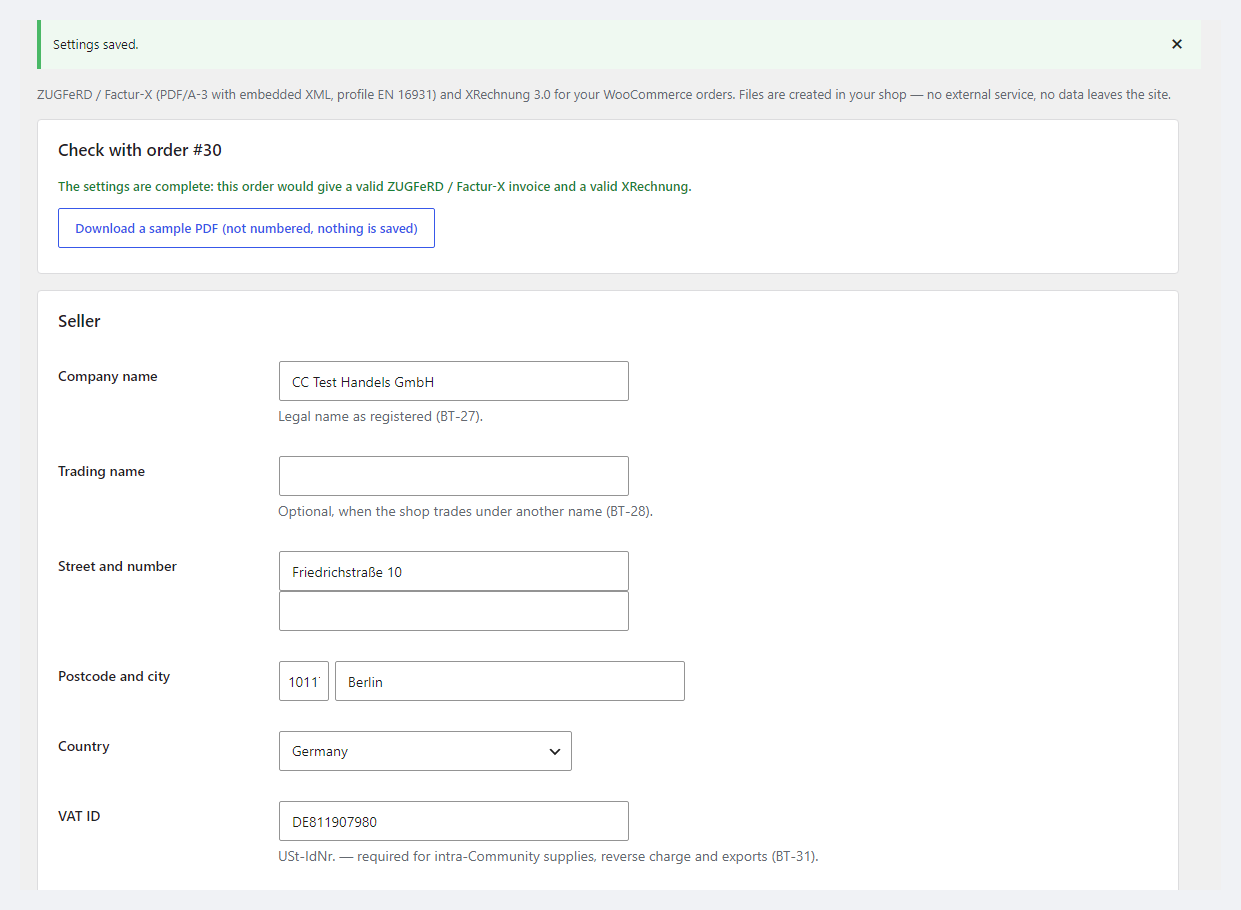
  • Settings check against a real order: the plugin builds an invoice with your details and tells you what is missing for a valid ZUGFeRD and XRechnung, before the first real invoice. There is also an unnumbered sample PDF.
  • VAT categories set automatically: standard rate S, reverse charge K / AE for a B2B customer from another EU country with a VAT ID, export G, small business under §19 UStG — E; each with a reason text and VATEX code. A product can have its own category set by hand.
  • Gap-free numbering from a pattern like RE-{YYYY}-{N:5}, restarting every year and continuing from the last number of your previous tool. A number is never “lost” when the plugin is deleted and reinstalled.
  • Payment: IBAN / BIC, days until due, terms text; the UNTDID 4461 payment means and a “Customer pays after the invoice” switch for every WooCommerce payment method.

Pro: automatic issuing, credit notes, customer account and a ZIP for the accountant

  • Automatic issuing when the order reaches the chosen status, with the PDF in WooCommerce e-mails to the customer.
  • Credit notes (Gutschrift, type 381) from refunds — line refunds and amount-only refunds, with their own numbering (GS-…) and a reference to the invoice. An amount-only refund is split over the invoice’s VAT groups proportionally — the credit note total is exact.
  • ZIP for your accountant per period: all PDFs, XRechnung files and a CSV list (UTF-8 with BOM, opens in Excel with umlauts intact).
  • VIES check of the VAT ID at checkout and your shop logo on the PDF.

Works together with our other modules for Germany and the EU

E-Invoice EN 16931 was built alongside three other modules of ours, and they have been tested together in one shop:

  • EU VAT Check for WooCommerce checks the buyer’s VAT number in VIES and removes VAT under reverse charge — E-Invoice takes the verified number and sets categories K / AE. There is one VAT number field at checkout.
  • DATEV Export for WooCommerce exports the postings for your tax adviser with the E-Invoice invoice number in the document field.
  • Unit Price Grundpreis for WooCommerce shows the price per 1 kg / 1 l in the shop; invoices with such products pass the validators with unchanged line items.

How it works — step by step

  1. Fill in the seller details (name, address, VAT ID or Steuernummer, contact) and payment details.
  2. In “Check with order” pick any order — the plugin shows whether the invoice will be valid and what to add.
  3. The customer places the order; a business customer enters a VAT ID, a public-sector buyer a Leitweg-ID.
  4. You click “Issue invoice” in the order (with Pro the invoice is issued by itself at the chosen status and sent by e-mail).
  5. A refund in WooCommerce → with Pro, a credit note referencing the invoice right away.
  6. At month end — a ZIP with every invoice for your accountant, or an export with DATEV Export.

Under the hood

  • Standards: EN 16931 (urn:cen.eu:en16931:2017), ZUGFeRD 2.5 / Factur-X 1.09 with XMP metadata and the factur-x.xml attachment (AFRelationship Alternative), XRechnung 3.0 (CustomizationID xrechnung_3.0) in CII and UBL.
  • PDF/A-3b with an sRGB profile and embedded Liberation Sans fonts (OFL); characters outside the font print as “?” in the PDF and stay correct in the XML.
  • Totals by the EN 16931 rules: VAT is calculated on the group base (BR-CO-17), and the difference to WooCommerce’s per-line rounding is closed with RoundingAmount — the amount due always equals the order total.
  • File access is checked: customers download only their own documents; guests and other customers get 403.
  • Numbering in separate counters that are kept on uninstall, as is the invoice metadata in orders — documents have to be retained by law.

Installation

  1. Plugins → Add New → Upload Plugin: choose catcode-e-invoice-en-16931-for-woocommerce-1.0.0.zip and activate.
  2. WooCommerce → E-Invoice: seller details, payment details, numbering, VAT categories.
  3. “Check with order” — pick an order and make sure the invoice will be valid.
  4. For Pro: paste the licence key from the e-mail after payment or start the 7-day trial, then choose the status for automatic issuing.

Questions
about the module

Didn't find the answer? Message us on Telegram and we'll reply within a business day.

@catcode_support Setup, compatibility, activation
Do I need an external service or an e-invoicing subscription?

No. PDF and XML are created inside your WordPress; order data is not sent anywhere. Only the Pro VAT ID check calls the European Commission's VIES.

Will portals and accounting software accept my invoices?

Every invoice and credit note from our test run passed the official validators: KoSIT 1.6.3 with the XRechnung 3.0.2 configuration and Mustang 2.26 (EN 16931 + veraPDF PDF/A-3b). We have not tested real portals yet (ZRE / OZG-RE, Peppol, DATEV, lexoffice) — try it on your own shop in the 7-day Pro trial, and if something is rejected, we will fix it quickly.

Who is responsible for the tax content of the invoice?

The seller. VAT categories and exemption texts come with sensible defaults, but they are settings, not tax advice. For unusual cases (services outside the EU, §19 UStG, complex B2B chains) check with your tax adviser.

An invoice for pay-by-invoice says "paid". Why?

WooCommerce sets a paid date when the order becomes Completed. For methods where the customer pays after the invoice (bank transfer, cash on delivery, cheque) switch on "Customer pays after the invoice" — the invoice then comes out unpaid, with a due date.

Does it work together with EU VAT Check?

Yes. There is one VAT number field at checkout, the invoice uses the already verified number, and reverse charge gives categories K / AE with the exemption reason.

What stays free?

Issuing ZUGFeRD / Factur-X and XRechnung with a button, the checkout fields, VAT categories, numbering and the settings check — with no time limit.

Not quite what you are looking for?

We build custom modules for WordPress, WooCommerce, OpenCart and Shopify. Tell us about the task and we'll prepare an estimate.

Order a custom module