
OpenCart
Deposit Return Fee for OpenCart — container deposit (kaucja, SGR, Pfand) as a separate order line
Free + Pro
1 290 UAH
v1.0.0
 All Access4 990 ₴ / year
 Website auditA PDF report by email in 3 minutesCheck a website
Everyday tasks
Image compressorSize, quality and WebP in bulkQR generatorLink, Wi-Fi, payment to IBANVAT calculator20, 14, 7% and amount in wordsTransliterationOfficial Ukrainian standardWebsite checks
PHP and pluginsPHP version, WordPress, pluginsGoogle Merchant feedFields, prices, GTIN, imagesDomain emailSPF, DKIM, DMARC, blacklistsAI search readinessllms.txt, bots, markupAll 9 toolsEnter at least 2 characters

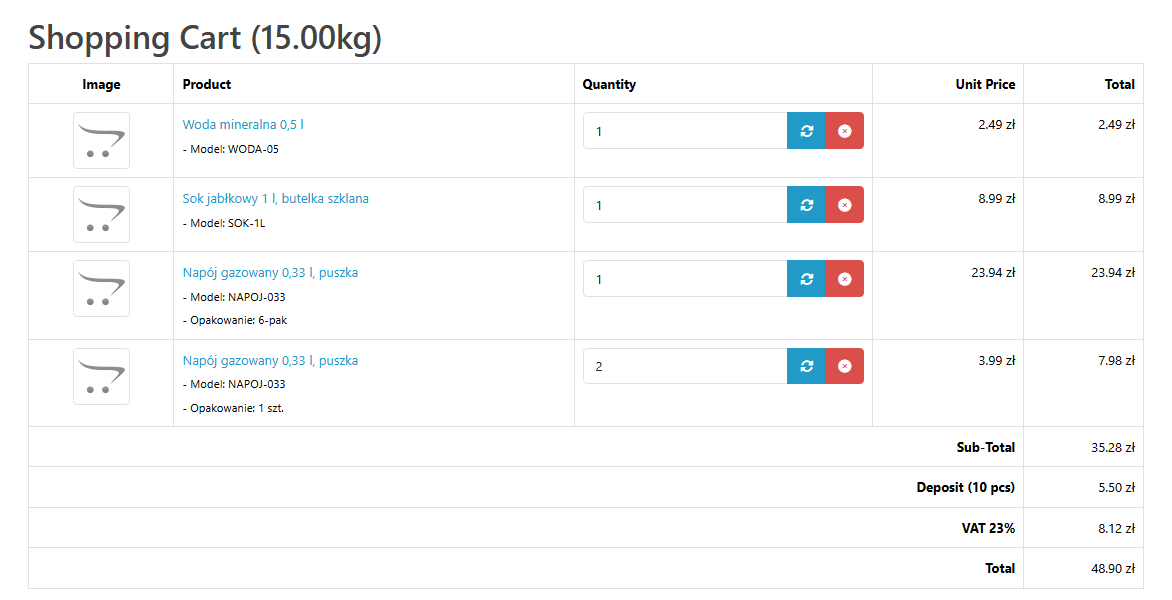
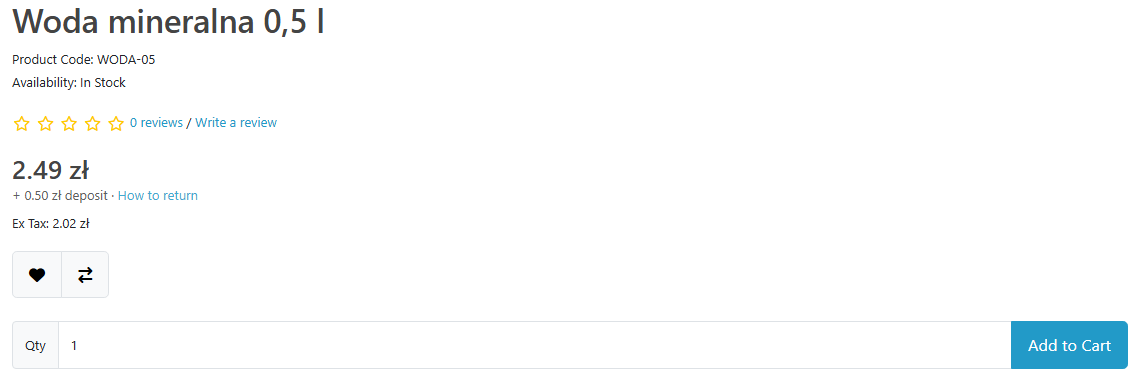
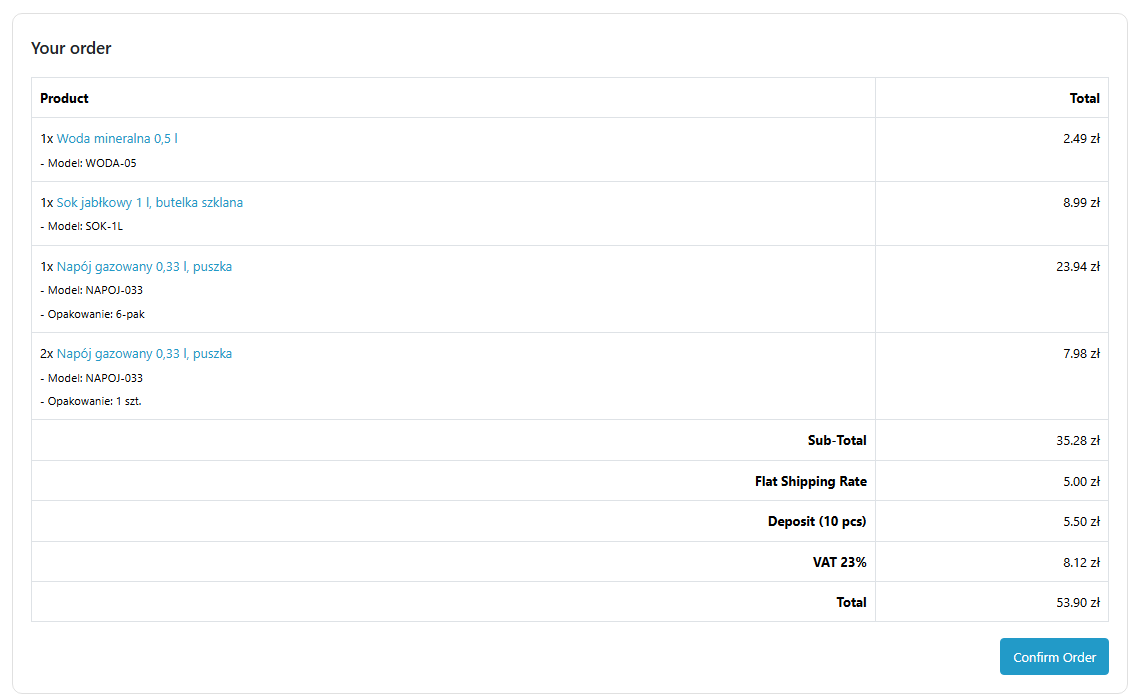
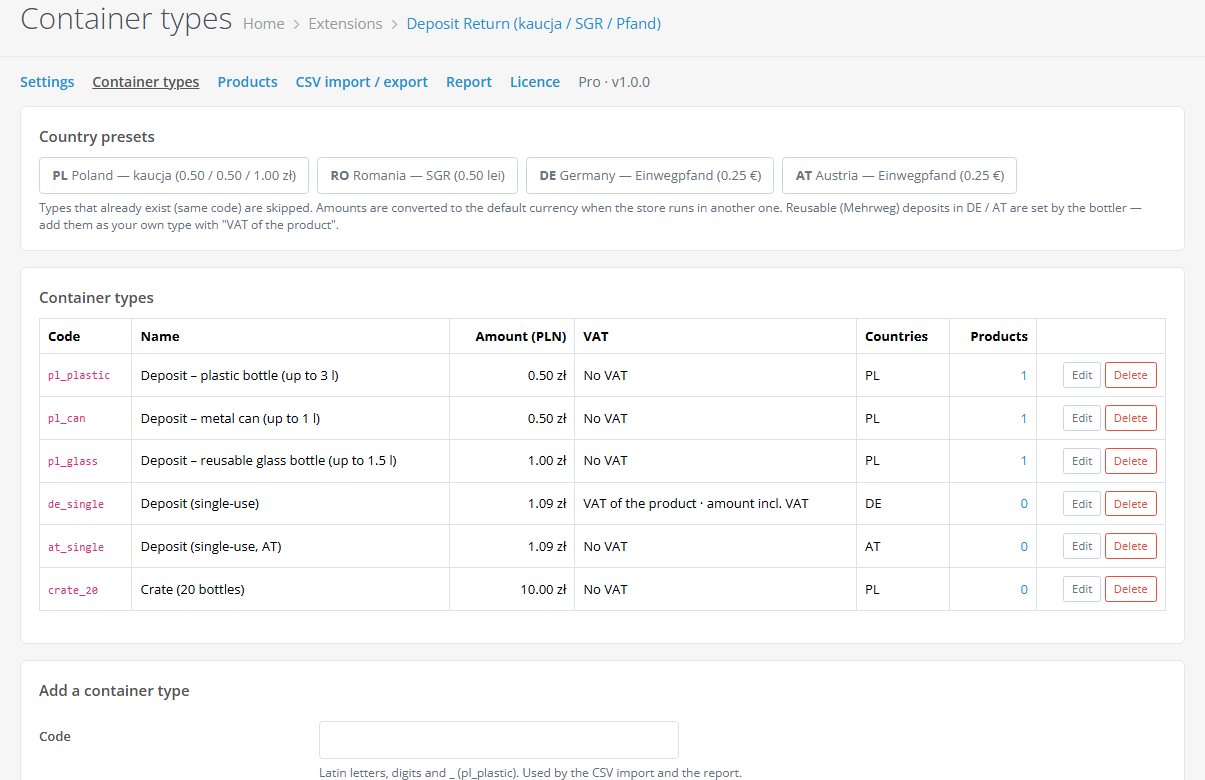
Deposit for bottles and cans as a separate line in the cart, checkout, order, e-mail and invoice of OpenCart 4, 3 and 2.3: Polish kaucja, Romanian SGR, German and Austrian Pfand. Container types with ready rates for PL / RO / DE / AT, VAT by the country rule, deposit per product in a product form tab, bulk assignment by filter, a "+ 0.50 zł deposit" note under the price. Pro — several lines per product, deposit by option (single / 6-pack / crate), one line per type, customer groups without deposit, CSV and a report. Lifetime licence.
The free version works with no time limit. Pro adds the rest of the features in the table.



A fresh install is the free version, nothing switches on by itself. The “Try Pro for 7 days” button → e-mail → the key right in the window and by e-mail.

Moving the store? Unbind the licence on the old domain and activate it on the new one yourself. For studios — keys for 5 or 25 sites, or unlimited.
 OpenCart 4.0.2 – 4.1.x (tested on 4.1.0.3 and 4.0.2.3 with the pdo driver), 3.0.x (tested on 3.0.5.0) or 2.3.0.2 (tested on PHP 7.0).PHP — as your OpenCart version requires, from 7.0; no third-party libraries.OpenCart taxes: for “VAT of the product” types the products need a tax class — the module takes the rate from it by the customer address.Checkout: the default one (OpenCart 4 — one page, 3.x and 2.3 — step by step) and One Page Checkout (CatCode). Third-party checkouts that build totals themselves have not been tested.Module languages: English, Polish, Romanian, German.
For OpenCart 4.x, 3.x and 2.3: container deposit as a separate order line; container types with presets for Poland, Romania, Germany and Austria and VAT by the country rule; “Deposit” tab…
4 modules in one order — 40% cheaper than separately



Deposit Return Fee for OpenCart adds the drink container deposit as a separate order line: the Polish kaucja (system kaucyjny), the Romanian SGR (garanție 0.50 lei), the German and Austrian Pfand. The “Deposit (N pcs)” line shows in the cart, at checkout, in the order, e-mail, invoice and customer account, and its VAT follows the country rule. One module for OpenCart 4, 3 and 2.3, no core edits.
Honestly about testing. The module went through full runs in clean stores on OpenCart 4.1.0.3, 4.0.2.3 (pdo driver), 3.0.5.0 and 2.3.0.2 on PHP 7.0: installation with the standard installer, real storefront checkouts with the order lines checked in the database — with a coupon, in a second currency, with options, with delivery to another country, with an order by a registered customer and a group without deposit, the order e-mail through a test mail server. The amount to pay equalled the sum of the lines every time. Third-party themes (Journal and others) and multi-store have not been checked yet — try it on your store with the 7-day Pro trial. Rates and VAT in the presets are starting values that the shop checks itself; this is not tax advice.
Running WooCommerce? There is a separate Deposit Return Fee for WooCommerce plugin: the deposit as separate lines in the classic and block cart, order, e-mails and invoices, with the same sets for Poland, Romania, Germany and Austria.
cc_deposit), so it is on the order page, the printable invoice and in e-mails with no extra setup.Rates and VAT here are presets, not tax advice. They are starting values from sources as of October 2026. The shop checks them itself (together with its accountant and the deposit system operator) and changes the rate, VAT and countries of each type when needed. The module shows the same reminder in the admin next to the presets.
cc_deposit_type, cc_deposit_product, cc_deposit_option, cc_deposit_order) — no core file edits and no OCMOD.cc_deposit.ocmod.zip (do not rename the archive) and click “Install”. OpenCart 3: Extensions → Installer → cc_deposit-oc3.ocmod.zip. OpenCart 2.3: copy the contents of the upload/ folder from cc_deposit-oc2.ocmod.zip to the store root (FTP or the hosting file manager).Didn't find the answer? Message us on Telegram and we'll reply within a business day.
 @catcode_support
Setup, compatibility, activation
@catcode_support
Setup, compatibility, activation
No. The deposit is a separate order line, and the OpenCart coupon takes its discount from the products only. We checked this with a real order and a 10 % coupon: the discount came from the products only, the deposit in the order was in full, and the amount to pay equalled the sum of the lines.
The way you set the container type. Poland, Romania and Austria — no VAT (that is what the presets use). Germany — 0.25 € already including VAT at the rate of the drink: at 19 % the order gets 0.2101 net and 0.0399 VAT in the tax line. You can also choose a fixed tax class. The presets are starting values from sources as of October 2026 that the shop checks itself, not tax advice: your accountant has the final word.
Type amounts are stored in the default store currency, and the customer sees the deposit in the selected currency, just like prices. The order stores the deposit in the store currency, while the e-mail and the admin show it in the order currency. Checked with an order: store in PLN, customer in EUR.
In Pro the deposit can be set on an option value: "6-pack" — 6 cans, "crate" — 20 bottles + the crate itself. For the selected value the deposit replaces the product lines, other values use the product deposit. Checked in a real order with two different options of the same product.
Every container type has a list of countries. The Polish deposit is charged only for delivery to Poland (or by the payment address — your choice). An order shipped to Germany did not get the Polish deposit — we checked it.
Yes, Pro has "Customer groups without deposit". A customer in such a group sees no deposit in the cart or under the price, and their order has no deposit line. Regular customers keep paying the deposit at the same time.
The deposit keeps being charged exactly as set up, including the lines and options saved during the trial: it is a legal charge, and the shop must not suddenly stop collecting it. Only editing the Pro settings pauses. The OpenCart licence is bought once and is valid forever.
No. It is a standard Order Total extension plus OpenCart events, without core patches or OCMOD modifications. Uninstalling keeps your types and assignments (in case you reinstall); with the "Delete data on uninstall" option the module tables are removed too.
No reviews yet. Be the first.
No questions yet. Ask one — we answer within 24 hours.
We build custom modules for WordPress, WooCommerce, OpenCart and Shopify. Tell us about the task and we'll prepare an estimate.
Order a custom module
—

CatCode assistant
Just now


CatCode assistant
Online

I’ll help with your website task
Describe your website task — I’ll find a ready-made module or pass it to a developer for an estimate. Modules, custom features, layout, integrations, speed, migration, technical SEO.
