Get in touch
  • WordPress
  • Sales and conversion
  • v1.0.0

Unit Price Grundpreis for WooCommerce — price per 1 kg, 1 l, 1 m² next to the price

Grundpreis for WooCommerce: the plugin works out the unit price from the package contents (Füllmenge) — per 1 kg, 1 l, 1 m, 1 m² or 1 m³ as the German PAngV sets it — and shows it next to the price on product pages, in listings, for the selected variation, in the cart and at checkout. Pro — unit price in orders and e-mails, JSON-LD for Google, net content filled in from product names and a catalogue check.

Download Free
Pro · one-year licence The more sites, the less each one costs
Compatibility
WooCommerce 7.0+ · WordPress 6.2+ · PHP 7.4+ · HPOS · classic and block cart and checkout, Mini-Cart block
Licence
one site, annual
Trial
7 days, no card, one per site
Updated
September 2026
Or all 144 Pro modules with All Access — 4 990 ₴ / year

What Free has,
and what Pro adds

The free version works with no time limit. Pro adds the rest of the features in the table.

Feature Free Pro
Net content (Füllmenge) and unit for simple products and for every variation; variations inherit the product's value ✔ ✔
Grundpreis worked out automatically from the displayed price: with VAT as the shop shows prices, with the sale price ✔ ✔
Reference quantity by PAngV: 1 kg, 1 l, 1 m, 1 m², 1 m³; 100 g / 100 ml only for loose goods; your own quantity for bulk goods ✔ ✔
Drained weight (Abtropfgewicht) and price per application, e.g. per wash load ✔ ✔
Products under 10 g / 10 ml get no unit price automatically; per-product switch; "hide when equal to the price" ✔ ✔
Shown on the product page, selected variation, product lists and blocks, classic and block cart, Mini-Cart, checkout ✔ ✔
Range for variable products ("from"), your own text template, position, shortcode [ccupg_unit_price] ✔ ✔
Preview of the unit price right in the product editor ✔ ✔
Plugin languages: English, Deutsch ✔ ✔
Unit price in order lines, WooCommerce e-mails and the admin — ✔
JSON-LD referenceQuantity for Google (unit pricing) — ✔
Net content detected from the name or an attribute: preview, bulk fill in the background, on save — ✔
Catalogue check: products without net content by category + CSV — ✔
Unit price columns in the WooCommerce product CSV import and export — ✔

What it looks like

Unit price on a WooCommerce product page: 27.80 € per 1 kg
Product page: Kaffee Bohnen 500 g at 13.90 € — under the price “Unit price: 27.80 € / 1 kg”. Change the price in the admin and the unit price follows by itself.
Unit price of the selected variation and the range for a variable product
A variable product with the same price and different pack sizes: range 20.00–40.00 € / 1 kg, and the selected 100 g variation shows its own 40.00 € / 1 kg.
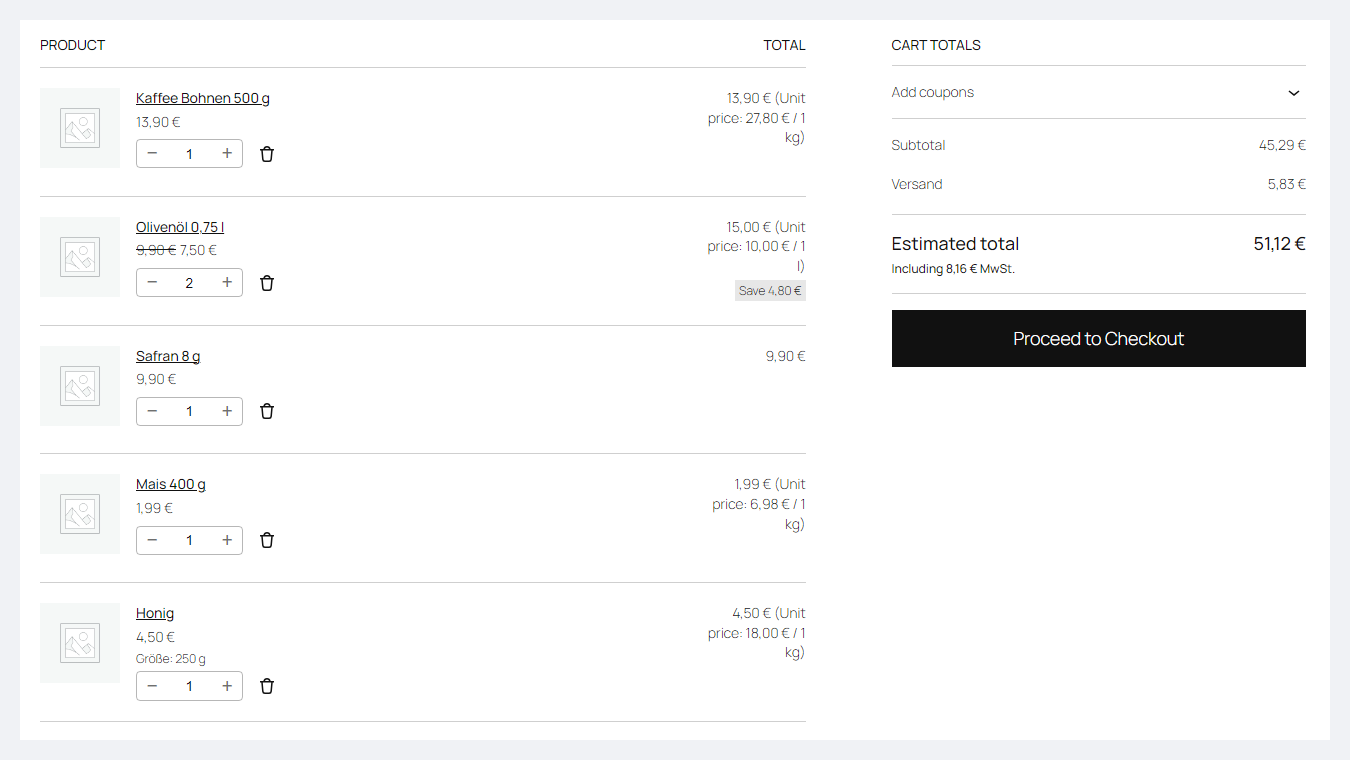
Unit price in the WooCommerce block cart
Block cart: next to each line — the price per 1 kg or 1 l, including the discounted oil; saffron 8 g has no line — under 10 g no unit price is needed.

The trial starts when you ask

A fresh install is the free version, nothing switches on by itself. The “Try Pro for 7 days” button → e-mail → the key right in the window and by e-mail.

One key — one site

Moving the store? Unbind the licence on the old domain and activate it on the new one yourself. If our server is unreachable, Pro keeps working for 14 more days. For studios — keys for 5 or 25 sites, or unlimited.

Technical requirements

  • WooCommerce 7.0+, classic or block cart and checkout, compatible with HPOS
  • WordPress 6.2+ · PHP 7.4+ (the full run was on PHP 8.3; syntax also checked on 7.4)
  • A theme with WooCommerce’s standard price output; otherwise — the shortcode
  • Plugin languages: English and German.

Version history

v1.0.0 Current September 2026

Net content for products and variations, automatic unit price from the displayed price, PAngV reference quantities (1 kg / 1 l / 1 m / 1 m² / 1 m³, 100 g / 100 ml for loose goods, own…

Frequently bought with Unit Price Grundpreis for WooCommerce

4 modules in one order — 40% cheaper than separately

“Store starter” bundle Unit Price Grundpreis Nova Poshta Premium LiqPay Telegram notifications and Viber/SMS for customers Need more — all 144 modules in All Access for 4 990 ₴.
3 590 ₴ / year instead of 5 960 UAH bought separately
Buy the bundle →

Full module description

Unit Price Grundpreis for WooCommerce shows the price per unit next to the product price — per 1 kg, 1 l, 1 m, 1 m² or 1 m³, as the German Price Indication Ordinance (Preisangabenverordnung, PAngV) sets it. You only enter the package contents (Füllmenge) — the plugin works out the unit price from the current price, sale price included, and shows it on the product page, in listings, for the selected variation, in the cart and at checkout.

What comes from the law and what is the shop’s decision. The rules follow the current text of PAngV (§ 2, § 4, § 5): the unit price includes VAT; the default is 1 kg / 1 l, 100 g / 100 ml only for loose goods; products under 10 g / 10 ml get none. Whether a product needs a unit price and which reference quantity to use is decided by the shop — this is not legal advice. Rules of other EU countries are not implemented separately.

What the customer sees

  • Under the product price — “Unit price: 27.80 € / 1 kg” (“Grundpreis: …” in the German locale), from the same price the customer sees, sales included.
  • Variable products: a range or “from” in the list and the exact unit price of the selected variation — even when all variations cost the same but the pack sizes differ.
  • Cart and checkout: classic and block cart, block checkout, classic checkout and the Mini-Cart in the header of a block theme.
  • Nothing extra: products under 10 g / 10 ml, those switched off by hand and those where the unit price equals the price (if set) show without it.

What the admin gets

  • Fields in products and variations: net content, unit (g, kg, ml, l, m, m², m³…), drained weight, reference quantity, own quantity for bulk goods, application name. A variation without its own value uses the product’s.
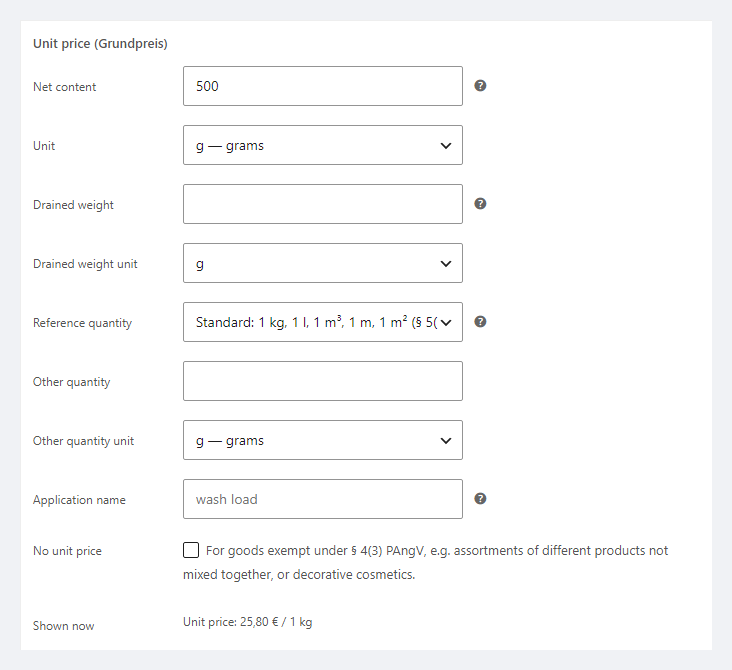
  • “Shown now” preview in the editor — exactly what the customer will see.
  • Display settings: where to show it, a text template with {price} / {quantity} / {content}, the range for variations, the 10 g / 10 ml limit, “hide when equal to the price”.
  • Shortcode [ccupg_unit_price] for page builders and themes with their own price output.

Pro: orders, Google and bulk filling

  • Unit price in order lines at the time of purchase — in the admin and in WooCommerce e-mails to the customer and admin.
  • JSON-LD referenceQuantity in the product markup — Google gets the unit price for unit pricing.
  • Net content detection from the name or an attribute (“500 g”, “0,75 l”, “6 x 0,33 l”): preview, bulk filling of empty values in the background and on product save. Only empty fields are filled.
  • Catalogue check: products without net content in chosen categories + CSV, and unit price columns in the WooCommerce CSV import/export.

Works together with our other modules for Germany and the EU

How it works — step by step

  1. Open a product → Product data → Unit price (Grundpreis): enter the net content, e.g. 500 g.
  2. If needed — drained weight, another reference quantity or an application name.
  3. Save — the preview shows “25.80 € / 1 kg”.
  4. Customers see the unit price on the product, in the list, cart and checkout; change the price or a sale and it is recalculated by itself.
  5. With Pro — fill in the net content for the whole catalogue from product names and check where it is missing.

Under the hood

  • Calculated from WooCommerce’s displayed price (wc_get_price_to_display) and the cart price — VAT and sales are handled exactly as in the price next to it.
  • Block cart and checkout — through the Store API and the item price filter; the Mini-Cart — when its block renders in the header.
  • JSON-LD (Pro): UnitPriceSpecification.referenceQuantity with unit codes per Google Merchant documentation; the markup has not been run through Google’s Rich Results Test yet.
  • Detection (Pro) reads “500 g”, “0,75 l”, “6 x 0,33 l”, “4×125g”, m², cm — and can be wrong (“5G” in a smartphone name), which is why there is a preview and only empty fields are filled.
  • Deleting the plugin removes product metadata, options and cron jobs; the unit price in lines of past orders stays as history.

Installation

  1. Plugins → Add New → Upload Plugin: choose catcode-unit-price-grundpreis-for-woocommerce-1.0.0.zip and activate.
  2. WooCommerce → Unit price: check where to show the unit price and the text template.
  3. Enter the net content and unit in your products (in variations — if needed).
  4. For Pro: paste the licence key from the e-mail after payment or start the 7-day trial, then run the detection and the catalogue check.

Questions
about the module

Didn't find the answer? Message us on Telegram and we'll reply within a business day.

@catcode_support Setup, compatibility, activation
Which reference quantity — 1 kg or 100 g?

Under the current PAngV (§ 5) packaged goods use 1 kg, 1 l, 1 m, 1 m² or 1 m³, and that is the default. 100 g / 100 ml under § 5 (2) is only for loose goods weighed in front of the customer; in the product it is a separate choice labelled that way.

Does the plugin guarantee my shop complies with PAngV?

No. It calculates and shows the Grundpreis by the rules of §§ 4–5 PAngV, but whether a product needs one and which reference quantity to choose is the shop's decision; this is not legal advice. Rules of other EU countries (for example Austria) are not implemented separately.

I already use Germanized or German Market.

They have their own unit price — do not run two at once. Our difference: the unit price is worked out automatically from the net content already in the free version, including variations and the block cart.

Why does the unit price not match the cart price?

The plugin calculates from WooCommerce's displayed price and the cart price. If another plugin changes only the price HTML (dynamic pricing, roles, multi-currency), the unit price can drift — write to us and we will look at compatibility.

My theme prints the price its own way.

If the theme bypasses WooCommerce's standard price output, put the [ccupg_unit_price] shortcode where you need it in the template.

What stays free?

Calculating and showing the unit price in the shop, cart and checkout with all reference-quantity rules — with no time limit.

Not quite what you are looking for?

We build custom modules for WordPress, WooCommerce, OpenCart and Shopify. Tell us about the task and we'll prepare an estimate.

Order a custom module