Get in touch
  • WordPress
  • Import/Export
  • v1.0.0

DATEV Export for WooCommerce — a Buchungsstapel from orders and refunds for your tax adviser

Export WooCommerce orders and refunds in the DATEV format (EXTF Buchungsstapel, format version 13) for your tax adviser: one posting per VAT rate, SKR03 / SKR04 account suggestions, your own account mapping, a preview with errors before download. Pro — payment postings, a debtor account per customer, OSS / intra-Community supplies / export, and a monthly e-mail to your adviser.

Download Free
Pro · one-year licence The more sites, the less each one costs
Compatibility
WooCommerce 7.0+ · WordPress 6.2+ · PHP 7.4+ · HPOS · DATEV format EXTF Buchungsstapel, version 13 (header 700)
Licence
one site, annual
Trial
7 days, no card, one per site
Updated
September 2026
Or all 144 Pro modules with All Access — 4 990 ₴ / year

What Free has,
and what Pro adds

The free version works with no time limit. Pro adds the rest of the features in the table.

Feature Free Pro
EXTF Buchungsstapel file (format 700, category 21, version 13): 125 columns, CR/LF, Windows-1252 or UTF-8 with BOM ✔ ✔
One posting per VAT rate: debtor / revenue account, products, shipping and fees after discounts, postings total = order total to the cent ✔ ✔
Refunds as separate postings on the refund date, split by the order's rates; amount-only refunds split proportionally ✔ ✔
Header: Beraternummer, Mandantennummer, fiscal year start, account length, SKR03 / SKR04, Diktatkürzel, Festschreibung ✔ ✔
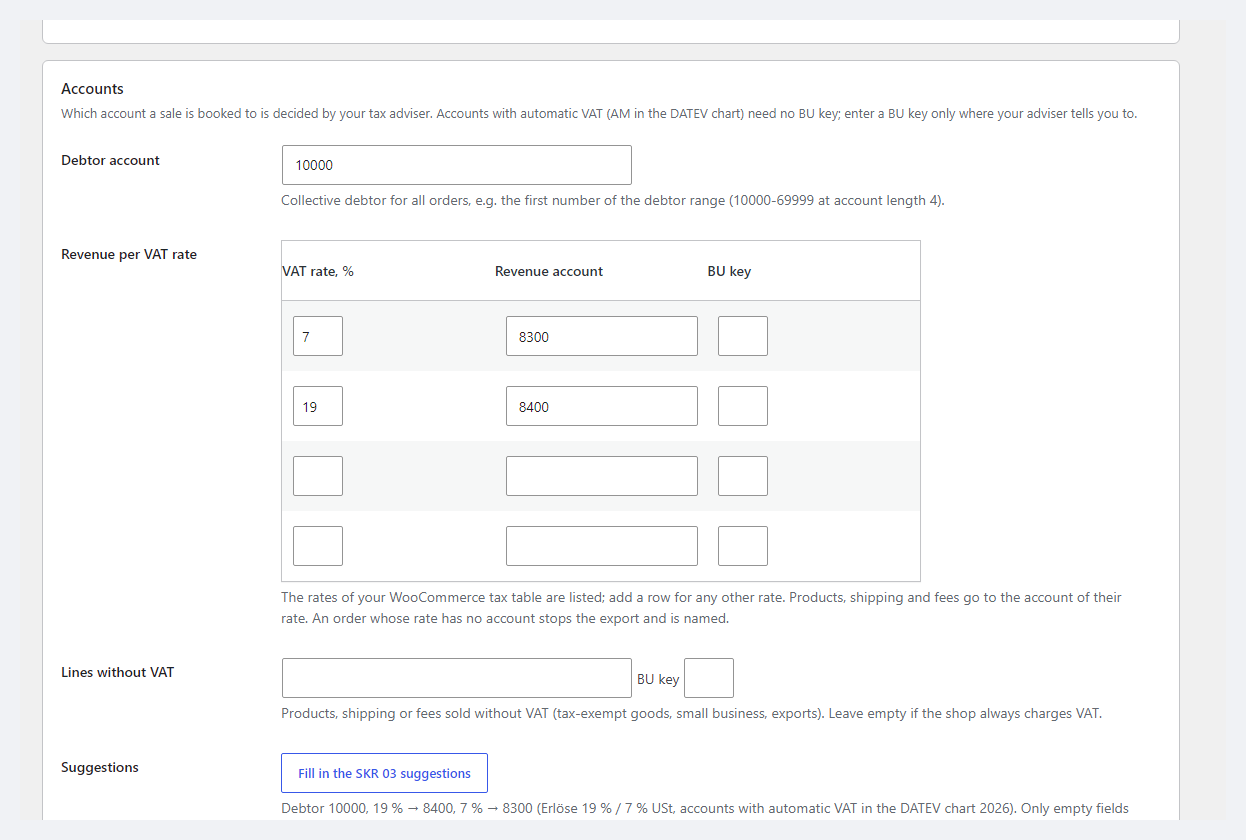
Account mapping: rate → revenue account and BU key, an account for lines without VAT, a collective debtor; SKR03 / SKR04 suggestions button ✔ ✔
Order statuses, document date (created, paid, completed), document number from the invoice number or order number, Buchungstext templates ✔ ✔
Preview before download: per-order errors block the file, warnings, totals per account, the first postings ✔ ✔
"Already exported" markers that skip those orders, a log of recent exports ✔ ✔
Plugin languages: English, Deutsch ✔ ✔
Payment postings per payment method: clearing account of the method / debtor on the payment date, refund payouts — ✔
A debtor account for every registered customer from a start number — ✔
OSS, intra-Community supplies with a VAT ID and export: own accounts, BU keys and EU fields (country, number, rate) — ✔
Monthly e-mail to your tax adviser with the file attached — ✔

What it looks like

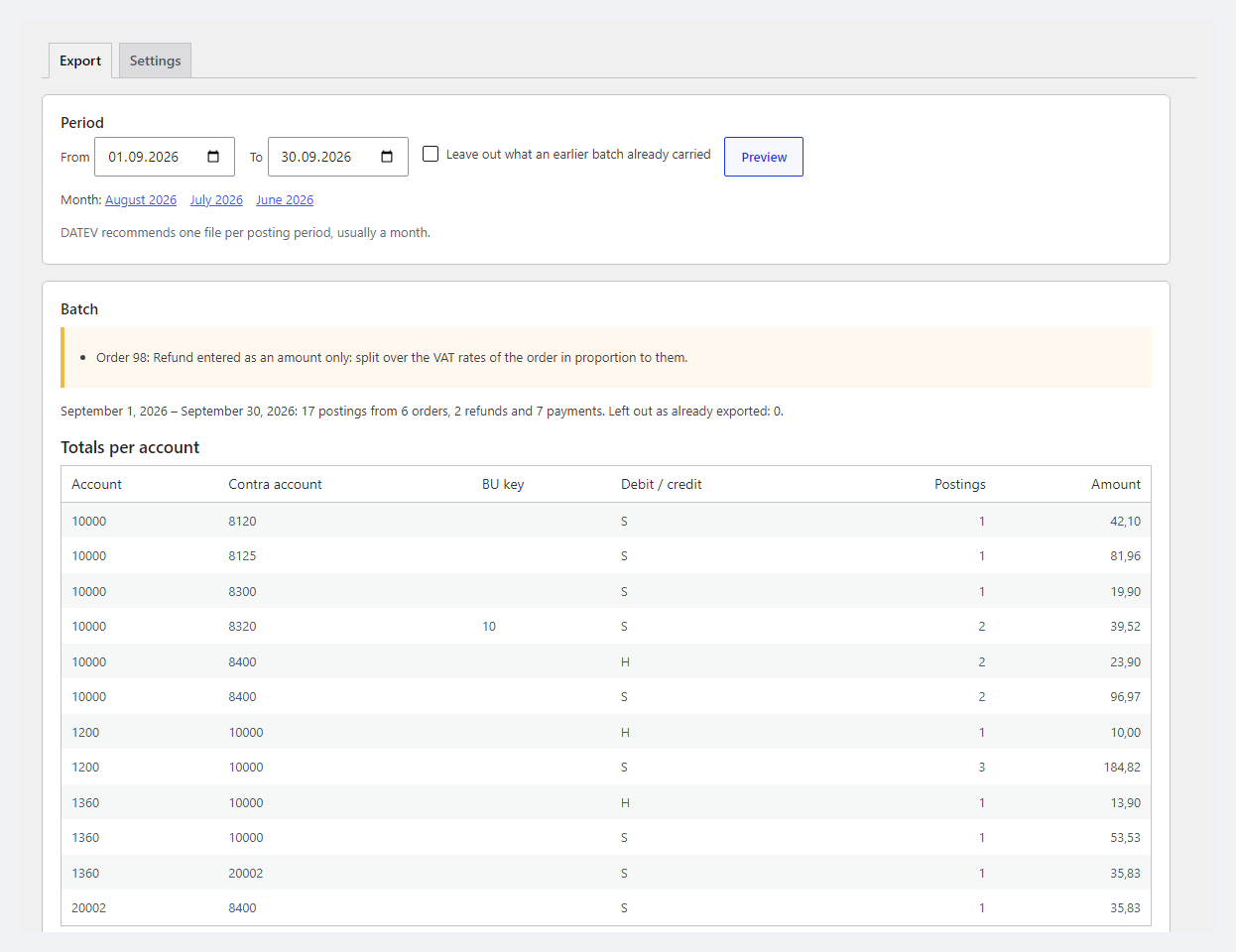
DATEV export preview for September: period, warnings, totals per account
Export tab: period 01.09–30.09.2026, “leave out what was already exported”, a warning about an amount-only refund and totals per account — 17 postings from 6 orders, 2 refunds and 7 payments.
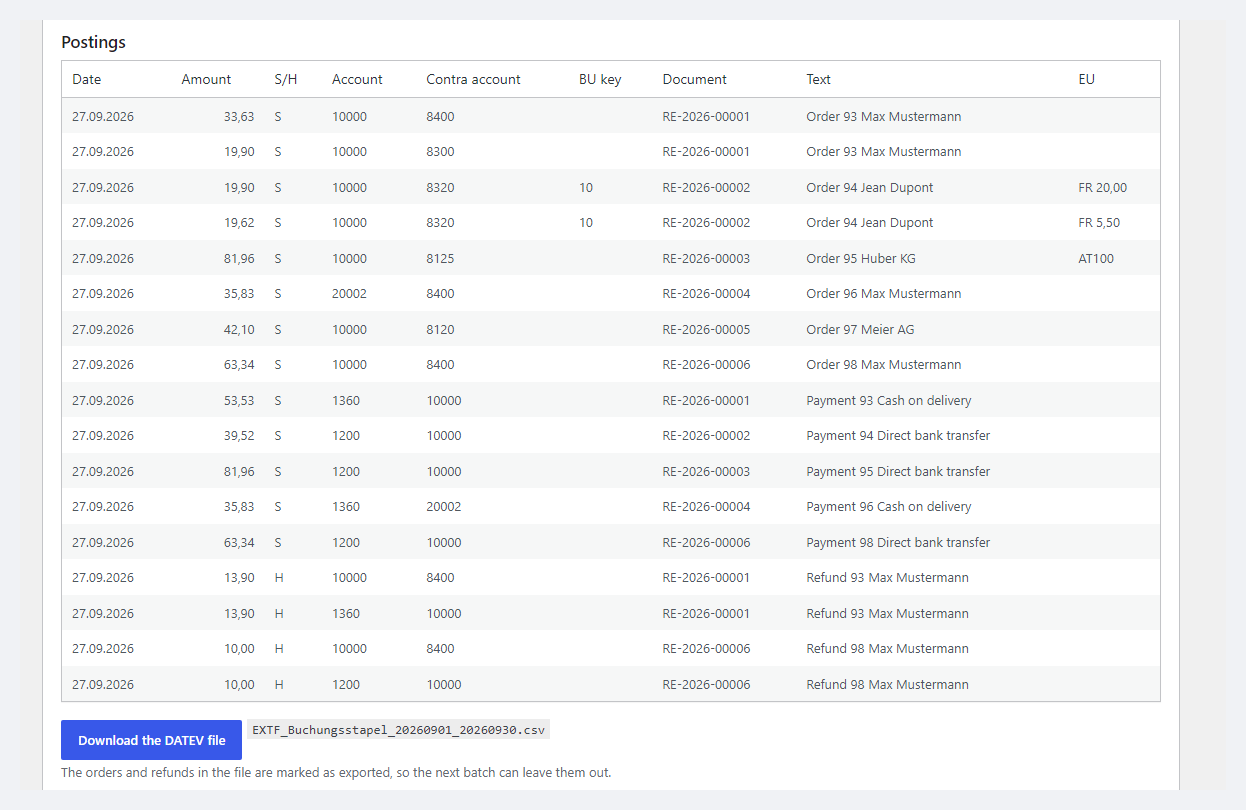
DATEV Buchungsstapel postings and the download button
Postings: date, amount, debit/credit, account and contra account, BU key 10 for OSS, the E-Invoice invoice number in the document field, text and the EU field (FR 20.00 / 5.50, AT…). At the bottom — “Download the DATEV file”.
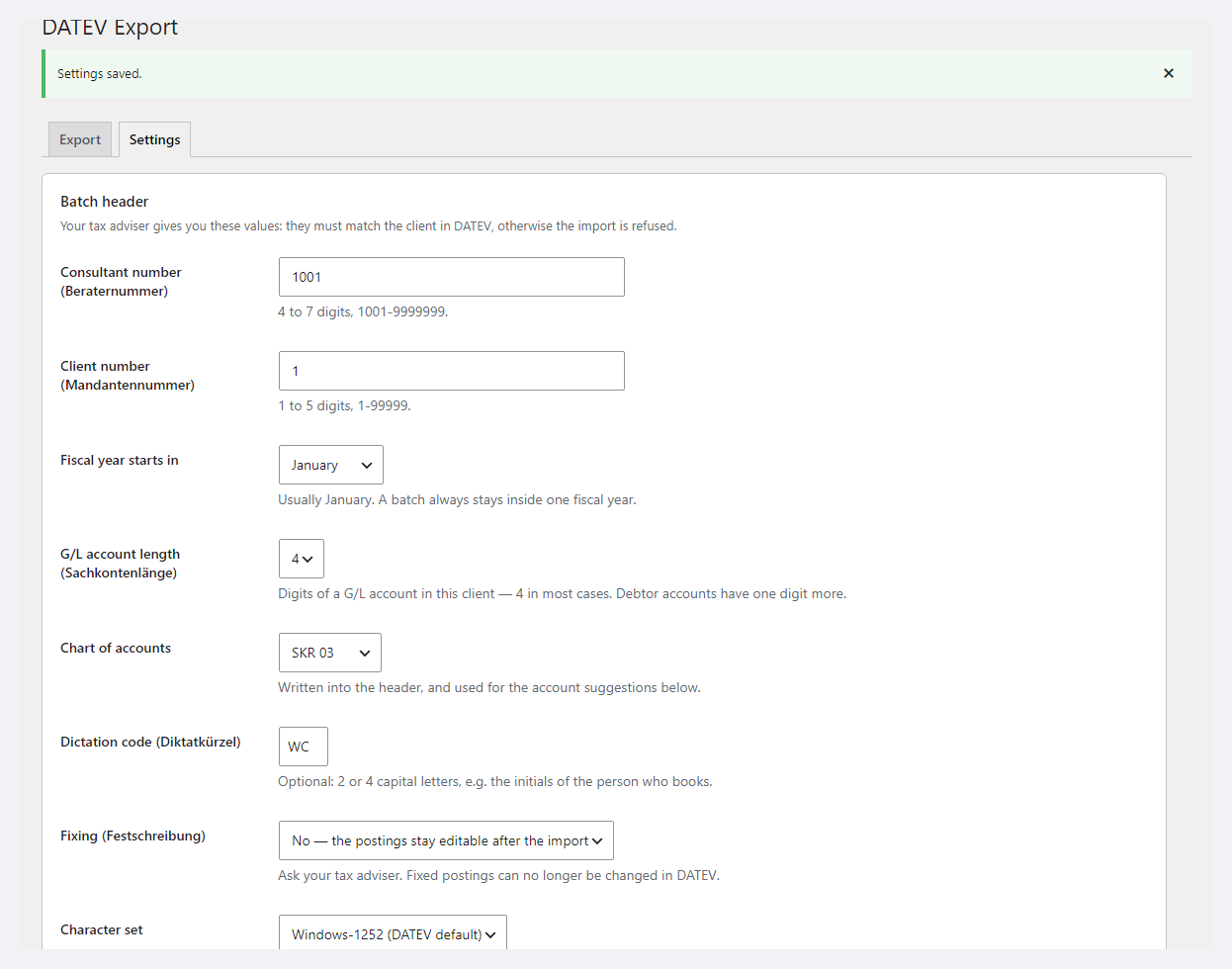
DATEV header: adviser and client numbers, fiscal year, SKR, encoding
Header settings: Beraternummer, Mandantennummer, fiscal year start, account length, SKR03 / SKR04, Diktatkürzel, Festschreibung, encoding.

The trial starts when you ask

A fresh install is the free version, nothing switches on by itself. The “Try Pro for 7 days” button → e-mail → the key right in the window and by e-mail.

One key — one site

Moving the store? Unbind the licence on the old domain and activate it on the new one yourself. If our server is unreachable, Pro keeps working for 14 more days. For studios — keys for 5 or 25 sites, or unlimited.

Technical requirements

  • WooCommerce 7.0+, compatible with HPOS and the legacy order storage (the file is byte-identical in both)
  • WordPress 6.2+ · PHP 7.4+ (the full run was on PHP 8.3; syntax also checked on 7.4)
  • One currency: orders in another currency are skipped with a warning
  • WP-Cron or a system cron — for the monthly e-mail (Pro)
  • Plugin languages: English and German.

Version history

v1.0.0 Current September 2026

DATEV Buchungsstapel (EXTF, format version 13, header 700) from orders and refunds, one posting per VAT rate, account mapping with SKR03 / SKR04 suggestions, preview with errors, markers…

Frequently bought with DATEV Export for WooCommerce

4 modules in one order — 40% cheaper than separately

“Store starter” bundle DATEV Export Nova Poshta Premium LiqPay Telegram notifications and Viber/SMS for customers Need more — all 144 modules in All Access for 4 990 ₴.
3 590 ₴ / year instead of 5 960 UAH bought separately
Buy the bundle →

Full module description

DATEV Export for WooCommerce exports your shop’s orders and refunds in the DATEV format — an EXTF Buchungsstapel file (format version 13) that tax advisers in Germany import into their software. Instead of copying totals by hand or exporting to Excel, you download one CSV file a month: the postings are already split by VAT rate, with revenue accounts, debtor, document number and text.

Honestly about testing. The format follows the description on developer.datev.de, and every generated file — free and Pro, UTF-8, a fiscal year starting in July, 1,000 orders, the e-mail attachment — passed the official DATEV-Format-Prüfprogramm 2.2.3.0 without a single message. We have not done a real import into DATEV Rechnungswesen / Unternehmen online yet: before regular use, ask your adviser to import one test file. Accounts and BU keys are settings agreed with your adviser; the module is a tool for handing over postings, not tax advice. DATEV is a trademark of DATEV eG; the module is not made or endorsed by DATEV.

What the shop and the adviser get

  • One file per period: EXTF_Buchungsstapel_<from>_<to>.csv in Windows-1252 (the DATEV standard) or UTF-8 with BOM.
  • One posting per VAT rate: products, shipping and fees after discounts, and the document’s postings add up to the order total to the cent. A rounding gap of up to 5 cents is closed on the largest group; a bigger one shows as a warning.
  • Refunds as separate credit postings on the refund date by the order’s rates; an amount-only refund is split proportionally, with a warning.
  • Document number — the invoice number from your invoicing plugin (for example E-Invoice EN 16931) or the order number; Buchungstext from a template.

What the admin gets

  • A preview before download: errors per order (no account for a rate — the file will not download), warnings (another currency — skipped), totals per account and the first postings.
  • Header: Beraternummer, Mandantennummer, fiscal year start, account length 4–8, SKR03 / SKR04, Diktatkürzel, Festschreibung.
  • Account mapping: VAT rate → revenue account and BU key, an account for lines without VAT, a collective debtor; the SKR03 / SKR04 suggestions button fills only empty fields.
  • “Already exported” markers: the next file does not repeat orders, and the log shows who exported which period and when.
  • Statuses and date: which statuses go into the file and which date becomes the document date — created, paid or completed.

Pro: payments, debtors, EU and the e-mail to your adviser

  • Payment postings: for payment methods you give a clearing account (for example PayPal or Stripe) — the payment on its date and refund payouts. If your adviser already imports the bank statements of those methods, leave this off to avoid double booking.
  • A debtor per customer: a registered customer gets their own debtor number from a start number; guests go to the collective debtor with a warning.
  • EU and export: sales to consumers in other EU countries (OSS) go to the OSS account with a BU key and the country and rate fields; supplies to companies with a VAT ID go to the intra-Community account with the buyer’s number; sales outside the EU go to the export account.
  • A monthly e-mail to your tax adviser with the file attached on the chosen day; if the month has errors, the e-mail goes to the admin instead.

Works together with our other modules for Germany and the EU

All four have been tested together in one test shop: orders from both checkouts, invoices, reverse charge and a DATEV file with no Prüfprogramm messages.

How it works — step by step

  1. Ask your adviser for the Beraternummer, Mandantennummer, chart of accounts (SKR03 or SKR04) and the accounts for your rates.
  2. WooCommerce → DATEV Export → Settings: header, “Fill in the SKR suggestions”, check accounts and BU keys.
  3. Export: pick a month and click Preview — the plugin shows errors and totals per account.
  4. Fix the errors (usually an account for another country’s rate), download the file and pass it to your adviser.
  5. Next month — the same; orders already exported are skipped. With Pro the file reaches your adviser by e-mail on its own.

Under the hood

  • Format: a 31-field header, the 125 Buchungsstapel columns per Format_Buchungsstapel.xml version 13, doubled quotes, decimal comma, CR/LF.
  • Verification: every file from the run went through DATEV-Format-Prüfprogramm 2.2.3.0 (0 messages) and our own strict validator; on a deliberately broken line the program does catch the errors.
  • Shop time zone: an order on 31.08 at 23:30 does not land in September, one on 01.09 at 00:30 does.
  • Speed: 1,000 orders (3,002 postings) — under a second in our test, with flat memory thanks to per-page cache resets; the file is built in one request, months with 10,000+ orders were not measured.
  • Deleting the plugin removes the settings, the cron job and the “exported” markers.

Installation

  1. Plugins → Add New → Upload Plugin: choose catcode-datev-export-for-woocommerce-1.0.0.zip and activate.
  2. WooCommerce → DATEV Export → Settings: adviser details, chart of accounts, account mapping.
  3. Export → Preview → Download the DATEV file.
  4. For Pro: paste the licence key from the e-mail after payment or start the 7-day trial, then set up payment accounts, debtors, EU rules and the adviser e-mail.

Questions
about the module

Didn't find the answer? Message us on Telegram and we'll reply within a business day.

@catcode_support Setup, compatibility, activation
Will my adviser be able to import the file into DATEV?

The file follows the format description on developer.datev.de, and every file we generated passed the official DATEV-Format-Prüfprogramm 2.2.3.0 without a single message. We have not done a real import into DATEV Rechnungswesen / Unternehmen online yet — before regular use, ask your adviser to import one test file; if anything is off, we will fix it quickly.

Who decides which accounts and BU keys to use?

Your tax adviser. The SKR03 / SKR04 button only fills empty fields with typical revenue accounts (for example 8400 / 4400 for 19 %), but accounts, BU keys and the treatment of EU sales are settings agreed with your adviser. The module is a tool for handing over postings, not tax advice.

What if my adviser already imports the bank statements?

Then do not switch on the Pro payment postings for those methods — you would book them twice. By default no payment method has an account, and the settings warn about this directly.

What about OSS and sales to other EU countries in the free version?

Free exports them by the rate mapping: rates of other countries (for example France's 20 % and 5.5 %) need their own account, otherwise the preview shows an error. The EU fields (country, number, rate) and separate OSS / intra-Community / export accounts are filled by Pro.

Is this an official DATEV plugin?

No. DATEV is a trademark of DATEV eG; the module is not made or endorsed by DATEV, it only writes a file in the open DATEV format.

What stays free?

The Buchungsstapel file from orders and refunds, account mapping, SKR suggestions, the preview with errors, markers and the log — with no time limit.

Not quite what you are looking for?

We build custom modules for WordPress, WooCommerce, OpenCart and Shopify. Tell us about the task and we'll prepare an estimate.

Order a custom module