

















OpenCart
1 290 UAH839 UAH≈ €17
Black November: −35% on all modules until 30 November Black November: −35% until 30 November Choose a module
 Website auditA PDF report by email in 3 minutesCheck a website
Everyday tasks
Image compressorSize, quality and WebP in bulkQR generatorLink, Wi-Fi, payment to IBANVAT calculator20, 14, 7% and amount in wordsTransliterationOfficial Ukrainian standardWebsite checks
PHP and pluginsPHP version, WordPress, pluginsGoogle Merchant feedFields, prices, GTIN, imagesDomain emailSPF, DKIM, DMARC, blacklistsAI search readinessllms.txt, bots, markupAll 9 toolsEnter at least 2 characters

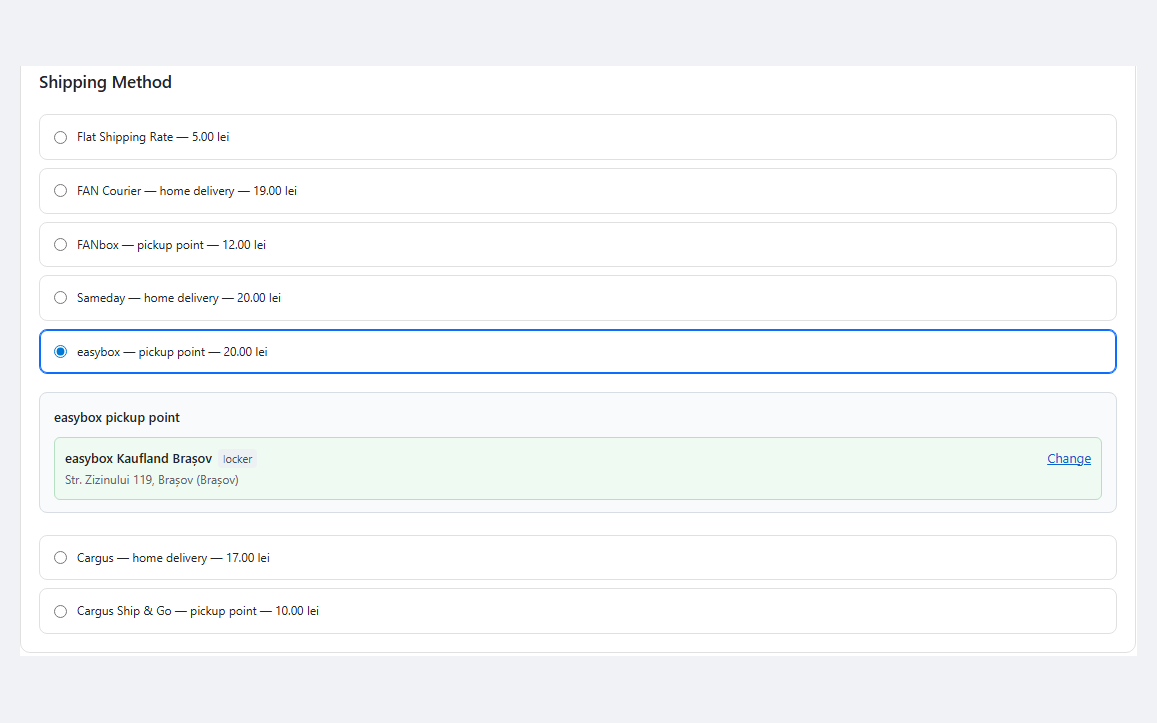
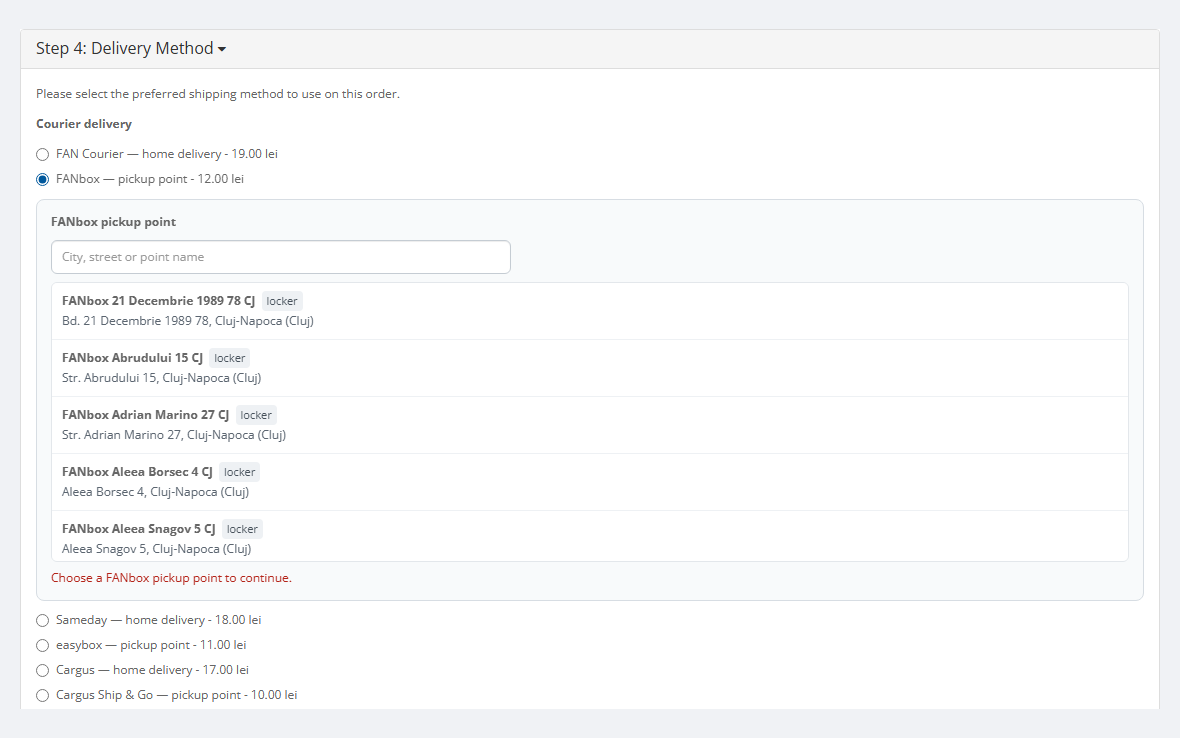
FAN Courier, Sameday and Cargus in one shipping module for OpenCart 4, 3 and 2.3 stores in Romania: delivery to the door and to pickup points (FANbox, easybox, Cargus Ship & Go), point selection on the stock checkout and on One Page Checkout, AWBs, labels, tracking and cash on delivery. Pro — live courier tariff, automatic and bulk AWBs.
Clear even without sound: Ukrainian subtitles
The free version works with no time limit. Pro adds the rest of the features in the table.



A fresh install is the free version, nothing switches on by itself. The “Try Pro for 7 days” button → e-mail → the key right in the window and by e-mail.

Moving the site? Unlink the licence on the old domain and activate it on the new one yourself. A staging copy (staging., dev.) works with the same key and does not take a site slot. For studios — keys for 5 or 25 sites, or unlimited.
 OpenCart 4.0.2.0+ and 4.1.x (tested on 4.1.0.3, 4.1.0.4 and 4.0.2.3), 3.x (tested on 3.0.5.0) or 2.3.0.2.PHP 7.0+ — whatever your OpenCart version needs (tested on 7.0, 8.2 and 8.3). The cURL extension; ZipArchive for bulk label printing across several couriers.Courier accounts: FAN Courier (selfAWB), Sameday (eAWB API), Cargus (UrgentOnlineAPI + WebExpress). Switch on one, two or all three.Buyer’s phone at checkout — all three couriers require it.RON currency in the store with a current rate — for the live tariff and cash on delivery.Cron: on OpenCart 4 — the built-in scheduler (System → Maintenance → Cron Jobs) or the cron URL; on OpenCart 3 and 2.3 — the cron URL from the settings once an hour. Without cron, points are refreshed with the button.Product weight — products without a weight use the default weight from the settings; the parcel size for lockers is set there too.Module languages: English and Romanian.
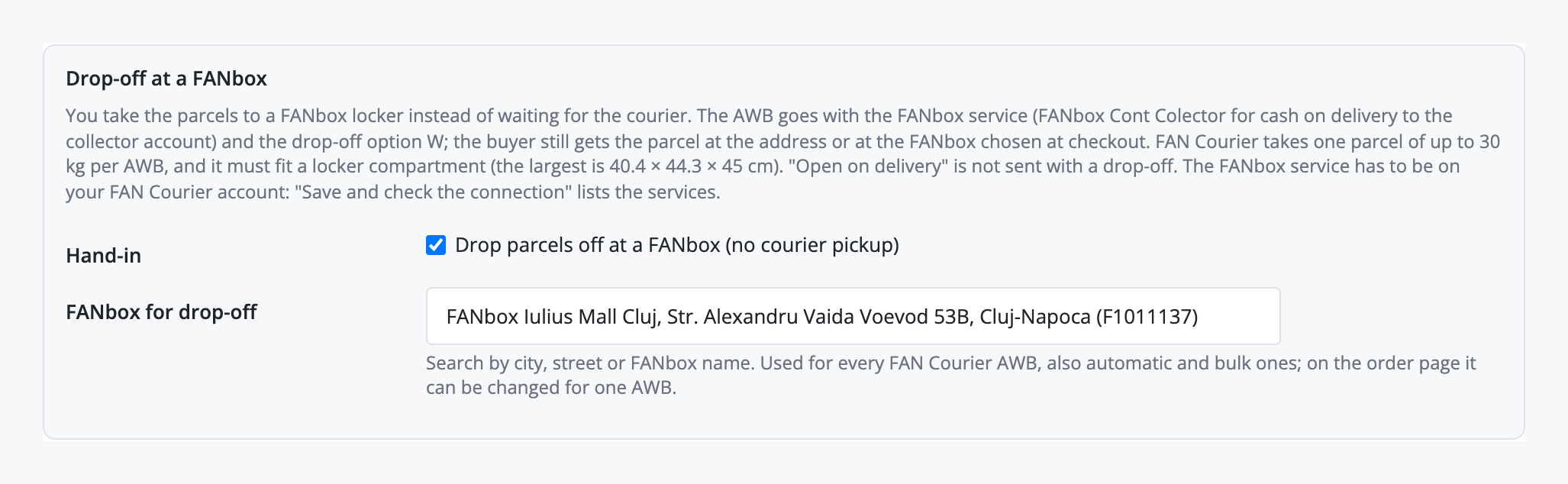
Pro: drop-off at a FANbox you choose.
Without Pro the Pro settings are shown switched off, and saving the page leaves them unchanged.
«Send test e-mail» in the settings (Shipments tab, under the AWB e-mail text).
The buyer’s AWB e-mail now lists the order: products with options, quantities and totals.
The buyer’s AWB e-mail is now a designed letter: store logo, the AWB in a box and a Track the parcel button.
Sameday: Test connection warns when the account has no pickup points and replaces a saved pickup point that is not in the account with the default one.
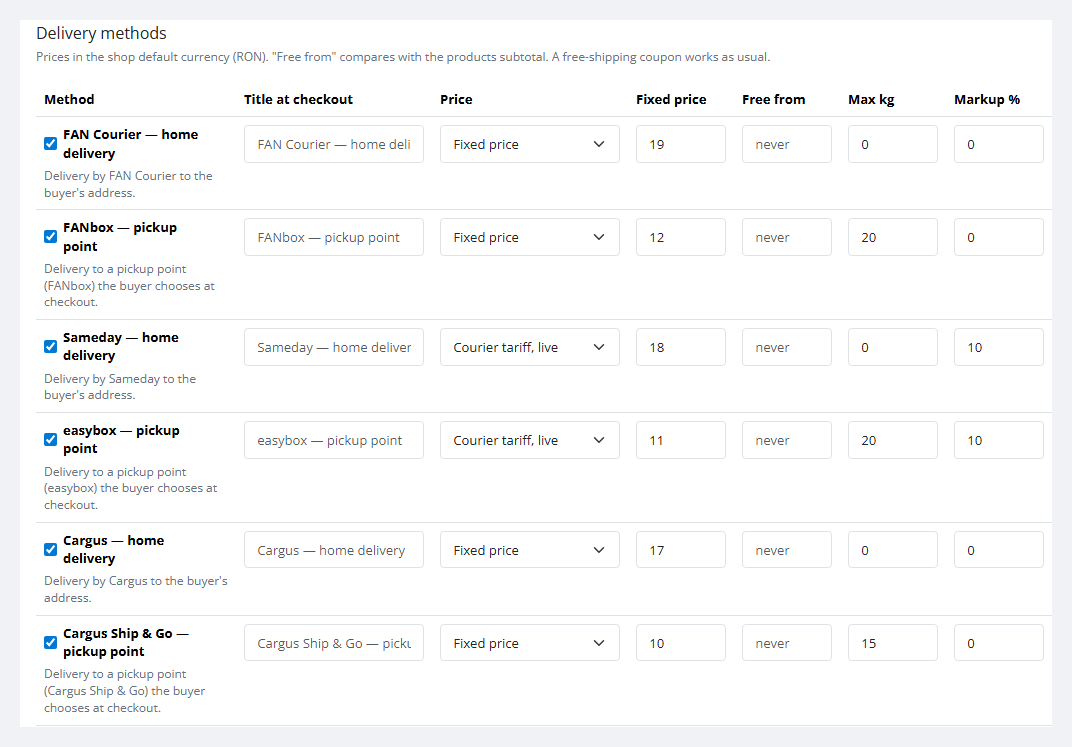
Free shipping can be limited by weight: next to “Free from” there is “Free up to, kg”.
Max size per delivery method (length × width × height, cm), next to Max kg.
Shops that translated the English (en-gb) language into Romanian instead of adding ro-ro now get the extension in Romanian.
A live tariff with no fixed price no longer shows 0.
Sameday’s own easybox map at checkout.
OpenCart 4: an archive installed under another name cannot open its settings (“Page Not Found!” or a PHP warning).
The panel appears whatever the checkout markup (theme checkouts, One Page modules) and comes back when it redraws itself.
OpenCart 4 on the PDO database driver.
OpenCart 3 and 2.3 with CatCode One Page Checkout.
For OpenCart 4.x, 3.x and 2.3: FAN Courier + FANbox, Sameday + easybox, Cargus + Ship & Go; point selection on the stock checkout and on CatCode One Page Checkout; AWBs, labels, tracking…


Romania Couriers for OpenCart is a shipping module for stores in Romania on OpenCart 4, 3 and 2.3. The country’s three largest couriers in one extension: FAN Courier with FANbox lockers, Sameday with easybox lockers and PUDO points, Cargus with its Ship & Go network. The buyer picks door or pickup-point delivery right at checkout, and the manager creates the AWB, prints the label and sees the parcel status on the order page without opening the couriers’ portals.
There is a separate version for WooCommerce — Romania Couriers for WooCommerce.
What you need. A business account with every courier you switch on: FAN Courier — client ID, user name and password of selfAWB; Sameday — an eAWB API user; Cargus — an UrgentOnlineAPI subscription key and a WebExpress account.
The buyer sees the methods of every courier you switched on, with prices. Once they choose a pickup-point method, the point panel appears under it: the list starts with the points of their city, and search works by city, street or point name. Switch to door delivery and the panel goes away, while their address stays their own: the module never writes the locker address into the buyer’s fields. Each courier keeps its own chosen point, so switching between FANbox and easybox mixes nothing up.
Try to check out with a pickup-point method and no point, and the server refuses with an explanation (“Please choose a FANbox pickup point.”). On OpenCart 4 that is the payment and confirm step, on OpenCart 3 and 2.3 already the shipping step. While no point is chosen, the order confirmation block on the page is held with a note that the point is missing. A point chosen earlier never ends up in an order with another shipping method. For a Cargus Ship & Go point that does not take cash on delivery, the module refuses cash on delivery.
Settings — Extensions → Extensions → Shipping → Romania Couriers. There are four settings tabs (methods, three couriers) plus Shipments, Automation and Licence.
cc_rocourier.ocmod.zip (do not rename the archive) and press Install. OpenCart 3: Extensions → Installer → cc_rocourier-oc3-1.1.7.ocmod.zip, then Extensions → Modifications → Refresh. OpenCart 2.3: upload the contents of the upload/ folder from cc_rocourier-oc2-1.1.7.ocmod.zip to the store root (FTP or the host’s file manager) — the 2.3 Installer does not copy files without FTP set up.Didn't find the answer? Message us on Telegram and we'll reply within a business day.
 @catcode_support
Setup, compatibility, activation
Yes, a business account with every courier you switch on: FAN Courier — client ID, user name and password of selfAWB; Sameday — an eAWB API user; Cargus — an UrgentOnlineAPI subscription key from the developer portal and a WebExpress account. Couriers can be switched on one by one.
Tested on the stock checkout of OpenCart 4, 3 and 2.3 and on CatCode One Page Checkout. The module was not run on a real Journal theme or other third-party checkouts, so please check it on your own store and tell us if anything works differently. After updating to 1.0.3, open the module's settings page once.
It appears once the courier's points are downloaded (the Download … points button in the settings) and the buyer's address is in Romania. Check the method's weight limit and the geo zone as well.
The couriers need the buyer's phone, and OpenCart 4 does not ask for it by default. The settings page has a button that switches on Telephone display and Telephone required; for an order already placed, type the phone in the AWB panel.
A FANbox takes cash on delivery by card only. FAN Courier has to enable card payment (mPOS) for your account; the module adds the option it needs by itself.
On OpenCart 4 check the file name first: OpenCart takes the extension's code from it, and a browser saves a second download as cc_rocourier (1).ocmod.zip. Uninstall the module in Extensions → Shipping, uninstall and delete every copy in Extensions → Installer, rename the file to exactly cc_rocourier.ocmod.zip, upload it and press Install in the Installer, then install the module in Shipping. Settings are kept. Missing rights in a user group show a different error: "Permission Denied!".
Yes, for Sameday, from version 1.0.5. Enter the map client ID issued by Sameday in the Sameday tab of the module's settings: a button opening Sameday's map appears at checkout above the search list. Without this ID the buyer picks the point from the list.
No. For OpenCart it is a one-time payment, a licence forever, and one licence covers all three builds: 4.x, 3.x and 2.3. Delivery methods, point selection, AWBs, labels, tracking and cash on delivery stay free with no time limit.
No reviews yet. Be the first.
No questions yet. Ask one — we answer within 24 hours.
We build custom modules for WordPress, WooCommerce, OpenCart and Shopify. Tell us about the task and we'll prepare an estimate.
Order a custom module
—
Charged in UAH; your bank converts it to your currency. EUR price is approximate.

CatCode assistant
Just now


CatCode assistant
Online

I’ll help with your website task
Describe your website task — I’ll find a ready-made module or pass it to a developer for an estimate. Modules, custom features, layout, integrations, speed, migration, technical SEO.