WordPress
Polylang Multilingual Shop for WooCommerce — a multilingual store on free Polylang
Free + Pro
990 UAH/year
v1.0.1
Enter at least 2 characters
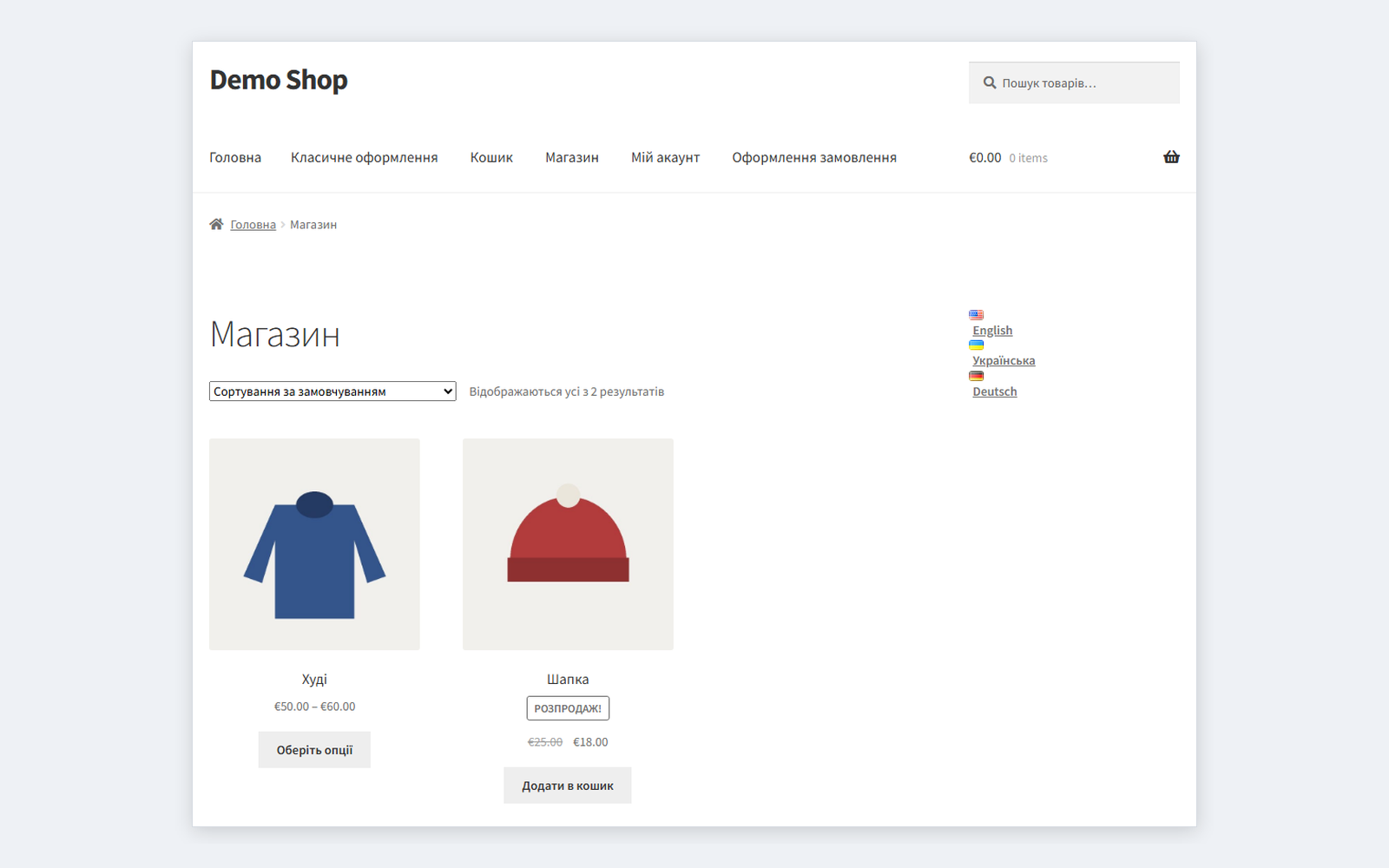
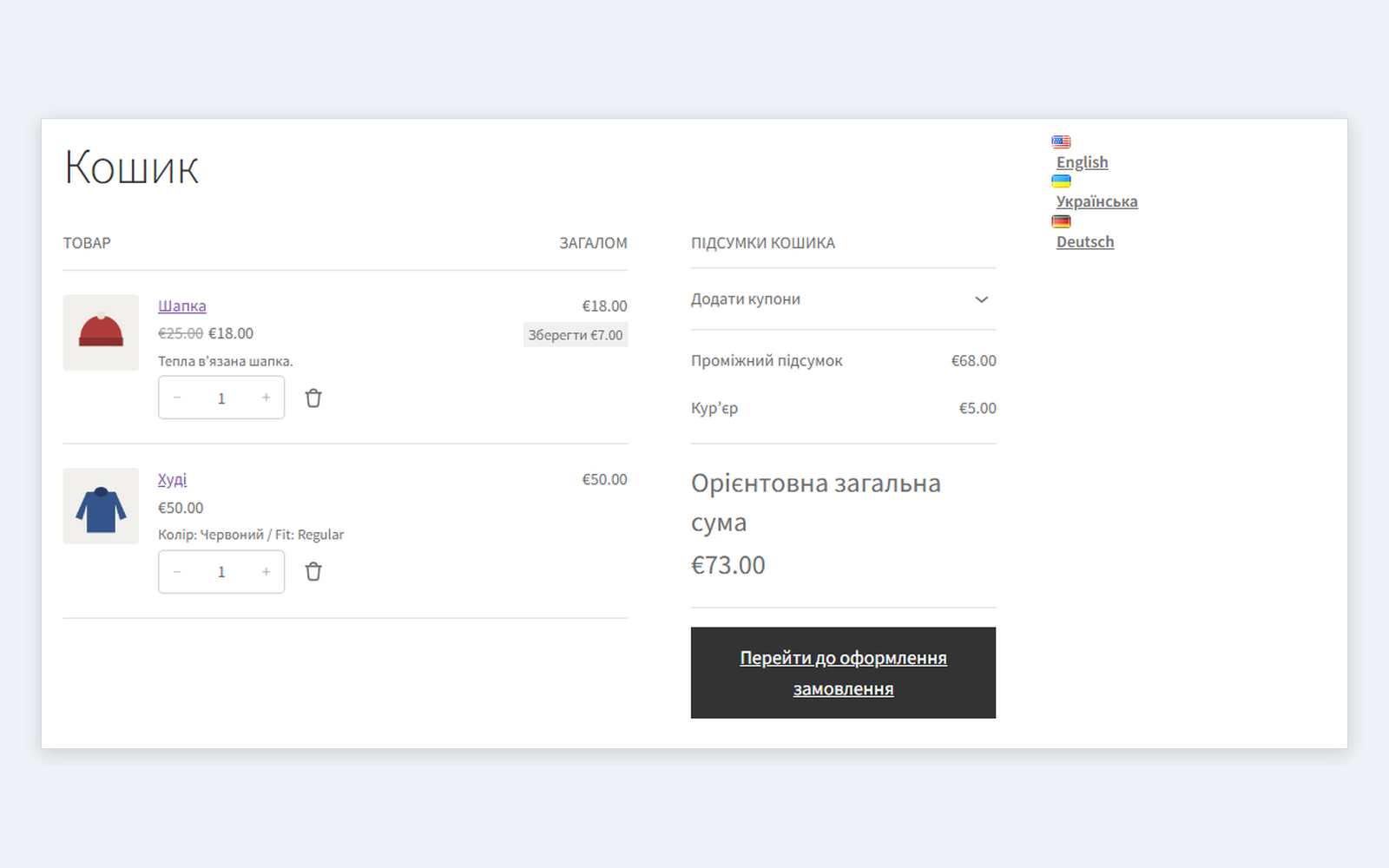
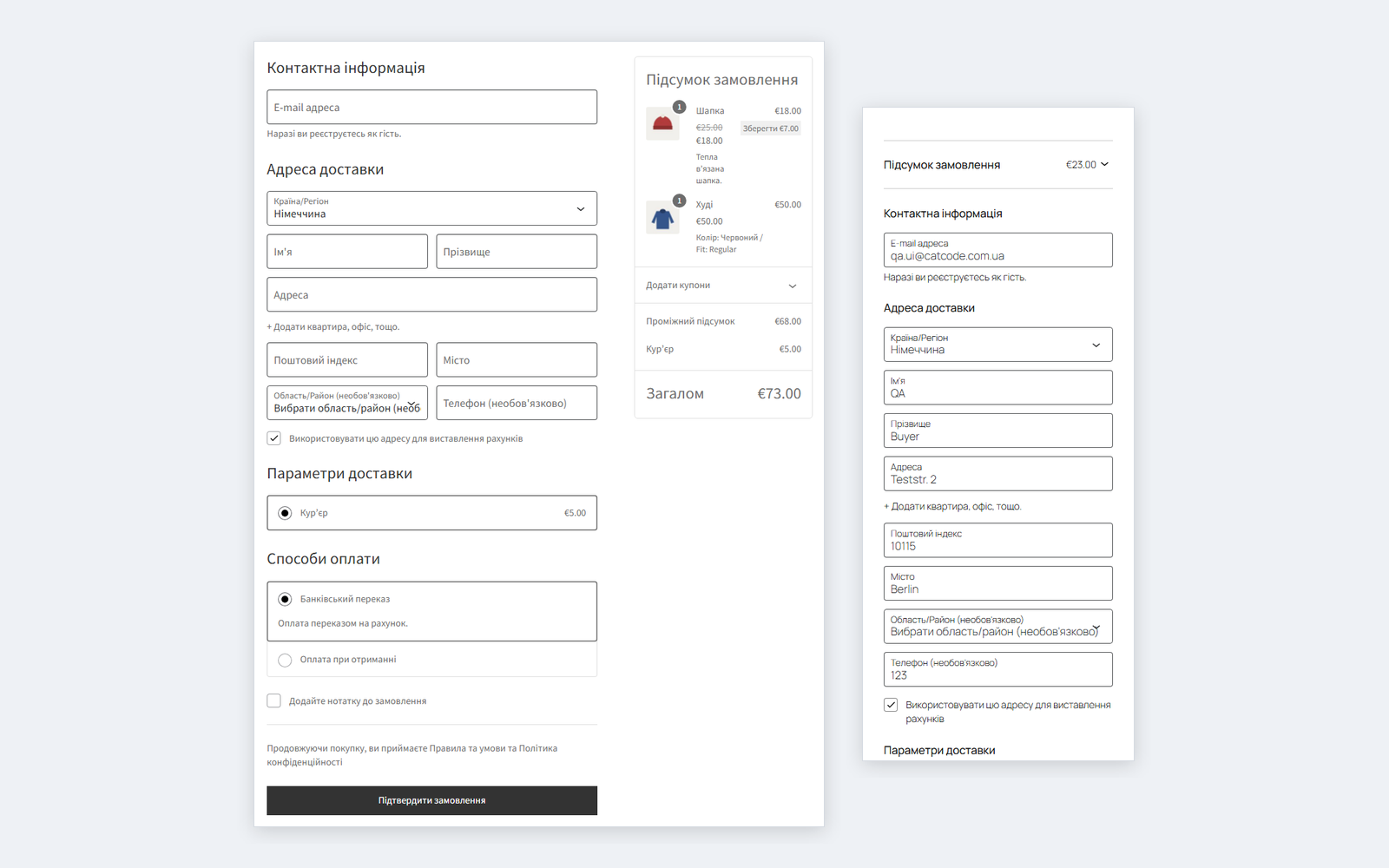
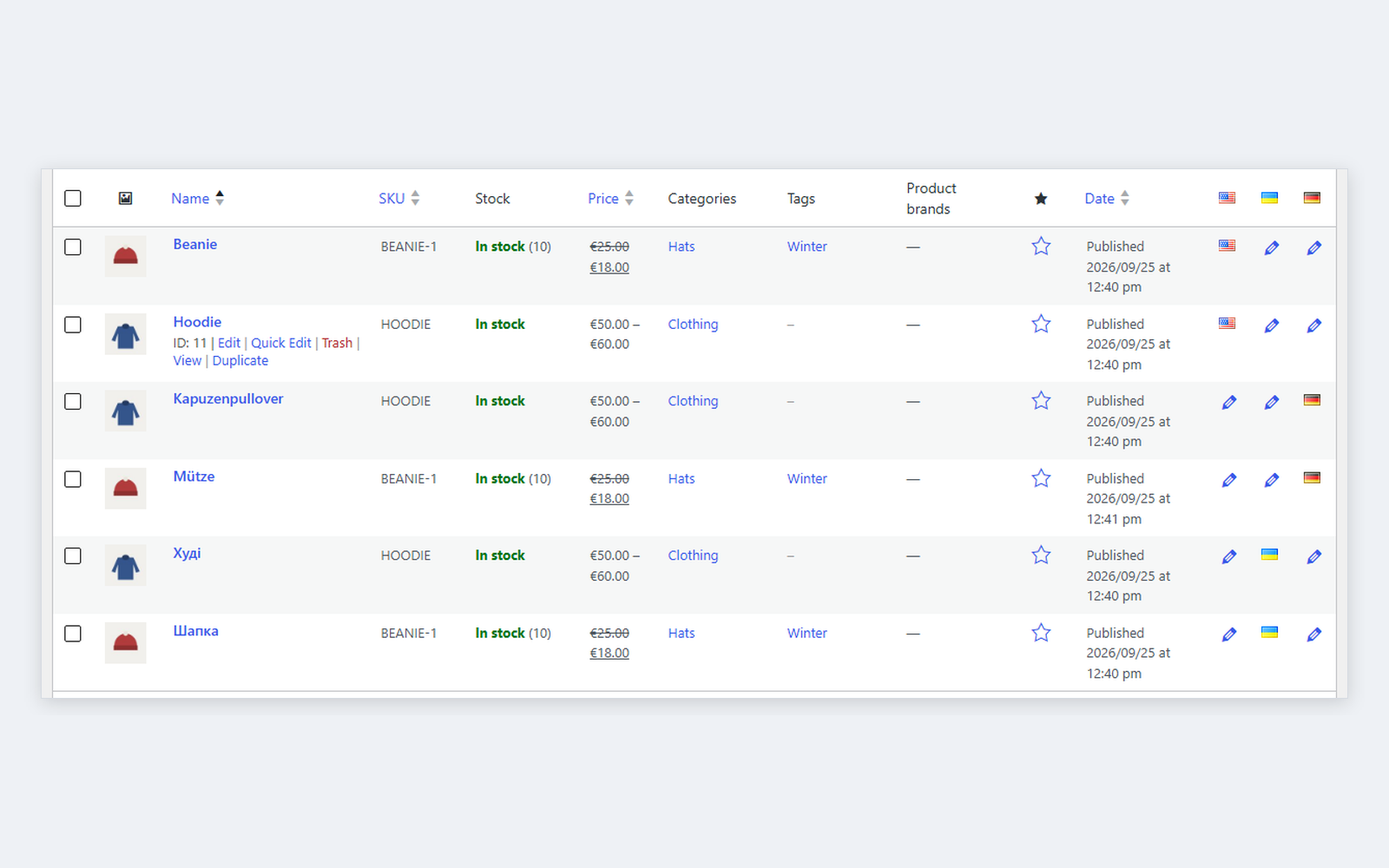
Multilingual WooCommerce on free Polylang: one-click product translation (prices, stock, SKU, images, categories, attributes and variations in one go), shared prices and stock across languages, shop, cart, checkout and account pages per language, the cart follows the shopper’s language, the order keeps its language and customer e-mails go out in it. Classic and block checkout, HPOS. The base version is free; Pro adds translating the whole catalogue in one run, separate prices or stock per language, payment and shipping texts per language and CSV with language columns.
The free version works with no time limit. Pro adds the rest of the features in the table.



A fresh install is the free version, nothing switches on by itself. The “Try Pro for 7 days” button → e-mail → the key right in the window and by e-mail.

Moving the store? Unbind the licence on the old domain and activate it on the new one yourself. If our server is unreachable, Pro keeps working for 14 more days. For studios — keys for 5 or 25 sites, or unlimited.
 WordPress 6.2+, WooCommerce 8.0+ and the free Polylang 3.7+. Live run on WordPress 7.1, WooCommerce 11.1 and Polylang 3.8, with and without HPOS.PHP 7.4+. Live run on PHP 7.4 and PHP 8.3.Polylang URL modes: directory, subdomain, content, plain permalinks — all four tested; a separate domain per language runs through the same code as subdomains but was not run on its own.Themes: tested with Twenty Twenty-Five and Storefront, block and classic cart and checkout.Not together with Polylang for WooCommerce or Hyyan WooCommerce Polylang Integration — they do the same job; the module pauses next to them. Polylang Pro and page caching were not tested.
Orders from the block checkout keep the shopper’s language even when the Store API request arrives without the language parameter.
First public release: translatable products, variations, categories, tags and attributes, one-click product translation, shared data, product type and stock in sync across languages,…
4 modules in one order — 40% cheaper than separately



Polylang Multilingual Shop for WooCommerce builds a multilingual store on the free Polylang. Polylang translates posts and pages; this module teaches it WooCommerce: products with variations, categories, tags and attributes, the shop, cart and checkout pages, the cart, the order and the e-mails. A shopper who reads the store in Ukrainian buys in Ukrainian and gets a Ukrainian e-mail, while the warehouse sees one product with one stock level.
A product is translated in one click: “+” in the language column creates a full copy — prices, stock, SKU, images, translated categories and attribute values, every variation. You only translate the texts. From then on everything that is not text stays the same in every language: change the price in any language and the others follow, sell the product in the German version and the stock drops everywhere.
The cart follows the shopper: switch the language and the lines move to the translations of the same product and variation, with the same quantity and coupon. The block cart, mini-cart and checkout get the page language (their Store API requests carry it), and so does the classic checkout — product names, shipping, field errors and the order itself are all in Ukrainian.
The order keeps the language it was placed in. “Order received”, then “Shipped” or “Completed” reach the customer in that language — whether the status is changed by an admin in an English dashboard or by a payment service at night.
The orders list has a Language column (HPOS and legacy storage), the order screen an “Order language” field. Admin notifications (“new order”, “low stock”) go out in the store’s default language, one per product rather than one per translation.
pll_*), products and orders through the WooCommerce CRUD — so it works with HPOS and with legacy order storage._catcode_plms_lang meta, the link between variations across languages in _catcode_plms_vgroup, settings in one option catcode_plms_settings. No custom tables.catcode_plms_email_language filter sets the language of any WooCommerce e-mail.catcode-polylang-multilingual-shop-for-woocommerce-1.0.1.zip with the button at the top of this page (or the Pro zip from your account after purchase) and install it: Plugins → Add New → Upload Plugin.Didn't find the answer? Message us on Telegram and we'll reply within a business day.
 @catcode_support
Setup, compatibility, activation
@catcode_support
Setup, compatibility, activation
No. The module works with the free Polylang from wordpress.org. If Polylang for WooCommerce is already active, our module pauses itself and says so — both do the same job.
Shared is everything that is not text: prices and sale dates, stock, SKU and GTIN, weight and dimensions, shipping and tax class, images, categories, tags, attributes, default variation, linked products. Separate are the name, descriptions, purchase note and custom attribute values. In Pro you can untick a group, and each language keeps, say, its own price.
In the product list click “+” in the language column. A full copy is created: prices, stock, images, translated categories and attribute values (missing ones are created as copies), every variation. You translate the texts and publish.
In Pro — “Translate the whole catalogue”: one run creates the missing translations of categories, tags, attribute values and products. It works in short steps, so hosting limits are not hit; 1,350 products took about a minute and a half, up to 3 s and 15 MB of memory per step. A rerun duplicates nothing.
The line moves to the Ukrainian translation of the same product and variation — same quantity, same coupon. If there is no published translation yet, the product stays as it was.
To the customer — the order language, even when the status is changed by an admin in an English dashboard, by a cron or by a payment callback. To the admin — the store’s default language. The order language can be changed by hand on the order screen.
Language from the directory (/uk/), from the subdomain (uk.example.com), from the content and plain permalinks (?lang=uk) — all four went through the full shopper run. On language subdomains the module also fixes the block cart and checkout translation: without it WooCommerce shows them in English there.
Tested with our Multi Currency: the Ukrainian store in hryvnias, switching the language keeps the currency, the order is placed in UAH with language uk.
Upload the Pro zip in Plugins → Add New and activate it. There is no fatal error: Pro runs on the same settings and data, the free copy switches itself off and tells you it can be removed.
Products, translations and pages always stay — they are Polylang content. Settings, variation links and the order language are removed only if “Delete data on uninstall” is ticked.
No reviews yet. Be the first.
No questions yet. Ask one — we answer within 24 hours.
We build custom modules for WordPress, WooCommerce, OpenCart and Shopify. Tell us about the task and we'll prepare an estimate.
Order a custom module
—

CatCode assistant
Just now


CatCode assistant
Online

I’ll help with your website task
Describe your website task — I’ll find a ready-made module or pass it to a developer for an estimate. Modules, custom features, layout, integrations, speed, migration, technical SEO.
