















WooCommerce
990 UAH644 UAH/year≈ €13
Black November: −35% on all modules until 30 November Black November: −35% until 30 November Choose a module
 Website auditA PDF report by email in 3 minutesCheck a website
Everyday tasks
Image compressorSize, quality and WebP in bulkQR generatorLink, Wi-Fi, payment to IBANVAT calculator20, 14, 7% and amount in wordsTransliterationOfficial Ukrainian standardWebsite checks
PHP and pluginsPHP version, WordPress, pluginsGoogle Merchant feedFields, prices, GTIN, imagesDomain emailSPF, DKIM, DMARC, blacklistsAI search readinessllms.txt, bots, markupAll 9 toolsEnter at least 2 characters
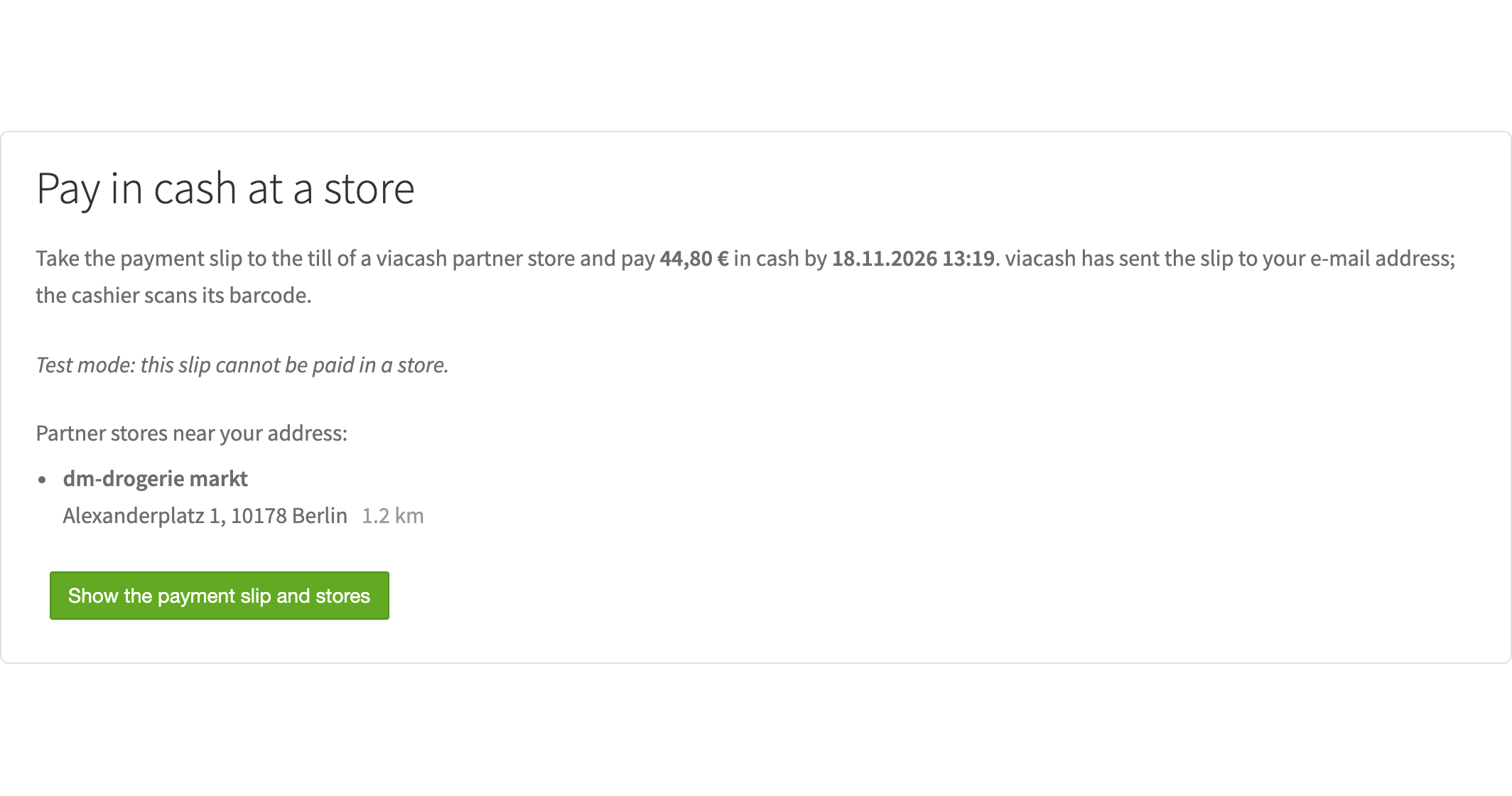
The buyer pays the order in cash at the till of a partner store with a barcode slip; the status comes back by webhook.
The free version works with no time limit. Pro adds the rest of the features in the table.


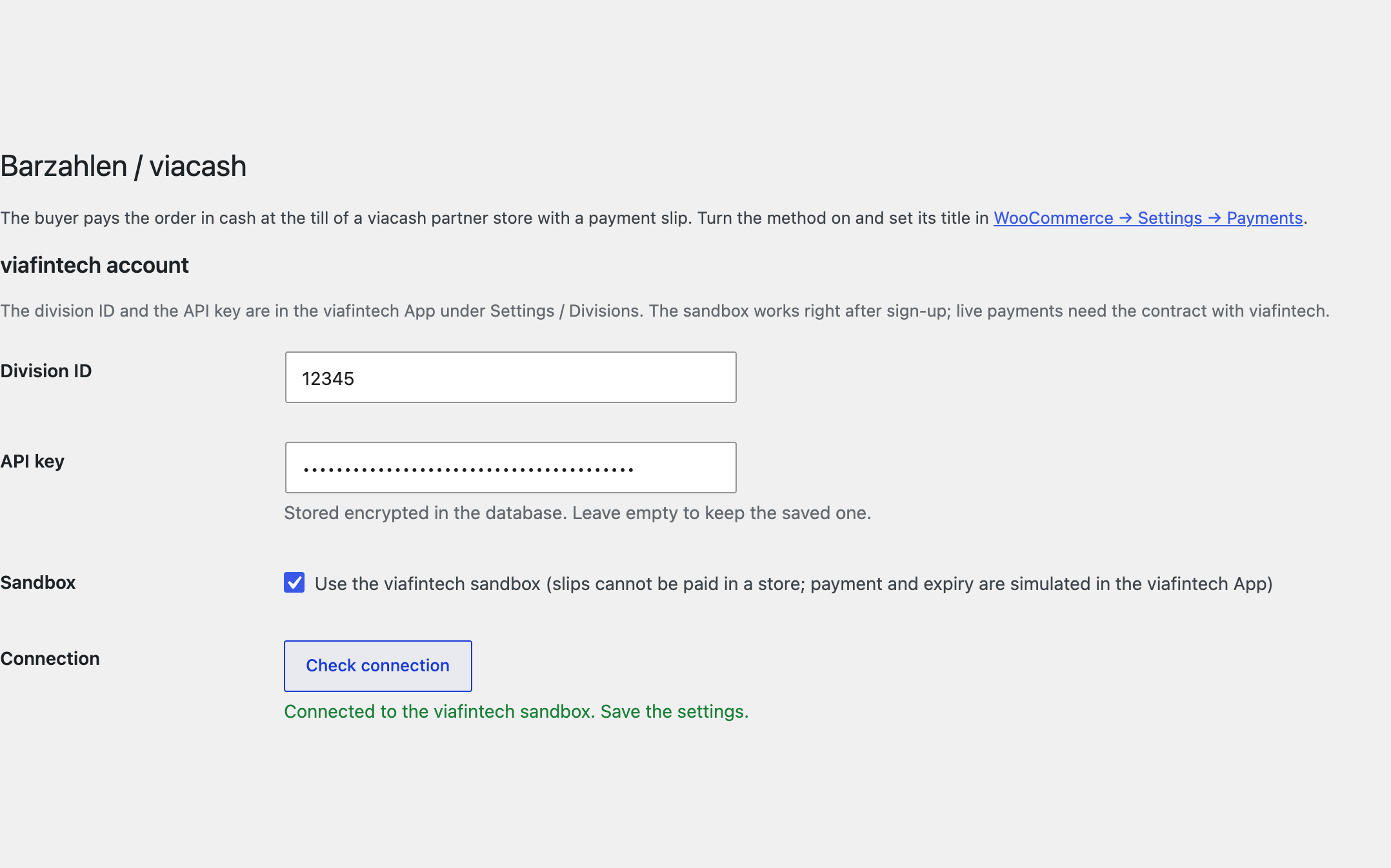
The settings live in one place: WooCommerce → Barzahlen.

Refunds from WooCommerce as a refund slip, full or partial; the refunds can never exceed what was paid, and viafintech reports when the buyer has collected the money at a till.

The base version is free. Pro costs 1290 UAH for a one-year licence. A year of updates, technical support and all Pro features.

A fresh install is the free version, nothing switches on by itself. The “Try Pro for 7 days” button → e-mail → the key right in the window and by e-mail.

Moving the site? Unlink the licence on the old domain and activate it on the new one yourself. A staging copy (staging., dev.) works with the same key and does not take a site slot. For studios — keys for 5 or 25 sites, or unlimited.
 WordPress 6.4+, WooCommerce 8.6+, PHP 7.4+.A viafintech account with a division ID and an API key; live payments need a contract with viafintech.A shop currency that viafintech takes for your division (usually EUR); an https site for the automatic webhook.
Fixed the licence status shown after the trial: the module says the trial has ended and links to buying a licence.
The Barzahlen / viacash payment method, a slip per order, the viacash overlay and nearest stores, a webhook with signature check, a status check, EUR and eight more currencies.

Barzahlen / viacash for WooCommerce adds cash payment at the till to WooCommerce: the buyer places the order, gets a payment slip with a barcode from viacash and pays it at the till of a partner store, for example a supermarket or a drugstore. When viafintech reports the slip paid, the order moves to Processing. The module works with your own viafintech account (division ID and API key), on the classic and the block checkout, with HPOS; the interface is English and German for the DE, AT and CH markets.
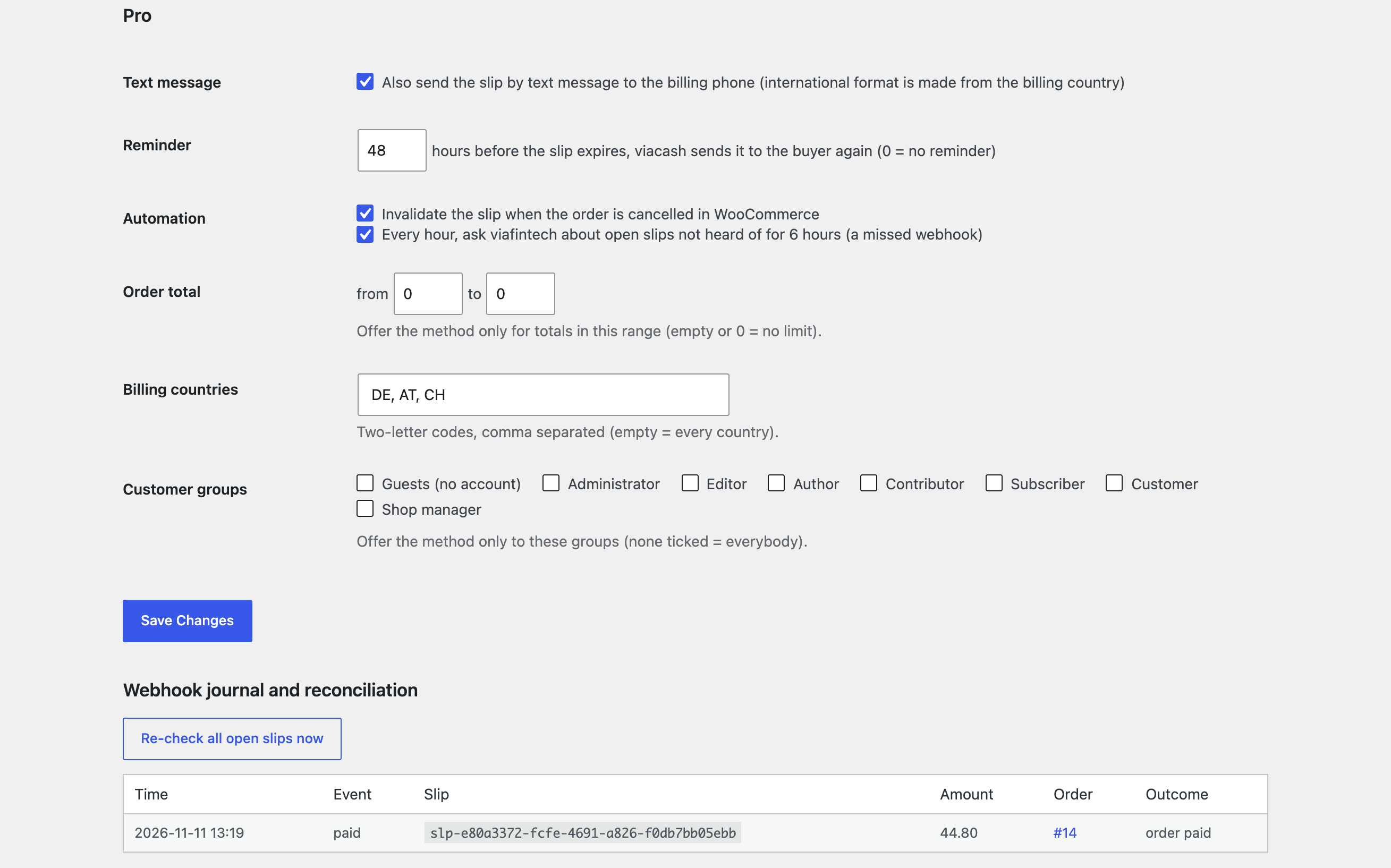
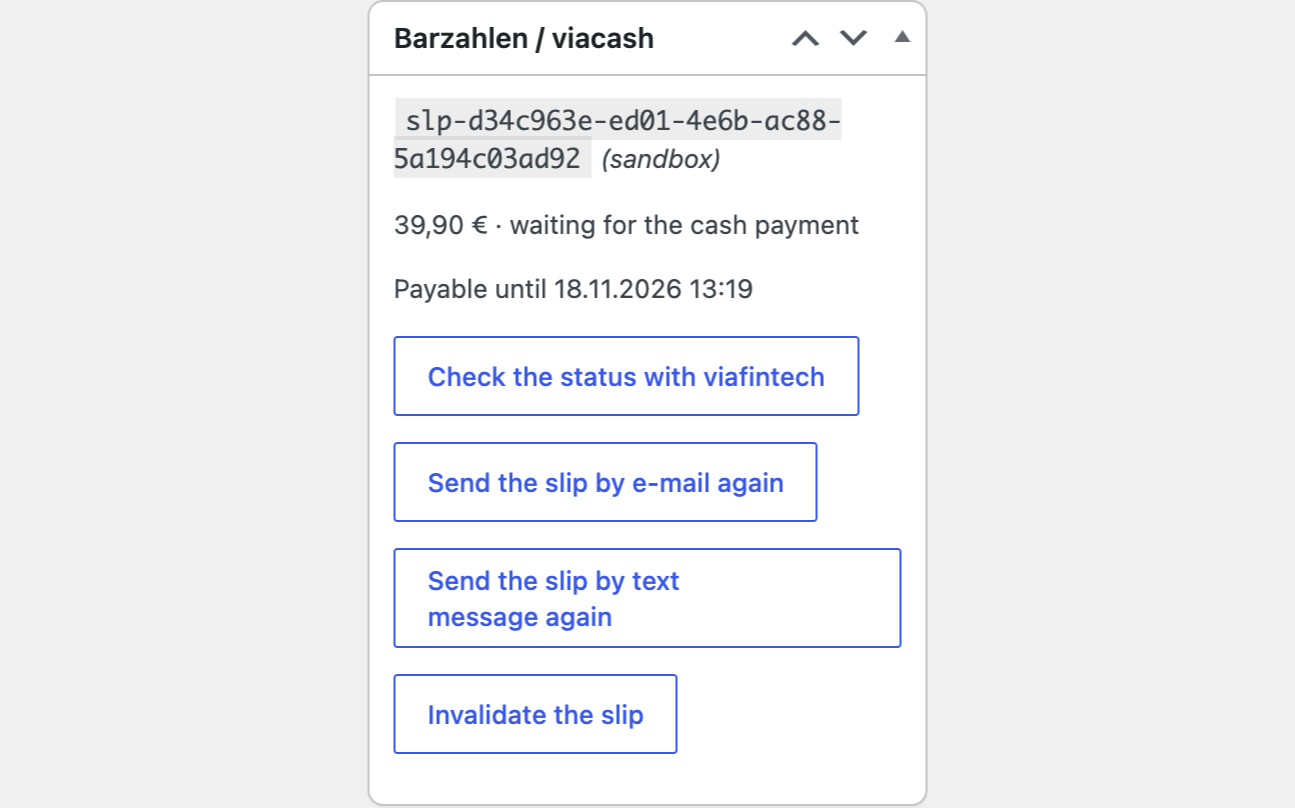
The settings live in one place: WooCommerce → Barzahlen. Enter the division ID and the API key from the viafintech App, choose the viafintech sandbox or live mode and press “Check connection”: a signed call to viafintech shows whether the key is accepted. The API key is stored encrypted and is never printed back into the form. Every order gets one slip: the order total, the order number as reference and an expiry from 1 to 30 days (7 by default). Placing the same order again gives the same slip, a request that timed out is repeated with the same idempotency key, so there are never two slips; if the total changes, the old slip is invalidated and a new one is made. After checkout the order waits for the payment (On hold), and the thank-you page and “My account → Orders” open the viacash overlay: the slip as a PDF, the nearest stores, the slip sent to a phone; a button opens it again. When the billing address is complete, the buyer sees the three nearest partner stores. The viafintech webhook is checked with its BZ1-HMAC-SHA256 signature: a paid slip moves the order to Processing, and a paid amount that differs from the order total puts it on hold with an explanation; an expired or invalidated slip cancels the order and puts the stock back; a declined slip sets Failed; repeated webhooks change nothing. The webhook address goes out with every slip (on an https site), otherwise you enter it in the viafintech App. The “Check the status with viafintech” button on the order asks viafintech about the slip if the webhook did not arrive. The buyer identifier for viafintech is the e-mail address or the shop customer number. Currencies: EUR, CHF, BGN, CZK, HUF, PLN, RON, SEK, GBP, as your contract allows.
Refunds from WooCommerce as a refund slip, full or partial; the refunds can never exceed what was paid, and viafintech reports when the buyer has collected the money at a till. Reminders: a set number of hours before the slip expires, viacash sends it to the buyer again. Cancelling the order in WooCommerce invalidates the open slip. An hourly check of open slips not heard of for 6 hours (for a missed webhook) and a “Re-check all open slips now” button. A journal of the last 200 webhooks with the outcome of each. The slip by text message to the billing phone (the international format is made from the billing country); on the order, buttons to send the slip again by e-mail or SMS, to invalidate it and to create a new slip. Rules for who sees the method: the order total from and to, billing countries, customer groups (guests included); it works on the classic and the block checkout. A German translation of the interface, a licence with a 7-day trial and updates from the admin.
The module is not on wordpress.org yet: the free version and Pro are one archive from this page. Without a key it works as the free version.
Didn't find the answer? Message us on Telegram and we'll reply within a business day.
 @catcode_support
Setup, compatibility, activation
No. It is an independent integration made by us; Barzahlen and viacash are names of a product of viafintech GmbH.
Yes. The sandbox is available right after sign-up in the viafintech App; live payments need a contract. The module does not do the sign-up.
It waits for the cash payment. When viafintech reports the slip paid, the order moves to Processing; the webhook comes after the store's cooldown period, so it can take some minutes.
The slip expires after the number of days you set, viafintech reports it, the order is cancelled and its stock is put back.
In Pro: a refund from the WooCommerce order creates a refund slip, and the buyer collects the cash at a till.
Pro switches off, the free part keeps working.
No reviews yet. Be the first.
No questions yet. Ask one — we answer within 24 hours.
We build custom modules for WordPress, WooCommerce, OpenCart and Shopify. Tell us about the task and we'll prepare an estimate.
Order a custom module
—
Charged in UAH; your bank converts it to your currency. EUR price is approximate.

CatCode assistant
Just now


CatCode assistant
Online

I’ll help with your website task
Describe your website task — I’ll find a ready-made module or pass it to a developer for an estimate. Modules, custom features, layout, integrations, speed, migration, technical SEO.
