
















OpenCart
1 490 UAH969 UAH≈ €20
Black November: −35% on all modules until 30 November Black November: −35% until 30 November Choose a module
 Website auditA PDF report by email in 3 minutesCheck a website
Everyday tasks
Image compressorSize, quality and WebP in bulkQR generatorLink, Wi-Fi, payment to IBANVAT calculator20, 14, 7% and amount in wordsTransliterationOfficial Ukrainian standardWebsite checks
PHP and pluginsPHP version, WordPress, pluginsGoogle Merchant feedFields, prices, GTIN, imagesDomain emailSPF, DKIM, DMARC, blacklistsAI search readinessllms.txt, bots, markupAll 9 toolsEnter at least 2 characters

Temu for OpenCart 4.x, 3.x, 2.3: SKU linking, stock and base prices, listing new products; in Pro automatic sync, orders and shipping. Licence for good.
The free version works with no time limit. Pro adds the rest of the features in the table.


Extensions → Modules → Temu Connector: choose the Temu region, paste the App Key, App Secret and Access Token and click “Check the connection”.

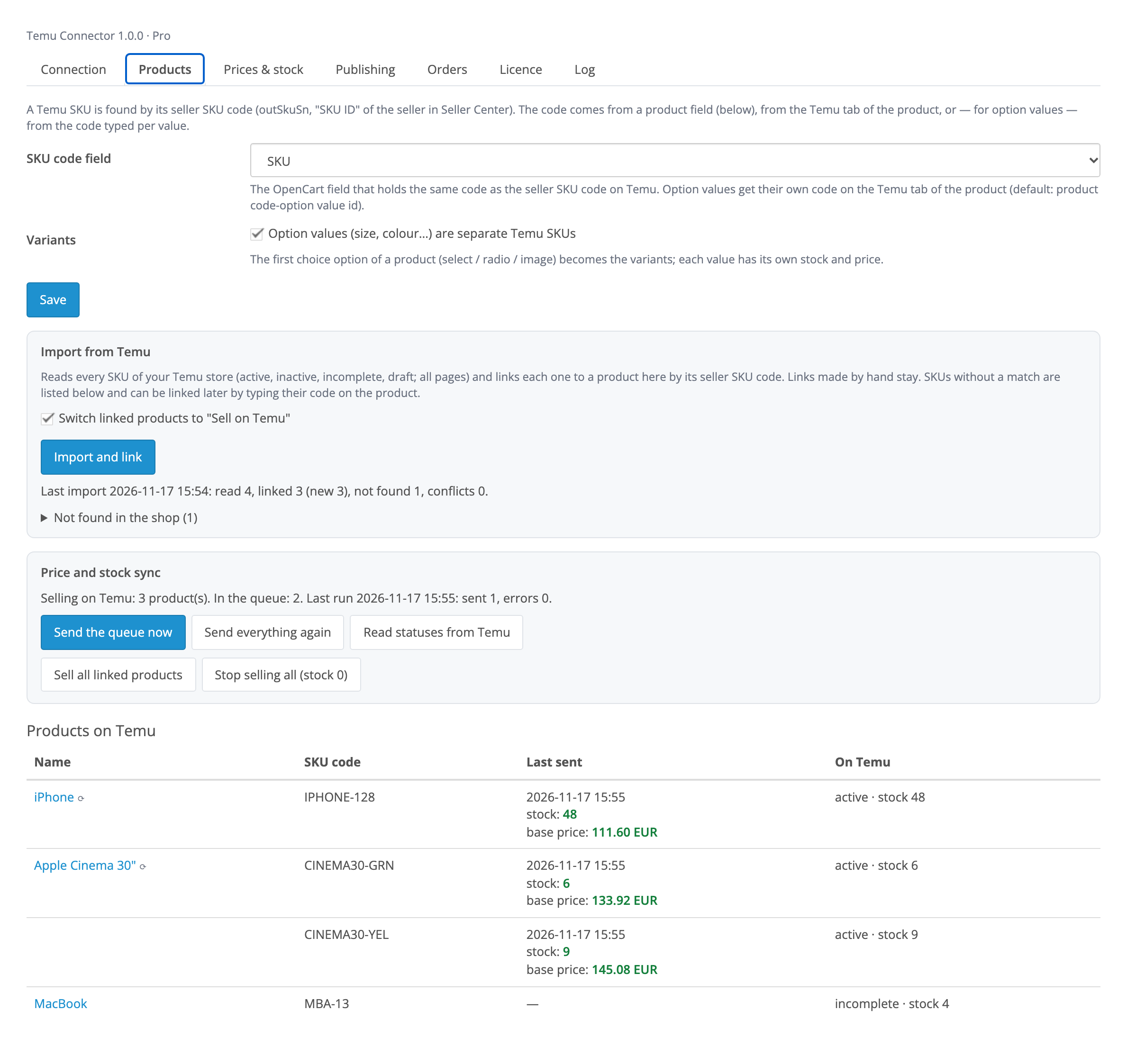
“Import and link” reads every SKU of your Temu store (active, inactive, in review, drafts) and links it to an OpenCart product by the seller SKU code: from the product field you choose, from the own code on the Temu tab or from an option value code (size, colour).

Products that are not on Temu yet are listed with the Product Listing API V3: name, description, images, attributes, brand, option values as variants, base price, stock, weight and size, EAN/UPC.

A fresh install is the free version, nothing switches on by itself. The “Try Pro for 7 days” button → e-mail → the key right in the window and by e-mail.

Moving the site? Unlink the licence on the old domain and activate it on the new one yourself. A staging copy (staging., dev.) works with the same key and does not take a site slot. For studios — keys for 5 or 25 sites, or unlimited.
 OpenCart 4.0.2+ (including 4.1), 3.0.x or 2.3.0.2; PHP 7.0+ for 2.3.A Temu seller store and an approved “Self-developed application” on the Temu Partner Platform.PHP cURL and OpenSSL; a static server IP address for the Temu application.For Pro: the OpenCart 4 scheduler or a hosting cron every 5 minutes (3.x and 2.3).Module languages: English, українська, русский, Ελληνικά.
For OpenCart 4.x, 3.x and 2.3: SKU linking, stock and base prices, listing with the Product Listing API V3.


Temu Connector for OpenCart (OpenCart 4.x, 3.x and 2.3) connects your shop to your Temu seller store through the Temu Open API for local sellers: Europe, the US and other regions. It links your Temu SKUs to OpenCart products, keeps stock and base prices up to date, lists new products on Temu and, in Pro, brings Temu orders into OpenCart and confirms shipments.
What you need from Temu. A Temu seller store and your own “Self-developed application” on the Temu Partner Platform: after approval it gives the App Key and App Secret, and the Access Token is issued in Seller Center. Temu accepts calls only from the server IP address given in the application.
Extensions → Modules → Temu Connector: choose the Temu region, paste the App Key, App Secret and Access Token and click “Check the connection”. The module shows the Temu store ID, the date the token is valid until and which permissions the app is missing. The keys are stored encrypted and never shown again; the module warns 14 days before the token expires.
“Import and link” reads every SKU of your Temu store (active, inactive, in review, drafts) and links it to an OpenCart product by the seller SKU code: from the product field you choose, from the own code on the Temu tab or from an option value code (size, colour). What is not found is listed and can be linked later. A change of price, special or stock of a product or option queues the product; only changes are sent, and Temu’s answer is shown per SKU.
The base price is made from the shop price: currency rate (from the currency table or your own), VAT for net prices, markup in percent and fixed, rounding to cents, .90, .99 or a whole unit. Stock comes with a reserve and its own value for products without stock tracking.
The Temu tab of a product shows the SKU code, option value codes, what was sent and when, and the state on Temu; “Send now” sends the product at once.
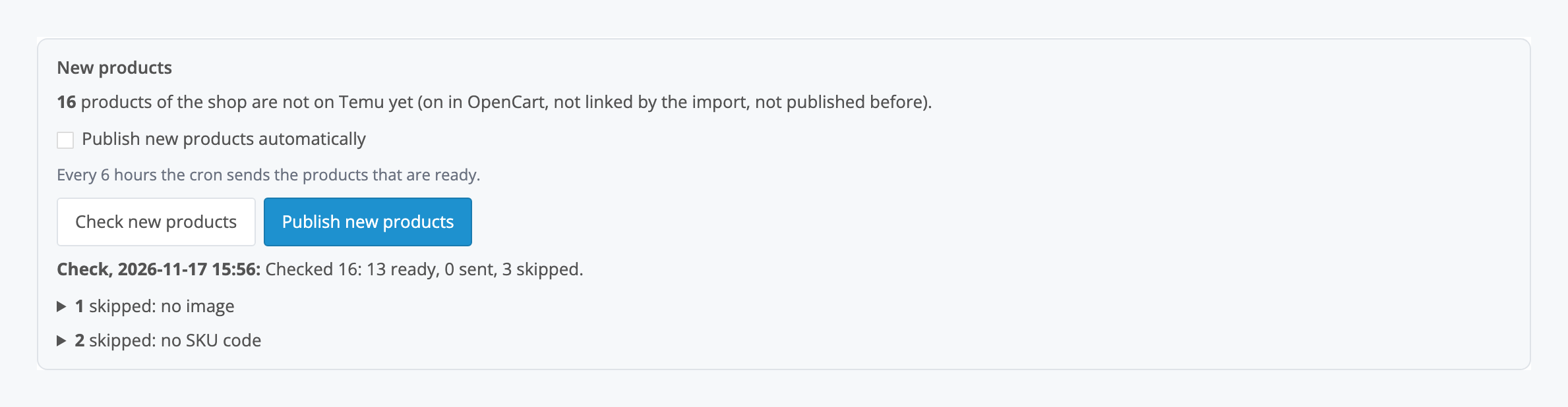
Products that are not on Temu yet are listed with the Product Listing API V3: name, description, images, attributes, brand, option values as variants, base price, stock, weight and size, EAN/UPC. Temu picks the category and attributes itself, or uses the category you set for an OpenCart category. The check shows how many products are ready and why the others are skipped (no image, SKU code or price). Temu processes a product for about 10 minutes; then it goes to review or stays a draft to complete in Seller Center, and its SKUs are linked automatically.
Automatic sync. The stock and price queue goes to Temu every 5 minutes and after every order, and once an hour the module checks everything.
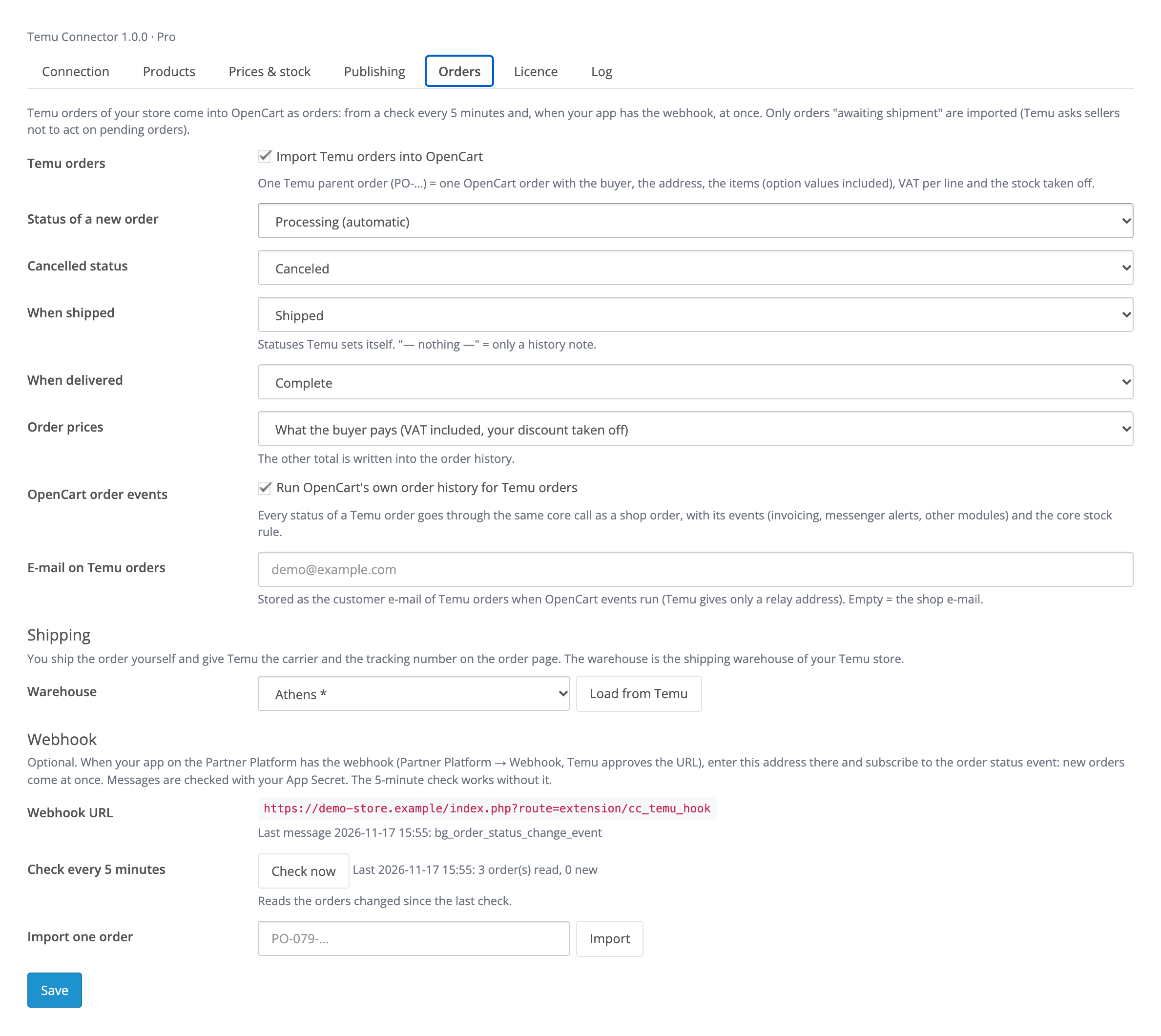
Temu orders in OpenCart. Orders awaiting shipment come with a check every 5 minutes, and at once with your app’s webhook. One Temu order (PO-…) is one OpenCart order: buyer, address with country and region, items with option values, VAT per line, stock taken off through the OpenCart core. Cancellation, shipping and delivery on Temu change the order status in the shop.
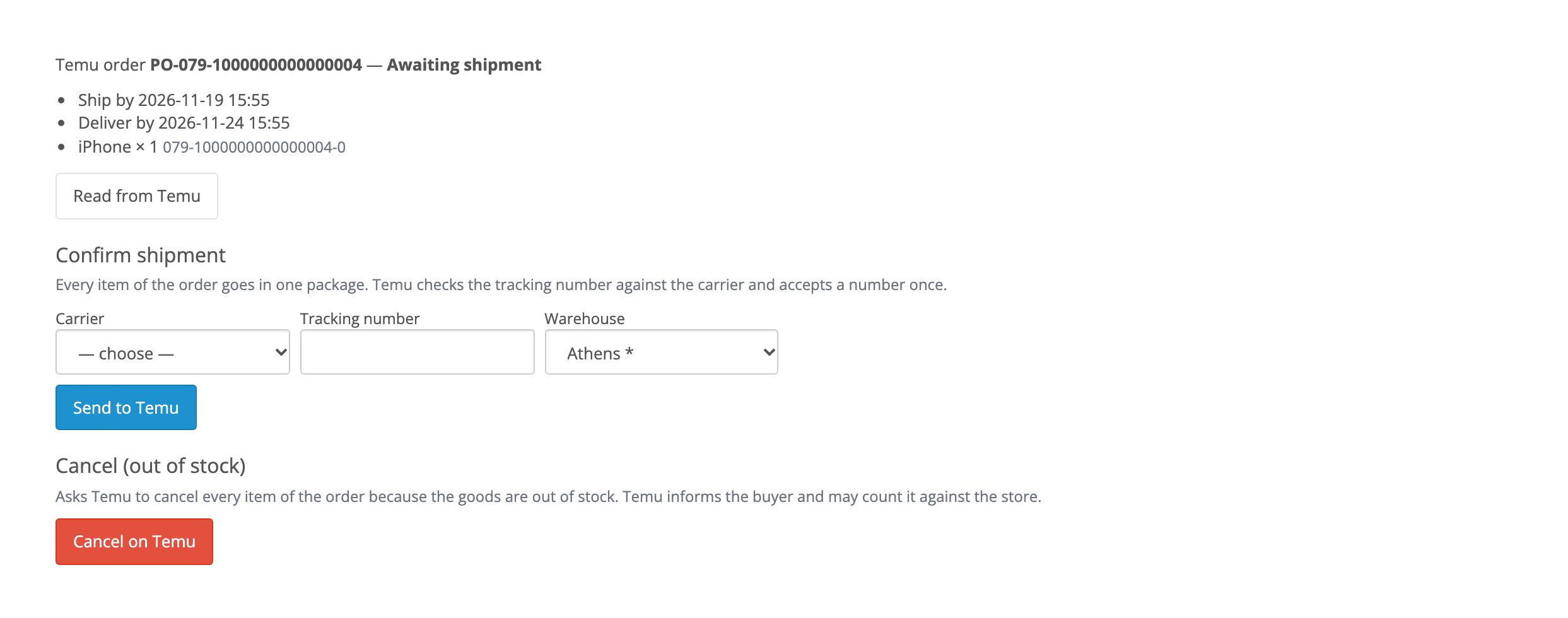
Shipping and cancellation. On the order page choose the carrier from Temu’s list, enter the tracking number and warehouse — the shipment is confirmed on Temu. If the goods are out of stock, the order can be cancelled on Temu with that reason.
Listing without limits. All new products at once or automatically every 6 hours.
Didn't find the answer? Message us on Telegram and we'll reply within a business day.
 @catcode_support
Setup, compatibility, activation
No, it is an independent integration by CatCode. Temu is a trademark of its owner; the module is not affiliated with or endorsed by Temu.
The seller applies once for a "Self-developed application" on the Temu Partner Platform (partner-eu.temu.com for Europe) and links their Seller Center. After approval the app shows the App Key and App Secret; the Access Token is issued in Seller Center → Authorization management. A step-by-step guide is available from support.
Temu stores in Europe (Greece, Germany, Italy, France, Spain, the UK and others), the US and other regions: the region is chosen in the settings, prices go in the currency of your Temu site.
By the seller SKU code: the module reads every SKU of your Temu store and finds the product with the same code in the OpenCart field you choose (SKU, model, EAN…), in the product's own code or in an option value code. What is not found is listed.
The base price of each SKU: the shop price with the currency rate, VAT for net prices, markup and rounding. Temu sets the price buyers see; Temu may review a base price change before it applies.
In Pro, Temu orders awaiting shipment become OpenCart orders with the buyer, address, items and VAT, and the stock is taken off. Shipments are confirmed from the order page: carrier, tracking number, warehouse.
OpenCart 4.0.2+, 3.0.x and 2.3.0.2 — three separate archives in one product.
Yes, for OpenCart it is one payment and a licence for good, for two sites: the shop and a test copy.
No reviews yet. Be the first.
No questions yet. Ask one — we answer within 24 hours.
We build custom modules for WordPress, WooCommerce, OpenCart and Shopify. Tell us about the task and we'll prepare an estimate.
Order a custom module
—
Charged in UAH; your bank converts it to your currency. EUR price is approximate.

CatCode assistant
Just now


CatCode assistant
Online

I’ll help with your website task
Describe your website task — I’ll find a ready-made module or pass it to a developer for an estimate. Modules, custom features, layout, integrations, speed, migration, technical SEO.