



Get in touch
OpenCart

Skroutz Smart Cart for OpenCart 2.3, 3.x and 4.x — orders, accept, reject, vouchers

Skroutz Smart Cart orders right in the OpenCart admin: accept, reject, voucher, deadline. Pro adds OpenCart orders with stock, auto-accept and statuses. Lifetime licence.

Pro · lifetime licence Staging copies are included. The more sites, the cheaper each one
Compatibility
OpenCart 4.0.2.x and 4.1.x (tested on 4.0.2.3 and 4.1.0.3), 3.0.x (tested on 3.0.5.0), 2.3.0.2 · PHP 7.0+ · languages: English, Greek
Version
v1.0.0 (OpenCart 4)
v1.0.0 (OpenCart 3.x)
v1.0.0 (OpenCart 2.3)
Licence
a site + a staging copy, lifetime
Trial
7 days, no card, one per site
Updated
November 2026
Or all 394 Pro modules with All Access — 4 990 ₴ / year ≈ €98

What Free has,
and what Pro adds

The free version works with no time limit. Pro adds the rest of the features in the table.

Feature Free Pro
API token stored encrypted ✔ ✔
Webhook address with a key and a test order ✔ ✔
Order list with no limits and an order card ✔ ✔
Match with the shop product, stock, deadline ✔ ✔
Accept: location, window, parcels ✔ ✔
Reject a line or the whole order ✔ ✔
Voucher link and a new order e-mail ✔ ✔
API log ✔ ✔
OpenCart orders with stock and options — ✔
Skroutz states to OpenCart statuses — ✔
Auto-accept and deadline reminders — ✔
Set as Ready, pickup change, pre-order voucher — ✔
Invoice and credit note upload, FBM tracking — ✔

What it looks like

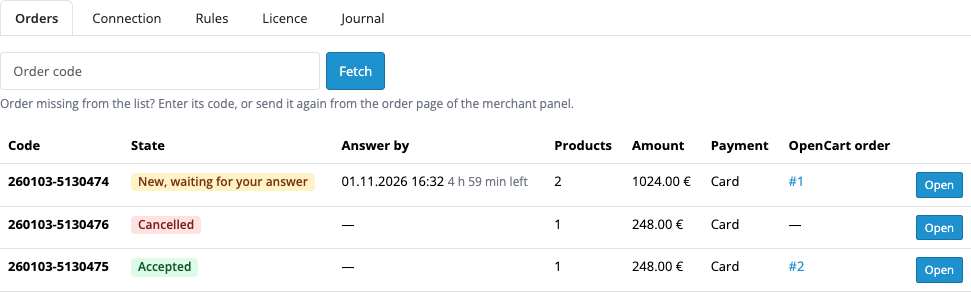
Order list
Skroutz orders.
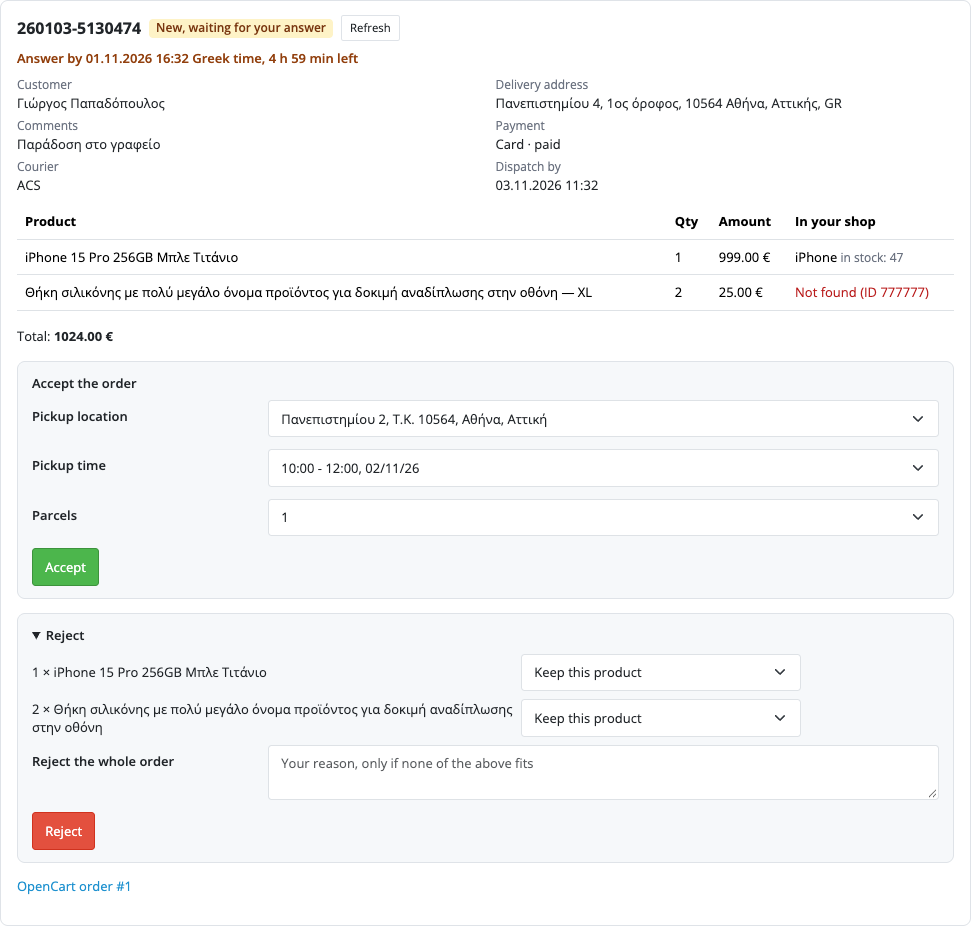
Order card
A card with a deadline.
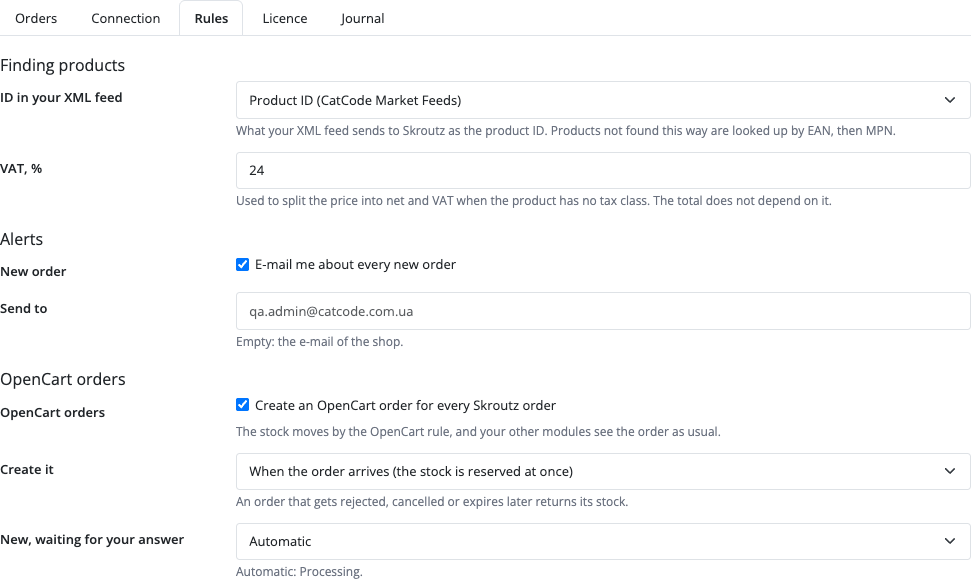
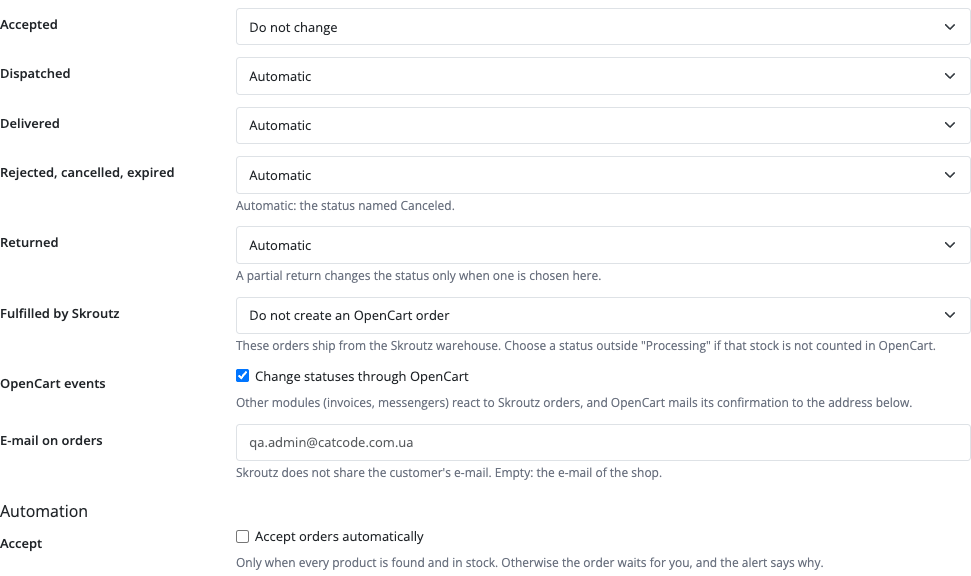
Rules

Key points

What you see in the admin

The buyer stays on Skroutz. A new request arrives by webhook, and the admin sees the order, product match, stock and deadline.

What the admin gets

You accept an order with a location and window, or reject a line or the whole order with a reason.

How much it costs

The base version is free. Pro costs 1 290 UAH, a one-time payment for a lifetime licence.

The trial starts when you ask

A fresh install is the free version, nothing switches on by itself. The “Try Pro for 7 days” button → e-mail → the key right in the window and by e-mail.

One key — a site and a staging copy

Moving the site? Unlink the licence on the old domain and activate it on the new one yourself. A staging copy (staging., dev.) works with the same key and does not take a site slot. For studios — keys for 5 or 25 sites, or unlimited.

Technical requirements

  • OpenCart 4.0.2.x and 4.1.x, 3.0.x or 2.3.0.2 · PHP 7.0+.
  • A Skroutz seller account and a Smart Cart token.

Version history

v1.0.0 Current November 2026

For OpenCart 4.x, 3.x and 2.3: orders, accept, reject.

Frequently bought with Skroutz Smart Cart

All Access Need more? All modules (394) under one licence, new ones are added automatically. 4 990 ₴≈ €98 Learn more →

Full module description

Skroutz Smart Cart brings Skroutz orders into the OpenCart admin, so you can accept them before the deadline without opening the seller panel.

This is an independent integration.

What you see in the admin

The buyer stays on Skroutz. A new request arrives by webhook, and the admin sees the order, product match, stock and deadline.

What the admin gets

You accept an order with a location and window, or reject a line or the whole order with a reason. In Pro the OpenCart order is created by itself, and a cancellation returns stock.

How it works, step by step

  1. You paste the token and webhook address.
  2. Skroutz sends a new order.
  3. You accept or reject it.
  4. The voucher opens through a link.
  5. In Pro statuses and stock stay in sync.

Under the hood

  • The token is encrypted with AES-256 and HMAC.
  • Without the webhook there are no new orders: the API has no list.
  • Only one token is active: a new token in another integration switches this one off.

How to install

  1. Extensions → Installer: upload the archive for your version and keep the file name.
  2. OpenCart 2.3: the Installer copies files only with FTP enabled. Without FTP copy the contents of upload/ to the shop root by hand.
  3. OpenCart 2.3 and 3.x: Extensions → Modifications → Refresh.
  4. Extensions → Modules → Skroutz Smart Cart → install button → Edit.
  5. Paste the token, copy the webhook address to the panel and send a test order.
  6. For Pro: paste the key or start the 7-day trial.

Questions
about the module

Didn't find the answer? Message us on Telegram and we'll reply within a business day.

@catcode_support Setup, compatibility, activation
Is the webhook needed?

Yes, without it there are no new orders.

Does it work with our Greece couriers module?

Yes, for FBM tracking, but the API takes only ACS and Geniki.

Not quite what you are looking for?

We build custom modules for WordPress, WooCommerce, OpenCart and Shopify. Tell us about the task and we'll prepare an estimate.

Order a custom module